By Tom Jaskulka
Manufacturer: Advanced Micro Devices, Inc.
Model Number: A10-7800
CPU Part Number: AD7800YBJABOX
Price As Tested: $155 MSRP (Amazon)
Full Disclosure: The product sample used in this article has been provided by AMD.
2014 saw the release of the first heterogeneous-system-architecture (HSA) enabled processor. The A10-7850K contained four of AMD’s new “Steamroller” cores (two modules), along with 8 GCN compute-capable cores. Together, they formed the foundation of the Kaveri APU. On July 31st, AMD released their second batch of APUs using the Kaveri architecture. While one of those APUs (the A8-7600) was announced in January and makes its retail appearance this summer, the other two are new additions to the Kaveri lineup: the single module/dual core A6-7400K, and the multiplier-locked, tuned for efficiency version of the A10-7850K, the A10-7800.
Sporting a configurable TDP and all of the Kaveri features (GCN graphics cores, Steamroller CPU cores, HSA, etc.), the A10-7800 which Benchmark Reviews will be looking at today sits right in between the A10-7850K and A10-7700K. What type of performance was AMD able to extract from this 65W APU? Read on to find out.
 In this review, I’ll mostly be concentrating on the performance of the A10-7800 and its Radeon R7 integrated GPU. I’ll include results at the 65W and 45W configurable TDP points, as well as an A10-7850K, A10-5800K and i5-4430 “analogue” (an i5-4670K clocked down to match i5-4430 specs). AMD’s marketing materials and pricing target the beginning of Intel’s i5 range, so we’ll take a look and see how the new A10-7800 compares.
| AMD A-SERIES ACCELERATED PROCESSOR MODEL NUMBER AND FEATURE COMPARISONS | |||||||
|---|---|---|---|---|---|---|---|
| Model | Radeon Brand | Compute Cores* | CPU Clock Speed | GPU Clock Speed | TDP | Total L2 Cache | DDR3 Speed |
| A10-7850K11 | Radeon R7 graphics | 12 (4 CPU + 8GPU) | 4.0 GHz/ 3.7 GHz | 720 MHz | 95 W | 4 MB | 2133 |
| ?A10-7800 | Radeon R7 graphics | 12 (4 CPU + 8 GPU) | 3.9 GHz/ 3.5 GHz | 720 MHz | 65 W/ 45 W | 4 MB | 2133 |
| A10-7700K11 | Radeon R7 graphics | 10 (4 CPU + 6GPU) | 3.8 GHz/ 3.4 GHz | 720 MHz | 95 W | 4 MB | 2133 |
| A8-7600 | Radeon R7 graphics | 10 (4 CPU + 6 GPU) | 3.8 GHz/ 3.1 GHz | 720 MHz | 65 W/ 45 W | 4 MB | 2133 |
| A6-7400K11 | Radeon R5 graphics | 6 (2 CPU + 4 GPU) | 3.9 GHz/ 3.5 GHz | 756 MHz | 65 W/ 45 W | 1 MB | 1866 |
Central Processing Units haven’t always been the multi-core beasts they are today. I suppose one could make an argument that today’s CPUs would be barely recognizable as such when compared to the earliest of central processing units. Consider the recent relabeling of CPU cores as “modules” by AMD (describing a Bulldozer – or Kaveri’s case, Steamroller – core consisting of two integer cores and one shared floating point unit). The buzz around modules becomes so much more interesting when one realizes that early CPUs didn’t even have the capability to perform floating point math on-chip (let alone share an FPU among two integer cores…). It begs the question, just what IS a CPU? Is all this talk of APUs and modules just more marketing speak, or is there something to it?  The more time I spend with AMD’s recent Kaveri APUs, the more I can see the need to describe modern processors as something other than *just* a CPU. Arguably, the same terminology could be applied to Intel’s Haswell lineup – an on-chip voltage regulator, on-chip graphics cores, VT-d/VT-x, Trusted Execution, WiFi, WiDi, and many more letters…clearly, today’s CPUs do much more than just crunch a few numbers and carry out linear instructions. For example, take a look at Kaveri’s CPU die below:
  Maybe one could argue that we should call this thing a GPU, since the majority of the transistors above (colored orange) are set aside for the 512 GCN graphics cores. Well, perhaps we can’t even call it that – AMD feels the term “Compute Cores” is more appropriate, since these cores are capable of a lot more than just rendering an image. Note their proximity to the two Steamroller modules on the right (green), most notably to the cache in the middle. The Kaveri APUs’ CPU modules and GPU cores have shared access to memory, which allows each to merely reference a location rather than copy data whenever they need it. Additionally, the graphics cores are counted by AMD as Compute Cores, since they meet the HSA definition: Any core capable of running at least one process in its own context and virtual memory space, independently from other cores (taken from AMD’s whitepaper on Compute Cores).
While I’m not sure we’re all ready to call the Kaveri APUs 12-core processors yet, on paper it seems that there are 4+8 cores individually ready to crunch some numbers. Later on, we’ll see if this reflects in a few benchmarks. With graphics processors uniquely suited for certain operations (not to mention the complex calculations required for today’s 3D environments and physics simulations), GPUs have become pretty adept processors over the years. Previously, the CPU and GPU were quite independent. One had to pass instructions to the other, and wait for the other component to finish before picking up the next instruction – the only information they had access to was whatever was explicitly sent over. AMD’s Kaveri APUs are trying to change that. While this isn’t an article about the Heterogeneous System Architecture or its benefits, it’s important to note that HSA changes the nature of CPUs yet again. Kaveri brought quite a few new technologies to the FM2+ platform and they all make an appearance in the A10-7800 APU. One of the major changes from previous APUs are Kaveri’s GCN graphics cores. Utilizing the same architecture as AMD’s Hawaii GPUs (with an HSA boost), the Kaveri APUs bring all of the latest generation graphics technologies with them. That includes:
- TrueAudio (a dedicated sound DSP that brings a shader-like approach to audio)
- Mantle (a lower level graphics API that can be used to reduce the load on a CPU)
- Eyefinity support (multi-monitor / panoramic display)
Of course, the real game-changer here is HSA, or Heterogeneous System Architecture. Very basically, HSA allows an application to run on whichever component would be more appropriate – highly parallel tasks would automatically run on a GPU compute core, with traditional tasks executing on the CPU cores. While we’re just starting to see the benefits of this, it doesn’t take much to see the possibilities here once HSA becomes commonplace (anyone that experienced the jump from CPU to GPU crypto-mining probably understands the potential). Compute-capable GPUs are just flat-out better at certain calculations – it only makes sense to allow the GPU to perform those operations. With the Kaveri APUs and the A10-7800, this ability is built-in to the hardware. So the hardware supports HSA – will the software follow? I’m sure it will take some time to fully answer that question, but let’s take a look at a few different types of benchmarks to see what type of performance the A10-7800 is capable of.
I assembled two different systems for this comparison. Since overclocking and discrete graphics performance aren’t part of this review, I’ve omitted the case and PSU components (for those curious, the Intel system used a BitFenix Prodigy / Cooler Master V700, while the AMD system lived in a SilverStone ML05 and used a SilverStone 300W SFX PSU – throttling due to temperatures wasn’t an issue in either case, and stock coolers were used all-around). The AMD processors were all swapped into the same shared platform, in an attempt to keep as many components the same as possible. While both Intel/AMD integrated graphics benefit from faster RAM, I hope no one feels the different kits between the two systems would affect the end result. Both systems use a similar capacity SSD with no mechanical storage, so they should be on similar turf for any benchmark in which storage speeds have an effect.
| CPU | “i5-4430” (i5-4670K clocked to 3.2GHz, 1.1GHz iGPU) | A10-7850K | A10-7800 | A10-5800K |
| Motherboard | Gigabyte Z87N-Wifi Rev 1.0 | Gigabyte A88XN-Wifi | ||
| Graphics | HD4600, 1.1GHz | R7, 512 GCN / 8 GPU Compute Cores, 720MHz | R7, 512 GCN / 8 GPU Compute Cores, 720MHz | 7660D w/384 Radeon Cores, 800MHz |
| Memory / RAM | 2x4GB Kingston HyperX Fury 1866 MHz 10-11-10-30 | 2x4GB GSkill Ares 2133MHz 11-11-11-30 | ||
| Storage | Samsung 840 EVO 250GB SSD (RAPID not used) | Intel 335 Series 240GB SSD | ||
| OS | Windows 7 Ultimate 64-bit | Windows 8.1 Pro 64-bit | ||
Right then – on to the benchmarks. First up, a suite of CPU compute tasks using AIDA64. For those unfamiliar with the Queen/Photoworxx/AES etc. tests, here’s a quick summary of each test from the AIDA64 help files:
Queen – This simple integer benchmark focuses on the branch prediction capabilities and the misprediction penalties of the CPU. It finds the solutions for the classic “Queens problem” on a 10 by 10 sized chessboard. CPU Queen test uses integer MMX, SSE2 and SSSE3 optimizations. It consumes less than 1 MB system memory and it is HyperThreading, multi-processor (SMP) and multi-core (CMP) aware.
Photoworxx – This integer benchmark performs different common tasks used during digital photo processing. It performs the following tasks on a large RGB image: Fill the image with random coloured pixels; Rotate 90 degrees CCW; Rotate 180 degrees (a.k.a. Flip); Difference; Color space conversion (a.k.a. RGB32 to YV12 conversion, used e.g. during JPEG conversion).
This benchmark stresses the SIMD integer arithmetic execution units of the CPU and also the memory subsystem. CPU PhotoWorxx test uses the appropriate x87, MMX, MMX+, 3DNow!, 3DNow!+, SSE, SSE2, SSSE3, SSE4.1, SSE4A, AVX, AVX2, and XOP instruction set extension, and it is HyperThreading, multi-processor (SMP) and multi-core (CMP) aware. Since AIDA64 v3.00, the PhotoWorxx benchmark implements AVX2 optimizations, and supports AMD Kabini and Intel Haswell processors.
Zlib – This integer benchmark measures combined CPU and memory subsystem performance through the public ZLib compression library Version 1.2.5 (https://www.zlib.net). CPU ZLib test uses only the basic x86 instructions, and it is HyperThreading, multi-processor (SMP) and multi-core (CMP) aware.
AES – This integer benchmark measures CPU performance using AES (Advanced Encryption Standard) data encryption. In cryptography AES is a symmetric-key encryption standard. AES is used in several compression tools today, like 7z, RAR, WinZip, and also in disk encryption solutions like BitLocker, FileVault (Mac OS X), TrueCrypt. CPU AES test uses the appropriate x86, MMX and SSE4.1 instructions, and it’s hardware accelerated on VIA PadLock Security Engine capable VIA C3, VIA C7, VIA Nano, and VIA QuadCore processors; and on Intel AES-NI instruction set extension capable processors. The test is HyperThreading, multi-processor (SMP) and multi-core (CMP) aware. Since AIDA64 v3.00, the AES benchmark supports AMD Kabini and Intel Haswell processors. Hash – This integer benchmark measures CPU performance using the SHA1 hashing algorithm defined in the Federal Information Processing Standards Publication 180-4 (https://csrc.nist.gov/publications/fips/fips180-4/fips-180-4.pdf). The code behind this benchmark method is written in Assembly, and it is optimized for every popular AMD, Intel and VIA processor core variants by utilizing the appropriate MMX, MMX+/SSE, SSE2, SSSE3, AVX, AVX2, XOP, BMI, and BMI2 instruction set extension. This benchmark is hardware accelerated on VIA PadLock Security Engine capable VIA C7, VIA Nano and VIA QuadCore processors.
FPU VP8 – This benchmark measures video compression performance using the Google VP8 (WebM) video codec Version 1.1.0 (https://www.webmproject.org). FPU VP8 test encodes 1280×720 pixel (“HD ready”) resolution video frames in 1-pass mode at 8192 kbps bitrate with best quality settings. The content of the frames are generated by the FPU Julia fractal module. The code behind this benchmark method utilizes the appropriate MMX, SSE2, SSSE3 or SSE4.1 instruction set extension, and it is HyperThreading, multi-processor (SMP) and multi-core (CMP) aware.

Each test reflects each CPU pretty accurately – there aren’t any outliers or surprises here. The most interesting result of this comparison is how close the 65W A10-7800 is to the A10-7850K. We can certainly see the advantage of clock speed as well, especially with the Queen scores (the Trinity-based A10-5800K has a pretty strong showing here, no doubt due to its higher frequency). Really, these synthetic CPU compute tests don’t show us anything we don’t already know – Intel still enjoys a sizeable performance advantage in traditional x86 applications.
Cinebench is a benchmark that uses “real-world” software (it’s based on Maxon’s CINEMA 4D software, used in movies like Iron Man 3 and Prometheus) to render a scene. Results are given as a score (higher is better).

Again, the APUs are at least consistent, but they can’t quite match Intel’s offering in this CPU-heavy benchmark. If anything, these results help illustrate the efficiency improvements in Kaveri’s Steamroller CPU cores – the higher clocks of the older Trinity A10-5800K begin to show their age here (although the actual performance gap is negligible, even if power usage is not).

The open-source rendering tool Blender tells much of the same story. This benchmark renders a simple image with the result given in seconds (lower times are better here). AMD’s Steamroller CPU cores again show an efficiency improvement compared to the higher-clocked Trinity APU, but not enough to match Haswell’s superior Instructions-Per-Clock rate. This isn’t news to anyone that has payed attention through AMD’s switch to the Bulldozer/Piledriver/”module” architecture. The design was originally intended to make up for its lack in single-core performance with additional integer cores and higher frequencies; the high frequencies just never really materialized, at least not at a level to rival Intel’s Core architecture.
Really though, the whole point of HSA and Kaveri is to stop throwing the same solution of “higher speed/IPC” at a changing problem. GPUs can render an image far faster than even the fastest CPU (that’s…kinda their thing, you know), so why not tap into that? The Cinebench and Blender benchmarks aren’t coded to take advantage of HSA yet, but Futuremark’s PCMark8 uses OpenCL extensions to give us a taste of what HSA can do. It isn’t a full implementation yet from what I understand (Kaveri APUs are the only HSA processors available right now, but OpenCL 1.2 code can run on both AMD and Intel integrated GPUs), although it’s a step in the right direction. Futuremark’s PCMark8 suite of benchmarks runs the system through a 30-minute-plus gauntlet of common Home, Office, or Creative tasks. Web browsing, video conferencing, photo editing, light/mainstream gaming and more are simulated. I’ve used the Home and Creative benchmarks (with the OpenCL Accelerated option) to obtain the following scores:

It definitely starts to narrow the gap. When you think about the tasks that you normally perform on a PC, HSA certainly makes sense. While the current implementation doesn’t magically rocket the A10-7800 APU to the top of the charts, it helps to showcase what the design could be capable of. Remember, more than half of those transistors on AMD’s Kaveri APUs are dedicated to graphics cores – Intel’s HD4600 integrated graphics, while improved, are still almost an afterthought on the Haswell die in comparison. It’s no surprise Intel still has an advantage in CPU performance when you see where they’ve “spent” their transistors, but the extent to which AMD has been able to leverage those GPU compute cores is growing. For the first time we see a clear lead of the Kaveri APUs over the previous non-HSA AMD processors.
With the majority of the A10-7800’s transistor budget spent on graphics, it’s again no surprise they perform pretty well for integrated graphics. Depending on the game, you’ll certainly need to use lower settings and resolutions, but I was surprised to find how playable some modern games are using just the A10-7800’s integrated graphics. Incidentally, while the A10-7800 is multiplier-locked, the integrated GPU clock can still be adjusted/overclocked. I left all integrated GPUs at their stock settings for benchmarking, but I had to play a couple rounds of MechWarrior: Online with the iGPU at 1GHz to get a feel for how a notoriously AMD-unfriendly engine would perform.
With settings at low, in DX9 mode and a windowed resolution of 1280×720, I was surprised to find MWO to be quite playable, with minimum frame rates around 30 and average FPS hovering around 45. This is purely anecdotal of course, but we’re talking a game that has trouble maintaining a 60FPS floor with an overclocked Core i5-2500K and Radeon R9 290 (on max settings / 1080p+ resolutions).
Battlefield 4 was quite playable as well on the APUs. The Frostbite engine scales across quite a few platforms, so it wasn’t difficult to get a playable experience at lower settings. While multiplayer scenarios are next to impossible to benchmark (there isn’t a way to ensure a consistent, measurable experience from run to run), hopefully the following 3DMark/Unigine/Game benchmarks will give us a better idea of what to expect from each processor’s integrated graphics.

The new 3DMark FireStrike benchmark is pretty punishing on integrated graphics, since it’s really designed for discrete graphics cards and high-end purpose built gaming machines. Still, the APUs all perform better than Intel’s HD4600 graphics. The new Sky Diver update, however, might accurately capture performance of more mainstream machines (such as those that might opt to build with an APU). I’m not sure if the physics portions used OpenCL or were able to access the graphics compute cores in the Kaveri APUs, but they all scored far better than the older A10-5800K – even the A10-7800 in its 45W TDP setting.

Unigine’s Heaven and Valley benchmarks are generally more GPU bound than many game engines. I’m not sure if that’s why the Kaveri APUs all throttled down to 3 GHz (2.5 GHz for the 45W setting) while running these benchmarks, but it didn’t seem to affect the results much (CPU load was never really an issue with the Unigine tests). AMD’s focus on on-die graphics remains apparent.

For completeness, the average and minimum frame rates are recorded above. Interestingly, the A10-7800 surpasses it’s faster sibling, the A10-7850K – I had started to notice this trend earlier, and wonder if the A10-7800’s focus on efficiency has something to do with it. While a bit of overclocking and some extra cooling would no doubt bring the 7850K back to the front of the pack, it’s notable that its locked counterpart matches or exceeds the performance of the top Kaveri at stock settings during some of these tests.
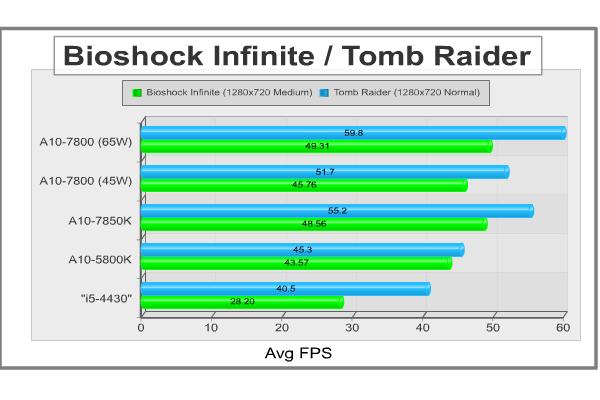
Well, those are all synthetic gaming benchmarks – what about some real examples? I’d really like to add a few mainstream / Free-To-Play games like DOTA 2, World of Tanks or League of Legends to the results since they seem to be be popular and a natural match for an APU (see the earlier discussion on multiplayer benchmark difficulty), but for now Bioshock Infinite and Tomb Raider’s built in and repeatable benchmarking utilities will be more useful. Bioshock uses a modified version of the popular Unreal Engine, and Tomb Raider contains a few AMD-specific technologies like TressFX.
Those special features were not enabled for these particular tests – both games were tested with a 1280×720 resolution and the Medium/Normal graphics presets. While each game was playable on the i5-4430, the experience was drastically better on the APUs. Again we see the apparently successful tuning of the A10-7800 compared to the A10-7850K, even at the 45W setting.
I think the attribute that surprised me the most while reviewing the A10-7800 was its proficiency at its stock settings – especially when compared to the “first Kaveri,” the A10-7850K. I enjoy the process of overclocking and finding the limits of components, so at first I wasn’t too sure about the A10-7800 (although I was very pleasantly surprised to find the integrated GPU clocks were adjustable!). I thought to myself, “why would anyone buy a locked version of the A10-7850K?”
Well, let’s just get this out of the way then – if you’re an enthusiast looking for the highest performance with discrete graphics cards and want to stay with the FM2+ platform, you’ll need the additional speed offered by the Kaveri APUs with unlocked multipliers. In non-HSA instances, you may even find the higher clock speeds of the Richland APUs more attractive. If you’re trying to choose a platform and need the greatest CPU performance available, the A10-7800 doesn’t do anything to change the Intel/AMD equation.
That’s not who this processor is for though – the A10-7800 impressed me more than I thought it would when placed in the tiny SilverStone ML05 HTPC case, where discrete graphics cards weren’t an option. Here, the A10-7800’s GCN graphics cores were a boon to integrated graphics performance and an obvious improvement over previous APUs. Compared to the stock A10-7850K, the A10-7800 almost matched performance at its optimized 65W setting (noticeably reducing noise – the stock cooler didn’t need to spin up near as much) and came surprisingly close in a couple instances at the 45W TDP setting. Essentially, if you have an application where integrated graphics are your only choice, the A10-7800 gives you all the Kaveri benefits and performance of the A10-7850K for less. Less money, less noise, less energy.
And those are all benefits that were realized while testing current-day applications. While you can still extract quite a bit of performance from the Trinity and Richland APU’s higher clock speeds, you won’t be able to take advantage of any HSA-enabled applications that may show up in the future. Unfortunately, while the possibilities are very exciting, AMD doesn’t have that “killer app” yet that makes the Kaveri APUs and their HSA technology a must-have. I think that will change – the benefits of HSA are too strong to ignore, but it will require time for software to catch up, like every other leap in hardware technology.
So what does that mean for the A10-7800? Right now, I think it stands in a pretty niche market, but in that market it’s one of the best options. I mentioned before, those users trying to extract the greatest amount of CPU performance from the FM2+ platform will still need to shell out for the A10-7850K, but for office/home/HTPC machines relying on integrated graphics the A10-7800 is the most compelling option so far in the lineup, other than maybe the A8-7600. Better yet if those users are able to take advantage of the few OpenCL 1.2 / HSA-enabled applications out there (LibreOffice, Photoshop).
When I started this review, I didn’t think I would be able to recommend the A10-7800 over the A10-7850K. After seeing the results, I can now see a few scenarios where I would personally choose the locked version – it was nice that tinkering with extra cooling and testing stable overclocks wasn’t necessary, and the majority of the performance was still available. The A10-7800 includes the best integrated graphics cores yet seen on a CPU, and offers all of the latest GCN/Radeon/HSA features for less. Maybe it’s only suited for a narrow range of uses that enthusiasts wouldn’t necessarily be interested in, but perhaps we need to remember that the market range of uses for the A10-7800 is probably much larger – for those users, the A10-7800 can be a pretty compelling option.
+ HSA-enabled APU
+ Most (if not more!) of the performance of the stock A10-7850K for less
+ Configurable TDPs (65W/45W)
+ Fully-featured GCN graphics cores (TrueAudio, Mantle, etc.)
+ Compute capable graphics
+ Focus on efficiency is noticeable
+ Integrated GPU is still overclockable
– Pure CPU performance, while “good enough” for intended application, still lacking compared to Intel
– Software needs to catch up to unlock full potential
– Not for enthusiasts – narrow range of use, even if within that range there isn’t anything comparable


One thought on “AMD A10-7800 APU Processor Review”
Great review, CPU & IGPU comparison yields interesting results.
Comments are closed.