By David Ramsey
Manufacturer: Intel Corporation
Product Name: Core i7-5960X Desktop Processor
Model Number: BX80648I75960X
Price: $1049.99 (Newegg | Amazon | B&H)
Full Disclosure: Intel provided the product sample used in this article.
Benchmark Reviews has now completed performance testing of our Intel Core i7-5960X Haswell-E processor. As this is Intel’s first 8-core consumer processor, we have high expectations for this top-end iteration of the new Haswell-E architecture. Equipped with Intel’s 22nm, “3D” transistors, 20 megabytes of on-chip cache, and a new DDR4 memory controller, the 5960X is unlike anything Intel’s ever done before.

If you haven’t read our Intel Core i7-5960X Extreme Processor Preview article, please do, as it will give you the background you need to get the most from this performance review. However, here’s a quick look at the Haswell-E features and Intel’s family of unlocked desktop-class CPUs to get you started.
Features and specifications courtesy of Intel
- 8 Cores, 16 Threads
- Intel Turbo Boost Technology 2.0
- Intel Hyper-Threading Technology
- Supports LGA2011-V3 socket Intel X99 Express Chipset-based motherboards
- Up to 20 MB Intel Smart Cache
- Integrated Quad-Channel Memory Controller (also supports dual and triple channel)
- 4 channels of DDR4 2133 MHz
- Up to 40 PCI Express Gen 3 Lanes
| Processor | Base Clock | Max Turbo Clock | Cores/ Threads | Cache | PCI-E lanes | Memory | TDP | Socket | Price |
| i7-5960X | 3.0gHz | 3.5gHz | 8/16 | 20MB | 40 | 4 channels DDR4-2133 | 140W | 2011-V3 | $999 |
| i7-5930K | 3.5gHz | 3.7gHz | 6/12 | 15MB | 40 | 4 channels DDR4-2133 | 140W | 2011-V3 | $583 |
| i7-5820K | 3.3gHz | 3.6gHz | 6/12 | 15MB | 28 | 4 channels DDR4-2133 | 140W | 2011-V3 | $389 |
| i7-4790K | 4.0gHz | 4.4gHz | 4/8 | 8MB | 16 | 2 channels DDR3-1600 | 88W | 1150 | $339 |
| i5-4690K | 3.5gHz | 3.9gHz | 4/4 | 6MB | 16 | 2 channels DDR3-1600 | 88W | 1150 | $242 |
Prices are for trays of 1,000 CPUs; individual retail prices will vary.
All of these CPUs use Intel’s latest “Haswell” architecture, with 22nm, 3D transistors. The new LGA2011-V3 CPUs all have DDR4 memory controllers, while the other two get by with DDR3. The one to keep your eye on, though, is the Core i7-4790K. Note that its base frequency is more than 30% higher than that of the 5960X, and its price is about a third of its big brothers’. Will the extra cost of the Haswell-E CPU be justified by its performance?
I compared the Core i7-5960X with its Sandy Bridge forebear, the Core i7-3960X, and the LGA1150-based Core i7-4770K. The test setups were as follows:
- Motherboard: ASUS X99-DELUXE
- Processor: 3.0GHz Intel Core i7-5960X
- System Memory: 16GB (4x4GB) Corsair Vengeance LPX DDR4-2166 at 15-15-15-36
- Primary Drive: Seagate ST3500 500GB drive
- Graphics Adapter: NVIDIA GTX580 reference card
- CPU cooler: Corsair H100i
- Motherboard: ASUS Sabertooth X79
- Processor: 3.3GHz Intel Core i7-3960X
- System Memory: 16GB (4 4GB DIMMs) Corsair Vengeance CMZ16GX3M4A1600C9 DDR3-1600 (9-9-9-24)
- Primary Drive: Seagate ST3500 500GB drive
- Graphics Adapter: AMD Radeon 6850
- CPU cooler: Intel High Performance Liquid Cooling System RTS2011LC
- Motherboard: MSI Z87 MPower Max
- Processor: 3.5GHz Intel Core i7-4770K
- System Memory: 8GB DDR3-1600 (two 4GB DIMMs) at 9-9-9-27
- Primary Drive: Seagate ST3500 500GB drive
- Graphics Adapter: AMD Radeon HD6850
- CPU cooler: Thermalright Silver Arrow
- Operating System: Windows 7 Home Premium 64-Bit
- Finalwire AIDA64 Engineer
- Maxon CINEBENCH R11.5 64-Bit
- x264Bench HD 5.0
- SPECapc LightWave 3D v9.6
- Handbrake 0.96 video transcoding
- Blender 3D rendering
- POV-Ray 3D rendering
I tested the 5960X at both stock and overclocked speeds. Intel’s press material say that exceptional CPUs will overclock to 4.6GHz, many CPUs will overclock to 4.5GHz, and pretty much all of them will overclock to 4.4GHz. Although I’ve had good luck with Intel CPUs in the past, with my Core i7-5960X sample, 4.4GHz was the best I could get. I could boot into Windows at 4.5GHz, but the system was very unstable and would crash with any benchmark. Let’s see what kind of performance we can get from synthetic benchmarks…
AIDA64 is FinalWire’s full 64-bit benchmark and test suite utilizing MMX, 3DNow! and SSE instruction set extensions, and will scale up to 32 processor cores. An enhanced 64-bit System Stability Test module is also available to stress the whole system to its limits. For legacy processors all benchmarks and the System Stability Test are available in 32-bit versions as well.
All of the benchmarks used in this test- Queen, Photoworxx, ZLib, and hash- rely on basic x86 instructions, and consume very little system memory while also being aware of Hyper-Threading, multi-processors, and multi-core processors. Of all the tests in this review, AIDA64 is the one that best isolates the processor’s performance from the rest of the system. While this is useful in that it more directly compares processor performance, readers should remember that virtually no “real world” programs will mirror these results.

The Queen and Photoworxx tests are synthetic benchmarks that iterate the function many times and over-exaggerate what the real-world performance would be like. The Queen benchmark focuses on the branch prediction capabilities and misprediction penalties of the CPU. It does this by finding possible solutions to the classic queen problem on a chessboard. At the same clock speed theoretically the processor with the shorter pipeline and smaller misprediction penalties will attain higher benchmark scores.
Like the Queen benchmark, the Photoworxx tests for penalties against pipeline architecture. The synthetic Photoworxx benchmark stresses the integer arithmetic and multiplication execution units of the CPU and also the memory subsystem. Due to the fact that this test performs high memory read/write traffic, it cannot effectively scale in situations where more than two processing threads are used, so quad-core processors with Hyper-Threading have no real advantage. The AIDIA64 Photoworxx benchmark performs the following tasks on a very large RGB image:
- Fill
- Flip
- Rotate90R (rotate 90 degrees CW)
- Rotate90L (rotate 90 degrees CCW)
- Random (fill the image with random colored pixels)
- RGB2BW (color to black & white conversion)
- Difference
- Crop
The 5960X acquits itself well here, turning in scores 10% higher than the 3960X at stock clocks and a startling 47% higher when overclocked. As we’ve seen before, Photoworxx is relatively insensitive to clock speed but does make effective use of more cores.

The ZLIB scores are compressed by the scale of the Hash scores, but the numbers give the 5960X a 17% better score than the 3960X. The real surprise here, though, are the Hash scores, where the 5960X returns performance much further above the 3960X than just two extra cores would lead you to expect. Its score of 6763 is almost 60% higher than that of the 3960X.
Maxon CINEBENCH is a real-world test suite that assesses the computer’s performance capabilities. CINEBENCH is based on Maxon’s award-winning animation software, Cinema 4D, which is used extensively by studios and production houses worldwide for 3D content creation. Maxon software has been used in blockbuster movies such as Spider-Man, Star Wars,The Chronicles of Narnia, and many more. CINEBENCH Release 11.5 includes the ability to more accurately test the industry’s latest hardware, including systems with up to 64 processor threads, and the testing environment better reflects the expectations of today’s production demands. A more streamlined interface makes testing systems and reading results incredibly straightforward.
The CINEBENCH R11.5 test scenario comprises three tests: an OpenGL-based test that models a simple car chase (which I didn’t use for this test, since the graphics card performs most of the rendering work, and I’m testing the CPU), and single-core and multi-core versions of a CPU-bound computation using all of a system’s processing power to render a photo-realistic 3D scene, “No Keyframes”, the viral animation by AixSponza. This scene makes use of various algorithms to stress all available processor cores, and all rendering is performed by the CPU: the graphics card is not involved except as a display device. The multi-core version of the rendering benchmark uses as many cores as the processor has, including the “virtual cores” in processors that support Hyper-Threading. The resulting “CineMark” is a dimensionless number only useful for comparisons with results generated from the same version of CINEBENCH.
The first benchmark renders the scene using only a single core. Note that the per-core performance of the 5960X is actually slightly below the performance of the 3960X, despite the fact that the Haswell core architecture is supposed to be somewhat better in the “instructions per clock” sense than the older Sandy Bridge cores. But the explanation is simple: clock frequency still counts for something, and the 4770K ticks along at 3.5/3.9GHz (base and turbo) clocks, while the 3960X is 3.3/3.9, and the 5960X a mere 3.0/3.5. There’s a lesson to be learned here, which I’ll get to later on, but note how much overclocking helps.
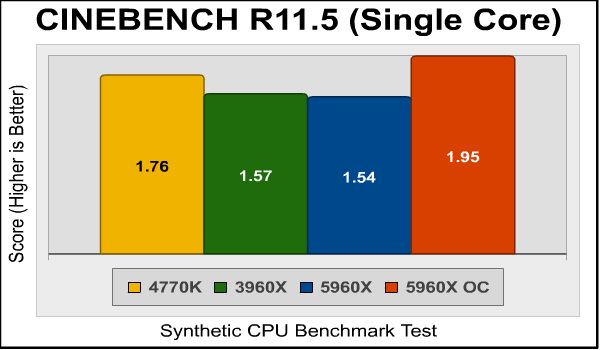
In the multi-core benchmark, CINEBENCH 11.5 uses all the CPU resources it can grab, and here there’s simply no contest. We see a nice even scaling in the scores as we move from a four-core CPU (4770K) to 6- and 8-core CPUs.
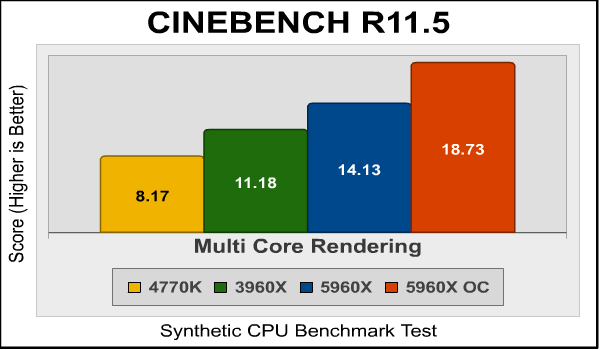
As we can see, if you can keep all the cores working, the performance of the Haswell-E is impressive.
I like media encoding benchmarks for several reasons. One, most of them are “real world” benchmarks rather than synthetic benchmarks that are only good for comparison with other scores from the same benchmark. Second, media encoding is one of the very few things that can really use all the threads and horsepower a modern CPU can provide. Unless you’re upgrading from a really old machine, that spiffy new CPU won’t play your games any faster, nor make your web browsing any smoother. But when you’re ripping that DVD to watch on your phone or tablet, then yeah, nobody ever said their transcoding was too fast.
For this test I used Handbrake 0.96 to transcode a standard-definition episode of Family Guy to the “iPhone & iPod Touch” presets, and recorded the total time (in seconds) it took to transcode the video.

Again, more cores means more performance, with the stock-clocked 5960X taking a full 33 seconds less time to transcode the episode than the 4770K. Overclocking yields the first sub-1-minute score I’ve ever recorded for this benchmark.
With version 5.0, TechArp’s x264HD Benchmark finally integrates AVX instructions into the main code branch. Previously, there were separate versions of this benchmark that used XOP and AVX instructions; now, they’re integrated and will be used if your CPU supports them. Of course this means that the results from the new benchmark can’t be directly compared to results from the old benchmark, but that’s the price of progress. An added benefit is that the new version runs in full 64-bit mode.
x264 HD 5.0 encodes a 1080p video segment into a high quality x264 format.

Again: more cores = more performance. There’s a 60% boost moving from the 4770K to the 5960X.
SPECapc (Application Performance Characterization) tests are fundamentally different from the SPECviewperf tests I’ve used in other performance reviews. While SPECviewperf tests incorporate code from the various test programs directly into the benchmark, the SPECapc tests are separate scripts and datasets that are run against a stand-alone installation of the program being benchmarked. SPECapc group members sponsor applications and work with end-users, user groups, publications and ISVs to select and refine workloads, which consist of data sets and benchmark script files. Workloads are determined by end-users and ISVs, not SPECapc group members. These workloads will evolve over time in conjunction with end-users’ needs and the increasing functionality of PCs and workstations.
For this test, I ran the SPECapc “Lightwave” benchmark against a trial installation of Newtek’s Lightwave 3D product. The benchmark, developed in cooperation with NewTek, provides realistic workloads that simulate a typical LightWave 3D workflow. It contains 11 datasets ranging from 64,000 to 1.75 million polygons and representing such applications as 3D character animation, architectural review, and industrial design. Scores for individual workloads are composited under three categories: interactive, render and multitask.
The benchmark puts special emphasis on processes that benefit from multi-threaded computing, such as animation, OpenGL playback, deformations, and high-end rendering that includes ray tracing, radiosity, complex textures and volumetric lighting. The test reports three scores: Animation (multitasking), Animation (interactive), and Rendering. The numeric scores represent the time it took to complete each section of the benchmark, in seconds, so lower scores are better.
I’ve found the SPECapc Lightwave 3D test to be an excellent indicator of overclock stability. In many cases, overclocked systems that will make it through every other benchmark here will crash in this test. Of course, this time around there’s no overclocking involved…
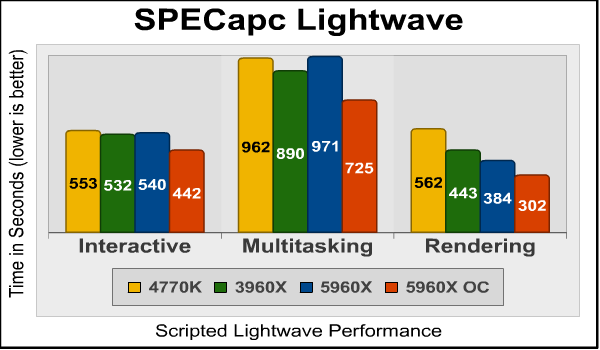
Bear in mind that what this benchmark does is use scripts to control a stand-alone instance of Lightwave, so it’s more indicative of real-world performance than the embedded Lightwave code in SPECviewperf. And here we see the prowess of the Haswell-E isn’t as evident as it’s been in some of the previous benchmarks: it’s virtually no faster than the 4770K in the Interactive portion of the test, actually slower in the Multitasking portion, and scores a decisive win only in the Rendering section.
Blender is an open-source, free content creation suite of 3D modeling, rendering, and animation capabilities. Originally released in 2002, it’s available in versions for Mac OS X, Windows, Linux, and several Unix distributions. It supports rigid and soft-body objects and can handle the draping and animation of cloth, as well as the rendering and animation of smoke, water, and general particle handling.
Our Blender test renders multiple frames of an animation of a rotating chunk of ice, with translucency and reflections. Rendering of this model uses ray-tracing algorithms and the program reports the rendering time for each of the animation’s 25 frames. The results are a summation of the rendering times for all frames and the lower the score, the better. You have to be careful with Blender since it defaults to using only two CPU cores; you must specifically set it to use all the cores your processor has.

Extra cores help here, although not as much as you’d think…it’s not until we get into the overclocked scores that real progress is evident. This is probably due to clock speed deficit on the part of the 5960X.
The Persistence of Vision ray tracer is a free, open source 3D modeling program that uses ray-tracing algorithms to generate realistic three dimensional images. Ray tracing is very computationally intensive, and the POV-Ray program has a handy built-in benchmark to let you check the performance of your system.
Cores make more of a difference here, with the 6- and 8-core CPUs turning in much better scores than the 4770K
 Let’s look at the memory bandwidth our DDR4-2166 system can give us next…
SiSoftware Sandra (the System ANalyser, Diagnostic and Reporting Assistant) is an information & diagnostic utility. It should provide most of the information (including undocumented) you need to know about your bandwidth, software and other devices whether hardware or software. It’s available in five versions, ranging from the free “Lite” version to the Sandra Enterprise version. Sandra fully supports and exploits multi-processor and multi-core systems, NUMA memory, Hyper-Threading, and MMX, SSE, SSE2, SSE3, SSSE3, SSE 4.1, SSE 4.2, AVX, and FMA instructions.
It comprises a massive suite of test and reporting features…but the one I’m interested in is the memory bandwidth test: SiSoft’s memory bandwidth test provides individual and aggregate scores across a variety of memory operations. For this test I’m reporting the aggregate score. Does DDR4-2166 give us more throughput than the DDR3-1600 used on Sandy Bridge Extreme?
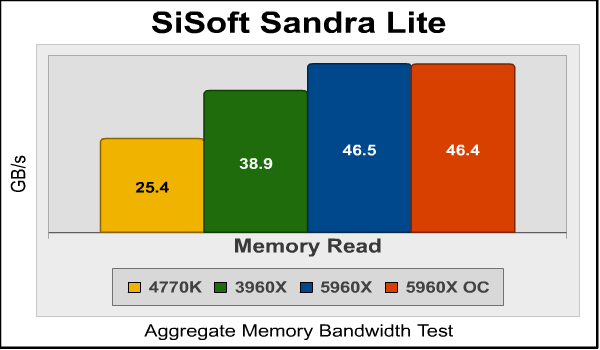
And note that with 20MB of onboard L3 cache, probably upwards of 90% of memory requests will be satisfied with no access to system memory required (this is one way multi-core chips avoid saturating their memory I/O). Memory bandwidth has little effect on most day-to-day computing.
Overclocking the Haswell-E CPUs is pretty simple: although you can fiddle with literally dozens of settings in a modern X99 BIOS, you can get 95+ of your best overclock simply by setting the multiplier and CPU core voltage…and making sure you have a good cooling solution, since this baby can dissipate 140 watts without any overclocking at all.
Starting with the Devil’s Canyon iteration of the LGA1150 Haswell CPUs, Intel has changed the thermal interface material used between the CPU die and the heat spreader. Intel calls it a “next generation polymer thermal interface” and says it should address the problems enthusiasts had overclocking the previous generation chips. The Haswell-E CPUs get this too, so I was hoping for some pretty epic overclocking action.
And I did get it, although not to the degree I had hoped. Intel’s press materials say that most CPUs should be stable at 4.5GHz @ 1.3VCORE, but the best I could do, even with my Corsair H100i cooler, was 4.4GHz. The system would boot into Windows at 4.5GHz but would crash running any benchmark. This is disappointing considering I had easily hit 4.8GHz in the Sandy Bridge Extreme Core i7-3960X CPU, and that was with Intel’s uninspiring 120mm liquid cooler. Granted, the 5960X does have an additional 10 watts in its TDP (140W vs. 130W), but I think some of the difference might simply be due to the extra complexity.

The maximum temperatures I saw running AIDA64’s “System Stability Test” were in the high 70s (Celsius). This caused the H100i fans to rev up a bit but were still within the acceptable range.
Although the overclock was less than what I’d hoped for, it did result in substantial performance increases in many of the benchmarks (items flagged with an asterisk: lower score is better):
| Benchmark | Stock | OC@4.4GHz | % Increase |
| AIDA64 Queen | 74078 | 99055 | 33.7 |
| AIDA64 Photoworxx | 27673 | 27742 | 0.25 |
| AIDA64 ZLIB | 561.9 | 741.9 | 32.0 |
| AIDA64 Hash | 6762 | 9007 | 33.2 |
| CINEBENCH Single | 1.54 | 1.95 | 26.6 |
| CINEBENCH Multi | 14.1 | 18.7 | 32.6 |
| Handbrake | 76.3 | 57.7 | 31.9 |
| x264HD Pass 1 | 117.3 | 154.7 | 31.9 |
| x264HD Pass 2 | 28.3 | 37.0 | 30.7 |
| SPECAPC Lightwave Interactive | 540 | 441 | 18.3 |
| SPECAPC Lightwave Multitask | 971 | 724 | 25.4 |
| SPECAPC Lightwave Rendering | 384 | 302 | 21.4 |
| Blender/Icetest | 56.1 | 42.3 | 24.6 |
| POV-Ray | 98.2 | 74.1 | 25.4 |
| Average increase | 26.3% | ||
So, there’s 26% free performance that should be readily available to almost any 5960X whose owner is willing to spend a couple of minutes in the BIOS.
I’ll present my thoughts and conclusion on this new CPU in the next section.
It’s good to see Intel finally update the LGA2011 platform, even if by “update”, I mean “replace with a system that’s completely incompatible with the previous generation system.” This system replaces LGA2011 entirely, and if the name “LGA2011-V3” confuses people into thinking that they can drop their Sandy Bridge Extreme or Ivy Bridge Extreme CPUs and DDR3 memory into an X99 Express motherboard, well, that’s the fault of Intel’s marketing department.

The truth is that unless you’re a professional content creator, or a really rich and avid video hobbyist for whom transcoding performance is the only metric that matters, it’s hard to justify the cost of a top-end LGA2011-V3 system. Aside from the number of cores, the main advantage to these systems is the surfeit of PCI-E lanes from the CPU: 40 for the 5960X and 5930K, and 28 from the 5820K. Any of these is a huge increase over the paltry 16 that Intel seems determined to keep the LGA1150 users shackled with. Although it’s true that running dual GPUs at x8/x8 won’t result in any noticeable performance deficits over x16/x16, more and more things like SATA Express and m.2 SSDs are making use of PCI-E lanes, which is why you see high-end LGA1150 motherboards using expensive ASMEDIA PLX chips to multiplex the existing lanes.
Although we didn’t receive the two other members of the Haswell-E family to test, I’d say that either one would represent a much better value for most people than the top-end Core i7-5960X. If a new Devil’s Canyon Core i7-4790K just isn’t enough, an additional $50 more ($389 at Newegg) gets you a Core i7-5820K with two more cores, almost double the on-chip cache, and 12 more PCI-E lanes to play with. And $389 goes down a lot easier than $1049.99 (Newegg | Amazon | B&H).
It’s hard to compare the performance of this processor directly to the previous generation since Intel has changed so many things this time around. When you compare CPUs, you’d prefer that as much of the rest of the system as possible– memory, hard disk, etc.– be the same since this will isolate any differences noticed to the CPU. But here we have a new supporting chipset and a new DDR4 memory controller, so the best we can do is test complete systems against each other.
Starting with the Core i7-980X CPU and its X58 chipset four years ago, Intel has used core count to distinguish its Extreme CPUs. And the price has remained remarkably constant over the years: if you want the top-end Intel consumer CPU, you’re going to pay a little over a grand for it.
But unless whatever applications you run keep all 8 cores working, you’re paying a lot of money for performance you’re not going to see. In fact you’ll see better performance in most applications from the much less expensive Core i7-4790K, simply because it’s using the same cores clocked at 4GHz base/4.5 turbo whereas the power and cooling issues with what’s essentially two of these CPUs on one die limit the 5960X to 3.0GHz base/3.5 turbo. Yes, you can overclock it– with the right cooling– but guess what? You can overclock the 4970K, too.
So this chip is a conundrum to me, really. It doesn’t make a lot of sense for most consumers or gamers, who will actually get better performance in most applications from the much less expensive Core i7-4790K. And if you’re a content creation professional– a modeler or animator or video production person for whom core count is king– then you should probably be looking at a multi-CPU Xeon-based system. A couple of 12-core Xeons in a server motherboard will easily outperform the 5960X in transcoding or rendering tasks, even if they will cost a lot more.
Granted, the canny enthusiast can come up with edge cases to effectively use this kind of power: you could start a DVD rip and limit the encoder to four cores, then play Crysis 3 with no hit in performance. Or maybe you’re setting up a tri- or quad-SLI system and really, really need every PCI-E lane you can get your hands on.
This processor’s native habitat is an entry-level content production workstation, for which it is admirably suited. My scores reflect this usage; most consumers, gamers, and enthusiasts would be best served by an LGA1150-based Haswell.
+ A new level of performance in a “consumer” CPU
+ Easily overclockable processor
+ 48 (total) PCI-E lanes as compared to the 24 lanes of an LGA1150 system
+ First use of DDR4 memory
– Very, very expensive for a desktop CPU
– Requires new X99 motherboard and new DDR4 memory
– Single-core performance lags behind that of much less expensive 4790K
– No CPU cooler included
-
Performance: 9.5
-
Construction: 9.00
-
Overclock: 9.00
-
Functionality: 9.50
-
Value: 9.5 (professional use)


11 thoughts on “Intel Core i7-5960X Extreme CPU Performance Review”
On the last page, you wrote 48 vs 24 PCI-E lanes. I believe that should be 40 or 28 PCI-E lanes versus 16.
In terms of value, it’s hard to justify this processor for most people. Only people with multi-threaded work can really benefit from this.
I think though that the 5820k might be a decent value though. For perhaps $80 in a CPU compared to a 4790K and around $50-$100, you do get another 2 cores, which might be useful, although there will be a premium you have to pay for DDR4.
What I said was “48 (total) PCI-E lanes as compared to the 24 lanes of an LGA1150 system”. Since I was talking about systems rather than CPUs, I included the PCI-E lanes provided by the chipsets as well.
1. Page 2, you say Z79 instead of X79
2. Page 8 says the RAM on the 3960X is running at 1066 while on page 2, you say that you are running 1600. Which is it?
3. Page 8, you typed 3096X instead of 3960X.
4. Why no clock for clock comparison? I mean in both the CPU and RAM speed, especially since you are giving tests scores with the 5960X being overclocked?
Thanks for the corrections; I’ve updated the article.
Clock for clock comparisons are are interesting if you’re into CPU architecture, or like to make people think you are. But there are so many other factors– amount of cache, clock speed which varies based on number of active cores, and so forth– that I think real-world performance tests are more useful.
Overclocking results are never guaranteed. Of course I always include overclock results for the CPU I’m testing, and I’ve gone back and forth on whether or not to include overclocking results from previously-tested comparison CPUs. Currently I don’t include them since it introduces another uncertainty into the comparison.
Why 1600 DRAM on 1150 and X79 – 2133 would have been more appropriate?
Two reasons:
— Neither the 4770K nor 3960X officially support DDR3-2133. It is a supported speed for Haswell-E.
— In any case I didn’t have any DDR3-2133 available.
If you can put your hands on some 2133 (decent sticks) you’d be surprised at the change you’ll see, and both the 4770K and the 3960X both easily run 2133…
” 46.5 gigabytes per second is about 20% higher than we see from the late-2011 Core i7-3960X. As usual, overclocking the CPU has no effect on memory bandwidth.”
OCing won’t have any real effect, but it’s an apples and oranges difference in the 3960X results when also running at 2133 (and that’s where the bandwidth differences in your charts come from – 2133 vs 1600)…
The slow CLs in DDR4 have caused many to reconsider moving to X99
Benchmark Reviews has been testing memory for many years, and we’ve never seen much real-world difference with expensive, high speed enthusiast memory vs. standard memory. Synthetic benchmarks, of course, will be different.
There’s another reason I wouldn’t do this, though: when we test components, we try to isolate the performance of the component as most users would see it, not as most users with lots of money who will equip their systems with high end memory, SSDs, and so forth. By sticking to the supported memory speeds for each platform, I’m providing a more accurate look at relative CPU performance, rather than “Haswell-E with stock memory vs. Sandy Bridge E with unsupported high speed memory”.
Still, testing each CPU with high speed memory on enthusiast motherboards would make an interesting article in its own right. Maybe someday…
I run 2133MHz Ram in an Ivy Bridge system with an i5K series, it has no problems running in that, but as David says, there is no appreciable difference to 1600MHz, but it does give me that warm and fuzzy feeling knowing I have fast Ram. 😉
It’s looking like the end of the line has been reached, with regard to heat-related issues, the overclocking tied to the heat, cost, and actually performance.
So, Intel’s predictions about the demise – or maybe more correctly, the end of the development road – is rapidly coming into view.
Except for the guys who actually need a zillion of everything (cores, PCI-E lanes) and just about everything else that keeps climbing with each new chip issue, and maybe the highest calibre gamers, it looks like everything has been invented, and the gravy offered by Haswell-E, etc. may not be such a necessity after all.
Just my 2cents worth.
Your comment reminds me of an editorial I wrote for this website nearly four years ago:
Intel Sandy Bridge CPUs Chill Aftermarket Cooling. I argued much the same, and lost some sponsors in the process. Read more: https://archive.techplayboy.com/index.php?option=com_content&task=view&id=13488&Itemid=8
Comments are closed.