By Julian Duque
Manufacturer: BitFenix Co. Ltd.
Product Name: Neos
Model Number: BFC-NEO-100-WWXKW-RP
UPC: 886027003558 EAN: 4716779445091
Price As Tested: $59.99 (Amazon l Newegg)
Full Disclosure: The product sample used in this article has been provided by BitFenix.
If you have ever been to a LAN party there is a pretty high chance you have seen one of the most popular cases from BitFenix, the Prodigy, a huge success among the gaming community due to its innovative design and style. Since then, BitFenix has started to shift it’s attention into different markets as we have seen with the Fury line of power supplies, but this time they have released a new set of cases, including the BitFenix Neos. Since it’s debut back in May, it was announced that the case would offer tremendous value and style, which was definitely showcased in early models of the case, immediately bringing attention from Benchmark Reviews. But in such a crowded market will the Neos manage not to drown in the sea of budget cases?
BitFenix is a very peculiar case manufacturer as they take ideas from many of their customers, this time they decided to make many different color variations of the Neos to make it easier to color coordinate your build. The BitFenix Neos comes in 10 different color variations which you can check out in this link. BitFenix will also be offering optional windowed side panels for both black and white body variations of the Neos soon, just like they did with their prodigy line.

But as for most of us, a valuable case is not just about the looks. A great case encompasses many features and little sacrifices, and BitFenix is set to make a very compelling model. In this article I will be taking a close look at the BitFenix Neos and determine if it is a mighty contender in the budget case market.
| Materials | Steel body, Front plastic |
| Body Color (Int/Ext) | Black/Black, White/White |
| Dimensions (WxHxD) | 185 x 429 x 470 mm |
| Motherboard Compatibility | Mini-ITX, mATX, ATX |
| 5.25″ Drive Bays | 2 |
| 3.5″ Drive Bays | 3 |
| 2.5″ Drive Bays | 3 |
| Cooling Front | 2 x 120mm (optional) |
| Cooling Rear | 1 x 120mm (included) |
| PCI Slots | 7 |
| I/O | 1 x USB3.0, 1 x USB2.0, HD Audio |
| Power Supply | PS2 ATX (bottom, multi direction) |
| Extras / Features | Front Dust Filter, PSU Dust Filter, Tool-Free Drive Locking |
| CPU Cooler Height | 158 mm |
So as usual let’s start with the outside of the case. BitFenix decided to send me the white version with the white front mesh. This case does not come with a windowed side panel however BitFenix kindly sent one anyways. If you are planning on obtaining a windowed side panel I suggest you go to the BitFenix online store as they usually have them in stock.

At the front there is a mesh panel with two 5.25″ bay openings. The aluminum BitFenix logo can be found on the bottom as with most BitFenix cases. There is no noticeable color shifts between the plastic vessel of the front cover and the paint finish of the side panels. The holes in the front mesh are larger than most mesh panels I have seen in the past, this should give the Neos slightly better ventilation.

At the back is the usual layout of a mid tower with 7 expansion slots, a bottom mounted power supply, a back I/O cutout hole near the 120 mm fan and four rubberized thumb screws that hold in place the side panels. The top expansion slot cover is missing as BitFenix expects you to populate it with a graphics card, however they do include an extra expansion slot cover with the accessories. The expansion slots are also covered by a plastic cover, leading to the question what is it hiding?

Both side panels are simple and plain. Once I removed one of them I found myself with a side panel that flexed so much that it was actually a hard task to place it back into the retaining holes. It is clear now that BitFenix might have done some hefty sacrifices to keep the costs down. This pattern can also be seen in the top panel as it also exhibits plenty of flex. This should not affect the functionality of the case, but it does give some insight to the overall build quality of the BitFenix Neos.

The front Input/Output panel can be found on the top. It features a power button and a reset switch, a microphone and a headphone jack, one USB 2.0 and one USB 3.0 ports. There is also a power indicator light and a hard drive activity light that are illuminated by a really nice soft white LED. There is no label for the microphone and headphone jacks which is a big annoyance if you have really bad memory as you will find yourself guessing which is which.

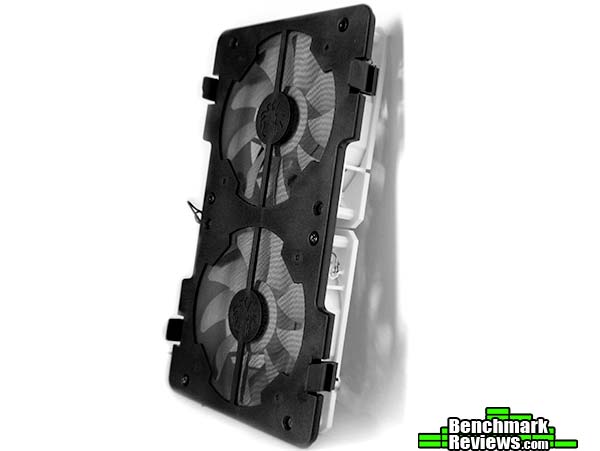
Removing the front panel I noted that the I/O panel actually stays in place, a nice feature at this price point. There is also a dust filter for both 120 mm fan mounts,which unluckily are also part of the dust filter. If you decide to populate both fan mounts you will have to remove the fans each time you clean the filter. Behind the filter we find the storage bays which have some pretty big holes to allow airflow through and not choke the fans. If you are planning on using all the hard drive bays we would recommend a better case as this will definitely limit the airflow of the BitFenix Neos.
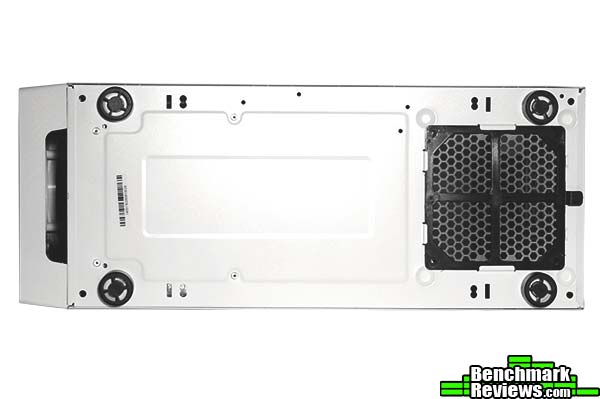
At the bottom there is no fan mounts, meaning that this case only has a total of three fan mounts. There are four plastic feet that keep the case off the floor and allow some air into the power supply. There is also a removable fan filter on the power supply intake, meaning that even though this case only has three fan mounts it is fully dust prove if you decide to use the back fan as an exhaust.
Like the outside, I expect the inside to look great but have some mayor difficulties in the performance department. Looking at the exterior I noticed a lack of fan mounts and build quality, but decent aesthetics. I also noticed that the case is really slim and this will compromise features such as cable management and air cooling compatibility.

The accessories are nothing exceptional. Included are the missing expansion bay cover, a couple of zip ties for cable management and all black screws. The manual is also not astonishing and does not really provide enough information for first time builders.
‘ 
Although the front panel looks fully meshed from outside, inside I encountered a more restrictive design. The 5.25″ bays are covered by some dust proof foam that is not easily removable. Both locations that sit right on top of the 120 mm fans are also covered with the same dust proof foam. The plastic construction itself is very sturdy and we do appreciate the fact that the Neos is fully dust proof as BitFenix claims, in fact the foam does a bit of sound dampening which is a great plus, however it would have been ideal to implement an easy way to remove this foam.
Inside we find the same layout found in the BitFenix Comrade. Everything is covered in white, with the exceptions of the fan, hard drive covers and the cables which are all black. There is also the motherboard standoffs that give the BitFenix Neos support for mini-ITX, micro-ATX, and ATX motherboards. The hard drive cages are all non removable however they are very sturdy which is really surprising considering the poor construction of the side panels.

At the bottom the power supply intake can be found, which is covered at the bottom by a fine mesh filter. There are also 1/4″ metal standoffs that elevate the power supply but they are not rubberized and may scratch the bottom of your power supply.

Towards the back there is a bit more disappointment as there is a lack of cable management features that make the BitFenix Neos a hard place to work in. There is less than an inch of space and the only place to tie down cables is by using the included zip ties around the cutout holes. There is a cable hole on the top right for the 4/8-pin, a nice consideration from BitFenix.
Before starting to build I highly suggest you check for compatibility with all your hardware, specially if you are air cooling as the BitFenix Neos is not very wide. With a 158 mm height clearance you will have enough clearance for coolers such as the Dark Rock Slim, and the Cooler Master T4. It is also suggested you install the cooler prior to installing the motherboard as the CPU cutout hole is small.
 \
\
I began to build by installing some extra fans to bring some air in from the front, as the BitFenix Neos only comes with a 120 mm BitFenix fan installed in the back. I installed two BitFenix Spectre Pro white LED fans which BitFenix kindly included with our sample of the BitFenix Neos. It should also be noted that if you buy one of the special edition BitFenix Neos they do come equipped with an extra fan at the front.
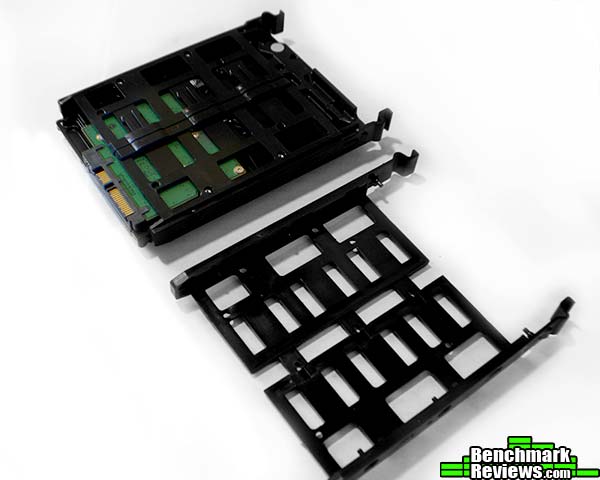
Hard drive installation is a breeze with the tool-less mechanism that BitFenix implemented on the Neos. The plastic brackets are very sturdy and stayed in place without any noticeable rattling. In total the BitFenix Neos offers three 2.5″ and three 3.5″ hard drive brackets from which the 3.5″ brackets also have holes for 2.5″ drive installation.

One of my biggest gripes with this case is the lack of fan mounts on the top of the case leaving only three fan mount locations. However if you are into modding you could easily make yourself some mounting holes on the top, and surprisingly there is a 1.25″ clearance between the rear exhaust fan and the top, which should be enough for many all in one water coolers.
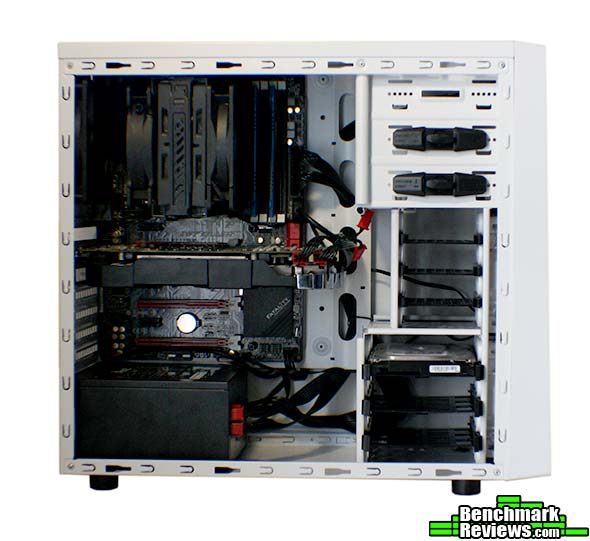
As expected the case performed poorly regarding cable management as the motherboard tray does not extend all the way to the bottom. You could probably do a better job than I did if you zip tie the mess, however most of the cables will still be shown. Before installing the motherboard I recommend you remove the PCI slot covers, as they bend inward to be opened and this may damage your components.

Another problem I found with this case is the lack of space between the power supply and the bottom of the motherboard which means that if you have angled connectors like the one shown in the picture you probably won’t be able to plug it in.
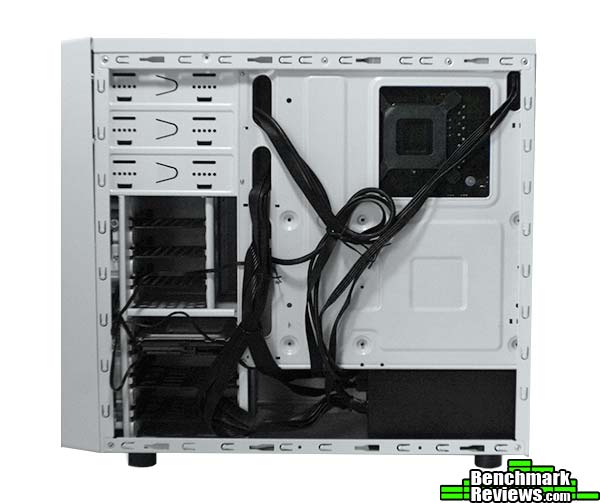
A back view reveals my somewhat neat cable management. There was almost no space to route the 24 pin cable behind the motherboard tray, and even the small cables that I routed through managed to make the flimsy side panel a task to install back.

With all the sacrifices BitFenix implemented with the BitFenix Neos we still think that it is a mighty contender at this price point mainly because of how it looks. The optional windowed side panel does give a very appealing look and in this market, looks are probably your main concern. Building within the BitFenix Neos has it’s ups and downs but if you handle the case appropriately and with patience you will find yourself with a good looking build.
So after much debate, my experience with the BitFenix Neos ends up in a semi-positive way. The BitFenix Neos has a lot of drawbacks, and is probably not a case that I would use to ship a pre-built system, but if you are in the look for a case that plain simply works and looks great you will probably find the BitFenix Neos an option to consider. I do expect this case to be very popular specially because of the low price tag and looks, but relative to it’s competition it does lack some important features; most importantly it lacks two top fan mounts for water cooling compatibility. For now, the BitFenix Neos remains as a very appealing concept that fits the needs of first time builders but still needs some refinement.
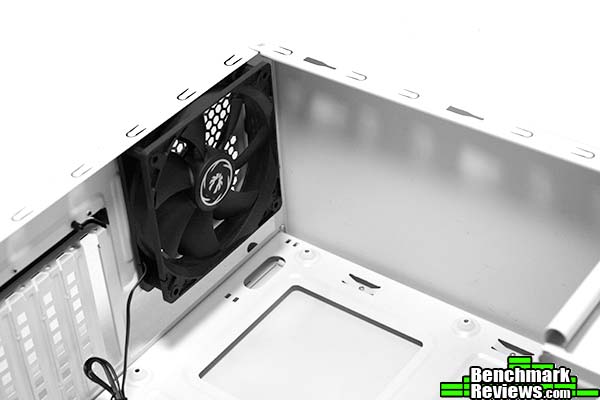
In the exterior the BitFenix Neos looks like it could be host to some pretty hefty hardware. The front mesh gives it a very aggressive look but once I turned the front panel around I found that the only openings on the back were right on top of the two 120 mm fan mounts that are mounted on the dust filter. The only fan that is included with the case is found on the back, along with the third 120 mm fan mount, which unluckily is the last one to be found on the BitFenix Neos. There is no fan mounts on the top or side panels, leaving almost no airflow to exhaust the hot air produced by my test rig. If BitFenix simply added two 120 mm fan mounts on the top, my story with this case would have been completely different.
What sets the BitFenix Neos apart from it’s competition is how good it looks. The side panels are plain and simple, however with the addition of the optional windowed side panel a very appealing build can be achieved. The Neos’ exterior design is elegant, and yet it looks interesting enough to attract attention, it almost reminds me of previous versions of the Mac Pro case. BitFenix has also gone ahead and released 10 color variations of this case so that users can color coordinate more easily.
But at this price point investing so much in the looks of the case does have some drawbacks. Both side panels were extremely flimsy, and a very small space for cable management in the back made even the CPU power cable a hard task to line the side panel with the dedicated mounting holes. The PCI slot expansion covers are non reusable and can only be removed with the motherboard uninstalled as they bend inward to be snapped off. However, the plastic front panel was very sturdy and the hard drive cages seemed really solid.
The BitFenix Neos is probably not the case to mount an extreme hardware configuration as it lacks airflow, cable management features, CPU cooler clearance, and water cooling compatibility. However if you are on the look for your first case, the BitFenix Neos will still hold graphics cards up to 300 mm in length, CPU coolers with up to 158 mm in height, and probably all the storage you need for an appropriate gaming rig. I do recommend you buy some fans as the BitFenix Neos only comes with one.
For a $59.99 (Amazon l Newegg) I think the case is probably priced a bit too high, especially when taking into account the missing features. But if you are into the really good looking design of the BitFenix Neos this case will probably be worth all your pennies. If you are looking for a new case that offers more features I would recommend that you take a look at some of the competition’s latest offerings.
+ All black cables and screws
+ Fully dust proof
+ 10 different color variations
+ Very rigid hard drive cages
– Only three fan mounts
– Non-reusable PCI slot covers
– Very flimsy side panels
– Very little clearance for cable management and CPU coolers
-
Performance: 7.5
-
Appearance: 9.0
-
Construction: 7.0
-
Functionality: 8.5
-
Value: 8.0


One thought on “BitFenix Neos Computer Case Review”
You know, the moment I saw the Neos it just screamed “Rebranded Comrade!” And after reading this, I think that comment stands. The designs, both inside and out are nearly identical. The only real differences being the mesh on the front and the I/O panels.
Comments are closed.