By Tom Jaskulka
Manufacturer: BitFenix Co. Ltd.
Product Name: Prodigy M
Model Number: BFC-PRM-300-KKXSK-RP
UPC: 886027003190
Price As Tested: $99.99 (Newegg / Amazon)
Full Disclosure: The product sample used in this article has been provided by BitFenix.
In 2012, BitFenix unleashed their Prodigy upon the world. An unusual case at the time, I believe it single-handedly jumpstarted the high-performance ITX category. In my opinion it was part of the reason we now see motherboards such as Asus’ P8Z77-I / Z87I Deluxe and Maximus VI Impact. Previously constrained by small cases and under-powered chipsets, the Prodigy allowed enough room for watercooling and an unprecedented amount of airflow for an ITX enclosure. However, again in my opinion, it was just too big. ITX is about cramming as much performance into as little space as possible, and the Prodigy was large enough to fit a micro ATX motherboard….
After seeing numerous modders do just that (and the customer feedback that was clamoring for such a case), BitFenix has responded with the Prodigy M. Using the frame of the original Prodigy, they reworked the internals to accommodate a micro ATX motherboard and all of the enthusiast configurations that go along with it. Even with its proven performance in ITX trim, can the Prodigy chassis keep up with mATX components? BitFenix sent their Midnight Black Prodigy M, model number BFC-PRM-300-KKXSK-RP to Benchmark Reviews so we could have a look.

| Materials | Steel, Plastic |
| Colors (Int/Ext) | Black/Black, White/White |
| Dimensions (WxHxD) | 250 x 404 x 359mm |
| Motherboard Sizes | Micro ATX, Mini-ITX |
| 5.25” Drive Bays | x 1 (removable) |
| 3.5” Drive Bays | x 4 (2 + 2) |
| 2.5” Drive Bays | x 5 (3 + 2) |
| Cooling Top | 120mm x 2 (optional) |
| Cooling Bottom | 120mm x 2 (1 included) or 200mm x 1(optional) or 230mm x 1 (optional) |
| Cooling Rear | 120mm x 1 (included) or 140mm x 1 (optional) |
| PCI Slots | x 5 |
| I/O | USB 3.0 x 2, HD Audio |
| Power Supply | PS2 ATX (bottom, multi direction) |
| Extras | FyberFlex™ Composite handles, SofTouch™ surface treatment, heat shield |
While the Prodigy M uses the same dimensions as the original Prodigy, there was some retooling necessary to fit mATX components. Let’s take a look outside and see what has changed.

The outside is essentially unchanged from the original Prodigy, at least from the front. For reference, the “face plate” is about an inch taller and wider than a Letter size sheet of paper (8.5 x 11 inches). While I don’t have any on hand to confirm, I’m going to assume the face plates are interchangeable with BitFenix’s aftermarket fascias so you can even swap out panels with something more your style (if the black mesh doesn’t do it for you).

The side panels are pretty simple – the right side contains the two USB 3.0 ports along with headphone/mic jacks and the power and reset buttons. The blue LEDs for the power and HDD activity indicators are blinding when viewed straight on (as with any LED…), but as the left and right panels are interchangeable this is easily mitigated by placing the I/O cluster on a side facing away from you (if the lights become an issue). There is another reason to swap the left and right panels, as we’ll see later.

The top is again essentially unchanged from the mini-ITX version of the BitFenix Prodigy, and that means a 240mm radiator (or just two 120mm fans) are easily installed under the latched dust filter using the same round hole mesh over a honeycomb plastic frame as the front.

Now things get interesting. In an obvious departure from the original Prodigy, the rear of the Prodigy M clues us in to some changes under the hood. Using an inverted motherboard orientation, the micro ATX format ends up placing hot GPUs towards the top of the Prodigy with a 120/140mm exhaust fan placed beside the rear I/O cluster (a 120mm BitFenix Spectre fan comes stock in this location). There are five PCI slots allowing for “overhanging” dual slot graphics cards in a Crossfire or SLI configuration. The component cards are held in place by a thumbscrew and sliding bar, but cards can be fastened down with screws if you want the extra security.

Unchanged are the molded FyberFlex composite handles, composed of a flexible material covered with BitFenix’s “SofTouch” coating. While the edges can get a little sharp, the slight flex serves to dampen any vibrations of the chassis – a unique benefit. As handles, they work pretty well too, if you don’t mind the slightly too-sharp edge (and let’s face it, if you’re reading this article you could probably stand to toughen up your hands a bit – or is that too…callous? Don’t worry, I put myself in that category too! Err… I mean, back in the good ole days we carried 100 lb full towers uphill both ways – and we liked it!).

In another departure from the original design to accommodate the mATX form factor, the bottom showcases a magnetic heat shield and the PSU mount. The heat shield covers a 230mm fan mount, or two 120mm fans (a radiator *might* fit here, but that would vary considerably depending on the brand and orientation of the hoses, etc.). The purpose of the shield is to block hot PSU exhaust from re-entering the case if you decide to place your 3.5″ drives on the “floor” of the Prodigy M (there’s room for two). The magnets are strong enough to hold the shield in place, but it has a tendency to move around in transit – sitting on a desk it should be just fine.
Opening the (hinged!) panels gives us a better picture of how hardware is supposed to fit in the Prodigy M.

Above is a picture of the “front” side, if you consider the “front” to be facing the motherboard. From here the general layout becomes a little more apparent – the PSU mounts to the front face of the Prodigy M, with the cables sticking up. A 5.25 bay resides up top, but placing an optical drive here will most likely intrude on either fans, radiators or GPUs as they all would occupy the same space.

The “back” is a little less interesting. The CPU cooler cutout is huge, and will allow installation of aftermarket coolers without removing the motherboard. Other than that, you’ll notice there isn’t a terrible amount of room here for stashing cables – most of those will have to be tied down next to the PSU.

One of the panels contains room for two 2.5″ drives and the wiring for the I/O cluster. To make wiring easier, you may want to swap this panel to be behind the motherboard. The cables are a little long for such a small enclosure, but I suppose that’s better than too short – at least the length allows you to route cables behind or around components and fans.
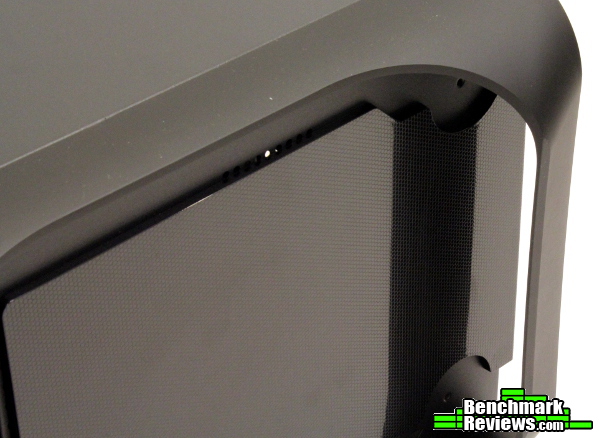
There’s a design engraved into the heat shield that is mostly cosmetic and helps offset some fingerprints, but as the shield stays underneath the Prodigy M (or is removed entirely) you may not even notice it. It’s nice to see even a small detail like this though, as they could have easily just used an unfinished slab of plastic and called it a day.

Drives are mounted using a rubber grommet and a screw, as pictured above. While not as tool-less as the ITX Prodigy, this is still a relatively quick and easy method of mounting hard drives – they just snap into place once the grommets are installed.

2.5″ drives are also pretty easily installed – and in the case of SSDs, they can be stashed anywhere there is room. In stock trim the Prodigy M has room for five 2.5″ drives: three on this bracket and two on the side panel. There’s a better picture of how drives mount on this bracket in the next section, so let’s begin placing some hardware in the Prodigy M.
Now for the fun part! The Prodigy M was refreshing departure from the typical ATX mid-tower layout, and I had a lot of fun figuring out what worked and what to avoid. As you’ll probably notice throughout this build, your component choice will have a huge impact on what types of configurations you can employ. So let’s get started…

I started with the motherboard, CPU, RAM, and cooler which I had assembled outside of the case and installed as one unit, although installing an aftermarket cooler would have been easy with that large CPU cutout in the motherboard tray. After removing the vertical drive bracket there is a surprising amount of room to work, and I didn’t feel cramped until I started connecting cables later on in the process (which is to be expected in a small enclosure).

With the Prodigy M I wanted to see if an overclocked FX-6300 and a Radeon 7970 would stay cool given the confines of the mATX setup. The motherboard I chose was not set up for Crossfire (I don’t believe a mATX board exists for the AM3+ socket that does), so one big GPU would have to do. The twin 120mm fan mounts up top seem perfect for a 240mm radiator; the Swiftech H220 fit nicely just barely clearing the 5.25 bay mount.

Right away I noticed a problem with my component choices. If that PCI-E x16 slot would have been positioned in the very “top” slot (which is of course the “lowest” position in this picture due to the inverted motherboard arrangement in the Prodigy M) there would be enough room for the 240mm radiator and fans. As it is, the dual-slot Sapphire Radeon 7970 wouldn’t clear the radiator.

Well, there’s an easy way to free up some more room, but for now I wanted to show that there is a lot of flexibility in this chassis – more than I expected! The “floor” of the Prodigy M is almost entirely mesh because of the multiple fan mounts here, but there are two mounting points for 3.5″ drives as well. You can even mix and match drives and 120mm fans if you feel so inclined.

Now back to the GPU clearance issue at hand. Understand that this really isn’t a limitation of the Prodigy M – the case is designed to hold two graphics cards, but the motherboard I’m using is not. An SLI/Crossfire capable motherboard would probably use the “top” slot for the first GPU, mitigating my clearance issues (and really, I would recommend such a motherboard for this enclosure – two graphics cards are the major advantage of the micro-ATX form factor). Still, for this build I’m going to have to figure something out…and for now I’m just going to put the fans on the outside of the Prodigy M. Not the cleanest option, but it’ll have to do (later, I just gave up and used a 120mm AIO cooler on the back panel – it seems this is one of the best configurations for the Prodigy M, as two graphics cards wouldn’t leave any room for fans up top anyway).

Removing the 5.25 bracket and placing the uniquely shaped Swiftech H220 reservoir upside down freed up enough room to clear the graphics card. There isn’t a LOT of room there, but most GPUs should fit (this specific 7970 is almost 30cm long). For the record, I’m not going to recommend this orientation for the H220 as that extruded portion of the radiator should be at the highest point in the cooling loop. That is where the fill port is located and where any remaining air trapped in the system should collect – with it facing down, you run the risk of any air bubbles moving throughout the cooling loop instead of collecting at the integrated reservoir. I could flip it the correct way, but then we’d be back to square one regarding GPU clearance – and with the reservoir on one side of the radiator and the hoses on the other, I wouldn’t be able to place it outside the case either (it didn’t quite clear the handles, even though the hoses could be maneuvered to fit externally).
Well, I guess I’ll have to stop being so stubborn and just continue on for now.

Next up: the PSU and some…additions. I had a 230mm BitFenix fan sitting around, so of course I needed to see what a fan almost the size of the chassis would look like installed in the Prodigy M. After installing the PSU, I realized the mesh in front of the power supply makes a great array of tie-down points. Even with a non-modular power supply it would be pretty easy to manage most of the extra cables; there’s enough room on either side of the power supply to stash cables. I initially was a little concerned about cables near the giant fan at the bottom that I added, but BitFenix engineered the case to leave nice channels alongside for routing – a comforting touch, as there are a lot of fan blades in close proximity here!

I ended up swapping the side panels, using the power button and USB 3.0 ports on the left side (behind the motherboard tray). This way, drives would be hard to reach but running the cables from this panel would be much easier (and wouldn’t need to be routed around that giant fan!) – even so, I’d recommend attaching all necessary cables to the motherboard first as squeezing my hand in between the GPU and radiator to attach the USB 3.0 cable to the header on the motherboard was impossible (your motherboard choice will determine if you run into the same issue).
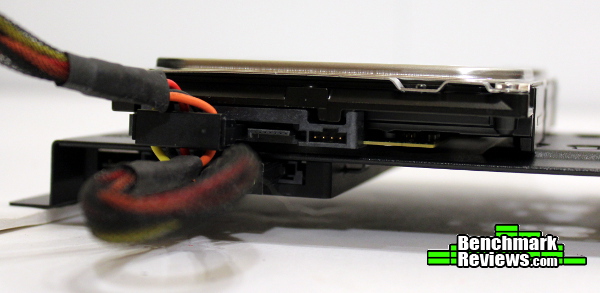
Remember the drive bracket? I’ve seen vertical mounts before, but the way BitFenix engineered this one is pretty slick. After attaching the rubber grommets to your 3.5″ drives, just slide them in the circular notches. 2.5″ drives are fastened by two screws and two hooks (except for the middle spot, which will just use four screws – if you plan to use this location, attach it before sliding on the bigger drives). They will sit opposite each other, making cabling surprisingly simple. In fact, you can even install the bracket and attach the cables later, as the data and power jacks are easily reached even when the drives are mounted. You did remember to attach SATA cables to your motherboard already, right? Again, depending on your motherboard, this might be simple or impossible to do at this point – so plan out your build or else you’ll find yourself removing a graphics card again (not that I know anyone to which this would happen – I am experienced).

With everything installed there are a few more observations to make. I had also replaced the rear fan with a 140mm Spectre Pro version from BitFenix – not a problem, but check out that clearance between the fan frame and the 3.5″ hard drive! Being this close won’t cause any performance issues, but it will limit your ability to install a 140mm AIO water cooler in this location (if you also want to install a hard drive there). That’s a trade-off that I feel is perfectly acceptable in a computer case this size.
Even with a modular PSU, cables can get a little messy – as I mentioned before most of them can be tied down to the front mesh, but there’s no avoiding a little clutter in a small case. Managing the cables is certainly doable though, and there’s enough room on either side of the power supply to tuck a lot of them out of the way.

With the vertical drive bracket installed a little channel is formed for cables beside the 230mm fan. Since the bracket is offset into the chassis a bit, it completely covers the cables and prevents them from slipping into the fan blades. With so many cables in such close proximity to fan blades, this is a really impressive design consideration. I was able to wire the system in such a way that I could pick up the Prodigy M and transport it around, then plug it in and power it up without fearing that cables had shifted and might get caught in something.
You’ll notice a trend throughout this review, and that is “pick your components carefully!” While switching to micro ATX provides a little more room, if the chassis stays the same size that means there’s less overall room to fit larger components. Even so, I managed to stubbornly stick with “all the wrong components” and still get them to fit without much of a fuss – that’s impressive, and really showcases the flexibility of the Prodigy M.
I ended up adjusting my build a little though. Perhaps a perfectly sized 240mm radiator would have worked better with the rest of my components, but I decided a dust filter would be more important so I switched the Swiftech H220 out for a 120mm cooler that stacked nicely on the rear fan port. This is the configuration I would recommend; the Prodigy M just seems better suited to tower coolers or 120mm AIO liquid coolers. Still, with a different motherboard…
Overall, I have to admit that building a system in the Prodigy M took me longer than I expected. I can’t really say it was difficult, rather this was the first case in a while that I really enjoyed the process! The small size and handles make it easy to flip around and work in, while the hinged side panels are surprisingly stiff and attach without a fuss. Every aspect of the Prodigy M feels like an engineering team labored over the smallest detail, and when everything is put together it’s a really neat looking enclosure.

I was impressed. You can tell BitFenix is a relatively new company – and I mean that as a compliment, as they’ve quickly iterated on one of the most successful mini-ITX chassis and released a micro ATX version that is just as impressive. Few companies are able to respond so quickly to changing trends. When I had asked them how much customer feedback was a factor in producing the Prodigy M, the response I received indicated it was THE factor – they had initially wanted to do a mATX Prodigy, but weren’t convinced that the trade-offs in component choice and airflow were worth it. Apparently customers were able to change their minds (and the multiple popular mATX mods to the mini-ITX Prodigy helped). I am personally glad they now offer a Prodigy in mATX format – I feel like it is the perfect size for that form factor, and you get access to SLI/Crossfire and a little more clearance around the CPU socket. While it still comes down to personal preference, in my opinion the Prodigy M is the better Prodigy.
Perhaps the airflow layout isn’t as traditional, but the Prodigy M doesn’t seem to suffer for it. With 120mm top fans mounted as intake, and BitFenix Spectre Pro 230mm/140mm fans as exhaust the Prodigy M kept an overclocked Radeon 7970 and FX-6300 (at 1GHz and 4.6GHz respectively) running well within thermal limits – I was even able to undervolt all of the case fans and let the 230mm fan do most of the work, keeping noise at very respectable levels for a small case. This is one of the best performing mATX enclosures I’ve used after modifying the stock configuration, and I’d attribute that to the close proximity of all of the fans. There simply isn’t room for “pockets” of warm air to collect, and every component gets directly blasted with cool air if desired. I may not even have the most efficient configuration yet – it would be interesting to try a positive pressure approach, and use the front mesh as a passive exhaust…in any case, there are numerous configurations to try and you should be able to find one that is appropriate for your build. The only negative I could really say here is the stock fans leave a little to be desired – BitFenix should really consider shipping the Prodigy M with a 200/230mm fan installed…
I personally like the way the Prodigy cases look. The Prodigy M streamlines it a bit more, as both panels are solid (instead of the perforated panel for the GPU in the ITX version). Even if you don’t like the mesh front you can easily swap it out with the existing Prodigy face plates – even the windowed side panels from the ITX Prodigy are compatible! You would need to remove the vertical drive bracket to see the other components, but it’s possible (and I’ve been told BitFenix is working on a different window for the “M” series of cases). The SofTouch coating (which is really well done and renders a premium feel to the entire chassis), overall proportions and nicely curved handles result in a unique look that is eye-catching. The Prodigy M is currently available in Black and White, with other colors possibly in the works (if you want to see a certain color, feel free to let them know at support@bitfenix.com or find them on Facebook). I appreciate the fact that BitFenix is serious about allowing users to customize the appearance of their Prodigy cases! This is one thing that BitFenix as a company seems to understand more than many companies – the people building their own rigs are doing it to reflect their own tastes and preferences, and that is hard to do with only one option.
The Prodigy M is constructed surprisingly well – I only say that because at first glance you don’t expect something so small to feel so…substantial. The side panels are solid, with zero flex. Every piece fits together nicely, and the whole thing feels very sturdy. The handles might be the only weak point here – the FyberFlex material’s flex is a little disconcerting the first time you pick up the Prodigy M, but I didn’t feel nervous carrying around a fully loaded case just by one handle. If I could change one thing, I’d prefer more of a rubber feel to the handles and less “plastic”, especially for the handles that the chassis rests on. The whole thing will rock a bit when plugging a USB device into front (side) ports, but only when sitting on a hard surface – and it wasn’t enough to bother me as I never once feared it would tip (you would have to shove it over pretty forcibly to do that).
As far as functionality, I think all the necessary pieces are here to give the Prodigy M top marks. All the difficulties I encountered while building were mainly due to my component choice, not the chassis – and when you can fit such a wide variety of coolers, motherboards, and graphics cards (multiple graphics cards) in such a small space, that’s impressive. Not only can you choose from a wide selection of components, but you can also play around quite a bit with the overall configuration – giving you a lot of control over airflow and performance.
The Prodigy M was released for sale online costing $99.99 (Newegg / Amazon); this is right in the thick of many options, but the Prodigy M’s size and feature set (and unique look) set it apart and earn every bit of its asking price. It seems to be a fair price point as they are already out of stock at Newegg and are currently selling at a slight premium on Amazon (when this review was published mid November). There are a lot of good cases out there at the $100 mark, but few of them offer performance, looks, customizability and quality in such a small and efficient enclosure.
It’s not so much the chassis itself, but what it represents. I think cases like the BitFenix Prodigy M are the most dialed in to what the PC builder / enthusiast community wants in a PC case. For responding so quickly to community feedback and offering such a unique and effective option, I think BitFenix deserves a Gold Tachometer award for the Prodigy M. The original Prodigy became a benchmark for the type of performance you could pack in a small enclosure, and the Prodigy M continues the tradition for micro-ATX.
+ Maximized use of space
+ Highly expandable / customizable to fit various levels of performance
+ Available accessories to further customize
+ Smart internal layout will accommodate a surprising amount of hardware
+ You asked, they delivered
+ SLI/Crossfire finally an option in a Prodigy
– Careful component selection required
– Stock fans may be inadequate depending on components
-
Performance: 9.25
-
Appearance: 9.75
-
Construction: 8.75
-
Functionality: 9.00
-
Value: 8.50
Excellence Achievement: Benchmark Reviews Golden Tachometer Award.
COMMENT QUESTION: What is your favorite mATX computer case?


One thought on “BitFenix Prodigy M mATX Case Review”
My favorite mATX case: Corsair 350D. In any mini-ITX or micro-ATX case, power cables are always going to be an issue. I’ve settled on Silverstone Strider modular power supplies, because Silverstone offers an inexpensive “short cable kit” (part number PP-05) that makes working in these cases a lot easier. They even have a modular SFX power supply that’s really nice for mITX builds.
Comments are closed.