By Julian Duque
Manufacturer: Corsair Components, Inc.
Product Name: Corsair Graphite Series 380T Mini-ITX PC Case
Model Number: CC-9011061-WW
UPC: 843591049863
Price As Tested: Black $139.99 (Newegg l Amazon) White/Yellow $149.99 (Newegg l Amazon)
Full Disclosure: The product sample used in this article has been provided by Corsair Components, Inc.
Computer form factors keep getting smaller and smaller, but the market for smaller systems keeps growing everyday mainly due to the availability of components that allow users to build extremely powerful systems in very constrained spaces. Corsair clearly understands this, with the release of the Corsair Obsidian 250D earlier in 2014 it became clear that there was a need for Mini-ITX designs to be implemented in the rest of their lines of products, leading to the release of the Graphite 380T, the case Benchmark Reviews will be taking a look at today.
In past reviews I have clearly noticed a trend with Corsair cases that establishes them as one of the leading case manufacturers of today. The Obsidian series for example is very renowned among enthusiasts for its elegance and functionality, the same functionality we see in the Graphite series. This time, It seems to me that Corsair is trying to achieve a more futuristic look with the new line of Graphite cases while still maintaining that industrial look that as you will read later on, also includes an exceptional layout for a Mini-ITX case.

Resembling something that came out of a Star Trek movie with Lamborghini detachable doors, the review sample that Corsair sent me is yellow. The 380T also comes in the monotone colors of white and black, the black version being slightly cheaper. The Graphite 380T is also wider than it’s obsidian predecessor, sounds like more clearance for the H100i which I found troublesome when installing in the Obsidian counterpart.
| Form Factor | Mini-ITX | |
| Dimensions (H x W x D) | 356 x 292 x 393 mm | |
| Drive Bays | 2x 2.5”/3.5” in removable drive cage2x 2.5” in internal tool-free drive cage | |
| Cooling Support | Front | 1 x 200 mm or 2 x 120 mm (1 AF-140 LED Fan included) |
| Rear | 1 x 120 mm (1 AF-120L Fan included) | |
| Side | 2 x 120 mm fans | |
| Radiator Support | Rear | 120 mm |
| Side | 240 mm (55 mm clearance) | |
| Expansion Slots | 2 | |
| I/O Ports | 2x USB 3.0Headphone and Microphone jacksThree-Mode Fan Control | |
| Clearances | Heatsink | 150mm |
| PSU | 160mm | |
| GPU | 290mm | |
Lets begin our review by looking at the exterior. The Corsair Graphite 380T sits on two plastic feet with a rubberized bottom to prevent any scratching of the surface it is sitting on. The feet are actually pretty sturdy and give it a very aggressive look like that of other Graphite cases.

The front greets us with a very open design that should allow plenty of airflow to get into the Corsair Graphite 380T. The steel mesh is small enough to prevent dust from settling in. At the front we also find a Corsair logo towards the bottom, and a white LED light fan towards the top. The light itself is not as harsh I had expected it to be, but it is bright enough to illuminate the corsair logo at night.

Probably my second favorite feature from the Corsair Graphite 380T are the side panels. If you are wondering what my favorite feature is, is the handle at the top which makes carrying around a built system a complete satisfying experience. The side panels can be easily removed by simply using the handles at the top. At first I was skeptical about this design, but you don’t have to open the side panels all the way down or to some weird angle to remove them. My only problem with these mechanism is that it makes it easy to open your system and steal your components, just something to keep an eye for.

The front I/O is easily accessible from the top of the case. It features two USB 3.0 ports, a reset button, a power button, headphone and microphone jacks. and a 3 speed fan controller. The power button has engraved the START / STOP words you will find in some of the power buttons of modern cars, maybe to further confuse people who have never seen a computer case like this before. The front I/O markings are all actually white LEDs that are illuminated when you turn on the system, they also help to indicate at what speed are the fans running.
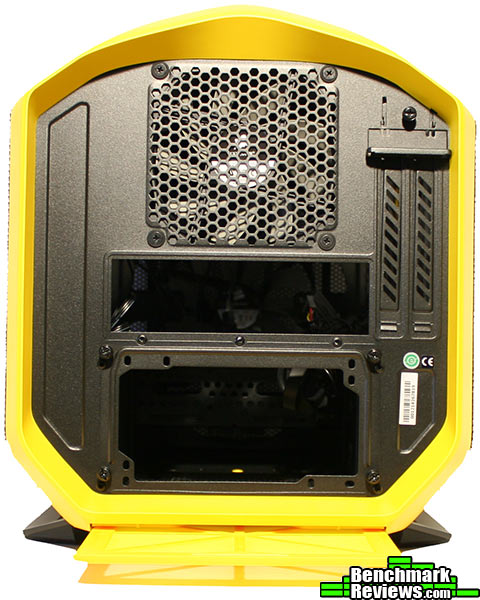
If you are wondering if this had any dust filters the only one I could find is in the back beneath the power supply. I would prefer that this dust filter was removed from the side but I understand that in the case of the Corsair Graphite 380T the feet would not allow for such option. The power supply is secured into place with the included bracket, which is held into place by 4 thumb screws.
Outside it is already a quite promising case that Corsair has brought today. The challenge for most ITX cases seems to be being efficient in utilizing all the space correctly as so to allow users get the most out of their system. I bet that once we open the Corsair Graphite 380T we won’t be disappointed.

Let’s begin with the accessories. Included are enough screws to fill the system completely, and yes those are all the screws you will need. You also get some zip ties and an instruction manual. Included with the Corsair Graphite 380T you also get two fans, a rear AF-120 and a front LED AF-140 which varies color depending on which color version of the Graphite 380T you chose.
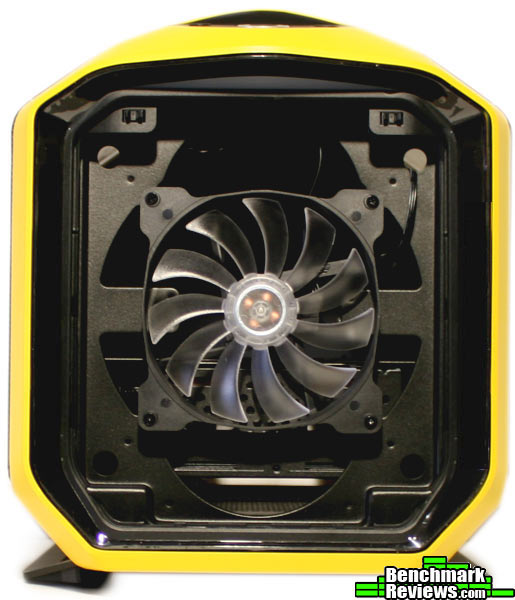
To take off the front cover just simply press on the top portion and it will unlatch itself. Behind the front cover we find compatibility for 2 x 120 mm fans, 1 x 140 mm fan, and 1 x 200mm fan. However you do not get any water cooling support here as there isn’t any clearance in the back. The front cover acts as a dust filter, and it can be easily clean by soaking it in water, make sure you let it dry first!

Both side panels have a metal mesh that is supported from the back with a plastic body. Ironically the panel has a lot less flex than many steel side panels. The top of the side panels also features a tinted cast window. The side panels also act as dust filters, and cleaning them is a matter of soaking them in water.

Towards this side of the case we find two supporting brackets that help keep the Corsair Graphite 380T solid as well as allowing two 120 mm fans or one 240 mm radiator to be mounted. You might also notice a large hole towards the side of the power supply cover, this is to route cables to the sides of the case. Because the Graphite 380T only allows for 160mm power supplies to be mounted with the hard drive cages in place, I suggest you choose your power supply carefully. Some modular power supplies will actually be longer than specified due to the plugs being elongated.

Generally, we are seeing more manufacturers go for this layout of Mini-ITX cases with the motherboard sitting flat, parallel to the ground, on top of the power supply and leaving the front for drive storage. The Graphite 380T also allows for two 3.25″ drives to be installed right next to the power supply compartment. You also get support for graphics card of up to 290 mm in length, and air coolers with up to 150 mm in height.
If you have ever build inside a Corsair case you are probably aware that they design all of their cases to have ample room. I have clearly come to appreciate this, and with cases getting smaller this is clearly going to be tested today. Before you build a system it is best to check compatibility with all the components you plan on using, however with the Graphite 380T I wasn’t as worried.

Here is a close up of the mentioned 2.5″ drive mounting options found on the Corsair Graphite 380T. I did mount a hard drive in there but I did notice some wiggle room, which was easily fixed by fixing a screw on top of the cage. To be secure I would rather mount this drive towards the front in a drive sled. You probably won’t have these type of problems with SSDs as they don’t have any spinning parts.

One issue many people seemed to have with the Corsair Obsidian 250D was the lack of clearance between the side fan mounts and the motherboard. Corsair seems to have fixed this by making the Graphite 380T a bit wider, allowing for 55 mm of space this time, which should allow their H100i to be mounted easily. This wide space also means better cable management, and as you can see below it allowed us to tuck all of our cables.

This is a picture of our almost finished build. I did forget to plug in a SATA cable, which I noticed later when I booted the system up. Towards the roof of the case, Corsair has included a white LED that illuminates the top of the motherboard, this light can be easily switched on or off with a switch found inside, on top of the graphics card area. Cable management was pretty easy, Corsair was very considerate to place tie down points almost everywhere and this is clearly appreciated on such a small case.

Our finished build looked quite simply astonishing. It was far from elegant, but it made a bold point. Without any sharp angles it was subtle but yet it screamed performance. The Corsair Graphite 380T is overall a very well regarded case, building inside of it was as expected from a Corsair case. The front cables were all long and black, there was cable tie down points almost everywhere, even after taking apart the system I found more tie down points that I didn’t even know were there before. The case is also tall and it allows you to see what you are working on, even with the graphics card installed.
Because the Corsair Graphite 380T offers a design that is optimized for airflow we decided to see how it performed under our synthetic test conditions, as well as comparing to the Corsair Obsidian 250D which features a more restricted design. All tests were conducted at a room temperature of 25 °C using the stocks fans that came included with both cases. Fans were running at 100% speed the whole time, including the CPU and GPU fans. We chose to use an air cooler as it will more accurately represent the airflow within the case. Each test was conducted three times, and the average of the three results is our end result.
-
Motherboard: Gigabyte GA-Z87N-WIFI
-
System Memory: 8 GB G. Skill Ares
-
Processor: Intel Core i5 4690k (@4.1 Ghz / 1.15 Volts)
-
Disk Drive: Seagate 1TB SSHD
-
PSU: Rosewill Hive-650W
- Graphicss Card: Sapphire HD 7950 OC
- Air Cooler: Noctua NH-U9B SE2 (only one fan installed)
- CPU Stress Test: Prime95 v285 (Small FFTs)
- GPU Stress Test: FurMark v1.9.2
- AMD Driver: AMD Catalyst 14.4
- HWMonitor v1.25

Furmark is a test program that runs an intensive OpenGL fur rendering algorithm to measure the performance and the temperature of modern graphics cards. The Sapphire HD 7950 features an open design which is great for our testing purposes as it introduces more heat into it’s surrounding areas as compared to a blower design. The HD 7950 was kept at stock settings, with the exception of having the fans running at 100% during the entirety of our tests. Surprisingly the Obsidian 250D beats the 380T by one unit at idle, however when stressed there does seem to be a small improvement in choosing the 380T.

For our CPU load test we used Prime 95, which is a free application that calculates Mersenne prime numbers by loading a demanding algorithm. We decided to to use the small FFTs option which is more focused on loading the CPU caches and floating point units, instead of loading the system memory. Our core i5 4690k is overclocked to 4.1 Ghz at 1.15 volts, which gave adequate temperatures for our low profile Noctua NH-U9B to handle adequately. Again very good temperatures for both systems. however the Graphite 380T has a two degree advantage over the 250D under stress.
With the release of the Graphite 380T I see Corsair successfully accomplish a case that will target LAN parties and in general people that want the ability to carry around a powerful system. Like most products, there are some minute details that I would love to be corrected, such as allowing users to remove the front portion of the motherboard tray to allow for front radiator compatibility. We would also love to see a locking mechanism for the side panels as opening them and stealing your hardware might be a little bit too easy. I don’t certainly miss the 5.25′ bay, but there will always be people that do.

The Graphite series from Corsair continues on with its performance legacy by introducing the 380T, a mini-ITX case that can certainly handle a great amount of hardware while still maintaining portability as an option. With support for one 240 mm radiator and one 120 mm, the 380T is “okay” in terms of water cooling support. I would have liked to see support for another 240mm on the front of the case, which you could easily add by modding the inside of the case by cutting the extension from the motherboard tray and therefore opening space for a radiator.
The Corsair Graphite 380T also takes a very bold step by implementing a very futuristic industrial design with very subtle angles that give outsiders a clue of what the 380T can hold inside. For people that are completely unaware of the DIY scene this design might be a bit confusing until you open the side panels, as the 380T resembles anything but a computer.
After watching many Corsair cases I was pretty confident that no matter how much plastic they use they were still going to make a very solid product. The plastic they used with the Graphite 380T is unlike most plastic used by other companies, it is actually solid and thick and does give a better structural integrity to the case. To support all this plastic Corsair made the chassis of the case with steel, which we found had some flex around the motherboard tray when the power supply was removed.
Like the Corsair Obsidian 250D, the Graphite 380T is actually very accurate in functionality, and actually improves in the great efficiency of the space of the 250D. It is a bit wider but this is just to simply make up for better cable management as well as to mount two 2.5″ drives on the side. The handle also adds another function to this case, making it more portable which is something I had not seen performed as well until now.
With a case that resembles a hornet, the major sting is the price. You can get the yellow and white versions of the Graphite 380T for $149.99 ( Newegg l Amazon ), or you can get the somewhat cheaper black version for $139.99 ( Newegg l Amazon ).
If you want to build a super portable, high end system that resembles nothing you have ever seen before look no further than the Corsair Graphite 380T.
Pros:
+ Premium construction
+ Eye catching
+ Support for long graphics cards
+ Handle for easy transportation
+ Many cable management options
– Premium price
– No front radiator support
-
Performance: 9.00
-
Appearance: 9.50
-
Construction: 9.50
-
Functionality: 9.75
-
Value: 7.25
COMMENT QUESTION: What does the Corsair Graphite 380T reassemble?


4 thoughts on “Corsair Graphite 380T Mini ITX Case Review”
Until Microsoft starts making Windows installers available on USB sticks, I’ll continue to criticize cases that have no provision at all for even a slimline optical drive.
I know, I know: I’m swimming against the tides of history!
Windows 7 USB DVD Download Tool
Any comment on noise? I’m assuming this case would get pretty noisy, being mostly mesh – what does it sound like sitting on a desk 1 meter away?
(Just wanted to add, for David 🙂 Microsoft includes a USB installer utility with their Win 8/.1 downloader/installer, and the Win 7 version has a utility available from Microsoft which will do the same thing – the Windows 7 USB/DVD tool works pretty well. I agree though, it would be nice if one could order a pre-configured Windows installer on USB, it’s the only way I’ve done OS installs for the past few years!)
The included 120 mm fan is a bit loud, even at the low setting within the fan controller. The 140 mm fan didn’t get that loud until I set it at 100%. A meter away with the complete system and the noctua CPU cooler, I could clearly hear the 80 mm fan even at idle. I decided to install a h60 AIO from corsair and I couldn’t hear the pump at all. I did notice a noise decrease if I set the case on the ground instead of on the table, probably because all the mesh is on the sides.
Comments are closed.