By Julian Duque
Manufacturer: NZXT Inc.
Product Name: NZXT S340 ATX Mid Tower Case
Model Number: CA-S340W-W1
UPC: 815671012111
Price As Tested: $69.99 (Amazon l Newegg)
Full Disclosure: The product sample used in this article has been provided by NZXT Inc.
With the release of the H440 earlier this year, NZXT made it clear what their new approach into the already crammed case market will be in it’s upcoming models. Following this trend, Benchmark Reviews will be testing the NZXT S340, a more “stripped” down version of the already great H440, which still features a similar simple design with a minimalistic design, putting functionality and efficiency above all things.
To my surprise, the NZXT S340 is being targeted as a budget option at just $69.99, which is almost half the price of the H440. What is even more surprising is NZXT’s move towards removing any plastic from their models, leading to better quality and construction in all of their upcoming models. This is a very bold step to take, but it is certainly something NZXT should be proud of, and might lead to other companies moving towards following this approach.

A quick glance at the Features and Specifications found on NZXT’s website and you might notice that the S340 follows the standard mid tower layout, but no external 5.25″ bay. Another bold step from NZXT. Of course you could always get an external CD drive, but this should be something to take into consideration. Another thing that stands out from the S340 is it’s weight, which is probably due to lack of plastic as compared to other cases.
| Drive Bays | External 5.25″: 0 Internal 3.5″: 2+1 Internal 2.5″: 2 |
| Cooling System | Front: 2x 140/2x120mm Top: 1x 140/120mm (1 x 120mm FN V2 Fans Included) Rear: 1x 120mm (1 x 120mm FN V2 Fan Included) |
| Filters | Front (Included) Bottom Rear(Included) |
| Radiator Support | Front 2 x 140 or 2 x 120mm Rear 1 x 120mm |
| Clearance | GPU Clearance With Radiator: 334mm GPU Clearance Without Radiator: 364mm CPU Cooler: 161mm Cable Management: Lowest Point – 17mm; Highest Point 168mm |
| Dimensions | 200mm x 445mm x 432mm |
| Material | SECC Steel, ABS Plastic |
| Motherboard Support | Mini-ITX, MicroATX, ATX |
| Expansion Slots | 7 |
| External Electronics | 1 x Audio/Mic 2x USB 3.0 |
| Product Weight | 7.05 kg |
| USB 3.0 Ports | 2 |
| Warranty | 2 Years |
At the time of this review, NZXT is offering two color versions of the S340, white and black, both of which are glossy. What is surprising is that this glossy finish is not a fingerprint magnet, is easy to clean, and is a lot more durable than other offerings, specially at this price point. Of course I insisted NZXT to send the white version, and it will be the model I will be reviewing today.

Included with the NZXT S340 we have enough screws to fill the case completely, zip ties, and a very good manual that goes into full detail of the case, not as lengthy like that of Silverstone’s cases but still deserving a mention. The manual even includes a section on how to install windows using a flash drive, which is important as the S340 lacks a 5.25″ drive bay. They also failed to include rubber washers for hard drive installation, that as you will read later would have been an excellent addition to the S340.

Unlike the rest of the case, the top is covered in a matte black finish. Running your fingers across it almost feels like the type of finish left by a soft coat of primer, unfortunately it is not easy to clean and it can be easily scratched, so don’t expect to place heavy items on top of the NZXT S340. Here you also find the front I/O which has two USB 3.0 ports, a power on button, and 3.5 mm audio jacks, but no reset switch.

The bottom includes four rubber feet that make the S340 stand tall, which is important as some of the front intake fans will draw air from the bottom. Because the exterior of the NZXT S340 has no plastic, NZXT used the same finish all across the S340 that leads to no color difference between all of the panels making a very pleasant and consistent white finish all across.
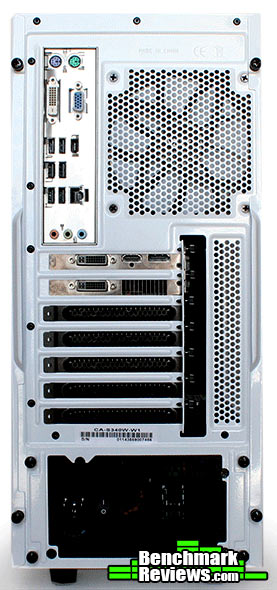
At the back we find nothing too exceptional, just the usual 7 expansion slots, an a variety of thumb screws found on the side panels and on the power supply bracket. Like in other NZXT cases, these thumb screws can not be completely removed and stay in their place which makes them almost impossible to loose. It is this attention to small details that sets apart companies like NZXT from the competition.
The outside the case was pretty compelling, but I believe we should take a closer look at some things. In this section I will discuss some of the detailed features as well as taking a first look inside the NZXT S340. I will first like to point out some the biggest sacrifices NZXT made to lower the price of the NZXT S340.

Probably the most notorious price cut made in the NZXT S340 is found here, at the bottom of the case. Although it’s functionality is debatable, this dust filter is probably not the most impressive I have ever encountered. It should be noted that it is very easy to clean, and removing it is a lot more easier than putting it back into place specially when the case is sitting flat on a table. On a more positive note, you can easily remove it from the back without having to move the case to have enough clearance.

Taking off the front cover we find two 120 mm or two 140 mm fan slots that can also accommodate a 240 mm or 280 mm radiator of up to 30 mm of width, the holes are elongated for better radiator support. This of course can lower graphics card compatibility depending on the thickness of the radiator you install. The fans installed at the front are covered by a dust filter than can only be removed when the front panel is off. There also seems to be enough space to accommodate a third fan slot at the bottom, but of course the hard drive cages would have to be pushed back lowering the power supply compatibility.

Inside we find a layout that resembles a mixture between the motherboard tray from the NZXT Source 210, and the power supply cover found in the H440 , of course this one does not have the fancy LED logo. You might also notice the lack of rubber grummets, but of course NZXT made another smart move here. The white plate serves as a cover to all of the cables coming from the back, you also get some hidden holes on top of the power supply cover and on the top of the motherboard tray.

Behind we find the drive cages. Unfortunately you can only add two 3.5″ drives here and a 2.5″ below the cage. There is also no rubber grommets and this may cause your drives to rattle. Another negative thing is that the cage is non removable, and drives can only be installed when the power supply is not installed. I would have preferred they placed this cage on the top, and that it was modular as not everyone will use 3.5″ drives.
Overall the NZXT S340 seems like a pretty solid case, of course don’t expect to fill this case with hard drives and an exotic water cooling system, as the NZXT S340 lacks both hard drive and fan mounts. I do find the white color scheme to be of my own taste, this made building a system within the S340 an eye candy joy. It was also a positive experience because there is a lot of ample space, even for people with big hands.
Maybe I do not value most fans that come pre-installed in cases, specially value cases, but then again not everyone is going to replace their fans. I think NZXT has done the right thing here, they have included two 120 mm fans that come pre-installed as exhaust, of course taking hot air out is more important than taking cold air in, but over time you will collect more dust. The fans are also not the quietest, but the fact that NZXT included two of them makes up for this.
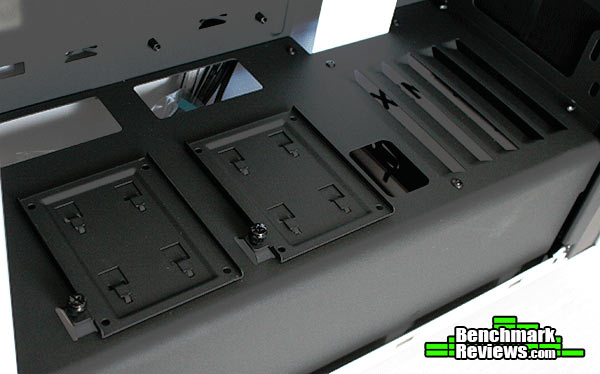
On the top of the power supply cover we find two 2.5″ drive trays. Of course they do not have any rubber dampening, but NZXT is expecting you to load these up with an SSD. At the back you also find two very appropriately placed holes to route cables directly to both trays. Once installed, removing the drives is a matter of removing the thumb screw and sliding the drives.

Like the rest of the case, the quality of the motherboard tray and the side panels is evident specially when you make a mess with your cables. Of course you probably won’t as the S340 offers a lot of cable routing options. Most evidently it offers plenty of cable tie down points, and a pretty big gap between the edge of the motherboard tray and the front of the case to route cables. Of course this is covered in the front by a white plate that can be removed if needed. Because the drive cages are directly in front of the power supply you probably do not want to use a modular power supply as access to it is limited.

With 360 mm of GPU clearance you can really show off the longest of graphics cards available. Of course take into account that if you use the front as a radiator mount, clearance will be lowered. Also, some motherboards will not fit if you decide to use the top fan mount as a radiator mount, or even with just the fan installed, specially in motherboards with very tall heat shrinks on the top. Cable management was easy, and building in the S340 was as expected.
The NZXT S340 is a great value, not only for people searching for a good looking case, but because it does what is expected from cases at a higher price. It is also packed with innovation, including the power supply cover, the lack of rubber grommets that is covered by a stylish white plate, and even the exterior glossy finish. Clearly NZXT is trying to stay competitive, and with the release of the S340 I believe they are headed the right direction.
Of course there are some minute things to be corrected. For example the bottom power supply dust filter is hard to put back into place unless you put the case on it’s side. NZXT should also allow for modular drive cages to be installed or purchased like an extra accessory for the S340, as it only has two 3.5″ drive mounts. I would also like to see a similar design on smaller form factor cases.

The NZXT S340 can hold most gaming configurations, of course with only one place to mount a 240 / 280 mm radiator. If NZXT had also placed another 120 mm mount at the top we could have seen an even more enthusiast friendly layout. If you are into modding it shouldn’t be too had as there is enough space for a 120 mm fan at the top. Power supply clearance could have also been improved if the drive cage was removable, but it is not and this cage really limits accessibility to the power supply.
Like the NZXT H440, the S340 has a very elegant design that can clearly get a lot of attention. Because there is no plastic front panel, the paint finish is consistent and does not change tone throughout the case. Another stylish addition is the steel plate that covers the cable management holes, and the two 2.5″ drive trays placed on top of the power supply to show off your SSDs. I do think the front panel is a bit too plain and the addition of the NZXT logo in black and not engraved would have greatly improved this.
Due to the lack of plastic, the NZXT S340 is extremely solid in most aspects. The motherboard tray and the side panels have little to no flex, this can cause trouble if you do not tidy up cable management. The power supply cover also acts to provide more support for the case and trying to flex the case will not reveal any flex. The only lack of quality can be seen in the bottom dust filter which functions correctly but is really flimsy.
When looking at cases at this price point I usually have to be constantly reminding myself of it’s price and that it will only function as so. This didn’t happen with the NZXT S340. The case will function more than adequately for most people looking to build a gaming rig, or pretty much anything that does not require a lot of hard drives. This case will also function as a fun case to mod, as there is a lot of space to add features.
The NZXT S340 is priced at $69.99 (Amazon l Newegg), making it very appropriate for gamers on a budget. Of course with the sacrfices NZXT made, you are still getting a case with great build quality and very clean looks. Small things like including two 120 mm fans, and including a power supply cover really add a lot more value to this case.
+ Great build quality.
+ Great value.
+ Power supply cover.
+ Very stylish.
– Flimsy power supply dust cover.
– Only one fan mount on top.
– Only two 3.5″ drive mounts, and no 5.25″ mount.
-
Performance: 8.0
-
Appearance: 9.0
-
Construction: 9.25
-
Functionality: 8.5
-
Value: 9.0


4 thoughts on “NZXT S340 Mid-Tower Case Review”
Interesting design, flawed but interesting.
Personally I think removing the feet and placing them on the rear would improve the design functionality.
By using the rear as the base and the base as the rear, the top then becomes the front with better access to the in/ out ports and a solid top is presented to the user.
The fans would then have to be turned around to switch airflow direction, allowing a 240 Radiator at the top to expel hot air, while cool air is drawn in at the base and lower rear.
Of course this is only practical if you don’t need constant access to the “rear” cables and ports as they will now be under the unit.
I liked your review of the case but just wish to point out a few things as I own this case myself I know that it has both hdd mounts and fan mounts also it is possible to install a custom waterloop yes you are restricted with what thickness radiator you install and your also unable to have a push pull config but it is possible to install a 240 or 280 radiator with a reservoir pump combo with a little work and a dremil
Can I please have the top view without the benchmarkreviews.com text for a 3D project?
Unfortunately not, as we only have the published images available at our website. Not many of the RAW images from past articles have been kept.
Comments are closed.