By Jason Vaught
Manufacturer: AORUS Pte. Ltd.
Product Name: Thunder M7
Model Number: GM-THUNDER M7
UPC: 818313020819 EAN: 4719331548339
Price As Tested: $89.99 (Amazon | Newegg | B&H)
Full Disclosure: The product sample used in this article has been provided by AORUS.
Have you ever heard of a gaming mouse? But of course you have! You’re not here at techplayboy.com by accident, you came here because you’re either already or an up and coming enthusiast! You may not have, however, ever heard of AORUS. That is understandable, but I’m sure you’ve heard of it’s parent company, Gigabyte. That’s right, AORUS is Gigabyte’s gaming brand. The company currently makes a gaming keyboard, gaming mouse, some gaming laptops, and accessories such as the Thunder P3 extended mouse pad (see page 5 Thunder P3 Mouse Pad Review for a short review).
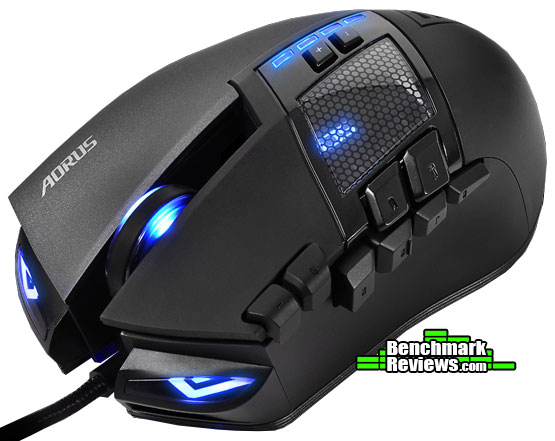
The AORUS Thunder M7 MMO Gaming Mouse is a 16 button fully-programmable gaming mouse. Featuring an advanced 8200dpi laser and the utlra-durable Omron switches. Combine these features with AORUS’s robust “Macro Engine”, and you’ve got yourself one sweet little mouse. We at Benchmark Reivews have been given the opportunity to review a few of their products, in this review we’re going to be talking about the AORUS Thunder M7 MMO Gaming Mouse. Let’s dive in!
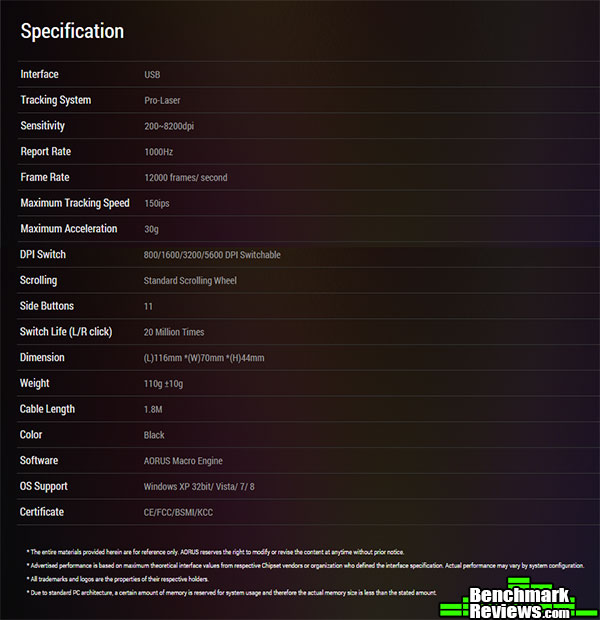
Specifications direct from AORUS’s website:
Some gaming mice come with just the basics, a mouse, a small manual, and maybe some outdated software on a disk. This, however, is not AORUS’s modus operandi. They’ve included a very nice, zippered travel case, a spare set of mouse feet, a small manual, and no software! That’s right, you have to download the most current version of the software direct from AORUS’s website. This makes sure that you’re running the very latest they have to offer, something a seasoned gamer is always willing to do.
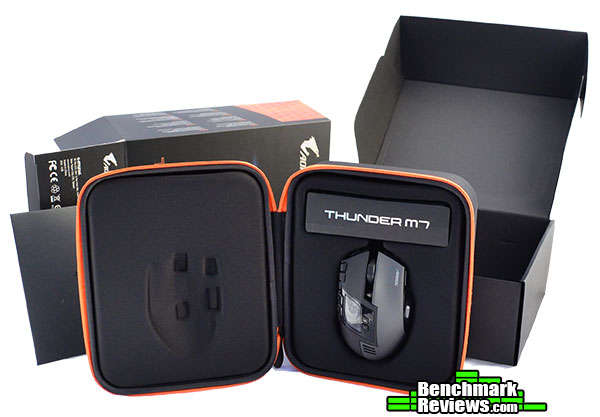 Above is a quick view of everything that comes in the box. What? You don’t see the extra mouse feet? Well that’s because they’re inside the envelope with the user guide! The rest of the packaging is very rigid and able to withstand the challenges with shipping.
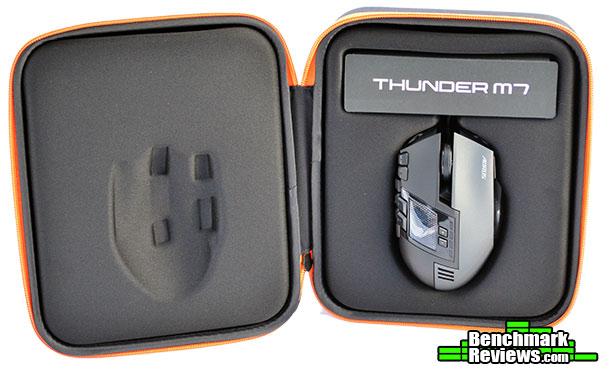
The zippered storage/travel/display case that is included with the AORUS Thunder M7 is spacious and well padded. The cord for the mouse is tucked underneath a self logo-ed banner at the top of the case. Make sure not to throw out the zippered case, even if you never plan to use it, as AORUS does not currently sell them separately, so finding a replacement would be a challenge.
 The AORUS Thunder M7 MMO Gaming Mouse features clean lines, ventilation and some fancy lighting effects that make it a real eye catcher as well as a perfect tool for your gaming domination. Throw in an arsenal of buttons at your fingertips, and you could be a force to reckon with on the battlefield.
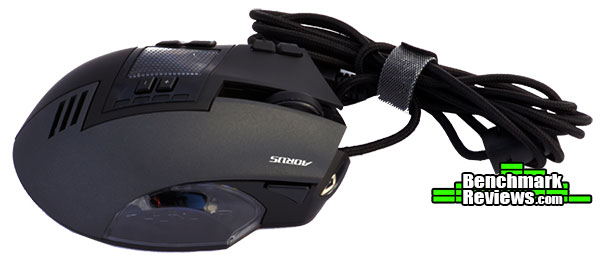 Now keep in mind, this is a corded mouse, so you do have the slight hassle of having to route your cord within the clutter of cords behind your desk. However, the cord is a very nice brad with a gold plated USB connector that also includes a hook and loop cord keeper.
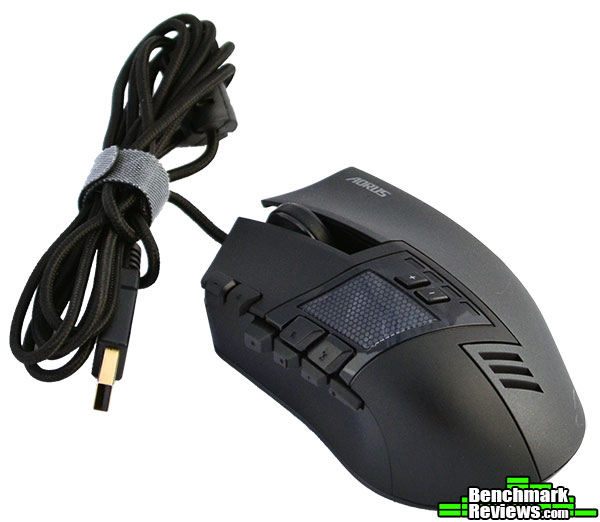
On the back of the mouse is the user selectable DPI switches. The position of these switches would make you think that you’d hit them with your palm, but this has proven not to be the case, as this mouse has a very short palm area, making it perfect for the “Claw” grip style of gaming mice. Now let’s take a look at some of the detailed features this mouse has to offer.
Now let’s take a look at some of the unique features of this mouse.
 On top of the AORUS Thunder M7 Gaming mouse is a little window that lets you see the illuminated AORUS logo. Other than looking cool, this window provides a visual aid to what profile you’ve selected, as the AORUS logo also changes colors with the mouse wheel.
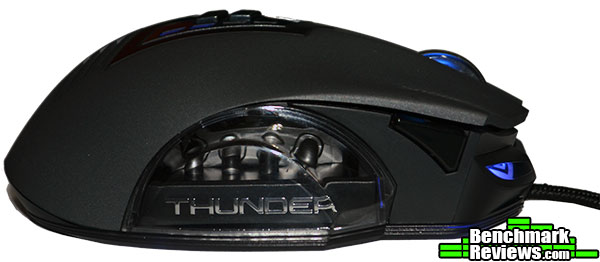 The right side view of the mouse reveals the mouse’s series “Thunder” as well as some pipes through a clear plastic window that makes up the ring finger rest. The pipes that you see in the above picture, are just eye candy contributing to the car-esc attributes of this mouse. Directly in front of the window is another button that is set as profile selection by default. The position of this button is a little inconvenient as I kept bumping it accidentally during the review and testing.
 This mouse has headlights! That’s right, headlights on your mouse. They serve no purpose other than looking cool. The headlights are brightness adjustable but do not, unfortunately, change colors with profile selection, nor can they be turned off completely.
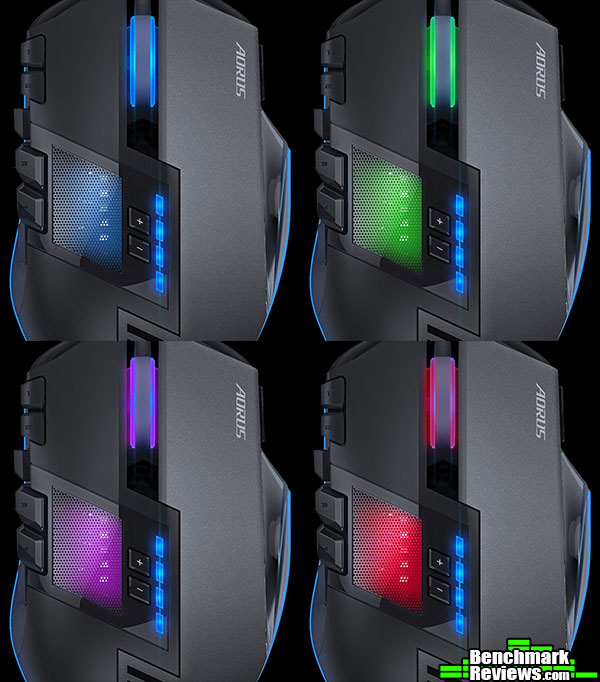 When selecting/cycling through the different profiles, the meshed window and the mouse wheel change colors. The headlights and the DPI level indicators stay blue.
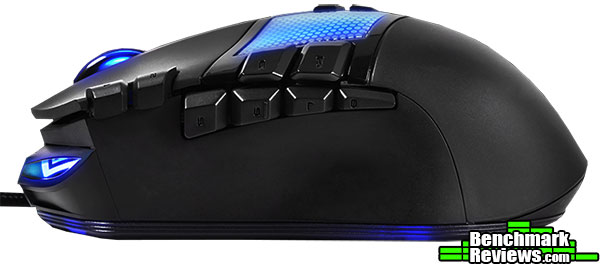 This mouse features 16 programmable buttons, 8 of which are on the left side of the mouse. Of course, as marketing can sometimes do, this statement is a little misleading. Two of the “programmable buttons” are not buttons at all, it’s the scroll direction of the mouse wheel. You can program each direction to do something different, but they are not “buttons”.
The AORUS Thunder M7 software is fairly straightforward and easy to configure. For this review, I didn’t even need to install new software as I already have it installed from a previous review I did of the AORUS Thunder K7 Gaming Keyboard. The software staying the same across both devices is a real bonus in my book. If you use both the Thunder K7 and M7, then this convenience of the software alone will make your life easier.

Above are the 6 categories for the mouse’s settings, including additional empty slots that would be filled with the Thunder K7’s settings if you had it attached.
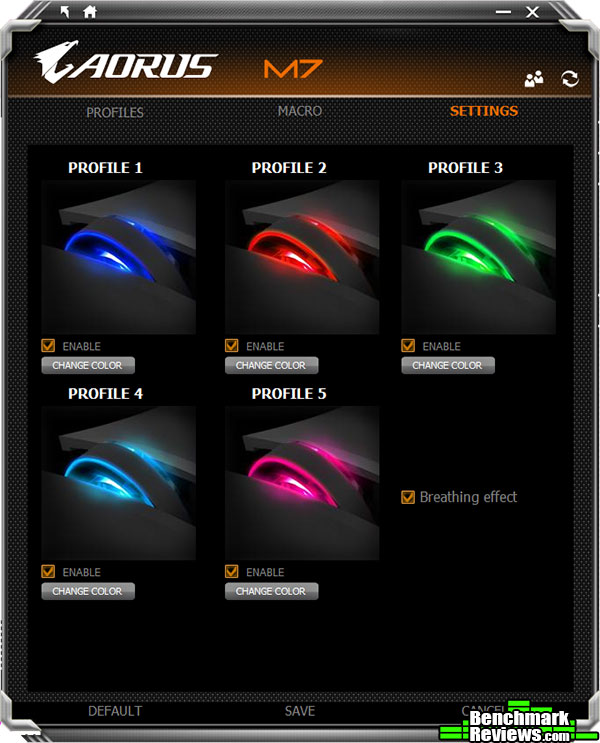
Under the manage profiles menu, you can make changes to the color of each profile, deactivate unneeded profiles and turn the breathing effect of the scroll wheel and AORUS logo on or off. You can also turn off the scroll wheel and AORUS logo all together by selecting the black profile color.

Instead of having some type of hypergliding scroll wheel, the AORUS Thunder M7 features scroll acceleration that you can set to allow scrolling through long pages easy by the number of lines it scrolls at one time.

The report rate menu allows the user to select what rate the mouse reports at up to 1000Hz.

The “head light” settings, does exactly that, adjust the headlight brightness. Although you cannot turn them off completely, when set to the lowest setting, they have just a slight glow.
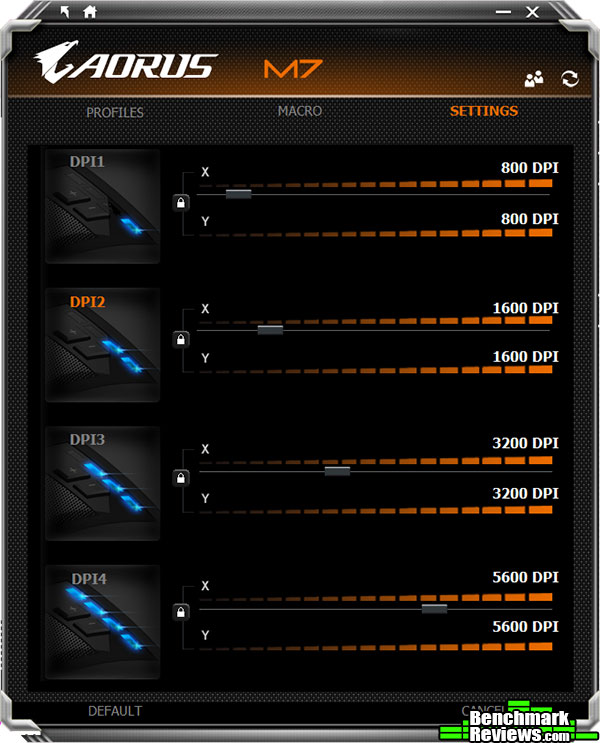
The sensitivity menu allows you to not only customize one of the 4 individual DPI profiles, but you can set the X & Y axis of each profile to operate independently of one another. Giving you a greater control of your mouse to suit your playing style.

As with most modern gaming mice, the AORUS Thunder M7 features on board memory. Within the memory settings you can Clean Memory, perform a Backup of your settings, or Restore them.

Under the profiles tab of the Macro Engine, you can adjust individual keys easily with just a click. Pictured above are two of the default profiles, note that the one of the left features your browser forward and back buttons. I don’t know about you, but I need those buttons on the regular.
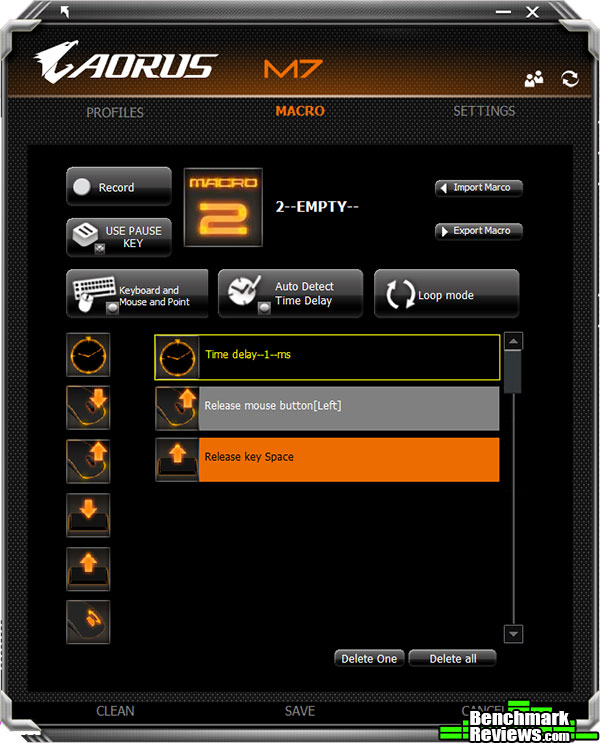
And last but not least, the Macro menu. The macro menu offers a slew of customization options as well as adding in keyboard, mouse, and point locations to your macro. With some patience, you can fine tune this beefy software to give yourself the clear edge over the competition. Or you can make life much easier in photoshop!
Manufacturer: AORUS Pte. Ltd.
Product Name: Thunder P3 Extended
Model Number: GP-THUNDER P3X
UPC: 818313019691 EAN: 4719331548254
Price As Tested: $39.99 (Amazon | Newegg)
The good folks at AORUS decided to throw in a Thunder P3 extended mouse pad to use during our testing. This mouse pad, in a word, is huge! Don’t get me wrong, I like a large mouse pad as well as anyone, but this thing is the hulk of mousepads, taking up 1000mm x 400mm of desktop space! This is one of the biggest mouse pads I’ve ever had the pleasure of using.
 The mouse pad also comes in other sizes, all of which are smaller of course.
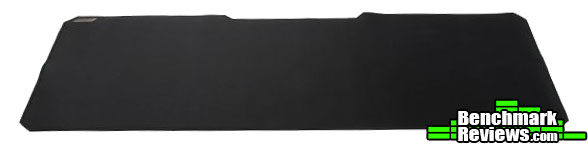 The Thunder P3 Mouse Pad features a super slick gliding surface with a 3mm rubber base. The material is also spill resistant and has anti-fraying stitched edges.
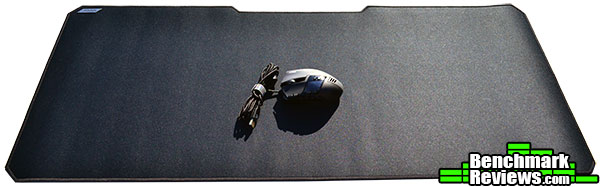
As you can see here, this pad is humongous. Pictured above is the AORUS Thunder M7 MMO Gaming mouse sitting atop this behemoth.

The design idea behind this pad is so that you can sit your Thunder K7 keyboard and your Thunder M7 MMO mouse on top of this stable surface and still have enough room for just about everything else.
The width of this mouse pad would become particularity useful if you use the Thunder K7 keyboard in 80% stand alone and 20% macro gaming mode.
The AORUS Thunder M7 MMO Gaming Mouse was tested on both USB 3.0 and USB 2.0 ports for a overall period of 40 hours. The programs and games that were used during testing, regular Windows and browser use aside, include: Adobe Photoshop CS6, World of Tanks, Diablo III: Reaper of Souls, Battlefield 4.
-
Motherboard: ASUS Sabertooth Z87
-
System Memory: Corsair XMS3 4GB x 4
-
Processor: Intel i7-4770K Haswell @ 3.5 Ghz
-
Audio: On-board
-
Video: XFX Double Dissipation R9-290X (4GB)
-
PSU: Corsair HX Series 1000HX
-
Monitor: Dell UltraSharp U2412M IPS 24″ x 3 @ 5760×1200
-
Operating System: Windows 7 Ultimate (64-bit)

The Thunder M7 has an available function, through the software only, to change its polling rate between 125 and 1000Hz. The max, 1000Hz, was used for all of my tests. According to our (Benchmark Reviews) polling tools, Direct Input Mouse Rate & Mouse Rate Checker, the Lumenata Pro performed exactly as advertised on both USB 2.0 & 3.0.
Here at techplayboy.com, we test from the budget end of the spectrum to the ultra high end and everything in between. The AORUS Thunder M7 MMO Gaming Mouse falls right in to the middle. This mouse comes loaded with a some premium options but stays at an affordable price point. Some people are a little hesitant about buying into a brand they’ve seldom or never heard of before, but keep in mind, it’s Gigabyte you’re buying into. A brand you probably already have in your home right now. The M7 performed above my expectations and I was quite surprised with the number of customizations the software offered as well as how the grip felt. Now I’m not a claw style gamer, but this mouse can accommodate any style even though it leans more towards the claw style. I found it comfortable for most gaming sessions once I adjusted to the difference in the grip of this mouse vs my current mouse, the G700.
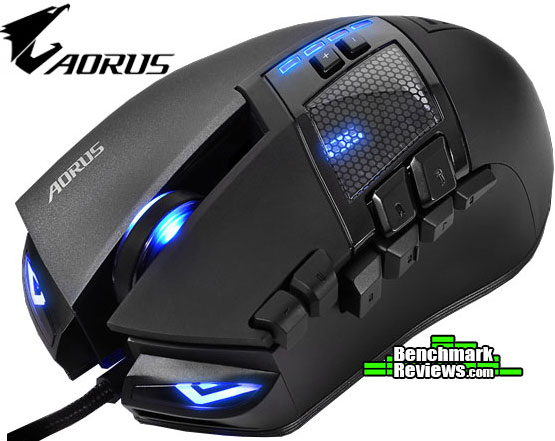
The AORUS Thunder M7 MMO Gaming Mouse’s performance is exactly what you would expect from an upper tier mouse. The Omron switches have a nice, clicky feel and the grip is comfortable. The mouse is very light, it could use some heft to make it more effective and prevent lift.
Appearance wise, this mouse is a looker. Sporting headlights, “exhaust pipes” and meshed window makes it stand out from the crowd. The illumination is soft, but could easily be considered a night light for the uninitiated. The finish on the mouse is of the textured nature with a slight rubbery feel.
The construction of the AORUS Thunder M7 is solid, no rattling of plastic and I didn’t feel like I could break it easily. The thick plastic over the right side of the grip and the meshed plastic window add to the tough feel of the mouse.
The mouse functions as advertised, with the exception of it only having 14 actual “buttons”. Other than that, it works perfectly as a MMO Gaming mouse. I experienced zero lag from the laser and noticed zero delay between the mouse and computer.
As the time of the writing of this review, the AORUS Thunder M7 MMO Gaming Mouse can be had for $89.99 (Amazon | Newegg | B&H), a price point that is fitting for this mouse, but could be a little cheaper given the other mice that are currently offered as direct competition in the MMO bracket of gaming mice.
The AORUS Thunder M7 MMO Gaming Mouse is a performer, made to suit the needs of the MMO gamer. As for using this mouse as a first person shooter, it fails to perform as well. But, it completely fulfills the purpose it was designed for. I would recommend this mouse for any gamer looking for a genuinely exceptional MMO gaming mouse, but keep in mind, this mouse’s main Pro is it’s robust and ultra-customizable software. The Thunder M7 houses an abundance of features that allows you to customize and evolve your gaming style as your needs arise.
+ 5 Configurable Profiles
+ 14 (yep 14) fully programmable “buttons”
+ 8200 dpi laser sensor
+ Omron switches
+ Macro Engine Software
+ Ergonomics
+ Braided mouse cord
+ Independent and programmable X and Y Axis
– Cord (Yes it’s in the pros also as some prefer to have a wireless mouse)
– Price
– No adjustable wight system
-
Performance: 9.50
-
Appearance: 9.00
-
Construction: 9.00
-
Functionality: 9.25
-
Value: 8.50


