By Jason Vaught
Manufacturer: ASUSTek Computer Inc.
Product Name: Strix Tactic Pro
Model Number: 90YH0084-B2UA00
UPC: 886227899074 EAN: 4716659899075
Price As Tested: $149.99 (NewEgg | Amazon)
Full Disclosure: The product sample used in this article has been provided by ASUS.
The Strix brand, ASUS’ new performance-to-premium gaming brand, was launched in May of 2014. Modeled around the mythological Roman owl. In it’s line up is the Strix Claw (a 5000 DPI optical mouse), the Strix DSP (7.1 ch. USB headset), the Strix glide control/speed mouse pads, and the Strix Tactic Pro gaming mechanical keyboard. In this article, Benchmark Reviews tests the Strix Tactic Pro keyboard to see if meets expectations and lives up to the ASUS name.
In this review, I’ll be testing the Cherry MX Brown switch version of this keyboard. The Cherry MX Brown switch is advertised as a quiet, tactile switch. Similar to a Cherry Blue, but without the noise. Cherry MX browns are advertised as both good for gaming and for typing.

The best way to test a keyboard, is to use it. However, we can also test the N-Key Rollover (NKRO) function that is advertised to work flawlessly over USB with this keyboard. I will also test the ease and function of the ASUS software for configuring the macro keys. I have been testing this keyboard with a variety of games and software for 40+ hours and am currently using the keyboard to type this review.
- Connector: Single gold-plated USB (Non-detachable)
- Anti-ghosting: True NKRO (6KRO switch included)
- Switches: Fully mechanical Cherry MX type
- Switch lifecycle: 50-million keystrokes
- Backlit: Individually-backlit (orange) keys with 4-level settings
- Cable: Braided fiber 1.8m
- Key cap material: Tough ABS
- Media keys: Volume control, play/pause, previous track and next track
- Macro keys: Up to 21 customizable keys (13 dedicated macro keys + 8 switchable macro/function (F1-F8) keys)
- Special features:
- On-the-fly macro recording
- Dual modes: plug-and-play hardware mode and software mode
- Gaming mode (disables Windows® key); Macro mode (reassigns F1-F8 as macro keys)
The ASUS Strix Tactic Pro is a full, QWERTY keyboard featuring an abundance of dedicated macro keys, orange backlit keys, NKRO (N-Key Rollover) and media controls.

What you see is what you get inside the box, the keyboard (of course), key cap puller, 3 orange replacement keys (no letters on these keys), software, and a strix sticker.
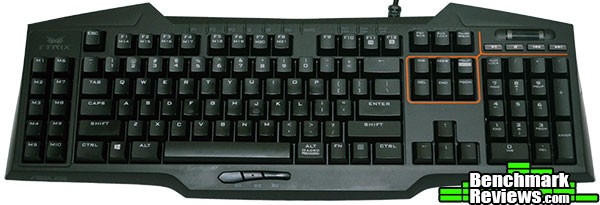
The ASUS Strix Tactic Pro features a familiar layout, but adds 10 dedicated macro keys to the left side and 3 dedicated macro keys below the spacebar. The casing is large with wedge type accents all the way around. It takes up more room than a regular membrane keyboard and more room than the Ducky Shine 3 DK9008 I reviewed, but this is mainly due to the 10 dedicated macro keys on the left side. However, it is significantly smaller than the giant CM Storm MECH Mechanical Keyboard.

The ASUS Strix Tactic Pro features orange backlighting that has 4 different lighting effects. To cycle the different lighting modes, you hold down the FN key and tap either the number 8 key (on the number pad) or the number 2 key (also on the number pad). The four modes include: Breathing effect (default), always on, always on (brighter) and non-illuminated mode.

One of the ASUS Strix Tactic Pro’s biggest and, in my opinion, most valuable features is the dedicated macro keys below the spacebar. This location, unlike the others, can be easily reached without lifting your hand off the keyboard. These keys proved to be very valuable during MMO gameplay as well as some routine tasks within Photoshop.

The ASUS Strix Tactic Pro comes in four different switch configurations, Cherry MX Blues, Reds, Blacks, and Browns. Cherry MX Blues and Browns are listed as the most tactile feel, while the Cherry MX Reds and Blacks are linear, featuring smooth actuation. Cherry MX Browns (the model we tested) have a similar tactile feel to Cherry MX Blues, but are a little quieter and require 5 cNs less of force to depress. See Detailed Features for more on the difference between Cherry Browns and Blues.
The ASUS Strix Tactic Pro excels in one particular area, macro keys, macro keys everywhere. This keyboard not only features 13 Dedicated macro keys, but you can also switch the F1-F8 keys to macro functionality as well, giving you a whopping 21 macro keys. Why so many macro keys? In one acronym, MMO. MMO Gaming utilizes an abundance of keyboard shortcuts and commands to make your gameplay smoother. Throw in a keyboard that can streamline this process for you and you’ll spend more time focusing on the gameplay and less time focusing on your hardware.

After removing the WASD keys, you can clearly see the Cherry MX Brown switches with their individual LED indicator lights above the switches. Each key is individually illuminated, resulting in a very uniform lighting profile. At the top of the keyboard are 10 profile and mode indicator lights, including NKRO, Numb Lock, Caps Lock, and Scroll Lock.
ASUS included 4 alternate keycaps, to replace the standard W,A,S,D keys, that are solid orange and feature no marks on them. Because they’re orange, instead of black, they light up quite nicely once attached to the switches. Note: The replacement orange key for “W” is slightly taller than the rest of the keys, this makes a difference in comfort and maintaining continuity between the keys on the upper row.

The ASUS Strix Tactic Pro features on-the-fly macro recording which simplifies commands and allows you to program new macros during gameplay.

From the side angle view above, you can see that the ASUS Strix Tactic Pro has the same key curvature that is seen in most modern keyboards, allowing easier access to additional keys in other rows as well as preventing accidental hits. It has a nice “wedge” shape with two wings or jute outs at the top of the keyboard. The wings don’t serve a purpose, other than aesthetics.
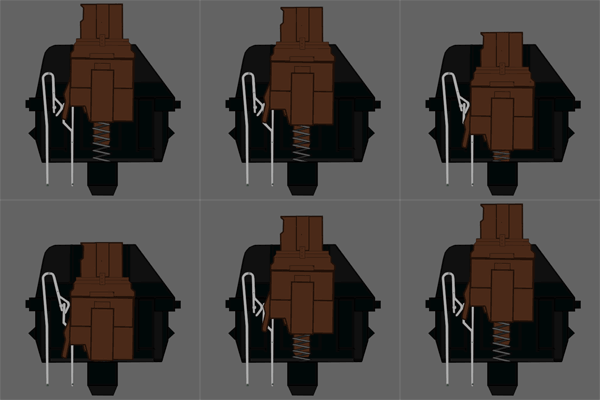

The Cherry MX Brown (on left) is a tactile, non-clicky mechanical switch. For comparison reasons, I’ve included a GIF of the Cherry MX Blue key-switch (on right). When utilizing a Cherry MX Brown or Blue, you fan feel the tactile bump as the key is depressed. The main difference, as you can see, the Cherry MX Blues have a white slider that is propelled to the bottom of the switch when the actuation point is reached, resulting in an audible “click” sound. Some people find the Blues to be too loud or disruptive in close quarters work environments, this is where the Cherry MX Browns excel. Cherry MX Browns feature the tactile bump , but don’t have a separate slider that slams to the bottom of the switch after the button is pressed, this results in a much quieter typing experience without sacrificing tactile feel.
The ASUS Strix Tactic Pro features two modes, Hardware and Software:
- Hardware mode – this mode allows you to use the internal flash memory of the keyboard to store profiles and macros for when you’re going to LAN partys, so you don’t need to install the software on the computer you’re using.
- Software mode – this mode allows you to configure and store unlimited profiles on the computer directly.
The main screen of the software features a list of all your dedicated macro keys and the ability to link specific profiles to specific programs or games.
Above is a list of various button settings for the macro keys, including the ability to assign specific keys to launch specific programs or the ability to disable a macro key altogether.
Recording macros with the ASUS Strix Tactic Pro software allows for visual representation and verification of what your’re recording, as well ass easy naming of your various macros. You also have the option to record the delay, and to select a default delay value.
The best way to test a keyboard is to simply use it, but there is another feature that we can test for accuracy, NKRO (N-Key Rollover). During normal typing on a membrane or “squishy” keyboard, only one key can be pressed at a time, with the exception of modifier keys (Shift or Control). With N-Key Rollover each keypress is correctly detected regardless of how many other keys are being pressed or held down at the same time. This is especially useful when gaming on keyboard heavy games. We’ll be utilizing Aqua’S KeyTest software to test this.
Since the ASUS Strix Tactic Pro is advertised as a gaming keyboard, I’ll also be testing the macro keys and their effectiveness during gameplay. The ASUS Strix Tactic Pro was tested for an overall period of 40 hours. The programs and games that were used during testing, regular Windows and browser use aside, include: Adobe Photoshop CS6, World of Tanks, Battlefield 4, and Guild Wars 2.
-
Motherboard: ASUS Sabertooth Z87
-
System Memory: Corsair XMS3 4GB x 4
-
Processor: Intel i7-4770K Haswell @ 3.5 Ghz
-
Audio: On-board
-
Video: XFX Double Dissipation R9-290X (4GB)
-
PSU: Corsair HX Series 1000HX
-
Monitor: Dell UltraSharp U2412M IPS 24? x 3 @ 5760×1200
-
Operating System: Windows 7 Ultimate (64-bit)

NKRO: As you can see, there was no problem with multiple presses on the keyboard. The remarkable part about this test is that it achieves this with absolutely no software on the PC and through USB, whereas most other keyboards need a PS/2 connection to achieve this.
Macro/Gaming: The ASUS Strix Tactic Pro performed very well, macro keys functioned perfectly and were easy to program. There were a couple of issues with the software and one of the media buttons during gameplay. The ASUS software refuses to be moved to a secondary screen. That’s right, it will not allow me to move it from my primary screen to one of the secondary screens. I’ve never seen a piece of software act this way, very strange. Also, the mute key doesn’t mute the computer at all, it actually brings up the start menu?!
Overall, the ASUS Strix Tactic Pro keyboard is a very, very nice unit. Featuring a plethora of macro keys, backlighting, and multi-profile support with on-board memory. Some people might find it’s footprint to be on the large side, but I found it to not be too much of an issue. The dedicated macro keys below the spacebar are especially nice and convenient.

Overall the ASUS Strix Tactic Pro is quite impressive, the finish on the keys themselves is quite nice and would last through heavy usage. The Cherry MX Browns, while they’re not my favorite, had excellent tactile feel and are quiet.
The ASUS Strix Tactic Pro performed well with it’s quiet, tactile Cherry MX Brown switches and it’s abundance of macro keys. The media keys did not live up to expectations and the software seemed a little lacking. The lighting effects, while nice to have, are limited and not very exciting.
The ASUS Strix Tactic Pro’s appearance is sleek, with “wings” on each side in a jet black package that has orange backlighting. One could say it has a Halloween/Batman type theme to it.
Although the ASUS Strix Tactic Pro is a large slab of plastic, it has a solid feel. Of course, only time will tell, but I don’t believe anyone would have any durability issues out of this keyboard. When you pick it up, it feels strong enough to be used as a self defense weapon or maybe a hammer.
Functionality wise, the ASUS Strix Tactic Pro only has one major flaw, the mute key. Instead of muting the sound, it brings up the Windows start menu. To be fair, this could be an issue with the review sample, or just a minor glitch within the firmware.
With a price tag of $149.99 (NewEgg | Amazon), the ASUS Strix Tactic Pro is in league with some of the other top tier mechanical keyboards. However, this keyboard lacks a couple of features found in similarly priced keyboards. However, some of the similarly priced keyboards don’t include macro keys, so it seems to even itself out. It would still be nice if ASUS could add a USB hub to the keyboard, this would seal the deal at the $149.99 price point.
The ASUS Strix Tactic Pro is a great all around keyboard, but if you don’t have a need for macro buttons, then it may not be for you. However, if you do photo editing, or simply want one button program launch from your macro keys, then this keyboard could be the perfect fit for you.
+ Cherry MX brown switches
+ 13 Dedicated macro keys
+ Media controls
+ N-Key rollover (NKRO) over USB
+ On-the-fly macro recordings
+ Plug-and-play
+ Backlit
+ Braided cable
– Software has some quirks
– Wide footprint
– Non-detachable cord
– Not enough customization for lighting
– One of the media keys malfunctions
– No USB ports or audio pass-through
-
Performance: 9.00
-
Appearance: 9.25
-
Construction: 9.00
-
Functionality: 9.00
-
Value: 8.50
Excellence Achievement: Benchmark Reviews Golden Tachometer Award.
COMMENT QUESTION: ?



One thought on “ASUS Strix Tactic Pro Gaming Keyboard Review”
How is this keyboard different to normal keyboards such as the Medion keyboards?
When I press keys and release them there is a sound, also when I hover my finger tips over them I feel some heat.
What is the difference of this keyboard compared to the low end keyboards that are not meant for gaming. There is a agronomical difference. For some reason I want to get this only because it feels better when I type but I do not know why. So please tell me the science used when the keyboard was made. Its got thicker keys and its maybe got a cushion beneath it to make it less hard to push keys.
Comments are closed.