By Julian Duque
Manufacturer: ASUSTeK Computer Inc.
Product Name: ASUS GeForce GTX 960 Strix
Model Number: STRIX-GTX960-DC2OC-2GD5
UPC: 886227953967
Price As Tested: $209.99 (Amazon | Newegg | B&H)
Full Disclosure: The product sample used in this article has been provided by ASUTeK Computer Inc.
As we assume with most NVIDIA video card family releases, NVIDIA first launches the best cards of the series, and then makes it’s way down the list. Today the spotlight is on the GeForce GTX 960, the direct heir of the GTX 760 and the sub $300 spot in NVIDIA’s current line of graphics cards. Seen as an opportunity, NVIDIA’s x60 series of video cards always tries to bring the most performance on a budget oriented card, as well as providing a direct upgrade to users running older systems.
What is surprising is how aggressively NVIDIA is pricing the 900 series of cards. The GeForce GTX 970 was released with a $330 price tag, that is an 18% price drop over it’s predecessor the GeForce GTX 770, which was released just short of the $400 mark. Same goes for the GeForce GTX 980 which was released for $534.99, a $115 or drop over the pricey GeForce GTX 780 which initially came in at $649.
It is clear what NVIDIA’s message is to the enthusiast community, they are willing to be competitive. To further confirm this claims, the release price of the GeForce GTX 960 is just $199 for the basic models, a bit more for the feature packed ones like the ASUS Strix sample that we will be reviewing today. In comparison to it’s predecessor, the GeForce GTX 960 comes in at around 20% cheaper than it’s predecessor, the GeForce GTX 760.

Probably the only let down Benchmark Reviews had with the release of the GeForce GTX 980 is that after 3 years of being the top manufacturing node for graphic processing units at TSMC, the 28nm process is still featured on the top tier graphics cards from both AMD and NVIDIA. Fortunately, TSMC has already established 20nm production for the likes of Apple and Qualcomm, which most likely means that soon enough, the 28nm process that was first introduced in Kepler, will become a retired veteran.
I start off this review with this analysis because it is important to know what NVIDIA has managed to do in order to keep their release cycle on point. In years past, TSMC released a new node every 2 years, and in certain occasions they released half -nodes in between those two years. This led to GPU manufacturers to quickly develop and pack more hardware into smaller and more efficient chips, which in turn led to a higher yield in performance.
With 28nm, this rapid growth has stalled, leaving manufacturers to look for alternatives to further improve their products. From NVIDIA the response was Maxwell, the revamped 28nm architecture, first seen 11 months ago with the release of the GeForce GTX 750 and GTX 750 TI which featured the entry-level GM 107 GPU. To show how much further Maxwell had improved over Kepler, NVIDIA then released the GeForce GTX 980 and the GTX 970 featuring the GM204 SoC that managed to do what was thought impossible. When Benchmark Reviews first got ahold of the GeForce GTX 980, it was concluded that the GM204, although larger in die size, had a 10% performance increase over it’s predecessor the GM107, while consuming 1/3 less the power.
| Graphics Processing Clusters | 2 |
| Streaming Multiprocessors | 8 |
| CUDA Cores | 1024 |
| Texture Units | 64 |
| ROP Units | 32 |
| Base Clock | 1228 MHz |
| Boost Clock | 1291 MHz |
| Memory Clock (Data rate) | 7200 MHz |
| L2 Cache Size | 1024K |
| Effective Memory Speed | ~9300 MHz |
| Total Video Memory | 2048 GDDR5 |
| Memory Interface | 128-bit |
| Total Memory Bandwidth | 112.16 GB/s |
| Texture Filtering Rate (Bilinear) | 72.1 GigaTexels/sec |
| Fabrication Process | 28 nm |
| Transistor Count | 2.94 Billion |
| Display Outputs | 3 x DisplayPort1 x HDMI1x Dual-Link DVI |
| Power Connectors | 1 x 6-pin |
| Thermal Design Power | 120 Watts |
| Thermal Threshold | 95o C |
| Physical Measurements | 215.2 x 121.2 x 40.9 mm |
The ASUS GeForce GTX 960 Strix comes with factory overclocked base and boost clocks, as well as with a higher memory clock right out of the box. Our sample’s base clock of 1228 MHz is 9% higher than the 1126 MHz of the official card. The Strix’s memory clock also brings in an additional 190 MHz more over the stock 7010 MHz, boosting an appropriate 7200 MHz. The boost clock provides an additional 63 MHz, which is close to being half of the boost clock seen in the GeForce GTX 970. As expected from all of the “Second Generation” Maxwell cards, the GeForce GTX 960 brings a lot of new features including:
- Multi-Frame Sampled AA (MFAA)
- Dynamic Super Resolution (DSR)
- Voxel Global Illumination (VXGI)
- VR Direct
- 4K NVIDIA ShadowPlay
Having ASUS provide the sample for the launch of the GeForce GTX 960, it was clear to me that the product they would send would be no ordinary card. Instead, they sent their Strix branded card which they claim is 30% cooler, three times quieter, and has a longer lifespan over the reference model. I could also write for days about how beautiful the design of the card is, but that is completely subjective.

The Direct CU ll Cooler has become a standard for most of the overclocked and enthusiast ready video cards that ASUS has launched into the market, with the exception of their Republic of Gamers line of cards which are usually targeted for other audiences such as extreme overclockers. The Direct CU II Cooler controls the temperature of the GM 206 chip with a total of 4 copper heat-pipes that transfer the heat of the chip to the heat sink which is cooled by the fans, that is if the graphics card temperature reaches the 55oC mark. Because GM 206 is such an efficient chip, it can be passively run at very light loads. For this reason, ASUS implemented their 0dB fan technology which leaves the fans off if the temperature is below the 55o mark.
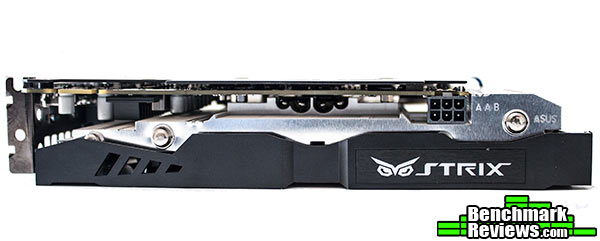
ASUS understands that NVIDIA is targeting this graphics card to overclockers. This comes as no surprise due to the cards low TDP, which usually means lower temperatures and a better overclocking experience. The ASUS GeForce GTX 960 Strix consumes a mere 120 Watts, and it is recommended that you obtain a 400 Watt power supply with at least one 6-pin PCI-E connector. If you are not concerned about power consumption, ASUS provides you with the GPU Tweak software which allows you to modify voltage, clock speeds, and fan speeds on the fly, as well as giving you complete monitoring through GPU Tweak Streaming.
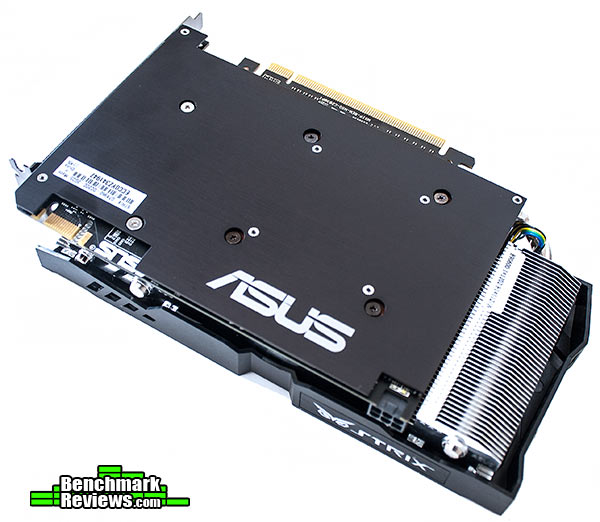
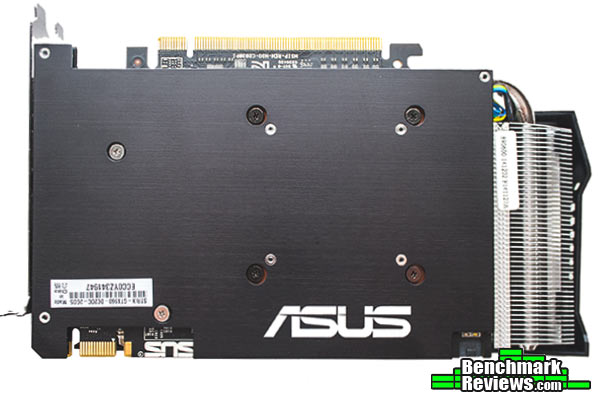
What I think is the most interesting inclusion of the ASUS GeForce GTX 960 Strix is the back-plate. Not only does it provide rigidity to the card, as well as eliminating any potential “GPU sag”, which was a very common issue in previous ASUS cards, but it gives the back of the card potentially higher cooling and protects the sensible electronics found underneath it. For a graphics card that retails at $209.99, the inclusion of a back-plate can be the determining factor when choosing the appropriate graphics card.

With the release of the second generation Maxwell Processors, NVIDIA added support for HDMI 2.0 which is capable of driving 4K displays at 60 fps, allowing for potentially 4K 3D videos, along with higher-frame-rate 2D content. Along with one HDMI 2.0 port, ASUS offers a dual-link DVI connection, and a total of three DisplayPort 1.2 connections. This is the same output layout found on most of the second generation Maxwell GPUs, such as the GeForce GTX 980 and the GTX 970, which is understandable as each one of these cards could potentially drive three displays and NVIDIA 3D-Vision Surround.
One of the things many of our readers take into account when buying a video card, is the bling factor. It is almost a standard nowadays that manufacturers implement LED logos into their most expensive line-ups, but unfortunately for the ASUS GeForce GTX 960 Strix, this is not common in lower-level video cards. What is new however, is the inclusion of an LED indicator which let’s the user know if the 6-pin connector is making appropriate contact or not. The LED is white if the connector is plugged in correctly, otherwise it is red.

To take off the back plate you do need to completely remove the heatsink, as it covers some of the screws which hold the back plate in place. Remember that removing the heatsink can void your warranty, and should only be done if necessary, like when installing a waterblock onto the GPU. At the back it can clearly be appreciated how small the PCB of the ASUS GeForce GTX 960 Strix is, however in the Strix model, the heatsink is elongated in order to accommodate for a second fan.

The heatsink itself is comprised of four copper heatpipes that transfer the heat directly to the heatsink fins, were the fans are in charge of removing the heat and therefore cooling the chip. If needed, the fans can be easily taken off and cleaned with a brush as they are only held by plastic grasps along both sides of the heatsink. To completely remove the fan assembly you will need to unplug the fan header, which can only be done if the heatsink is removed.

At the center of the PCB we find the star of this review, the GM 206. Towards the left you might be able to see the 5-phase thermal design which comprises itself of dedicated super alloy MOS with higher voltage threshold, super alloy chokes which should decrease whining noise over the standard ferrite or iron chokes, and super allow caps which are rated for a higher life span.

In the next section we will give a complete detailed guide on how we conduct each of our tests as well as providing specifications for all the equipment used in each of the tests. I highly recommend you read it before you jump ahead into the benchmark scores.
Due to Microsoft DirectX-11 (DX11) being native to the Microsot Windows 7 Operating system, it has been our primary choice for our test bench for quite some time. The DX11 API is also available as a Microsoft Update for the older Windows Vista O/S, and it is native on the newer Windows 8 and Windows 8.1 Operating Systems.
By Benchmark Reviews high standards, we always try to take a bigger sample and do simple statistical procedures to obtain the most accurate results that represent how each item performs in a certain area. Each benchmark test starts with a “cache” run, followed by five recorded test runs. From those five scores, the two outliers are eliminated and the average from the remaining three is calculated and displayed as a score in the following pages.
Our combination of synthetic, video game, and compute benchmark tests has been chosen in this article to correctly represent relative performance among video cards. These benchmark results are not intended to represent real-world graphics performance, as this can change based on different system configurations, and the perception of individuals that play the video game.
Intel Z87 Test System
| CPU | Intel Core i5 4670k @ 4.0 GHz |
| CPU COOLER | Raijintek Triton |
| MEMORY | 8GB G. Skill Ripjaws 2000 MHz ram |
| MOTHERBOARD | ASUS Gryphon Z87 |
| STORAGE DEVICES | WD Black 2 TB DriveSamsung MZ7TD120HAFV 120 GB |
| MONITOR | QNIX 2710LED 2560×1440 |
| POWER SUPPLY | EVGA SuperNOVA 650W |
Video Cards Being Tested
| Driver | Memory Amount | Memory Interface | Memory Clock (MHz) | Boost Clock (MHz) | Base Clock (MHz) | GPU Cores | |
| Gigabyte GTX 980 | Forceware 347.09 | 4096 MB GDDR5 | 256-bit | 7010 | 1216 | 1126 | 2048 |
| Evga GTX 970 SC | Forceware 347.09 | 4096 MB GDDR5 | 256-bit | 7010 | 1367 | 1165 | 1664 |
| ASUS GTX 960 Strix | Forceware 347.25 | 2048 MB GDDR5 | 128-bit | 7200 | 1291 | 1228 | 1024 |
| XFX DD R9 290x | Catalyst 14.12 | 4096 MB GDDR5 | 512-bit | 5000 | N/A | 1000 | 2816 |
| XFX DD R9 280x | Catalyst 14.12 | 3072 MB GDDR5 | 384-bit | 6000 | N/A | 850 | 2048 |
| Evga GTX 770 |
Forceware 347.09 | 2048 MB GDDR5 | 256-bit | 7010 | 1137 | 1085 | 1536 |
| Evga GTX 760 | Forceware 347.09 | 2048 MB GDDR5 | 256-bit | 6008 | 1033 | 980 | 1152 |
| Evga GTX 750 TI | Forceware 347.09 | 2048 MB GDDR5 | 128-bit | 5400 | 1085 | 1020 | 640 |
| Evga GTX 660 TI | Forceware 347.09 | 2048 MB GDDR5 | 192-bit | 6008 | 980 | 915 | 1344 |
Unigine “Heaven” is a benchmark tool that has been around for quite a while. However it has been recently updated to it’s current version which can be used to determine the stability of graphics card under extreme conditions. It has become a standard tool on all of our graphics card reviews as it provides unbiased results by generating true in-game workloads across the entirety of the system.
This tool is available for free publicly and can be downloaded through Unigine’s website.
Unigine 4.0 “Heaven” – Benchmark Settings
- DirectX11
- Quality: High
- Tessellation: Extreme
- 16x AF
- 4x AA

 2560×1440 Resolution
It is surprising how close the GeForce GTX 960 approaches the GeForce GTX 770 in our first result. However, due to it’s low bandwidth, higher textures and resolutions really show to be demanding for the GeForce GTX 960. At 1080p, which is the target of this card, it is still getting a very good score with 43.3 FPS, putting it right in place between the GeForce GTX 770 and the GeForce GTX 760. I wouldn’t be surprised if at lower resolutions or with lower AA and textures, the GeForce GTX 960 might even beat the GeForce GTX 770.
3DMark11, like it’s name implies, is the leading benchmark for DirectX-11 video cards from 3DMark. 3DMark uses an in-house independent DX11 engine which is capable of rendering and delivering very demanding test scenes, as well as taking advantage of many of DX11 advantages including tessellation, compute shaders, depth of field effects and many more.
Although 3DMark11 offers an unbiased Open Source Physics Library as viable replacement for NVIDIA’s PhysX for the CPU/GPU Physics Test, Benchmark Reviews only takes into consideration the four graphics test from 3DMark11 which focus more on raw graphics card performance.
3DMark11 Benchmark Settings

 .
.
The GeForce GTX 960 just about fails to beat the GeForce GTX 770 in the 3DMark11 benchmark. There is clearly a big gap in between the GTX 960 and the GTX 970 which should give some insight as to what NVIDIA should be planing to do in the upcoming months. The 3DMark11 test also shows how the GM206 found in the GeForce GTX 960 compares to the fully fleshed GM204 found on the GeForce GTX 980, bringing in almost exactly half of it’s performance.
Being one of the most recent releases of big magnitude, Lord of the Rings: Shadow of Mordor was the perfect game to start our gaming benchmarks. Lord of the Rings is a fairly demanding game, but it is well optimized to be stable and playable at different configurations. Featuring a modified version of the LichTech Jupiter EX engine, Shadow of Mordor should give us some insight as to how the GeForce GTX 960 will perform with upcoming titles in 2015.
Lord of the Rings – Shadow of Mordor Benchmark Settings
- Graphical Quality: Ultra Preset.
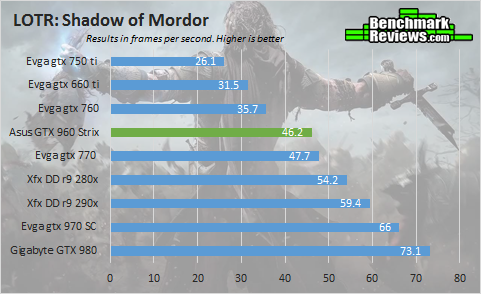
 2560×1440 Resolution
I believe we are starting to see a trend here. There were a couple of runs in which the GeForce GTX 770 and the GeForce GTX 960 were indistinguishable from each other. However, the AMD cards are not that far away from their NVIDIA counter parts. Higher resolutions and more defined textures is definitely not on par with low memory bandwidth. The AMD R9 280x features a 392-bit memory interface, which triples that of the GeForce GTX 960. At 1440p, Shadow of Mordor is almost unplayable with the GeForce GTX 960, unless you are willing to lower higher textures and turn off Anti Aliasing.
FarCry 4 was made publicly available on November 18th of 2014 as a sequel to the fairly popular PC port FarCry 3. Although the stories are completely unrelated, they do share the same game engine which at the time when FarCry 3 was released, was called the graphics card widow maker. Just like many PC games lately, when FarCry 4 was released, there were various issues with it’s unstable performance as well as a collection of bugs that deteriorated the gameplay experience. Fortunately, Ubisoft has since patched the game to at least give decent performance to users.
FarCry 4 Benchmark Settings
- Graphics Quality: Ultra Preset.

 2560×1440 Resolution
What surprised me the most is that even at 1440p the game was playable. However, there were some scenes in which the frames dropped constantly, but the average frame rate stayed the same. The GeForce GTX 960 gains an average 5 frames more than it’s predecessor, the GeForce GTX 760 at 1440P which is really not a lot. But at 1080P, the GeForce GTX 960 Strix shines with a 25% increase in frame rates over the GeForce GTX 760, and a 40% performance increase over the GeForce GTX 660 ti.
Just like FarCry 4, the Assassin’s Creed franchise did not enjoy it’s launch last year. But let’s leave the past behind, and move on to today. Just a few days ago, Ubisoft gifted users the Dead Kings DLC for free, as well as patching the game to fix common runtime errors. The game is now actually playable, but it is still a pretty demanding game in terms of raw performance. For this reason we had to change our settings, as AA was simply so taxing on the low-end graphics cards that they simply would not run our tests at 1080p.
Assassin’s Creed – Unity Benchmark Settings
- Textures: Ultra
- Environment: Ultra
- Shadow Quality: High
- Anti-Aliasing: No AA
- Ambient Occlusion: SSAO

 2560×1440 Resolution
It is almost unfair how well NVIDIA cards are optimized for this game, at least that was what I would have told you when the game released. There has been a gradual improvement with the AMD graphics cards, with the AMD R9 290x now at least trailing the GeForce GTX 970, and the R9 280x beating the GeForce GTX 770 by a small margin. The GeForce GTX 960 doesn’t fall short either, with an average frame rate of 50 fps at 1080p, which means that you can probably set AA to 2x and enjoy the eye candy.
The Frostbite engine was first developed by EA to debut on Battlefield: Bad Company on 2008. Six years later it is still a widely used engine, mainly because EA keeps updating it and keeping it up to date with the modern standards of gamers. Frostbite 3 is the newest version of this engine, and it is highly configurable with a wide variety of options for audio, animatics, scripting, rendering, visual effects, and many more. It also happens to be featured in one of EA’s latest games; Dragon Age – Inquisition. EA has also scheduled to release more games featuring the same game engine, including Shadow Realms which is expected to debut in 2017.
Dragon Age – Inquisition Benchmark Settings
- Ultra Preset
- 2x MSAA

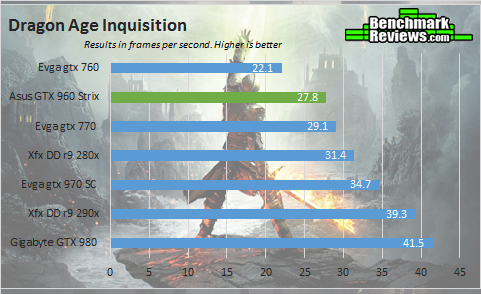 2560×1440 Resolution
The role that the GTX 960 is playing here is that of a GeForce GTX 770 follower. Of course if you consider that the GeForce GTX 960 is rated at just 120 Watts, and is relatively cooler, this should put it right on par on value with the GeForce GTX 770. It can also be expected that with future driver updates, the GTX 960 might even surpass the performance of the GeForce GTX 770.
The last in our list of DirectX-11 games to test the performance level of the GeForce GTX 960 Strix is Tomb Raider. The PC version of this game offers the expected nuts and bolts from DX11, including tessellation, ambient occlusion, and SSAA, as well as AMD’s TressFX which is a real hair physics system. TressFX is disabled for all of our benchmarks, as it does impact heavily on the performance of NVIDIA graphics cards.
Tomb Raider Benchmark Settings
- 1920×1080: Ultra Preset
- 2560×1440: Ultra Preset, no AA
- TressFX is disabled

 2560×1440 Resolution
Playing Tomb Raider with the GTX 960 al 1440p resolution is quite acceptable, as the frame rates reach almost 60 fps, with very stable performance. The AMD R9 280x surprisingly dropped below the GeForce GTX 770, however the R9 290x beats the GeForce GTX 970 in some very strange test results. It should be noted that our 1440p benchmark had no AA, while our 1080p was set to the extreme preset.
LuxMark 2.0 is an OpenCL benchmark tool and is our only compute benchmark in this review. LuxMark 2.0 tests GPUs for SmallLuxGPU 2.0 which is an advanced ray tracer using the original LuxRender engine featured in the larger LuxRender Suite. Ray tracing adequately maps the pipelines on the GPU, which in turn yields faster render times for artists.

The GTX 770 somehow manages to stay way behind the GeForce GTX 960. In turn, the GeForce GTX 960 almost manages to take over the R9 280X. In this test, Maxwell really shows how much performance per cuda core it has over it’s kepler predecessor. I should remind you that a few years ago, this benchmark was completely dominated by the AMD video cards.
This section reports our temperature, and power consumption results subjecting the video card to maximum load conditions. During each test a 20°C ambient room temperature is maintained from start to finish, as measured by a digital temperature sensor located outside the computer system. GPU-Z is used to measure the temperature at idle as reported by the GPU, as well as under load.
The power consumption and temperature statistics discussed in this section are absolute maximum values, and may not represent real-world power consumption created by video games or graphics applications.
As always each test is conducted five times, with the exception of the idle measure. Our synthetic load constitutes of a 10 minute run of Furmark. NVIDIA highly recommends you do not use Furmark to test stability on your GPU, as Furmark is an extreme case scenario, and a game or a benchmarking software like Unigine Heaven might be a safer option to use. Our game load constitutes of 5 runs of graphics test #4 in 3DMark11. As usual two of the outliers in the data are eliminated in our final average calculation.

As mentioned many times already in this article, the Maxwell architecture from NVIDIA really takes high remarks when it comes to efficiency as compared to older designs. This is evident by the load and game temperatures which are far from the 95o thermal threshold of the GeForce GTX 960. At idle the card reached 22 o, while the fans were completely off. It is to note that this results may vary accordingly with the different models of the GTX 960, mainly due because of higher base clocks out of the box and different types of coolers.
Power Consumption
PCI-Express graphics cards are isolated for idle and loaded electrical power consumption. In our power consumption tests, Benchmark Reviews utilizes an 80+ Gold EVGA SuperNOVA 650W power supply to measure isolated video card power consumption, as well as a Kill-A-Watt EZ (model P4460) power meter made by P3 International.
A baseline measurement is taken without any video card installed on our test computer system, which is allowed to boot into Windows 7 and rest idle at the login screen before power consumption is recorded. Once the baseline reading has been taken, the graphics card is installed and the system is again booted into Windows and left idle at the login screen before taking the idle reading. Loaded power consumption reading is taken with the video card running a stress test using graphics test #4 on 3DMark11 for real-world results, and again using FurMark for maximum consumption values.

NVIDIA suggests you obtain a 400 Watt or higher capacity power supply to install a GeForce GTX 960. It is also required that such power supply includes a 6 pin PCI-E connector if not the GPU will not activate the display. The power consumption results for the ASUS GeForce GTX 960 Strix may vary with other models of the GeForce GTX 960, mainly because the ASUS GeForce GTX 960 Strix ships with a higher base clock.
Even under it’s maximum load, the ASUS Geforce GTX 960 Strix peaked at 128 Watts on average. Under game load, which is meant to represent a more everyday load, we observed a 30 Watt drop over having the card running the Furmark burning test. It comes to no surprise that the idle was on average at 9 Watts, which is really close to the 10 Watts from the GTX 980 measurement.
I think Maxwell has done it again with a completely new chip, build from the ground up to provide enthusiasts with the perfect balance between budget, efficiency, and performance. It is clear that the GeForce GTX 960 is a worthy competitor in the budget section of the video card market. Users that obtain a GTX 960 will be able to play most games at 1080p on ultra settings without any hiccups. ASUS also deserves a mention, as the Strix version of the GTX 960 includes many features that are usually non-standard, as well as a beautiful design that includes a very robust backplate.
The most curious part of this story is the pricing NVIDIA has set for the GeForce GTX 960. In their current line-up there is a $150 gap between the GTX 960 and the GTX 970, which I have a feeling NVIDIA is going to fill. I recommend you stay tuned with Benchmark Reviews as we will be covering any future releases by NVIDIA.
The performance scores of the ASUS GeForce GTX 960 Strix land it right below the GeForce GTX 770 and with an average 12% improvement over it’s predecessor the GeForce GTX 760. Compared to an AMD card, the GeForce GTX 960 is a direct competitor to the AMD R9 285X, and totals the performance of the R9 270X. Compared to other graphics cards in it’s series the GeForce GTX 960 Strix has around half the performance of the fully fledged GeForce GTX 980. Due to a low memory bandwidth, the GeForce GTX 960 struggles at very high resolutions, and at games with very high amount of textures.
As expected from any ASUS Strix product, they put a really high emphasis on beautiful designs that depict elegance. The whole black theme is adorned by red accents found on the fans and fan shroud. Along the back you find an ASUS logo which is pointing the right way, and can be read by someone looking through the window of a case. The matte black PCB is well hidden by the beautiful exterior of the Direct CU ll cooler, which is easily identifiable by any DIY enthusiast due to the large visible heatpipes.
NVIDIA is clearly to this date the leader in the video card industry. In today’s product we saw one area in which NVIDIA always shines; the Maxwell architecture is a complete improvement over the really old Kepler GPUs, and although they shame the same 28nm manufacture process, Maxwell is much more well constructed. The GM206 processor consumes a lot less energy, produces less heat, and is able to run on just a single 6-Pin connector. Additionally, NVIDIA is now giving support for 5K displays with the GeForce GTX 960 graphics card, as well as H.265 encoding and decoding.
As of it’s launch date the ASUS GeForce GTX 960 Strix is valued at $209.99 (Amazon | Newegg | B&H), however there are many current models of the GeForce GTX 960 available for purchase now which means that prices may vary accordingly. A $209.99 price point also means that the ASUS GeForce GTX 960 Strix is at the same price as the AMD R9 285X which is it’s direct competitor. At launch, the GeForce GTX 760 was expected to be valued at $249.99, which compared to the official price of the GeForce GTX 960, is a $50 dollar difference.
At the end of the day, NVIDIA’s efforts to find a worthy replacement for the value oriented X60 graphics cards is successful. However, with the 900 series the spot for best price for the money has been taken by the GTX 970, which performs a lot closer to the GTX 980 than it does with the GTX 960. However there is still a very big price gap between both cards, which leads to the question, what is next in NVIDIA’s plans?
+ Back plate adds rigidity, value, and style
+ Outstanding performance for such a low price
+ Features HDMI 2.0 and Display port 1.2 for appropriate 4k support
+ Low power consumption and temperatures
+ Features ASUS 0dB technology
+ 5K display support
+ 2-Way SLI support
– At higher resolutions, low memory bandwidth becomes an issue
-
Performance: 8.5
-
Appearance: 9.75
-
Construction: 9.75
-
Functionality: 9.00
-
Value: 9.00


12 thoughts on “ASUS GeForce GTX 960 Strix Video Card Review”
Was disappointed to see no noise measurements. Have read of numerous complaints about coil wine and fan noise on many of the Nvidia 700 and 900 series cards, so when you mentioned that Asus was claiming 3 times lower noise for the Strix, I was anxious to find out exactly what they meant.
Also, the fact that the card has no fans running at all until it reaches 55 degrees Celsius had me wondering what it would be like to have a totally silent card that suddenly activated it’s fans at a certain temp. Would that activation be jarring or annoying or would it be a gradual ramping up, and how loud would it be?
I’m still running a GTX 560 ti and am ready for an upgrade when the right card comes along, so am really curious about the noise levels of this one. Although I agree with your suspicion about the odd price point, and that there is usually something in the $250.00 – $275.00 range that is missing in the 900 series.
The lower noise can be claimed due to the fans not running during idle, it is a marketing trick as the fans will not be that much quieter usual when actually running.
I suspected that as well, which made it even more unusual that Julian reported no noise measurements.
I was a bit disappointed not to see an R9 270 included in the test, as in my opinion that is it’s direct competitor, judging by size, price and performance.
Hello Bob. We did not record noise measurements in this article as we will soon be doing a complete noise roundup test soon with the appropriate tools. Just to recap something I didn’t mention, the fans never ran at 100% during all of our tests.
Will be waiting anxiously for the “noise roundup test”, but it should be part of every video card test.
We understand, but we are in the process of obtaining better equipment to test for noise using quantified measurements instead of the usual Max noise score that we used in past reviews. We did not want to delay this review past today, and that is the reason why there are no noise tests.
Yes, everything measurable should always be part of every review… unless you’re only given three days (evenings) to complete a lengthy project you offer to the public completely free of charge.
While I’m thinking about it, you know what should be in every comment below a review? Some form of gratitude along with whatever question you have.
Indeed, I totally agree with Olin. People used to only complain/ inquire in the comments.
Thank you for your reviews guys, they are helpful.
Thanks for having this out so soon! You guys beat Anandtech 😉 (Along with almost everyone else!) – I know you probably didn’t have time, but any word on how this thing overclocks (and how it performs when overclocked)? With the other Maxwell cards able to hit 1300/1400 boost clocks, I’d be curious to see if the 960 would as well. Could change the equation a bit, although overclocking definitely varies per card. Seems like it’d be easier to jump to an overclocked R9 290 otherwise and get 970ish performance for a bit more (although, if you want to talk about noise…) Appreciate the observations on the new Maxwell, thanks Julian!
“”At the center of the PCB we find the star of this review, the GM 204″”
Really? Isn’t the GM 206?
Thanks for bringing this up, I have now corrected the article. It is in fact the GM 206, as the GM 204 is found on both the GTX 970 and 980.
Comments are closed.