By Julian Duque
Manufacturer: SilverStone Co. LTD.
Product Name: Kublai KL05 Windowed Edition Mid Tower
Model Number: SST-KL05B-W
UPC: 844761011864
Price As Tested: $69.99 (Newegg l Amazon)
Full Disclosure: The product sample used in this article has been provided by SilverStone.
If you have ever bought a SilverStone case, you would probably agree that the price can be easily justified by the over-the-top build quality and the unique designs that can only be obtained by buying one of the many cases that SilverStone has available. It has been over a year since SilverStone last released a member of the Kublai series, and when they mentioned to Benchmark Reviews that they were updating this line with the Kublai KL05B-W, we immediately asked for a sample.
The first time I laid eyes on a SilverStone case was back in 2007, when the SilverStone SG02 first featured in white. It was quite a unique case because to this day, it still remains as one of the smallest Micro-ATX cases ever made. It is this same ideology of daring to take risks, like making the smallest Micro-ATX case, that has allowed SilverStone to gain such popularity among enthusiasts. But even the popular SilverStone can not make premium cases all the time and expect to remain as a top contender in the case market.

That is the reason why SilverStone introduced the Kublai series of cases a very long time ago. The first time we ever took a look at a case from this line, was in 2013 when Tom Jaskuilka concluded that the KL04 was a very promising case that unfortunately lacked many features that made it really hard to build in. Looking at the features and specifications of the KL05 from SilverStone’s website, the KL05 improves over the KL04 by adding more support for cooling, and by adding to it’s dimension to make a more spacious case.
Courtesy of SilverStonetek.com
|
Material
|
Plastic front panel, steel body (SST-KL05B-W) | |
|
Motherboard
|
ATX , Micro-ATX | |
|
Drive Bay
|
External | 5.25” x 2 |
| Internal | 3.5″ x 6 or 2.5” x 6 , 2.5” x 2 | |
|
Cooling System
|
Front | 2 x 120mm/140mm fan slot (1 x 120mm intake fan included) |
| Rear | 120mm fan slot x 1 | |
| Side | — | |
| Top | 120mm / 140mm fan slot x 2 | |
| Bottom | 120mm fan slot x 2 | |
|
Expansion Slots
|
8 | |
|
Front I/O Port
|
USB 3.0 x 2 Audio x 1 MIC x 1 |
|
|
Power Supply
|
Optional Standard PS2(ATX) | |
|
Expansion Card
|
Compatible up to 16”, 11” with optional drive cage (sold separately) installed | |
|
Limitation of CPU cooler
|
165mm | |
|
Limitation of PSU
|
225mm | |
|
Net Weight
|
6.8Kg | |
|
Dimension
|
200mm (W) x 525mm (H) x 494mm (D), 52 liters | |
|
Extra
|
Support Kensington locks | |
The W n the KL05B-W model stands for windowed, the model that will be reviewed in this article. If you are looking for the review about the quiet version of this case it should be available soon. All KL05B models are black, however it would not be surprising if later on SilverStone released a white variant of this case.

Although the SilverStone KL05’s body is made of steel, the front cover is made entirely of plastic, a very common thing with SilverStone cases. Luckily, the cover has a brushed aluminum finish, which makes it very pleasant to look at, while not being a fingerprint magnet. The front also holds the front I/O bay, which is made up of two USB 3.0 ports, one power and one reset button, and 3.5 mm headphone and microphone jacks. Underneath you can find the front mesh which allows for a pretty decent amount of airflow to come through, as well as protecting the case from dust.

The top cover, which can be removed by two screws from the back, has a dust filter attached to it that can not be separated from the cover itself. I would not consider this “bad”, as there is nothing else attached to the top cover that could prevent it from being cleaned with water. This cover also gives the SilverStone KL05 a taller stand, and adds a bit of attitude to the case.

Because the SilverStone KL05 has 8 expansion slots, it is interesting that it is being categorized as a mid-tower. Other than that anomaly, the back has a a fairly standard layout, with a bottom mounted power supply, and a 120 mm fan mount. There is also two rubber grommets next to the expansion slots, which is also weird considering that the top cover has no holes to allow tubing to come through.
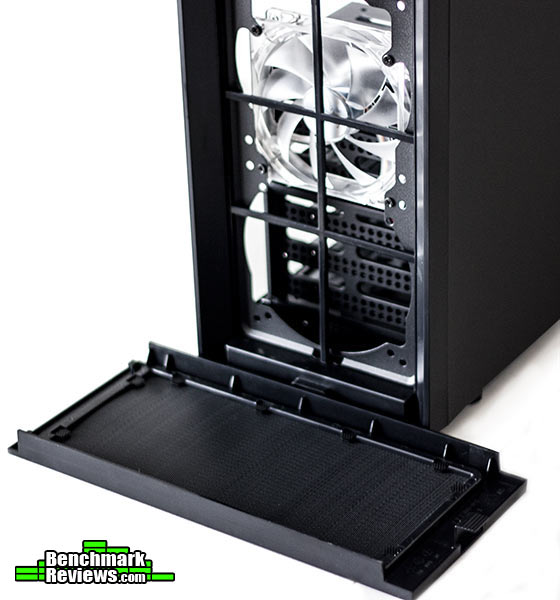
Taking off the plastic front cover, it is evident that the SilverStone KL05 has some serious cooling potential. The front allows you to mount two 120 mm or 140 mm fans, that are filtered by the front dust filter which is attached to the front cover. Behind the two fans, you would normally expect airflow to be restricted by the drive cages, I found that this was not the case in the SilverStone KL05. The open design of the cages allows for plenty of air to come through the front, and if it is not enough, you can always remove them.
Due to the SilverStone’s KL05B side panel window, It is expected that it’s interior is as aesthetically pleasing as it’s exterior. In this section I will take a look at the guts of the SilverStone KL05B, which is the same in both the KL05B-Q and the KL05B-W.

Going inside the case there are some small things that I feel SilverStone ignored in order to keep the price of the KL05B down. Starting with the front I/O cables, aside than their rainbow nature, they are not flat, but rather twisted and messy, making them hard to cable manage.On a more positive note, both of the 3.5″ drive cages can be removed for better radiator compatibility, and a separate drive cage can be purchased in order to have compatibility for up to 9 3.5″ drives. Unfortunately, the 5.25″ drive cage an not be removed, but it does feature a tool-less mechanism to install drives.

Water cooling compatibility is a very important feature for this case. As it is, you can install a 240 mm or a 280 mm radiator on the top, with plenty of space for a push/pull configuration, however, there is no space to run tubing from the motherboard to the top if you decide to use a 280mm radiator mounted between the chassis and the top panel. At the front there is space for two 120 mm / 140 mm fans and at the bottom there is space for two 120 mm fans given that you mount the cages to the bottom of the 5.25″ drive bay.

Cable management seems to be the biggest issue with this case. The back has less than one inch of space for cable management, so a 24-pin cable extension is a no in this case. The 2.5″ bays that can be mounted to the back are an excellent addition, and might be very valuable if you decide to build a custom loop inside the KL05 and remove both the drive cages.

The motherboard tray, although lacking rubber grommets, has the appropriate size and location of cable management holes. Adding to that the incredibly large CPU cutout hole which I have gotten to value a lot while replacing CPU coolers. You might have also noticed that there is not that many cable tie down points, which could have made handling the rainbow cables a lot more easier.
Being such a large case and with a fairly standard design, building inside the SilverStone KL05 should not pose great trouble. After looking at the interior fthe case my only worry remains being the cable management limitations this case has.

The first surprise was that although our power supply was 160 mm long, there was still plenty of space for two 120 mm fans at the bottom, or one 120 mm fan and the two drive cages. It should be noted that if you decide to mount a radiator at the bottom, you will have to move the drive cages to the top, and maybe have to drill some holes due to the spacing between both fans depending on your radiator.

Looking at the drive trays, 3.5″ drives can be mounted easily with the tool-less mechanism, which does require that you bend the tray in order to accommodate it appropriately. There is also rubber washers to prevent rattling. If you decide to install 2.5″ drives instead, they can be mounted on the center, or offset to the left for better cable management.

Our finished build looks pleasing, and took less than 20 minutes to build. The Hyper 212 Evo was a very tight fit, but other than that compatibility is a strong point for this case. Since the motherboard I had in hand did not have a USB 3.0 header I decided to hide in the 5.25″ drive cage. I also made the front I/O rainbow cables less noticeable by routing them behind the 24 pin cable, which turned out to be a perfect plan.

If you decide to buy this case, I would highly suggest buying a modular power supply, as the cables I did not use were hidden in a very unfashionable way. This in turn made closing the side panel a lot harder than it had to be and added to the almost impossible task of cable managing inside the SilverStone KL05.
Does the SilverStone KL05-W live up to SilverStone standards? After spending some time with it, I do think it does. First impressions were great, with ample support for large graphics cards, water cooling, and drives. There is also that renowned SilverStone build quality which at this price point is surprising. It should be mentioned that there were some clear sacrifices being made, such as a plastic front cover which is smartly hidden by a brushed aluminum finish. The manual is not what I expected from SilverStone, but it gets the job done. Cable management also seemed poor, and this is a major issue when you have a side panel window as you will notice it due to the lack of rubber grommets and black cables.
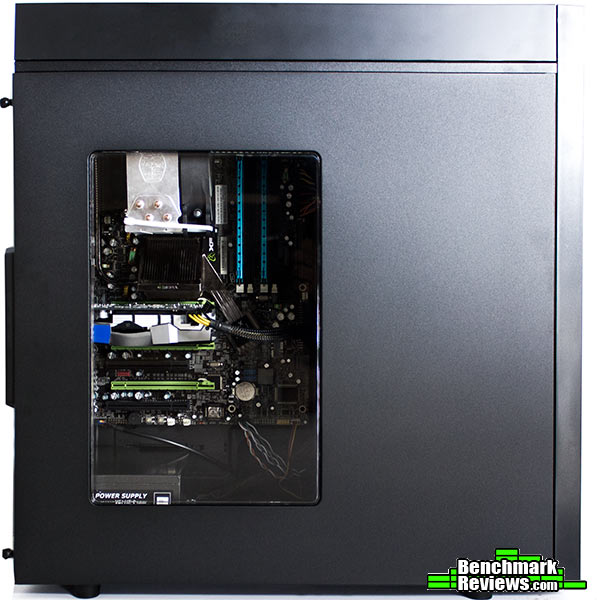
If this is the first time you are building a gaming system, there is no reason why you should spend a lot of money since the KL05B-W makes performance affordable. The SilverStone KL05-W offers plenty of support for water-cooling, drive configurations, and plenty of clearance for both power supplies and graphics adapters. In size, the KL05B-W should be considered a full tower, as it has eight expansion slots, and plenty of space for even first time builders to have a pleasant time building.
Given an all black design, there is nothing peculiar about the SilverStone KL05-W other than the side panel window which allows you to see your finished system. Unfortunately that also means that you will be able to see the colorful cables that unfortunately SilverStone included. There is of course ways of fixing this issue, but as it is, these small issues set apart the great cases from the best.
An all steel construction is pretty common nowadays. This comes as no surprise as steel has gone down in price and it is really sturdy. There were also no small mistakes as we expect from any SilverStone case, with the exception of the window on the side panel which was easily scratched. The entirety of the chassis didn’t have any noticeable flex and the exterior finish is not easily scratched making it an overall very well constructed case.
Aside from being enthusiast friendly, the KL05-W offers a great amount of value by bringing a very spacious case with plenty of strong points. Most importantly it is SilverStone’s response to the other performance mid-towers in the market, while also bringing many of the premium features that the more expensive cases have at a very low price point. For $69.99 (Newegg l Amazon) you can get one of the most inexpensive full towers in the market, with plenty of compatibility for enthusiast hardware.
+ 8 expansion slots.
+ Fully dust proof.
+ Ample storage configurations.
+ Great water-cooling support.
– Poor cable management options.
– Only one fan included.
– No rubber grommets.
– Plexi window easily scratches.
-
Performance: 9.0
-
Appearance: 8.5
-
Construction: 9.5
-
Functionality: 8.5
-
Value: 8.75


