By David Shields
Manufacturer: Zalman Tech Co., Ltd.
Product Name: Z11 Neo
UPC: 823884207163 EAN: 8809213767395
Price As Tested: USD $74.99
Full Disclosure: The product sample used in this article has been provided by Zalman USA.
Zalman is best known for it’s cooling products and affordable chassis designs. The Zalman Z11 Plus Mid-Tower is arguably one of Zalman’s best cases, but is definitely showing its age. Zalman is looking to remedy this with it’s latest chassis, the Zalman Z11 Neo.
This new take on the Z11 design features a new exterior design, mounts for water cooling and filtered intakes, along with the sleek, jet-inspired exterior design from the original Z11. In this article for Benchmark Reviews, I will cover the Zalman Z11 Neo and discuss the changes Zalman has made from the Z11 Plus before delivering my final rating.

| Case Type | ATX Mid Tower Case | |
| Dimensions ( W x H x D) | 205 x 520 x 515mm | |
| Motherboards | Standard ATX / Micro ATX | |
| Power Supply Unit | Standard ATX / ATX 12V | |
| PCI / AGP Card Compatiblility | Full size 270~400mm | |
| Expansion Slots | 7 slot | |
| Color | Black | |
| Compatibility | GPU up to 278mm, CPU cooler up to 215mm | |
| Drive Bays | 5.25″ | External Bay x 1 |
| 3.5″ | Internal Bay x 6 | |
| 2.5” | External Bay x 2 | |
| Cooling Components (Fans) |
Front | 2 x 120mm Fan Vent (1 LED Fan Included) |
| Rear | 1 x 120mm Fan Vent (1 Fan Included) | |
| Top | 2 x 120/140mm Fan Vent (1 LED Fan Included) | |
| Bottom | 1 x 120/140mm Fan Vent (Fan Optional) | |
| Side | 2 x 80mm Fan Vent (2 Fan Included) | |
| I/O Ports | Ports | 1 x Microphone, 1 x Headphones, 2 x USB 3.0, 2 x USB 2.0 |
The new front panel is made from a brushed plastic instead of the previous meshed design. This creates a new, more attractive look, but also reduces airflow to the front intakes. A sliding cover is included for the ODD bay in order to maintain a finished look. On either side, we can see vents for the side and front intakes. These vents are not filtered, nor do they allow much airflow to the front panel intakes.

This side panel has a large clear acrylic window to show off the internals. Sadly, the window appears to mark easily, given that mine arrived scratched all over. Behind the Z11 Neo logo is a mount for an 80mm intake (pre-installed). Both the side intakes and the window have been slimmed down to present a sleeker look than the Z11 Plus.

The other side panel features the same layout without a window or logo.
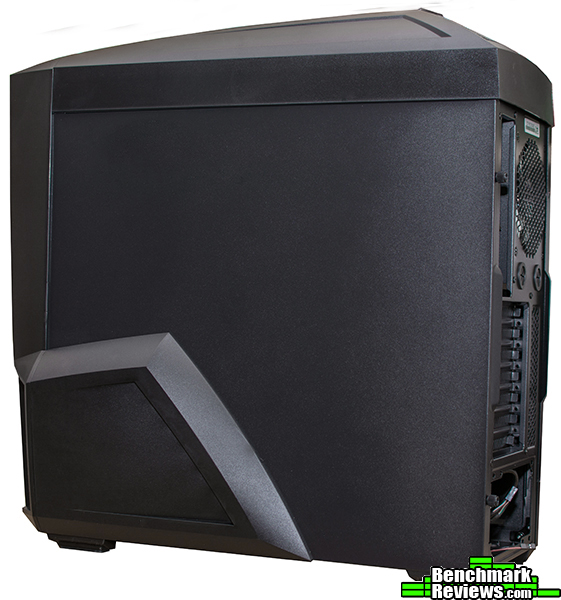
The back panel is nothing new, just the usual assortment of seven expansion slots, motherboard I/O plate, 120mm exhaust fan, and rubber grommets for water cooling.
 .
.
On the bottom we find a filtered mount for a single 120mm/140mm case fan. Next to that is a small removable grate that covers the very small vents for the PSU.

The top panel has also undergone several changes, ostensibly to accommodate the new emphasis on water cooling. At the front we still get a small tray for whatever you might want (thumbdrives, phone, etc.) At the back though, we get a series of clear(ish) plastic fins over the top fan mounts. On the Z11 Plus these were more angular and closer together, so you didn’t get quite as much airflow. On the Neo, you get a lot more space for air to pass through, but at the cost of plenty of open space for dust infiltration.

A lot of changes have been made to the Neo’s exterior from the Z11 Plus, most of them focusing on making the design sleeker and more attractive. Dust filtration has been improved at the front as well, which is always nice to see.
The HDD trays are made of plastic, and are horribly flimsy. Not just flimsy in that they kinda bend, but in that they REALLY bend. On the plus side, they do include rubberized mounts to reduce vibration. If you want to install a second front fan, or improve your airflow, it is possible to remove the bays. Moving on to the ODD bays we can see Zalman included three. Yes, three. Despite the fact that the front panel design only lets you access one. Apparently, Zalman intends the other two bays to be used for HDD drives. Both bays include pre-installed adapters for 3.5″ and 2.5″ drives.. For those of you that have problems installing your own standoffs (like me) some stand offs are pre-installed. Finally, in an effort to update the Neo with the times Zalman has included an internal 3.0 USB header (which seems ubiquitous but the Z11 Plus did NOT have one).
Graphics cards of up to 278mm can be installed (regardless of whether or not the HDD cages are removed). CPU coolers of up to 215mm can be installed thanks the the concave window design. On the bottom, your PSU must be less than 139mm in order to fit a 140mm fan, and less than 152mm to fit a 120mm fan. For cable management, you do get five routing holes (one bottom, three side, and one top.)
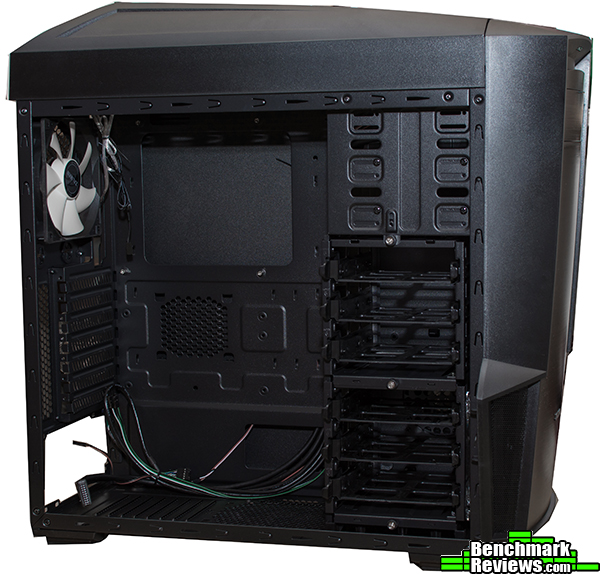
On the back panel, we get a decent 28mm of cable space and. plenty of tie down points. For easy backplate installation the motherboard cutout is 177mm wide.

This photo shows the front without the plastic panel. The front fan mounts are covered by a removable dust filter, and you can also see one of the 80mm side fans in the left vent.

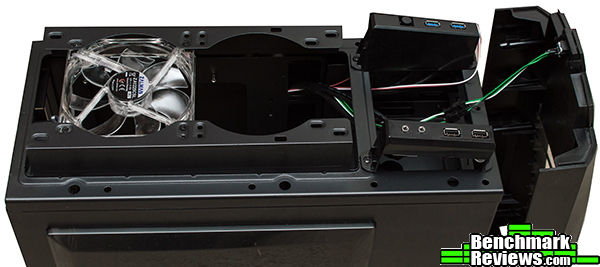
The top panel has been drastically altered to specifically accommodate a 240mm radiator. We also see the I/O panel, which includes a pair each of 2.0 and 3.0 USB ports, audio ports,and reset switch.
This is the inside look at the 80mm side fan. In the Z11 Plus, it was theoretically possibly to replace this fan but accessing it was prohibitively difficult. With the Neo, Zalman has made it much easier, although it is still a bit of a chore to remove all those screws and tabs to replace it.

The interior hasn’t changed a great deal. The most obvious difference is the new top mount for that 240mm radiator, and the fact that the HDD cages are now removable and incorporate trays.
The Z11 Neo is not simply a rebranded Z11 Plus. It’s a new take on an old design that has quite a few changes. Unfortunately, not all of them are good. My second ever case was a Zalman Z11 Plus, and that case had its faults to be sure. This new Z11 series case fixes a few of those, but also adds it’s own to the mix. If I were to choose between the Z11 Neo and the Z11 Plus, I’d probably get the Neo, but it’s a close one.
With eight fan mounts you get a lot of cooling power for your buck. Dedicated water cooling is easy to do, and you can remove the HDD cages for better airflow (although this means you have to install either a 5.25″ HDD or use the 3.5″ adapter.
I like the changes made to the exterior that make this new Z11 seem sleeker and more polished. But it does have its drawbacks. For example, the large plastic window scratches up easily, while the brushed plastic on the front attracts dust and fingerprints.
In this price range, plastic panels with a metal body is considered the norm. The Z11’s plastic front and top panels are pretty sturdy though, and the metal framework is solid. My biggest gripe is with the internal HDD trays, which are flimsier than any I’ve ever seen.
I do like how Zalman has specifically designed the top mounts for a 240mm AIO water cooling system. Because of the lack of dust filtering though, you’ll probably want to mount that as an exhaust as opposed to an intake, which would introduce a significant amount of dust into the case. However, I don’t like the new front panel quite as much because it restricts the airflow to the new dual 120mm mounts.
As of the writing of this article, no price has been confirmed for the Z11 Neo, but $74.99 seems to be the most likely MSRP. This places it in the same range as the Z11 Plus, Corsair Carbide 300R and SPEC-03, and the NZXT S340. The biggest advantage the Neo holds is cooling options, with the ability to mount up to eight fans and five fans included out of the box.
Overall, I find myself liking the Z11 Neo. It’s a great budget product at $74.99, with a decently sturdy construction, some customization options, and plenty of cooling. However, it has its drawbacks, such as limited intake and flimsy HDD trays. As a result, I award the Zalman Z11 Neo our “Recommended Product” award for an overall well thought out design.
+ Five included fans, including two with LEDs.
+ Top mounts dedicated to 240mm water cooler.
+ Front/bottom dust filters.
+ Removable HDD bays.
+ Sleek, attractive design.
– Flimsy HDD trays.
– No top filter.
– Limited front intakes.
-
Performance: 8.75
-
Appearance: 8.75
-
Construction: 8.50
-
Functionality: 9.00
-
Value: 9.00


