By Greg Schepers
Manufacturer: Thermaltake Technology Co., Ltd.
Product Name: Chaser A71
Model Number: VP400M1W2N
UPC: 814463050873
Price As Tested: $125.96 (Amazon / Newegg)
Full Disclosure: The product sample used in this article has been provided by Thermaltake.
Typically, when you purchase a computer case from Thermaltake, you can expect to get a well-built chassis packed full of features at a reasonable price. And why not? After all, the mission of the organization is to “deliver the perfect user experience.” Well, Benchmark Reviews has been given the opportunity to look at every nook and cranny of the new Thermaltake Chaser A71 in order to see if it lives up to the reputation that Thermaltake has established and if it is consistent with the company’s mission statement. Spoiler alert: the Thermaltake Chaser A71 is a 2013 Red Dot award recipient in product design.
As I am sure you are all well aware, the Thermaltake Chaser A71 is not the first chassis in the Chaser Series. Its direct predecessor, the A41, was a mid-tower addition to the Chaser Series that boasted some of the same features that are prevalent in the A71, such as great cooling, tool-less drive bays, and great cable management. And, it is not the first full-tower design in the Chaser Series. That distinction goes to the Chaser MK-1, which shares the same dimensions and has very similar features to the A71, including a top-mounted HDD hot-swap bay. Now, let’s move forward and take a closer look at the Thermaltake Chaser A71.
Regarding the features of the Chaser A71, Thermaltake placed emphasis on a number of different items. This chassis was adorned with the Thermaltake E-Sport Design, giving it a stylish look without going overboard. The aforementioned hot-swap drive bay is certainly a convenient feature. Ventilation was a major consideration of this Chaser model, as was the tool-less design and cable management. Basically, the Thermaltake Chaser A71 has a ton of features and is sure to turn some heads, and we will test these features as well as all of the features that this chassis has to offer. Having said that, why don’t we move forward and take a closer look at this computer case.

I already mentioned several of the features. However, the full complement of features maintained by the Thermaltake Chaser A71 is as follows:
Thermaltake Chaser A71 Full Tower chassis – This new full tower chassis of Chaser hardcore gaming series, designed for gamers to gear with the latest gaming component, offering not only style and personality but an exceptional combination of cooling, performance, versatility and adaptability to any configuration for gaming purists to ensure true enjoyment while in or out of the game.
E-Sport Design – The black metal meshed highlighted with blue fluorescence stripes on the front panel combined with a windowed side panel, it hard not to get attention on!
Easy Hot-Swap – Top-mounted 2.5” or 3.5” HDD Docking Station enables blazing fast file transfer and effortless hot-swap drive replacement.
Supreme Ventilation – Preinstalled one 120mm rear fan; three large 200mm fans located at front, top-mounted and side including blue LED to optimize system cooling solution for extreme airflow. In order to keep the interior dust free, all intake ventilation holes come with dust protection including a removable dust filter at the bottom of the chassis.
Innovative tool-less design – Innovative 5.25” & 3.5” tool-free drive bay design minimized the troubles of installing ODD, HDD and SSD devices for more expandability.
Convenient Support – Two retained holes with rubber grommet to support LCS, five retained holes for advanced cable management ,one large CPU cut-out to ease on CPU cooler installation
High-end Complete System on the go – Enables user to simply build up a complete high-end water cooling solution with 240mm radiator liquid cooling system and extra long graphic card supported to protect user’s hardware and increase CPU’s overclocking potential, most importantly delivers outstanding cooling efficiency in the entire case.
Stress-free Cable Management – Wide cable routing gap for easy cable management and hiding cables behind motherboard tray, to ensure smoothness for build and tinker (upgrade), reduce wiring tangled, as well as better airflow and dust management.
| Case Type | Full Tower |
| Dimension (H x W x D) | 537 x 221 x 565mm (21.1 x 8.7 x 22.2 inch) |
| Net Weight | 10 kg/22.1 lb |
| Side Panel | Transparent Window |
| Color | Exterior & Interior : Black |
| Material | SECC |
| Cooling System | Front (intake) : 200 x 200 x 30 mm fan (600rpm, 13dBA) Rear (exhaust) : 120 x 120 x 25 mm Turbo fan (1000rpm,16dBA) Top (exhaust) : 200 x 200 x 30 mm Blue LED fan (600rpm, 13dBA) Side (intake): 200 x 200 x 20 mm Blue LED fan (600rpm, 13dBA) Bottom (intake) : (Optional) 120 x 120 x 25 mm or 140 x 140 x 25 mm |
| Drive Bays | – Accessible : 3 x 5.25’’, 1 x 3.5’’ – Hidden : 5 x 3.5’’ or 2.5’’ – HDD Docking : 1 x 3.5” or 2.5” |
| Expansion Slots | 8 |
| Motherboards | 9.6” x 9.6” (Micro ATX), 12” x 9.6” (ATX), 12” x 13” (Extend ATX) |
| I/O Ports | USB 3.0 x 2, USB 2.0 x 2, HD Audio x 1 |
| PSU | Standard PS2 PSU (Optional) |
| LCS Upgradable | Supports 1/2”、3/8”、1/4” water tube |
| Radiator | Top: 1 x 120mm or 2 x 120mmRear: 1 x 120mm |
| Other | CPU cooler height limitation: 160mm VGA length limitation: 344 mm |
It is difficult to get a true grasp of the quality and features that were incorporated into a chassis’s design until it is unboxed. The anticipation of receiving a new computer case generally leads to two different conclusions after it is pulled out of the box; you are either going to be disappointed or impressed. I guess indifference could be a third result, but that usually means that the chassis met expectations. In the case of the Thermaltake Chaser A71, it was the latter for me. There was no doubt that this was a quality case and its stature was more formidable than I initially expected it to be. That’s a good thing; clearly, a full-tower is ordered for a reason.
When this case was originally announced, one of the common descriptions for its appearance was that it resembled something out of “Tron.” I can see that, but it is not overwhelmingly “Tron.” In person, I found this case to be a very attractive design. I really liked the fact that the combination of steel and ABS plastic is textured, appearing to be more of a flat black. The only glossy portion of the exterior surface is found on the inside edge of the chassis’s ridges that span the entire length of the front and top.
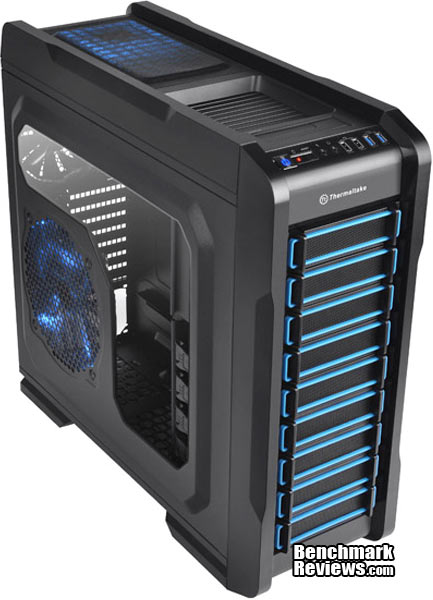
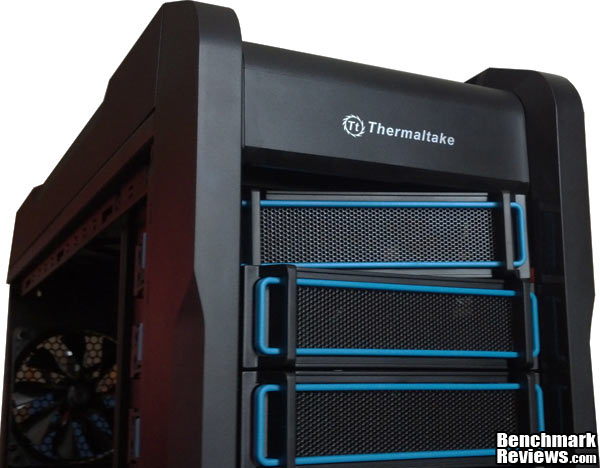
The drive bay covers consist of black mesh surrounded by a plastic frame. As you can see, airflow is not obstructed from the front of the chassis. Behind the bottom five covers, you will find a 200mm fan. Speaking of the covers, I’m sure you’ve noticed the fluorescent-blue coloring running around the perimeter of each. I wasn’t sure that I would find that feature attractive. However, when this case was loaded up and running, the blue LED lighting paired well with the fluorescent-blue coloring.
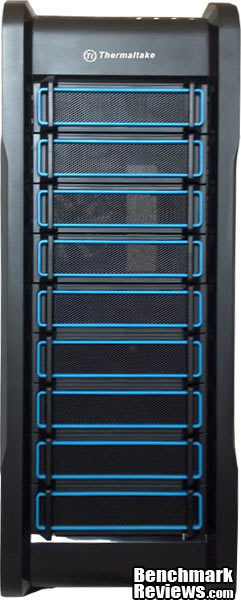
Let’s flip this thing around and take a look at the back. There’s really nothing new to see here. The I/O area is in the upper left-hand portion with the 120mm exhaust fan to I/0 area’s immediate right. Directly below the I/0 and the fan is the expansion slot area. Two holes with rubber grommets, which are designated for liquid-cooled rigs, are located to the right of the expansion area. Clearly this is set up for a PSU to be mounted at the bottom of the case. Finally, there is a small cable lock in the upper right-hand portion of the case’s backside.
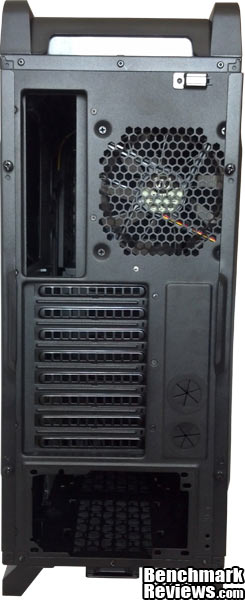
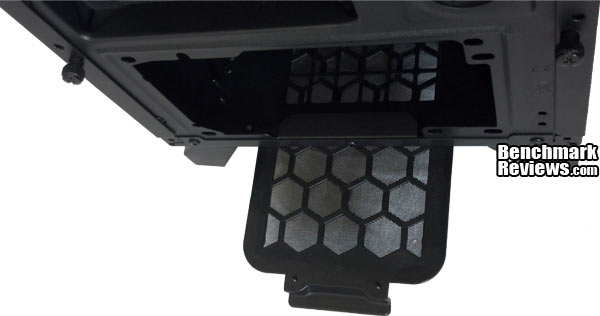
On the bottom of the computer case you will find four pretty significantly-sized feet, which each have a rubber pad to prevent movement and surface marring. A large pull-out dust filter, covering both the PSU and the optional fan areas, can also be found down there.
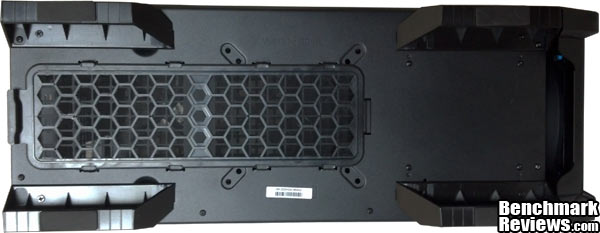
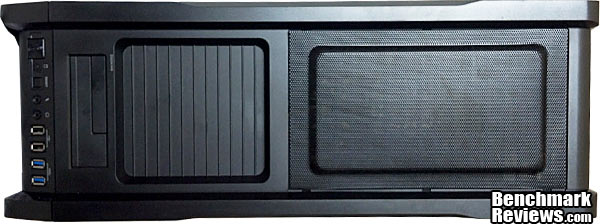
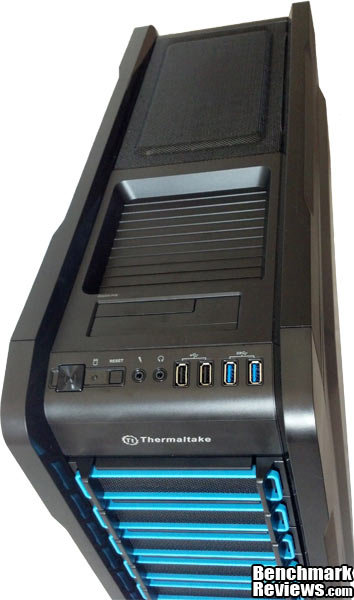
The top of the chassis has a whole lot going on. From right to left, you can see the I/O panel, the top-mounted hot-swap drive bay, a speed bump-laden storage tray, and the mesh area for the 200mm exhaust fan.
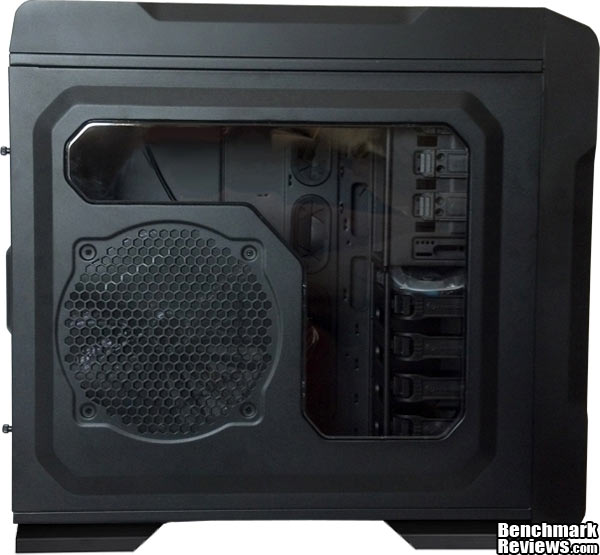
The left-side of the case has a nice big window on it so you can show off the components of your cool rig. Here, you will also find yet another 200mm fan, this one being an intake. It has blue LED illumination when on, just like the top fan.
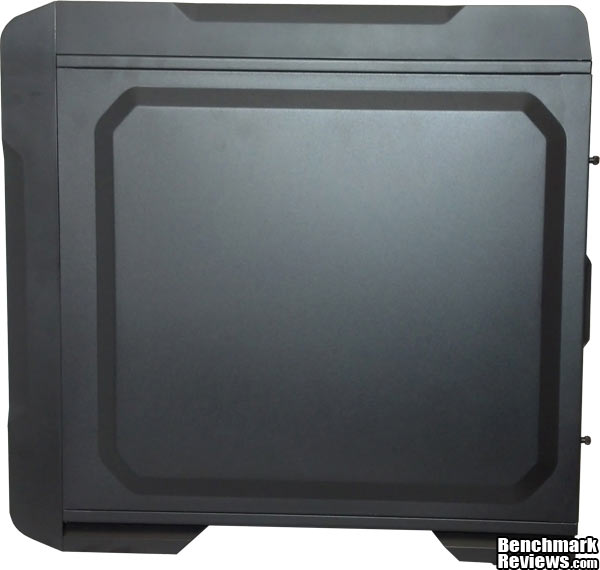
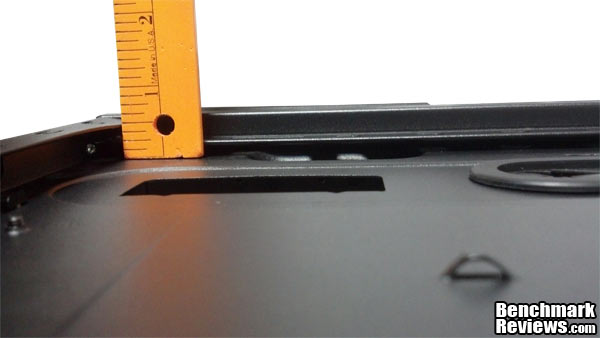
On the right-side, you won’t really find anything, with the exception of a pretty significant bulge. This same bulge can be found on the left-side, but it is way more beneficial on the right in terms of providing space for cables. That bulge provides another ~½” of width to that space.
Do you think we’re done admiring the Thermaltake Chaser A71 on the outside? Think again. Follow me to the next page where we’ll take a closer look at the external features.
All nine drive bay covers have a foam filter on the reverse side to help prevent that pesky dust from getting sucked into the case. The covers have noticeable plastic tabs on either side of the front, which helps you to contort them during removal. The quality of the covers’ construction is a double-edged sword; it makes them difficult to contort, which makes the removal process difficult, yet, you know you’re not going to break them.
One of the complaints on the Chaser MK-I was that the top-mounted hot swap was a dust (beer, potato chip, etc…) catcher. Well, Thermaltake engineered a door on the A71 that addressed these concerns. Unlike the door on the MK-I, the spring-loaded door on the A71 completely seals off the opening to the hard-drive docking station. It is actually two doors in one. The main door, which accomodates 3.5” drives, obviously hinges from the bay doorframe. The secondary door, which is for 2.5” drives, hinges from the main door allowing the main door to remain closed if you are using an SSD in the drive bay. If the above description is confusing, maybe the image below will help to clarify the hot-swap bay door situation.

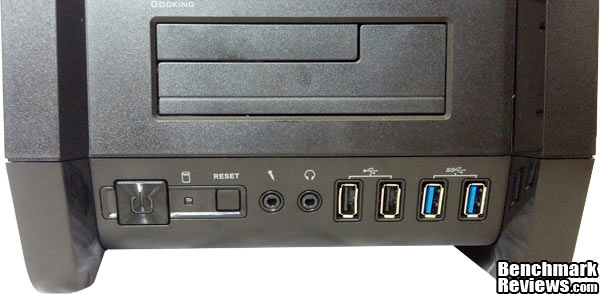
Here’s a good look at the I/O panel. From left to right we have the power button, which has blue illumination when on, the activity LED, the reset button, microphone port, headphones port, two USB 2.0 ports, and two USB 3.0 ports.
This is just another feature to really appreciate about the Thermaltake Chaser A71; the dust filter. When a company incorporates four pre-installed fans into the design of a case and bills it as having “supreme ventilation,” it should integrate dust-prevention into the chassis. Not all companies do. Thank you, Thermaltake.
There are plenty of positives to take away from this review of the Thermaltake Chaser A71’s exterior. It has a bold look, a bevy of features, and is solidly constructed. It’s time to take the panels off and see what this case has in store for us on the inside.
What are our expectations from a full-size tower? Obviously, space is on the top of the priority list. With the left-side panel removed, you can see how cavernous the interior appears. You will find 13 1/2′ of space for your video card, so you won’t have to try to squeeze it in there. If you plan on installing a custom liquid-cooling system, there is plenty of space to accommodate it as well. Oh yeah; I would be remiss if I did not mention that Thermaltake provides plenty of accessories, which includes screws, ties, stand-offs, buzzer, 8-pin extension cable, 3 pin to 4 pin adapter, a 3.5′ adapter plate, and a non-interference fan module if you do decide to go with a liquid-cooling setup.

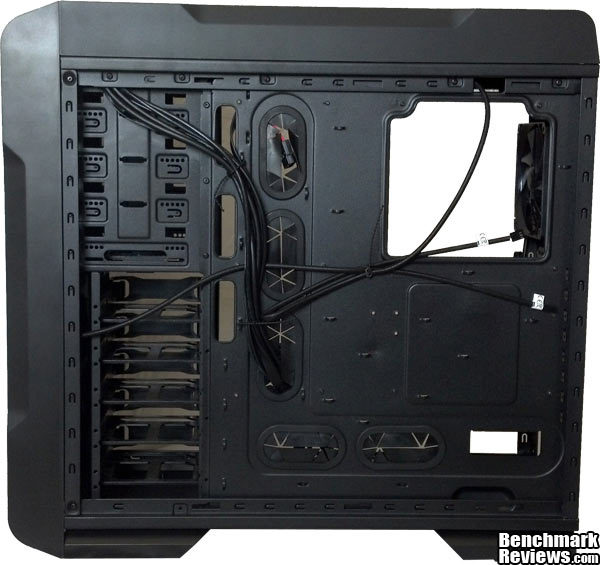
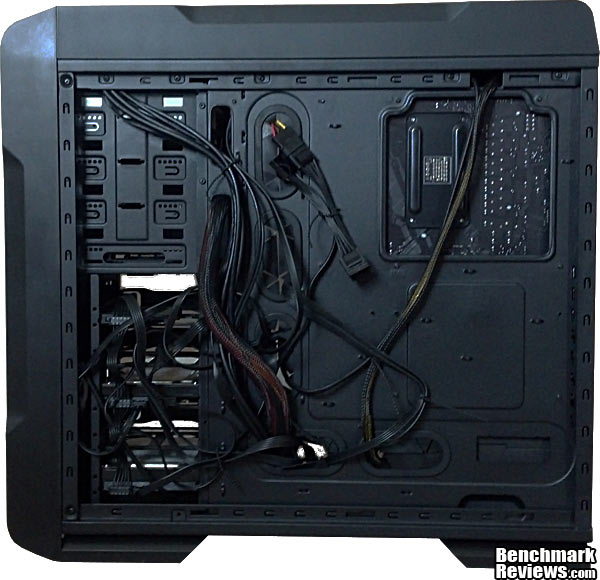
After pulling off the right-side panel, we can see behind the motherboard tray. This view reveals all of the cabling for the chassis and all of the grommets that make routing cables a breeze. I also appreciated all of the metal loops for tie-downs. The generous CPU cutout is also very noticeable, aiding CPU cooler installation.
Staying behind the motherboard, I have no doubt that you are curious to know just how much room you have back there for cables. I measured approximately a half-inch of space between the motherboard tray and the panel on the right side. However, the generous bulge on the panel door provides another half-inch of space.
Tool-less designs are not always well-designed. I have no doubt that most of you have had situations to where an ODD or HDD did not sit as securely as you had hoped, and there was no secondary option to keep it in place. I did not have this experience when installing drives in the Thermaltake Chaser A71. After removing a drive bay cover, my ODD slid right into its slot and locked securely in place.
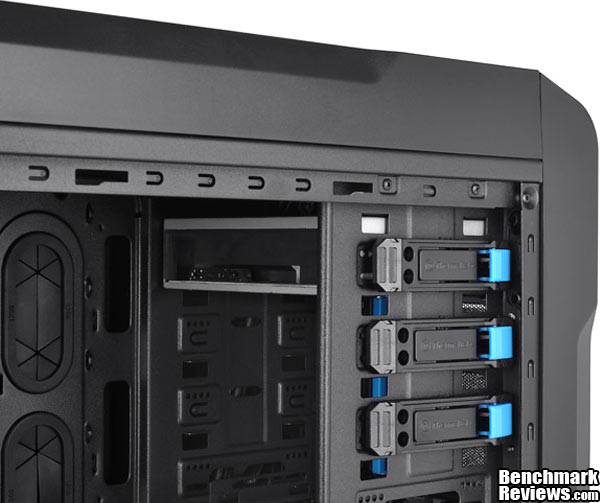
Installing my SDD and HDD’s was as smooth a process as was installing the ODD. This is worth mentioning; the Chaser A71 is not a modular design, so the HDD and ODD racks are riveted into place.
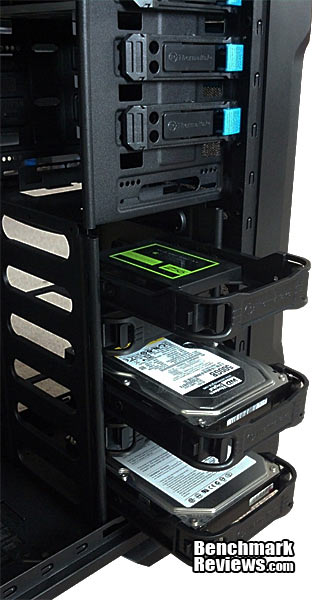
There are five HDD trays/slots in the Thermaltake Chaser A71. Again, the tool-less designs make HDD/SDD installation a simple proposition after utilizing the holes to mount your drives to the trays. Squeeze the tabs together on the front of the tray, and it slides in or out with ease. These trays stay secure as well when inserted.

We’re not quite done looking at the interior of the Thermaltake Chaser A71. There are a few more items to look at in further detail. Let’s move on…
If you’ve read this review in its entirety to this point or if you are already familiar with this computer case, you are well aware of the fact that Thermaltake made ventilation a priority on the Chaser A71. Pulling off the front bezel, you can see one of the three 200mm fans that was pre-installed. Even though this fan sits in front of the HDD rack, the rack was smartly designed to allow air to be drawn in by this fan and greatly contribute to the cooling process.
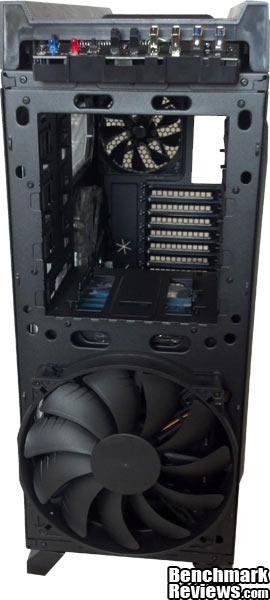
The top of the chassis is home to yet another 200mm fan, this one having blue LED illumination. There are plenty of other cooling configurations that can be implemented here, since there are holes for a pair of 120mm or 140mm fans. This space will also accept a 120mm or 240mm radiator liquid cooling system, if you so desire. Thermaltake also took more preventative measures to keep dust out by providing a nice mesh screen up there.
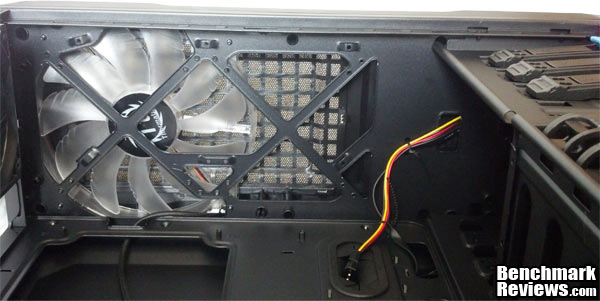
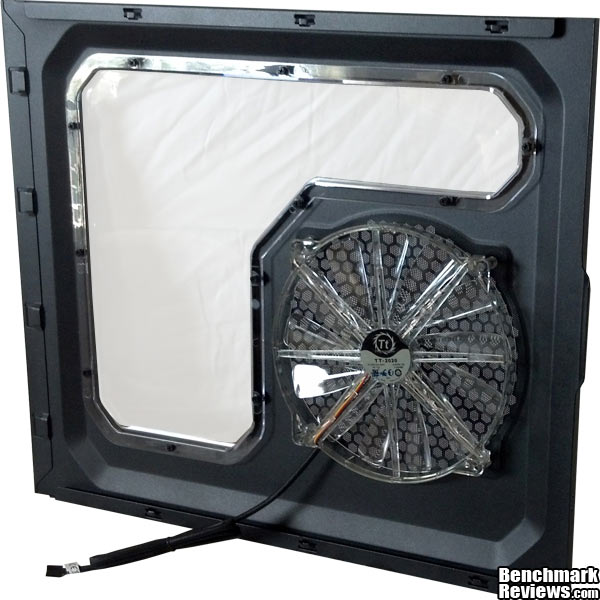
The left-side panel houses the third and final pre-installed 200mm fan. It is a blue LED-illuminated fan just like its counterpart presented above. I think a fan on the side panel is a good idea; yet, I would prefer a hinged door to add to the convenience factor.
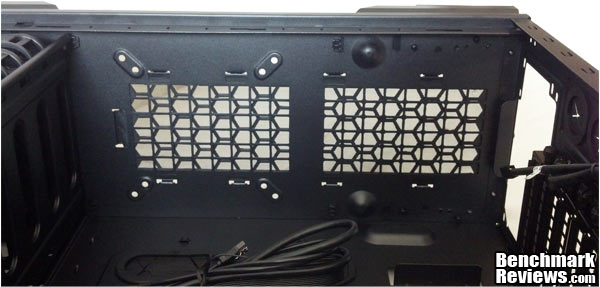
We were able to see the bottom of the case earlier. Here’s a look at the bottom of the case from the inside. This gives you a better view of the area where the PSU will be mounted. The PSU will be slightly suspended from the bottom surface by some tabs and bumps. You will also notice that there are holes to mount additional 120mm or 140mm fans. You can see the removable dust filter as well.
Next, let’s put some components in the Thermaltake Chaser A71 so you can get yet another perspective of how much room this chassis provides to a builder.
One of the best ways for a reviewer to provide the proper perspective regarding a chassis is to throw some components in there and let you know how everything went. At the end of the day, a company can boast all they want regarding the features it has incorporated into case, but if the aggregate result is not a smart design, the number of features really doesn’t matter.
Clearly, my cabling job is not the finest you will see. However, I can report that the right-side panel slid on with ease. There are several loops from which to tie down cabling, and there is plenty of room for more. Something worth mentioning; Thermaltake provided reusable tie downs rather than zip ties. I found this very convenient because I tend to change my mind repeatedly and reroute cables during a build. I’m sure I’m not the only one that proceeds in that fashion.
I wanted to include a picture with only an ATX motherboard and CPU/stock heatsink installed in order to provide a perspective of how much room there really is inside the Thermaltake Chaser A71. Clearly, a 240mm radiator and custom liquid cooling system would fit in this case with ease.
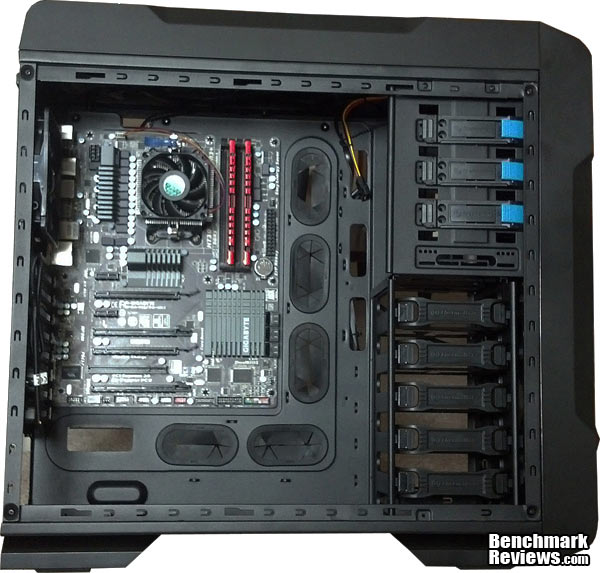
With all the components in the Thermaltake Chaser A71, the amount of room that the chassis actually provides is quite apparent. The image below does not fully capture how much space is actually remaining. Everything went into place without any issues. The ATX motherboard, for example, dropped right into place without having to worry about scraping my knuckles on the HDD or ODD cage. There is no doubt that an EATX motherboard would fit in this space.

After buttoning everything up, this rig is ready for duty. Of course, do not forget to plug in the fan on the left-side panel before sliding it into place. Unfortunately, I was unable to capture an image that provided a true representation of the blue LED illumination, which lights up all of the interior components. It looks quite sharp. These fans are also whisper quiet.
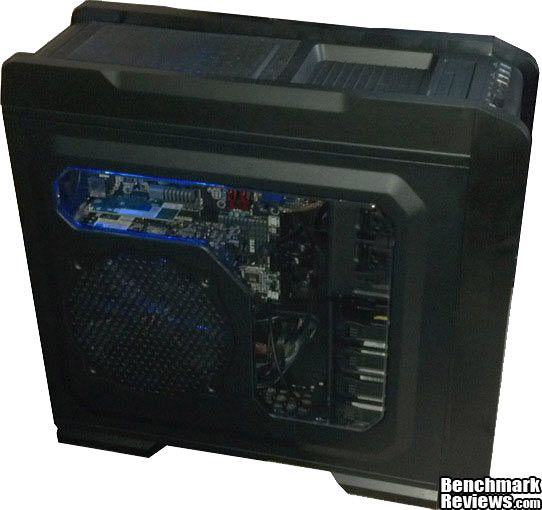
Since I already covered the ODD and HDD installation earlier, I did not feel the need to share that process once again in this section. However, I will reiterate that installing the ODD, an SDD, and the HDD’s was a simple operation. I encourage you to go back to the internal features section and read more about it.
The Thermaltake Chaser A71 was a great case for this build. Obviously, this was a pretty simple build, but there is plenty of room for expansion. For enthusiasts wanting to upgrade the stock air cooling system and go for something with at 240mm radiator and a liquid cooling setup, there won’t be any problems.
Every time I start shopping around for a new chassis, I tell myself that my priorities are as follows; features, followed by dimensions, and finally, aesthetics. However, I end up considering all of the cool-looking cases first, and if one of those visually appealing towers has the size and features I’m looking for, that’s usually the one I go with. I think what Thermaltake has in the Chaser A71 is a case that has the necessary visual appeal to grab your attention, and then seal the deal with everything else it has going for it. Yeah, it doesn’t look like Megatron, but it is still going to turn heads. In all reality, it has the look to play the role of either a gaming rig, a desktop PC found in a professional setting, or both.
In the Thermaltake Chaser A71, I found virtually nothing to complain about. It may not have the versatility of a modular design, but it is large enough and built with so much attention to airflow that its lack of modularity isn’t really relevant. If I was really going to pick nits, I would suggest making the power button easier to depress. Initially, I thought it was a touch sensor power toggle. Of course, once you realize that it takes more force to engage the power button on the Chaser A71 then you’re typically accustomed to exerting, it really doesn’t matter.
If you’re looking for a diminutive case that you can hide away or you simply do not have the room for a full-tower, this is not the case for you. However, if you are in the market for an attractive full-tower chassis that is chalked full of features, this is one to seriously consider.
Thermaltake really has a great lineup of computer cases and the A71 is a excellent addition to its Chaser family. It is a larger version of designs that were already successful, and improvements were made to enhance features that were already more than adequate. One example of the improvements implemented into the Chaser A71 is the top-mounted docking station door, which fully covers the bay in order to prevent dust and debris from collecting in it. This dedication to design excellence resulted in the Thermaltake Chaser A71 earning a 2013 Red Dot award in product design.
It’s difficult to rate a computer case in terms of performance, since so much depends upon the components put into the chassis and if a build is done properly. However, based on what Thermaltake had intended for this design, we can draw some conclusions. One of the goals for the A71 was to ensure that it provided superior airflow. Considering that it was adorned with three 200mm fans and one 120mm fan, is spacious, and has plenty of mesh, air can move freely through this chassis. Mission accomplished. Another aspect of the Chaser A71 that is a positive performance factor is the great cable management integrated into the design. There are rubber grommets a-plenty to run cables through, plenty of loops from which to tie cables down, and a cavernous area behind the motherboard tray for the cables to live. Collectively, these cable management features help performance by aiding the effort to supply air flow to the design.
What I appreciate about the appearance of the Thermaltake Chaser A71 is that it is not over-the-top, but it is also not a boring design. The fluorescent-blue coloring running around the perimeter of each drive bay cover coupled with the blue LED illumination produced by the top and side 200mm fans results in a bold, yet attractive look. This case looks great as high-end gaming rig, but still maintains the aesthetic subtlety to look perfectly normal in a professional setting.
The materials used to produce the Thermaltake Chaser A71 aren’t anything new under the sun; metal and plastic. However, the real test is how well it is put together. I looked for parts that would shake or rattle, weren’t fastened on well, or just felt cheap. I didn’t find anything like that at all. In fact, I can make an argument that some parts are too solidly constructed. For example, the drive-bay covers were a challenge to remove and reinsert simply because they didn’t flex like a cheap cover normally would. And no, it’s not because it’s just harder plastic. You would have to try to break them. The only real complaint I would have is the power button issue I shared in the “Final Thoughts” section above; it could be made easier to depress.
Not only does the Thermaltake Chaser A71 have form, but it is also long on function. The top-mounted hot-swap HDD/SDD drive bay is an under appreciated feature in my opinion. Also, the ability for this case to provide a high-quality cooling solution, whether you want to leave it stock, add some more fans, or upgrade to a liquid cooling setup, it impressive. The attention to dust prevention is another feature that helps to keep your rig performing at desired levels. Incorporating a tool-less method of HDD/ODD installation into the design is a big plus. Finally, the size just offers so much in terms of flexibility when deciding how to initially build or eventually expand.
For under $126 (Amazon / Newegg) you are getting a chassis that has a multitude of positives. For some of us, it’s hard to justify getting to that price-point for a case, but you have to consider what you are getting. And, it is the kind of case that can grow with you as you expand and upgrade.
When all is said and done, there is so many positive things to say about the Thermaltake Chaser A71, and very little to complain about, unless you want to get really picky. In honesty, it might be more case than what some people need. However, it is worth every penny of the asking price, and I highly recommend this case, especially to those planning on a moderate to high-end build, or are planning to eventually modify/expand.
+ modest, yet attractive design
+ excellent stock cooling solution
+ hot-swap drive
+ tool-less design
+ superior cable management
+ highly expandable
+ space, space, and more space
+ whisper quiet fans
+ built like a tank
– drive bay covers difficult to remove/replace
– power button depression is too rigid
-
Performance: 9.00
-
Appearance: 8.75
-
Construction: 9.50
-
Functionality: 9.00
-
Value: 8.75
Excellence Achievement: Benchmark Reviews Golden Tachometer Award.
COMMENT QUESTION: Who makes your favorite computer case?


