By David Shields
Manufacturer: Thermaltake Technology Co., Ltd
Product Name: Suppressor F51 E-ATX Mid-Tower Chassis
Model Number: CA-1E1-00M1NN-00
UPC: 841163061817 EAN: 4717964402004
Price As Tested: $119.99 (Newegg | B&H | Amazon)
Full Disclosure: The product sample used in this article has been provided by Thermaltake Technology Co., Ltd
Thermaltake has been somewhat under the radar in the custom PC world for a while now, mainly due to a string of underwhelming products. However, with the release of the Core series they’re starting to make a comeback, and their newest product is their first silent chassis design, the Thermaltake Suppressor F51 E-ATX Mid-Tower Chassis.
Boasting compatibility with up to an E-ATX motherboard, mounting for up to a large 420mm radiator, modular design, sound proofing, and a large side panel window, could this be the product Thermaltake has needed to reassert it’s dominance? In this article for Benchmark Reviews, we’ll take a look at this new chassis and compare it to the most popular silent cases on the market, the Fractal Design R5 and NZXT H440.

| Model | Suppressor F51 |
| Dimension (H x W x D) | 525 x 230 x 577 mm (20.6 x 9.1 x 22.7 inch) |
| Net Weight | 12.7 kg / 28 lb |
| Color | Exterior & Interior : Black |
| Material | SPCC |
| Cooling System | Front (intake): 200 x 200 x 30 mm fan (600~800rpm,13~15dBA) Rear (exhaust): 140 x 140 x 25 mm Turbo fan (1000rpm, 16dBA) |
| Drive Bays | 2 x 5.25’’, up to 6 x 3.5’’ or 2.5.’’ |
| Expansion Slots | 8 |
| Motherboards | 6.7” x 6.7” (Mini ITX), 9.6” x 9.6” (Micro ATX), 12” x 9.6” (ATX), 12” x 13” (Extend ATX) |
| I/O Ports | USB 3.0 x 2, USB 2.0 x 2, HD Audio x 1 |
| Fan Support | Front: 3x 120mm, 2x 140mm, 1x 200mm Top: 3x 120mm, 3x 140mm, 2x 200mm Rear: 1x 120mm or 1 x 140mm Bottom: 2x 120mm |
| Radiator Support | Front: 1x 360mm, 1x 420mm Top: 1x 360mm, 1x 420mm Rear: 1x 120mm Bottom: 1x 240mm |
| Clearance | CPU cooler height limitation: 185mm, VGA length limitation: 310mm(with HDD rack), 465mm(without HDD rack), PSU length limitation: 220mm (With Bottom Fan) |
The Thermaltake Suppressor F51 is an E-ATX mid-tower computer case, currently available online for $119.99 (Newegg | B&H | Amazon).
The front panel is covered by this magnetically locking door panel made from brushed plastic. I’ve reviewed a number of similar panels recently that had issues with picking up dust and fingerprints, but I was pleased to discover this panel was a little bit more resistant.

Behind the door we find a pair of optical drive bay covers and a removable dust filter for the front intakes. The door itself is thick and quite heavy, but also very well secured. I don’t think you’ll be seeing this one fall off at any point. As you can see, the door has a plenty of noise padding as well. One 200mm, dual 140mm, or triple 120mm fans can fit up front.

Thermaltake offers two versions, one with this windowed side panel and one that has a fan mount instead. The window is plastic and covers most of the interior, showing off your build inside. The window will show fingerprints, but it is cleaned without to much effort.

The other side panel is just a plain sheet. Both door panels are quite heavy (thanks to the noise cancelling pads) and instead of sliding into place they simply swing in and out, making replacement easy. Both panels feature captive thumbscrews, so you don’t have to worry about losing those. Fingerprints don’t stick to easily to the paint job, which is always a bonus with a black case such as this.

The top panel has mounts for triple 120mm or 140mm fans, dual 200mm fans, or a 360mm or 420mm radiator. By default, each vent is covered by a removable panel with noise reducing foam. A big improvement over the H440 and Define R5 is the addition of a magnetic dust filter. Now you don’t have to compromise noise or cooling in order to keep dust out of your chassis.

The bottom has space for a pair of 120mm fans (note you must remove one HDD cage to install more than one) as well as a pair of removable dust filters for the PSU and fans.

The back panel has our regular assortment of expansion slots (eight), motherboard backplate, and a mount for a 120mm/140mm fan. A non-standard inclusion is a security lock for your peripherals, such as your keyboard and mouse

The exterior isn’t anything special, but it is well done. A sturdy construction and resistance to damage or oily fingerprints is always worth a few points in my book. I am a fan of the magnetic filter on the top, as it’s a big improvement over the H440 and Define R5.
The interior is modular, with removable ODD and 2.5″/3.5″ bays. Removing the bays frees up space for a longer water cooler or another top intake, another fan on the bottom, or a water cooler in the front. With the HDD bays in place you get 310mm of GPU clearence, without them you get 465mm. If you install a bottom fan your PSU is limited to 220mm, otherwise any PSU will fit. Finally, CPU coolers of up to 185mm will fit inside quite cozily.

Removing the front panel reveals another removable dust filter. Ostensibly to provide filtration for the side vents, it doesn’t completely cover the pre-installed 200mm fan, so some dust could make it’s way in. 120mm or 140mm fans shouldn’t have a problem though.

A PSU support bridge is included to provide a small degree of clearance for the PSU fan, improving airflow. As it also has rubber padding it reduces vibration noise as well.

Six bays for 2.5″/3.5″ drives are included. 3.5″ installation can be done without tools, but 2.5″ installation requires screws. The trays are sturdy and not inclined to bend or break under duress. Removing the bays requires unscrewing thumbscrews from both inside and on the backplate.

This photo shows off the triple soundproofed covers. Each cover is made from thick plastic and covered with sound proof padding. You can remove any number of pads to install additional cooling, but you will sacrifice some noise reduction.

The back panel features numerous rubber grommets and tie-down points for cables. 12.7mm of cable management space is included, and since the noise padding is recessed into the panel, it won’t encroach on that space. The motherboard cutout is 203mm wide. Also included are four fan connectors for the front fan controller.

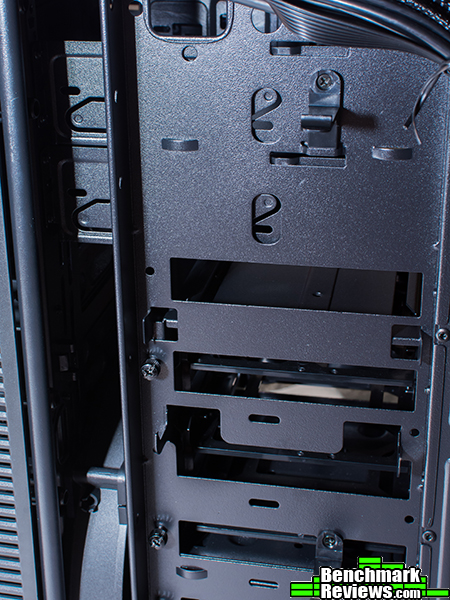
You might be wondering, what do I do if I remove all the 2.5/3.5″ drive bays? Well, you could always mount drive in the ODD bays or you can secure two of the trays to the backplate using the shown mounting points.
The Suppressor F51’s interior is pretty basic and has most of the features we’ve come to expect from recent silent case designs, such as removable storage bays. A few added perks, like a PSU support and rear 3.5″ tray mounts, are nice bonuses.
Many have compared the Suppressor F51 to the Fractal Design R5, claiming that Thermaltake has simply ripped off the R5’s design. I have reviewed the Define R5 here on benmarkreviews.com, and yes, they share a number of similarities. But if they were identical, what would be the point of having a Suppressor F51? For starters, it’s a good bit larger. This means additional air cooling, additional water cooling options, and compatibility with E-ATX motherboards. Additional improvements like the rear 3.5″ mounts and the magnetic dust filter on top are great additions.
The Suppressor F51 performs about as well as you might expect from any case. It has all the features you could need while running nice and silently. However, considering that you can install up to nine 120mm fans, we really could have used more fan plugs.
I wouldn’t call this especially elegant or good looking. It’s really just a black box, and I definitely dislike the grilled design of the front panel. Thankfully it’s hidden so long as the door is closed. On the plus side, I appreciate the exterior’s resistance to scratches and fingerprints.
Not only is this sizable for a mid-tower, but it’s incredibly well built. At no point did I feel that something was going to break, snap off, or get stuck. Of course, the build does make the case a little heavy. My sole complaint was the design of the inner thumbscrews securing the HDD bays. Instead of placing them on the outside, they are located directly next to the motherboard tray, making access a little awkward. They were also extremely tight, forcing me to use a power drill to get them off.
Functionality was looking all fine and dandy…until I pulled off the front cover and saw the second filter. Why in the world would you include a 200mm then place it behind a filter that doesn’t cover it? While you probably won’t see significant dust accumulation from that, it’s still such an obvious design fault you can’t help but wonder. Also, I mentioned earlier only having four fan plugs from the controller means you’ll have to invest in additional equipment to control more than that. I do like the mounting system on the backplate. The H440 is limited to 2.5″ drives without the trays while the Define R5 can only use the ODD bays, but the F51 isn’t, which is good for people like me who use both 2.5″ and 3.5″ drives.
The Suppressor F51 is currently available online for $119.99 (Newegg | B&H | Amazon), making it slightly more expensive that the Define R5 and H440. But I might consider the price justified overall giving the added cooling features. I only wish it also had just a little bit more modularity, then it could be considered an excellent value.
Despite it’s similarity to the Define R5, it’s still a strong product if you want a little bit more room or that extra cooling. But if neither of those are necessary, or the few extra perks like top filters or rear mounted 3.5″ drives don’t appeal to you, you’ll probably prefer the H440 or Define R5.
+ Sturdy construction.
+ Resistant to marks and oily fingerprints,
+ Plenty of cooling potential.
+ Soundproofed, modular design.
+ Filtered front, top, and bottom.
+ Mounting points for 2.5″ and 3.5″ drives on back.
– Poor filtration for side vents.
– Difficult to remove HDD cages.
– More expensive than a H440 and Define R5.
– Only four connectors to the fan controller.
-
Performance: 9.00
-
Appearance: 8.75
-
Construction: 9.25
-
Functionality: 8.75
-
Value: 8.75


