By Julian Duque
Manufacturer: Tenda Technology Co.,Ltd.
Product Name: Tenda AC15 AC1900 Smart Dual-Band Gigabit WiFi Router
Model Number: AC15
UPC: 885397270379
Price As Tested: $89.99 (Newegg l Amazon)
Full Disclosure: The product sample used in this article has been provided by Tenda.
It used to be a pretty well understood fact that merging to the 802.11ac wireless standard was an expensive task, with just the thought about having to replace both your router and wireless card made anyone’s wallet shudder, but that was back in 2013. Come back, three years in the future, and we encounter devices like the one Benchmark Reviews has in it’s hands today. The Tenda AC15 AC1900 Router is not only AC capable, but it features a Broadcom’s BCM4708 Wi-Fi chipset capable of delivering speeds of up to 1300 Mbps over the 5 Ghz band. Astonishingly, it comes at only $87.99, which is the lowest price tag we have ever encountered on any AC1900 router.
To give you some contrast, let’s talk about something you have probably heard off during the past days relating to wireless connectivity. Google’s OnHub Wireless has become essentially the most talked about router during 2015, featuring things like 13 “high-performance” antennas, seamless control through a mobile app, speakers and ambient lights, a design that resembles a Mac Pro waste basket. and yes, speeds up to 1300 Mbps over the 5 Ghz band which is exactly the same as Tenda’s offering for more than twice of the AC15’s price. But in Google’s defense, the OnHub is targeted to a much difference audience. The Tenda AC15 is probably not going to blend with your furniture if it was set in the middle of your living room, and is probably not going to be configured through a Bluetooth enabled smartphone. Yet, it wouldn’t be a surprise if they both performed equally as well.

AC1900 vs AC1750
Although both of these standards have been out for quite some time, I think it is time to revisit their differences briefly. In a simple sentence we can simply sum up that AC1900 routers using Broadcoms’ BCM4360, BCM4708, and BCM4709 SoCs use a classic 3×3 5G WiFi 802.11ac Gigabit Transceiver for both the 5 Ghz and 2.4 Ghz bands. Meanwhile, all AC1750 routers use an 802.11ac device for the 5 Ghz radio and an older 802.11n for the 2.4 Ghz radio. Broadcom achieved this by tweaking it’s drivers to enable 256-QAM modulation and coding when using both bands, allowing the 2.4 Ghz radio a maximum 40 Mhz bandwidth which allows a maximum 600 Mbps transfer speeds, and labelled it “TurboQAM”. Now, this does not mean that you can upgrade your AC1750 router to AC1900 with a simple firmware update. As noted earlier, this tweak only works because of an upgraded transceiver that has 802.11ac capabilities over both radios.
Courtesy of Tendacn.com
| Hardware | |
| Internet Connection Type | Dynamic IP, Static IP, PPPoE |
|---|---|
| Dynamic IP, Static IP, PPPoE | IEEE 802.11ac/a/n 5GHz, IEEE 802.11b/g/n 2.4GHz |
| Interface | 1*10/100/1000Mbps WAN, port 3* 10/100/1000Mbps LAN ports, 1* USB3.0 port |
| Antenna | 3*3dBi external dual band antennas |
| Frequency | Works over 2.4G and 5G concurrently |
| LED | 1*Power, 1*Internet, 3*LAN, 1*5G, 1*2.4G, 1*WPS, 1*USB, 1*SYS |
| Button | 1*Power on/off, 1*WiFi on/off, 1* Reset button,1* WPS button |
| Power Input | 100-240V—50/60Hz 0.3A |
| Dimension | 8.9 x 7.07 x 3.02 in (226 x 179.5 x 76.6mm) |
| Software | |
| Operating Mode | Wireless router mode, WISP mode, Universal repeater mode |
| VPN Pass-through | IPsec pass through, PPTP pass through, L2TP pass through, PPTP server, PPTP client, L2TP client |
| USB Sharing | Samba, FTP Server, Media Server, Printer Server |
| Other Function | Smart WiFi Schedule, Smart Power Saving, Smart LED on/off , Tenda Cloud Tenda App |
| Default Settings | Default Access: tendawifi.com |
| Transmission Rate | 1900Mbps(5GHz: Up to 1300Mbps, 2.4GHz: Up to 600Mbps) |
| Security | WPA-PSK/WPA2-PSK, WPA/WPA2, Wireless Security: Enable/Disable, WPS fast encryption |
| Others | |
| Certification | CE, FCC, RoHS, BSMI, NCC, EAC, C-tick, IC |
| Package Content | AC1900 Smart Dual-Band Gigabit WiFi Router, Stand, Power Adapter, Install Guide, Ethernet Cable |
| Temperature | Operating Environment:0~40 ;Storage Environment:-40?~70? |
| Humidity | Operating Environment:10%~90% RH non-condensing ;Storage Environment:5%~90% RH non-condensing |
There is nothing really fancy included with the Tenda AC15 wireless router. This has come to be expected considering the low price point being targeted. There is no PoE injector (mainly because the Tenda AC15 does not support PoE), the installation guide is short yet straightforward, and there is no wall mounting accessory. Tenda does include a charger, an Ethernet cable, technical documentation, and a stand that allows the router the be mounted vertically. 
The Tenda AC15 measures 8.9 x 7.07 x 3.02 in (226 x 179.5 x 76.6mm) which is average when compared to similar routers such as the ASUS RT-AC68U. Tenda does expect you to use it primarily using the included stand, as there are no wall mounting accessories included. Laying it down horizontally against a surface is probably not a good idea as the antennas can not be turned so they are the facing towards the top and the connections at the back would be squeezed by the weight of the router.
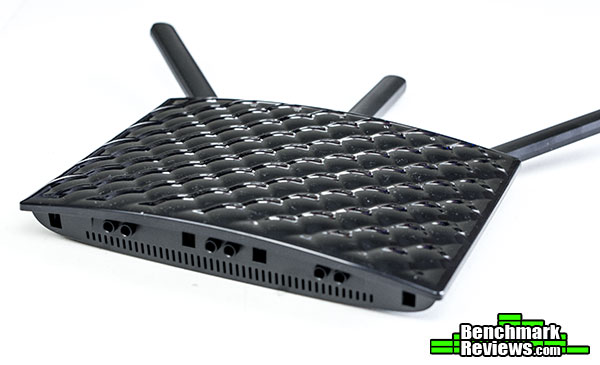
The front of the Tenda AC15 is decorated by a very peculiar plastic design. It feels soft to the touch, and it avoids the common fingerprint problem that many routers with a soft metallic finish use. But I still feel like Tenda should have included a more subtle design. Most of our readers would agree that it has become quite the trend for hardware enthusiasts to make more minimalistic designs with less flashy features.

In terms of outputs and inputs the Tenda AC15 has plenty of options. At the top we find three buttons, one for WPS, one for WiFi off/on, and another one for resetting the router. At the back we also find a power on/off button, a power port, one USB 3.0 ports, one RJ45 WAN port, and three RJ45 LAN ports. In terms of front facing indicator LEDs we find one Power, one Internet, three LAN, one 5G, one 2.4G, one WPS, one USB, and one SYS indicators.


Now that we have seen the exterior of the Tenda AC15, let’s crack it open.
Although the AC15 is not a serviceable unit, it’s still fairly easy to crack open. Behind the router, there are two easily accessible Philips screws that hold the Tenda AC15 together. Asides from removing them, you will still need to pry open the casing, for which there is a small insertion along one of the sides of the router as if Tenda expected you to open it.I used a small flat head screw driver to unlock the plastic tabs located around the edges. Inside we find a small PC board with all the components, as the antennas are external. There are no metal plates, or ballasts inside to add weight to the unit, but that shouldn’t matter as the Tenda AC15 is supposed to be set on the included stand.

A general view of the internals reveal that there is no vents on the front side of the AC15 as this is were the back of the PCB is facing. However, at the back, there seem to be plenty of small openings that allow air to flow more than adequately inside the router. This is important, as we observed that other AC1900 Broadcom chipsets do tend to run warmer than previous ones such as those found in AC1200 routers. Curiously the antennas are directly connected to the back of the board and not soldered, which is probably a cost saving feature as the antennas will not be replaceable as with more expensive options.

The first thing that stands out from looking at the front is that almost all the components inside the router are covered by a single heatsink. Along the top are the three input ports consisting the WPS, WiFi on/off and reset buttons witch are soldered to the motherboard. The antennas are also located at the top, isolated from the PCB, making only a very slight contribution to the weight of the router itself. Back at the bottom, squeezed between the heatsink and the RJ45 Ethernet ports we find the isolation and impedance matching pulse transformers that keep the Ethernet signal noise free. There are no shielding devices located inside the Tenda AC15 with the exception of the aluminum heatsinks themselves.
While the chipset and overall architecture are sourced from Broadcom, the board found inside the Tenda AC15 differs slightly from the reference board by moving some of the inputs to the top of the unit. Unfortunately it would be almost impossible to get the aluminum heatsinks off without destroying them, and most of the time, damaging the board itself. For this reason we will not be looking at a detailed layout of the PCB itself. Usually, we would also go into deeper discussion of the overall architecture of the chip found inside, which is were technology gets interesting. But unfortunately, Broadcom is pretty strict with the technology inside their chips. For now we will skip to our testing methodology.
To test the Tenda AC15 Wireless Router I used two similar test applications, both of which are specifically designed for testing network throughput. The first one is Passmark Performance v7.0 Advanced Network Test. The second one is TamoSoft’s Throughput Test v1.0, Build 28. These tests measure throughput between two PCs connected through a router, switch, or access point and normally, the router, switch, or access point is the device that is under test. With a known baseline for the router, switch, or access point you can also test the performance of other devices in the communication chain, such as wireless adapters or network interface cards (NICs). In order for this test to work one PC must be set up as ‘Client’ and the other must be set up as the ‘Server’. Each test was run at least five times with the highest and lowest result omitted and the remaining results averaged to give a final result.
A baseline benchmark speed was established before with a GbE network switch connecting the server and client workstations used in both of these tests. Both systems have been part of the same network for a long time, and can easily sustain Gigabit transfer speeds and higher over wired LAN.
PassMark Advanced Network Test

This benchmark eliminates most of the variables involved in network speed testing, but not all. The PCs themselves can introduce spurious issues, such as hardware bandwidth limitations, resource conflicts, wait states, and buffer inconsistencies. In some cases, the networking hardware is having issues communicating with other networking gear. The following chart shows why you have to dig a little deeper than just looking at the Average Transmission rate that is displayed on the main screen. For some reason, at the start of this test the two systems were having a hard time establishing a rapport. The average value (shown in yellow) doesn’t really reflect the true capability of the network until things start to settle down around the ten second mark. The default time period that’s set in the software for this benchmark is 2 seconds, and the calculated average result after 20 seconds is more than 20% lower than the average after 2 minutes. I maxed out the test period to 200 seconds, and was finally able to see some convergence on the data rate after the first minute or so.
TamoSoft Throughput Test

For the second set of tests, I used an application that our own Bruce Normann discovered when trying to get the measure of some 10GbE networking gear that was on his test bed at the time. The graphs I show from Passmark Performance v7.0 Advanced Network Test are only available for viewing after the test is complete. Plus, there is a 200 second limit for the Passmark software, which TamoSoft does not have. Oh, and did I mention that you can run the TCP/IP and UDP tests at the same time? Results for both upload and download are presented, and I ended up using the two download averages for reporting purposes. The packet loss and Round-trip time are shown as well, although this information isn’t truly relevant for our purposes. TamoSoft has a bunch of additional test applications that are more comprehensive and are available for purchase, but this one is free for downloading.
-
Motherboard: GIGABYTE GA-MA785GM-US2H AM3
- NIC: Realtek 8111C
-
System Memory:G.SKILL 4GB (2 x 2GB) F2-5300CL4D-4GBPQ
-
Processor: AMD Phenom X3 8600
-
Disk Drive: Samsung 850 Pro 256GB SSD
-
Enclosure: SilverStone SG13
-
PSU: Corsair CX430
-
Operating System: Windows 8.1 Pro
Client
Alienware 13
- Processor: Intel® Core™ i5-4210U
- Wireless: Killer 1525 802.11ac 2×2 WiFi
- Memory: 8GB Dual Channel DDR3L (2x 4GB)
- Operating System: Windows 10 Home
Support Equipment
- 10-Feet of Category-6 Solid Copper Shielded Twisted Pair Patch Cable
Testing Procedure
If you have ever worked with a wireless network you are probably aware of the random degradation of Wi-Fi signal in a typical home or office environment. A drop in signal strength comes along with a lower maximum data rate, and are usually caused by barriers between the signal provider and the receiver. Added to this, the increased traffic caused by various devices using the same band has caused a saturation of the 2.4 Ghz band, with most buyers nowadays looking to take advantage of the less congested 5 Ghz band. It is almost impossible to obtain a location with no traffic near a location in which an internet provider provides access to the net. To avoid this variation in traffic, each of the tests in this review is conducted at night (between 2:00 to 3:00 am) when the traffic is low.
Ultimately, we want to measure the performance of a router, even when there are barriers which are all common within the Tenda AC15 target market which includes small businesses, medium sized homes, and gamers. So we have picked three locations that accurately represent three typical client locations. Our network consists of a server connected to the Tenda AC15 Router through 5 feet of Cat-6 cable. The location of both the server and router remained static throughout all the tests. The router was placed on the middle of a a room central to our test building. The client consists of an Alienware 13 laptop with a Killer 1525 WiFi adapter, probably one of the most popular among high-end gaming laptops due to it’s high throughput, low latency, and yes, compatibility with ac wireless. The first location was right next the router, at a distance close to 3 meters or 10 feet with no obstacles and a clear line of sight between the client and the router. The second location was in a room 15 meters away (around three rooms away), two floors higher and with three wooden walls of your typical Florida building being the only obstacles. The third location was in the ground floor of the building (were the router is located), 40 meters away from the installation point, with two walls and a storage room filled with computer cases, clothes, and other equipment acting as barriers in a “worse” case scenario in both of our tests.
The encryption level was set to WPA2-PSK at all times. It is true that you get better speeds with no encryption, but most users have come to realize the importance to having a protected network and will most likely use it. The Killer 1525 WiFi adapter is a 2×2 adapter compatible with the 802.11ac protocol, which will limit our throughput to 867 Mbps over the 5 Ghz band in theory, however that is almost never really achieved unless you are in a perfect environment with absolutely no traffic. This test concentrates on 802.11ac for both 2.4 Ghz and 5 Ghz bands since there is no point in proving that new hardware works with an outdated protocol.
The first thing to note is that these benchmark results show ‘Real-World’ throughput. Nobody using Wi-Fi is actually getting the throughput performance that’s highlighted on the front of the manufacturer’s box. Those are theoretical numbers, and they refer to the raw data bitrate that’s possible with the hardware in question. In this particular test, with the router and adapter in the same room, we are still limited by the card in our client to 867 Mbps, which was reached at peak points during our testing. But, between the data encryption that I was running and the error handling overhead of the various communication protocols, the average effective data rate is always going to be much lower.

For this test we will only be using TCP as our Transfer Protocol. Our time was set to 200 seconds, as the router does not reach a steady state signal until around 40 seconds after starting the test. Tenda did not provide any indications as to how to conduct a test of the AC15 router, so we left everything in the router settings as default, with the exception of enabling encryption. PassMark results are only shown as upload speeds from the client side, in this case we are uploading from WLAN to LAN.

This first test was conducted three meters in front of the router which is our model for having the router in your same room with a clear line of sight. The results are strong, managing an average 255 Mbps download speeds with peaks close to 800 Mbps occurring randomly through our 802.11ac performance tests. Our 2.4 Ghz were also impressive, and this can be easily attributed to having a single transceiver that allows 802.11 ac over the 2.4 Ghz radio. Nowadays 94 Mbps over wireless is still plenty to spare, taking into account that the average network speed provided by ISPs goes around the 50 Mbps segment.
Distance is not the only deteriorating factor to the signal provided by the router. Obstacles such as walls, waves emitted by appliances, and even things like clothes and insulation can brake the overall data signal. Of course, the stronger the signal provided by the router, the higher chance of having a stable signal even after setting various obstacles between the router and the client. At 15 meters with three wooden walls acting as obstacles our 802.11ac signal dropped by more than half the throughput when compared to 3 meters with no obstacles.
In the last of our locations, the client never seemed to to finish the test at 5 Ghz due to a lost connection with the server, although at 2.4 Ghz it still managed to get some packages over without losing complete connection, but the slow speeds were obsolete. This is probably the main weakness for 802.11ac devices, as 802.11n provides better results with longer distances and obstacles.
TamoSoft is a privately held company based in Christchurch, New Zealand that develops cutting-edge security and network monitoring software for the Internet and Local Area Networks. The TamoSoft Throughput Test is a utility for testing the performance of a wireless or wired network. This utility continuously sends TCP and UDP data streams across your network and computes important metrics, such as upstream and downstream throughput values, packet loss, and round-trip time, and displays the results in both numeric and chart formats.

Although we have played around with the settings of this software, we always seemed to get the best results when leaving the settings as default. TamoSoft’s throughput test provides plenty of tools, ironically more than PassMark’s network test which requires the purchase of a license. Just like the previous test, we will only be reporting averages after 200 seconds which is a lot of time to get a stable throughput measure.

Using UDP, about 5% of the packages were being lost on all five runs at 3 meters. This is fairly common as we have seen in the past with different TamoSoft builds the results were still very similar. TCP throughput was stellar, showing very similar results to the PassMark tests in both download and upload streams. Quite curiously, our TCP results in PassMark were equal to those using UDP Down in TamoSoft over the 5 Ghz band, but the 2.4 Ghz results were increased by 20 Mbps using UDP Throughput did hit peaks of 800 Mbps again at 5 Ghz, while at 2.4 Ghz throughput remained constantly high with not many spikes.

At 15 meters we still good with TCP numbers dropping by only a couple of Mbps when compared to the 3 meter test. Package lost reached 15% at 5 Ghz. At the 2.4 Ghz band we saw equally loss in throughput, mainly because the AC15 allows 802.11ac signal over the 2.4 Ghz radio. Results are still consistent with the ones from the PassMark Network Test, with peaks of 800 Mbps and some loss when increasing the distance by some meters.
In this case, TamoSoft didn’t even connect to the server at our 40 meter distance test, but that is common in all of the home routers we have tested. I think it is time for a conclusion.
If you are looking for the ultimate router with an astonishingly appealing design, the Tenda AC15 is not right for you. Not only does it seem out of place in the year 2015 in terms of appeal, with the industry leaning towards more “futuristic” looks, but it even fails to do things like being placed horizontally on a surface while keeping the antennas facing upwards. However, let’s face it, if you are like most of the world, you will probably end up hiding your networking equipment behind furniture or inside a cabinet somewhere in your house. If that is the case, then the Tenda AC15 makes a really strong case for being the best performing router per dollar Benchmark Reviews has taken a look at.
If all you care about is performance, then the Tenda AC15 is the right router for you. Who cares about mounting the router on a wall and flashy features like MU-MIMO compatibility right? The Tenda AC15 gives you the performance of devices that are almost twice it’s price and still maintains a very robust web interface with what is a very easy setup. At 15 meters with some obstacles between the client and the router we had speeds of more than 250 Mbps, which is an excellent result when compared to other AC1900 routers.
Now all that performance at such a low cost means that Tenda needed to cut some corners. Alright, it doesn’t look that bad, but if they had simply left the front with a simple, plain, matte black design with a Tenda logo and the indicator LEDs I think the AC15 would have turned to be more likeable. Instead, the soft plastic is a dust magnet and looks a bit out of date.
When opening the Tenda AC15 we noticed that inside it looks just like most AC1900 models out there with the blue Broadcom PCB and a single large heatsink in charge of maintaining the router cool. Tenda handles this heat with plenty of small openings on the back of the router to allow that hot air to get out from the enclosing. Next time, Tenda should have included removable antennas, as the ones included can not be removed or turned so that they face upwards if you were to place the router horizontally.
As router, the Tenda AC15 has 3 Gigabit LAN and one Gigabit WAN (for internet) ports on it’s back. This is normal number of ports for a home router. The AC15 is average in size, so it is quite surprising that Tenda still managed to include a USB 3.0 port to host a permanent storage device at the back, which means that handling a NAS connected directly to the router will not be as messy.
I was a bit skeptic at first, as for me, Tenda was relatively unknown prior to writing this review. But after writing this review I think that for $89.99 (Newegg l Amazon) you are getting quite a lot. Specially considering that other AC1900 routers retail for almost twice that cost.
+ Extremely inexpensive AC1900 router.
+ Great performance in both the 5 Ghz and 2.4 Ghz radios.
+ Included stand.
– A more detailed manual should be included.
– Antennas are not removable and can not be rotated completely.
– No wall mounting accessories.
-
Performance: 9.5
-
Appearance: 7.5
-
Construction: 9.0
-
Functionality: 9.5
-
Value: 10.0