By Meng Vang
Manufacturer: Cooler Master Ltd. Inc.
Product Name: MasterCase 5
Model Number: MCX-0005-KKN00
UPC: 884102027246
Price As Tested: $104.95 (Amazon | Newegg)
Full Disclosure: The product sample used in this article has been provided by Cooler Master.
The Cooler Master MasterCase 5 offers an evolutionary way of customizing a computer system for any type of purpose. Whether it is for productivity or gaming, the MasterCase 5 is able to be upgraded to any configuration without much problem. With Cooler Master’s new FreeForm Modular System, computer users will now be able to take control in fully customizing the exterior and interior parts of the case.
Because of the FreeForm Modular System, this will allow any user to customize, adjust, and upgrade the case as their needs change over time. Extra parts, such as the top cover kit, HDD cages, SSD pockets, and the side panel window kit, can all be purchased separately at any time when needed. This allows any user to upgrade the case, making it theirs, instead of replacing it entirely. Benchmark Reviews is excited to review the Cooler Master MasterCase 5 along with the additional side panel window kit. Let’s go ahead to see what Cooler Master has brought to the table.

| Model | MasterCase 5 | ||
| P/N | MCX-0005-KKN00 | ||
| Available Color | Dark metallic grey exterior with black interior | ||
| Materials | SECC, Plastic | ||
| Weight | 10.6 kg/23.4 lbs | ||
| Size (WxHxD) | All | 235x512x548mm | |
| Body | 235x460x460mm | ||
| Mother Board Support | ATX, m-ATX, M-ITX | ||
| Expansion Slots | 7 | ||
| Drive Bay | 5.25″ ODD | 2 | |
| 3.5″ HDD | 2 | ||
| 2.5″ SSD | 2+2 | ||
| Electronics | I/O port | U3 x2, Audio | |
| Fan speed control | N/A | ||
| Pre-install fans | Front | 140mm x1 | |
| Top | N/A | ||
| Rear | 140mm x1 | ||
| Fan Support | Front | 120/140mm x3 | |
| Top | 120/140mm x2 | ||
| Rear | 120/140mm x1 | ||
| Water Cooling Support |
Front | 240/280mm radiator, up to 40mm thickness without fan | |
| Top | N/A | ||
| Rear | 120/140mm | ||
| CPU Air Cooling Support | 190mm/7.5inches | ||
| VGA Card Support | w/ 3.5″ HDD Cage | 296mm/11.7inches | |
| w/o 3.5″ HDD Cage | 412mm/16.2inches | ||
| Cable Management | 25mm | ||
| Dust Filters | Front/Top/Bottom | ||
| Power Supply Type | Bottom Mount, ATX PS2 | ||
| Remark | No Top Cover No Front Door |
||
MasterCase 5 comes with all the essential accessories to complete your build. Aside from the user’s manual and warranty information, a few zip ties, screws, fan adapters, and a fan bracket all come in a nice cardboard box. A motherboard standoff screw is also included in the box to help tighten the motherboard standoffs without having to use a wrench.

Taking a look at the front of the case, we notice the front panel ports are located at the top along with two 5.25″ ODD expansion bays. I/O ports include two USB 3.0 ports in black, standard headphone and microphone jacks, HDD activity LED, a reset button, and a power button. The mesh front dust filter is removable and the entire front panel is ventilated to allow the best possible airflow to the internal components.

There is not much to see on the side panel to the MasterCase 5, but do notice that captive thumbscrews are included on both side panels and throughout the exterior and also the interior layout. This is something I have been waiting to see for a long time and I am very happy to see Cooler Master finally listening to customer feedback and putting captive thumbscrews on the MasterCase 5. The side panels also include their own hinges at the bottom to prevent them from falling off when removing them. Nice little improvements like these do go a long way.

The rear of the case has a standard layout with the addition of a safeguard at the bottom; great for securing a wired mouse or keyboard during LAN parties. A 140mm exhaust fan is also preinstalled on the adjustable mounting fan strips. A power supply mounting bracket is included for installing a PSU, but we will come back to this later.

Taking a look at the top of the MasterCase 5, there are two plastic-covered handles with medal underneath that are attached to the frame. The top mesh does include a dust filter but it can only be taken out if the four screws are removed. Two 120mm fans or two 140mm fans can be installed here at the top, but installing a 240mm or 280mm radiator with fans will require the top cover kit. The top cover kit includes a radiator bracket and a mesh top cover, which is sold separately for the MasterCase 5 but included with the MasterCase Pro 5.

The bottom of the case is very simple with an easy to remove dust filter for the PSU and large rubberized feet. This should give plenty of room to allow the PSU to breathe.

Now that we have seen a quick look, let’s go ahead to show more about the features the MasterCase 5 has to offer.
Once the front panel is removed, we can see there is a single 140mm preinstalled fan at the front with room for up to three 140mm fans total. Being able to install three 140mm fans at the front is something we do not normally find in a mid-tower computer case. Installing a third fan will require the removal of the ODD cage to install the fan bracket that is already included in the accessories box.

The internal structure looks great with the large CPU cutout and three rubberized cable routing holes on the motherboard tray. FreeForm Modular System will allow the ODD and HDD cages to be adjusted or removed for the best possible airflow. MasterCase 5 comes with a single 2-bay HDD cage that can be removed via its own captive thumbscrews. This cage will support up to two 2.5″ SSD’s or two 3.5″ HDD’s. At the very bottom is the power supply chamber where an additional 2-bay HDD cage can be installed closer to the front of the case.
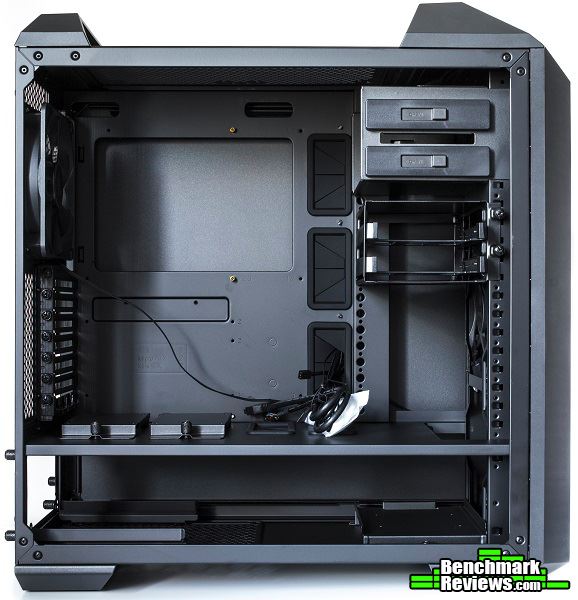
Behind the motherboard tray are a few Velcro straps for cable management that lie right on top of a small channel for the cables to run through. Unfortunately, we do not see any other cable tie-down points aside from the two that are located closer to the rear of the case. Two SSD Slip-and-Clip pocket bays can be installed right under the CPU cutout to add more storage to the system or just to give the interior a cleaner look overall.

Power supplies can only be installed by removing the power supply bracket and sliding it into the chamber. The bracket can be removed by undoing the four captive thumbscrews and securing the bracket onto the PSU using four additional standard screws.

Here we have a closer look at the power supply mounting rails. Although this is not something new to the market, it is a great feature to have. Removing a redundant or a fully modular PSU can be done very quickly thanks to this feature.

There are too many details to go over on this page, so let’s go over a few more details in the next section.
The 2-bay HDD cage can be removed, adjusted, and installed in the power supply chamber. It can also be adjusted closer to the power supply in order to make room for a radiator at the front of the case. Also keep in mind there is 40mm of clearance space for a front radiator.

The mounting holes on the Clip-and-Click panel for the 2-bay HDD cage allows the user to almost fine tune where to place the HDD cage without having to modify the internal structure. Removing the cage completely reveals a large area for nonrestrictive airflow. In the future, the FreeForm Modular System will be able to integrate replacement parts for fans and even water cooling accessories on the Clip-and-Click panel.
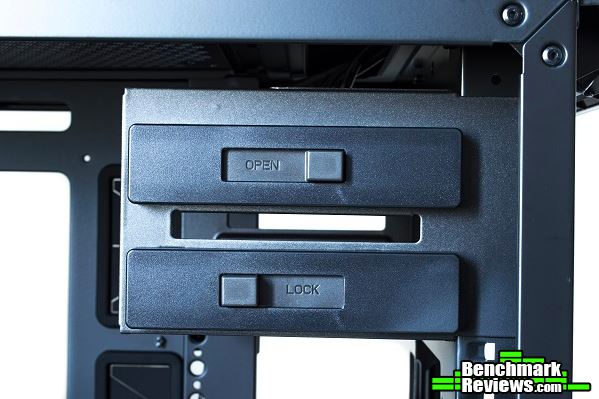
 The locking mechanism on the 5.25 ODD cage is one of the easiest to use. Although we have seen this type of locking mechanism in some of Cooler Master’s earlier products, it is great to see it in the MasterCase 5 as it is focused on modularity. Thankfully, the ODD cage can be removed and an additional 120mm or 140mm fan can be installed at the front of the case using the included fan bracket.
On the floor of the main internal chamber are two rubberized cutout holes for cabling and two SSD Slip-and-Clip pocket bays. These can be removed by undoing the captive thumbscrews and installing the SSD drives on the inside. Cable cutout holes are also available closer to the motherboard tray for SATA and power connections to the drives. MasterCase 5 is able to accommodate up to four SSD Slip-and-Clip pocket drives; two in this location and two more behind the motherboard tray.

Because we are starting from the ground up with our MasterCase 5, the FreeForm Modular System lets us customize the case by adding additional exterior and interior parts. For this review, we will start our upgrade with the side window kit. Cooler Master was kind enough to send us a side window kit with our MasterCase 5 to help demonstrate how an upgrade will look like. This window side panel can be purchased separately but is already included with the MasterCase Pro 5. Like the standard side panel, captive thumbscrews are also included.

At the bottom of the window side panel is a tinted acrylic plate. This covers up the power supply chamber but can also be easily removed by undoing a few screws to show off the power supply unit. Of course, hinges are also included to prevent the side panel from falling when it is removed.

In the next section, let’s go ahead and build a system with the MasterCase 5.
In our build, I will be upgrading the side panel as well as moving a few things around in the MasterCase 5 case to demonstrate how the FreeForm Modular System works. Cable management is always something I look at when putting a system together. Let’s take a look at how the system turned out.

-
Motherboard: Gigabyte GA-990FXA-UD5 R5
-
System Memory: 4x4GB 1600MHz DDR3
-
Processor: AMD FX-8350 @ 4.7GHz
-
Audio: Realtek ALC1150
-
Video: MSI GeForce 780 Ti
-
Disk Drive 1: Crucial MX100 256GB SSD
-
Disk Drive 2: Seagate Barracuda 500GB HDD
-
Enclosure: Cooler Master MasterCase 5
-
PSU: Corsair CX750M 750W Modular
-
Monitor: HP 23bw 23″ IPS display
-
Operating System: Windows 8.1 Professional 64-Bit
As expected, the MasterCase 5 was very easy to build in especially after removing the ODD and HDD cages. Lots of interior room was available for large components, such as a water cooling unit on the graphics card and a massive CPU air cooler. There was still enough room for two 120mm or 140mm fans to fit at the top if I want to add more fans in the future. I went ahead and installed the rear exhaust fan to the front of the case using the included fan bracket to maximize airflow through the front intake. The only thing I would have liked to see was a shroud on the power supply chamber just so it can cover up the cables coming from the power supply unit. Hopefully in the future, an add-on will be available to handle this.

With Velcro straps over the cable routing channel, there is really no excuse for having bad cable management with the MasterCase 5. Using a few of the included zip-ties can also help reduce cable clutter. The large 24-pin motherboard connector can be easily tucked away into the cable routing channel without having it touch the side panel. Something I would have liked to see behind the motherboard tray was a fan hub of some sort, but this can become its own separate add-on in the near future.

The power supply mounting bracket can be a great feature for computer users who own a fully modular PSU. The CX750M used in this build was not fully modular, meaning I had to fish the CPU and 24-pin cables through the power supply cutout in order to install the PSU. Using a fully modular PSU, this should not be a problem and makes swapping out the PSU very easy without having to undo any wires.
Upgrading with the window side panel kit really gives the case a greater look especially for showing off the internal components. The dark acrylic portion at the bottom of the window can be screwed off to reveal the power supply chamber, but I chose to keep it on in order to hide the cables underneath. Something to also note is the fact that the side panels are not interchangeable, meaning you cannot install the window side panel on the opposite side of the case.

The ability to add more HDD cages for more storage and a top cover kit for water cooling radiator support can become very useful in the future. I really like the idea behind the FreeForm Modular system. This allows even the most basic computer user to start from the ground up and add onto it in the future when they are ready to upgrade, instead of having to purchase an entirely new case.

Let’s go into my final thoughts and end this review with my conclusion in the next section.
MasterCase 5 gives any computer user the flexibility to customize their build to serve any purpose. The FreeForm Modular System allow computer users to take control in fully customizing the exterior and interior parts of the case. Extra storage cages, a top cover kit, and a side window kit can all be purchased separately to turn this case into a server, productivity, or gaming machine. Beginners can start out with the MasterCase 5, but have the option to upgrade the case anytime in the future without having to purchase a new case. In the near future, we can expect more FreeForm accessories from Cooler Master, like different color exterior parts, sound dampening side panels, internal fan and water cooling accessories, updates to the front I/O panel with USB 3.1 support, and even tempered glass materials.

MasterCase 5 comes with two preinstalled 140mm fans, one at the front and another in the rear. Water cooling is possible but only at the front of the case as a separate radiator bracket must be purchased separately to support a top radiator. Because the internal components can be moved around, airflow into the case should not be much of an issue. Three 140mm fans can be installed at the front, which is something not common on a mid-tower chassis. Aside from having to purchase additional accessories, MasterCase 5 comes ready to cool out from the box with the flexibility to make it better.
The black finish on the exterior looks very modernized with it slick and minimalistic appearance. Although this is based on personal preference, I think it looks great with or without the side window upgrade kit. With the window, this may appeal more towards a gaming computer, but the standard side panel without the window does make sense to have for a server or a productivity machine. Improvements can always be made in the future as more parts come out. I am really hoping to see different colored side and front panels along with the option to have sound dampening materials to build a silence optimized computer. Having different types of modular accessories can really satisfy the consumers.
The overall structure of the case is very sturdy even without the side panels attached, but the side panels themselves are not the sturdiest I have seen. They do have hinges to prevent them from falling off when removed, which is something very handy for a lot of users who loves removing their side panels every now and then. The fact that Cooler Master is finally including captive thumbscrews with the MasterCase 5 is something I have been waiting to see for a very long time. I was starting to question these major case manufacturers because even my old Compaq Presario desktop PC from 2007 had its own captive thumbscrews. I really hope other manufacturers can begin putting captive thumbscrews with their cases so this can finally become the standard. The handle bars up on the top of the case are also a nice feature to have especially for LAN events or just to carry the case from place to place.
The MasterCase 5 has the potential to become a case that can serve just about any purpose. Without any additional accessory, it can be suitable for a basic computer or perhaps a gaming PC. Two 3.5″ HDD slots are available for 2.5″ and 3.5″ drives along with two more 2.5″ Slip-and-Clip SSD pockets, but mass storage using 3.5″ drives can become limiting. Water cooling potential is also limited to only the front without the additional top radiator bracket, but the FreeForm Modular System will allow computer users to purchase additional parts when needed.
As of November 2015, Cooler Master’s MasterCase 5 is available online for $104.95 (Amazon | Newegg). Although it may not be in the sub 100 dollar category, it still makes a great case for what it has to offer. Other computer cases, such as the Fractal Design Define S, Phanteks Enthoo Pro M, and NZXT S340, are all alternative choices under 100 dollars. But looking at what the MasterCase has to offer with its support for three 140mm fans at the front, the FreeForm Modular System for maximum flexibility to customize, adjust, and upgrade, and separate parts that can be purchased from the Cooler Master store, it really does make it a good value for the price. Instead of purchasing something with a lower price tag, spend just a few more bucks on something that can last a long time without having to purchase a new computer case every time your needs change. All accessories can be purchased from the CM Store at www.cmstore-usa.com.
+ FreeForm Modular System to customize, adjust, and upgrade
+ Captive thumbscrews on interior and exterior parts
+ Lots of interior room to work with
+ Lots of accessories to choose from
+ Includes handles and safeguard for portability
+ Great build quality
+ Supports three 140mm fans at the front with included fan bracket
+ Removable dust filters all around
+ Easy to build for beginners and experience system builders
– Limited on storage and water cooling potential out of the box
– Extra accessories can be purchased separately, but better than purchasing a new case
-
Performance: 9.00
-
Appearance: 9.25
-
Construction: 9.25
-
Functionality: 8.75
-
Value: 9.00


