By David Ramsey
Manufacturer: Cooler Master Corporation
Product Name: Quickfire Rapid-i Mechanical Gaming Keyboard
Model: SGK-4040-GKCL1
UPC: 884102024887 EAN: 4719512045886
Price As Tested: $99.99 (Newegg / Amazon)
Full Disclosure: Cooler Master Corporation provided the product sample used in this article.
Benchmark Reviews has looked at a number of gaming keyboards of late, and most are stuffed with features: extra keys, elaborate macro definition software, dual-core CPUs and megabytes of RAM to hold all the key definitions and macros. And there’s also the elaborate RGB lighting that has become de rigueur in this market segment. So it’s almost a relief to see that the Cooler Master Quickfire Rapid-i is a compact, minimalist TKL (ten-keyless) version of their Quickfire Rapid series of gaming keyboards. Benchmark Reviews will check out this new minimalist entry to see if less really is more.

Like many other enthusiast keyboards these days, the design of the Cooler Master Quickfire Rapid-i is very plain: it’s small, black, has very thin bezels, and except at the rear, no badging.
- Cherry MX mechanical switches (Blue, Brown, or Red)
- Soft-touch paint
- Adjustable command rate
- Full LED backlighting with 5 modes and 5 intensity levels
- ActivLight mode lights keys when pressed
Let’s take a look at this keyboard in the next section.
As a “TKL” keyboard, the Cooler Master Quickfire Rapid-i only occupies about 80% of the space of a full-sized keyboard. With flat black coloring and thin bezels, it makes little visual impression and would pass unnoticed in most settings.

The back of the keyboard has only a label and the standard fold-out feet.

The only branding it at the rear of the keyboard, where it will never be seen.

The detachable USB cable connects via a micro-B connector at the rear corner. This is a common connector for keyboards with detachable cables; personally, I find it fiddly and hard to deal with, and would prefer the larger mini-B connector instead.

Since the Quickfire Rapid-i doesn’t support macros or key redefinition, there documentation provided is pretty slim, consisting of two small folded pamphlets. The included USB cable is sheathed in nice braiding and has the expected gold-plated USB plug.

Let’s take a closer look at this keyboard in the next section.
Since there are no dedicated media or control keys, the top row of keys does double duty, with the lower labels operating when the FN key is held down. This composite shot shows all the options: F1 through F4 control lighting mode and intensity; F5 through F8 control the command polling rate, while F9 through F12 allow the user to save and recall lighting profiles– specific modes and intensities.

My review keyboard came with Cherry Blue key switches with white LED backlighting. Cherry MX Blue switches are an unusual choice for a gaming keyboard: they’re both tactile and audible, producing a loud clicking noise as you type. Most gamers prefer the silence of Cherry MX Red or Black switches, which are linear and make less noise. Although Blue switches are normally the choice of typists, everyone seems to have their own key switch preferences. Fortunately Cooler Master offers a choice of switches with this keyboard.
As you can see in the image below, Cooler Master has painted the metal key switch mounting plate white to help diffuse the backlighting. Each Cherry key switch has an individual white LED at the top.

Sadly, the Quickfire Rapid-i key caps are not double-shot (where the legends are molded completely through the key in a contrasting color of plastic), but are rather a translucent plastic (so the backlight can shine through) with a black paint or coating applied. Theoretically this coating can wear, but if this worries you, third party Cherry-compatible key caps are widely available.

The backlighting is pretty good, but– although it’s not evident in this photo– lower legends such as the “$” on the “4” key– are visually much dimmer than upper legends, due to the placement of the LED above the stem of the key switch.
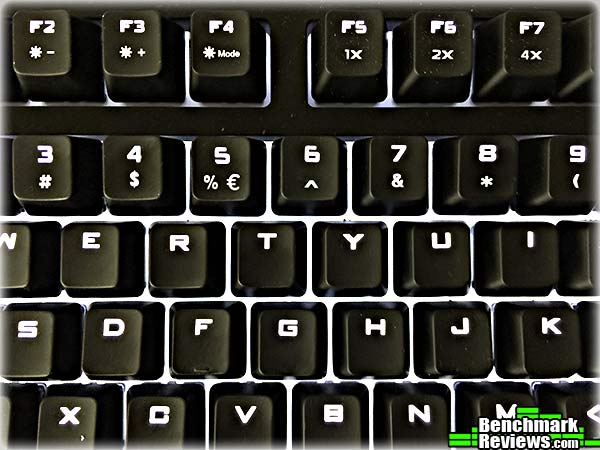
There are five backlighting modes: all off, all on, “breathing” (the illumination waxes and wanes automatically), only 6the “WASD” and arrow keys lit, and a “reactive” mode where the keys illuminate you you press them, and darken when released. You can also set the maximum intensity of the lighting to one of five levels. The keys are not individually programmable, and the choices are few enough that personally I’d never bother with saving configurations, even though you can.
So there you have it: a very basic, non-programmable gaming keyboard. In the next section, I’ll give my final thoughts and conclusion.
With Cherry’s patents expired, the market is flooded with mechanical keyboards using less-expensive Chinese clone switches. Even vendors that have historically used Cherry switches are offering products with clone switches, so it’s interesting to see Cooler Master sticking with the original thing.
Mechanical keyboards for gamers, or people who simply don’t like the rubber-dome keyboards delivered with most computers, have become very popular, and the introduction of backlit switches has led to a slew of very elaborate keyboards, with embedded CPUs and hundreds of kilobytes of flash memory to hold macros, key redefinitions, and lighting profiles for keyboards offering per-key RGB LED lights. Seen against this backdrop, the Cooler Master Quickfire Rapid-i obviously brings up the low end of the scale, with no programmability and only minimal lighting effects.

Although the Cherry MX Blue switches are an odd choice for a gaming keyboard, Cooler Master does offer other options, and most gamers would probably prefer the MX Red switches. Any Cherry key switch will offer excellent, crisp response and an immediate feel; the difference between the switches lies in tactility (whether you can feel the actuation point), noise or “clickiness”, and the spring weight.
This is a competent and high-quality keyboard, and if you’re moving up from a non-mechanical keyboard, you’ll really appreciate the improvement in key feel and the better typing experience. The TKL form factor lends it a smaller size which opens up space for mouse movement, a boon to gamers. However, the competition– admittedly using clone switches– offers significantly more features for only a little more money: for example, the Thermaltake Poseidon Z Forged keyboard has backlighting, macros, and dedicated macro keys for $20 more; and the Tesoro Excalibur Spectrum offers both macros and full RGB backlighting, also for $20 more.
The Quickfire Rapid-i keyboard is a solid, basic gaming keyboard with high-quality Cherry mechanical switches and some nice backlighting. The backlighting features are simple– there’s no color selection or per-key control here– and there’s no macro capability.
It’s a nice piece of equipment but its use of Cherry switches keeps the price higher than that of its competition, which can offer significantly more features for just a little more money by saving production costs with Chinese clone switches that (so far) seem to be just as good as the Cherry switches.
That said, backlit TKL mechanical keyboards are still somewhat of a rarity, and you know you’ll have Cooler Master’s well-deserved reputation for quality and support backing you up. For $99.99 (Newegg / Amazon), it’s worth having.
+ Real Cherry backlit key switches
+ Easy-to-configure lighting effects
+ Soft-touch paint covering
+ Ten-keyless design saves desk space
– No dedicated macro or media keys
– Very plain physical appearance
– Priced a little high considering the competition
-
Performance: 9.50
-
Appearance: 8.00
-
Construction: 9.50
-
Functionality: 8.25
-
Value: 8.75
Quality Recognition: Benchmark Reviews Silver Tachometer Award.
COMMENT QUESTION: What do you demand most from a gaming keyboard?


