By David Ramsey
Manufacturer: Thermaltake Corporation
Product Name: Poseidon Z RGB Mechanical Gaming Keyboard
Model: KB-PZR-KBBRUS-01
UPC: 84116361466 EAN: 4717964401656
Price As Tested: $99.99 (Amazon | Newegg)
Full Disclosure: Thermaltake Corporation provided the product sample used in this article.
Just a few months ago, full RGB mechanical keyboards were rare beasts, and the inclusion of full per-key RGB lighting commanded a very high price, with some keyboards selling for almost $200.00. Now, prices are coming down rapidly and vendors are starting to compete on features, but how many more features are there left to add? Today Benchmark Reviews looks at the latest entry in the “full color per-key RGB keyboard” market, Thermaltake’s Poseidon Z RGB Mechanical Gaming Keyboard.

Produced by Thermaltake’s Tt eSports division, the Poseidon Z RGB is one of over twenty different keyboards they offer, and one of the most interesting in terms of capabilities.
- 32-bit processor controlling 16.8 million colors per key
- Custom lighting effects including Wave, Arrow Flow, Ripple, Reactive. Fully Lighted, Pulse, and Spectrum Running
- Tt eSports Certified Mechanical key switches
- Mirrored back plate for optimum lighting dispersal
- On-the-fly macro recording
- Full N-key rollover under USB
- 5-year warranty
Let’s take a look at this keyboard in the next section.
As with many keyboards I’ve reviews lately, the Thermaltake Poseidon Z RGB keyboard has a plain appearance (with its lighting off, anyway). A flat black housing with thin bezels and black keys with white (when unlit) lettering don’t offer anything to grab the eye.

The back of the keyboard has the product label, fold-out feet, and a molded channel so you can direct where the attached USB cable exits.

The permanently attached USB cable has neither a braided sheath nor gold-plated connector, neither of which add any functionality at all…so I don’t miss them. OK, well, the braided sheathing does look kinda cool. So I miss that. A little.

Of course there’s no included installation media; you’ll have to be content with a warranty booklet and a quick-start guide. But the first thing you’ll want to do when you unpack this keyboard is to go online and download Thermaltake’s utility software and keyboard manual.

Let’s take a closer look at this keyboard in the next section.
The box for the Thermaltake Poseidon Z RGB keyboard touts its “Tt Certified” key switches. Popping a key cap reveals that we’re dealing with Kailh Brown RGB switches. I have seen these switches criticized for the wide latitude in the official specification for spring force– according to Kailh, their Brown switches have an actuation force of 45 grams +- 15 grams, which is a huge tolerance– but I couldn’t feel anything untoward in this keyboard. Perhaps the “certification” consists of binning switches to minimize this difference.
This image also shows the slightly “glitttery” appearance of the key back plate. Rather than plain white paint, Thermaltake has used some sort of reflective coating to enhance the appearance of the key lighting effects.

Thermaltake uses standard (for backlit keyboards) translucent key caps with a black coating of some sort.

Since there are no dedicated media or lighting control keys, these functions are doubled up with the function keys and accessed via an “Fn” key.
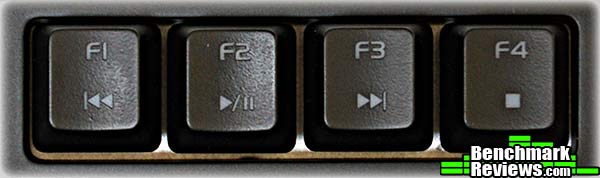
Five profiles (lighting and macros) can be stored in the keyboard’s on-board memory. Pressing the “Fn” key in combination with one of these keys instantly switches to the selected profile.

The latching “double arrow” key at the upper right of the numeric pad enables Game Mode. Game Mode makes macros available and turns the Windows key into another control key.

Thermaltake uses an NXP LPC11U3 micro controller, which combines a 32-bit ARM Cortex M0 core with a 16-bit LED controller. This allows extremely fine control of the LEDs as well as enabling programmable effects.

To get the most out of this keyboard, we’ll need to fire up the utility software in the next section.
In the modern mode, configuration software is always downloaded from the vendor web site instead of being included with the hardware, so I downloaded the Tt eSports Poseidon Z RGB utility from Thermaltake’s web site, along with a short guide to recording on-the-fly macros and an overview of the utility software.
The main screen shows the current profile at the top (Profile II in this example), Macro Keys and Lighting Options tabs at the right, and T Key, Single Key, Default, and Launch Prgm buttons, along with Instant Shift Sys, at the bottom. It’s important to remember that the keyboard must be in Game Mode to define or use any macros. You can switch between normal and game mode using the buttons at the upper left of the keyboard in this window, or by pressing the mode switch at the upper right of the keyboard itself.

The Poseidon Z RGB keyboard has a very versatile lighting system, with full 16-bit control over the color of each key, as well as a number of animations and effects you can apply. From a simple single-color for the entire keyboard or selected keys, you can branch out into reactive keys (that light when you press them, and fade when released), as well as flow, wave, and ripple patterns that send spectrums of color dancing across the keyboard. You can define sets of colors and effects, and then store them in a profile.

The macro definition feature is pretty versatile, too: you can define, load, and save sets of macros, and, unlike many other keyboards, you have full editing control over existing macros: you can delete and insert steps, and even rearrange existing steps! This is great for tweaking complex multi-key macros. A popup menu at the lower right of the macro key setting panel lets you insert non-key actions such as Find, Save, Print, Show Desktop, and so forth.

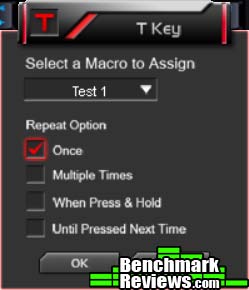
Once you define a macro, you bind it to a key using the T Key button on the utility’s main screen. My only complaint about the macro system is an annoying limitation I’ve seen in other keyboards: without dedicated macro keys, it would be nice to be able to assign macros to modifier+key combinations. You can assign a macro to, say, F1, but you can’t assign one to Ctrl-F1 or Alt-F1 or Shift-F1.
There’s also an on-the-fly macro recording feature: pressing Fn-F9 will light the MR indicator on the keyboard. Then press the key you want to bind the macro to, type the keystrokes comprising the macro, and press Fn-F9 again to terminate the sequence. While this feature is convenient, the utility software can’t “see” such macros, so there’s no way to examine or edit them.
An interesting feature is Thermaltake’s Instant Shift System. This lets you define a modifer key– Shift, Ctrl, or Alt– to instantly apply another profile as long as that key is held down. Here, holding down the Ctrl key makes the entire keyboard act with the macros defined in Profile III. Once you release the key, whatever profile you were using previously takes over. Note again that this feature is only active in game mode.

Overall, this is one of the better macro definition and lighting control utilities I’ve seen. All settings are stored in the keyboard, so anything you define will remain even if you take the keyboard to another computer without the Thermaltake software installed.
I’ll present my final thoughts and conclusion about this keyboard in the next section.
The Thermaltake Poseidon Z RGB keyboard is marketed under Thermaltake’s Tt eSports division, and as such is aimed at gamers and enthusiasts. Equipped with Kailh Brown RGB mechanical key switches backed by a 32-bit microcontroller and clever software, it offers a broad and versatile array of macro and lighting capabilities. The ability to completely disable any macros and use the keyboard as a normal keyboard with the press of a latching button is a nice feature that increases the day-to-day utility of the keyboard.
Of course, fancy lighting and macros don’t mean much if the keyboard can’t be used for normal typing as well. The Kailh Brown RGB key switches are Chinese clones of the venerable German Cherry MX Brown switches, and while purists may argue the minutiae of key “feel” and projected long-term reliability, I’ve been a mechanical keyboard snob since before it was cool, and I can’t tell the difference between the Cherry and Kailh switches without popping a key cap off and looking. One legitimate criticism is that Kailh’s official specifications for the key switch actuation pressure (the amount of force required to press the key) has a very broad tolerance: over 30% either way for the nominal 45-gram actuation force, which means that anything from 30 to 60 grams would be acceptable. However, it seems as if Thermaltake’s certification program (they are advertised as “Tt Certified”) has examined the switches and equips the keyboard with switches exhibiting much better tolerances. I couldn’t detect any difference in actuation pressure among the switches on the keyboard. Thermaltake must feel pretty confident about them since the 5-year warranty is the longer I’ve ever seen for a keyboard.

Thermaltake’s eponymous utility software is also excellent. I’ve reviewed too many keyboards with no ability to edit macro definitions, which can make getting a complex macro just right a huge pain. Tt eSports also shows some nice innovations such as the latching Game Mode switch at the upper right of the keyboard that instantly disables all of the macros, so you don’t need to worry about accidentally triggering something during normal typing, and the Instant Shift system that lets a designated modifier key provide instant temporary access to a different macro profile.
It’s not quite perfect: the inability to define modifier-based macro triggers like Alt-F1 is annoying, as is the inability of the utility software to see or edit macros that are defined with the keyboard’s “on the fly” recording capability. Also, it’s missing the ability to switch in pre-defined macro sets automatically when specific games are launches– a previously common feature that’s gone missing on the latest crop of macro keyboards. And heavy macro users would probably prefer a keyboard with dedicated macro keys– which of course would mean a larger, more expensive keyboard.
Fierce competition is driving the RGB keyboard market right now, and it was just a few months ago that I noted that the Tesoro Excalibur Spectrum RGB keyboard, at $119.99, was the least expensive RGB keyboard on the market with per-key lighting. Now we have the Thermaltake Poseidon Z RGB keyboard with the same Kailh RGB key switches and coming in well below that price point and with very similar features – plus its macro and lighting effects offer capabilities beyond that of the Tesoro unit.
One of the features I like the best on this keyboard is the Game Mode switch that instantly disables all the macros; this saves you from having to waste a profile with undefined keys so you’ll have the full use of the keyboard and function keys when you need them. That said, I’d still really, really like the ability to define modifier-based macros.
One last oddity is that Thermaltake only offers this keyboard with non-linear keys: tactile Browns and clicky Blues. Many gamers prefer the linear, non-tactile-bump feel of Red or Black keys, and they’ll have to look elsewhere. But otherwise, this is my new favorite keyboard at the $99.99 price level (Amazon | Newegg).
+ High quality Kailh Brown RGB key switches
+ Per-key RGB backlighting; onboard CPU and memory for lighting effects and macros
+ Excellent macro definition and editing features
+ Game Mode key quickly toggles between “normal” and “game” modes
+ 5-year warranty
– No dedicated macro or media keys
– Not available with linear Red or Black key switches
– Cannot define macros using modifier keys
-
Performance: 9.75
-
Appearance: 8.00
-
Construction: 9.50
-
Functionality: 9.50
-
Value: 9.75
Excellence Achievement: Benchmark Reviews Golden Tachometer Award.
COMMENT QUESTION: What do you demand most from a gaming keyboard?


