- Incredibly sensitive 100-12,000 DPI Optical Sensor.
- 17 programmable mechanical switch buttons.
- Keypad array slides laterally to accommodate hands of all sizes.
- Designed specifically for MOBA and MMO type games.
- Special CUE software enabled for extensive macros and timers.
| Mouse Backlighting | 4 zone RGB |
| Polling Rates | 1000 / 500 / 250 / 125Hz |
| On-Board Memory | Yes |
| Weight | 147g |
| Mouse Feet | Extra Large PTFE |
| Dimensions | 119.4 x 77 x 48.8mm |
| Cable | 1.8m braided fiber |
| Warranty | Two Years |
The Scimitar RGB was presented in such a fashion to illustrate the highlights of the MMO gaming mouse. These are shots on the inside and outside cover-flap of the box, which had a nifty magnetic clasp to secure it. Descriptions are not very detailed, but that is what we are here to cover.
 |
 |
From the profile view 3 of the 4 independent color zones can be seen. Take special note of the ergonomically designed keypad and how wide and tall the mouse is at it’s apex. It’s almost like placing your hand over an extremely large and solid satin-covered egg. The surface is smooth, even, and slippery despite its rubber coating. This keeps the mouse hand from perspiring over extended periods. A small textured rubberized platform exists on the right side exclusively for the smallest finger support. On par with the famous Mionix Naos series for ergonomics.
 |
 |
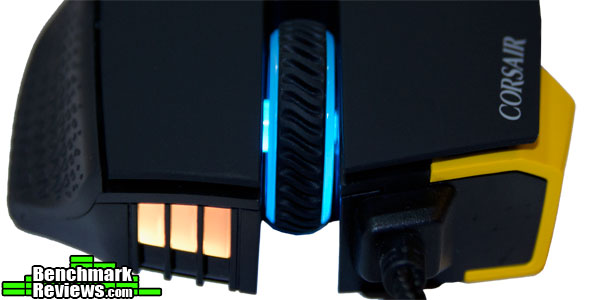
The sliding keypad is one of the main distinguishing features on this mouse. The twelve mechanical buttons boast consistent tactile feedback and precise actuation. Sliding distance is approximately 1.2cm in either direction. Here we can see the 4th independent color zone on the right, along with the slightly oversized mouse wheel. Even though the wheel is very light, it is oversized and has an excellent rubber texture covering it. It does not allow free spinning, but the default settings are so comfortable that it isn’t really needed.
 |
 |
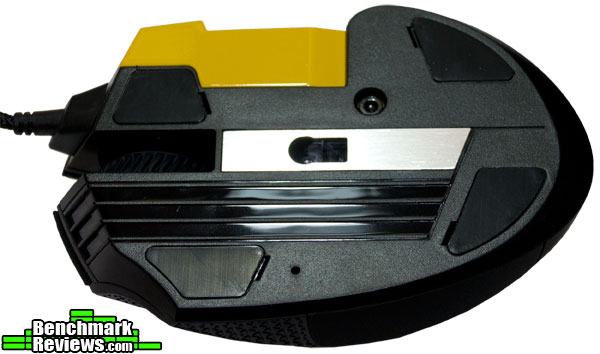
The bottom sports 4 medium silicone pads that do more than an adequate job. Especially preferring these to the standard mouse pads (due to the incredibly slippery and dense surface) the design guarantees scratch-free durability. The left panel displays a standard 1.8 meter braided cable and the special tool that locks the sliding keypad down into place (the hex-screw locking mechanism is shown right above the sensor).
 |
 |
First impressions of the physical form-factor and actual construction are very positive at this point. It is extremely ergonomic in design and a pleasure to hold in the hand, whether utilizing the thumb-keypad or not.
The drivers for the Scimitar RGB are very unique and possess a plethora of options; just about anything one can think of doing is possible. Due to the high complexity of some the features, just the main highlights of each panel will be touched on.
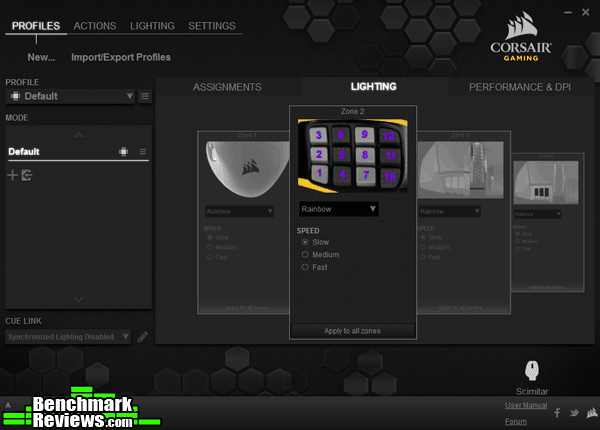
The main profiles / key assignment panel is where the keypad and buttons may be selected and uploaded into the mouse’s memory. The lighting panel gives the user basic LED color and effect controls over each of it’s four color zones (independently or linked).
 |
 |
Under the performance tab independent colors may be set for each of the five profiles (this only affects the color zone shining horizontally across the keypad). A maximum DPI rate may be set for up to whopping 12,000 DPI, even more then enough for 4k resolutions. The actions tab is where one can program anything on the system to any button: macros, keystrokes, timers, or media controls.
 |
 |
Something completely unexpected was discovered under the advanced lighting control tab: the ability to fine tune the effects of the four provided special light shows. Moving on to the settings / device tab, there is the option to toggle overall polling of the device up to 1000Hz per 1msec. This is also the important place to find the firmware and bootloader version.
 |
 |
The program tab provides access to basic media player controls, advanced overlay on screen timers (and whatever the user names them) and more detailed macro-recording options. The last driver page is a technical overview of the system with links to online support and a user manual.
 |
 |
The drivers contained supreme functionality; however, the pure organization of the pages and details may have been grouped in a more logical and streamlined manner. This may or may not be critical depending on how much time you feel is fit for perfect customization.
Testing Methodology
The Corsair Scimitar RGB was tested over a period of 50+ hours on a cotton-polyester weaved rubber-backed mouse pad. The main programs and games tested consisted of Adobe Photoshop and Elder Scrolls Online. These two were specifically chosen to test out the sliding keypad, functionality of buttons, and sensitivity.
Test System
- Processor: Intel Core i7-4790K
- Motherboard: Gigabyte GA-Z97X-UD5H
- System Memory: Corsair 16GB 1866Mhz
- Video: Gigabyte Windforce GTX 970 G1
- Monitor: LG 27″ IPS 2560 x 1440 (3K resolution)
- Audio: HT | Omega Claro Plus+
- Operating System: Windows 10 64 bit
Results
Corsair’s Scimitar RGB has multi-polling rate abilities available on all five profiles for 125, 250, 500, and 1000Hz. The maximum polling rate of 1000Hz was used for all tests. At this point in testing an unexpected anomaly was observed: All functionality was preserved in the Windows 10 environment reflected by Mouse Rate Checker; however, using DirectX apps and games the polling rate could not exceed 800Hz.

Standard desktop applications were great to work with; enabling side scrolling features to the 1 and 3 keys along with the back and forward assigned to 2 and 5 seemed very natural in standard internet browsing and Photoshop. The snapping feature (to keep the axis’s steady even at an angle) and the adjustable lift-off distance did make a difference in finer, zoomed in work for all applications.
Concerning MMO gaming, (which this mouse is totally designed for), there is a few things to keep in mind at this phase. First off, as far as design goes, this is almost a perfect mouse concerning ergonomics. Testing out Elder Scrolls Online to check how the main keypad felt, the scalloped angled keys implemented was pure genius concerning comfort and tactile feedback from the switches.
Everything worked great for about 1-2 hours before the mouse would disconnect (only in games). Dropping the mouse’s polling rate to 250-500Hz did stabilize the problem somewhat; fortunately, the polling rate adjustment did not hinder the performance or overall response time of the mouse.
Corsair has taken a bold approach toward this specific segment of the market, bringing innovation to a new level of creativity. From the perfected ergonomics with the sliding keypad, to 100% customization capabilities, there is no limitations on what the Scimitar RGB can do in game.
Concerning the issues with mouse polling rate and disconnects, Corsair has assured us that a new firmware update is due out in late December to address those rare system issues. As it stands now the mouse is functional at a lower polling rate. The following was a statement provided by Corsair’s Public Relations Manager:
“The issue Joe has found is a known issue with the current FW of the mouse. It’s not one we can replicate 100%, but it is known to happen, and it’s system based, not mouse based. We could ship a replacement, and the same issue would occur.
We believe it’s an issue with the way the USB protocol and the mouse communicate, and a fix is in the works. Currently this is targeted for a late December time-frame, as part of the mouse’s v1.14 firmware.
Sorry I can’t give a sooner fix, but as Joe’s found, dropping to 500Hz resolves it in the short term with little discernible impact. However, we’re aware that we need to deliver the mouse as promised, and will ensure the Scimitar RGB works as advertised at 1000Hz.”

The Scimitar RGB provides performance beyond even the most rigid expectations due to the ultra sensitive 12,000 DPI sensor. With the drivers providing the ability to enable “angle snap” (holding mouse slightly off axis yet still tracking true) coupled with adjustable lift-off distance, one can totally customize the overall feel of it in motion.
Aesthetically speaking, the appearance can either be very neutral or extremely flashy on however the user wants to customize it. The flexibility of color options are many spread over five profiles. Construction is solid, ergonomic in every facet, and of course adds the highlight of the sliding keypad. Research and development at Corsair really did their homework on this one and it shows.
Functionality wise, to be honest there was no limitations found, with the driver setup providing a thorough representation of how to map and program all of the keys fairly easily. The only issue was a disconnect issue that had an easy temporary fix and a permanent one on the way.
As of December, 2015, the Corsair Scimitar RGB can be found online for $69.99 (Amazon | Newegg). Considering how many features are implemented coupled with the high-end hardware, this is a very decent price, and less then I would expect it to be.
Pro’s:
+ Ultra sensitive 12,000 DPI optical sensor.
Con’s:
– Minor firmware issues with DirectX at 1000Hz polling rate.
Ratings:
- Performance: 9.00
- Appearance: 8.75
- Construction: 8.5
- Functionality: 7.0
- Value: 9.25


