By Meng Vang
Manufacturer: Phanteks Co.
Product Name: Enthoo Evolv Galaxy Silver
Model Number: PH-ES515E-GS
UPC: 886523300601
Price As Tested: $179.99 (Newegg)
Full Disclosure: The product sample used in this article has been provided by Phanteks.
The Phanteks Enthoo Evolv ATX is a beautiful aluminum case with lots of water cooling flexibility. It includes great features like the innovated radiator bracket, support for Phanteks modular 3.5″ HDD brackets, and swivel side panels to complement the elegant 3mm thick aluminum exterior. The interior frame looks almost identical to the Enthoo Pro M due to the 2.5″ drop-N-lock mounts behind the motherboard tray and on the power supply chamber and the lack of interior HDD cages. Built specifically to target water cooling enthusiasts, the top and front of the case can support up to a 360mm or a 280mm radiator with plenty of space for a large reservoir. At Benchmark Reviews, we will be taking a look at the Phanteks Enthoo Evolv ATX case in Galaxy Silver. Let’s go ahead and go through a quick overview of the case.

|
Case Specifications
|
|||
|
Dimension
|
235 mm x 495 mm x 510 mm (W x H x D)
9.25 in x 19.5 in x 20.1 in |
||
|
Form Factor
|
Midtower Chassis
|
||
|
Material(s)
|
Aluminum (3mm) Exterior, Steel Chassis
|
||
|
Motherboard Support
|
E-ATX *(up to 264mm wide), ATX, Micro ATX, Mini ITX
|
||
|
Front I/O
|
2x USB 3.0, Mic, Headphone, Reset
|
||
|
Side Window
|
Yes
|
||
| Expansion & Drive Bays | |||
|
Expansion slots
|
7
|
||
|
Internal 3.5″
|
8x (5x included)
|
||
|
Internal 2.5″ (dedicated)
|
3x (2x included)
|
||
|
Cooling
|
120mm fan
|
140mm fan
|
|
|
Front
|
3x
|
2x (included) | |
|
Top
|
3x
|
2x | |
|
Rear
|
1x
|
1x (included) | |
|
Liquid Cooling
|
120mm radiator
|
140mm radiator
|
|
|
Front
|
Up to 360
|
Up to 280 | |
|
Top
|
Up to 360
|
Up to 280 | |
|
Rear
|
120
|
140 | |
|
Clearance
|
|||
|
Graphic card
|
420 mm (16.54 in) No HDD brackets
300 mm (11.8 in) HDD brackets installed |
||
| PSU |
318 mm (12.5 in)
|
||
|
CPU cooler
|
194 mm (7.6 in)
|
||
|
Cable management
|
35 mm (1.38 in)
|
||
|
Memory clearance
(motherboard – fan) |
120mm: 68 mm (2.68 in)
140mm: 48 mm (1.89 in) |
||
|
Packaging Information
|
PH-ES515E
|
||
|
Package Dimension
|
324 mm x 590 mm x 577 mm(WxHxD)
|
||
|
Net Weight
|
10,2 kg (22.0 lbs)
|
||
|
Gross Weight
|
11,9 kg (24.3 lbs)
|
||
|
Warranty
|
|||
|
Length
|
5 Years Limited
|
||
Aside from the user’s manual, the accessories box comes with a lot of goodies. The most noticeable thing is the toolbox, which includes all the screws needed to mount the motherboard, storage drives, fans, and water cooling accessories. The toolbox also separates these screws into their own compartment, which is something I am very happy to see considering the price of this case. A few cable ties for cable management and three interchangeable front LED’s come together in a small plastic bag. Having the option to swap out the power LED from the standard white to red, blue, or green does add some flexibility in customization.
Since the Evolv ATX is designed for water cooling, a mounting bracket for a water pump is included in the accessories box along with three modular 3.5″ HDD brackets for mounting extra storage drives. Both the pump and 3.5″ brackets have vibration dampening materials to reduce vibration and noise. Of course, more 3.5″ HDD brackets may be purchased separately when needed.

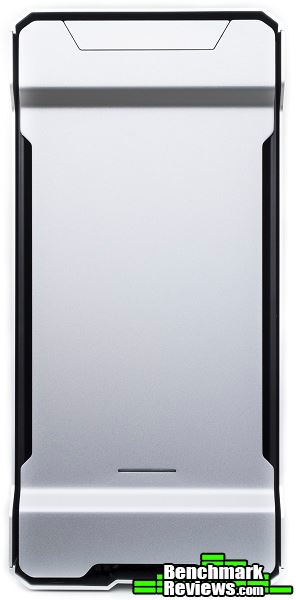
The front of the case is very simple with only the power LED near the bottom and a few air ventilation strips located towards the sides. Front panel I/O ports are hidden under a flap located at the top of the case. Because the Evolv ATX is targeted towards water cooling enthusiasts, 5.25″ ODD expansion bays are excluded from this case in order to make room for large interior components.
The Evolv ATX has a single 140mm fan preinstalled at the rear of the case. This adjustable fan mount can also support a 120mm fan. Ventilation holes are present throughout the entire rear of the case allowing the highest possible air flow for the internal components. Water cooling retention holes are not present on the Evolv ATX, but reservoir mounting strips are located to the side of the seven expansion slots.

The main side panel includes a non-tinted window to show off the internal components of the system. Finger prints and dust can show on the surface of the window but can be easily cleaned off with a microfiber cloth. No sound dampening materials are included under the main and opposite side panel, but the side panels are separated from the main frame by a thin foam layer to reduce vibration. The side panels swing open like car doors, which eliminates the need for thumbscrews. We will go into more details about the side panels later.

The top of Enthoo Evolv Galaxy Silver case maintains a very simple design similar to the front. The only ventilation we can see here are the ones near the side panels, which may seem restrictive to some users. The power button is located at the top for easy access but does not illuminate when the system is on.

The Evolv ATX stands about an inch off the ground due to the four rubber coated feet. This ensures a firm grip on a smooth surface. Water cooling pumps can be installed using the pre-drilled mounting strips near the front of the case after removing the internal HDD cage. The power supply unit is also filtered with an easy to remove dust filter.

In terms of the front I/O ports, two USB 3.0 ports, standard headphone and microphone jacks, and a reset button are all located under the metal flap. The reset button also doubles as the HDD activity light. When not in use, these ports can be hidden underneath the metal flap.

Now that we have seen a quick overview of the Evolv ATX, let’s take a look at the features this case has to offer.
The internal frame structure is similar to what we have seen in the Enthoo Pro M reviewed earlier this year. Motherboard standoff screws are already pre-installed for an ATX motherboard. A large CPU cutout is available on the motherboard tray as well as five mounts for the 3.5″ modular HDD bracket. The top and the front of the case are able to accommodate a 360mm or 280mm radiator without having to remove any ODD or HDD cages. The power supply chamber has a cutout to showcase the brand of the power supply unit along with a small Phanteks logo. Towards the front of the case, a 2.5″ SSD mount for a 2.5″ drop-N-lock bracket is also included to showcase the SSD drive installed.

For cable management, three Velcro straps are included to tie down even the largest cables. The power supply chamber hides the cables coming from the power supply unit and includes two 3.5″ HDD caddies near the front of the case. Behind the motherboard tray are two more 2.5″ SSD mounts with both brackets included in the box. The bracket features a drop-N-lock mechanism for easy installation and removal. A fan hub is also included to control up to six fans and requires a single SATA power plug for power.

As stated in the previous section, the side panels open up like car doors for easier access to the internal components. This is a great feature to have for users who love opening their cases often. The side panels are made from aluminum and are also 3mm thick for extra durability.
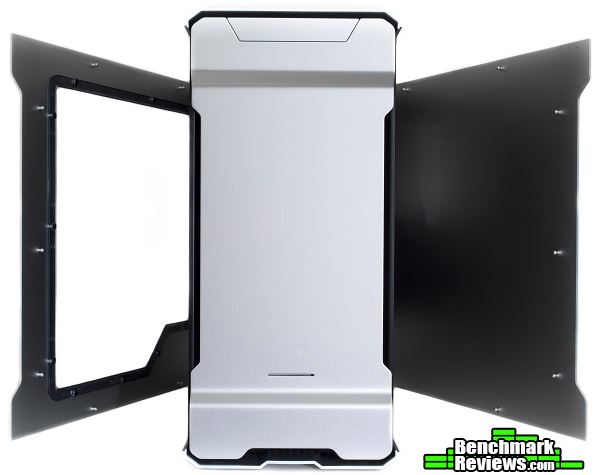
Once the side panels are opened wide enough, they can be lifted off and removed entirely from the case. The main structure of the case and the side panels are separated by a thin layer of foam to prevent any vibration caused by metal on aluminum contact.

Once the front panel is removed, the entire intake area is covered by a large dust filter. This dust filter sits on top of two 140mm pre-installed fans and can be easily removed for cleaning. Once removed, we can clearly see the two front fans mounted on the front mounting strips. Three 120mm fans or two 140mm fans can be mounted at the front for optimal airflow, but support for three 140mm fans would have been something nice to have.
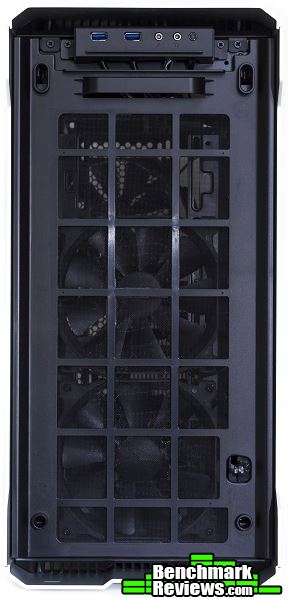

Installing a 360mm or 280mm radiator at the front of the case also requires you to remove this metal plate. This metal plate is part of the power supply chamber and has mounting holes for water pumps. If removed, pre-drilled mounting holes are still available at the bottom of the case for a water pump.

The built-in radiator bracket simplifies the installation of large radiators and fans. It can slide out once the five silver screws are removed. Phanteks also made sure to design the radiator bracket so radiators and/or fans do not come into contact with the motherboard components by offsetting the mounting holes closer to the main side panel.
Now that we have seen the interior layout and the innovative radiator bracket, let’s talk about storage in the next section.
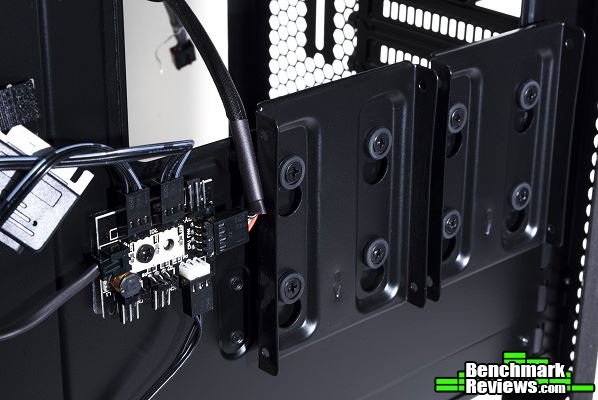
The modular 3.5″ HDD bracket can be installed by removing a drive opening at the back of the motherboard tray. A few screws are required to secure the HDD into place. After installing the HDD, the bracket can then be aligned with the drive opening and secured with another screw. These 3.5″ HDD brackets can be adjusted anywhere to accommodate larger graphics cards or water cooling components.

Behind the motherboard tray, the HDD connection ports align perfectly with the drive opening. This allows for easy installation when using a right-angled power and SATA cable.

The HDD caddies can easily mount 3.5″ drives without any screws using a swivel-type design. Mounting 2.5″ drives does require four screws for installation.

The HDD caddies can be easily inserted back into the HDD cage. The entire cage can be removed to make room for a 280mm or 360mm radiator at the front of the case. Keep in mind there are only two 3.5″ drive caddies in the Evolv ATX.

SSD drives can be screwed into the SSD drop-N-lock bracket. There are two drop-N-lock mounts behind the motherboard tray and another one on the outside of the power supply housing. Two drop-N-lock brackets are already included in the box with the Evolv ATX to increase storage potential. Unfortunately, using right-angled power and SATA cables may not be suitable for storage devices mounted here.
Let’s go ahead and build a system with the Evolv ATX after seeing all the great features it has to offer.
The Enthoo Evolv Galaxy Silver ATX case is designed for water cooling setups, so that is exactly what we are going to take a look at in our build. Using the Corsair H100i on the CPU and the Corsair H55 on the graphics card, we will see how much room is left in the case for a reservoir, pump, and extra storage drives. Cable management is also be something to look at to see how much effort is needed to manage the cables behind the motherboard tray.

-
Motherboard: MSI Z97 Gaming 5
-
System Memory: 4x8GB 1600MHz DDR3
-
Processor: Intel Core i7 4790k @ 4.6GHz
-
Audio: Realtek ALC1150
-
Video: EVGA GeForce 780 Ti
-
Disk Drive 1: Kingston SSDNow V300 240GB SSD
-
Disk Drive 2: Kingston SSDNow V300 120GB SSD
- Disk Drive 3: Kingston SSDNow V300 120GB SSD
- Disk Drive 4: Toshiba 2TB HDD
-
Enclosure: Phanteks Enthoo Evolv ATX
-
PSU: Corsair HX850i
-
Monitor: HP 23bw 23″ IPS display
-
Operating System: Windows 8.1 Professional 64-Bit
The build turned out very well with the Evolv ATX. I did not run into a lot of problems as there was a lot of interior room to work with. Mounting the Corsair H100i at the top of the case using the radiator bracket was not much of a problem, although it was difficult getting the motherboard into the case while trying to align the radiator bracket to the top rails. The Corsair H55 fitted perfectly at the rear of the case after adjusting the top radiator to allow enough clearance in between. There was still enough room for a reservoir to be installed behind the front two fans when working with a custom water cooling setup. Airflow through the front of the case was nonrestrictive as there were no HDD cages to worry about.

During the build, I used a few cable ties to clean up some of the extra cables around the power supply chamber. Because of the three Velcro straps that were included with the case, cable management was not much of a problem overall. There were a few tie down points closer to the rear of the case for a CPU power cable, which really cleaned up the cables for that area. The fan hub was easily removed as it was not used in this build.

One problem that I did encounter with this build was the difficulty in installing the motherboard and aligning the radiator bracket with the radiator installed onto the top mounting rails. In my situation, the tubes on the H100i were not long enough for this type of installation. This could alternatively be done by removing the water cooling unit from the motherboard then installing the motherboard into the case first. Then install the radiator bracket with the radiator installed into the case and secure the water block onto the motherboard. Both methods do work, but it really depends if you want to remove the water block from the motherboard or not.

The side panels blocked off a lot of noise coming from the internal components. Because air ventilation holes were not present on the side panels, the case remained quiet even without sound dampening materials.

The build turned out better than expected. Do keep in mind when having a radiator installed at the front of the case, there would be no support for the modular 3.5″ HDD brackets. This is something to keep in mind for those who prioritize in storage. A push-and-pull configuration at the top of the case seemed possible with a 360mm radiator, but this would depend on the RAM modules, water block, and radiator size. The Evolv ATX does not allow for 360mm radiators to be mounted simultaneously at the top and the front, which was a given in the first place.

Let’s go ahead and finish up with my final thoughts and conclusion.
The Evolv ATX is a great case with lots of interior space for water or air cooling setups. Although this case is marketed at a much higher price than the Phanteks Enthoo Pro M, Fractal Design Define S, and even the Cooler Master MasterCase Pro 5, the Evolv ATX does make up for it with its premium build quality. The innovated radiator bracket simplifies installation of a top radiator and the idea of not having any ODD or HDD cages in the way of the front intake area is really something I would like to see in future computer cases. The Evolv ATX keeps the internal components nice and cool thanks to the large air intake at the front of the case.

The Evolv ATX does great in terms of performance. Because of the three pre-installed 140mm fans at the front and rear of the case and the lack of HDD and ODD cages, air can simply flow into the case to cool the internal components without restriction. There is a lot of space to mount a 360mm and 280mm at the top and front of the case giving flexibility to system builders. The 140mm fan at the back can also be replaced for a 140mm radiator and fan; in our system build, I replaced it with a 120mm fan and radiator. The rear of the case is completely ventilated for the best possible airflow and includes a mounting strip for a reservoir as well.
The case looks great with its simple but premium design. It looks similar to the Evolv Micro-ATX and the Evolv ITX, but the entire exterior is made of thick aluminum to give it a stronger and shinier finish. The interchangeable front LED light can be swapped out for a red, green, or blue LED to match a specific color scheme. The side panel window is large enough to display everything in the case. The only thing I did not understand about it was having a cutout on the power supply chamber to show off the power supply just to have that part covered by the side panel. If the side panel was designed similar to the Evolv ITX, this would have made more sense. As of now, this really defeats the purpose of having the PSU cutout on the power supply chamber.
The build quality is one of the best I have seen in a long time. With the aluminum exterior panels that are 3mm thick, the Evolv ATX should be able to last a long time. The interior frame is made of similar materials we see in most computer cases, but it is reinforced by the aluminum exterior. Phanteks PH-F140-SP 140mm fans push plenty of air (82.1 CFM) at just 19db, so having three of these already pre-installed in the Evolv ATX is a great thing to have.
The Evolv ATX supports up to a 360mm radiator at the top or the front giving flexibility to the system builder. Reservoirs can be mounted at the rear of the case or where the modular 3.5″ HDD brackets go to improve the looks of the system. Because there are only two 3.5″ HDD caddies and three 2.5″ drop-N-lock mounts with two brackets available, storage can become limited especially when using a 360mm radiator at the front of the case. This renders the three included modular 3.5″ HDD brackets and the HDD cage in the power supply chamber useless since the radiator is in the way. In a situation like this, a user is limited into using just two 2.5″ drives out of the box. Something I think can be improved is the innovated radiator bracket. I believe making it modular instead of having to screw out the five silver screws (two under the main side panel, three on the opposite side panel) with a screwdriver would save some time when building the system.
As of November 2015, the Phanteks Enthoo Evolv Galaxy Silver ATX case is set to hit the market at a price of $179.99 (Newegg). The less expensive Enthoo Pro M, Fractal Design Define S, and the Cooler Master MasterCase Pro 5 are all cheaper alternatives for water cooling builds. Although the Evolv ATX may not have the most appealing price to most computer users, the overall build quality and the water cooling potential does make up for the price. Overall, the Evolv ATX is a great case for a full-fledged water cooling system with its great features and premium aluminum exterior design.
+ Lots of interior space
+ 3mm thick aluminum exterior
+ Side panels open up like doors
+ Slick and simple exterior design
+ Removable dust filters for easy cleaning
+ Flexible mounting areas for water pumps and reservoirs
+ Supports large 280mm or 360mm radiators at the top and front
+ Radiator bracket, drop-N-lock design, and modular 3.5″ HDD mount
– Limited storage space with 360mm radiator at the front
– Side panel window does not expand towards the PSU cutout
– Expensive to most users, but the features and build quality makes up for it
-
Performance: 9.00
-
Appearance: 9.25
-
Construction: 9.75
-
Functionality: 9.00
-
Value: 8.75


4 thoughts on “Phanteks Enthoo Evolv Galaxy Silver Case Review”
“Phanteks PH-F200SP 140mm fans push plenty of air (82.1 CFM) at just 19db, so having three of these already pre-installed in the Evolv ATX is a great thing to have.”
Typo alert
The F200-SP is a 200m 110 cfm fan
The F140-SP is a 140m 82 cfm fan
Thank you for pointing this out; I’ve fixed the typo. That being said, your typo alert contained typos: 200m denotes 200 meters. I think you meant 200 mm. 🙂
Haha! 🙂
I would love to see a build containing 200m fan.
Actually you CAN mount two 360 rads simultaneously.
In my build it required disassembling entire top panel to do so 🙂
https://youtu.be/J6E3BIYhuy4
I wouldn’t recommend doing so though, as you can easily mount
360+280 with almost the same amount of radiator area.
Comments are closed.