By David Shields
Manufacturer: Corsair Components, Inc
Product Name: Carbide Series Clear 600C
Model Number: CC-9011079-WW
UPC: 84359171772 EAN: 006015439717
Price As Tested: $149.99 (Amazon | Newegg)
Full Disclosure: The product sample used in this article has been provided by Corsair Components, Inc.
If you don’t know about Corsair, you’re either new to the world of custom PC’s, or you’re living under your desk. Best known for quality RAM, chassis designs, and power supplies, you can’t build a custom PC without looking at a component from Corsair. My current build uses both RAM and a PSU from Corsair. Possibly Corsair’s biggest market is in chassis design, with designs ranging from portable Mini-ITX (Graphite 380T) to silent mid-tower (Carbide 330R), dedicated water cooled designs (Obsidian 900D) to those designed to show off interiors (Graphite 760T).
Their latest design is part of the Carbide series, the Carbide Clear 600C and Quiet 600Q full-tower cases. The 600C features a large side panel window (much like the Graphite 760T) while the 600Q is designed for silence and water-cooling capability. Both designs feature an inverted motherboard mount intended to display the interior and improve airflow along with a PSU shroud, hidden HDD/SSD trays, and much more. Today we’ll be looking at the windowed version, the Carbide 600C.

| Material | Steel/Plastic | |
| Form Factor | ATX | |
| Dimensions (H x W x D) | 454mm x 260mm x 535mm (17.87” x 10.24” x 21.06”) | |
| Drive Bays | Front | 2x 5.25” tool-free (hidden behind door) |
| Internal | 3x 2.5” tool-free, 2x 2.5”/3.5” tool-free | |
| Cooling | Front | 2x 140mm AF140L fan (only one installed in 600Q; extra fan included in accessory kit) |
| Rear | 1x 140mm AF140L fan | |
| Top | – | |
| Side | – | |
| Bottom | Supports up to 3x 120mm fans or 2x 140mm fans | |
| Radiator
Support |
Front | Up to 240mm/280mm |
| Rear | Up to 140mm | |
| Top | – | |
| Side | – | |
| Bottom | Up to 280mm/360mm | |
| Expansion Slots | 8 | |
| I/O Port | 2x USB 2.0
2x USB 3.0 Headphone and mic 3-channel, 3-speed fan controller |
|
| Power Supply Standard | ATX | |
| Clearances | Heatsink | 200mm |
| PSU | 210mm | |
| Graphics | 370mm | |
Each panel is made of mostly steel, with the exception of the windowed panel, which is acrylic. Accents are mostly plastic, but sturdy. For easy access to the interior, simply pull the latch and it opens smoothly on a pair of sturdy hinges. Also note, due to the inverted motherboard the window is on the opposite side of the case compared to traditional designs.
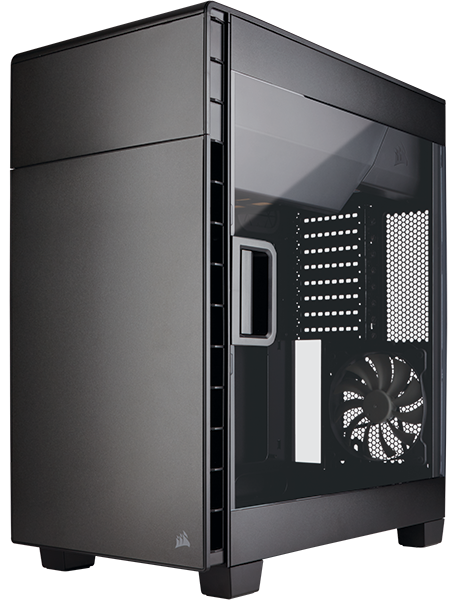
The front panel is unmarked except for a Corsair logo in the lower corner and another door covering the dual 5.25″ drive bays. This door is magnetized and opens easily, with a very solid hinge action that will likely remain intact through wear and tear. Behind the panel is a dust filter covering a pair of pre-installed 140mm fans. The filter is removable, but only by removing the entire front panel first.

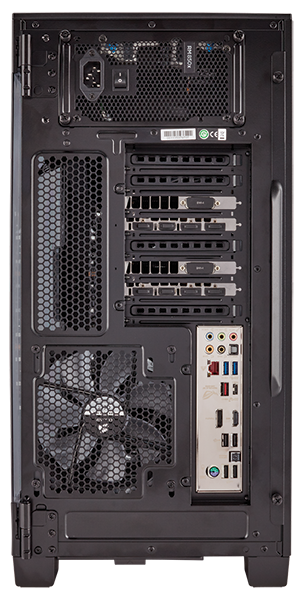
As motherboard is inverted, of course the back panel is inverted as well. Beyond that, this panel basically identical to every other back panel in existence, with a PSU bracket, a pre-installed 140mm exhaust fan, and eight expansion slots.
The bottom panel features four rubberized feet along with a dust filter along the entire length. This filter slides out from the bottom. No fans are preinstalled here, but space is available for up to three 120mm or dual 140mm fans and the equivalent radiator.

The paneling does an admirable job of resisting fingerprints and dust, but those with more oily hands might want to watch out. The only other notable feature is the noise canceling padding found behind the front panel and along the top. It’s heavy, but not very thick, and I wonder how well it’ll actually dampen sound.
As discussed earlier, the entire interior layout is inverted, with the PSU at the top and the CPU cooler at the bottom. From Corsair’s description, the “Inverted ATX layout shows off components, allows for direct airflow across the hottest components, and prevents noise from escaping the top of the case.” However, given the fact that heat natural rises (something that a 90 degrees motherboard rotation takes advantage of) I wonder if having the traditional exhaust fan at the bottom is really for the best.
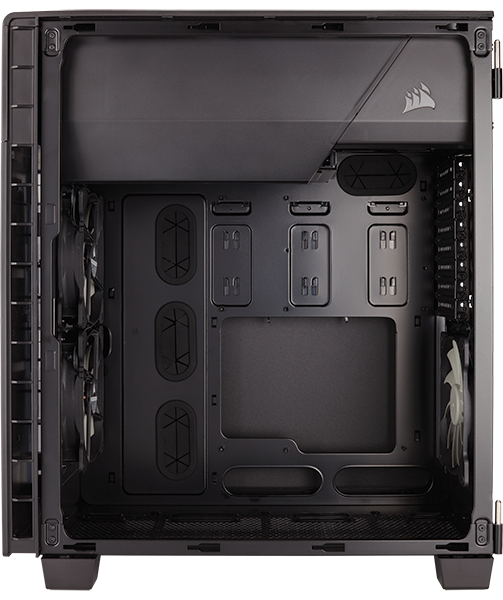
The shroud at the top conceals not only the PSU but also a pair of tool-free 3.5″ drive bays. Clearance wise, 200mm of heat sink space is provided along with 370mm of room for expansion cards. Easily enough for any system builder. One note – the 600T is not as tall as many other full towers due to the lack of space up top for fan mounts, and the smaller clearance on the bottom.

On the back of the case, we can see the PSU mount along with three tool-less 2.5″ drive bay. You get 210mm of PSU space, giving plenty of room for those Corsair PSU’s! Also visible are a pair of 3.5″ drive bays (under the PSU cabling) and three 2.5″ drive mounts. They are tool-less, but you are limited to just these five bays in the entire case, and while all five could accept a 2.5″ SSD, only the top two will take a full 3.5.”

This shot show off the possible bottom fan configuration with an 280mm AIO cooler. Again, consider the position of the traditional rear exhaust fan – on the bottom as opposed to the top. Since people’s system’s differ I can’t say for sure if you could place a push/pull AIO system in the bottom, but at the very least you’ll almost certainly have to remove the rear fan.

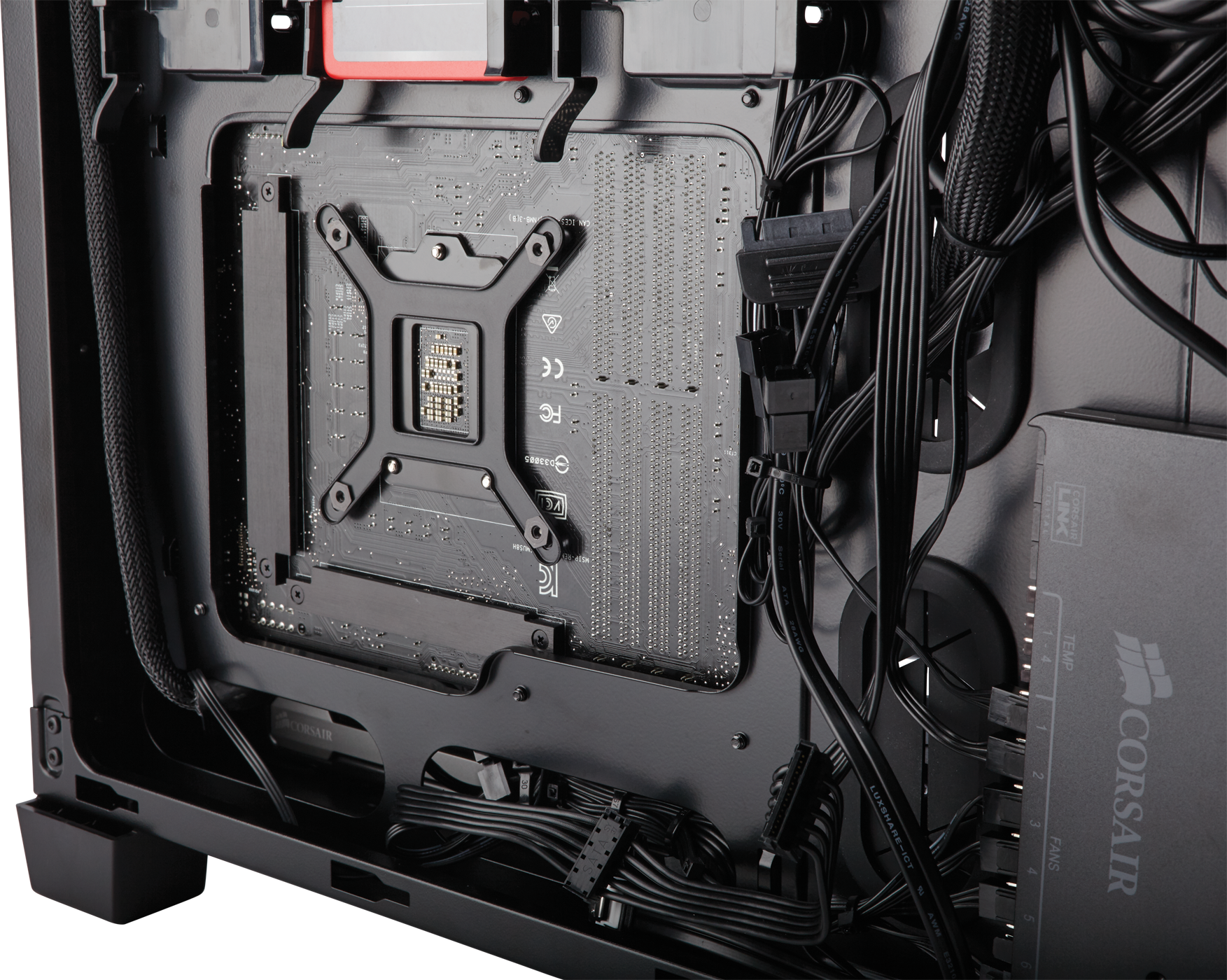
A large cutout is available for mounting the motherboard backplate, 203mm across and 152mm tall. 25mm of cable space is provided along the entire side, making fitting any cables easy. Routing them however, might be different depending on how picky you are. Tie down points are only present along the outer edges and the edge of the cutout.
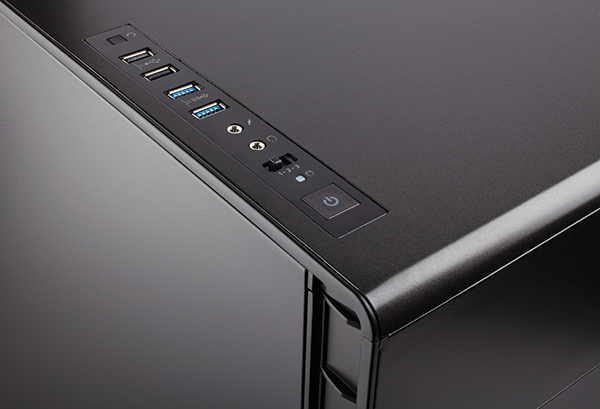
The I/O panel on top has a power/reset switch and a pair of USB 3.0 and 2.0 ports each. Also included is a three setting fan controller with three connectors, meaning you have full fan control straight out of the box!
Building a clean, attractive system in this interior would be a cinch. A different story however, exists behind the scenes. A total of only five hard drive bays combined with somewhat limited cable routing options makes for an organizational ordeal.
The Corsair Carbide Clear 600C is intended more as a design for enthusiasts who want to make a neat, beautiful system (something that Corsair does well). As a result, it does lack extra features that some might deem necessary, such as more cooling, additional storage, or cable routing for nitpicks.

Systems vary, and of course so will your performance. The inverted layout looks good on paper, but I question how good the airflow really is. I think there’s a great deal of potential, especially with an extra large CPU cooler, for heat to build up in the top of the case. Indeed, because the 600C isn’t very long either, there’s less clear path for air to travel through the interior.
The intent is less to show off the case itself and more to show the internal design. Its certainly not as eye catching as other Corsair classics like the Obsidian or Graphite series designs. If you want a full tower to show off your fancy hardware though, you can’t do much better than this. I’d like to see someone do THIS mod in here. Given Corsair’s penchant for white chassis designs, I think a version in that color would look great.
Made mostly of steel, with a bit of plastic, the construction is of excellent quality. I might even prefer it over the last Corsair case I reviewed here (the $189.99 780T) since it seems much less plastic.
Functionally, it’s rather two halves of a whole that doesn’t know what its trying to be, a display item or a performance case. If the intent is to display a well organized interior, this might just be the best case I’ve reviewed for the job. If however you are planning to build a fancy high performance system with lots of cooling, you’ll want to look elsewhere.
$149.99 (Amazon | Newegg) is little steep for any tower design. I’d say here you pay more for bells and whistles than for total features. Consider the Graphite 760T, which features a similar window panel. It costs an additional $40, but you do get three additional fan mounts, five more internal drive bays, and better airflow. Just no inverted motherboard or PSU shroud.
From the last few paragraphs you’re probably thinking “wow he’s roasting this thing.” Nonsense. I don’t think that the Carbide 600C is a bad design. It’s a good design, but overall I feel it lacks innovation and usefulness. You’ll buy the Carbide 600C because you like the design, not the features.
But fear not, if you do buy, do so with confidence.
+ Attractive exterior finish.
+ Clean and simple interior.
+ Sturdy steel construction.
+ Triple pre-installed 140mm fans with fan controller.
– Limited internal storage.
– More limited cooling options than competitors.
– Iffy cable management.
-
Performance: 8.50
-
Appearance: 8.75
-
Construction: 9.25
-
Functionality: 8.25
-
Value: 8.25


