By Tom Jaskulka
Manufacturer: SIlverStone Tek Co., LTD.
Product Name: TD03 Slim
Model Number: SST-TD03-SLIM
UPC: 844761012281
Price As Tested: $64.99 (Newegg | Amazon)
Full Disclosure: The product sample used in this article has been provided by SilverStone Tek Co., LTD.
The Tundra line of coolers by SilverStone is about to get larger…by getting slimmer? Well, at least two of them are: the TD03 Slim and TD02 Slim. Containing aesthetics from the Tundra Lite coolers and coupling them with a slim radiator and fan (with a total rad/fan package height of 37mm), this AIO cooler seems custom-built for slim cases or anywhere where space is at a premium. Benchmark Reviews has the opportunity to investigate the cooling potential of the 120mm TD03 Slim – will it survive the cooling testbed? We’ll also see how this cooler performs in one of its “intended use” cases: the slim Fortress FTZ01.

| Model No. | SST-TD03-SLIM | |
| Water block | Dimension | 65mm (L) x 65mm (W) x 39.2mm (H) |
| Material | Copper base with plastic body | |
| Pump | Motor speed | 2500±200RPM |
| Rated Voltage | 12V | |
| Rated Current | 0.28A | |
| Fan | Dimension | 120mm (L) x 120mm (W) x 15mm (H) |
| Speed | 800~2200RPM | |
| Noise level | 16.5~27.4 dBA | |
| Rated Voltage | 12V | |
| Rated Current | 0.02 ~ 0.15A | |
| Max airflow | 13.1 ~ 35.85CFM | |
| Pressure | 0.31 ~ 1.84 mmH2O | |
| Connector | 4 Pin PWM | |
| Radiator | Dimension | 153mm (L) x 120mm (W) x 22mm (H) |
| Material | Aluminum | |
| Tube | Length | 310mm |
| Material | Rubber | |
| Application | Intel Socket LGA775/115X/1366/2011/2011-v3 AMD Socket AM2/AM3/FM1/FM2 |
|
| Net Weight | 566g | |
We’ll start with a look at the overall cooler and move to some detailed/unique features of the TD03 Slim.
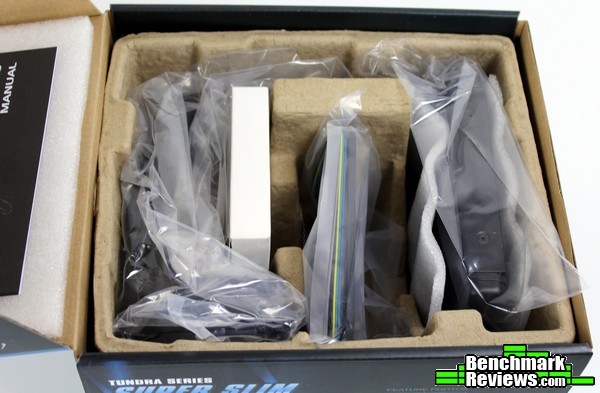
The TD03 Slim arrives in a recycled cardboard insert, with every component secured in its own section. The slim radiator is padded by two additional foam inserts and the slim fan sits in its own compartment (clearly made for two regular 25mm fans). It looks to be the same layout as any other 120mm AIO kit, and should keep everything protected and in place quite adequately.
The usual assortment of mounting brackets and screws is included, although SilverStone goes quite above and beyond with a few key mentions. A 12V Molex adapter for the pump is included which is very welcome to see on a kit likely to be installed on a mini-ITX motherboard (which typically contain a maximum of two fan headers). Enough fan mount screws are included for a push/pull arrangement with slim and regular fans – a nice touch for a unique slim kit like this (slim fans are difficult to source) and a rarity for 120mm AIO kits at this price point.
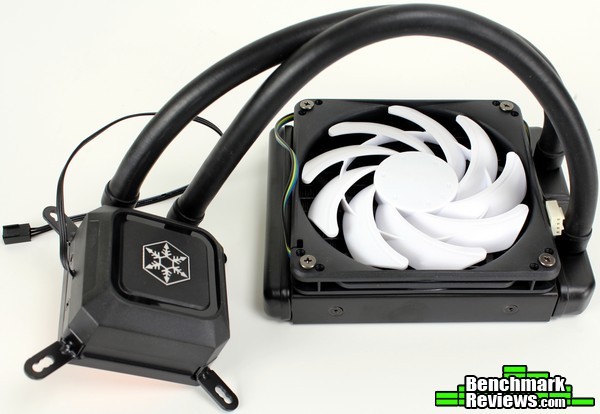
The TD03 uses rubber hoses with a length of 310mm. A 3-pin connector powers the pump, while the slim fan is a 4-pin PWM/2200 RPM type.
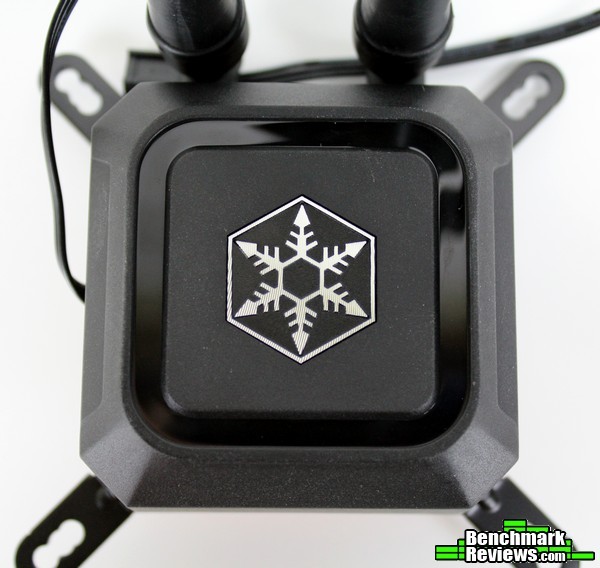
The CPU block resides in a plastic housing, but the cold plate is all copper with a fine microchannel structure to increase conductivity. A relatively subtle blue LED shines around the logo when power is connected as the only indication that power is applied, since the pump itself is surprisingly quiet.
Now for a closer look at the TD03.
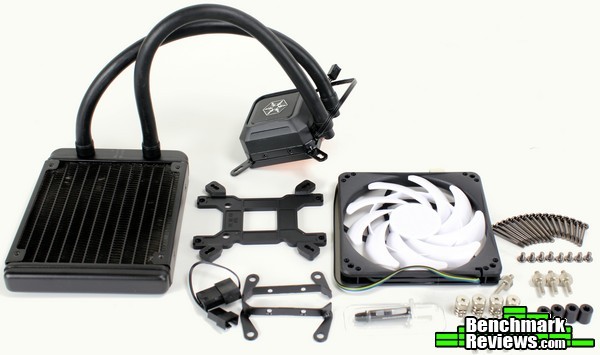
The mounting hardware included is enough for all main sockets (LGA775/115X/1366/2011/2011-v3/AM2/AM3/FM1/FM2). The multi-use plastic backplate is labeled for all of the mainstream platforms (the LGA2011 sockets have the cooler mount directly to the motherboard).
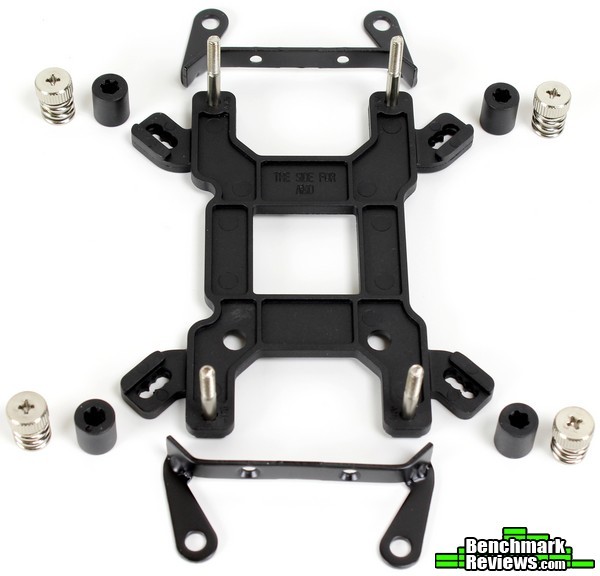
You’ll need to swap brackets if you’re intending to use the TD03 Slim on an AMD socket since it ships with the Intel brackets installed. As we’ll see later, this is probably an acceptable decision. Anyway, it’s pretty easy to see how the CPU cooler mount assembles – pick the right side, slide the notched posts through the right holes, and slip the plastic collars over the other end to keep everything in place while you mount the water block.
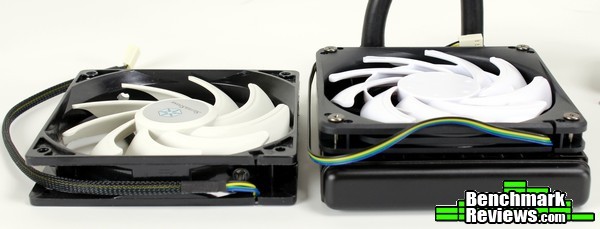
It’s tough to tell from pictures how slim the TD03 Slim actually is. The radiator is only 22mm thick, which is less than a typical 120mm fan. The whole assembly (slim rad+fan) of the TD03 Slim stands at 37mm thick.
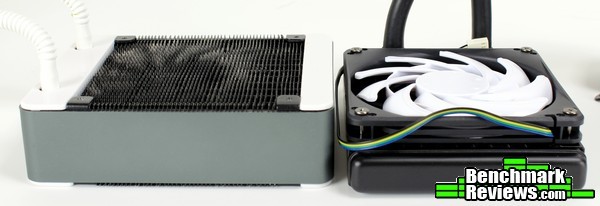
Which is less than the thickness of the double-thick radiator (45mm) from the original TD03! Truly this is the AIO of choice if clearance is an issue – let’s just hope its cooling performance is up to the task, as it lacks the superior cross-fin construction of the larger TD03 radiator. The radiator fin density, while not the same as the full TD03, appears to be similar to the larger/wider radiators from the TD03-Lite kit (roughly 20 FPI).
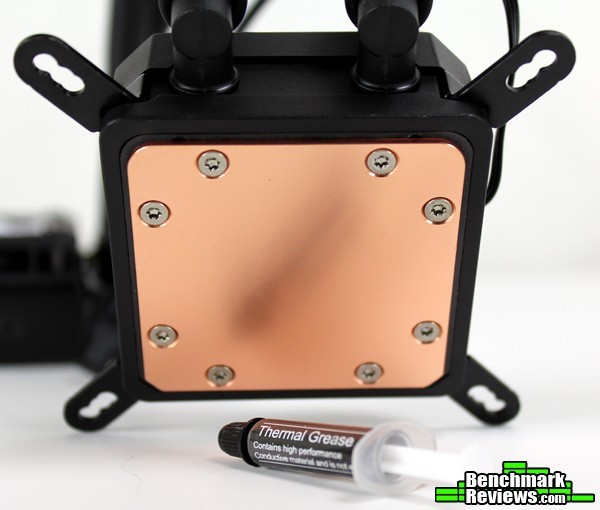
The contact plate forgoes the uninterrupted welded construction from the TD03 as well, securing the cold plate to the pump housing through a series of eight screws. Most mainstream CPUs won’t be impacted from this change, but it isn’t as nice to look at as the perfectly smooth base of the TD03. No mirror polish here on the TD03 Slim either, although the surface doesn’t contain any noticeable grooves or machining marks.
Enough about the details; let’s get the TD03 Slim installed in the AMD-based testbed.
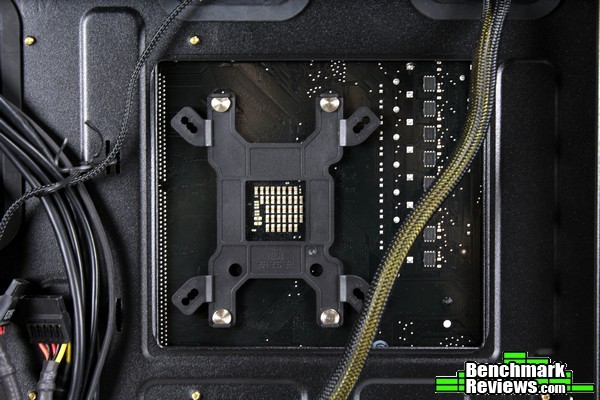
As with most aftermarket coolers, you’ll need to remove the AM3+ standard backplate and replace it with the cooler’s backplate. The four mounting posts are notched to prevent rotation, and slip through the backplate and motherboard where they are held in place on the other side by plastic spacers.
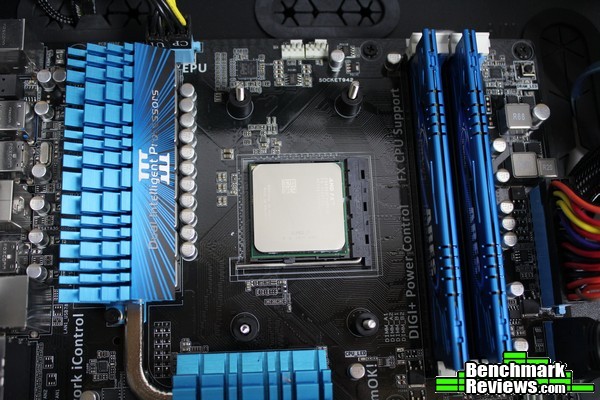
The four plastic collars slip over the posts and keep the backplate assembly from moving around. They could stand to be a little tighter, as you’ll still need both hands when installing the CPU cooler pump housing (to prevent the posts from slipping out of the back) – at least they keep the backplate in place while you’re getting ready for the next step.
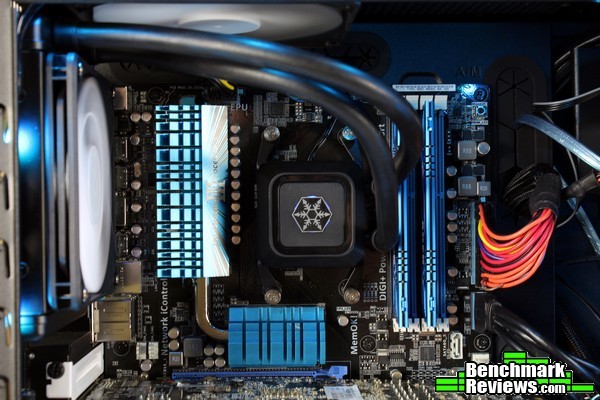
With the right brackets installed (you’ll need to unscrew the Intel brackets and replace with the AMD versions) the whole pump assembly secures easily to the mounting posts. The spring-loaded fastening nuts can be a bit tough to start – you’ll need to apply a little bit of pressure to get that first thread to bite. Still, compared to many installations the TD03 Slim is relatively simple to install.

It looks like many other AIO liquid coolers; with a generally tidy appearance, rubber hoses and a simple, compact pump housing design. The 310mm hoses allow for good flexibility in mounting locations – most ATX cases won’t have an issue with clearance in either the rear or top positions (the hoses are a bit too short for mounting in the front or bottom in larger cases which is typical of most AIO kits).
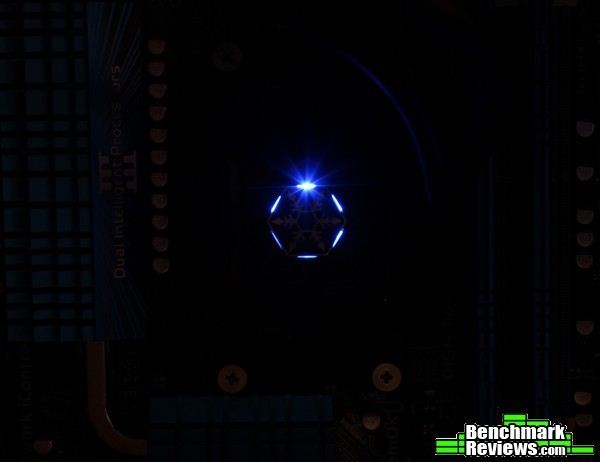
The pump’s LED adds a bit of subtle decoration to the assembly, with a hexagonal design highlighting the SilverStone snowflake.
Now, normally this is the part where we fire up some stress tests and get some data to plug into some neat graphs. While I don’t intend to take that away from anyone, I had my suspicions that this particular cooler wouldn’t do so well on the overclocked AM3+ testbed I normally use for testing coolers. Think about it – “water cooled” sounds – well, cool and all, but it’s a bit of a misnomer. The water doesn’t do much cooling on its own – it merely provides a medium for the cooler to conduct heat (and transfer that heat away from the CPU). The actual cooling is performed by air moving past the radiator fins. While not completely correct, it isn’t too far off to say that AIO liquid coolers are merely air coolers with flexible heat pipes…
Point being, the radiator is the portion that actually sheds (err…radiates?) heat from the system. You can estimate the cooling capacity merely by the size of the radiator – just like with air coolers, more volume = greater heat “capacity” (and the larger the surface area, the faster you can transfer that heat into the ambient air). If you look at the slim radiator included with the TD03 Slim, you can probably begin to see why I’m a little concerned about where the approximately 150-200W from an overclocked FX CPU is going to go. Still, as that is where the majority of my cooler data was gathered from, I had to at least give it a shot…
…where the TD03 Slim promptly failed the thermal load output by an overclocked FX-8350. In fact, it was the first time (other than the stock cooler) that I’ve seen the thermal throttle kick in. It simply couldn’t shed the heat fast enough, with such a small radiator surface area. It should be clear to most users this isn’t the cooler to pick for a CPU that can consume 200W when overclocked and has a max temp limit of around 55C, so let’s move on to something a little more relevant.
Well…that didn’t go as planned. To be frank, FX processors are NOT the intended use case for this unique slim AIO cooler. Sure, it could probably work on something like an FX-6300 or a lower overclock on one of the FX-8 series, but one of the benefits of liquid cooling is unlocking that extra potential…
Of course, the main benefit of this particular AIO kit is the slim form factor. Let’s leave the AMD testbed behind for now and install it in a more relevant case: the SilverStone FTZ01. Switching sockets is pretty simple – flip over the backplate and swap the mounting posts into their new locations.
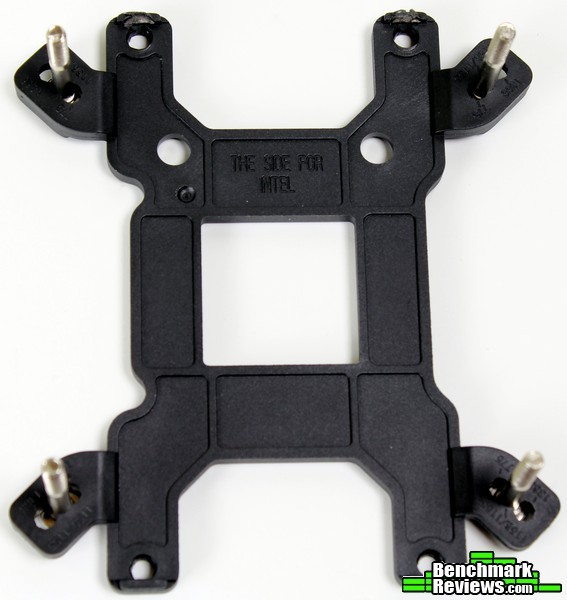
Easier said than done, as right away I experienced some issues with the TD03 Slim. Two of the plastic tabs on the backplate, designed to keep the notched mounting posts from turning, broke with the torque during the install. I had to use a pliers to keep the posts from turning so I could remove the TD03 Slim from the FX CPU! While this issue could be avoided by being extremely careful during the install/removal, it’s bound to result in a large amount of RMAs for SilverStone… This portion of the backplate would do well to be revisited or strengthened somehow.
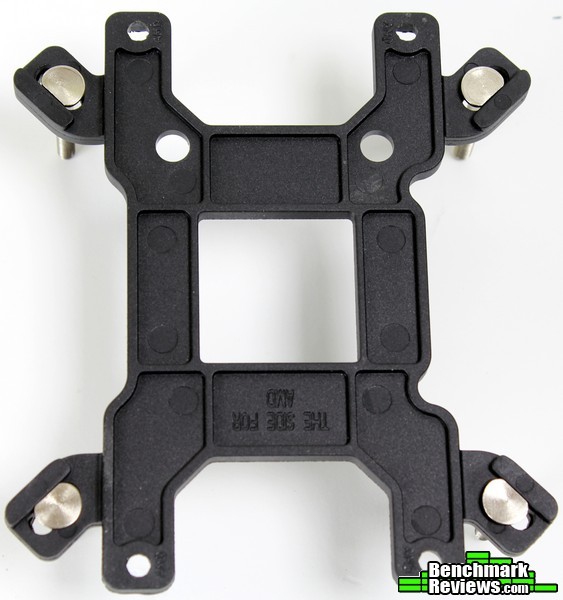
Strangely enough, it appears the Intel side uses thicker bars to prevent the mounting posts for turning. I didn’t experience any problems during the Intel install. The backplate itself is stamped to make it easy to pick the correct side for your particular socket, although it can be confusing at first (the easiest way is to place the appropriate stamp – AMD or Intel – “closest” to the processor itself. The stamp will be on the inside/facing the CPU after the backplate is installed).
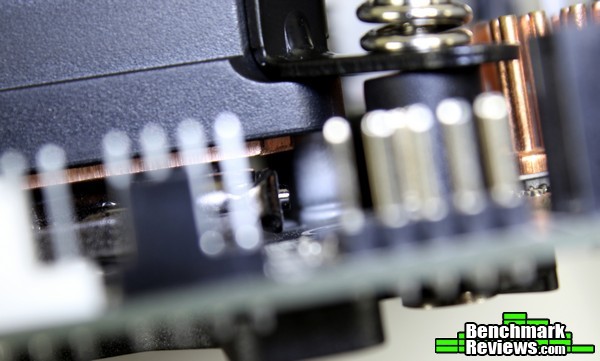
The pump housing covers a few capacitors on the Gigabyte GA-Z97N-WIFI motherboard shown here – the cold plate itself was right up against them, but narrowly missed. It seems the cold plate follows Intel’s “keep out” zone, but the plastic housing itself may not. Thankfully, it didn’t affect the contact with the CPU as it was raised enough to clear the capacitors. It may not be an issue on many ITX boards, but it made me a bit nervous on this one.

With the TD03 Slim mounted I had to find a spot to place the radiator in the narrow FTZ01. Initially, I thought right above the motherboard would work – the math seemed to add up, but finding a way to route the hoses quickly…hosed…that plan (I’m so sorry). With the perfect position it might work – the hoses were in grave danger of becoming kinked no matter what I tried, so I began to consider other options.
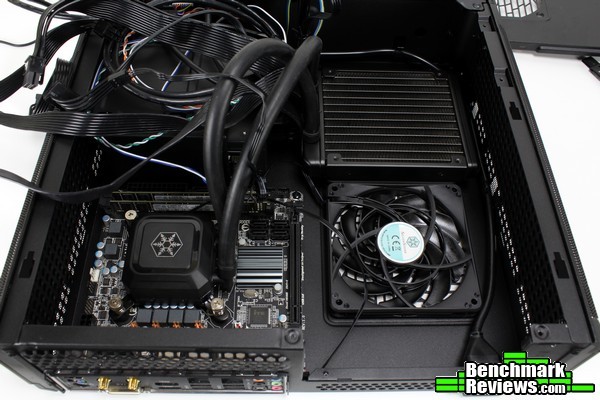
There was really only one other location that would work – the front GPU intake fan mount. The hoses just reached – some swiveling barbs on the radiator would do wonders for this particular layout (and could potentially open up even more mounting options).
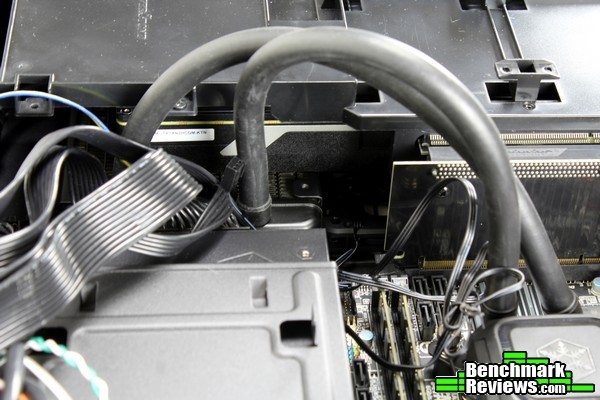
You’ll need to be careful with your GPU selection – the Nvidia reference cooler pictured here was practically resting on the radiator. There wasn’t anything blocking any fans though, so I went ahead with the installation. Besides, while I wasn’t excited about shedding the heat from the CPU directly into the intake fan on the graphics card, it’s a vastly better option than the stock Intel cooler!

I was surprised to find everything else buttoned up pretty nicely. I had to clear off some space over the PSU compartment to route the hoses, but with some dedicated effort the side panel closed quite nicely. I couldn’t help but think how much easier this part would be with some swiveling barbs on the radiator – it works, but it could be even better with more options to route the hoses. It’s in though – and that’s no small feat, in a case this tiny. Let’s see how it performs!
The first test will be performed with the system shown in the Intel installation portion of this article. Perhaps the most relevant test of the TD03 Slim, it should show the performance advantage of using the only AIO cooler capable of being installed in the slim Fortress FTZ01. This is most likely the main use-case scenario for this product, but we’ll also install it on a new Intel testbed for comparison to other coolers next. Other than the system used, the testing methodology will stay the same – an AIDA64 stability test will be used to generate max/average temperatures.
-
Motherboard: Gigabyte GA-Z97N-WIFI
-
System Memory: 2x4GB Samsung DDR3
-
Processor: Intel Core i5-4690K 4.4GHz @ 1.26V
-
Audio: On-board
-
Video: Nvidia GTX970 Reference (using Titan cooler)
-
Disk Drive 1: Samsung 250 EVO
-
Enclosure: SilverStone Fortress FTZ01
-
PSU: SilverStone 500W SFX-L
-
Monitor: 1920×1080 LCD/120Hz
-
Operating System: Windows 7 Ultimate 64-bit
| Case | Avg CPU Temp (Delta over Ambient) | Max CPU Temp Reached |
| Fortress FTZ01 | 37.2C | 56.8C |
That’s a very respectable result for an overclock (albeit a conservative one) in a tiny slim mini-ITX case. 4.4GHz with a max temp under 60C means there’s still quite a bit of overhead. The system stayed pretty quiet throughout testing – again, quite a feat for a case only 14L. It’s pretty clear the TD03 Slim opens up quite a few options for the slim chassis it is designed for – unfortunately, I don’t have a Cryorig C1 (or SilverStone Argon AR06 / NT06) ITX cooler to compare, as the low profile C-type coolers may be the only coolers capable of competing in the FTZ01.
Now for the new Intel testbed. Thermaltake’s Core v21 should be able to accommodate most coolers on the market as well as allow for multiple orientations (vertical/horizontal/inverted) while providing easy access to every component, and Asus’ Gryphon Z87 mATX motherboard (with all of its thermal sensors) housing a Core i5-4670K should serve well as a long-lived test platform. Since this is a brand new testbed for my reviews, I won’t have that many data points at first. The TD03 Slim is a relatively unique product – there aren’t any other slim AIO coolers out there (unless you count the TD02 Slim, naturally), so I chose a 120mm cooler of similar price to begin the comparison: the Noctua NH-U12S.
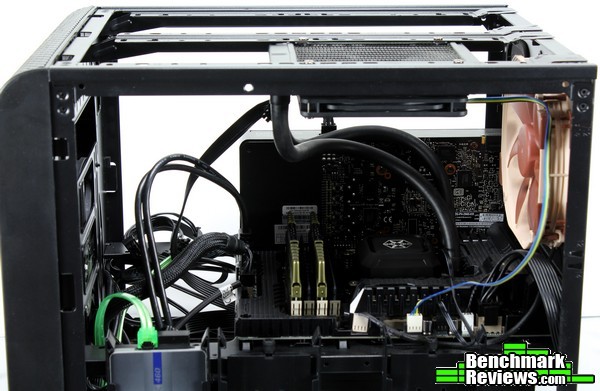
I’ll be using the stock 200mm Thermaltake intake fan at the front, with a Noctua 140mm fan added to the rear for exhaust (all fans will run at 100% during the stress test). In the case of AIO liquid coolers, their radiators will be mounted above the motherboard, exhausting outside of the case. The system will be left to idle until temperatures stabilize, then AIDA64’s System Stability test will be run for two minutes as a warm up. Once the two minute mark is reached, the statistics will be cleared and the stability test will run for another five minutes. At the end of the test, max and average temperatures will be recorded, and the average ambient temperature over the course of the test will be subtracted from the average core temps to arrive at the temperature shown in the chart. All fans will be run at 100% for the cooling stress tests, with the intent to compare all coolers at their maximum performance capabilities.
-
Motherboard: Asus Gryphon Z87
-
System Memory: 2x4GB Corsair Vengeance DDR3-1600
-
Processor: Intel Core i5-4670K @ 4.6GHz / 1.33V/1.42V LLC
-
Audio: On-board
-
Video: Integrated/GTX 660 Dedicated
-
Disk Drive 1: OCZ Vector 460
-
Enclosure: Thermaltake Core V21
-
PSU: Cooler Master V700
-
Monitor: 1920×1080 LCD/120Hz
-
Operating System: Windows 7 64bit Ultimate
| Cooler | Average Temp (Delta over Ambient) | Max Temp Reached |
| NH-U12S | 45.6C | 65C |
| TD03 Slim | 49C | 71C |
Both of these coolers can be found for around $65. Even with a fan that spins almost 1000 RPM faster than the Noctua (~2200 RPM vs. 1500 RPM), the slim TD03 just doesn’t have the mass to keep shedding the heat fast enough to keep up with the Noctua 120mm tower cooler.
If you’re looking for the “best CPU cooler at $65”, the Noctua is the obvious choice between the two. However, you can’t fit the Noctua in the FTZ01 – or many other ITX cases for that matter. With all of its limitations, the TD03 Slim performs admirably in its intended role. When looking at these results – even though they cost the same – it is apparent these are two different coolers designed for different purposes.
As an AIO cooler? Well, the applications are fairly limited. I can’t recommend it for anything over ~100W or so, as it appears to saturate too easily. There just isn’t enough surface area/mass to get rid of the heat fast enough on AM3+ platforms. Sure, push/pull could help, as well as extremely powerful fans, but it becomes apparent that isn’t the goal of the TD03 Slim. So…as a slim liquid cooler? It’s the only game in town.
I’d argue you would have more success with a custom cooling loop – this kit would especially benefit from swiveling barbs on the radiator. A low profile CPU block with appropriate elbow fittings, cut-to-length tubing, and swiveling fittings would all improve the experience in a slim chassis. However, it is the only kit I know of with such a slim radiator/fan combo, which is necessary for chassis like the FTZ01/RVZ01/ML07. It removes the main limitation of those chassis (very little room for aftermarket cooling) and makes it almost a non-issue. It’ll make you question your sanity a bit (well, there are those that would say that of anyone putting liquid in their computer let alone in a tiny slim case), but in the end it does exactly what it sets out to do, and it does it quite well.
The backplate issues I experienced could be avoided with very careful application of force during installation and removal of the spring-loaded fastening nuts. Or SilverStone could have avoided the issue entirely with a metal backplate – although, understandably, the full (and rightfully more expensive) TD03 kit won’t experience this issue and is the better choice for anyone concerned about durability. In context, it’s an issue that should be highlighted, but ultimately may not be much cause for concern for the intended application of the TD03 Slim.

Well, I wasn’t blown away by the performance of the TD03 Slim, but I think it’s important to remember it isn’t gunning for a “top spot” in the CPU cooler hierarchy. What I was blown away by was the performance it unlocked (and the reduced noise) in the Fortress FTZ01 I had reviewed previously. With that in mind, the performance of this AIO kit was adequate enough to cool most overclocks on Intel’s enthusiast processors – I can’t say the same for the hotter AMD CPUs though.
I like the appearance of SilverStone’s “Lite” coolers, and the Slim series follows the same aesthetic. It isn’t quite as striking as the all-aluminum and nickel original TD03, but it should blend in with a much wider range of systems. For the price point, it’s perfectly suitable – although I suppose your opinion may change depending on your stance on snowflakes.
There isn’t much to say about the construction of the TD03 Slim. It’s on par with the other products in this category, and the rubber hoses are a welcome change over the FEP tubing of the other Tundra products in the past. The cooler itself is pretty typical AIO fare – the backplate could use some reinforcing for the mounting posts, but with care it’ll do its job for everyone but the most obsessive of tinkerers (for what it’s worth, I didn’t experience any problems with the Intel installation over the course of five + installs/removals).
The main function of a CPU cooler is to cool a CPU – this kit does that. Comparable – if not a bit worse – than other products at the same price point. However, the real draw of this AIO cooler is its ability to fit where other coolers can’t; for that, it’s the only option currently available. Some swiveling barbs on the radiator would enhance this ability even further.
The TD03 Slim can be found online for $64.99 (Newegg | Amazon). That’s about mid-range for a CPU cooler – many equivalent-performing coolers can be found for that or much less. Those coolers won’t fit in the chassis the TD03 Slim is designed for; as far as I can tell the nearest performance competitor would be Cryorig’s C1 which happens to be the same price. The TD03 Slim will likely install on any mini-ITX motherboard without any clearance issues, unlike the C1 – if you can find a place to mount the radiator, that is. Ultimately, the TD03 Slim has a lot of value for the specific applications it is designed for, which is all you can really ask of a product in my opinion.
In the end, I’m glad a product like the TD03 Slim exists. Admittedly, it’s a niche product for a niche category of enthusiast products, but it’s the only option for that segment. I can’t recommend it to everyone, but I’m certain a few enthusiasts are excited for the potential. Those users can rest assured that the TD03 Slim will – with the right system – unlock additional performance in the tightest of places.
+ Water cooling in a tiny chassis!
+ Slim radiator/fan combo fits almost anywhere
+ Simple, streamlined no frills AIO kit
+ Screws included for both slim and normal fans – in push AND pull combinations
+ Includes 12V adaptor for pump – ideal for mini-ITX systems with limited fan headers
– Only makes sense in space-constrained chassis
– Can be difficult to mount radiator/route hoses without swiveling barbs on the radiator
– Backplate can be stripped easily with any strong torque during installation/removal
-
Performance: 7.25
-
Appearance: 8.00
-
Construction: 7.50
-
Functionality: 9.00
-
Value: 7.75
COMMENT QUESTION: CPU cooling: air or liquid?