By David Ramsey
Manufacturer: Samsung Electronics Co. Ltd.
Product Name: Portable SSD T3
Part Number: MU-PT500B
UPC: 88727613351
Price As Tested: $219.99 (Newegg / Amazon)Full Disclosure: Samsung Electronics Co. Ltd. provided the product sample used in this article.
Samsung’s new Portable SSD T3 offers up to 2TB of amazingly fast external storage in a metal enclosure that’s smaller than a business card, if somewhat thicker. Equipped with the latest USB Type C connector implementing USB 3.1 (Gen.1) protocols, the Portable SSD T3 is now compatible with Android mobile devices that have Type C connectors, as well as Windows and Mac OS. Sporting Samsung’s VNAND flash memory architecture with Turbo Write technology, the drive also comes with easy-to-use security software for Windows, Mac, and Android. Is the Samsung Portable SSD T3 a compelling solution for fast external storage? Benchmark Reviews checks this new drive out to see what it’s got.
While SSDs are rapidly becoming the standard for newer desktop and laptop computers, portable USB-powered external drives have continued to use the older mechanical spinning-platter technology. There’s good reason for this: the 2.5″ drive mechanisms used in these devices are both inexpensive and capacious. What they are not, however, is “fast” or “appropriate for new mobile technology.”

| Capacity | 500 GB |
| Interface | USB 3.1 (Gen.1) |
| Form Factor | Custom, 74mm x 58mm x 10.5mm |
| NAND | Samsung VNAND Flash |
| TRIM | No |
| NCQ? | No |
| Max. Read | Up to 450 MB/sec |
| Max. Write | Up to 450 MB/sec |
| Warranty | 3 years |
No matter how fast your processor, memory, or video card is, your computer will still be limited by its slowest component: the hard disk. While hard disk speed has improved tremendously since the “early days”, with large caches and 10,000RPM spindle speeds, even the fastest hard disk’s performance is glacial compared to the rest of the computer. The situation only gets worse with modern pre-emptive multitasking operating systems, where dozens of threads are running simultaneously and competing for your disk’s limited response time and bandwidth.
Consider: the average time to move a high-performance hard disk’s read/write head to a new track will be less than 10ms, which seems pretty fast. But your CPU is galloping along at billions of cycles per second, and will spend a significant amount of its time just waiting for the hard disk to fulfill its last request. Hard disk performance has plateaued in the last few years, running up against the physical limitations of spindle speeds, magnetic media density, and head servomotor performance. At the end of the day, disks are limited by the fact that they’re comprised of physical, moving parts.
With no moving parts, Solid State Drive technology removes this bottleneck. The difference an SSD makes to operational response times and program speeds is dramatic: while a faster video card makes your games faster, and a faster processor makes compute-bound tasks faster, Solid State Drive technology makes your entire system faster, improving initial response times by more than 450x (45,000%) for applications and Operating System software, when compared to their mechanical HDD counterparts. The biggest mistake PC hardware enthusiasts make with regard to SSD technology is grading them based on bandwidth speed alone. File transfer speeds are important, but only so long as the operational I/O performance can sustain that bandwidth under load.
As we’ve explained in our SSD Benchmark Tests: SATA IDE vs AHCI Mode guide, Solid State Drive performance revolves around two dynamics: bandwidth speed (MB/s) and operational performance I/O per second (IOPS). These two metrics work together, but one may be more important than the other. Consider this analogy: bandwidth determines how much cargo a ship can transport in one voyage, and operational IOPS performance is how fast that ship moves. By understanding this and applying it to SSD storage, there is a clear importance set on each variable depending on the task at hand.
For casual users, especially those with laptop or desktop computers that have been upgraded to use an SSD, the naturally quick response time is enough to automatically improve the user experience. Bandwidth speed is important, but only to the extent that operational performance meets the minimum needs of the system. If an SSD has a very high bandwidth speed but a low operational performance, it will take longer to load applications and boot the computer into Windows than if the SSD offered a higher IOPS performance.
The Samsung Portable SSD T3 is much smaller than a typical 2.5″ USB-powered external hard drive. The form factor seems to be unique to Samsung, but it’s a nice one, with a smaller area than a business card and only 10.5 mm of thickness. Weighing a mere 51 grabs without an interface cable, you’ll never notice either the size or weight of half a gigabyte of data.
The case is elegant, but plain, with naught but a SAMSUNG logo on one side…

…and a model designation on the other.

One end of the drive has the USB Type C connector, which supplies both interface and power. USB Type C connectors are reversible, so it doesn’t matter which way the cable is plugged in.

The remaining side merely has a serial number, a model number, and a power specification.

Although the presence of the Type C connector implies that this is a full USB 3.1 drive, it’s really not: it’s using standard USB 3.0 protocols and is limited to the 5Gb/s of SuperSpeed USB, rather than the 10Gb/s of USB 3.1. The supplied cable plugs into a standard USB 3.0 connector on the host end:

…so if you want to connect this drive directly to the Type C port on a laptop or Android device, you’ll need to supply the Type C – Type C cable yourself.
Let’s take a look at the performance of this drive in the next section.
When we test storage devices, the two main metrics to consider are access time and transfer rate. Simply put, access time is the time is takes the storage device to start delivering data once the request has been received, while transfer rate is how fast (megabytes per second) the data comes once the transfer operation begins. With a hard disk, data transfer cannot begin until the disk’s head servo physically moves the read/write head to the correct track, and the rotation of the disk brings the designated sector under the head. Although modern servos are very fast, in the best case you’re still looking at several milliseconds to do this, while an SSD’s access time is always under a millisecond. The disadvantage is even worse if the data isn’t all in a contiguous space on the disk, since the head will have to be repositioned on the fly, leading to more delays.
Early consumer SSDs actually had slower transfer rates than the best hard disks, although their instantaneous access times more than made up for it. The zenith of consumer hard disk performance was probably reached in 2012 with the release of the Western Digital Velociraptor 1 terabyte disk. Spinning at 10,000RPM, this disk could under ideal circumstances (i.e. a synthetic bandwidth test) reach a sequential transfer rate of over 230MB/s. Keep this figure in mind as you read this review.
Early on in our SSD coverage, Benchmark Reviews published an article which detailed Solid State Drive Benchmark Performance Testing. The research and discussion that went into producing that article changed the way we now test SSD products. Our previous perceptions of this technology were lost on one particular difference: the wear leveling algorithm that makes data a moving target. Without conclusive linear bandwidth testing or some other method of total-capacity testing, our previous performance results were rough estimates at best.
Our test results were obtained after each SSD had been prepared using DISKPART or Sanitary Erase tools. As a word of caution, applications such as these offer immediate but temporary restoration of original ‘pristine’ performance levels. In our tests, we discovered that the maximum performance results (charted) would decay as subsequent tests were performed. SSDs attached to TRIM enabled Operating Systems will benefit from continuously refreshed performance, whereas older O/S’s will require a garbage collection (GC) tool to avoid ‘dirty NAND’ performance degradation.
It’s critically important to understand that no software for the Microsoft Windows platform can accurately measure SSD performance in a comparable fashion. Synthetic benchmark tools such as ATTO Disk Benchmark and Iometer are helpful indicators, but should not be considered the ultimate determining factor. That factor should be measured in actual user experience of real-world applications. Benchmark Reviews includes both bandwidth benchmarks and application speed tests to present a conclusive measurement of product performance.
- Motherboard: MSI Z170A GAMING M7 Socket LGA 1151
- Processor: 4.0 GHz Intel Core i7-6700K Skylake CPU
- System Memory: 16GB DDR4 2133MHz
- Operating System: Microsoft Windows 10 Pro
The following storage hardware has been used in our benchmark performance testing, and may be included in portions of this article:
- Crucial RealSSD-C300 CTFDDAC256MAG-1G1 256GB SATA 6Gb/s MLC SSD
- Crucial m4 CT256M4SSD2 256GB SATA 6Gb/s MLC SSD
- Crucial M550 Solid State Drive515GBCT512M550SSD1
- Crucial MX100 Solid State Drive 512GBCT512MX100SSD1
- Crucial BX100 Solid State Drive 500GB CT500BX100SSD1
- Intel SSD 311 Series Larson Creek SSDSA2VP020G2E
- Intel SSD 320 Series MLC Solid State Drive SSDSA2CW160G3
- Intel SSD 335 Series Solid State Drive SSDSC2CT240A4K5
- Intel SSD 520 Series MLC Solid State Drive SSDSC2CW240A3
- OCZ Agility 2 OCZSSD2-2AGTE120G 120GB MLC SSD
- OCZ Agility 3 AGT3-25SAT3-240G 240GB MLC SSD
- OCZ Vertex 2 OCZSSD2-2VTXE120G 120GB MLC SSD
- OCZ Vertex 3 VTX3-25SAT3-240G 240GB MLC SSD
- OCZ Vertex 3.20 MLC SSD VTX3-25SAT3-240G.20 MLC SSD
- OCZ Vertex 4 VTX4-25SAT3-256G MLC SSD
- OCZ Vertex 450 VTX450-25SAT3-256G MLC SSD
- OCZ Vertex 460VTX460-25SAT3-240G MLC SSD
- OCZ Octane OCT1-25SAT3-512G MLC SSD
- OCZ Vector VTR1-25SAT3-256G MLC SSD
- OCZ Vector 150VTR150-25SAT3-240G MLC SSD
- Patriot Torqx 2 PT2128GS25SSDR 128GB MLC SSD
- WD SiliconEdge-Blue SSC-D0256SC-2100 256GB MLC SSD
- AS SSD Benchmark 1.6.4067.34354: Multi-purpose speed and operational performance test
- ATTO Disk Benchmark 2.46: Spot-tests static file size chunks for basic I/O bandwidth
- CrystalDiskMark 3.0.1a by Crystal Dew World: Sequential speed benchmark spot-tests various file size chunks
- Iometer 1.1.0 (built 08-Nov-2010) by Intel Corporation: Tests IOPS performance and I/O response time
- Finalwire AIDA64: Disk Benchmark component tests linear read and write bandwidth speeds
- Futuremark PCMark Vantage: HDD Benchmark Suite tests real-world drive performance
This article utilizes benchmark software tools to produce operational IOPS performance and bandwidth speed results. Each test was conducted in a specific fashion, and repeated for all products. These test results are not comparable to any other benchmark application, neither on this website or another, regardless of similar IOPS or MB/s terminology in the scores. The test results in this project are only intended to be compared to the other test results conducted in identical fashion for this article.
Note: Our existing library of SSD test results is entirely based on internal SSD drives, connected to a SATA 6G port or an m.2 port. The Samsung Portable SSD T3 is the first external solid state drive Benchmark Reviews has tested, and since it’s a USB 3.0 device, we know going in that it will not provide the same level of performance as internal SSDs. I will discuss this at length in the Final Thoughts section of this review.
Alex Schepeljanski of Alex Intelligent Software develops the free AS SSD Benchmark utility for testing storage devices. The AS SSD Benchmark tests sequential read and write speeds, input/output operational performance, and response times.
AS-SSD Benchmark uses compressed data, so sequential file transfer speeds may be reported lower than with other tools using uncompressed data. For this reason, we will concentrate on the operational IOPS performance in this section.
Beginning with sequential transfer performance, the Samsung T3 portable solid state drive produced 435MB/s for sequential reads and 432MB/s for sequential writes. The 4K-64 thread test we concentrate on in this benchmark produced only 86MB/s reads and 110MB/s writes.

Samsung Portable SSD T3 Results
The chart below summarizes AS-SSD 64-thread 4KB IOPS performance results among a variety of enthusiast-level SSDs. The MU-PT500B returns a very low score relative to the internal SSDs that comprise the remainder of the chart.

In the next section, Benchmark Reviews tests transfer rates using ATTO Disk Benchmark.
The ATTO Disk Benchmark program is free, and offers a comprehensive set of test variables to work with. In terms of disk performance, it measures interface transfer rates at various intervals for a user-specified length and then reports read and write speeds for these spot-tests. There are some minor improvements made to the 2.46 version of the program that allow for test lengths up to 2GB, but all of our benchmarks are conducted with 256MB total length. ATTO Disk Benchmark requires that an active partition be set on the drive being tested. Please consider the results displayed by this benchmark to be basic bandwidth speed performance indicators.

500GB Samsung T3 ATTO Benchmark Results
Although the results are much faster than those from an external USB-powered hard drive, the Samsung is still slower than an internal SATA drive.

In the next section, Benchmark Reviews tests sequential performance using the CrystalDiskMark 3.0 software tool…
CrystalDiskMark 3.0 is a file transfer and operational bandwidth benchmark tool from Crystal Dew World that offers performance transfer speed results using sequential, 512KB random, and 4KB random samples. For our test results chart below, the 4KB 32-Queue Depth read and write performance was measured using a 1000MB space. CrystalDiskMark requires that an active partition be set on the drive being tested, and all drives are formatted with NTFS on the Intel P67 chipset configured to use AHCI-mode. Benchmark Reviews uses CrystalDiskMark to illustrate operational IOPS performance with multiple threads. In addition to our other tests, this benchmark allows us to determine operational bandwidth under heavy load.
CrystalDiskMark uses compressed data, so sequential file transfer speeds are reported lower than with other tools using uncompressed data. For this reason, we will concentrate on the operational IOPS performance in this section.
CrystalDiskMark 3.0 reports sequential speeds reaching 441.8MB/s reads and 455.2 MB/s writes.

500GB Samsung Portable SSD T3 CrystalDiskMarkResults
The chart below summarizes 4K random transfer speeds with a command queue depth of 32. Again, the Samsung’s performance can’t compete with that of internal drives.

In the next section, we continue our testing using Iometer to measure input/output performance…
Iometer is an I/O subsystem measurement and characterization tool for single and clustered systems. Iometer does for a computer’s I/O subsystem what a dynamometer does for an engine: it measures performance under a controlled load. Iometer was originally developed by the Intel Corporation and formerly known as “Galileo”. Intel has discontinued work on Iometer, and has gifted it to the Open Source Development Lab (OSDL). There is currently a new version of Iometer in beta form, which adds several new test dimensions for SSDs.
Iometer is both a workload generator (that is, it performs I/O operations in order to stress the system) and a measurement tool (that is, it examines and records the performance of its I/O operations and their impact on the system). It can be configured to emulate the disk or network I/O load of any program or benchmark, or can be used to generate entirely synthetic I/O loads. It can generate and measure loads on single or multiple (networked) systems.
To measure random I/O response time as well as total I/O’s per second, Iometer is set to use 4KB file size chunks over a 100% random sequential distribution at a queue depth of 32 outstanding I/O’s per target. The tests are given a 50% read and 50% write distribution. While this pattern may not match traditional ‘server’ or ‘workstation’ profiles, it illustrates a single point of reference relative to our product field.
All of our SSD tests used Iometer 1.1.0 (build 08-Nov-2010) by Intel Corporation to measure IOPS performance. Iometer is configured to use 32 outstanding I/O’s per target and random 50/50 read/write distribution configuration: 4KB 100 Random 50-50 Read and Write.icf. The chart below illustrates combined random read and write IOPS over a 120-second Iometer test phase, where highest I/O total is preferred:

The 500GB Samsung T3 SSD returned 5,738 iOPS on this test– the lowest we’ve ever tested for a solid state storage device.
In our next section, we test linear read and write bandwidth performance and compare the speed of Samsung’s external SSD against several other top storage products using the AIDA64 Disk Benchmark.
Many enthusiasts are familiar with the Finalwire AIDA64 benchmark suite, but very few are aware of the Disk Benchmark tool available inside the program. The AIDA64 Disk Benchmark performs linear read and write bandwidth tests on each drive, and can be configured to use file chunk sizes up to 1MB (which speeds up testing and minimizes jitter in the waveform). Because of the full sector-by-sector nature of linear testing, Benchmark Reviews endorses this method for testing SSD products, as detailed in our Solid State Drive Benchmark Performance Testing article. One of the advantages SSDs have over traditional spinning-platter hard disks is much more consistent bandwidth: hard disk bandwidth drops off as the capacity draws linear read/write speed down into the inner-portion of the disk platter. AIDA64 Disk Benchmark does not require a partition to be present for testing, so all of our benchmarks are completed prior to drive formatting.
Linear disk benchmarks are superior bandwidth speed tools because they scan from the first physical sector to the last. A side affect of many linear write-performance test tools is that the data is erased as it writes to every sector on the drive. Normally this isn’t an issue, but it has been shown that partition table alignment will occasionally play a role in overall SSD performance (HDDs don’t suffer this problem).

We run the AIDA64 linear read and write tests with a 1M block size. Charted above, read performance on the 500GB Samsung external SSD returned average speeds of 411.9MB/s. There is an odd bump in read performance up to about 427MB/s in the 20-50% range.
AIDA64 linear write-to tests were next…

With an average linear write speed of 319MB/s across its capacity, the Samsung external T3 SSD falls somewhere between the performance of MLC and TLC NAND internal drives.
The chart below shows the average linear read and write bandwidth speeds for a cross-section of storage devices tested with AIDA64.

Linear tests are an important tool for comparing bandwidth speed between storage products, serve to highlight the consistent-bandwidth advantages of SSDs, which don’t suffer the performance drop-off that HDDs do as the test proceeds away from the fast outer edge of the disk.
In the next section we use PCMark Vantage to test real-world performance…
PCMark Vantage is an objective hardware performance benchmark tool for PCs running 32- and 64-bit versions of Microsoft Windows 7. PCMark Vantage is well suited for benchmarking any type of Microsoft Windows 7 PC: from multimedia home entertainment systems and laptops, to dedicated workstations and high-end gaming rigs. Benchmark Reviews has decided to use the HDD Test Suite to demonstrate simulated real-world storage drive performance in this article.
PCMark Vantage runs eight different storage benchmarks, each with a specific purpose. Once testing is complete, results are given a PCMark score while and detailed results indicate actual transaction speeds. The Samsung drive turns in better results in this real-world test than it does on the synthetic tests.

500GB Samsung Portable SSD T3 PCMark VantageResults

In the next section, I’ll look at the security software included with this drive.
Although the Portable SSD T3 is not compatible with Samsung’s excellent Samsung Magician software– apparently it only works with internal devices– it does come with a simple and powerful security system that implements AES 256-bit encryption. Included on the drive are versions for Mac OS, WIndows, and Android.

Setting up the drive password is easy: just type it in twice. You’re limited to 16 characters, though, which limits the use of pass phrases. Note that Samsung warns that if you set a password and subsequently forget it, you’ll have to send the drive back to Samsung to have it reset, which will incidentally result in the loss of all information on the drive.

Once the password is set– and any time you run the security program afterwards– you’ll get this nice summary screen showing the serial number of the drive, and its name and status.
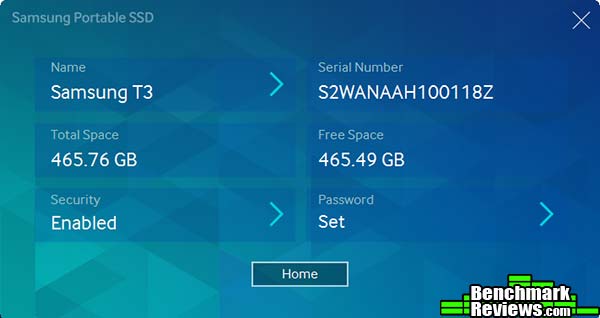
Any time the computer is rebooted, or the drive connected, you’ll have to enter the password in order to mount it.
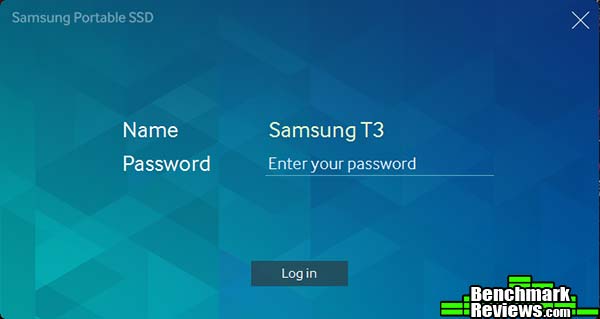
If you take the drive and connect it to another computer without the security software, only a small read-only partition will mount. This partition– which, by the way, survives a DISKPART “clean all” command– contains copies of the security software and an explanatory note. Once a password has been set, you’ll need to install the security software and enter the correct password to use the disk on another computer.
In the last section I’ll present my final thoughts and conclusion for the Samsung Portable SSD T3 drive.
IMPORTANT: Although the rating and final score mentioned in this conclusion are made to be as objective as possible, please be advised that every author perceives these factors differently at various points in time. While we each do our best to ensure that all aspects of the product are considered, there are often times unforeseen market conditions and manufacturer changes which occur after publication that could render our rating obsolete. Please do not base any purchase solely on our conclusion, as it represents our product rating specifically for the product tested which may differ from future versions.
The Samsung Portable SSD T3 is the first solid-state external drive we here at Benchmark Reviews have ever tested. It’s not really fair to compare it to the internal drives we’ve tested, but that’s all the data we have, so that’s what we did.
Although the Samsung drive strives to maximize its performance by using UASP (USB Attached SCSI Protocol), it cannot compete with the performance of a drive connected to a SATA 6G or a PCI-E based m.2 port. This is why its scores were at or near the bottom of the charts in most of the benchmarks. Also, there’s currently no way to support TRIM over USB, so you’ll be dependent on the drive’s internal garbage collection.
However, this product is not competing against internal drives; rather, it’s competing against the slowest computing storage available today: 2.5″, USB-powered external drives. Typically equipped with sluggish 3,400RPM laptop drive mechanisms to save power, these external drives are generally inexpensive for the storage capacity they offer, and are adequate for backup use.

The Samsung Portable SSD T3, on the other hand, doesn’t really make sense for backup– although it can certainly be used for same. It’s for people who routinely move large amounts of data to and from platforms, especially mobile platforms, (although we tested a 500GB version, Samsung offers a 2TB version) and need the performance…the small size and shock resistance are just icing on the cake. Samsung claims that compared to standard USB-powered external hard drives, the T3 is anywhere from 4-7 times faster, and in informal testing with a Seagate external USB-powered drive I had, I achieved that level of improvement.
My only real complaint about this drive is the lack of a cable or adapter to enable it to connect directly to a USB Type C port. These are rare today– Apple’s Macbook Retina is one of the few laptops with this connector– but it’s becoming more common on Android phones and it would have been nice to be able to connect this drive directly to these devices.
Samsung offers the Portable SSD T3 in 250GB at $84.99 (Newegg / Amazon), 500GB at $219.99 (Newegg / Amazon), 1TB at $429.99 (Newegg / Amazon), and 2TB at $849.99 (Newegg / Amazon) capacities. There’s not a lot of competition in the external SSD market these days; for now, it looks as if Samsung has a winner on its hand if it’s what you need.

+ Outstanding performance for an external USB-powered drive
+ Very small and light, high impact resistance
+ Easy to use security application
– Very expensive compared to traditional external drives
– USB 3.1 Gen. 1 support limits raw transfer speed to 5Gb/s
– No Type C connector cable included
- Performance: 9.00
- Appearance: 8.50
- Construction: 9.50
- Functionality: 8.75
- Value: 8.00
Quality Recognition: Benchmark Reviews Silver Tachometer Award.
COMMENT QUESTION: Which brand of SSD do you trust most?

3 thoughts on “Samsung Portable SSD T3 Review”
Driver needed for Mac? See warning for previous model at
Mac Owners Should Hold Off on New Samsung T1 Flash SSD
https://www.macobserver.com/tmo/article/mac-owners-should-hold-off-on-new-samsung-t1-flash-ssd
Can it be used to boot Mac and work from it all day long?
RAID 0 inside as in SanDisk’s 1.92TB Extreme 900 Portable SSD? That is the best way to lose data (2x probability or more). One disk fails (or controller), all lost.
The T3 drive comes with the necessary software to run it on a Mac, included the SAT driver mentioned in your link. I tried the drive on a Mac and had two minor issues: the first time I ran the installer, it installed the security software, but not the SAT driver, so the drive was inaccessible. Running the installer again brought up the option to install the SAT driver. Second, the “T3 Login Activator for Mac” utility you need to unlock an encrypted drive doesn’t “see” the T3 if it’s connected when you boot the Mac– you need to unplug the drive and then plug it in again.
I copied over 200GB of video files to the drive (simply by dragging them over in the Finder) and saw a transfer rate of about 1GB every 7 seconds, or about 140MB/second.
I don’t see any way to use the T3 as a boot drive for the Mac, since their installer will not install the security software and SAT driver on the T3 itself. You might be able to hack around this by manually transferring a preconfigured system folder, but I wouldn’t recommend it. In any case, an internal SSD would be much faster than a USB 3 SSD.
Thanks. I guess you mean when using the T3 security software. I guess, no problem when not using it.
Sure an internal SSD could be faster, but booting from external Thunderbolt or SSD is very convenient as Mac to Go (like Windows to Go) to carry your stuff and boot from Mac at work and home.
Comments are closed.