By David Ramsey
Manufacturer: Samsung Electronics Co., Ltd.
Product Name: Samsung SSD 950 PRO
Part Number: MZ-V5P512BW
UPC: 887276070339
Prices: $327 each (Newegg / Amazon)Full Disclosure: Samsung provided the product samples used in this article.
Samsung’s 950 PRO m.2 PCI-E SSD set new performance records for a consumer SSD, blasting through the limits of SSDs tethered to the old SATA interface. What could be better than one of these blazing-fast solid state storage monsters? Two of them in RAID-0! In this article, Benchmark Reviews explores the outer limits of storage performance with a pair of 512GB Samsung 950 PRO SSDs on our MSI Z170A Gaming M7 test system.
We’re excited to be able to being you this test, and thank Samsung for providing us with the two 950 PRO SSDs that allow us to do so.

When Serial ATA (SATA) replaced the old IDE/ATA disk interface standard, it brought much greater performance potential as well as much smaller cables. With SATA Revision 3 (also known as “SATA 6”), the raw data rate increased to 6Gb/s. With standard 8/10 disk data encoding, this translates into a maximum theoretical bandwidth of 600MB/s. This is far more than any hard disk can achieve, but consumer-level SATA SSDs have started bumping up against this limit, returning real-world speeds over 560MB/s.
But the flash NAND memory used in modern SSDs is capable of much, much greater speeds: all it needs it a way to transfer the data that can handle more bits per second. The PCI Express (PCI-E) lanes of modern computers provide a perfect solution. A single PCI-E 2.0 lane can transfer 500MB/s, while a single PCI-E 3.0 lane almost doubles that to about 985MB/s. The Samsung 950 PRO m.2 SSD can use up to four PCI-E 3.0 lanes (it’ll work with fewer lanes, although performance will be limited) giving a theoretical maximum throughput of a staggering 4GB/s. In our test of a single Samsung 950 PRO m.2 SSD on our MSI Z170A Gaming M7 motherboard, we saw a maximum sustained read speed of 2.3GB/s in AIDA64, and up to 2.6GB/s in the ATTO disk benchmark.
Of course, getting this performance depends on having both the PCI-E lanes available, and the m.2 slots (or an m.2 PCI-E adapter card such as Silverstone’s ECM20). Prior to the recent introduction of Intel’s Z170 Express chipset, most consumer systems were limited to 24 PCI-E lanes: 16 3.0 lanes from the processor and 8 2.0 lanes from the chipset. An enthusiast system’s hardware– graphics cards, USB 3.0 ports, etc.– could easily use all the available PCI-E lanes; in fact, some motherboards even had physical switches allowing you designate how the available lanes were allocated. Some motherboards added expensive PCI-E multiplexer chips to try to spread the available lanes across more devices.
The X99 LGA2011 platform has up to 40 PCI-E 3.0 lanes available (the exact number depends on which CPU you use), but it’s expensive and doesn’t natively support m.2.
Enthusiast salvation arrived late last year with the Intel Z170 chipset, which provides 20 PCI-E 3.0 lanes on its own; combined with the 16 lanes from the processor, 36 lanes are available. Along with native m.2 support, this opens up a slew of possibilities…like, say, dual m.2 RAID!
SATA’s not going down without a fight: the SATA Revision 3.2 specification defines a PCI-E interface for SATA, as well as the traditional interface. Known as “SATA Express”, it’s supported by additional connectors on most Z170 motherboards, such as these on our MSI Z170A Gaming M7 test platform:

Using up to two PCI-E lanes per drive, SATA Express attempts to bridge SATA and PCI-E, and while it’s a noble attempt, it simply hasn’t caught on with SSD vendors. Although a few vendors announced SATA Express SSDs, I’ve never seen one, and can’t find any for sale on Newegg or Amazon.
I’m not a big fan of the m.2 form factor: small, bare circuit boards are vulnerable to physical damage and static discharge, and the tiny, fiddly screws and posts needed to mount an m.2 drive are clumsy to deal with. Still, it looks as if m.2 will be the way for SSDs to move to the next performance level.
RAID is an acronym standing for– depending upon who you ask– either “Redundant Array of Independent Drives” or “Redundant Array of Inexpensive Drives”. There are many types of RAID, some designed for data redundancy and reliability; some designed for speed, and some designed for a combination of both, but the common point of all RAID systems is that read and write requests are spread across multiple drives. There are many RAID variants but the three most common are mirrored systems, where multiple drives each contain the same data, ensuring data integrity if a drive fails; parity systems use a dedicated parity drive as a running check on the data, and the system we’ll be using, a striped system that splits reads and writes across multiple drives.
Theoretically a two-drive RAID-0 setup can result in a doubling of raw read and write performance, since each drive only has to handle half the data. In the real world, a 50% increase is a more reasonable expectation. Also, note that a two-drive RAID-0 system doubles your chances of drive failure, since both drive appear as a single logical drive to your system.
RAID-0 setups used to be common on enthusiast machines, as doubling the performance of a relatively slow hard disk was a huge win. But while RAID-0 will improve data transfer speeds, it won’t do a thing for IOPS– the number of requests the storage subsystem can handle per second. This is critical since the improved IOPS performance is the main reason SSD-based systems feel faster in daily use than hard drive based systems. Since a single SSD will outperform even RAIDED hard disks in data transfer rates, and vastly outperform them in IOPS, the utility of a RAID-0 system is less apparent than it used to be.
Early on in our SSD coverage, Benchmark Reviews published an article which detailed Solid State Drive Benchmark Performance Testing. The research and discussion that went into producing that article changed the way we now test SSD products. Our previous perceptions of this technology were lost on one particular difference: the wear leveling algorithm that makes data a moving target. Without conclusive linear bandwidth testing or some other method of total-capacity testing, our previous performance results were rough estimates at best.
Our test results were obtained after each SSD had been prepared using DISKPART or Sanitary Erase tools. As a word of caution, applications such as these offer immediate but temporary restoration of original ‘pristine’ performance levels. In our tests, we discovered that the maximum performance results (charted) would decay as subsequent tests were performed. SSDs attached to TRIM enabled Operating Systems will benefit from continuously refreshed performance, whereas older O/S’s will require a garbage collection (GC) tool to avoid ‘dirty NAND’ performance degradation.
It’s critically important to understand that no software for the Microsoft Windows platform can accurately measure SSD performance in a comparable fashion. Synthetic benchmark tools such as ATTO Disk Benchmark and Iometer are helpful indicators, but should not be considered the ultimate determining factor. That factor should be measured in actual user experience of real-world applications. Benchmark Reviews includes both bandwidth benchmarks and application speed tests to present a conclusive measurement of product performance.
- Motherboard: MSI Z170A GAMING M7 Socket LGA 1151
- Processor: 4.0GHz Intel Core i7-6700K Skylake CPU
- System Memory: 16GB DDR4 2133MHz
- Operating System: Microsoft Windows 10
The following storage hardware has been used in our benchmark performance testing, and may be included in portions of this article:
- Crucial RealSSD-C300 CTFDDAC256MAG-1G1 256GB SATA 6Gb/s MLC SSD
- Crucial m4 CT256M4SSD2 256GB SATA 6Gb/s MLC SSD
- Crucial M550 Solid State Drive515GBCT512M550SSD1
- Crucial MX100 Solid State Drive 512GBCT512MX100SSD1
- Crucial BX100 Solid State Drive 500GB CT500BX100SSD1
- Intel SSD 311 Series Larson Creek SSDSA2VP020G2E
- Intel SSD 320 Series MLC Solid State Drive SSDSA2CW160G3
- Intel SSD 335 Series Solid State Drive SSDSC2CT240A4K5
- Intel SSD 520 Series MLC Solid State Drive SSDSC2CW240A3
- OCZ Agility 2 OCZSSD2-2AGTE120G 120GB MLC SSD
- OCZ Agility 3 AGT3-25SAT3-240G 240GB MLC SSD
- OCZ Vertex 2 OCZSSD2-2VTXE120G 120GB MLC SSD
- OCZ Vertex 3 VTX3-25SAT3-240G 240GB MLC SSD
- OCZ Vertex 3.20 MLC SSD VTX3-25SAT3-240G.20 MLC SSD
- OCZ Vertex 4 VTX4-25SAT3-256G MLC SSD
- OCZ Vertex 450 VTX450-25SAT3-256G MLC SSD
- OCZ Vertex 460VTX460-25SAT3-240G MLC SSD
- OCZ Octane OCT1-25SAT3-512G MLC SSD
- OCZ Vector VTR1-25SAT3-256G MLC SSD
- OCZ Vector 150VTR150-25SAT3-240G MLC SSD
- Patriot Torqx 2 PT2128GS25SSDR 128GB MLC SSD
- WD SiliconEdge-Blue SSC-D0256SC-2100 256GB MLC SSD
- AS SSD Benchmark 1.6.4067.34354: Multi-purpose speed and operational performance test
- ATTO Disk Benchmark 2.46: Spot-tests static file size chunks for basic I/O bandwidth
- CrystalDiskMark 3.0.1a by Crystal Dew World: Sequential speed benchmark spot-tests various file size chunks
- Iometer 1.1.0 (built 08-Nov-2010) by Intel Corporation: Tests IOPS performance and I/O response time
- Finalwire AIDA64: Disk Benchmark component tests linear read and write bandwidth speeds
- Futuremark PCMark Vantage: HDD Benchmark Suite tests real-world drive performance
This article utilizes benchmark software tools to produce operational IOPS performance and bandwidth speed results. Each test was conducted in a specific fashion, and repeated for all products. These test results are not comparable to any other benchmark application, neither on this website or another, regardless of similar IOPS or MB/s terminology in the scores. The test results in this project are only intended to be compared to the other test results conducted in identical fashion for this article.
Alex Schepeljanski of Alex Intelligent Software develops the free AS SSD Benchmark utility for testing storage devices. The AS SSD Benchmark tests sequential read and write speeds, input/output operational performance, and response times.
AS-SSD Benchmark uses compressed data, so sequential file transfer speeds may be reported lower than with other tools using uncompressed data. For this reason, we will concentrate on the operational IOPS performance in this section.
The results of this test are something you should get used to: transfer rates beyond anything you’re likely to have seen before. With a sequential read rate of over 2.8 gigabytes per second, and a sequential write just barely slower at 2.5 gigabytes per second, the performance of our Samsung 950 PRO RAID-0 array is more than five times faster than we’ve seen from the very best SATA SSDs.

Samsung 950 PRO RAID Results
While hammering the drive with 64 requests at once, the results aren’t quite as stellar: a meager 1346MB/s read and 768MB/s write…but as you can see from the chart below they’re still far beyond any SATA SSD. Compared to a single Samsung 950 PRO, write performance has roughly doubled, but reads are only somewhat better.

In the next section, Benchmark Reviews tests transfer rates using ATTO Disk Benchmark.
The ATTO Disk Benchmark program is free, and offers a comprehensive set of test variables to work with. In terms of disk performance, it measures interface transfer rates at various intervals for a user-specified length and then reports read and write speeds for these spot-tests. There are some minor improvements made to the 2.46 version of the program that allow for test lengths up to 2GB, but all of our benchmarks are conducted with 256MB total length. ATTO Disk Benchmark requires that an active partition be set on the drive being tested. Please consider the results displayed by this benchmark to be basic bandwidth speed performance indicators.

1TB Samsung 950 PRO Array ATTO Benchmark Results
Most drive produce a chart like this on the ATTO test: read and write speeds that ramp and plateau. You have to read the number in the “Read” and “Write” columns to appreciate what you’re seeing here. Wait, maybe a graph would be better:

You’ll recall that the real-world bandwidth ceiling of a SATA 6 connection is about 560 megabytes per second. Our 950 PRO array blows through this with a peak read speed of 3.3 gigabytes per second– over six times faster– and a peak write speed of just over 3 gigabytes per second.
In the next section, Benchmark Reviews tests sequential performance using the CrystalDiskMark 3.0 software tool…
CrystalDiskMark 3.0 is a file transfer and operational bandwidth benchmark tool from Crystal Dew World that offers performance transfer speed results using sequential, 512KB random, and 4KB random samples. For our test results chart below, the 4KB 32-Queue Depth read and write performance was measured using a 1000MB space. CrystalDiskMark requires that an active partition be set on the drive being tested, and all drives are formatted with NTFS on the Intel Z170 chipset configured to use AHCI-mode. Benchmark Reviews uses CrystalDiskMark to illustrate operational IOPS performance with multiple threads. In addition to our other tests, this benchmark allows us to determine operational bandwidth under heavy load.
CrystalDiskMark uses compressed data, so sequential file transfer speeds are reported lower than with other tools using uncompressed data. For this reason, we will concentrate on the operational IOPS performance in this section.
CrystalDiskMark 3.0 reports single-threaded sequential speeds reaching 3286MB/s reads and 2680MB/s writes. 4K tests at a queue depth of 32 produced 853MB/s read and 768MB/s write performance.

The chart below summarizes 4K random transfer speeds with a command queue depth of 32. Again, read speeds are only a little better than a single Samsung 950 PRO, although write speeds almost double.

In the next section, we continue our testing using Iometer to measure input/output performance…
Iometer is an I/O subsystem measurement and characterization tool for single and clustered systems. Iometer does for a computer’s I/O subsystem what a dynamometer does for an engine: it measures performance under a controlled load. Iometer was originally developed by the Intel Corporation and formerly known as “Galileo”. Intel has discontinued work on Iometer, and has gifted it to the Open Source Development Lab (OSDL). There is currently a new version of Iometer in beta form, which adds several new test dimensions for SSDs.
Iometer is both a workload generator (that is, it performs I/O operations in order to stress the system) and a measurement tool (that is, it examines and records the performance of its I/O operations and their impact on the system). It can be configured to emulate the disk or network I/O load of any program or benchmark, or can be used to generate entirely synthetic I/O loads. It can generate and measure loads on single or multiple (networked) systems.
To measure random I/O response time as well as total I/O’s per second, Iometer is set to use 4KB file size chunks over a 100% random sequential distribution at a queue depth of 32 outstanding I/O’s per target. The tests are given a 50% read and 50% write distribution. While this pattern may not match traditional ‘server’ or ‘workstation’ profiles, it illustrates a single point of reference relative to our product field.
All of our SSD tests used Iometer 1.1.0 (build 08-Nov-2010) by Intel Corporation to measure IOPS performance. Iometer is configured to use 32 outstanding I/O’s per target and random 50/50 read/write distributionconfiguration: 4KB 100 Random 50-50 Read and Write.icf. The chart below illustrates combined random read and write IOPS over a 120-second Iometer test phase, where highest I/O total is preferred:

After testing some TLC NAND-based SSDs with relatively weak IOPS performance, it’s amazing to see the Samsing 950 PRO array chew through over 214,000 IOPS per second. To be fair, though, this is pretty much the same performance we got from a single 950 PRO. Remember that RAID systems can’t help IOPS performance.
In our next section, we test linear read and write bandwidth performance and compare the speed of the Samsung SSD array against several other top storage products using the AIDA64 Disk Benchmark.
Many enthusiasts are familiar with the Finalwire AIDA64 benchmark suite, but very few are aware of the Disk Benchmark tool available inside the program. The AIDA64 Disk Benchmark performs linear read and write bandwidth tests on each drive, and can be configured to use file chunk sizes up to 1MB (which speeds up testing and minimizes jitter in the waveform). Because of the full sector-by-sector nature of linear testing, Benchmark Reviews endorses this method for testing SSD products, as detailed in our Solid State Drive Benchmark Performance Testing article. One of the advantages SSDs have over traditional spinning-platter hard disks is much more consistent bandwidth: hard disk bandwidth drops off as the capacity draws linear read/write speed down into the inner-portion of the disk platter. AIDA64 Disk Benchmark does not require a partition to be present for testing, so all of our benchmarks are completed prior to drive formatting.
Linear disk benchmarks are superior bandwidth speed tools because they scan from the first physical sector to the last. A side affect of many linear write-performance test tools is that the data is erased as it writes to every sector on the drive. Normally this isn’t an issue, but it has been shown that partition table alignment will occasionally play a role in overall SSD performance (HDDs don’t suffer this problem).

We run the AIDA64 linear read and write tests with a 1M block size. There’s about a 7-8% “wobble” in the read results but the average of 3.12 gigabytes per second across the entire array is still amazing. Note, though, the high CPU utilization: normally in SSD testing the CPU utilization is 0-2%; here it’s 14%! This is because the “Intel Rapid Storage Technology” RAID driver is a software-based system: while a server or industrial computer would have a dedicated RAID controller, this consumer-level Intel system does it all in software.
AIDA64 linear write-to tests were next…

The pattern we see here in the write results is very similar to the pattern we saw on this benchmark with a single 950 PRO. However, the difference between the maximum and minimum transfer rates our our Samsung 950 array was very large at about 1.3GB/s, much higher than the 158MB/s deviation we saw with the single drive.
The average write performance, at 1723MB/s, wasn’t as much faster as you’d expect from the single drive’s average performance of 1349 MB/s. However, note the maximum performance of 2.5GB/s is maintained for just over 20%– about 200 gigabytes– of drive space.This is a gigabyte per second faster than the 1.5GB/s maximum we saw from the single drive, and is maintained over a larger amount of data as well. Unless you routinely write over 200GB of data sequentially at once, the write performance you’ll get from this array will be much closed to the maximum rather than the average speeds reported here.
The chart below shows the average linear read and write bandwidth speeds for a cross-section of storage devices tested with AIDA64. The performance of the Samsung 950 PRO, whether singly or in a RAID-0 array, makes all the other drives look puny.
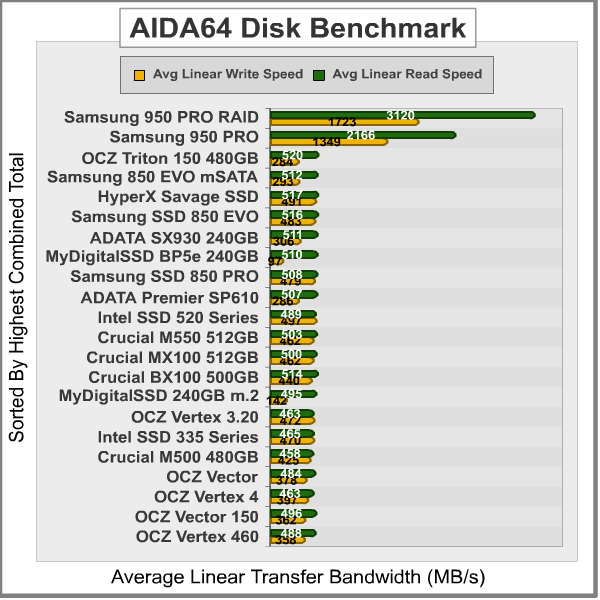
Linear tests are an important tool for comparing bandwidth speed between storage products, serve to highlight the consistent-bandwidth advantages of SSDs, which don’t suffer the performance drop-off that HDDs do as the test proceeds away from the fast outer edge of the disk.
In the next section we use PCMark Vantage to test real-world performance…
PCMark Vantage is an objective hardware performance benchmark tool for PCs running 32- and 64-bit versions of Microsoft Windows 7. PCMark Vantage is well suited for benchmarking any type of Microsoft Windows 7 PC: from multimedia home entertainment systems and laptops, to dedicated workstations and high-end gaming rigs. Benchmark Reviews has decided to use the HDD Test Suite to demonstrate simulated real-world storage drive performance in this article.
PCMark Vantage runs eight different storage benchmarks, each with a specific purpose. Once testing is complete, results are given a PCMark score while and detailed results indicate actual transaction speeds. Since it simulates real-world consumer workloads, Vantage gives much more weight to read speeds, and fast iOPS are not as important as they would be in a server or other business environment. With an overall score of 97944, the Samsung 950 PRO RAID-0 array deals us a bit of a surprise…

You’ll notice that I have three results for the Samsung RAID here. When you create a RAID, one of the parameters you can adjust is the stripe size:

(MSI oddly labels the “stripe” parameter as “strip”, but either works, really.) This is the smallest amount of data that can be read from or written to the array. Larger stripe sizes theoretically provide better performance, but waste space if you have a lot of data that’s smaller than the stripe size. Intel recommends 16kB stripes for most uses, and that’s what the Rapid Storage Technology configuration defaults to. However, given the odd results in the Vantage test, I ran it with stripe sizes of 8K and 32K as well.
As you can see, changing the stripe size made little difference.
This test result is the only one in which the Samsung array didn’t completely crush the competition. Now, you’ll note that its overall score is still faster than any SATA SSD, but it’s oddly far below the score recorded by a single 950 Pro.
In the next section, I share my test conclusion.
Remember that this is not a review of the Samsung 950 PRO NvME SSD drive; we’ve already done that, and you can read about it here. There’s no doubt that this is one of, if not the, fastest consumer SSD in existence, and it’s a no-brainer if your system supports m.2 NvME and you want exceptional storage performance.
But what if “exceptional” isn’t enough? The possibilities opened up by the extra PCI-E lanes in Intel’s Z170 chipset really just begged for something like this, and the performance improvement over a single drive was pretty impressive (all numbers in the chart below are megabytes per second):
| Benchmark | Single 950 PRO | 950 PRO RAID | Difference % |
| AS-SSD Read | 1175 | 1346 | +14.55 |
| AS-SSD Write | 374 | 768 | +105 |
| ATTO Read | 2491 | 3314 | +33 |
| ATTO Write | 1568 | 3034 | +93 |
| Crystal Diskmark Read | 777 | 853 | +10 |
| Crystal Diskmark Write | 426 | 768 | +80 |
| AIDA64 Read | 2166 | 3120 | +44 |
| AIDA64 Write | 1349 | 1723 | +28 |
| PCMark Vantage (16K stripe) | 210264 | 97994 | -53 |
In reads, we see an average performance improvement of just over 25%, while in writes we see an average performance improvement of over 75% (Vantage score excluded). But there’s a great variability in the improvement depending on the test that is run.
The Vantage score remains puzzling. I’ve tested SSDs that return middling synthetic results but great Vantage results; this is the first time I’ve seen the opposite condition apply. Note, though, that the Vantage score only looks bad compared to the score returned by a single Samsung 950 PRO: it’s still better than the scores of the other SSDs we’ve tested.

Realistically, this level of storage performance will make absolutely no difference for the vast majority of enthusiast systems. Unless you’re routinely moving multi-gigabyte video files or running multiple virtual machines with high I/O loads, you’re simply not going to notice the added throughput over a single 950 PRO. And don’t forget that this RAID implementation comes with some drawbacks: since this is software RAID without a dedicated RAID controller, the CPU utilization is high, as the RAID driver must decide how to slice data up to spread it across multiple drives, and how to reassemble it when reading it back. Also, building a single logical volume out of multiple drives increases the risk of drive failure, and losing one drive in a RAID-0 array means you’ve lost everything.
But, really, who cares? Setting up a system like this is never about practicality or utility; a RAID-0 array is just one component of building the ultimate enthusiast machine, so dripping with power and capability that it will laugh at anything you throw at it. So go ahead and indulge yourself. Also, it’s the currently only way to get a terabyte-sized chunk of 950 PRO goodness, and perhaps that’s justification enough.
Pros:
+ Amazing benchmark performance
+ More storage than a single SSD
+ Bragging rights
– Performance not really noticeable in most enthusiast workloads; no IOPs improvement
– Increased CPU utilization
– Increased performance of drive failure

10 thoughts on “Samsung 950 PRO SSD RAID-0 Performance”
Question: Is RAID-0 SSDs worth it?
Answer: Nope!
Not for most people. Still, there are situations where yes, you could indeed use that kind of speed.
I have this drive configured as a 512GB x2 RAID-0 array.
1. How can I update its driver from Samsung as it keeps on saying:
“Samsung NVM Express Drive is not connected. Please connect the device and retry”.
In fact no software from Samsung recognize my SSD RAID-0 array. What am I supposed to do to fix this? Samsung has not responded to my query…
2. Can I convert from my RAID-0 array to a single 1TB drive without losing data? If so, how can I do it?
The speed data you’ve taken there isn’t much difference in performance…
Thanks,
David
1. Sorry, I don’t know of any way to get the Samsung software to recognize the RAID.
2. No, there’s no way to convert your RAID 0 array “in place” to a non-RAID 1TB drive. You’ll have to back the drive’s contents up, break the array, created the spanned drive (if your motherboard BIOS supports that) and restore it.
But why bother? The only thing you’d accomplish is making your 1TB volume somewhat slower. I’m pretty sure if the Samsung software won’t recognize a RAID 0 volume, it won’t recognize a spanned volume either.
Hi, the results obtained with CrystalDiskMark (3286MB/s reads and 2680MB/s writes) are on a software or hardware raid?
I create a Raid 0 with Intel Raid Controller and not get to those numbers with CrystalDiskMark.
Oscar, I created the RAID with the built-in software– i.e. Intel– on the MSI motherboard, which is equipped with two m.2 slots.
I recommend using an Asrock Extreme 7+ motherboard with Windows 10 on a flash drive and the latest Intel Rapid Storage Technology drivers on another flash drive. This motherboard will allow you to create a RAID0 array on say thee Samsung 512GB m.2 drives. There are guides on the internet on how to setup the BIOS and go through the required steps.
What’s not clear folks, is it’s a fizzer on intel despite the nominal 2x m.2 ports. They both share the total 4x pcie3 lanes of the intel chipset.
A pair of samsung evoS easily exceeds that 4GB/s limit.
Lane rich amd Threadripper or epyc can achieve amazing array speeds tho.
Crystal Disk Mark 6 released Nov.6 2017. And you’re using version 5.0.2… so why does it say CDM 3? Really weird.
Sorry, I apologize, this post is from 2016… the last post by Peter made me think it was recent. Sorry! 😀
Comments are closed.