By Meng Vang
Manufacturer: NZXT, Inc.
Product Name: Manta Matte White Mini-ITX PC Gaming Case
Model Number: CA-MANTW-W1
UPC: 815671012777
Price As Tested: $139.99 (Amazon | Newegg)Full Disclosure: The product sample used in this article has been provided by NZXT.
The NZXT Manta computer case makes a great case for a water cooled mini-ITX gaming system. With enough room for two 280mm radiators at the top and the front, users can expect exceptional airflow thanks to its water cooling capabilities. NZXT’s new manufacturing process allows for the creation of curved panels, giving the user more work room for cable management while maintaining a sturdy construction all around. A 3.5″ HDD can also be installed behind the motherboard tray without worrying about it making contact with the curved side panels. The Manta mini-ITX can support any standard size ATX power supply unit with enough room for a single 3.5″ HDD in the power supply chamber. Benchmark Reviews is happy to review the NZXT Manta mini-ITX case in white. Let’s go over a quick overview of what this mini-ITX case has to offer.

- New manufacturing technology offers unparalleled build quality
- Elegant, curved steel paneling and window
- Double the cable management space
- Dual 280mm liquid cooling support
- Kraken X61-ready with push/pull capabilities
- Integrated PSU shroud for a beautifully clean build
- Fully filtered, easy-to-remove intake
| Model Number | CA-MANTW-W1 (Matte White/Window) |
| Motherboard Support | mini-ITX |
| Dimensions | W: 245 x H: 426 x D: 450mm |
| Weight | 7.2kg |
| Clearance | CPU Clearance: 160mm GPU Clearance: 363mm PSU Length: 363mm |
| Cooling System | Front: 2 x 140/120mm (2 x 120mm included) Top: 2 x 140/120mm Rear: 1 x 120mm (Included) |
| Radiator Support | Front: Up to 280mm Top: Up to 280mm Rear: 120mm |
| Drive Bays | Internal 3.5”: 2 Internal 2.5”: 3 |
| External Electronics | I/O Panel LED On/Off, 1 x Audio/Mic, USB 3.0 |
| Expansion Slots | 2 |
| Power Supply Support | ATX |
| UPC | 815671012777 (Matte White/Window) |
| EAN | 5060301693108 (Matte White/Window) |
The NZXT Manta mini-ITX case is currently available online for $139.99 (Amazon | Newegg). Inside of the accessory box, we find plenty of mounting screws for the motherboard, storage drives, and the power supply unit. A few zip ties along with a brochure are also included.

The exterior of the Manta mini-ITX looks astounding with its curved and simple design. There is nothing much to see at the front of the case except for a very faint NZXT branding logo towards the bottom of the case; trust me, it’s there.

On the main side panel, there is a large window to show off basically everything inside of the case. NZXT claims this is the largest side panel window for a mini-ITX case at the time of this review. It is non-tinted and both side panels include their own captive thumbscrews.

The rear of the Manta mini-ITX maintains a standard layout with a 120mm exhaust fan pre-installed. Two expansion slots are included and the power supply unit mounts directly at the bottom. The power supply unit is protected from dust by a removable dust filter at the bottom of the case.

At the top of the case, we can see the front panel ports along with the power LED and power button. The top maintains a very simple look just like the rest of the exterior.

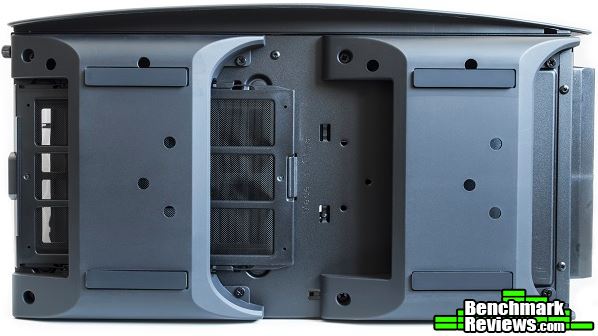
The Manta mini-ITX stands on four rubberized feet that are tall enough to allow air to pass under the case and to the power supply unit. Here we can see the removable dust filter for the power supply unit.
Now that we have seen a quick look, let’s go ahead to show more about the features the Manta mini-ITX has to offer.
Removing the front panel reveals a large dust filter for the front intake. This dust filter can be easily removed and has enough room to support a radiator with fans.

Once we remove the dust filter, we can see there are two 120mm pre-installed front intake fans included with the Manta mini-ITX. Of course, two 140mm fans or a 280mm radiator can also be installed here.

The interior of the Manta mini-ITX is one of the most spacious I have ever seen for an ITX chassis. There is a CPU cutout on the motherboard tray and two SSD mounts towards the front of the case. The power supply chamber is completely closed off except for a few ventilation holes to give the graphics card access to fresh air. Something I did notice about the Manta mini-ITX was the lack of rubber grommets for the cable management holes.
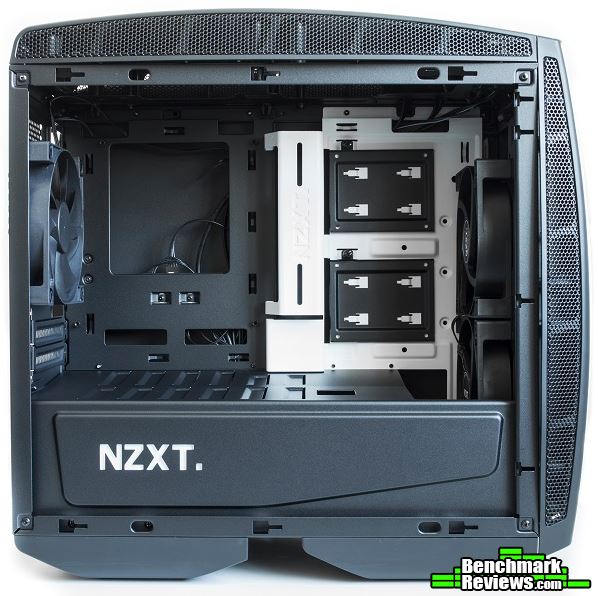
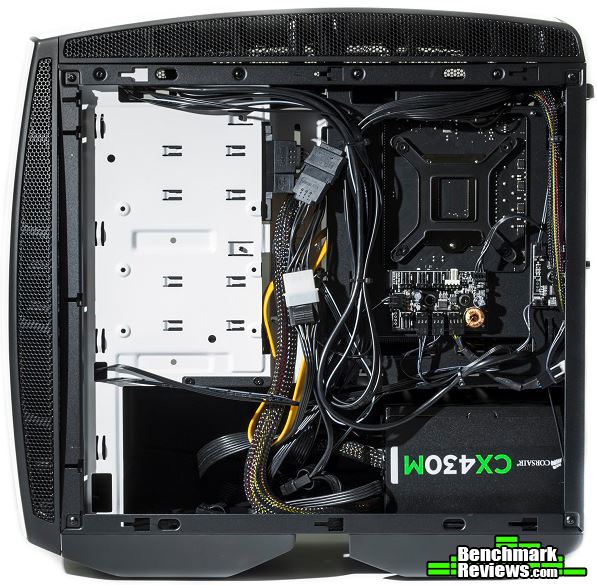
Behind the motherboard tray, we find a lot of tie down points for cable management, a fan hub, and enough space in the power supply chamber to mount a 3.5″ HDD and a large power supply unit. A 3.5″ HDD can also be mounted closer towards the top left of the case, but it requires the removal of the SSD brackets to do so.

Taking off the top cover, we can see there is plenty of space here to mount two 120mm fans or two 140mm fans. There is support for a 240mm a 280mm radiator as well. I would have liked to see a design similar to the front panel as a dust filter is not present at the top of the Manta mini-ITX.

Here we can take a closer look at the ventilation holes for the graphics card. There is also a small cable cutout just right of the graphics card ventilation holes for a power cable to the graphics card. At the front of the case, there is about five centimeters of space from the fans to the power supply chamber for a radiator.

There are too many details to go over on this page, so let’s go over a few more details in the next section.
Front panel ports include two USB 3.0 ports and standard headphone and microphone jacks. Additional USB 2.0 ports and a reset button are not present with the front panel ports. Perhaps in the future, we can expect to see an updated version with support for USB 3.1.

The Manta mini-ITX may not have ventilation holes directly over the front or top fans, but it does have large enough ventilation gaps that are closer to the side of the case. These ventilation gaps should be able to stop larger dust particles from entering the system.

The front power LED’s and HDD LED are integrated into one for a simpler exterior look. Here we can see the HDD LED between the two power LED’s.

The Manta mini-ITX comes with a fan hub that can support up to eight fans. It comes with an extension cable and a PWM connector. It is powered by a standard SATA power plug. We can also see the small circuit board that controls the LED lighting behind the motherboard rear I/O and the NZXT logo on the power supply chamber.

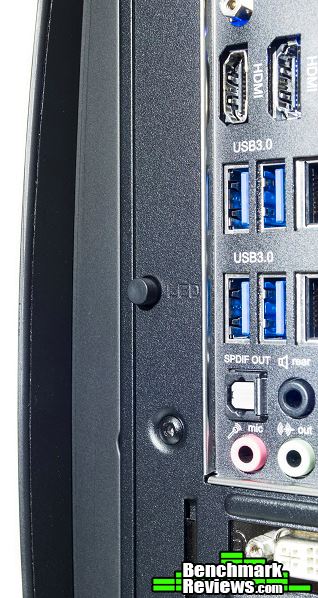
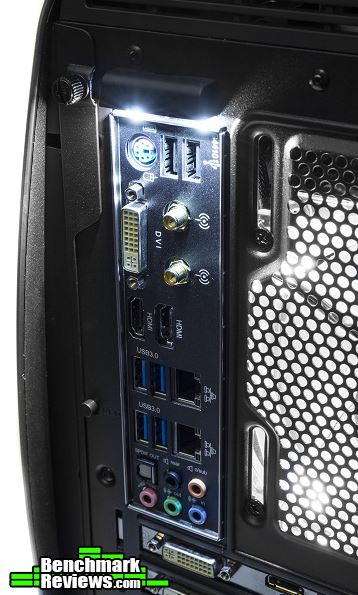
There is a small button behind the Manta mini-ITX to control the lighting on the rear I/O ports and the NZXT logo on the power supply chamber. Pressing it once will illuminate the lights on the rear I/O. Press it again and it turns off the light on the rear I/O but illuminates the NZXT logo on the power supply chamber. Press the button a third time to illuminate both the rear I/O and NZXT logo, then press again to turn the lights off.
In the next section, let’s go ahead and build a system with the Manta mini-ITX.
During the build, I installed a Corsair H100i water cooling unit along with a RADEON R9 270X Windforce edition graphics card. I was very interested in seeing how cable management would turn out to be since there were no rubber grommets for the cable cutouts and no Velcro straps to tie down large cables. Let’s take a look at the build.

-
Motherboard: Gigabyte Z97N-WIFI
-
System Memory: 2x4GB 1600MHz DDR3
-
Processor: Intel Pentium G3258 @ 4.8GHz
-
Audio: Realtek ALC892
-
Video: Gigabyte R9 270X 2GB GDDR5 Windforce Edition
-
Disk Drive 1: Kingston SSDNow V300 120GB SSD
-
Enclosure: NZXT Manta mini-ITX case
-
PSU: Corsair CX430M
-
Monitor: HP 23bw 23″ IPS display
-
Operating System: Windows 8.1 Professional 64-Bit
The overall build turned out well since there was a lot of work room in the case. I installed the radiator to the Corsair H100i at the front of the case with enough room for two more fans for a push-pull configuration. The Gigabyte R9 270X 2GB GDDR5 Windforce Edition graphics card installed without a problem considering how long the card was. Getting the cables to the motherboard was doable, but bending a few cables just to get them to plug into the motherboard was difficult because of the cable bar. Once I was able to get the cables plugged in, the cable bar does a good job at hiding most of those cables.
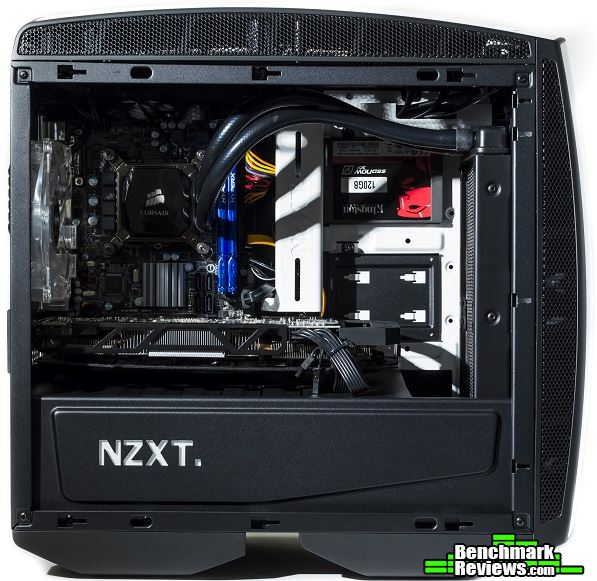
Cable management was simple to do thanks to the many cable tie down points on the motherboard tray. Although Velcro straps were not included, I was still able to tie down the large 24-pin motherboard cable without much problem. Since the side panels were curved outwards, the cables behind the motherboard tray had enough clearance and did not come into contact with the side panel.
Because I mounted the 240mm radiator to the front, I placed the two 120mm fans on the outside of frame. But does that mean we lose the front dust filter?

The front dust filter installed without a problem even with the fans installed outside the frame. The front dust filter was large enough for this kind of configuration. Adding two more fans behind the radiator could be done for a push-pull configuration.

The SSD brackets could be removed via a single thumbscrew. These brackets did not have a tool-less design as installing an SSD required four screws. I would had been able to admire the SSD installed in this system if only it was not upside down. Also, when installing a 3.5″ HDD behind the motherboard tray, these two SSD brackets must be removed to do so.

Take a look at how much room was left for additional fans on the radiator. Assuming there were additional fans on the radiator for a push-pull configuration, there would still be about a centimeter or two between the fans and the graphics card. The Gigabyte R9 270X 2GB GDDR5 Windforce Edition measures in at 11.5″, but it should have no problems with a push-pull configuration.

The LED’s on the motherboard rear I/O ports were bright and provided enough light to plug in the necessary cables. This was a great feature to have especially since this build was often left alone in a dark corner. What I would had liked to see was some sort of way to power these LED’s by battery. This way, the user can plug in all the necessary cables before powering on the system.
The illumination on the NZXT logo on the power supply chamber was very bright and looked great in darker environments. There were no LED strips on the interior or underneath the case, but I personally liked it without these added features anyway.

Let’s go into my final thoughts and end this review with my conclusion in the next section.
I had a lot of fun building a system with the Manta mini-ITX. There was a lot of work room to install a large graphics card and a 240mm radiator at the front of the case. Velcro straps for cable management were not present, but the many tie down points on the motherboard tray were enough to secure even the largest cables. Just make sure to have plenty of zip ties, but NZXT already included a number of zip ties in the accessory box for cable management. I am happy with the build overall and I could see many enthusiasts building a system with a full-fledged water cooling setup with the Manta mini-ITX.
With water and air cooling capabilities, the NZXT Manta does well in terms of performance. Computer users can install up to two 280mm radiators for maximum cooling or a CPU cooler up to 160mm in height. I personally would have liked to see support for a taller CPU cooler as some users may not prefer water cooling. The ventilation gaps on the top and front panels are large enough to allow air to enter the system, but the top does not have a dust filter like the front panel.
The Manta mini-ITX looks great with its curved design and large side panel window. It does not have any of the gamer-like features that sticks out like a sore thumb, but the simple design gives it a very modern, elegant, and classy look all around. The built in LED feature on the rear I/O and power supply chamber are not too overly done, and does serve a purpose especially in a darker environment. Most SSD’s are going to be presented upside down due to the way the brackets have to be mounted. If the brackets mounted the other direction, this problem would not exist. But then the cabling for the drives would have to come from somewhere else instead of coming from underneath the cable bar.
The quality of the side panels are very strong even with the curved design. There is extra support to the case with the cable bar in the middle; similar to what we have seen on the NZXT S340. Once the side, top, and front panels have been removed, the internal frame is about as sturdy as a standard case. It may not be the sturdiest, but the curved panels do a great job at reinforcing the internal frame.
When it comes to functionality, the Manta mini-ITX does everything it should for an ITX case. Being able to support two 280mm radiators is a plus for a mini-ITX case. The body itself is on the larger side, about the size of a smaller micro-ATX case. But being a larger ITX case gives it more functionality when compared to a smaller ITX case. Something I would have liked to see was a tool-less design for the HDD and SSD mounts especially at this price point.
As of March 2016, the NZXT Manta is currently available for $139.99 (Amazon | Newegg). It may not be the most affordable mini-ITX chassis out there, but it does contain a lot of great features that are only included in some of the more expensive ATX cases. A cheaper alternative would be the Phanteks Evolv ITX case, which does have some of the same water and air cooling capabilities. The Manta ITX, however, has a fan hub for eight fans and a much stronger body construction thanks to a new manufacturing process to create curved steel panels. Enthusiasts who are looking for a mini-ITX case to build a water cooled system should be happy with the NZXT Manta ITX case.
+ Strong panels due to curved design
+ Large side panel window for an ITX case
+ Simple and elegant exterior design
+ LED control for rear I/O and PSU chamber
+ Supports up to two 280mm radiators
+ Good cable management system
+ Fan hub for eight fans
+ Captive thumbscrews on side panels
+ Removable dust filters for easy cleaning
– No tool-less mounting mechanism for HDD/SSD
– Cannot support CPU air coolers over 160mm in height
– Must remove SSD brackets to install 3.5″ drive behind motherboard tray
– Most SSD’s will appear upside down when mounted on SSD brackets
-
Performance: 9.50
-
Appearance: 9.00
-
Construction: 9.25
-
Functionality: 8.75
-
Value: 8.75


