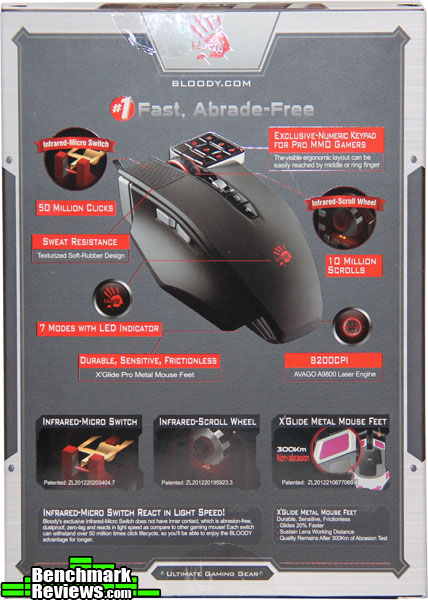
- Gaming laser sensor engine with resolution as high as 8200 DPI.
- Infrared micro switches and wheel provide 0.2ms response time.
- Numeric pad style for pro MMO players with 17 Macro buttons.
- Metal X Glide Pro mouse boots.
- 4 different weapon modes for left mouse key.
- Built in 160K memory.
| Sensor | AVAGO A9800 Laser |
| Buttons | 17 |
| Connector | USB 2.0 / 3.0 |
| Cable length | 1.8 meters |
| Size | 126 x 81 x 40 mm |
| Weight | 153 grams |
| System requirements | Windows (all versions) |
The Bloody ML160 Commander Laser Gaming Mouse currently sells online for $69.99 (Amazon | Newegg). The box is no-nonsense with simple descriptions of the main features of the mouse; which we shall delve into on a closer scale. Contents consisted of the ML160 Commander Mouse itself (of course), a bloody hand sticker, and two small cards with driver directions and warranty.
 |
 |
The side profiles of the ML160 show off the ergonomics concerning the thumb and last two finger rests. This is unique in the fact that mouse frame is designed so the middle finger rests naturally on the “5 key” (right mouse button). The same middle digit also operates the mouse wheel with the second joint contacting the silver rocker switch (2 positions, by default controls DPI sensitivity). As for the thumb, it rests comfortably between the back and forward buttons, with the ability to press either without having to reposition. The silver scalloped vents at the bottom front also light up with the bloody hand icon for an added effect.
 |
 |
Top profile illustrates the textured left main mouse button finger pad, as well as two more auxiliary buttons (3 and 4) which are used in the “core profiles” (discussed later in the driver section) or to set your own macros. On the bottom profile a wise choice was made to do away with the standard plastic and Teflon mouse pad feet and go with a superior metal format bloody refers to as “Metal X Glide Pro mouse boots.” Due to the shape and location on the frame they maximize a snag-free and particle-free experience.
 |
 |
The mouse wheel is slightly larger then the standard size with the base constructed of thick translucent plastic. A broad riser of textured rubber completes the tactile experience for perfect wheel rotation and accuracy. The keypad itself is a marvel of ergonomics; each key slightly angled toward the center 5 key (which is the default right mouse button key) so one’s finger naturally drifts back to the center of the pad.
 |
 |
The mouse cord is a heavy duty braided affair with a standard USB connection. A complimentary bloody sticker is included for a fierce show of intimidation concerning your elite gaming prowess in the field.
 |
 |
It’s important to take note that this mouse is definitely a different type to get used too. It took almost two days to retrain my finger muscle memory to accept its new home parameters. After realizing the proper way to place and orient the hand, things started to click; yet there was more surprises in store than just comfort.
Due to the nature of the Light Strike infrared micro switch technology involved, it is imperative to load the drivers for the mouse initially or only the primary left mouse button will function. After setting everything up to your preferences a simple save to the ML160’s mouse memory is all it takes and the mouse can operate without the drivers running.

The first driver page is where the user selects one of four mouse “cores,” or preconfigured macro settings for weapons assigned to the 1, N, 3, and 4 buttons. The standard first MMO core was used in this review due to the flexibility of setting up all 17 keys independently; however, let’s examine the other three cores. Core two offers four shooting modes in the left button using the “1, N, 3, 4” keys to shift between them instantly. Core three is for FPS headshot combos. Core four is for optimal MMO macros that are simplified complex actions assigned to one button. Quite a bit of flexibility for just four basic settings.

The second driver page appropriately entitled “Buttons” is the main go-to panel for configuring all 17 buttons. Drop down menus for keyboard macros, Microsoft Office, all multimedia functions, and even a special screen capture application are all assignable here. In addition, on screen indicators for each button is also available (which is really nice for seeing what sensitivity setting you may be cycling with the hotkeys).

The tiny colored spinning bloody hand (located top of Buttons Panel) brings up the seven possible profiles that is stored on the mouse. Each profile can have its own color effects on the mouse (concerning the bloody hand logo and the front lower scalloped vents). The four main effects consist of: constant light, color breathing, full color loop, and slowly changing colors.
 The sensitivity panel is where a toggle of up to five DPI settings may be fine tuned (800-8200 DPI) as well as polling rate per global profile. The most interesting aspect is the laser sensor calibration for the type of surface being used. The preset one works absolutely great for a standard mouse pad; however, for a colored, textured, wood, or glass surface active calibration measures the surface and adjusts accordingly.
Testing Methodology
The ML160 Commander was tested over a period of 70+ hours on a black cotton-polyester weaved rubber-backed mouse pad. The main programs and games tested consisted of Adobe Photoshop and Grim Dawn. These two programs were specifically chosen to test out the sensitivity of the laser and the functionality of the keypad.
Test System
- Processor: Intel Core i7-4790K
- Motherboard: Gigabyte GA-Z97X-UD5H
- System Memory: Corsair 16GB 1866Mhz
- Video: Gigabyte Windforce GTX 970 G1
- Monitor: LG 27″ IPS 2560 x 1440 (3K resolution)
- Audio: HT | Omega Claro Plus +
- Operating System: Windows 10 64 bit
Results
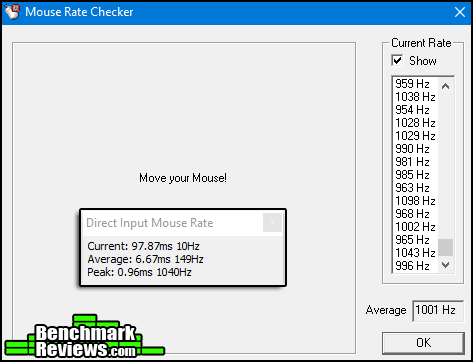
The ML160 has the ability to change polling rates per the seven profiles to 125, 250, 500, and 1000Hz. The maximum polling rate of 1000Hz was used for all tests. According to two separate polling tools, Direct Input Mouse Rate (for DirectX) and Mouse Rate Checker, the bloody ML160 exceeded the peak advertised polling rate.
Desktop Application: Using a native resolution of 2560 x 1440 (3K resolution) the DPI setting mostly used was 4000 for all basic desktop operations. The AVAGO laser sensor was rock solid on precision work within Photoshop for the airbrush tools with zero quivering when sitting completely still. Often with past laser sensors a slight jittering would be introduced with certain mouse pads, so apparently the built in sensor calibrations are actually doing the job properly. The keypad was hot-keyed to all audio multimedia functions and was a perfect setup to not only learn how to use the ML160 more instinctively, but showed off how perfectly it integrated with Windows 10 native audio software. Whatever audio software one chooses as the default, the mouse should be able to hook into. The buttons themselves, being the Light Strike type, was a refreshing experience due to the instant response time.
Gaming: To sum it up: completely flawless. Tracking was precise down to the pixel with minimal issues on overcorrection. The well designed mouse base felt completely frictionless. In Grim Dawn (a Diablo 3 type of game), the re-assigned keypad for the standard 1-9 active commands (excluding the number five since that is the right mouse button key) exhibited zero lag. The ergonomics for the last three fingers of the hand are so well thought out, that even after four hours of playing, the ML160 still felt extremely comfortable.
It is really challenging to illustrate how the Light Strike technology affects the long term gaming and desktop application impact when it comes down to raw speed and responsiveness. Think of it this way: remember when you upgraded from a mechanical drive to an SSD or an M.2. hard drive and was blown away by the access speeds and boot up times? This is a similar type of upgrade; however, it takes 2-3 days of learning how to use the mouse to feel the difference. To be honest at this point, this reviewer does not really want to go back to a mechanical switch version.
The only criticism would be to have a slightly heavier mouse wheel (perhaps metal) so one could spin through pages more quickly when necessary. The better solution already provided is the general multi-scroll (middle mouse button by default), but sometimes it would just be more satisfying to spin that wheel on desktop applications. Otherwise the response time is higher than the O.S. can handle concerning web pages and one can accidentally over shoot the target page.
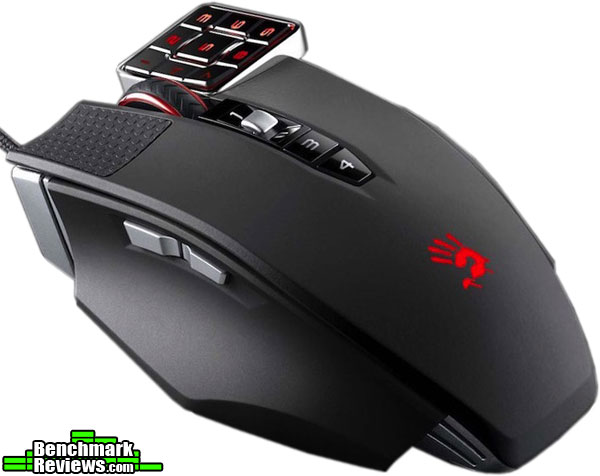
The performance of the ML160 is unparalleled due to the innovative Light Strike technology. Coupled with the Metal X Glide Pro mouse boots and the precision surface sensor calibrator, this is a formidable tool for not only gaming but desktop applications that demand it.
Appearance wise the ML160 is not too flashy, with only the bloody hand being able to change color (with the front vents); otherwise the pulsing effects are applied to all lights. The entire body is constructed with no deviations in the textured plastic, all parts fitting tight with zero rattling, (which makes sense since there is no metal switches to rattle). The master finishing touch is the metal plating on the bottom sporting the excellent mouse boots.
The functionality aspect is far and above what one would expect from he streamlined mouse drivers. Only three panels to sort through with the possibility of using any macro on the 17 buttons provided. Saving profiles to the 160K provided memory makes the ML160 portable between computers without reinstalling drivers.
The bloody ML160 Commander is available on line now for $69.99 (Amazon | Newegg). Surprisingly this is a price range aimed at mid-range gaming mice, where as the bloody ML160 offers features and technology that is far above that price-point considering “getting what you pay for.” If you are in the market for a mouse with a keypad, this is almost half price compared to leading competing brands and worth the money.
Pro’s
+ Light Strike technology perfected for micro switches.
+ Extreme mouse pads for almost frictionless use.
+ Once loaded and saved, drivers compliment keypad perfectly.
+ Flexibility between 4 cores lends functionality to any genre of game.
+ No metal parts in switches means no corrosion and is splash-proof.
Con’s
– Mouse wheel would benefit from heavier weight.
Ratings:
- Performance: 9.25
- Appearance: 9.00
- Construction: 9.25
- Functionality: 9.00
- Value: 9.50



One thought on “A4Tech Bloody ML160 Commander Mouse Review”
Looks and sounds like an really good mouse even for those tedious everyday tasks which a great thing in itself but to also be a fantastic mouse for gaming aswell well that is a really big bonus. I shall certainly be keeping my eye out for one of these as a replacement for my Logitech gaming mouse
Comments are closed.