By Joe Gulczinski
Manufacturer: A4TECH / Bloody Division
Product Name: AL90 Blazing Laser Gaming Mouse
Model Number: AL90
UPC: 4711421918664
Price as Tested: $79.99 (Newegg | Amazon)Full Disclosure: The product sample used in this review has been provided by A4TECH’s Bloody Division.
A4TECH’s Bloody Division unleashed upon the world last year a serious game changer called Light Strike technology, which replaces mechanical metal contacts with optical switches using infrared light. Today we examine the most recent iteration of the Bloody mice series, the AL90 Blazing Laser Gaming Mouse, combining a popular eight button layout possessing the Light Strike technology with an incredibly sensitive laser sensor. This is only one of 21 mice in the lineup.
Why Light Strike technology? There are several advantages that a light switch has over a mechanical switch including: dust and water proof, no metals exposed to oxidize, zero noise, and no accidental double clicking. The most prominent feature is the 0.2ms actuation key response. This equates to a zero chance possibility of lag (a 30ms faster response time versus a mechanical switch).

- Gaming laser sensor engine with an 8200 CPI maximum resolution (suitable for 4K).
- Infrared micro switch technology for all switches including the wheel.
- Metal X Glide armor boots for mouse pads.
- Unique weight system for fine tuning.
- Advanced macro programming available.
| Laser Sensor | AVAGO A9800 |
| Memory | 160K |
| Resolution | 100-8200 CPI |
| Buttons | 8 |
| Connector / Cable | USB / 1.8 M |
| Size | 222 x 161 x 67 mm |
| Weight | 144g |
| System Requirements | Windows (all versions) |
The AL90 Blazing Laser Mouse is currently available for $79.99 (Newegg | Amazon). Bloody’s artwork has a very creative chosen theme of the box textured in metal with the mice displayed against a backdrop of exciting galaxies. It is actually a no-frills type of packaging with just the basics packed inside efficiently: no fluff here.
 |
 |
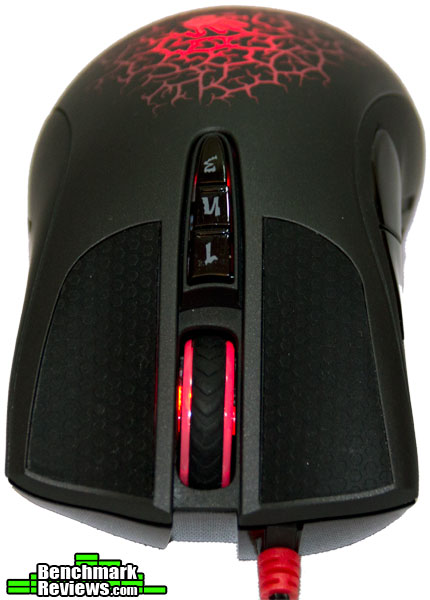
The AL90 is designed for the full palm grip rather than the claw type. The palm rests comfortably exactly over the glowing bloody hand logo. Those of you with Xenophobia be warned; this mouse looks like a veiny, gestating alien egg pulsating in your hand; yet feels so comfortable and ergonomic! The surface has been sprayed with a rubber black matte finish that is sweat resistant and cool to the touch. The back and forward buttons on the right side are completely recessed into the body of the mouse for added comfort. Ergonomically the AL90 not only feels natural in the palm, but has inlaid special rubber textures for the thumb and pinky finger to rest on. The small attention to such details significantly adds to gaming comfort.
 |
 |
The wheel is perfectly placed for the palm grip (small to medium hands) possessing just the right amount of resistance to not depress it accidentally (as with all the buttons); furthermore, it is also rubber coated with a much thicker rubber texture. The bottom reveals Bloody’s excellent “Metal X Glide Pro mouse boots,” which are actually smooth metal plates that reduce friction by 20%.
 |
 |
 |
The innovative looking weight system is accessed by rotating the plastic disc located on the back. This core weight system provides the flexibility to fine tune how the mouse physically feels on the mouse pad. For testing purposes all weights were employed in the core. Without the weights this is a seriously light mouse.
 |
 |
 |
The standard length USB cable is well protected by a braided fabric weave, increasing durability and strength at each end. Of course it would not be a “bloody” product unless twin bloody hand stickers weren’t provided inside. In addition there is a warranty card and instructions for downloading the main mouse driver as well as optional software.
 |
 |
Considering the materials carefully chosen for the AL90 Blazing Laser Gaming Mouse, it has a decent weight for it it’s size with really no real draw backs (unless of course you really don’t like the esthetics or have Xenophobia). This is the most popular button configuration for a gaming mouse: it provides advanced functionality and still manages to keep things simple.
The AL90 uses the same driver for over 20 of their mice that use the Light Strike Infrared Switch technology. The software reconfigures flawlessly between the various models for an easy to understand setup. If one so desires to make even more powerful and advanced macros, additional software is available at the Bloody store too.
 The first driver page is where the user selects one of four mouse “cores,” or preconfigured macro settings for weapons assigned to the 1, N, and 3 buttons (the three buttons under the mouse wheel). The first CORE1 standard preset was used in all testing in this review. Core two offers various shooting modes in using the “1, N, 3” keys to shift between them instantly. Core three is for FPS headshot combos. Core four is for optimal MMO macros that are simplified complex actions assigned to one button
 The second driver page appropriately entitled “Buttons” is the main panel for configuring all eight buttons. Drop down menus for keyboard macros, Microsoft Office, all multimedia functions, and even a special screen capture application are all assignable here. A small undocumented feature is presented by right clicking on the bloody hand icon on the system taskbar: launch options plus three onscreen display status states.
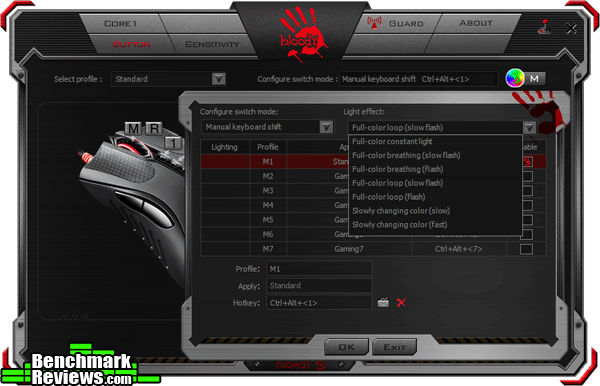 The tiny colored spinning bloody hand (located top of Buttons Panel) brings up the seven possible profiles that is stored on the mouse. Each profile can have its own discreet color effects (concerning the bloody hand logo). The four main effects consist of: constant light, color breathing, full color loop, and slowly changing colors.
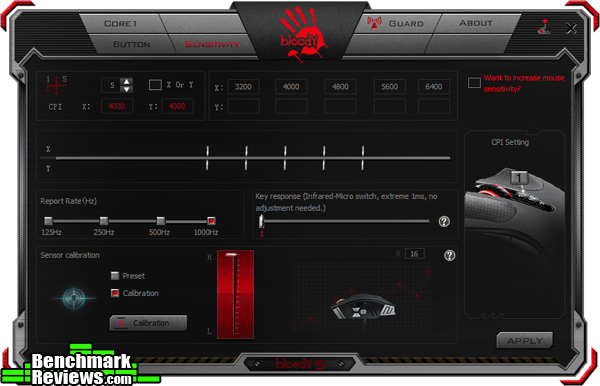 The sensitivity panel is where a toggle of up to five DPI settings may be fine tuned (100-8200 CPI) as well as polling rate per global profile. The most interesting aspect is the laser sensor calibration for the type of surface being used. The preset one works absolutely great for a standard mouse pad; however, for a colored, textured, wood, or glass surface active calibration measures the surface texture at staggering 10.8 megapixels per second and adjusts accordingly.
Testing Methodology
The AL90 Blazing Laser Gaming Mouse was tested over a period of 40 hours on a cotton-polyester weaved rubber-backed mouse pad. The main programs and games tested consisted of Adobe Photoshop and Doom. These two programs were specifically chosen to test out the sensitivity of the laser and the functionality of the keys.
Test System
- Processor: Intel Core i7-4790K
- Motherboard: Gigabyte GA-Z97X-UD5H
- System Memory: Corsair 16GB 1866Mhz
- Video: Gigabyte Windforce GTX 970 G1
- Monitor: LG 27″ IPS 2560 x 1440 (3K resolution)
- Audio: HT | Omega Claro Plus +
- Operating System: Windows 10 64 bit
Mousepad
Curtesy of the Bloody Division, one B-070 Offense Armor mousepad was also provided. This is the largest mouse mat that Bloody offers with a size of 43 x 35 x 0.4 cm. The materials are pure quality with an incredibly durable and solid stitching on the perimeter. This is exact mouse mat used in all testing. This product is available now at Amazon for $24.99.
 |
 |
One major thing to point out about the Bloody Offense Armor mouse mat is not only how mammoth and durably constructed it is, but the actual surface itself. Imagine a standard mat that has rubber on the back and nylon on the front. Now double that rubber backing and add a thin layer of silk and satin on the top and fuse it all together: It makes the surface almost like glass on rubber.
 |
 |
The mat’s surface combined with Metal X Glide Pro mouse boots provides even more of a frictionless experience. It is important to note that the AL90’s Laser sensor was specifically calibrated to this surface in the driver’s prior to testing (rather than using the standard default settings).
Results
The AL90 has the ability to change polling rates per the seven profiles to 125, 250, 500, and 1000Hz. The maximum polling rate of 1000Hz was used for all tests. According to two separate polling tools, Direct Input Mouse Rate (for DirectX) and Mouse Rate Checker, the Bloody AL90 exceeded the peak advertised polling rate. The polling rate is imperative to check at least once on a new mouse to ensure smooth operations: a mouse that can not lock onto a polling rate or fluctuates can not only crash a game out but in rare cases bring a whole system down (lock it up).

Desktop Applications: Using a native resolution of (2560 x 1440) the CPI mostly used was 4800 for all basic operations. The new version of the AVAGO A9800 Laser sensor was supremely solid to work within Photoshop for high detail projects; however, there was a few wheel mouse commands that did not respond natively. The basic sliders in Photoshop sub-menus for fine tuning all of the parameters did not perform at all; all values had to be manually typed. Considering that this is a very basic eight button mouse, it is tantamount that all native windows functions perform flawlessly (Photoshop does not use it it’s own mouse driver, it merely hooks into the O.S.). Besides this oversight, even with dust and perhaps miscellaneous kitten hair on the mouse pad, the mouse was dead steady with zero quivering.
Gaming Applications: This is the AL90’s strongest asset, as it should be. I attribute the special metal mouse boots in combination once again with the accurate laser sensor: zero over steering (sometimes due to acceleration) and no lag at all. Experiencing a massive frag-fest in Doom proved satisfying in the aspect that there was no issues in leading fast moving targets dead into the cross-hair sites. Due to the streamlined and ergonomic design of having the palm slightly raised higher than normal (perhaps 5 degrees higher), there was no hand fatigue even after 3 hours.
Bloody’s AL90 Blazing Laser Gaming Mouse offers a mixed bag that boils down to what your objective is: If the primary objective is pure gaming, this truly is a supreme weapon of choice. The Light Strike technology is second to none (since the last time I checked nothing goes faster than the speed of light). The response time is instant and the physical structure feels perfect. The AL90 is also suitable for standard desktop applications; however, working with Photoshop may be frustrating.
As a side note it should be mentioned that the human body has an average reflex time of approximately 0..25 seconds. This is a far cry from the 0.2 millisecond the AL90 operates on due to Light Strike technology. The only fair way to compare a mouse of this nature is through pure experience of the other 40+ mice reviewed at this point. There is no way my brain can actually tell if it is so much faster than a standard mechanical mouse; however, it just feels more responsive to the point of being instant.
 |
 |
Performance wise the AL90 is hands down at the top due to the implementation of Light Strike technology and one of the best laser sensors on the market. The metal glide mouse boots actually do reduce friction by a very noticeable margin and the calibration sensors are now very mature (as in refined) providing maximum accuracy.
Appearances were capitalized on with this mouse. Everyone that saw it immediately questioned it and desired to touch it due to the color-changing pulsating veins. The entire body being sprayed with a rubber texture makes the AL90 entirely matte black, which also makes it entirely fingerprint resistant.
The functionality aspect is well thought out and streamlined, with only three panels to work within the driver system. Saving profiles (7 memory profiles are provided) to the 160K makes the AL90 portable between computers without installing new drivers. The only criticism is that it would be great if the onscreen display functioned without having the drivers running; however, at this point that may not be technically possible.
The Bloody AL90 Blazing Laser Gaming Mouse is currently available online for $79.99 (Newegg | Amazon). At this price point we are starting to get into the high-end range of mice. On one hand you get what you pay for with the newest laser sensor and Light Strike technology; on the other this is a very basic (yet popular) layout of keys with functions physically limited. This product is aimed at the pure gamer that demands the best performance.
+ Light Strike technology perfected for micro switches.
+ Precision laser engine.
+ Splash and dust proof.
+ Flexibility between 4 cores lends functionality to any genre of game.
+ Metal glide mouse boots reduce friction by 20%.
– Mouse drivers need to be loaded for onscreen display.
– Infrared scrolling on mouse wheel not fully compatible in Photoshop.
- Performance: 9.25
- Appearance: 9.00
- Construction: 8.00
- Functionality: 6.50
- Value: 7.00


