By Jason Maxfield
Manufacturer: Kingston Digital
Product Name: Micro SDXC UHS-I Class 10 Industrial Temp Card with SD Adapter
Model Number: SDCIT/64GB
UPC: 740617253481
Price As Tested: $47.03 (NewEgg | Amazon)
Full Disclosure: The product sample used in this article has been provided by Kingston Digital.
With HD video and high resolution image capturing becoming common place on smart phones and inexpensive point-and-shoot cameras, this leaves us with a need for larger capacity and faster SD cards. Kingston has recognized this need over the years, and has continually upgraded the capacity and speeds of their SD and MicroSD cards. The Kingston Industrial Temperature MicroSD is rated as a UHS-I class speed 1 (U1) MicroSD card with speeds up to 90MB/s read and 45MB/s write.
The Kingston Industrial Temperature MicroSD card is designed specifically for harsh environments with temperature extremes, from -40C to 85C. Its high insertion rating is ideal for applications in which the card will be frequently accessed and removed from devices. On top of that, Kingston extensively tests the Industrial SD cards. Industrial Temperature MicroSD cards are water, shock, vibration, and airport x-ray proof.
Industrial Temperature MicroSD card comes in 8GB, 16GB, 32GB, and 64GB capacities. Optionally they can be purchased with or without a SD adapter, depending on your needs.
In this review for Benchmark Reviews I will examine the Kingston Industrial Temperature 64GB MicroSD card and put it to test. Will the Industrial Temperature hold up to it’s claims? Let’s find out.

Features and Specifications courtesy Kingston website
Industrial-grade features — The card’s operating temperature rating of -40°C to 85°C makes it perfect for harsh environments. For durability, it’s rated for 10,000 minimum insertions.
Tested for industrial applications — Kingston uses wide and broad temperature testing so you can feel secure using the card in industrial applications.
UHS-I interface — Its UHS-I interface offers higher sustained write speeds to ensure data integrity by reducing transmission stutter.
MLC NAND — MLC NAND allows for large amounts of data to be written to the card.
Capacities: 8GB, 16GB, 32GB, 64GB
Performance: UHS-I Speed Class 1 (U1) • 8GB: 90MB/s read and 20MB/s write, • 16GB-64GB: 90MB/s read and 45MB/s write
MicroSD Dimensions: 11mm x 15mm x 1mm
SD Adapter Dimensions: 24mm x 32mm x 2.1mm
Format: FAT32 (MicroSDHC 8GB-32GB); exFAT (MicroSDXC 64GB)
Operating & Storage Temperature: -40°C to 85°C
Voltage: 3.3V
Thermal Cycle Testing: interval testing completed at various extreme temperatures
Vigorous Temperature Humidity Bias: several hundred hours of testing to ensure durability at varying levels of humidity
Wide Temp Chamber Testing: completed on all SDCIT cards prior to production
Warranty: 5 years
We’ll take a look at the Kingston Industrial Temperature MicroSD and go over a few of it’s features.
The Industrial Temperature MicroSD comes with an adapter for use with devices that require full size SD cards. The packaging is no frills and straight to the point.
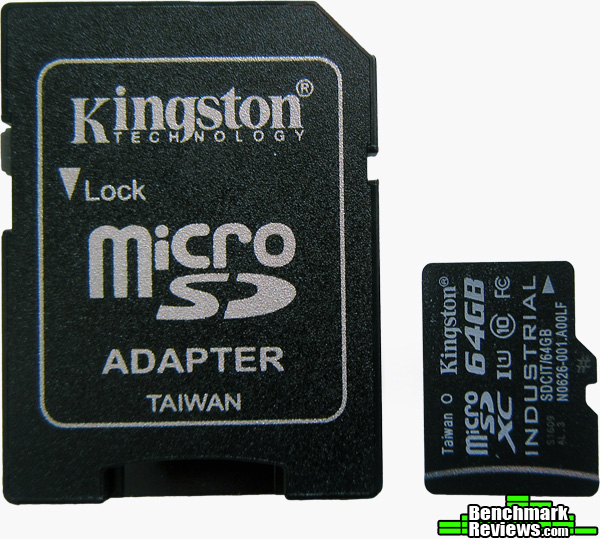
Out of the package we can get a closer look at the Industrial Temperature MicroSD and it’s adapter. We can clearly see it is marked as MicroSDXC, with UHS-I class speed 1.
That’s all great and dandy, but what does that mean? SDXC, where the ‘XC’ part stands for ‘extended capacity.’ The ‘UHS-I’ stands for ‘ultra high speed interface.’ With the speed class 1 rating meaning it must sustain a minimum speed of 10 MB/s. That is important mainly for streaming devices such as camcorders so that there is no loss in frames, which would result in choppy playback. Even high megapixel cameras will require a certain speed rating for high resolutions and burst mode shooting.
The Industrial Temperature MicroSD is fast enough for 1080p video recording. You should pay close attention to those speed and capacities to make sure whatever device you are using is compatible with the cards rating before purchasing.
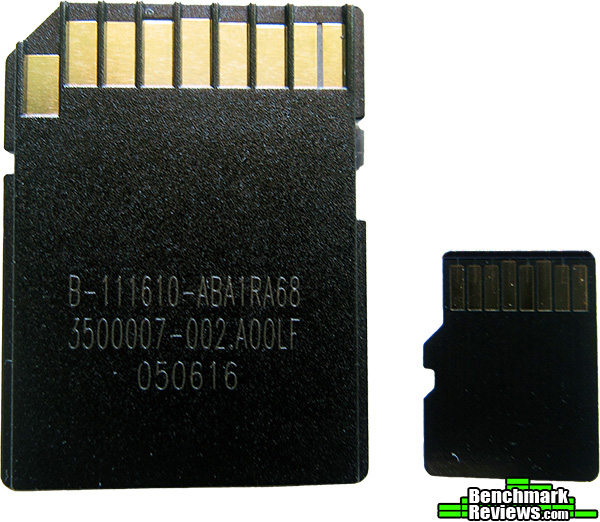
A look at the reverse side of the Industrial Temperature and it’s accompanying adapter you can see the contacts that will interface with your device. Those contacts are pretty durable and rated for a minimum of 10,000 insertions.
As a practical test, I spent many hours using my Canon Powershot SX610 HS camera and ZTE Warp Elite smart phone shooting hundreds of photos and a little more than 20 hours of 1080p video footage with both devices for about a week in the desert around Joshua Tree and surrounding area.
I spent most of it in the heat of the day where we were having low 100 degree temps for a few of the days. I tried to put the Kingston Industrial Temperature MicroSD out in the heat as much as I could while testing it. I even put the Industrial Temperature into a glass of water for a few minutes to see if it was truly waterproof. After letting it dry thoroughly, it showed no signs of damage and worked flawlessly.
But of course, what would a review be without some benchmarks? Well, that would just be boring. So, with that in mind, I set about testing the Industrial Temperature with ATTO Disk Benchmark, CrystalDiskMark, AS SSD Benchmark, and A1 SD Bench utilities. The last of which, is a smart phone benching application for Android OS.
First of all, I made sure to format the Industrial Temperature MicroSD with the exFAT file format, to be able to have files sizes larger than 4GB, which is the max single file size limitation on FAT32 format. Then I set up testing for both USB 2.0 and USB 3.0 using a Transcend TS-RDF5K USB 3.0 MicroSD/SD card reader. The initial USB card reader I was using wasn’t up to snuff, and operated only at USB 2.0 speeds, which hampered initial testing and required me to pick up the Transcend USB card reader to fully see the speeds of the Industrial Temperature MicroSD.
I also observed while testing, that if you use the SD adapter and then plug that into the card reader, it hampered performance by almost half. I recommend using the MicroSD without the adapter when possible. It didn’t hamper recording performance, however, with my Canon Powershot since it does not use MicroSD cards and must use the adapter.
-
Motherboard: MSI Z87-G45 Gaming
-
System Memory: G Skill Sniper DDR3 16GB @ 1600MHz
-
Processor: Intel i7 4770K @ 4.0GHz
-
Audio: On-board
-
Video: Gigabyte GTX 770 4GB Windforce
-
Disk Drive 1: WD Green 1TB 7200 RPM SATA II
-
Optical Drive: HL- DT- ST DVDRAM GH60N
-
Enclosure: Antec GX 505 Window SC
-
PSU: SeaSonic SSR-650RM 650W 80PLUS Gold
-
Monitor: AOC 2770Vh1 27in
-
Operating System: Windows 10 Home Edition
We’ll start the testing with CrystalDiskMark. I used the latest version 5.1.2 x64, which is the 64bit version of the client.
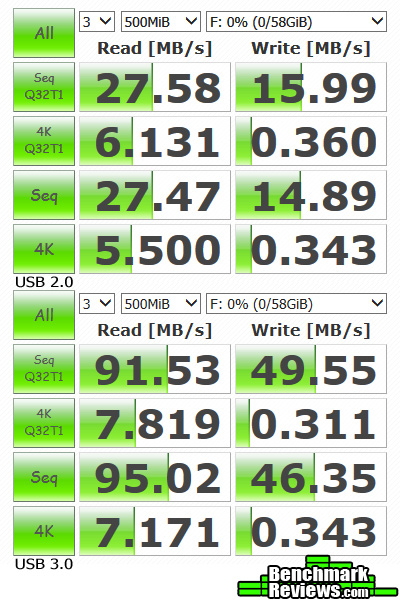
The difference between USB 2.0 and USB 3.0 are pretty significant. The results are more than 3 times faster in sequential read and writes. If fast transfer speeds are important to you, make sure that you are connected through USB 3.0 especially for large files that will make use of the higher bandwidth.
With reads as high as 95.02 MB/s and writes of 49.55 MB/s, the Kingston Industrial Temperature MicroSD is living up to it’s speed ratings.
Next up, we have ATTO Disk Benchmark version 3.5.0. ATTO Disk Benchmark tests the MicroSD card at varying transfer sizes from 512 bits, to 64MB.

Again, we notice a huge difference between USB 2.0 and USB 3.0 transfer speeds. ATTO gives you a good idea of what kind of transfer speeds you will see depending on file sizes. A bunch of small files are going to transfer relatively slow, compared to large files.
Once you hit the 64KB range the Kingston Industrial Temperature MicroSD comes alive and starts to show the speeds it’s capable of sustaining. We see peak write rates of about 52 MB/s at the 16MB block size, and peak read rates of about 95 MB/s around 12MB and 24MB block sizes. This is pretty much in line with what CrystalDiskMark reported.
Now we have AS SSD Benchmark version 1.9.5986.35387. AS SSD Benchmark is similar to CrystalDiskMark in that it tests sequential read and write, as well as testing random read/write of 4K blocks with a 1GB file transfer.

At this point there is no surprises. We know USB 3.0 is going to be much faster than USB 2.0. Although this time we seem to have an anomaly with the sequential write speed on the USB 3.0 bus. With 64.95 MB/s this is quite a bit faster than the other two benchmarks. I did the test a few times with the same results. The sequential read speed of 90.73 MB/s is right in line with the other two tests.
I also obtained a somewhat similar result in the next test, A1 SD Bench version 5.1 on my ZTE Warp Elite smart phone.

Oddly enough my smart phone was slower at reading the Kingston Industrial Temperature MicroSD than it was at writing to it. With a read rating of 58.55 MB/s and write rating of 59.43 MB/s it leaves me wondering if the last two benchmarks were using some kind of compression to give it an effectively higher write speed? In both situations I ran the tests again to confirm the results, and they were consistently the same. I made sure to reboot both my phone and computer, to ensure that no caching was involved in the test results.
So, there you have it. The Kingston Industrial Temperature MicroSD is rugged and fast. On the next page I’ll give you my final thoughts and conclusions.
I’m impressed with the Kingston Industrial Temperature MicroSD. It’s the fastest SD card I have ever used. I even took some of my random zipped files, 11 in total, which came out to be 4GB worth of files and transferred them from the PC to the card, with the Windows meter showing transfer rates going from 50 to 80 MB/s. That was the fastest transfer of 4GB worth of files I have done with anything connected to a USB port.
The Kingston Industrial Temperature MicroSD is a solid performer and dealt with the heat of the desert without any problems. The applications for such extreme temperature ranges are almost limitless. The ability to stay submerged in water up to 1 meter deep for 30 minutes is nice for anyone that likes to take pictures or videos while doing water sports.
It’s even good for traveling, since the airport x-ray machine won’t damage this MicroSD card. Although, flash storage can theoretically be changed by airport x-rays, causing stored cells to change from a 1 to a 0, which could cause data corruption if it was to happen to enough cells. This almost never happens even with unprotected flash media, but Kingston has you covered with the Industrial Temperature MicroSD, just in case.
In conclusion, Kingston has made a very fine product that can be used in a wide variety of environments and survive while recording and delivering your data to you very fast.
The performance of the Kingston Industrial Temperature MicroSD was every bit as advertised and even a bit more. It is rated for 90 MB/s read and 45 MB/s write speeds, and it exceeded those numbers in my benchmarks.
The Kingston Industrial Temperature MicroSD appearance is rather plain, but to be fair, it is a MicroSD card. There isn’t a lot of space to print fancy graphics onto it.
Construction of the Kingston Industrial Temperature MicroSD feels solid. Considering it’s only 1mm thick, I wouldn’t try to bend it or subject it to any weight stacked on it.
The functionality of the Kingston Industrial Temperature MicroSD is perfect. The SD adapter did hamper performance by about 50% when testing USB 3.0. It never hampered video recording or picture taking on my Canon Powershot. I recommend that you transfer data from this MicroSD without the adapter for maximum throughput. In any event, this may just be an anomaly that I experienced with the SD adapter. Without other cards to compare I can’t say this is a definite issue.
The value of the Kingston Industrial Temperature MicroSD is a hard one to discern. There are plenty of MicroSDs on the market that can match the speed of the Industrial Temperature at half the price. But, they are also not as rigorously tested and built to handle the extremes of temperatures as the Industrial Temperature either. It’s value lies mostly in it’s ability to survive rugged extremes.
At the time of this writing the Kingston Industrial Temperature MicroSD is priced for $47.03 (NewEgg | Amazon).
I would recommend the Kingston Industrial Temperature MicroSD to anyone who is working in or needs to put this MicroSD card in an extreme environment. Otherwise, you can get the same performance from other MicroSD cards for a lot less.
+ Industrial grade for extreme environments
+ UHS-I speed
+ MLC NAND
+ High insertion rating
– SD adapter slowed transfer speeds
– Cost
-
Performance: 10.0
-
Appearance: 8.0
-
Construction: 9.0
-
Functionality: 9.5
-
Value: 7.5
Quality Recognition: Benchmark Reviews Silver Tachometer Award.
COMMENT QUESTION: ?

2 thoughts on “Kingston Industrial Temperature MicroSD Review”
industrial temperature is 105°C, 85°C rating is “standard” for capacitors, intel CPU´s safe limit is 81°C, memory is sensible to temperature, example; OCZ Agility 4 self shutdowns when temperatures are high, also others, Samsung 850 Pro uses the aluminium case as a shell, not as a heatsink, probably because other components in a laptop could overheat the memory.
Anyway… U1 is not fast enough to record video at 100Mbps.
U3 required.
hdtune not tested?
The information on Kingston’s site and it’s data sheet says 85°C. That’s why it’s in the article. Since this information is from Kingston directly, I would consult with them if you think this is an error.
I do not own HD Tune, and the free trial version does not include write benchmarks.
I’m not sure why you would comment that U1 is not fast enough for recording video at 100Mbps. I never stated it would write that fast, nor did any of my benchmarks.
Clearly, U1 is designed to handle 1080p. My Canon camera and ZTE smart phone recorded 1080p video just fine @30fps. U3 would be needed for 4K and probably 1080p @60FPS.
Comments are closed.