By Jason Vaught
Manufacturer: Corsair Components, Inc.
Product Name: K95 RGB PLATINUM Mechanical Gaming Keyboard
Model Number: CH-9127014-NA
UPC: 0843591086141
Price As Tested: $199.99 (Amazon | NewEgg)Full Disclosure: The product sample used in this article has been provided by Corsair.
Corsair has revamped their K95 series with a new Platinum edition. The K95 RGB Platinum is a gaming mechanical keyboard featuring 100% cherry browns or cherry “speed” switches with RGB illumination and a slew of lighting effects. The “speed” switches, the variant we’ll be reviewing today, offers a short, 1.2mm actuation distance, that has no tactile bump or click.
What is the main reason to spend money on a “gaming” mechanical keyboard vs a regular keyboard? With membrane based gaming keyboards, your purchase depends mainly on features that you can only utilize during gameplay. But with a gaming mechanical keyboard, your priorities in performance to value are more broad. You’re looking for a long life keyswitch that offers tactile feel and a comfortable typing experience as well. This is what we should all look for in a gaming mechanical keyboard, does the K95 Platinum live up to these expectations? We’ll find out in this article for Benchmark Reviews.

| Key Switches | Cherry MX Speed RGB, mechanical, 45g actuation force, 1.2mm actuation distance. Cherry MX RGB Brown, mechanical, 45g actuation force, 2.0mm actuation distance. Guaranteed durability for >50M keystrokes, gold cross-point contacts |
||||||
| Backlighting | Individually lit keys and per key programmable; 19-zone fully programmable LightEdge | ||||||
| Chassis Color | Black (Worldwide) or Gunmetal (North America only at launch) | ||||||
| LED Color | RGB | ||||||
| USB Pass-through | Yes | ||||||
| Macro Keys | Yes, 6 | ||||||
| Matrix | 100% anti-ghosting with full key rollover on USB | ||||||
| Onboard Storage | Yes, 3 profiles, fully customizable with actions and dynamic lighting effects | ||||||
| Media keys | Six dedicated multimedia keys, incl. Volume Up/Down roller | ||||||
| Windows Lock key | Yes | ||||||
| Wrist rest | Full length detachable, dual-sided, with soft touch finish | ||||||
| CUE (Software) | Enabled | ||||||
| Cable | Braided Fiber | ||||||
| Dimensions | 465(L) x 171(W) x 36(H) mm / 18.3”(L) x 6.7”(W) x 1.40”(H) | ||||||
| Weight | 1.31 kg / 2.88 lbs. | ||||||
| Warranty | Two years | ||||||
| MSRP | $199.99 | ||||||
The Corsair K95 RGB Platinum is marketed as the next generation of the K95 platform. The K95 platform is, essentially, a mechanical keyboard with media controls and dedicated macro keys. Previous generations of the K95 had 18 dedicated macro keys or “G” keys as Corsair calls them, whereas the new Platinum version has 6 dedicated G-keys. The Corsair K95 RGB Platinum keyboard currently sells online for $199.99 (Amazon | NewEgg).
Above, you can see a layout similar to that of the Logitech G710, but adds RGB illumination and an aluminum frame. The aluminum frame adds to the weight, but also gives the keyboard a durable feel. K95 RGB Platinum comes in at just below 3lbs, this is ideal to keep the keyboard from sliding around while you type. There are only 6 macro keys, which should be more than enough for most games.

K95 RGB PLATINUM comes with a set of MX-compatible keycaps for WASD and QWERDF keys for both first person shooter (FPS) and Multiplayer Online Battle Arena (MOBA) games. Each key is contoured, textured, and
soft to the touch, for easy identification by touch and added grip during gaming. A key-puller is also included to make removing keys quick and easy for cleaning and/or rearrangement.
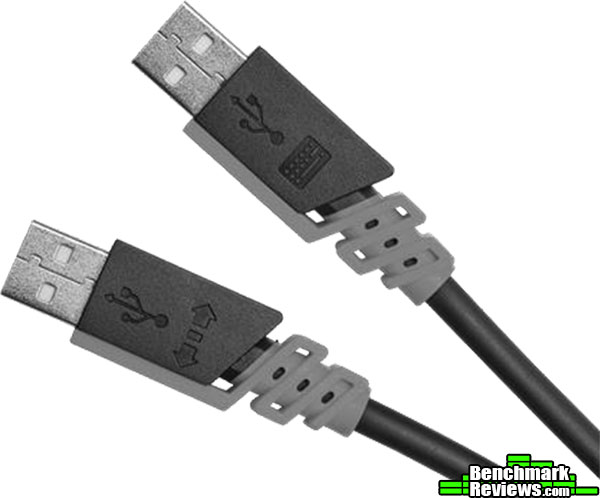
To utilize the keyboard’s built in USB pass-through, you’ll need to connect a second USB cord (bottom one in the above photo). These USB cables are beefy and don’t like to bend easily.
 The inclusion of a USB pass-through on keyboards has become somewhat of a standard, thankfully, and the K95 RGB Platinum is no different. Unlike some of their competitors though, they do only have 1 port, instead of the 2 ports that competitors offer.
 Corsair actually did something interesting with the bottom of their keyboard. Normally, the bottom is boring and only a spot to hold collapsible height adjustments, but Corsair added this unique X channel. The idea for the X channel or the criss-crossed cable management channels is to allow users who utilize the USB pass-through for connecting a wired HID device, such as a headset, can now route the cable neatly and comfortably underneath the keyboard.
The K95 RGB Platinum supports the full spectrum of RGB color. In addition, the platform utilizes a new controller which expands upon the lighting colors in comparison to the previous generations of the K95 RGB keyboard. The keyboard, by default on startup, will be in Standard Mode, and display a default pattern known as “Spiral Rainbow”.
 Corsair includes optional WASD keys that are contoured and textured to help facilitate easier identification by touch. This WASD configuration is optimal for FPS (first person shooter) games.
 Corsair didn’t forget the MOBA (Multiplayer Online Battle Arena) gamers, and has included a set of optional QWERDF keys that are contoured and textured as well.
 With the optional wrist rest attached, you can see that the keyboard has some depth to it, this should be taken into account when desk space is limited. The wrist rest is dual sided, featuring both a softer and harder side depending on your preference.

The K95 Platinum includes a very prominent “lightedge” at the top of the keyboard. It’s colors are of course configurable and coincide with lighting schemes created by users and corsair. There are a total of 19 configurable zones on the lightedge.
 While all of Corsair’s premium keyboards come with dedicated volume and multimedia controls, the K95 RGB Platinum introduced a larger and smoother volume up/down roller. The four media control buttons are now raised higher for better access. The K95 also has a dedicated profile button, brightness button, and windows key lock, making it easy to toggle these settings on the fly.
The Corsair K95 RGB Platinum integrates with Corsair’s already widely used configuration software called the “Corsair Utility Engine” or CUE. The CUE software helps you fully customize the lighting effects of your keyboard, as well as set up any macros you might need.

The performance section of the CUE software for the K95 RGB Platinum is where you set up some of your basic color indicators; brightness, profile, and lock indicator colors. An interesting idea here is that you can set the dedicated Win Lock button to also disable Alt + Tab, Alt + F4, Shift +Tab, and of course, the Windows key itself.

The actions section of the CUE software is where you program your macros and customize your lighting and buttons. Macros can be set to record delays, keyboard events, mouse clicks, mouse wheel scroll, and of course, mouse movement.
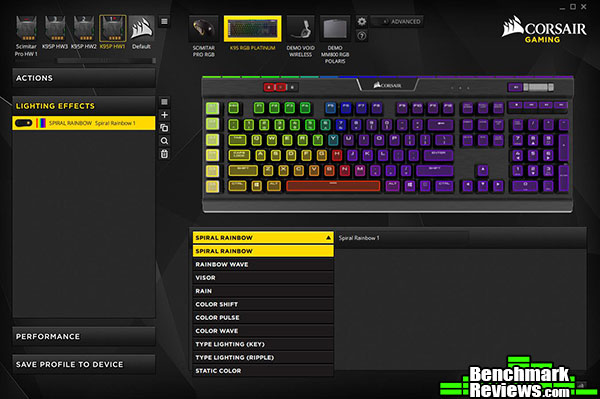
The lighting effects section of the CUE software is where you adjust the lighting effects of the keyboard. The default lighting effect that is preset is “Spiral Rainbow”

Above is the list of the default lighting effects that come pre-loaded on the hardware profile. Of course all of these can be customized and saved directly to one of the keyboard’s onboard profiles.

Above is the list of the default lighting effects that are pre-loaded for the software profile. Of course all of these can be changed and saved to a software profile.
The best way to test a keyboard is to simply use it. The K95 RGB Platinum was tested for an overall period of 30 hours with Diablo III, Tom Clancy’s The Division, Photoshop CS6, and various typing tasks including this review.
Corsair claims to set itself apart when it comes to anti-ghosting and full key rollover. The term “ghosted” refers to the keystrokes that are not detected and then drop off (for example, when someone presses D-C-U and only sees D-C, the U has been ghosted). While anti-ghosting is present in most gaming keyboards, it is often restricted to a certain number of keys or sections of keys. Popular sections of limited anti-ghosting may include the WASD part of the keyboard as it incorporates the keys that are the most common to use for first-person shooter games.
Corsair claims:
“The K95 RGB PLATINUM keyboard features a 100% anti-ghosting matrix with full key rollover. This ensures that every keystroke will be recognized accurately by the computer, even when simultaneous combinations are inputted by the user.”
Now we’ll see how accurate that is.
- Motherboard: MSI X99A SLI PLUS LGA 2011-v3 Intel X99
- System Memory: HyperX Savage 64GB (8x8GB)
- Processor: Intel Core i7-5930K Haswell-E 6-Core 3.5 GHz LGA 2011-v3
- Audio: On-board
- Video: 2 x XFX Double Dissipation R9-290X (4GB) (Crossfired) (1 card after-market water cooled)
- PSU: Seasonic 1200W Platinum
- Monitor: Dell UltraSharp U2412M IPS 24″ x 3 @ 5760×1200
- Operating System: Windows 10 Pro (64-bit)

As you can see from the results above, Corsair’s claim for full key rollover is accurate, at least as accurate as I can test since I can’t physically press all the keys at the same time, but you get the idea. I can, however, press enough keys to know that you won’t have a large enough combo for the full key rollover to matter.
In the world of mechanical keyboards, they’re steadily becoming a dim a dozen. Razer, Corsair, Filco, Das, Ducky, Cooler Master, Vortex, the list goes on, all make good mechanical keyboards because of one thing and one thing only…The mechanical switch. For me it is all about the switch, personally, if it doesn’t have Cherry MX Blues or an equivalent (such as the Kailh switches on the Zalman ZM-K900M), then it’s not for me. I’ve tried and reviewed Cherry Reds and Browns, and nothing is more satisfying than the Blues, at least for me.
That being said, the Cherry “Speed” switches from Corsair are perfectly fine if you like a linear switch with a short travel. Think of it as a Cherry Red but with about half the distance. Since I type far more than I game, and I’ve had no issues gaming with Blues, I can’t recommend this switch unless you’re already familiar with and like linear switches, such as Cherry Reds. If you prefer a more traditional mechanical key, go for the Cherry Browns. The Cherry Browns retain tactile feel without the click.

In terms of performance, the Corsair K95 RGB Platinum performed at my expectations. It is, after all, a Corsair product, and one would be hard pressed to find a Corsair product that didn’t please. Would you use this for your regular, every day keyboard? Well, maybe. Would you use this for your gaming keyboard? More than likely. It’s loud RGB lighting wouldn’t be appropriate at the job setting, but would fit in perfectly in your fortress of solitude. The Cherry “Speed” keys, while not my preference, are crisp and responsive with a very short travel distance. The CUE software, however, leaves a lot to be desired as it is somewhat buggy and convoluted. I’m confident Corsair is constantly improving this software and my concerns will be negated in the near future.
Appearance wise, the K95 RGB Platinum is stunning. The brushed black (or gunmetal) aluminum has an excellent finish and has a quality feel to it. The RGB lighting is bright and vibrant. The inclusion of MOBA/FPS textured and contoured keycaps is a nice touch.
The K95 RGB Platinum is solid. The wrapped cord is insanely thick, but feels like it will outlive the switches themselves. The aluminum frame is heavy duty and feels virtually indestructible. While I haven’t tried to destroy it, yet, the keyboard should hold up fine in a bag or box to take to your LAN party.
In terms of functionality, well, this is where things get tricky. Does it function perfectly as a keyboard? Yes, yes it does. Does it function well as a mechanical keyboard? Well that depends on your preference. If you like linear switches, then you’re good to go. If you want a tactile feel, then buy the Cherry Brown version. If you want anything else, sorry, you’re out of luck for now.
Value is where I had to knock off some points, priced at $199.99 (Amazon | NewEgg), this keyboard draws quite a premium compared to the competition. Ducky, Vortex, Cooler Master, and even Zalman have more affordable boards available, albeit they don’t have an aluminum frame, and some of them don’t have multimedia controls. A price point of $159-$169 would hit the sweet spot for this keyboard. Now, having said that, I would still happily pay $199.99 if it came in Cherry MX Blue. Your move Corsair.
I would recommend this keyboard to anyone who is looking for a high end keyboard with Cherry Brown switches. Again it would be better at a lower price, but this pricing follows Corsair’s normal pricing scales for keyboards in this class. I have seen some interest around the internet for the shorter throw switches, so for those of you who like linear switches and a short throw, this is the keyboard for you, it will perform perfectly. Twitch gamers who utilize a keyboard vs a controller, will enjoy the short throw Cherry “Speed” keys.
+ Comes in Cherry brown switches
+ Braided nylon cord
+ USB Pass-through
+ 6 programmable “G” keys
+ RGB LED lighting
+ Aluminum frame
+ 8MB onboard profile storage
+ Detachable, dual sided wrist rest
– Cherry “Speed” switches bottom out easily, hard to adjust
– CUE software a little overly complicated
– Lack of switch options (need it in Cherry Blues)
– Braided, attached cord is very thick and not very flexible
– High price
-
Performance: 9.00
-
Appearance: 9.50
-
Construction: 9.50
-
Functionality: 9.00
-
Value: 8.00



2 thoughts on “Corsair K95 RGB Platinum Keyboard Review”
Great review! I have this exact same keyboard and enjoy it. I would love to see a comparison review of this keyboard but with the cherry brown switches instead of the speed switches. The speed switches are extremely sensitive but I can see how they got their name and unique feel. I’m really curious at the difference.
The difference would only be evident in the stroke, as the Cherry MX Speed and Brown switches share the same 45g actuation force. Speed has a 1.2mm actuation distance, compared to 2.0mm for Brown. That 0.8mm difference appears noteworthy if you compare the numbers, but is not terribly significant in real-world use.
Comments are closed.