By Meng Vang
Manufacturer: BitFenix Co. Ltd.
Product Name: Shogun E-ATX Dual Tempered Glass Gaming Case with SSD Chroma Modules
Model Number: BFC-SOG-600-KKWSK-RP
UPC: 886027015261
Price As Tested: $139.99 (Amazon | Newegg)Full Disclosure: The product sample used in this article has been provided by BitFenix.
The Shogun is the new top of the line super mid-tower computer case from BitFenix. But what makes it super? The Shogun is roughly the same size as a standard mid-tower case, but it can house an E-ATX motherboard with the included E-ATX bracket. It features BitFenix’s modular Quick Custom Design, curved exterior aluminum panels, three GPU Safe support brackets, a hybrid power supply SSD bracket with RGB LED’s, and dual tempered glass side panels. Benchmark Reviews will be taking a look at the BitFenix Shogun with ASUS Aura Sync RGB SSD Chroma modules, so let’s jump into a quick overview on this super mid-tower case.

| Color | Black |
| Materials | Aluminum ¦Tempered Glass ¦SECC Steel ¦ABS |
| Chassis Type | Super Mid-Tower |
| Motherboard | E-ATX ¦ ATX ¦ M-ATX ¦ Mini-ITX |
| CPU Cooler | Up to 175mm Height |
| Graphic Card Length | Up to 410mm |
| Power Supply Length | Up to 250mm |
| Storage Capacity(5.25″ODD) | 0 |
| Storage Capacity (3.5″ HDD) | 6 |
| Storage Capacity (2.5″ HDD) | 6 + 5 |
| Cooling Capacity (Front) | Up to 140mm x3 or 120mm x 2 (2x120mm Included) |
| Cooling Capacity (Rear) | 120mm x 1 (Included) ¦ 140mm x 1 |
| Cooling Capacity (Top) | Up to 140mm x 2 or 120mm x 3 |
| Radiator Capacity (Front) | Up to 280mm x 1 or 240mm x 1 |
| Radiator Capacity (Rear) | 120mm x 1 ¦ 140mm x 1 |
| Radiator Capacity (Top) | Up to 360mm x 1 or 280mm x 1 |
| Front I/O port | USB 3.0 x 2 ¦ USB 2.0 x 2 ¦ HD Audio MIC & Headphone |
| Dimensions (WXHXD) | 250 x 565 x 525 (mm) |
| Weight | 14.15kg (net)¦16.34kg (gross) |
| Highlights | Elegant Aluminum Design ¦ Dual Tempered Glass Side Panel ¦ Quick Custom storage design ¦ Quick Custom SSD Chroma ¦ Quick Custom EATX Shield ¦ BitFenix Chroma Control and SSD Chroma ¦ Advance design GPU Safe ¦ Support Graphic Card Length up to 410mm ¦ Up to 25mm Cable management Space ¦ 360mm Radiator Support at Top ¦ 3 pre-installed Fans |
The BitFenix Shogun currently sells online for $139.99 (Amazon | Newegg). It comes with a quick installation guide, a few screws and zip ties, and a large Quick Custom E-ATX Shield for E-ATX motherboards.

At the front of the case, we have just a smooth, matte finish with the company logo towards the bottom. There is also what looks like a 5.25″ expansion drive slot. This slot is not intended for 5.25″ devices, but it can be used for future modifications.

The Shogun does come with a 120mm exhaust fan at the rear with support for a 140mm fan. You can mount the fans further up or down thanks to the adjustable fan mounts. There is a power supply dust filter underneath the case to prevent larger dust particles from entering the system.

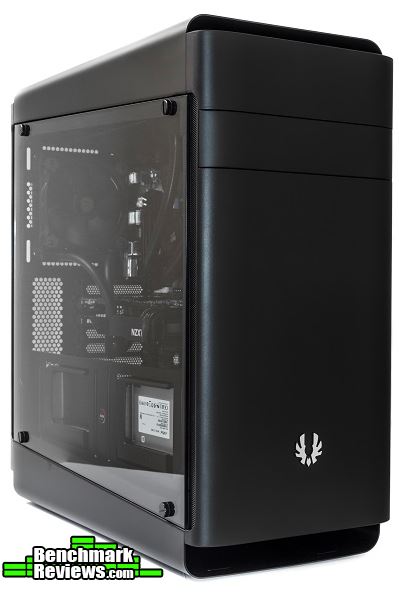
The main side panel includes a reflective tempered glass window to show off the internal components of the system. Not only does the window make it more difficult for me to shoot these pictures, but it looks fantastic in person. Finger prints and dust will show on the surface of the window but they can be easily cleaned off with a microfiber cloth.

On the opposite side, there is also a large glass side panel. This side panel is not tinted, but there is a darker layer that runs across the entire glass panel to prevent anything from showing through, including light.

The top of the case includes a durable, curved aluminum panel. Beneath it are ventilation holes and a dust filter for airflow. The front I/O includes a microphone and headphone jack, two USB 2.0 ports, a tactile power button, two USB 3.0 ports, a reset switch, and a LED control switch.

Similar to the top, the bottom also has a curved aluminum panel. This bottom panel prevents the power supply from suffocating when placed on thick carpet.

Now that we have seen a quick overview of the Shogun, let’s take a look at the features this case has to offer.
With the tempered glass side panel removed, we can see the internal layout of the Shogun. There is a lot of work room and a few HDD cages for multiple hard drive configurations. The HDD cages and the GPU Safe graphics card support brackets are adjustable. There is also a large bracket over the power supply chamber for installing two SSD’s.

There are three Velcro straps included for cable management. A few cable tie-down points are placed around the motherboard tray to route other cables. Below the CPU cutout are two more 2.5″ SSD mounting brackets and are easily removable via thumbscrews. Above the CPU cutout is the built-in LED controller.

With the Quick Custom E-ATX Shield installed, you may install an E-ATX motherboard. It has three cable management cutouts for routing cables to the back of the motherboard. Of course, you would have to remove the HDD cages and the GPU support brackets to install the shield.

Taking off the front panel, we can see the large surface area for installing a 240mm or 280mm radiator. Two 120mm fans are at the front with the option to install up to three 140mm fans. Unfortunately, there is no support for three 120mm fans and a 360mm radiator.

With the top panel removed, we can see the large surface area for cooling accessories. The top does support a 360mm and 280mm radiator along with three 120mm and two 140mm fans.

The Shogun comes with three GPU support brackets. They each have some foam to protect the graphics card from damage. When not in use, the brackets are easily removable via a few thumbscrews.

There is another HDD cage towards the bottom of the case, which can house two standard HDD’s or SSD’s. Beside it is a 2.5″ bracket for an additional SSD. Suppose you are building with an E-ATX motherboard, the E-ATX bracket will knock out the two upper HDD cages and the three GPU support brackets. With the bottom HDD cage and dedicated SSD slot, you will still have some room for your storage devices.

The bracket over the power supply acts as a hybrid power supply housing. These Chroma modules can mount two SSD’s with the addition of having RGB lighting. The lights are positioned so the beams reflect off the SSD allowing you to show off your storage device. The entire bracket is removable from the case thanks to BitFenix’s Quick Custom Design.

Before we continue to the system build, let’s take a look at the Alchemy 2.0 RGB LED strips in the next section.
Manufacturer: BitFenix Co. Ltd.
Product Name: Alchemy 2.0 Magnetic RGB LED
Model Number: BFA-RGB-30MK 15C-RP and BFA-RGB-30MK 15N-RP
UPC: 886027015087 and 886027015070
Price As Tested: $24.99 (Newegg) and $32.63 (Newegg)Full Disclosure: The product sample used in this article has been provided by BitFenix.
Our friends at BitFenix were kind enough to send us a few of their Alchemy 2.0 magnetic RGB LED strips to add to our build. There are two variants; one with an LED strip and ASUS Aura SYNC RGB SSD Chroma controller, the other with just the LED strip. These products are certified by ASUS Aura and are compatible with ASUS Aura motherboards. The one with the controller is good for computer systems without RGB capable motherboards. It also comes with a switch to quickly switch between different colors and lighting effects. The one with just the LED strip is ideal for computer systems with RGB capable motherboards.

| Available LED Colors with Chroma box | Red, Blue, Green, Purple, Yellow, White, NV Green |
| Magnets | Black Sintered NdFeB Permanent Magnets |
| LED Type | 5050 TriBright™ SMD |
| Lumen | 60 |
| Color Rendering Index | ~80 |
| Angle | 120° |
| Voltage (v) | 12 |
| Flex PCB Quality | 1oz copper |
| Protective cover | High-Clarity Polyurethane |
| Power Cable Length | 50cm – 20″ – daisy-chainable |
| LED Strip Width | 10mm – 0.4″ |
| LED Strip Thickness | 2mm – 0.08″ |
| Alchemy 2.0 Magnetic RGB LED Strip – 30cm | |
| LEDs | 15 |
| Magnets | 6 |
| Wattage (W) | 3.6 |
| Alchemy 2.0 Magnetic RGB LED Strip – 60cm | |
| LEDs | 30 |
| Magnets | 12 |
| Wattage (W) | 7.2 |
Both products come with a 30cm RGB LED strip, a daisy chain cable, and a controller cable. The product with the controller comes with the controller itself, a toggle switch, and an additional cable to connect the controller to the switch.

The LED strip, toggle switch, and controller are all magnetic. They will stick onto any metal surface allowing you to reuse them over and over again. The controller does have a standard 4-pin Molex port for power.

Let’s put these RGB strips to use in our system build section on the next page.
-
Motherboard: ASRock X99 Extreme4
-
System Memory: 4x8GB 2666MHz DDR4
-
Processor: Intel Core i7 5820K @ 4.5GHz
-
Audio: Realtek ALC1150
-
Video: MSI GeForce 780 Ti
-
Disk Drive 1: Crucial MX100 256GB SSD
-
Disk Drive 2: WD Blue 3TB HDD
-
Enclosure: BitFenix Shogun
-
PSU: EVGA 850P2 850W Modular
-
Monitor: HP 23bw 23″ IPS display
-
Operating System: Windows 10 Professional 64-Bit
The results turned out great with the BitFenix Shogun. Motherboard standoff screws were already in place for a standard ATX motherboard. This reduced installation time as I only had to drop in the motherboard and plug everything else in. I had no problems installing the radiators, but the top panel was somewhat difficult to remove. With all the built-in cables, it did take longer to put the system together when compared to a more basic case. The Quick Custom Design aspect of the Shogun reminded me of the FreeForm Modular System found on the Cooler Master MasterCase series. I was very happy to see this modular concept introduced with the Shogun as this allowed for greater flexibility and customization.

I kept the E-ATX bracket installed to block off some of the cabling behind the motherboard tray as well as cleaned up the interior by removing the HDD cages and GPU support brackets. But suppose you did go with an E-ATX build, you would lose four HDD slots and the three GPU support brackets with the E-ATX bracket installed.
The cable straps behind the motherboard tray allowed for easy cable management. I used only a few cable ties to tie up some of the cables towards the bottom. Cable tie-down points are located all over the motherboard tray with some more on the E-ATX bracket. This is great especially for a system with many cables.

The Shogun did come with its own built-in RGB controller, but my power cables could not reach over the CPU cutout unless I pulled out more cables for my power supply. Instead, I removed the built-in controller and used the magnetic controller included with the Alchemy 2.0 RGB LED strips and placed it towards the bottom. This way I could hook it up to the same cable that fed power to my storage devices without pulling out more cables.
One problem I had was working with the short HD audio cable. Most motherboards have their front audio headers located towards the bottom left. With the Shogun, the HD audio cable just barely made it to the header ports on my ASRock X99 Extreme4 motherboard. There was quite a bit of strain on the cable without having to take shortcuts, which would affect cable management and aesthetics.
With the system powered on, the LED’s looked and worked well. I placed a strip towards the top, and one down at the bottom of the case. RGB color reproduction was fairly good with white having a tint of blue to it, while red was noticeably darker than any other color. Lighting effects worked well with its static and spectrum breathing effects as the colors synced nicely and transitioned very smoothly between one another. Just don’t mistaken the reset switch for the LED control switch as terrible things may happen.

With the tempered glass side panel installed, the case ran very quiet and looked amazing.

LED’s are nice to have, but I personally do not like having to see the LED’s especially when powered on. The LED’s on the SSD brackets would have looked better with the LED’s positioned on the opposite side. This would point the beams down without having to see the blinding LED’s. To me, a system looks much better when you see just the beam from the LED’s, not the LED’s themselves.

The system ran pretty quiet with the pre-installed fans running at their full speeds. GPU and CPU temperatures ran fairly cool and did not have any overheating issues. I would say the air intake at the front was a bit on the restrictive side. Since the top dust filter was not removable, cleaning it would be somewhat difficult because of the aluminum panel. I would recommend using the top as an exhaust instead of an intake. This would prevent any dust buildup between the filter and the aluminum panel.
If you do choose to go with air cooling, the Shogun has 175mm of clearance from the motherboard tray to the side panel for tall CPU coolers. This means it can support large CPU coolers, like the Noctua NH-D15 and the Phanteks PH-TC14PE, without a problem.

In the next section, we will finish this review with my final thoughts and conclusion.
The BitFenix Shogun makes a great computer case for a high-end air cooled or a custom water cooled system. It looks great with its curved aluminum panels and dual tempered glass side panels. It supports an E-ATX motherboard with the included E-ATX bracket for a server build, but installing the bracket means you would lose four drive slots and the three GPU support brackets. As for a dedicated gaming case, the Shogun serves this purpose well. Long graphics cards could use the GPU support brackets and there is a lot of potential for water cooling. I just wished it had a longer HD audio cable and an additional bracket for the front panel to allow up to three 120mm fans.

In terms of performance, the Shogun does very well as there is enough room for large CPU coolers and water cooling accessories. The top does support a 360mm radiator, but I would have liked to see the same 360mm radiator support on the front as well. Perhaps an additional bracket would have made this possible, like on the Cooler Master MasterCase 5 series.
The case looks great with its dual tempered glass side panels and its smooth plastic and aluminum panels. Add in a few LED strips and the system really shines. One thing I did not like was the positioning of the LED’s on the SSD bracket. Although this is just my personal preference, a system looks much better when you see just the beam from the LED’s, not the LED’s themselves. Some computer manufactures would actually put the LED strip right on the power supply chamber. This method can most likely attract people who never owned a gaming computer before, but for an enthusiast, this looks almost horrifying.
When it comes to construction and build quality, the internal structure is very sturdy throughout. The tempered glass side panel is 3mm thick making it heavy and durable. The case does tend to wobble side to side with little force. This may be caused by the curved aluminum panel at the bottom of the case. Although it does wobble, it is not enough to tip the entire system over unless you do it on purpose.
The Shogun does well in terms of functionality. It works great as a dedicated gaming case, but does fall a bit short as a server case if you decide to go with an E-ATX motherboard. Of course, you will lose four 3.5″ drive bays and the three GPU support brackets, but you will still have two 3.5″ HDD and three SSD slots. Having that E-ATX support does allow for some interesting multi CPU builds.
As of March 2017, the BitFenix Shogun sells online for $139.99 (Amazon | Newegg). This is a great value considering it supports E-ATX motherboards along with the addition of dual tempered glass side panels. The Quick Custom Design allows for lots of customization options making the case ideal for future builds. Because it is a super mid-tower case, the Shogun has plenty of space for water cooling accessories and even a multi CPU system.
+ Supports E-ATX motherboards
+ Dual tempered glass side panel
+ RGB capable LED lighting feature
+ Supports large 280mm and 360mm radiators
+ Adjustable GPU support brackets and HDD cages
– Short HD audio cable
– Odd LED position on SSD side bracket
-
Performance: 8.75
-
Appearance: 9.25
-
Construction: 9.25
-
Functionality: 8.75
-
Value: 9.25


