By David Ramsey
Manufacturer: AZIO Corporation
Product Name: Retro Classic (originally project MK Retro Pro)
Full Disclosure: AZIO provided the product sample used in this article.
Here at Benchmark Reviews, we’ve tested several AZIO keyboards and been impressed with the quality of their construction and the bang for the buck they offer. So when AZIO offered us the chance to take a look at a prototype of their project “MK Retro Pro” keyboard, we jumped at the chance– even though a retail version of this product is some months in the future. An evolution of AZIO’s existing “MK Retro” typewriter-themed keyboards, later renamed Retro Classic, ups the ante with a new design and new features.
- Custom center-backlit Kailh mechanical key switches
- Full N-key rollover over USB
- Elegant retro design with robust metal and leather construction
- Ten backlighting levels with breathing, reactive, and static lighting modes
- Function-shifted media and lighting control keys
Let’s take a look at this keyboard in the next section.
Retro Classic is a full-sized keyboard, and weighs a surprising 3.5 pounds– over a pound heavier than the existing MK Retro keyboards. The brass-colored metal frame appears to be solid metal, rather than a thin metal covering. The keyboard is designed to mimic the appearance of an old typewriter keyboard.

As you might expect from a prototype keyboard, there is no label and no model number or serial number information on the back.

The seamless metal frame– anodized aluminum perhaps?– surrounds the entire keyboard. There are no accessory ports (USB pass through, audio, etc.)…just a braided, and permanently attached, USB cable.
 Unlike the original MK Retro keyboard, Retro Classic’s keys are backlit with white LEDs.

This prototype keyboard arrived in an unlabeled brown box; there were no accessories or documentation included.
Let’s continue our examination of this keyboard in the next section.
Retro Classic’s unique round keys have a slightly concave, matte black center section and a seamless brass-colored plastic rim.

The custom Kailh mechanical switches have a center-mounted white LED. This switches cannot accept standard Cherry MX-style caps, but who’s going to replace the standard keys anyway? The switch feel is tactile without being loud and clicky; they’re similar to Cherry MX Browns.

The baseplate’s textured leatherette cover enhanced the period feel of the keyboard. AZIO says production keyboards will use real leather…or real marble! On my prototype unit, only the “C” indicator light would work; pressing the Scroll Lock and Num Lock keys had no result as far as the lights are concerned. And no, I don’t know what the “W” indicator is for.

AZIO’s “pillar style” feet can be extended or retracted at the rear of the keyboard by rotating the metal ring. In this image you can also see a slight marring of the upper rim of the foot where it was snapped of its plastic molding tree. Yes, although the frame of this keyboard is metal, the rims of the feet and keys are plated plastic, and each one has this small defect, although it’s all but invisible on the keys (you have to remove the key caps to see it).

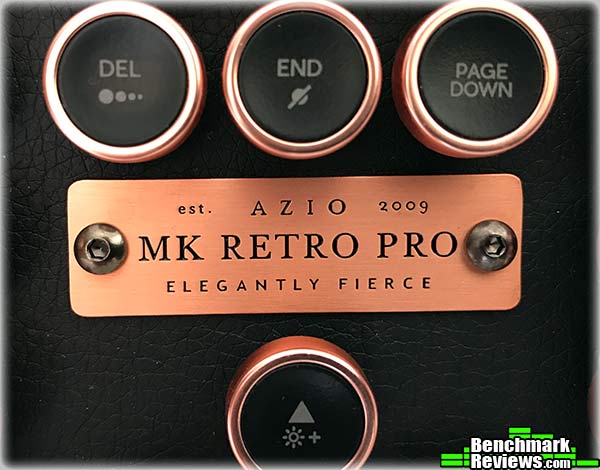
The page control keys can be function-shifted to change the backlight intensity (there are 10 levels!) as well as switching between reactive (each key lights briefly when you press it, then fades) and breathing modes. You can also disable the backlighting entirely. The function keys F1-F12 have some shifted functions as well, including media playback, volume control, and launching browsers and mail applications, although not all of these functions worked on my sample unit.

There’s no utility software with this keyboard, so what’s it like to type on?
Although Retro Classic’s key spacing and layout is completely standard, the keys themselves offer much less “strike area” than a normal square key cap does. Take a look:

Even the most accomplished typist will have an adjustment period with this keyboard before they’re back up to full speed. It took me a couple of days to get really comfortable with this keyboard. That said, I really liked the quiet mechanical feel of the custom Kailh switches.
But’s it’s not really about the practicality or feature set of this keyboard: rather, it’s all about the aesthetics. This keyboard looks freaking gorgeous sitting on your desk, which is hopefully a rustic wooden piece, or perhaps something with a dark leather surface.

In the last section I’ll give you my final thoughts on this keyboard.
AZIO made is clear that the prototype they sent us does not represent the final product. Although the plaque on the front of the keyboard says “MK Retro Pro”, AZIO asked that we refer to it as “Project Retro Pro”, which they later finalized into “Retro Classic”. They did say that production keyboards will use genuine leather (or marble!) base plate finishes, but as to what other changes might be coming, well, we just don’t know.
As it sits, it has several enhancements over AZIO’s existing MK Retro keyboards (which we gave a Golden Tachometer Award): it seems to use more metal in its construction (it’s over a pound heavier), it has backlit keys, and design changes such as the exposed screw heads on the plaque and keyboard rim give it a more premium feel.
Interestingly, for an established company, AZIO is financing the production of this keyboard with an IndieGogo campaign. There are several ‘Perk’ reward levels, with options split between USB and Bluetooth, and AZIO estimates the first deliveries of the completed products as early as August 2017.
Since what we have isn’t a retail production keyboard, and AZIO has emphasized that the final product will be different, Benchmark Reviews will not rate Retro Classic/MK Retro Pro or give any recommendations about it. We can say that it looks magnificent, works well in prototype form, and we’re eagerly awaiting the opportunity to perform a full review on the final product!


