By Jason Maxfield
Manufacturer: Fractal Design
Product Name: Focus G
Model Number: FD-CA-FOCUS-GY-W
UPC: 817301015141 EAN: 7350041085140
Price As Tested: $49.99 (Amazon | NewEgg)Full Disclosure: The product sample used in this article has been provided by Fractal Design
Fractal Design has been busy of late with the release of a whole slew of new cases. We’ll be taking a look at the ATX mid-tower Focus G.
Fractal Design is competing in a tough segment of the market with the Focus G. I have reviewed over a dozen cases, and a lot of them fall into this price range. One good thing with all the competition is that case manufacturers have had to up their game with features and accessories.
The Focus G offers a host of cooling options, 120mm and 140mm fans, as well as support for 240mm and 280mm radiators in the front or the top (240mm limitation on top) of the chassis. Fractal Design even has a slew of colors to choose from: white, black, mystic red, petrol blue, and the case I received, in gunmetal gray. Included with the case are two Fractal Design SIlent Series 120mm fans pre-installed in the front of the case, which also have white LED’s.
In this review for Benchmark Reviews, I’ll be using the Focus G for my new Ryzen build. How will the Focus G stack up? Let’s find out.

| Colors available | Multiple colors |
| Side panel window | Large |
| 3.5″ or 2.5″ Drive capacity | 2 |
| Dedicated 2.5″ drive capacity | 1 |
| Expansion slots | 7 |
| Motherboard compatibility | ATX, mATX, ITX |
| Power supply type | ATX |
| Total fan mounts | 6 |
| Front fan | 2x 120 or 2x 140 2x Silent Series LL 120mm LED fans included |
| Top fan | 2x 120 or 2x 140 |
| Rear fan | 1x 120 |
| Bottom fan | 1x 120 |
| Side fan | No |
| Dust filters | Top fans Bottom fan + PSU Front fans |
| Front radiator | 120/240mm 140/280mm Limitation: 280 requires that the bottom 5.25″ slot is unused |
| Top radiator | 240mm |
| Rear radiator | 120mm (max width 120mm) |
| Power supply depth limit | Maximum 230mm |
| Graphics card length limit | 380mm |
| CPU cooler height limit | 165mm |
| Cable routing | 18-25 mm space |
| Cable routing grommets | No |
| Fixed velcro straps | No |
| Padlock and Kensington lock support | Yes |
| Captive thumbscrews | Both side panels |
| Dimension (WxHxD) | 205x444x464 mm |
| Volume | 39.8 L |
| Weight | 4.5 kg |
Specifications taken from Fractal Designs website. Next we’ll take a look at the Focus G overview.
Included with the Focus G you have a user guide, and a box full of all the screws you’ll need to build your PC. Unfortunately, Fractal Design didn’t include any extra fan screws, in case you wanted to mount extra fans in the back or top of the case. You do get a handful of zip ties, which always come in handy for cable management.

Here we have a look at the front and back of the Focus G. Pretty standard fare. The front includes 2 optical drive bays… however they aren’t tool-less like most cases in this price range these days.
Around back you have your standard input/ouput cutout, mounting holes for a 120mm exhaust fan, and 7 PCI expansion slots. Down at the very bottom is where you mount the PSU.

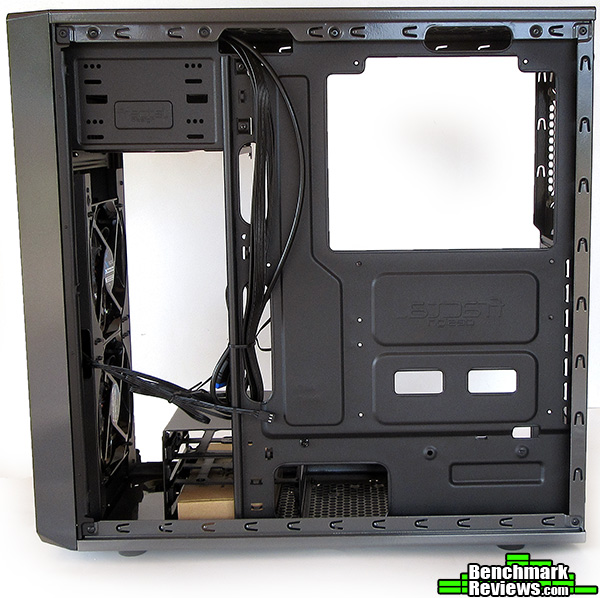
As you can tell, that gunmetal gray paint is pretty glossy. Not a whole lot to see on the cable management side of the case. There is a bit of a punch out in the panel to help with space inside the case. I only wish it was a bit deeper as you’ll see why later in the article.

The top of the Focus G has offset mounting holes for 120mm or 140mm fans. If you notice the screws already in there, they are holding in a fan filter, which kind of gets in the way when trying to mount fans. And is a nuisance if you want to actually clean it. You will have to uninstall your fans to pull the filter out to clean it thoroughly.
At the front end on top, you can see the power, reset, HDD LED light, headphone / mic jacks, and USB 2/3 inputs. Not sure why Fractal Design decided to include a USB 2.0 header on the front instead of 2 USB 3.0, when the port can handle two USB 3.0 connections.

On the bottom of the case you have a fairly long fan filter, that covers the PSU area and a spot toward the front, you can mount a 120mm or 140mm fan to pull air in from the bottom, only if you sacrifice the drive bay inside the case.

Next, we’ll take a look inside the Focus G to see detailed features.
This looks pretty cozy, if a bit plain. I can understand the ommision of grommets here, since this is a bit more of a budget oriented case. At least the cable pass-through are rolled over and won’t slice your hand or your cables to ribbons!
As you can see the optical drive bay is not tool-less, but at least Fractal Design included some thumb screws that make installation quick and easy.
At the bottom you’ll see the drive bay, it only has two slots. That’s all you get besides the hidden SSD mount where the PSU would sit. If you have to use that motherboard tray mount for an SSD, you would be wise to install that before the PSU, otherwise you won’t be able to mount it in place.

The cable management area is pretty sparse. Not a whole lot of tie-down points and that huge gap near the front doesn’t do any favors in hiding your cables.
As you can see, the CPU cut-out is massive, so you shouldn’t have any issues of mounting or swapping a back-plate while the motherboard is installed in the Focus G.
On the front of the case you can get a clear look at those shiny 120mm Silent Series white LED fans.
The second optical bay is blocked by a metal bracket, but you can remove it to have use of the drive bay. That’s what I had to do when making room for my AIO liquid cooler. More on that later in the article.

Here is a close up shot of the top power, reset, HDD LED, headphone / mic jacks, and USB 2.0 and 3.0 ports.
I would of liked to have some seperation of the power and reset buttons here. It is pretty easy to accidentally hit the reset button instead of the power button when you are sitting down, since they are on top and not the front of the case. It has the benefit of keeping the front of the case looking clean, but makes it a bit harder to plug things in if your PC is higher than head level.

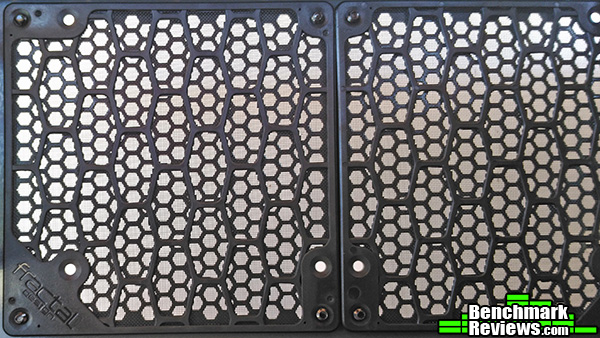
This front panel makes me cringe every time I had to pop it off. Those plastic tabs tend to break at some point, and this is the only way to get to the foam filter for cleaning. I do like the fact the filter is foam instead of plastic, it should filter more things out, and doesn’t seem to impede airflow that much.

This is a shot of the top filter. Since this filter is sandwiched between the case and any fans you might want to mount here, it would of been nice of Fractal Design to include some longer fan mounting screws, since the normal length ones are barely adequate. I, however, decided to remove it since my AIO liquid cooler is exhausting air and the filter would impede air flow for no reason in this configuration.
If for some reason you wanted to mount one fan as an exhaust and one as an intake you could remove one filter and leave the other installed for the intake fan.
Next, we’ll go over what it’s like to build a PC with the Focus G and give you a break down of the results and any issues I encountered while building the system.
My methodology is pretty simple. I assess the case while building it. Mark down anything I find good, bad, or some bit of detail that might help someone decide if this case would be for them or not. I look for ease of building inside of the case. How much room there is for cable management. Fit and finish of the product, i.e. how well the doors close, etc.
-
Motherboard: Asus Prime X370-Pro
-
System Memory: Corsair Vengeance 2400 16GB (8×2) 2400, OC to 2800
-
Processor: Ryzen R5 1600 OC to 3.9Ghz
-
Audio: ALC 1220 Codec
-
Video: XFX R9 390 8GB GPU
-
Disk Drive 1: Samsung 850 Evo SSD 500GB
-
Disk Drive 2: WD Black HDD 750GB
-
Optical Drive: DVD Burner
-
Enclosure: Fractal Design Focus G Gunmetal Gray
-
PSU: EVGA Supernova G2 850W
-
Monitor: Acer x223w 1680×1050
-
Operating System: Win 10 Pro 64bit
The build went pretty smooth. I was in the middle of building this when my AM4 bracket arrived for my SilverStone TD02-Slim AIO water cooler that I reviewed here. I had all the fans how I wanted, so I had to disassemble some of them and figure out where I was going to mount my liquid cooler.
As I was fitting it in the top of the case I knew it was going to be tight. In the picture below you can see my DVD burner is in the second bay since the cooler takes up space needed for the optical drive bay rendering the top bay useless.
Also you can notice the front mesh is a bit warped and has a small dent in it. I think this occurred during shipping as the box had a nasty gouge in it. So, I wouldn’t expect your Focus G to look like this.

Below we have a good look at just how cramped this build ended up being with my components inside of it.
As mentioned before, the liquid cooler encroaches on the top optical bay, and the only other way to prevent this if you absolutely needed the top bay and wanted to use a 240mm liquid cooler, would be to mount the AIO cooler in the front of the case. I also had to remove the top filter to mount the radiator to the case. This isn’t a big issue since i’m exhausting the hot air out of the case and having the filter installed would add impedance to the air flow coming out of the top of the case, which we do not want.
I opted to not mount my cooler this way because I wanted to keep the pre-installed Silent Series 120mm white LED fans in place to test them.
The graphics card has plenty of room thanks to the design of the Focus G. You could fit a graphics card of 12+ inches easily into this case.
At the bottom of the case we have the PSU. With the drive bay pushed further toward the back of the case, it made for a cramped install with my EVGA Supernova G2. Squeezing it into place to tighten it down was a bit awkward. I didn’t want to tweak any of the leads, and I didn’t want to try and attach them in such a small space after the fact. So I wasn’t left much of a choice but to shoe-horn it in there. After it was seated properly there was a bit more room for the wires to breath and not become crimped.
Another issue I had was with the liquid cooler hoses almost interfering with the back exhaust fan. I had to kink the hoses a bit to get them to not sit on the fan. Also, the 8 pin CPU power cable is being pushed down on by the radiator fans. The Asus Prime X370-Pro has the 8-pin power at the very top above the VRM section on the left of the motherboard. This clearance might not be an issue depending on where that 8pin sits on other motherboards. Just take a note of that when considering water cooling with the Focus G. If not for the TD02 Slim’s design a thicker cooler might not of fit with this motherboard without seriously crimping the CPU power cable or not having enough room to fit.

The cable management side of the Focus G is a bit sparse. There is no grommeted pass-through, just simple holes to move your cables through. I wasn’t able to use them very efficiently. The thicker 24 pin motherboard power cable had to be routed around the holes instead.
The front panel audio cable barely reached to the back of the motherboard. If there wasn’t a hole right at the bottom there I would not of been able to connect it without it running around the graphics card.
There is a few tie-down points, but I found the cable management of the Focus G to be wanting. My cables were pretty long, and the space for management isn’t sufficient for my cables. And the side panel just doesn’t have enough room with the small punch-out to keep it from having to be squeezed on, which I elaborate more on below.
The included Silent Series 120mm LED fans work great. The white LEDs are bright, but not annoying thanks to the foam front filter. The fans are only 3 pin, but I find running them at full speed isn’t an issue. They hit around 1300 RPM and are pretty quiet and feel like they push a decent amount of air into the case. I wouldn’t call them silent, but they are quieter than other case fans I have used before.

In this close up of the drive bays, I wanted to point out just how cramped the power cable wires are. They have to be bent at an extreme angle, and even then the panel is pressed up against them snugly. This has me concerned that the cables after time could become damaged. I would of liked to see a bigger punch-out on the cable management side of the panel to accommodate the power cables better.

The picture below shows a fit and finish issue I had with the window side panel. Putting the panel on the case leaves a good 1/8 of an inch gap and a good amount of pressure has to be exerted on the back of the panel to get the top thumb-screw to engage to lock this panel into place. Once that is done it sits flush.

I recorded a time lapse of the build, you can see here:
On the next page I will conclude this article and give my final thoughts and conclusions on the Focus G.
The Fractal Design Focus G leaves a bit to be desired. But at this price point some sacrifices are made, and I think there is nothing here that is a game killer.
This case is smaller than it looks. After building in it, it’s definitely cramped with my components installed. Some careful planning of components is always a good idea to consider when looking to purchase any case.
I think for my components this case could use an inch extra in all dimensions. This would of given more room for the cable management. More room for the optical drive top bay, more room for the liquid cooler up top, and not interfere with the CPU power cable, and the PSU would of had more breathing room between the drive bay.
I think Fractal Design could of done a better job on this case. Using a full size ATX motherboard just feels a bit too cramped and including the use of liquid cooling, this case just feels like it wasn’t thought out well enough.
Performance of the Focus G is mixed. With the fit and finish issues and some cramped spacing with my components it’s not performing well. It’s just barely adequate for the needs of my hardware.
Appearance of the Focus G is very sleek. The gunmetal gray color goes very nice with my components. The front panel styling with the bottom corners cut off keep it looking like it’s just a plain rectangle. The paint job itself is pretty good for a case in this price range.
Construction felt a bit shoddy with the windowed panel. The fit was off by a good margin and had to be forced into place. The panels are also a bit flimsy, but feel solid enough when mounted to the case.
I also had an issue with the DVD burner that I didn’t mention in the build portion of the article. The slots almost didn’t line up for the DVD player to use the thumb-screws to mount it in the bottom optical bay, which is blocked off by a piece of metal that you have to remove. It’s a functional bay, so I’m not sure why that metal bracket is there to begin with.
Functionality is mixed as well. Given the Focus G was designed with the ability to us liquid cooling, it was almost not possible with the TD02 Slim, which was designed for cases just like this, and almost wouldn’t fit in the top of the case.
All nit-picking aside, the Fractal Design Focus G is a good value. At the time of writing this article it is priced for $49.99 (Amazon | NewEgg). I can’t think of many 50 dollar cases that look this good and offer the ability to use liquid cooling in the front or top of the case.
If you plan on using bigger components like I have, I would find another case. If you plan to use the Focus G with a smaller build and motherboard and perhaps no water cooling this case will work out for you if you don’t mind the cable management issues.
+ Cool colors to choose from
+ Low price
+ Can accommodate liquid AIO coolers
– A bit small for larger PSUs
– Fit and finish issues
– AIO liquid coolers could cause issues with CPU power plug and block the top optical bay
– Cable management is cramped with few tie-down points
-
Performance: 7.0
-
Appearance: 9.0
-
Construction: 7.5
-
Functionality: 7.5
-
Value: 9.0


