By Jason Vaught
Manufacturer: Corsair Components, Inc.
Product Name: STRAFE MK.2 RGB – Cherry MX Silent
Model Number: CH-9104113-NA
UPC: 843591060776
Price As Tested: $139.99 (Amazon | Newegg)Full Disclosure: The product sample used in this article has been provided by Corsair.
Corsair has revamped their STRAFE series with a new MK.2 edition. The STRAFE RGB MK.2 is a gaming mechanical keyboard featuring 100% Cherry MX Silent and Cherry MX Red switches with RGB illumination and a slew of lighting effects. The Cherry MX Silent switches, the variant we’ll be reviewing today, is smooth and quiet, and a 3.7mm actuation distance.
What is the main reason to spend money on a “gaming” mechanical keyboard vs a regular keyboard? With membrane based gaming keyboards, your purchase depends mainly on features that you can only utilize during gameplay. But with a gaming mechanical keyboard, your priorities in performance to value are more broad. You’re looking for a long life keyswitch that offers tactile feel and a comfortable typing experience as well. This is what we should all look for in a gaming mechanical keyboard, does the K70 MK.2 live up to these expectations? We’ll find out in this article for Benchmark Reviews.

| Warranty | Two years | Keyboard Size | Full |
| Weight | 1.46kg | Media Keys | Dedicated (MUTE, VOL DOWN/UP, STOP, PREV, PLAY/PAUSE, NEXT) |
| Key Switch | Cherry MX Silent | Wrist Rest | Yes- Detachable |
| Keyboard Backlighting | RGB | CUE Software | Enabled |
| Dimensions | 455mm x 170mm x 39mm | Cable Type | Braided |
| Report Rate | Up to 1ms / 1000Hz | WIN Lock | Yes |
| Matrix | 100% anti-ghosting with full key rollover | Keyboard Layout | NA |
Package contents
- STRAFE MK.2 Mechanical Gaming Keyboard
- Detachable full length wrist rest
- Rubber topped gaming keys: W,A,S,D, Q,W,E,R,D,F
- Keycap puller
- Warranty card
- Quick start guide
Compatibility and System Requirements
- PC with USB 2.0 port (two ports if using USB Pass-through
- Windows 10, Windows 8, Windows 7
- An internet connection is required to download the Corsair Utlity Engine software (CUE)
The Corsair STRAFE MK.2 RGB is the newest iteration in the STRAFE family, selling for $139.99 (Amazon | Newegg). The previous generation is a crowd favorite, but the MK.2 has new upgrades in the LED department. Brighter, longer lasting LEDs and a more advanced controller, and dedicated multimedia controls.

When you first pull this keyboard out of the box, you’re greeted with a regular looking keyboard that features an over-sized wrist-rest.
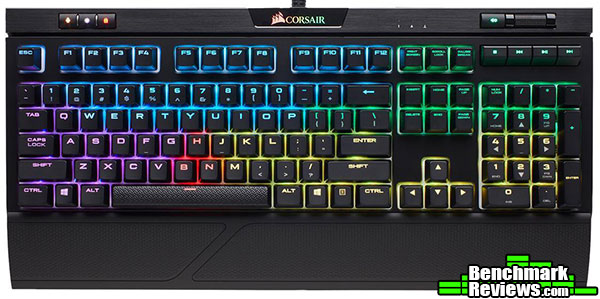 But once you plug it in, then bam! RGB everywhere. The STRAFE MK.2 has no shortage of color popping at you from the get go. This keyboard is bright, but luckily, Corsair has dedicated button with 3 levels of brightness control.

Don’t use or prefer a wrist-rest? No problem, it is easily removed. Removing the wrist-rest also reduces the depth footprint of this keyboard, and gives it a more minimalistic look. 
From this angle, you can see that the key switches do sit up off the PCB, making them a bit tall in comparison to a traditional, membrane keyboard. Adjusting to this profile will come easily and you’ll being typing at full speed in no time thanks to Corsair’s use of OEM profile keycaps.
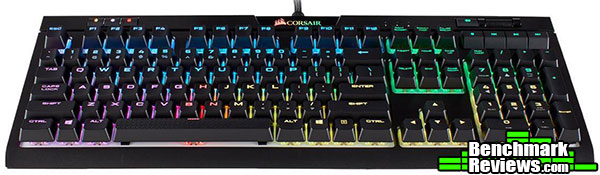
From this angle, removing the wrist rest gives you a more traditional typing experience that some (including me) prefer. For me, this feels more natural, although I can see the value of the wrist rest when gaming.
The STRAFE MK.2 RGB supports the full spectrum of RGB color. The keyboard, by default on startup, will be in Standard Mode, and display a default pattern known as Rainbow Wave.

The bottom of the STRAFE MK.2 is your standard affair, no special cable routing channels, and small rubber feet. The bottom of the case, or frame, is made out of abs plastic.

New to the STRAFE family, dedicated multimedia keys. Corsair took a design idea from the K70 and added dedicated multimedia keys to the MK.2. The multimedia keys features stop, play/pause, forward, backwards, mute and a volume wheel. To the left of the volume roller we see 3 tiny, dedicated LEDs (non-RGB) that act as indicators for NUM Lock, CAPS Lock, and SCROLL Lock.

Included in the box is some extra keys that feature a rubberized and textured top layer. The above configuration of switching out the W,A,S,D keys is for FPS gamers. Those who utilize the keys extensively while gaming will appreciate the quick homing function the keys provide as well as the slightly angled profile they provide.

Are you a MOBA gamer? No problem, Corsair has you covered there as well. Not only did Corsair provide rubberized W,A,S,D keys, they have also provided Q,W,E,R,D,F keys for the MOBA gamers out there.
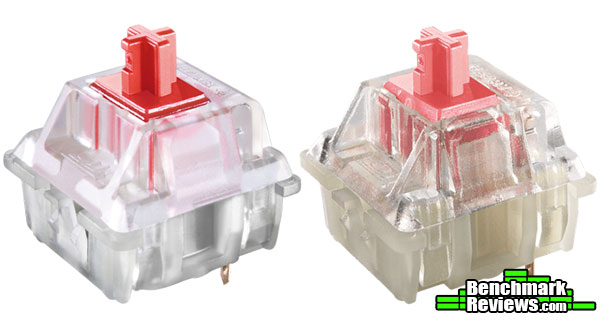
The Corsair STRAFE MK.2 key-switches come in two flavors, Cherry MX Red, and Cherry MX Silent. The cherry MX Reds are smooth and linear, while the cheery MX silents are smooth and silent. The silent variant eliminates the need for sound dampening O-rings while maintaining that smooth linear feel of the Red variant.
The best way to test a keyboard is to simply use it. The STRAFE MK.2 was tested for an overall period of 30 hours with Ghost Recon: Wildlands, Star Citizen, , Photoshop CS6, and various typing tasks including this review.
Corsair claims to set itself apart when it comes to anti-ghosting and full key rollover. The term “ghosted” refers to the keystrokes that are not detected and then drop off (for example, when someone presses D-C-U and only sees D-C, the U has been ghosted). While anti-ghosting is present in most gaming keyboards, it is often restricted to a certain number of keys or sections of keys. Popular sections of limited anti-ghosting may include the WASD part of the keyboard as it incorporates the keys that are the most common to use for first-person shooter games.
Corsair claims:
“100% anti-ghosting with full key rollover ensures your commands and simultaneous keystrokes always register the way you intended.”
Now we’ll see how accurate that is.
- Motherboard: MSI X99A SLI PLUS LGA 2011-v3 Intel X99
- System Memory: HyperX Savage 64GB (8x8GB)
- Processor: Intel Core i7-5930K Haswell-E 6-Core 3.5 GHz LGA 2011-v3
- Audio: On-board
- Video: EVGA GeForce GTX 1080 Ti FTW3 GAMING
- PSU: Seasonic 1200W Platinum
- Monitor: Dell UltraSharp U2412M IPS 24″ x 3 @ 5760×1200
- Operating System: Windows 10 Pro (64-bit)

As you can see from the results above, Corsair’s claim for full key rollover is accurate, at least as accurate as I can test since I can’t physically press all the keys at the same time, but you get the idea. I can, however, press enough keys to know that you won’t have a large enough combo for the full key rollover to matter.
The Corsair STRAFE MK.2 is a worthy addition to the STRAFE lineup. It’s footprint is larger than it’s predecessor, but not by much. This increase is needed for the dedicated multi-media keys borrowed from the K70 line. While I’m normally a big fan of Cherry MX Blues, I actually am enjoying these Cherry MX Silents. They have a good feel, and are in fact silent. If you were planing to put this keyboard in a bedroom, and use it while your significant other was sleeping, I don’t think your typing would be noticed or heard.
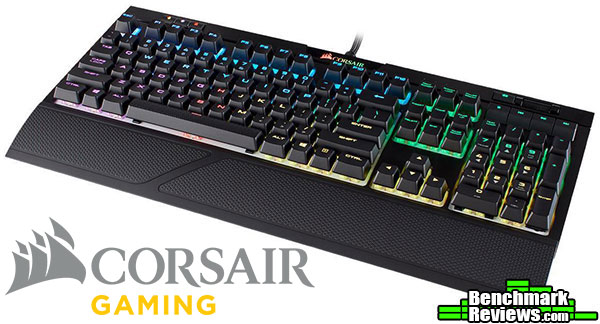
In terms of performance, the Corsair STRAFE MK.2 RGB performed at my expectations. It is, after all, a Corsair product, and one would be hard pressed to find a Corsair product that didn’t please. Would you use this for your regular, every day keyboard? Well, maybe. Would you use this for your gaming keyboard? More than likely. It’s loud RGB lighting wouldn’t be appropriate at the job setting, but would fit in perfectly in your fortress of solitude. The Cherry MX Silents, however, would be welcomed anywhere that you don’t want someone to hear every keystroke.
In terms of appearance, well, it looks almost identical to the Corsair K70 MK.2. The one caveat though, the STRAFE does not have the beautiful aluminium that the K70 MK.2 has. The RGB lighting is bright, vibrant, and insanely customizable.
Even though the STRAFE MK.2 doesn’t have the copious amounts of aluminum that the K70 MK.2 has, it is still hefty and solid. It actually weighs slightly more than it’s K70 MK.2 brother, just not as pretty. The ABS plastic frame and top-plate are of excellent quality.
In terms of functionality, the STRAFE MK.2 lives up to it’s predecessor. The addition of dedicated multi-media keys is always welcomed and was a missed feature on the MK.1. The keycaps fit tight on the stems, and the switches are 100% authentic Cherry MX. The bottom row however, is non standard. Corsair seems to love making these non-standard, as they’ve done it with almost all of their keyboards. Non-standard layouts can be difficult to find keycaps for, should you want to swap out your keycaps.
Value is where it gets a bit tricky, priced for $139.99 (Amazon | Newegg), this keyboard draws a bit of a premium compared to the competition. Ducky, Vortex, Cooler Master, and even Zalman have more affordable boards available, albeit they don’t have an aluminum frame, and some of them don’t have multimedia controls. When you compare the STRAFE MK.2 to the K70 MK.2, there is only a $10 price difference, but the K70 MK.2 adds more features.
I would recommend this keyboard to anyone who is looking for an RGB keyboard that has an abundance of switch options. The price of 149.99 is a little steep, but that depends on exactly what you consider valuable in a mechanical keyboard. To me, for a $10 price difference, the K70 MK.2 is still a better deal, but if $10 a waste for the extra features the K70 MK.2 adds, then save that money and get the STRAFE MK.2. The deciding factor in the past for a lot of people was that the original K70s had multimedia keys and the STRAFEs did not. Another difference worth mentioning is that the wrist rests on the K70 and STRAFE are different sizes, but feel pretty much the same.
+ Per key RGB
+ Authentic Cherry MX switches
+ Braided cable
+ Dedicated media keys
+ Heavy base
+ Multi-profile support
+ USB Pass-through
– Non-standard bottom row
-
Performance: 9.50
-
Appearance: 8.75
-
Construction: 9.00
-
Functionality: 9.00
-
Value: 9.00
Excellence Achievement: Benchmark Reviews Golden Tachometer Award.
COMMENT QUESTION: ?


