By Tom Jaskulka
Manufacturer: ROCCAT GmbH
Product Name: Vulcan AIMO 120
Model Number: ROC-12-441-BN-AM
EAN: 4250288151772
Price As Tested: $159.99 (Best Buy Exclusive)Full Disclosure: The product sample used in this article has been provided by Roccat, GmBH.
It’s safe to say mechanical keyboards have become mainstream. Once the realm of ultra-enthusiasts and those with a fondness for IBM Model M planks, keyboards with mechanical switches have now replaced membrane-based keyboards at almost every price point – from $40 to $200. Despite the dizzying number of options available, it’s rare to find a mechanical keyboard that offers something beyond your favorite gaming brand’s spin on Cherry MX switches. Up until Logitech’s Romer-G and Cherry’s Speed Silver switches (alongside Razer’s Green/Orange/Yellow variations), almost every mechanical keyboard – while varying in sound and tactile feel – had an actuation point of 2mm and a key travel of 4mm.
That is, of course, until now. Roccat has forged a completely new switch in the fires of their in-house design labs and brought to market something unique: the Titan switch.
The brand-new Titan switch debuts on Roccat’s also brand-new Vulcan line of mechanical keyboards. Three distinct versions – Vulcan 80, Vulcan 100 AIMO and Vulcan 120 AIMO – will be launched in Q3 of 2018. With its new switch, unique ultra-light keycaps, rotary dial, smart AIMO RGB illumination and premium design, does the Vulcan AIMO 120 have what it takes to forge a new path among the competition? Benchmark Reviews was given an opportunity to review the Roccat Vulcan AIMO 120, so let’s find out!

The ROCCAT Vulcan mechanical gaming keyboard represents a powerful combination of technological innovation, robustness and illumination. It marks the first ROCCAT keyboard to feature inhouse-developed Titan Switches. The switches, designed from the ground up, were built for gamers craving a key stroke that was swift and precise while still being tactile. A toughened metal plate strengthens the Vulcan and protects it from knocks and falls, while keys are optimized to resist dust. The powerful AIMO lighting engine is brought to life with long-life LEDs and transparent switch housing that spreads the light evenly. The living light system is customizable on a per-key basis in 16.8M vivid colors/iconic ROCCAT blue color.
The Vulcan was developed with passion following the renowned principles of German design and engineering. It is a precision gaming tool that lets you sense the performance from first glance and feel it from the first key stroke.
The Titan Switch is the pride of the Vulcan. It was developed to breathe new life into aspects of mechanical switch technology in which innovation was long overdue. As well as a tactile and silent 1.8mm actuation point with a 3.6mm travel distance, the switches feature structural housing to reduce wobble while being pressed. They were also designed to bring electrical contact bouncing to a minimum, allowing firmware to recognize input 20% faster. Combined with the Vulcan’s ultra-light key caps – 50% lighter than standard – key strokes feel incredibly swift and precise, responding rapidly to your commands.
Learn more about how we developed that Titan Switch here.
BUILT TO LAST
The Vulcan provides the best possible platform for the AIMO lighting engine. Each switch features an individually configurable, long-life LED capable of displaying 16.8M colors in a variety of special effects. Transparent switch housing means the multicolor lighting shines impressively and is spread evenly from every key.
AIMO represents both a lighting engine and an eco-system at once. Its functionality grows based on the number of AIMO-enabled connected devices. It reacts organically based on your usage, presenting state-of-the-art illumination scenarios without the need for configuration.
Discover what’s possible with AIMO illumination here.
- 1.8mm actuation point (tactile, silent)
- 3.6mm switch travel distance
- 512kb integrated macro & settings memory
- All keys remappable
- ROCCAT® Easy-Shift[+]™ technology
- 32-bit ARM Cortex-M0 based processor
- 1.8m USB cable
- 1000Hz polling rate
- ROCCAT® Swarm software suite
- RGB per-key illumination with 16.8m colors
- Removable ergonomic palm rest
- 1150g weight
- 462mm x 235mm x 32mm dimensions
Let’s start with a quick overview of the Roccat Vulcan 120 AIMO, but be careful not to skip over the specifications section on the previous page – lots of additional information and context can be found there, direct from Roccat. It’s worth reading up a bit on the Titan switch and AIMO lighting system, as both are central features of the Vulcan 120 AIMO.
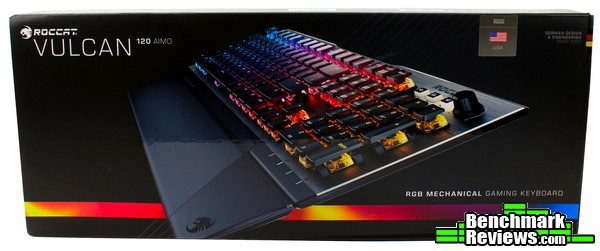
The product packaging is clean and tidy. The front contains only the most relevant details – a nice image of the product, product name, layout and only an essential description. It’s clear from just the front what we’re dealing with, and I always appreciate simple and effective communication.
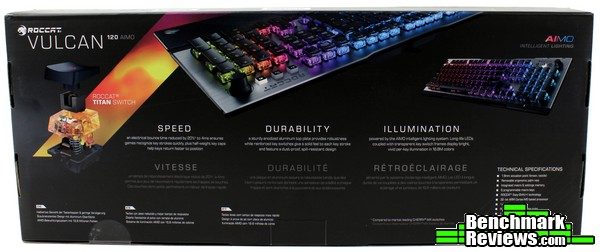
The rear of the box features an exploded view of the new Titan switch and a few marketing talking points.
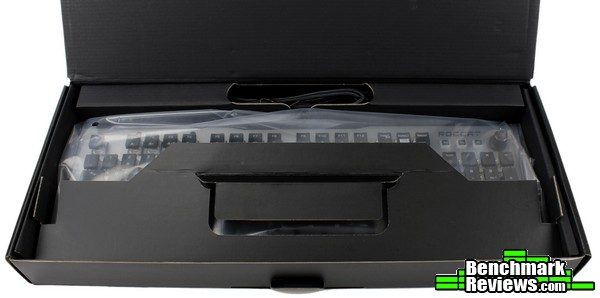
The keyboard itself is packaged adequately and should survive shipping without incident. A cutout for the magnetic wrist rest that is normally included with the 120 AIMO version of the Vulcan can be seen here, but the wrist rest itself is missing. It’s possible it was overlooked given that this is a review item; it’s hard to imagine a customer would be excited to discover they received a Vulcan 100 AIMO rather than the Vulcan 120 AIMO (the only difference between the two being the wrist rest and $10 MSRP).

There aren’t any accessories to speak of that accompany the Vulcan 120 AIMO keyboard – just a quick installation guide, user manual and some Roccat logo stickers. Of course, the magnetic wrist rest would normally be pictured here as well.
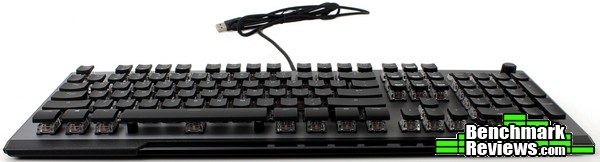
The keyboard overall is relatively flat. Tthe Vulcan doesn’t use a stepped arrangement like many other mechanical keyboards. Despite this difference, I didn’t find the Vulcan difficult or uncomfortable to use.
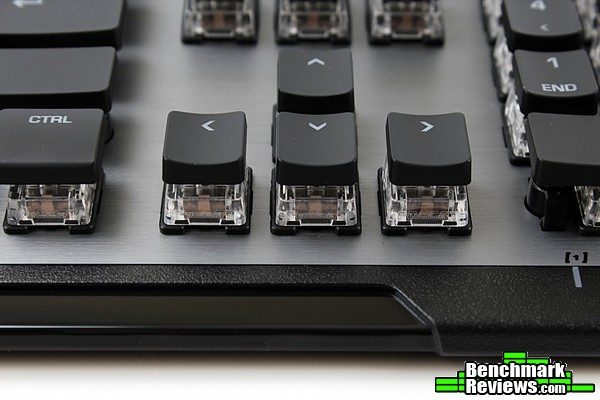
The keycaps are unique – the idea, according to Roccat, is to have the smallest amount of material (about half that of other keycaps) to make for a responsive, lightweight, rapid switch feel. The switch housing was designed to reduce wobble, and it seems to have done so for the most part.
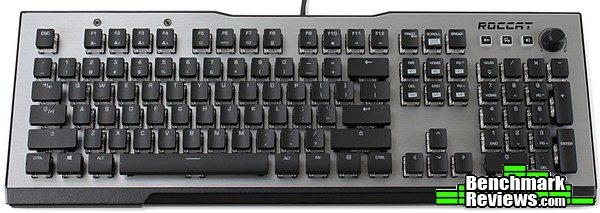
A solid aluminum plate forms the majority of the Roccat Vulcan’s backing and creates a lot of stability. The Vulcan 100 and 120 feature a grey/silver/aluminum color, while the Vulcan 80’s aluminum plate is anodized black.
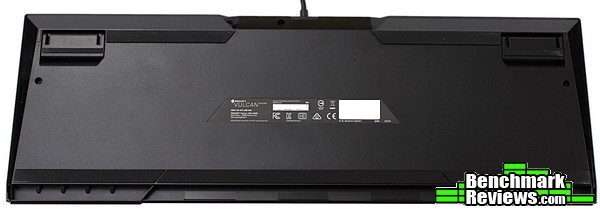
The bottom of the Vulcan 120 AIMO is mostly featureless, with a generous application of non-skid rubber surfaces to keep the Vulcan in place. The leading edge of the board has a rubber strip that runs nearly the entire width of the bottom.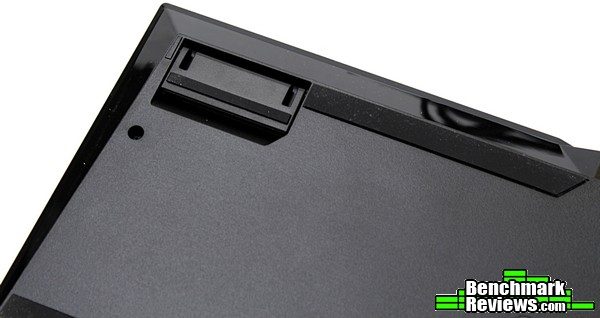
The rear pivoting feet have rubber on both raised/lowered surfaces to accompany the large strips that run towards the center of the keyboard at the rear.
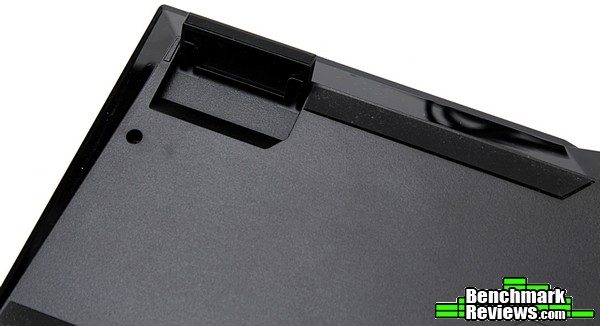
The raised position of the feet will incline the board at slightly steeper 8-degree angle (approximately).
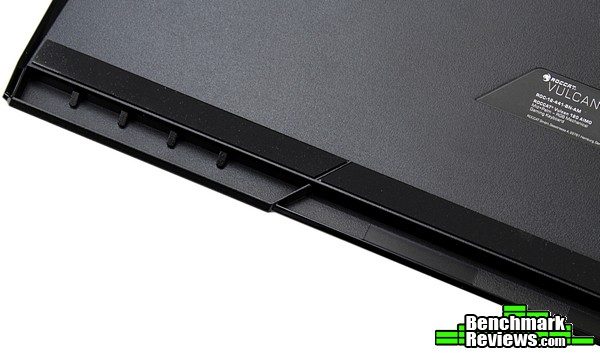
A wrist rest most likely latches under this lip on the front edge, and is held in place by magnets. This sample was missing this component, so I won’t be able to say much about this feature – from what I’ve read, it’s a hard plastic addition that mainly adds to the overall look rather than adding much in the way of comfort. From the looks of this front edge, it doesn’t look like the wrist rest would be able to be thick enough to be of much benefit.
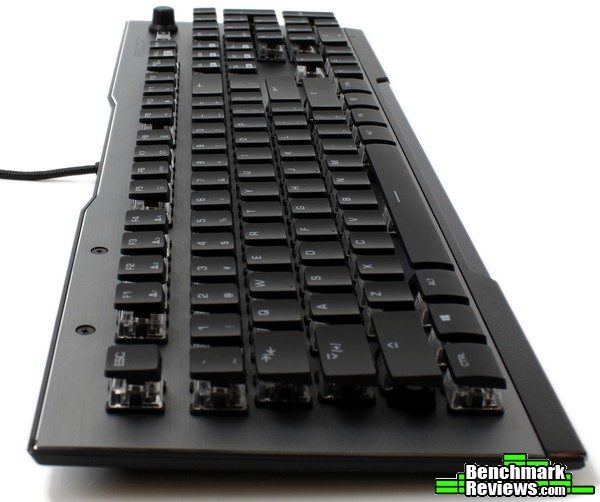
The plastic casing that forms the bottom of the Vulcan does sit at a small incline (approximately five degrees), but the overall profile of the Vulcan is flat. The keycaps have a small concavity to them that helps cradle your fingertips ever so slightly, but the lack of a stepped arrangement to the key rows means there will be a very slight adjustment period if you’re coming from a more standard keyboard.

The rear edge of the Vulcan keyboard is relatively non-descript; a few angles and a non-removable braided USB cord right in the center are the only features.

The chamfered edges catch the light in a subtle, beautiful way. Details like this really set the construction of the Vulcan apart from the various other mechanical keyboards on the market today. Let’s take the next page to take a closer look at some of those details.
It’s pretty apparent the Roccat Vulcan 120 AIMO brings a fresh new design and feel to the ever-more-crowded mechanical keyboard market. Let’s dig in and investigate some details that further set the Vulcan part from its peers.

Starting with my favorite detail of them all: When the Vulcan first powers on, a beautiful orange/yellow color scheme adorns the RGB lights under each Titan key. Fitting for a keyboard named for a god of fire…Right away, it’s apparent Roccat applied some specific thought and attention to their new flagship keyboard. This fiery Orange/Yellow blended color scheme looks like it came straight from the forge. This slight nod to the product name blended with some mythology was a tiny little detail that didn’t go unappreciated. I’m pretty sure I said something along the lines of “oh, cool!” when I first powered it on. It might be a small thing, but I’ve learned you’re generally in for a treat when companies pay attention to these little details.
The Titan switches are worth checking out. While they’re pretty similar in overall feel and function to Cherry MX Browns mixed with some Romer-G Tactiles, what really sets them apart is their slim keycaps showing off that crystal-clear casing.
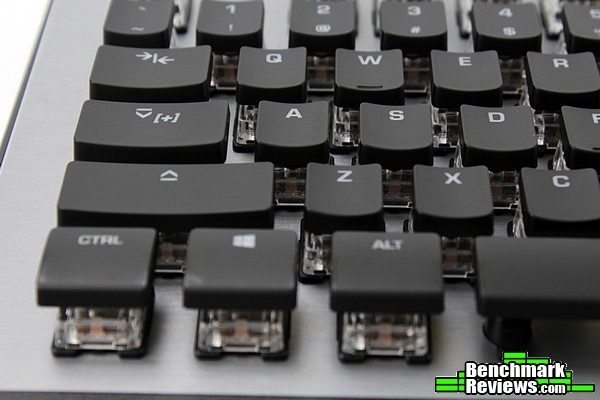
Roccat’s proprietary touches continue with the use of their Easy-Shift[+]™ tech. Most manufacturers by now have emulated this type of functionality, but I’ve gotten great use out of Roccat’s implementation. Unlike some of the other Roccat keyboards, the Vulcan keeps this Caps-Lock key here as the default key instead of the Easy-Shift[+] ability.

The 100 AIMO and 120 AIMO versions of the Vulcan contain three rubber buttons and a rotary dial in lieu of dedicated media buttons. The Easy-Shift[+]™ indicator, Caps-Lock, Num-Lock and Game Mode LEDs light up in white on the lower right corner of the keyboard.
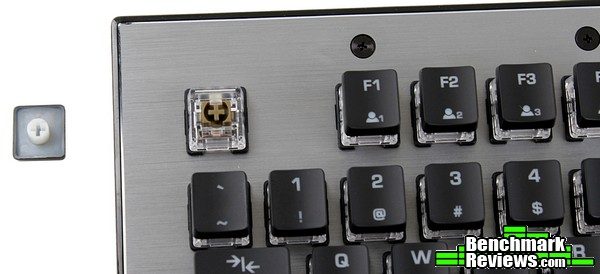
The keycaps look to be Cherry MX compatible, with an additional support built in to the stem on the keyswitch itself. Indeed they are – while the Titan keycap stems have a rounded exterior post compared to the simple cross of a Cherry MX keycap, I was able to swap in a Cherry compatible cap just fine. If for some reason the custom low-profile Titan keycaps don’t agree with you, it is possible to switch them out with a different set.
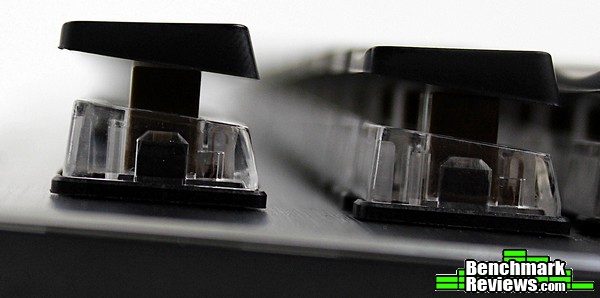
The reduction in keycap material is very obvious from the side – I’m not sure if I noticed a “faster response” purely due to the lighter weight (although the Vulcan was certainly responsive!), but it had the side effect of making sure any cables (headset/headphone cables especially) that go anywhere near the keys get trapped pretty easily. You’ll want to make sure to keep this keyboard free of any stray cables lest they tear off a keycap or get caught.

Although there are three backlit rubber buttons in the top right of the keyboard it’s more accurate to say there are only two; the FX and Volume Icon/Sound buttons function as toggles to adjust the behavior of the rotary dial. The Mute button is dedicated to that function.
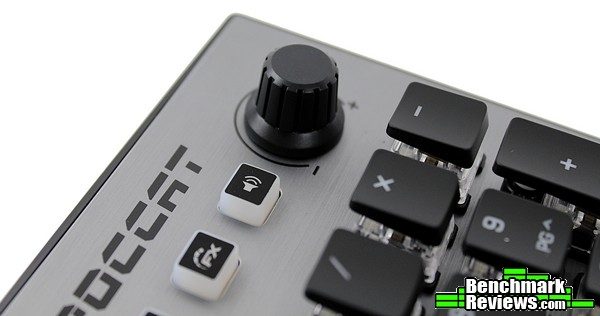
Depending on the “mode” selected, the rotary dial will adjust the volume digitally in Windows or change the lighting mode/AIMO light display.
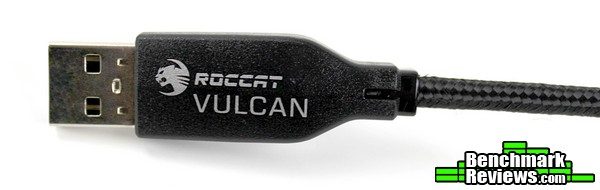
The Roccat Vulcan 120 AIMO is powered by a single braided USB cable.
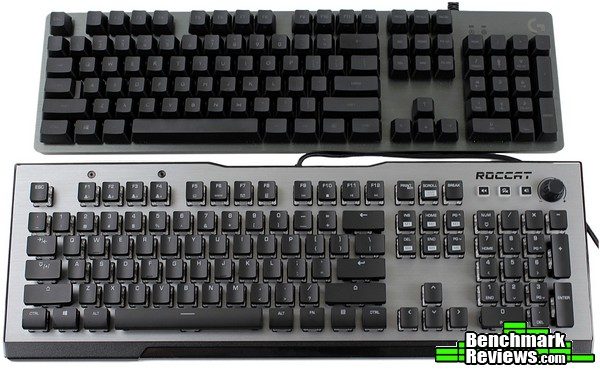
While a relatively compact keyboard, the larger bezel on the Vulcan ends up commanding a bit more real-estate on your desk compared to other standard layouts. The Logitech G513 pictured here is a pretty natural competitor to the Vulcan and manages to pack the same layout into a noticeably more compact chassis. Still, the Vulcan’s styling really stands out even among premium offerings from the competition, and the extra space really allows the light from the crystal clear switch housings to spill out beautifully across the aluminum surface. Let’s take a closer look at that light show on the next page.
Given that RGB features are all the rage recently, I’ve taken to using a page to display some of the effects and abilities of the latest RGB keyboards. Each manufacturer seems to approach RGB in a slightly different manner, so it’s nice to take a glance at what each implementation is like.

The solid colors are vibrant and accurate. A solid, full value blue is intense combined with the crystal switch housings.
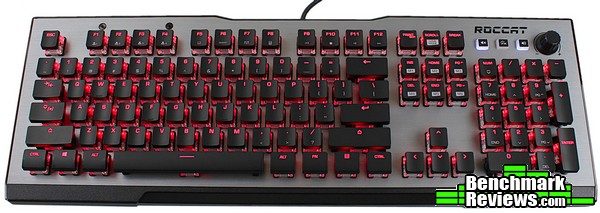
As is a full value red – many boards seem to have an orange tint to the reds, Roccat gets closer to a truer red (and you can always decrease the brightness/red value to get a darker red).
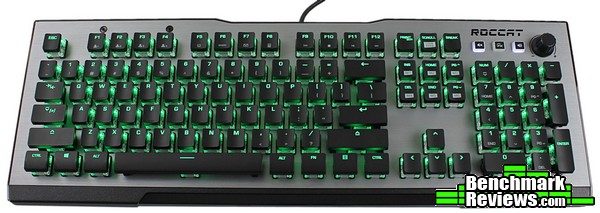
A full value green has a slightly softer hue to it; it isn’t the venom green/yellow that Razer likes to showcase (although some of this may be due to the LED photography lights washing some color out, admittedly). It’s a beautiful green nonetheless.
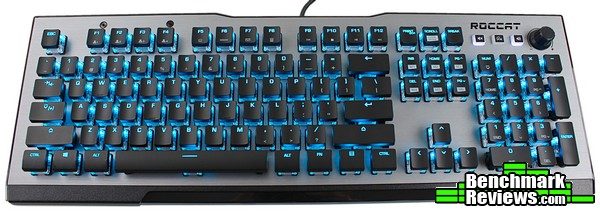
Even blended colors like this “Roccat Blue”/ice blue are vivid and true, as far as my eyes can tell. I remember being impressed with the vivid colors on a Roccat Tyon I reviewed years ago (especially the yellow!), and Roccat has only gotten better – their RGB lighting is one of the best on the market in my opinion. Only Logitech’s Romer-G lighting is comparable, but the clear Titan switch housings on the Vulcan bring it to another level, allowing the light play across the surface of the board resulting in a beautiful, jewel-like effect.
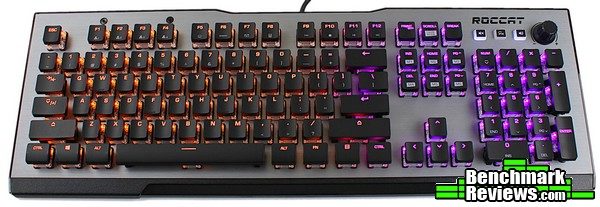
And all that before activating the AIMO lighting effect available on the Roccat Vulcan 100 and 120 versions. I’ll have to admit, I didn’t quite see the point of AIMO on the Roccat Khan AIMO headset I reviewed recently, as well as a Roccat Kone AIMO I’ve been using for almost the last year – I liked the additional lighting effects I could configure and the different zones, but the organic, flowing AIMO system didn’t seem to be doing much of…anything in particular.
For anyone that felt the same way, it seems you’re just missing the most essential piece – an AIMO-enabled keyboard. The photo above is static, so it’s tempting to conclude AIMO is just a fancy color wave effect, but it turns out there is so much more to it. The default action is a flowing, spotlight-like back and forth pattern with smooth transitions. The moment you begin to type, the board lights up smartly beneath your fingertips, figuratively exploding in color. It isn’t as distracting as it sounds – rather, it’s quite soothing and organic. It feels like interacting with alien machinery…it’s quite something. I do wish AIMO more obviously took some cues from action on-screen, I think that would be even more impressive…but the point is, the Vulcan elevated something that I wrote off as a gimmick into a feature worth checking out.
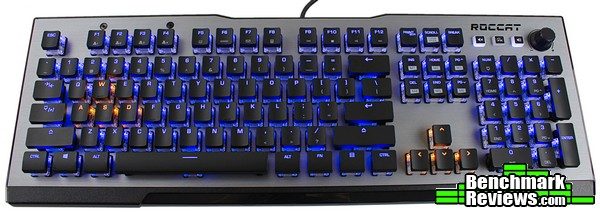
While AIMO intelligent lighting is the central focus of this product, the RGB feature set is just as programmable as most other RGB keyboards on the market. The Vulcan doesn’t contain quite as powerful of an effect editor as Logitech’s keyboards, but the per-key capabilities are right up there with everything else. Custom zones, individual colors per key…it’s all there along with a few other effects. I’ve got some .gifs of those on the next page, so let’s take a look at the software that enables all of these fancy effects.
Most of Roccat’s devices now use their SWARM driver. It’s a centralized, modular hub similar to Logitech’s Gaming Software and Steelseries’ Engine. The SWARM software acts as the starting point, and each Roccat device will automatically be detected and download its respective driver as needed. I’ve been using Roccat devices on systems for years, and other than some initial growing pains I’ve found it quite usable – I’ve read other reviews where users will experience version/update bugs or frustrations, but I can’t say I’ve experienced anything similar (especially recently).
Existing Roccat devices will already have their own drivers installed – when plugging in the Vulcan 120 AIMO for the first time, it will be recognized by SWARM and will get labeled by an exclamation point.
Clicking on the Vulcan 120 AIMO in the product list will provide a list of instructions and walk you through the rest of the process. Simply click the provided link (or check for updates) and the correct driver will be downloaded and installed.
Some devices use firmware that needs to be updated from time to time, and those updates get delivered directly through the SWARM auto-updater. Again, Roccat does a great job of providing relevant information and instructions walking you through the process, making the entire thing as simple and non-intrusive as possible.
With all firmware and device driver updates complete, your new Roccat product will have its own tab in the SWARM driver. All devices have a “pinned” tab, where you can customize which options appear on a single screen – I rarely use this feature (as I generally set preferences once and rarely touch it after), but I am very glad it exists. The first settings tab we’ll look at for the Vulcan 120 AIMO is the General Features tab. Here, the options for Character Repeat rate/delays and software sound feedback can be configured – or, a factory reset option can return your Vulcan to its original state.
The Key Assignment tab contains a pretty powerful macro editor, and allows for programmable customization of nearly every key on the Vulcan (other than the Function and Scroll Lock keys). A surprisingly plentiful set of preset macros can be found with the SWARM driver, containing common controls for a large number of popular games for easy configuration and assignment.
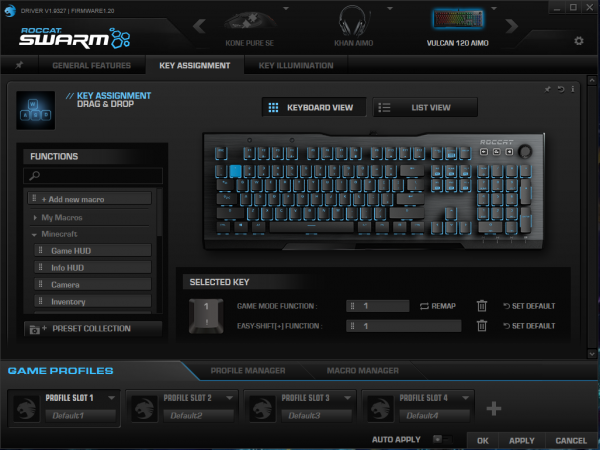
It isn’t completely obvious at first glance how to assign new functions to keys (especially if you miss the “Drag & Drop” subtitle on this tab), but it’s as simple as dragging a function on to whatever key you like. Alternatively, click on/select the key you want to program, and its existing configuration pops up for easy modification. Generally, the macros can only be assigned to the “Easy Shift[+]” Function category, but that can very per key. Once a key has been assigned a custom function, a small blue indicator will appear next to the macro in use making it easy to glance through and see which keys have been modified.
The Key Illumination tab contains all of the fancy lighting effects one would expect in a flagship RGB keyboard. It doesn’t have quite the customizability of Logitech’s Custom Effect Editor, but the Custom Mode allows for transitions and per-key custom illumination for easy creation of custom themes.
The full list of options are shown above. Again, there aren’t quite as many effects as some competing products, but it’s pretty apparent Roccat intends for the AIMO intelligent lighting option to take center stage. They may be on to something, for after playing around with the various effects I kept returning to this option myself. It’s – well, it’s mesmerizing, beautiful, and soothing enough that it isn’t distracting. It’s the first keyboard I haven’t just set a static color theme on, if that says anything.
The other effects are quite interesting as well and consist of more than just the usual rainbow waves. The Breathing 2.0 pattern featured above was well done, and syncs pretty nicely with the Breathing 2.0 mode on the Kone AIMO mouse.
Many keyboards have a “Ripple” / reactive mode, and the Vulcan 120 AIMO is no different. The Ripple FX mode was responsive with smooth animations.
Of course, the AIMO effect is justifiably the star of the show. It’s hard to describe what it’s like, but it’s quite impressive on a keyboard. The Vulcan 120 AIMO is what sold me on this particular feature unique to Roccat. This “Intelligent Lighting System” didn’t make as much sense on the Kahn AIMO or Kone AIMO, but I’ve seen the light now, so to speak…if it was better at picking the color palette from the action on-screen, it would absolutely be a killer feature you’d hear me raving about to anyone that would listen. As it is, it’s certainly worth checking out in person if you get a chance. It’s impressive, but Roccat – if you’re listening – please find a way to incorporate the action on screen…that would be something to see indeed!
I like to test keyboards by simply using them daily for all typical gaming PC tasks and noting any irregularities or irritants. Of course, for gathering data points and comparisons certain tools can be useful – primarily, I like to use Aqua’S Key Test and typeracer.com to test rollover capabilities and get a feel for typing speed/switch feel, respectively. I generally get more time typing on each keyboard than I’m able to dedicate to playing games, but I’ll load up a few rounds of PUBG, ARMA 3 or Starcraft II (along with some Minecraft, Dead Cells and MWO if I have time!) to see what the experience is like across a few genres.

My initial impressions of Roccat’s new Titan switch were pretty good – it feels crisp and responsive, just as the marketing materials state. The overly-flat layout of the keys took a little getting used to, but it wasn’t difficult to adapt after a short period. Those that prefer flatter keyboards (such as those on laptops or those that use scissor switches) will probably feel quite at home with the Vulcan. Typing was quite pleasant, gaming a little less so (mostly due to the spacebar feeling a bit uncomfortable after repeated presses), but overall I think most users would be happy with the way the Vulcan feels across the majority of applications.
Starcraft II actions were swift and wonderfully concise, but I found myself wanting to go back to my G910 Orion Spark for shooters due to the more comfortable (for me) keycaps and spacebar. Generally I’ll use a gaming keypad for FPS games anyway as I find them more comfortable (I blame the Belkin N52te); after using the Vulcan 120 AIMO for PUBG and Minecraft I ended up plugging my Razer Orbweaver in and keeping it close by. It’s not that the Vulcan was uncomfortable, but I personally wouldn’t be able to use it for extended periods of time in games centered around the WASD cluster. RTS/strategy/turn-based, other genres, typing, productivity…all of these felt great, and the downward-curved lower row of keys did help a bit with FPS games; just not enough to allow me to want to use the Vulcan exclusively.
-
Motherboard: Asus ROG Strix Z270I Gaming
-
System Memory: 2×8 GB G.Skill Trident Z RGB DDR4-2400
-
Processor: Intel Core i7-7700K
-
Audio: On-board
-
Video: Asus Strix GTX 1080 Ti
-
Disk Drive 1: Samsung 960 EVO M.2 500GB NVMe
-
Disk Drive 2: Seagate Firecuda 1TB SSHD
-
Enclosure: Phanteks Shift X
-
PSU: Silverstone SFX 650W
-
Monitor: Acer XG270HU 144Hz 2560×1440 TN LCD
-
Operating System: Windows 10 Pro 64-bit 1803
It’s always good to know on a gaming keyboard if the keys you press will register. Many games require some pretty extensive finger gymnastics to press combinations of keys, so making sure your keyboard of choice will register your input accurately is the task of our first testing suite. Generally, I’ll just lay a palm across the keyboard and try to press as many keys as possible to see if they all register.
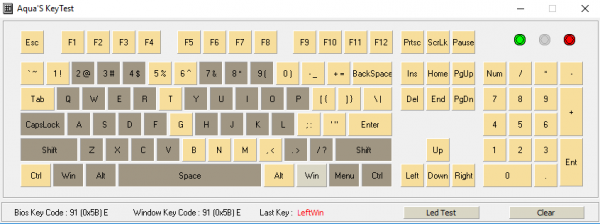
It seems the Vulcan doesn’t have complete N-key rollover, but the entire gaming cluster has received some dedicated attention (most likely using the same or similar system as the Horde AIMO keyboard). It’s nice to see full NKRO on flagship keyboards, but it’s frankly an unrealistic scenario in the first place – the important thing is the Vulcan didn’t have any issue registering keypresses even in the most ridiculous or fast-paced gaming or typing scenarios.
I always find it entertaining to race coworkers or friends using typeracer.com, which is also a fun way to get a feel for different keyboards and their typing feel. I was excited to give the new Titan switches a spin, so I did jumped straight into typing on the Vulcan with five races consecutively and using the average WPM speed to “rate” each keyboard. The Titan switches are just as good as Cherry Blues or Browns to type on, and I had no problem landing right in my typical average typing speed range (88 WPM for the Titan-equipped Vulcan 120 AIMO).
| Roccat Vulcan 120 AIMO | Logitech G513 Romer-G Tactile | Logitech G513 Romer-G Linear | Roccat Skeltr | Thermaltake Meka G (Cherry MX Black) | Razer Black Widow (Cherry MX Brown) |
| 88 WPM | 88 WPM | 86 WPM | 103 WPM | 79 WPM | 82 WPM |
For reference, here are a few other racing speeds I managed with some keyboards I’ve tested in the past. The Titan switches on Roccat’s Vulcan keyboards are great for typing, with a nice crisp tactile feel and responsive action. They felt slightly stiff to me overall, compared to the smooth action of the Romer-G switches. I like the key action of the Titan switches and would recommend them to others, but they didn’t exactly sway me from my previous Romer-G preference – even though they are a close competitor.
In my time with the Roccat Vulcan 120 AIMO, I grew to appreciate many things and made quite a few observations that surprised me a little.
- Keys feel like – dare I say – better Cherry MX Browns? Perhaps a little stiffer in feel, although the specs woudl say otherwise…either way, it feels close enough to be related. Typing on the Vulcan’s Titan switches reminds me of a cross between Cherry MX Browns, Cherry MX Blacks (stiffness) and Romer-Gs (for the enhanced crispness/tactile feel/earlier actuation).
- It’s absolutely beautiful. Just…attracts the eye like no other. It’s like having a jewel-encrusted keyboard that doesn’t actually look bejeweled. It’s almost sophisticated. The acrylic bases of the Titan keys are gorgeous, the lighting is vibrant and the AIMO effect really comes into its own on a keyboard. I don’t think I could bring this keyboard to work, I’d have to answer questions about it all day long…
- It may have been just me, but the Vulcan seemed to concentrate just a tiny bit too much on form over function. Personally, I’m okay with that – it’s a worthwhile centerpiece to a build and certainly worth showing off. It’s wonderful to type on; general productivity and most genres of games don’t suffer for that at all. There were only a few occurrences that made me reach for a different keyboard
- AIMO was built for this board. If you thought it was a gimmick, you need to at least consider seeing it in action on the Vulcan. If it took more cues from the on-screen color palette, I’d never switch to another RGB effect. I may never switch keyboards if that were integrated, actually…
I’ll try and summarize my experience with the Roccat Vulcan 120 AIMO in terms of Performance, Appearance, Construction, Functionality and Value categories, but as always I feel like I should add a disclaimer. You must understand that my own preferences and uses for gaming peripherals differ from most; while I try to view each keyboard as objectively as I can, I probably can’t avoid my own bias from affecting my conclusion in some manner. I implore you to think in depth of your OWN uses and preferences, and use my reviews as a guide or simply as another perspective.
I didn’t find any issues with the performance of the Roccat Vulcan 120 AIMO. From gaming to typing, it remained responsive, accurate and exactly what one would expect from a high-end mechanical gaming keyboard. The 32-bit ARM Cortex-M0 based processor and 512kb of on-board memory ensure RGB animations are smooth and powerful macros execute as intended.
Speaking of RGB animations…is there anything more I need to say about the appearance of the Roccat Vulcan 120 AIMO? I had gone on record as saying the Logitech G513 was the best-looking mechanical keyboard on the market at the the time…I think we have a new winner. The aluminum plate, chamfered edges, crystal clear key switch housings, slim keycaps and unique Titan switch design all combine to create something that truly stands out in the market. The Vulcan 120 AIMO deserves every design accolade it receives, in my opinion. It’s simply beautiful.
Similarly, the design extends a little to the construction of the Vulcan. That aluminum top plate and custom Titan switches both serve to lend a premium, solid feel to the whole thing. It’s a little lighter than I expected, but in that “Apple thin & light = premium” sort of way. It feels like a high-tech keyboard should feel. The overly flat design can take some getting used to, and lends to some sharper edges that could become uncomfortable in certain applications, but it’s worth the end result – just look at it!
The volume/multimedia knob is a welcome addition, although it doesn’t seem to contain the full functionality of the rotating dial on Roccat’s Horde AIMO keyboard. Still, all of the other usual Roccat accoutrements make an appearance – Easy-Shift[+], the macro editor, on-board memory, programmable keys, multiple profiles…all present and accounted for. Besides, the design is the real function of the Vulcan…
The Vulcan 120 AIMO is a BestBuy exclusive in the US, and retails for $159.99 (Best Buy Exclusive). That’s on the higher end for keyboards in this category, but understandable for a product with full RGB functionality and brand-new-to-this-market Titan switches (along with some unique Roccat-specific technologies like the AIMO intelligent lighting system). I’d recommend trying one out in person before committing at that price, and I feel most users would be happy with what they receive for that amount. One thing’s for sure – you’ll never get tired of looking at it on your desk.
It’s for that last reason I feel the Roccat Vulcan 120 AIMO ultimately earns a Benchmark Reviews Golden Tachometer Award. Yes, it has all the high-end mechanical keyboard features and functions – it’s equipped to serve most users quite well. The Titan switches are unique and worth checking out, as is AIMO, but it’s not just those qualities that help the Vulcan stand out. It’s the fact that it’ll bring you a little bit of glimmery joy every time you see it on your desk.
+ Absolutely beautiful
+ Solid construction
+ Roccat tech/on-board memory/driver that doesn’t require a login
+ AIMO was built for this board
+ Responsive, well-designed switches a standout option in a crowded market
+ Attracts a lot of (well-deserved) attention
– Attracts a lot of attention…I suppose the lights DO turn off (…but why would you??)
– Overly flat profile can take some getting used to
– Questionable QA?
-
Performance: 9.00
-
Appearance: 11.00 (Yes. 11 out of 10. It’s beautiful.)
-
Construction: 8.50
-
Functionality: 8.75
-
Value: 8.00


