By Jason Maxfield
Manufacturer: Reeven
Product Name: Twila RGB LED Light Strip
Model Number: ALS-01
UPC: 840636102118 EAN: 4717011052114
Price As Tested: $14.49 (NewEgg | Amazon)Full Disclosure: The product sample used in this article has been provided by Reeven
Reeven has taken a plunge into the ever popular RGB segment with a pair of RGB LED strips, with Twila. Reeven Twila comes packed with 2 RGB LED strips, with 21 5050 LEDs, and small, but powerful magnets to hold the LED strips in place.
Reeven Twila is compatible with Asus Aura, MSI Mystic Light Sync, ASrock RGB LED, and Gigabyte RGB Fusion ready. Twila connects to motherboards via the 4 pin RGB connector. The motherboard manufactures have their own software for controlling the output of the LED connectors built-in to compatible motherboards.
In this article for Benchmark Reviews, I’m going to be testing the compatibility of the Reeven Twila RGB LED strips with an Asus X370 Pro motherboard, and ID Cooling’s Dashflow 240 RGB cooler!

- Connector: RGB 4-pin header (+12V, G,R,B)
- Dimensions: 380 x 8 x 3.5mm
- LED-Type: 5050 ( 21pcs per strip )
- LED Color: Full color RGB
- Rated Voltage: 12V
- Rated Current: 0.42A per strip
- MTTF: 20,000 hrs
Next page we have an overview of the Reeven Twila RGB LED strip.
In this section of the article we have a quick overview of the Reeven Twila RGB Light Strips. As of July 2018, this kit sells online for $14.49 (NewEgg | Amazon).

The back of the product has sparse information about the product. The Twila lighting system doesn’t come with any manual, so you are on your own when it comes to hooking up this product. I’ll go over that more in the testing and results section of the article.

This is what you get inside the box. Reeven packs in two of their RGB lighting strips, an 2 extension cables, and 2 sheets of double sided tape to keep the wires tacked down snugly and out of site after installation.
Next page we go over some of the finer details of the Reeven Twila RGB Lighting Strips.
With the images below, I’ll discuss some of the finer details of the Reeven Twila Light Strips.

With this close up shot of the light strip, we can see the magnet in the center, with 2 RGB lights to either side of it. You can even make out the separate RGB lights housed within each SMD lighting unit. At the left and right side of the strip you have 2 resistors.

For diversity, you cause use either end of the extension cord, depending on how you run your strips inside your PC. One end is female, and the other male. They are keyed so you can’t reverse the connection and end up with 12v on the blue LEDs ground wire.
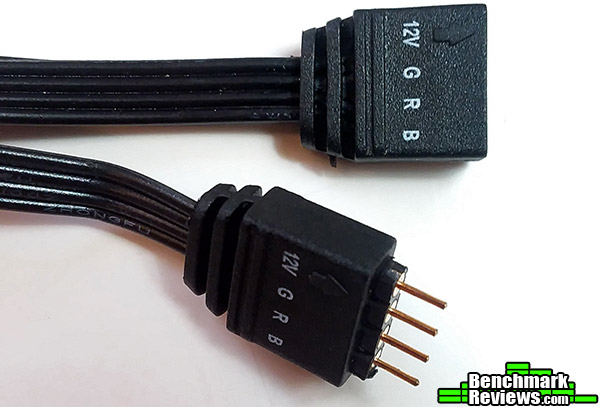
This is the interface cable that connects directly to your motherboard, or from an extension cable if you are using multiple RGB LED devices, as I am. Having a male and female connector allows flexibility in the way you connect the Twila RGB strip.
A QUICK WARNING BEFORE PROCEEDING: Since Reeven did not include instructions, and there doesn’t appear to be any documentation on the Reeven site either it’s important for me to stress proper connections of the Twila RGB strips to your PC if you are integrating it with another system such as I did with the ID Cooling Dashflow 240 RGB cooler.
The 12v must never be connected to any of the RGB ground wires, as this could damage the strips, and possibly damage the motherboard as well. The connectors that come with the Reeven Twila RGB LED strips are clearly marked, but the extension cable for the ID Cooling unit only has an arrow indicating the 12v side of the connector.
This is just to illustrate the importance of the order in which the connectors are to be hooked up. Keep this in mind at all times when connecting your LED strips, or possible damage may occur!
Testing was rather simple, despite the lack of instructions being included with the product. I already have an ID Cooling RGB Dashflow 240 system installed. The Dashflow 240 included a RGB header with a 3-way splitter, which allows you to connect more RGB lights.
Using this splitter (from the ID Cooling Dashflow 240) I was able to connect the Twila RGB strip without any issues. I ran the extension cord to the top back of the PC just above the rear exhaust fan, and ran the first strip across the top of the PC case (back to front). I then connected the extension cable and used the double-sided tape to hold that run down to the bottom of the case, and then attached the other strip to the bottom of the PC case (front to back).
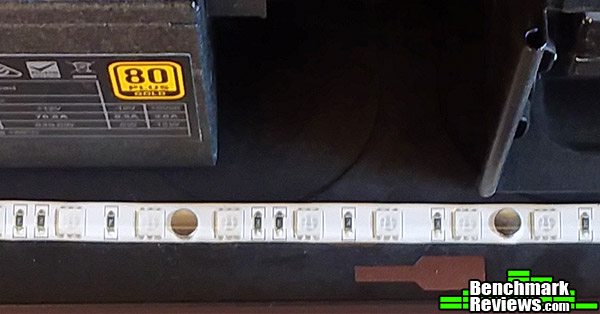
Above is a picture of the bottom strip installed on the floor of the Corsair Spec Omega case. The magnets hold the LED strip in place easily. Keep in mind if you are using an aluminum case, you will need to use double sided tape to tack the strips down.
-
Motherboard: Asus X370 Pro
-
System Memory: DDR4 2800 16GB Corsair Vengeance
-
Processor: AMD Ryzen 1600 @ 3.8Ghz
-
Audio: On-board
-
Video: XFX R9 390 8GB
-
Disk Drive 1: Samsung Evo 850 500GB SSD
-
Disk Drive 2: Western Digital 750GB HDD
-
Optical Drive: N/A
-
Enclosure: Corsair Spec-Omega
-
PSU: EVGA SuperNova 850 Gold
-
Monitor: Acer X223w
-
Operating System: Win 10 Pro 64-bit
After installing the strips and turning the PC back on, the lights synced up immediately. I fired up Asus Aura Sync software to see if all the lights would sync and display correctly, and they did without a hitch.

As you can see in the image above with all the lights set to static white, the interior is lit up fairly well. Do to blooming issues with the camera (I had to reduce exposure settings), it appears darker than it actually is to your eyes. Without reflections on the glass at night, it appears that the glass is not even on the case.
Syncing during all the Aura Sync software patterns was not an issue at all. All the lights were in sync at all times. The Reeven Twila RGB LED strips integrated into the system without a single hiccup!
Despite Reeven not including any instructions for the Twila RGB LED Light Strip, I was able to install the LED strips without any issue. I did however have a slight issue with getting the extension cables to stick to the double sided tape since the cables had kinks in them from being wrapped up in the box. I would suggest taking time to straighten the cables out better than I did before installation and save yourself a bit of a hassle.
There isn’t really much else to say about the Twila RGB system. It works, and the magnets keep the strips in place no matter where you put them. The interval between magnets is good enough to even put them on a bend if you have to. I would advise against this, as kinking the wires could cause issues down the road, it’s probably your best bet to lay them as flat as possible inside your case.

Reeven has done a good job with the Twila RGB LED Lighting Strips (minus the lack of instructions). Although 5050 LED strips are common and there really isn’t much of an issue with their use and integration into a system, just make sure your systems motherboard is compatible before looking into buying any RGB LED strip to install into your PC.
Performance is outstanding. Every single Aura Sync pre-set works great. Custom lighting works just as well. I haven’t had a single flaw in the week and a half I have been evaluating the product.
Appearance is always subjective, and the only gripe I have about appearance is the casing of the RGB strips are white in color. Most cases are black, and it would be a seamless transition if the casing of the strips were also black.
Construction is flawless. I didn’t find a single loose cable, bent pin, or any other defect with the Twila RGB strips.
Functionality is also perfect. The LED strips respond exactly as they should without hesitation. They are in complete sync with the rest of the system. The extension cables work as they should as well.
Value of the Reeven Twila RGB LED strips is in the ballpark of other offerings currently on the market. At the time of this writing, the Reeven Twila RGB LED Lighting kit can be bought for $14.49 (NewEgg | Amazon). Value of this type of accessory is a subjective matter. For those with a certain vision on how they want their PC build to look, this cost could be trivial. To someone who doesn’t care about RGB LEDs, this would be a hard sale.
If you are running an Asus, MSI, ASrock, or Gigabyte motherboard that is RGB compatible with this product and you haven’t taken the plunge into the RGB LED craze, this is an inexpensive way to add some highlights to your system without a need to commit or waste a lot of cash.
+ 2 Year Warranty
+ Easy installation
+ Bright LEDs
+ Strong magnets
– No instruction manual
– White casing around LED strip doesn’t blend well with black cases
-
Performance: 10.0
-
Appearance: 8.50
-
Construction: 10.0
-
Functionality: 10.0
-
Value: 9.00


