By Dan McNamara
Manufacturer: Leap Motion, Inc.
Product Name: Leap Motion Controller
Model Number: LM-010
UPC: 857192004015
Price As Tested: $79.99 (Newegg / Amazon)
Full Disclosure: The product sample used in this article has been provided by Leap Motion.
Back in May the announcement of the Leap Motion Controller had me with the first sentence on the home page: “With a wave of a hand or lift of a finger, you’re about to use your computer in a whole new way.” However I had to wait until the product launch in July before Benchmark Reviews was able to obtain one for me to conduct a review. Of course, once the review item arrived it was out of the box and on my computer in no time at all. I was really keen to begin testing so that I could share my exploits in discovering how effective this “amazing device” really is. In this article, Benchmark Reviews tests and evaluates the Leap Motion Controller (model LM-010) for functionality and innovation.
To begin I think that it is worthwhile to open with a limited discussion on the ubiquitous mouse, not to say that the only purpose of the Leap Motion Controller is to replace a mouse, for it goes far beyond normal mouse functionality. From reading other reviews it is apparent that this comparison always arises.

It is hard to believe that the modern mouse has been around for more than 30 years. A first prototype appeared in 1963, but the mouse did not hit the mainstream until 1984. With that kind of exposure it is not surprising that most of us don’t realize just how much training it first took us to learn how to use the mouse. Many hours were invested so that the mouse now is more like an extension of our brain. Now with less a 2 inch (5 cm) movement of my hand I can track across 2 screens and point with an accuracy of less than 1/32 of an inch (1 mm). That is pretty fast and accurate and speaks to the utility of the mouse as a computing tool.
There may be health hazards associated with using the mouse, but you usually operate a mouse, on a stable surface, with some support to your forearm, so that you can last for hours working or playing without your arm becoming tired. Mice also have options on them, so they are not just simply moving around an arrow, or cross. These buttons and rollers increase the utility of the mouse geometrically, in fact you can complete various, complex tasks, so that, unless you are actually typing, you can get away with an absolute minimum of keyboard input – which is reflected in the move to portable devices.

So the race is on to find a replacement that can meet the demands of a computing society on the move. Today no-one wants to be tied down as we move to the next evolution of computers, the tablet. So it is no surprise that there are a large number of different input devices coming on line because that who ever comes up with the replacement for our valiant friend the mouse is going to make out like a bandit.
So let’s have a look at the Leap Motion candidate for user input, the Leap Motion Controller. In this article Benchmark Reviews has made every effort to provide better insight into the effectiveness of the Leap Motion Controller.
- Simple USB connectivity.
- Two USB 2.0 cables with micro USB 3.0 connectors are included with the Leap Motion controller, with cord lengths 124″ and 60″.

- Dimensions: 0.5 x1.2 x 3 inches or 1.27 x 3 x 7.6 cm (HxWxD)
- Weight: 0.1 pound (220 grams)
- Minimum System Requirements:
- Windows 7 or 8 or Mac OS X 10.7 Lion
- AMD Phenom II or Intel R i3, i5, i7 processor
- 2 GB RAM
- USB 2.0 port
- Internet connection
- Warranty Terms: 1 Year limited
- Included in box:
- Cables 24 and 60 inch or 61 and 155 cm
- Software: Leap Motion Software and Airspace available at www.leapmotion.com/setup
- Welcome card
- Important information guide
It is not hard to describe the Leap Motion Controller because everything is in one package: the sensor. To give you a feeling for the size of the Leap Motion Controller it is about as long and thick as my middle finger, and as wide as my thumb. Of course the dimensions are given in the Features and Specification section, or see in the image below if you need a more accurate account. The point is that it is a very unobtrusive object to put on your desk.

As can be seen it sensor is has a brushed aluminum casing, with a shiny black piece of glass on top, one green LED to let you know it is on, and rubber on the bottom (which helps you figure out which way is up).

The next detail is that the Leap Motion Controller has a USB 3.0 connection, so those with USB 3.0 functionality can enjoy the maximum speed of response, and those with USB 2.0 can also use the unit.
So that is about it for the description of the Leap Motion Controller. It has simple classic lines, with nothing to reveal what is under the hood. It is not until the unit is installed and plugged in that the true magic comes alive.
The first thing I wanted to know was how in the heck this thing works. So I was faced with a choice. Either I take my brand new, just arrived, review Leap Motion Controller apart, or I see what I could find on the internet. Now I am not going to pretend that I would take it a-part, well maybe as a last resort, after the review, but luck was on my side. Included in the media package supplied by Leap Motion that was a question in the Leap Motion FAQ.pdf: “The Leap Motion Controller contains 2 camera sensors and 3 infrared LEDs. Leap Motion’s software is the real magic – (it) translates the information from the camera sensors into 3 D input. Leap Motion’s software is based on mathematical breakthrough s made by cofounder David Holz.“

I was also able to find a few websites that actually showed the disassembly of the sensor. The one that I found with the most detailed tear down was at SparkFun (be careful my browser did not like the “https//learn” extension). For me it saved the life of one Leap Motion Controller.

So once have your Leap Motion Controller, you need to visit the Leap Motion Setup site to download the software and activate the controller. At the same time you sign up for an Airspace Account because this is where you will download apps that use the controller. Now once you have installed the software and downloaded a couple of apps you are off to the races! There is a good tutorial on the use of the Leap Motion Controller, and most apps also have tutorials for the specific hand shapes and gestures used for the specific application.

When I first heard of the Leap Motion Controller I immediately went searching for reviews to see what how it was being received. Every review I found focused on (1) how well you can control the computer, and (2) the limited amount of software for the device. If that is what you are looking for I can add my take to this discussion. Controlling the computer with gestures is more time consuming, and more, detailed software would make it more fun for the general public.
We need to remember that we have spent an incredible amount of time learning how to use the mouse, and the input system is designed around the mouse, not gesture input, so that will come in time. Also the Leap Motion Controller is being launched by a start up company, and not Apple, or Microsoft, so, with continued support, we will see better software.
In my testing I am focusing on how well the device does what it does, and not so much on the software. My concern is that people will try out the Leap Motion Controller, and then put it away as a neat toy. What I have attempted to do is to give better details on the detection data available and maybe entice more developers to take on the challenge to break new ground here.
I am not going to spend a lot of time discussing the software side of this device. I had the opportunity to download a large number of apps and try them out. As a fellow Benchmark Reviews contributing editor said, “There is a ways to go with the software, however, the Leap Motion Controller basically performed as advertised.”
And that is what I found. When playing games that involved 3D movement, throwing, shooting, flying, dodging or the like, the Leap Motion Controller really does shine. There is a ways to go on the physical input side of things, especially typing and grabbing objects, but I am sure that will come.
I would like to see software developed to teach the user to progress from rough to fine control using this device. To refer back to the mouse – early on playing solitaire was seen as a way to build up speed and control. I would suggest that a similar game be developed so that touch control, motion and grasping could be developed so that users could experience the differences between the Leap Motion Controller and a simple mouse. I think it would go a long way to sell this idea.
-
HP Pavilion g6-2288ca Notebook
-
Motherboard: ACPI x64-based PC (Mobile)
-
System Memory: 7650 MB
-
Processor: Mobile Quad-Core AMD A10-4600M, 2700 MHz
-
Audio: IDT 92HD87B2/4 High Definition Audio Controller
-
Video: AMD Radeon HD 7660G
-
Disk Drive 1: TOSHIBA MQ01ABD075 SATA Disk Device
-
Monitor: 15.5″ led 1280×800
-
Operating System: Microsoft Windows 8
Other Peripherals Used:
- Screen 1: Vision Quest VQL 19WSD
- Screen 2: View Sonic VA2703
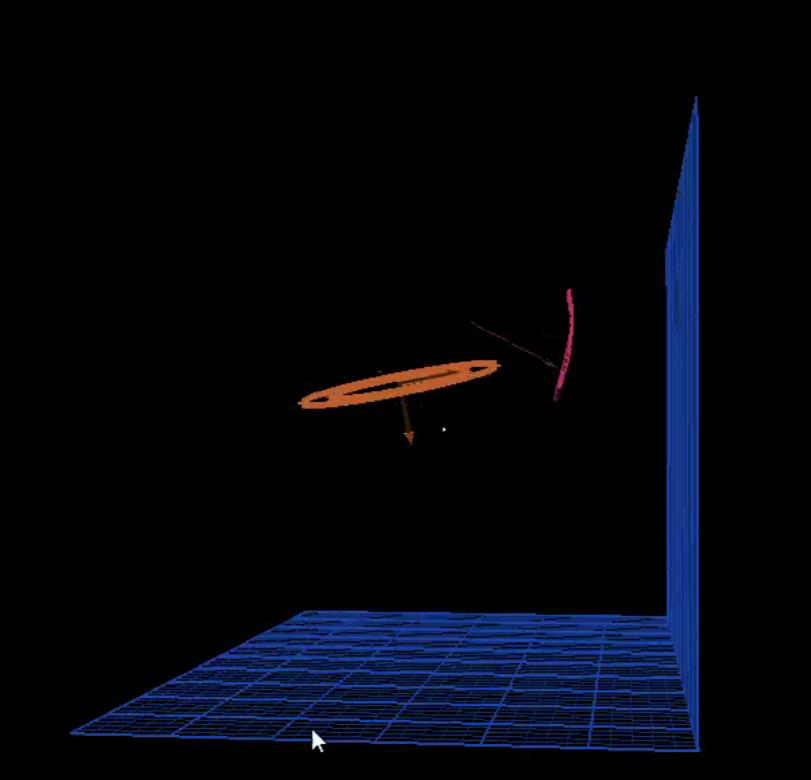
What I will focus on is the input and data representation that is generated directly from the Leap Motion Controller. i was luck that while I was exploring the Leap Motion Control Panel, I found the Diagnostic Visualizeron on the trouble shooting tab.
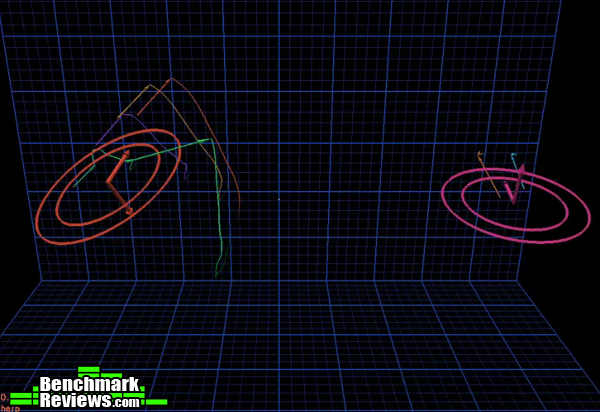 This program turns out to be very close to a raw feed of data, at it runs very light. As I am writing, I have the visualizer running is it is using about 9.2 MB RAM, and about 1.5 % of the CPU working. The Diagnostic Visualizer has a very nice visual presentation where the hands are depicted by circles, the fingers by vectors, and the palm orientation by large arrows out of the center of each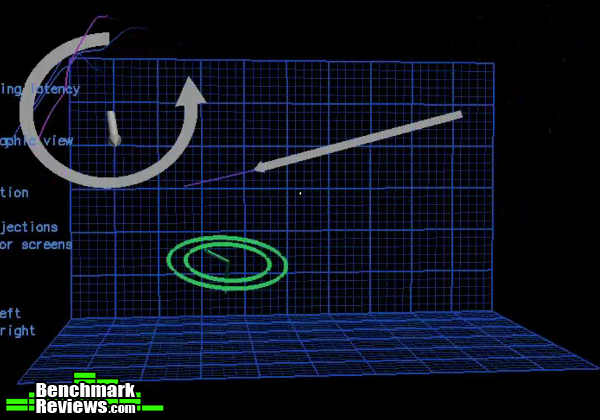
Hand gestures are displayed as vectors showing direction, in 3D, and circular motion can be in any plane or orientation. In addition each finger is tracked separately and has rotary motion relative to the knuckles as seen below.
 Above you can see, in red, the effect of bending a finger. This brings up another interesting effect that 3D motion using your hand or a stylus creates. When seen in a 2D screen view a circle can be traced so that it shows up pretty close to what a circle should be. If you rotate your view 90 degrees, as shown below and movement in the 3rd dimension is evident. So that when using the gestures as input, the developer must be congnisant of this fact.
 This is not too surprising once you consider that every movement we make will not be perfectly 2D because every joint in the human body operates in a rotary fashion. Why bring this up? Well, when you are trying to manipulate something in 2D you may find that as you try move linearly the object will move in path that has unforeseen consequences. Of course, with every challenge is an opportunity. In this case true 3D art can be made possible and depth can also come into play for game functioning.
You may be wondering how accurate are objects tracked with the Leap Motion Controller. The above image is a screen capture of the dynamic tracking data that can be displayed with the Diagnostic Visualizer. What this data represents is the position, in space of each finger, with a speed associated with its location. I was unable to determine what units are used, but if they are close to millimetres I would question the need to carry the info to the third decimal place for tracking, just given the general shakiness of the human hand.
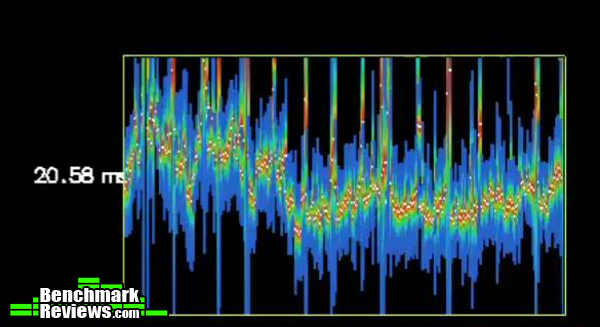 From the same image I have isolated this graph. While it is not clear exactly what is being displayed, it is related to the data stream. As I mentioned above this device is tracking multiple objects, measuring data and calculating motion at an incredible rate. What this graph shows is that the data is that the signal is pretty rough, so, once again, the developers must have incorporate some data smoothing so that movement can be smooth and not jumpy. It is still extremely impressive. Below is one example where it seems that multiple echoes or phantom objects appear, and maybe some filtering or predictive movement analysis may assist in reducing the effect.
The image above is of one hand, in this case the green circle. At times, there can be multiple “hands” seen when only one or two are present. What is causing this is not apparent. One possible cause is other IR sources in the viewing room because this device uses IR to illuminate the objects in the viewing area. Another issue may be random data points but I am sure as this technology matures these issues will be addressed.
The final issue that I would like to highlight is the lack of the ability to “calibrate” your Leap Motion Controller to your hand, in the environment where you are working. As the device is activated there is a “compensation” that takes place for exterior IR sources. The only re-calibration tool provided is for the sensor to itself.
To me it would make sense to provide the operator a way of defining the envelope of performance so that extraneous factors are minimized. For example reducing sensitivity so only active fingers are detected. There are cases where the sensor “sees” other digits when they are firmly in the palm, thus creating extraneous tracks that can upset the precision of the movement. Another situation, when lateral movement is required that setting a sweep area would be handy. The sweep area would treat motion, within a certain range, in that direction, as a straight, flat move in 2D.
I am not an expert on this type of sensing. I am just trying to indicate directions where, with some sort of control on the interpretation of the device data, the developer can make the motion correlate to a particular action. I apologize if I sound like I am trying to nit pick. I am not.
The Leap Motion Controller represents an extremely impressive and truly functional entry into the arena of 3D motion detection and control. The testing has shown that the detection field is accurate and the movement variations are, maybe not limitless, but certainly quite numerous.
I have produced a short (5.25 min) video with some of the testing above to show my results:
The Leap Motion Controller clearly demonstrates the vast possibilities this type of 3D controller represents. There are clearly areas that I can see it will dominate. I experience a freedom and joy when using particle manipulation software which I think is something that should be built into everyone’s day. Flying an aircraft with one or two hands feels natural and empowering. Leap Motion has provided us with a tool to open up a new way of creating in 3D; it is up to the application developers to stretch the potential into actuality.
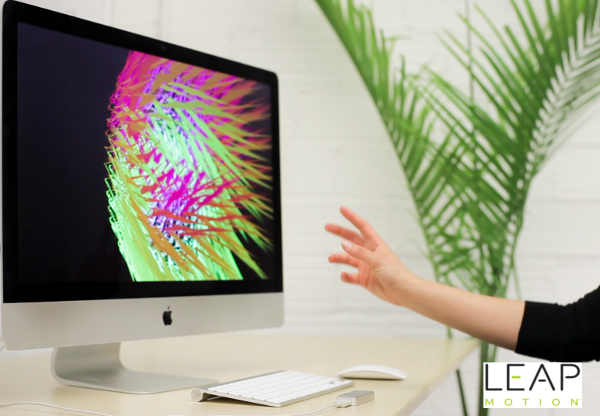
While testing the Leap Motion Controller I found that the device performed exactly as advertised. The sensor can track items within the sensing field to a very accurate degree, quickly and with very low computing overhead. Although there was some ghosting of the images the sensor was able to correctly identify the real image and produce the desired effect within each application tested. And with a tracking input device this is the most important test element.
The Leap Motion Controller is surprisingly small. Having combed the internet prior to the arrival of the device I was still shocked at how small it is. The design is modern, simple, with clean lines. This makes the Leap Motion Controller far more impressive once it is installed and people get to see what magic can be performed in such a small package.
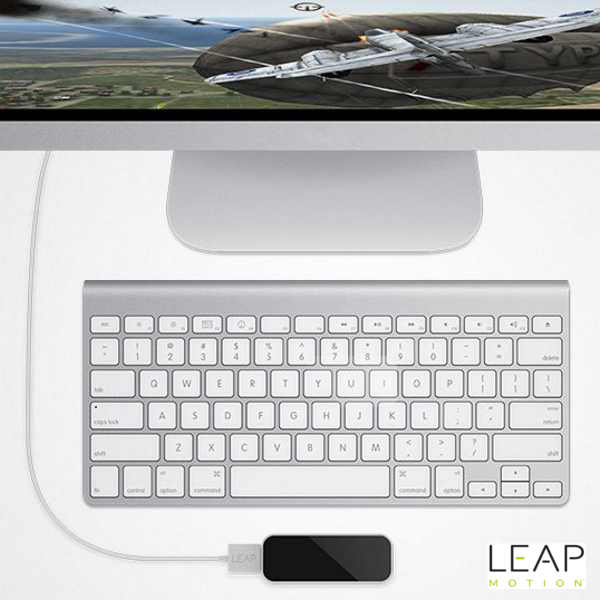
The construction of the Leap Motion Controller is also very sturdy. As a single unit there are no sharp edges, obvious fasteners on any surface. Thanks to other intrepid reviewers on the internet I have had an opportunity to see inside the device, and from what I can see there really are not parts that can fail, unless there is a catastrophic incident in which the whole unit is crushed or broken.
In the area of functionality I look at how well the Leap Motion Controller is designed to carry out its job. The size of the sensor is such that it can be taken almost anywhere. It is slim enough to fit between the Keyboard and the edge of the tray, or right up front of the monitor. The non-skid rubber on the back of the unit allows for you to place in on a smooth surface and not have it spin around.
As of October 2013, the Leap Motion Controller (model LM-010) was available online for $79.99 (Newegg / Amazon). There are a couple of ways at looking at the value of the Leap Motion Controller. First as an input device I would say that the value will be growing with each application that is developed. The flexibility to input motion and position data in in 3D is something that will grow as more devices such as this are manufactured. Second as an entertainment device the Leap Motion Controller has potential to bridge the gap between full body motion capture and mouse input. There are actions, such as flying, racket sports, and painting that this type of input is more natural so there is value in that. And finally the Leap Motion Controller has the “cool factor”. It is just plain fun to show others how you can control various aspects of the computer and games with just gestures of your hand.
I would say that everyone who tries the Leap Motion Controller will be wowed by the freedom and grace that it provides. I would also expect that those originally drawn to the Leap Motion Controller will cool to it pretty quickly if strong app support is not forthcoming. There is an incredible amount of potential here and with mobile computing a reality it is only a matter of time until someone figures out how to bring this capability into the main stream. I would also recommend that game developers and artists have a good look at this device because 3D control is the natural extension of our real world, and 3D is the basis of our reality.
On the other hand I would not recommend the Leap Motion Controller as a mouse replacement, at least not at this time. I don’t think that the way we use a mouse maps easily to 3D input, and, like stated above, I think it will take some time and effort to get our heads around the optimum way to incorporate these devices into our computing. But don’t forget there is also the cool factor to consider as well, and the Leap Motion Controller has it in spades.
+ USB 3.0/2.0 Connectivity
+ Vector data and gesture recognition is inherent from sensor
+ Complex data input possible in real time
+ Well Constructed
+Captured complex motion very well
+ Huge potential.Cons:
– Leap Motion must seperate itself from other similar items offered by demonstrating where the Leap Motion Controller excells
– Not a mouse replacement.
– The huge potential must be translated into tangible performance-
Performance: 9.25
-
Appearance: 9.50
-
Construction: 9.00
-
Functionality: 8.75
-
Value: 8.25
COMMENT QUESTION: What would you use the Leap Motion Controller for?
-