Artificial Intelligence: Understanding Local AI
For the past few years, frontier artificial intelligence has been dominated by cloud-hosted services like ChatGPT, Claude, and Gemini. While these platforms offer convenient access to powerful AI models, relying entirely on remote servers introduces clear drawbacks: token limit restrictions, recurring subscription fees, Internet dependency, potential privacy concerns, and variable network latency.
These concerns are a real factor for users, leading to a growing community of PC tech enthusiasts shifting toward local AI execution. Running local AI models directly on desktop hardware grants the user total privacy, offline access, and complete control over your software stack with zero ongoing API costs. These are the same factors that ultimately drove me towards using a very capable local AI model on a 16GB GPU.
From a system architecture standpoint, running a local language model is not just another software application. It is an intense parallel computing workload that taxes PC components in unique ways. Unlike traditional PC gaming or video rendering, local AI workloads place extreme demands on memory bandwidth and local video memory capacity.
It has been a long many years since I last wrote new content for TechPlayboy (formerly Benchmark Reviews), but this topic invites the perfect opportunity to share some of my recent lessons. This article will break down the core concepts, technical terminology, and hardware layers required to run a large language model (LLM) on your computer, and provide a clear path for hardware enthusiasts looking to build or optimize a system for local AI.
| VRAM Tier | Model Count | Notable GPU Examples |
|---|---|---|
| 3 GB | 4 | GeForce GTX 1060 (3GB), GTX 1050 (3GB), GTX 780 |
| 4 GB | 12 | GeForce GTX 1650, GTX 1050 Ti, GTX 960, Radeon RX 550 |
| 6 GB | 10 | GeForce RTX 2060, GTX 1660 / Super / Ti, GTX 1060 (6GB) |
| 8 GB | 32 | GeForce RTX 4060, RTX 3070, RTX 5060, Radeon RX 7600, RX 9060 XT |
| 10 GB | 2 | GeForce RTX 3080 (10GB) |
| 11 GB | 2 | GeForce GTX 1080 Ti, RTX 2080 Ti |
| 12 GB | 17 | GeForce RTX 4070, RTX 3060 (12GB), RTX 5070, Radeon RX 6700 XT / 7700 XT |
| 16 GB | 17 | GeForce RTX 4080, RTX 4070 Ti Super, RTX 5080, Radeon RX 7800 XT / 9070 XT, Intel Arc A770 |
| 20 GB | 3 | Radeon RX 7900 XT, RTX 4000 SFF Ada |
| 24 GB | 11 | GeForce RTX 4090, RTX 3090 / 3090 Ti, Radeon RX 7900 XTX, Titan RTX |
| 32 GB | 4 | GeForce RTX 5090, RTX 5000 Ada |
Decoding the AI Nomenclature: Core Concepts
To evaluate and configure local AI models effectively, you need a clear understanding of the core technical terms used across the local AI ecosystem. It certainly helped me to better understand the discussions on Reddit and elsewhere.
Parameters
Parameters are the numerical coefficients, or weights, stored inside a neural network. They determine how the model processes incoming text and then generates an output. In general, a model with a higher parameter count has a greater capacity to understand complex instructions and retain nuanced information. Each parameter requires memory space to store and compute, preferably VRAM for the most responsive behavior, making parameter count the primary driver of hardware requirements.
SLM vs. LLM (Small vs. Large Language Models)
There is no specification that defines exact size, and the numbers are also ever-changing due to refinements, but language models typically fall into two relative size categories based on their parameter count: Small Language Model (SLM) or Large Language Model (LLM). Models featuring only <1-billion (1B) to 3-billion (3B) parameters are usually considered a Small Language Model (SLM); occasionally dubbed a “tiny model”. Small Language Models ranging from roughly 1-billion (1B) to 8-billion (14B) parameters can be found on laptops and other hardware-limited devices, deployed for a very specific purpose.
The local AI community occasionally refers to 7B-14B models as Large Language Models (LLM), especially now that Mixture of Expert (MoE) models help to prune for what is most desired in a model, while 30B-70B+ parameter models are nearly always considered large language. These LLMs are designed specifically to fit into consumer desktop hardware, and provide fast response times for daily tasks. Anything with 70-billion parameters or more is unquestionably a Large Language Model. These massive architectures require specialized multi-GPU setups or enterprise server hardware to run effectively. The Radeon AI Pro R9700 32GB has been a popular choice for these models.
Since I know it will be asked: proprietary frontier models like Anthropic’s Claude Fable or OpenAI’s ChatGPT Sol are estimated to measure around 1-trillion parameters. There is no amount of hardware you can cobble together to privatize a model of that size.
Tokens and Context Window
Models do not process raw text word by word. Instead, model text is parsed into tokens, which are standard sub-word units of text. For reference, 1000 tokens equal roughly ~750 English words. The context window represents the total number of tokens a model can hold in its active working memory during a single session. This includes your system prompt, conversation history, and the newly generated response. Compacting is a popular feature that summarizes a session prior to reaching the edge of a context window – akin to running out of storage space – allowing for extended discussion.
Quantization and Extreme Compression
Uncompressed models store their parameters in high-precision formats like 16-bit floating point (FP16), requiring roughly 2GB of VRAM for every 1-billion parameters. Quantization is a compression technique that reduces the mathematical precision of these weights down to 8-bit (Q8), 4-bit (Q4, considered the sweet spot), or even lower.
More recent techniques use extreme compression, such as sub-2-bit or ternary formats, to reduce memory footprints further. These methods make it possible to load higher parameter models onto consumer hardware, though extreme quantization can reduce accuracy in complex tasks like coding or tool execution.

Peeling Back the Layers: Anatomy of a Local AI Stack
Running a local AI model efficiently requires an understanding of how hardware and software work together in layers. Every component in the hardware pipeline (typically, GPU→RAM→SSD) directly impacts performance, while the software stack translates high-level prompts into hardware instructions.
Layer 1: Silicon Foundation and Memory Hierarchy
The speed at which a model generates text, referenced as token per second (t/s), depends almost entirely on memory throughput. Understanding how different memory pools operate helps explain why hardware choice matters so much for local AI.
Why VRAM Matters (Latency and Bandwidth)
The Video Random-Access Memory (VRAM) on your graphics card offers massive memory bandwidth, often ranging from 500 GB/s to over 1000 GB/s on modern enthusiast GPUs. Because every token generation pass requires reading the model weights from memory, high bandwidth translates directly into higher generation speeds and lower latency. Keeping the entire model (and context windows) inside VRAM is the key to fast performance.
The System RAM Spillover Penalty
When a model size exceeds available VRAM, inference frameworks must offload portions of the model into system memory (RAM) shared by the Operating System. Standard DDR4 or DDR5 system memory operates at a fraction of GPU memory bandwidth, typically between 50-100 GB/s. As a result, spilling over into system RAM creates a severe throughput bottleneck, causing token generation rates to instantly plummet.
The SSD Bottleneck
Solid State Drives (presently, NVMe SSDs) are essential for storing large model files and loading them quickly into memory when an application launches. However, SSD access introduces latency, and read speeds (typically 3.5-7 GB/s) are far too slow to handle active token generation. Even the fastest storage drives cannot act as working memory during runtime inference.
Layer 2: The Inference Engines and Backends
The inference engine serves as the underlying execution engine. Frameworks like llama.cpp, Ollama, and ExLlamaV2 (noticing a theme?) take the quantized model weights, allocate memory buffers across available hardware, and then convert raw math operations into low-level instructions for your GPU and CPU.
Layer 3: Agent Handlers and Client Interfaces
The top layer handles user interactions and system control. Software management layers, such as Pi handler or Open WebUI, connect directly to the inference backend. Think of the agent handler as a client, the inference engine as a server, and the model as a database. Together, these tools manage conversation histories, system prompts, context buffers, and multi-agent workflows, providing a usable interface over the raw backend runtime.

Matching Hardware Tiers to Local AI Models
Memory capacity defines the upper limit of what models your computer can load. Choosing the right hardware depends entirely on the parameter size and precision you intend to target, plus the reserved conversation (context) window. In the following examples I focus on desktop computer hardware paired to a dense LLM model that activates every single parameter of its neural network to compute the output. Much larger models can be substituted by using Mixture of Experts (MoE), which routes input to select “expert” sub-networks and requires less VRAM.
Legacy / Entry: 4GB-8GB VRAM
Hardware in this range is severely memory constrained, but still very much a candidate for a capable model. Systems with 4GB to 8GB of VRAM can reliably run small 1B to 3B parameter models or lightweight architectures designed specifically for edge execution. While recent extreme compression techniques also make it possible to squeeze experimental 27B parameter models into an 8GB memory envelope using 1-bit or sub-2-bit formats, although these compressed builds exhibit trade-offs in complex reasoning, coding tasks, and multi-step tool execution.
Mainstream Enthusiast: 12GB-24GB VRAM
This range represents the practical target for local AI model deployment. Cards featuring 12GB to 16GB of VRAM comfortably run 8B to 14B parameter models at standard 4-bit or 8-bit precision. On my own RTX 4080, I run a 27B model made possible using mixed per-tensor precisions averaging 3-bits. Desktop configurations with 24GB of VRAM can load 27B to 32B parameter models smoothly while maintaining sufficient headroom for larger context windows. Availability in the higher end of this tier has shifted following the recent discontinuation of the flagship NVIDIA GeForce RTX 5090 graphics card, pushing builders toward alternative enthusiast configurations or pre-owned hardware to achieve 24GB of dedicated VRAM.
AI Workstation: 32GB+ VRAM
For local AI setups focused on running larger models or uncompressed weights without aggressive quantization, dedicated workstation cards provide necessary capacity. Specialized hardware such as the Radeon AI Pro R9700 32GB delivers high memory bandwidth alongside 32GB of GDDR6 VRAM on a single dual-slot card, offering the memory overhead required for heavier local workloads and extended context sizes.
That’s everything I can think of regarding terminology. Next, I outline my own local AI model build. Using the terms you’ve just learned, it will all make more sense…
Practical Implementation
To demonstrate these architectural layers in practice, I have established a reference baseline on an enthusiast desktop build running a local inference stack. While I do plan to release a full guide soon after this article is published, here are the specifics:
System Configuration
The test environment consists of a Windows 11 computer hosting a Debian Linux environment through Windows Subsystem for Linux (WSL2). This was done to separate one environment from the other, and sandbox AI from accessing the local system. The same can be done using Docker, or similar.
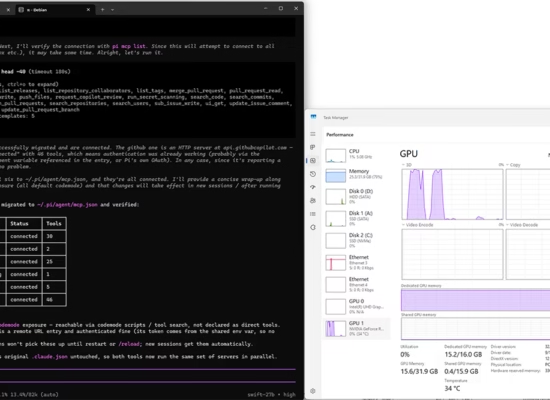
Hardware components include an Intel Core i9-11900K desktop processor, 32GB of DDR4-3600 system memory, and a dedicated 16GB NVIDIA GeForce RTX 4080 graphics card featuring 16GB GDDR6X VRAM. Debian, llama, Pi, model weights, and project directories all reside on a dedicated NVMe SSD 970 PRO solid state drive.
Software and Model Stack
The software pipeline uses llama.cpp as the core inference backend, managed by a Pi handler interface layer. The target model selected for this test is Swift-1.5-Qwen3.8-27B, a dense reasoning-efficient 27-billion parameter variant loaded at a mixed quantized precision level calibrated to fit within the 16GB VRAM window.
Measured Performance Metrics
By keeping all model weights and KV cache memory fully allocated inside GPU memory, the setup achieved the following runtime results:
- VRAM Allocation: 100 percent in-memory residency with zero system RAM spillover.
- Active Context Window: 102400 tokens fully loaded and maintained in GPU memory.
- Token Generation Speed: A burst output rate of 70 tokens per second, and 50 t/s average during continuous generation to 100% filled context.
This setup demonstrates how proper hardware targeting, adequate VRAM headroom, and a lightweight software stack allow an enthusiast desktop system to run a highly capable 27B class model smoothly at production speeds.
Complete installation guide now published: How-To Install 27B Local LLM on 16GB Graphics Card