By Tom Jaskulka
Manufacturer: Thermaltake Technology Co., Ltd.
Product Name: MEKA G-Unit Illuminated
Model Number: KB-MGU006USB
UPC: 841163047828
Price As Tested: $99.99 ( Amazon / NewEgg )
Full Disclosure: The product sample used in this article has been provided by Thermaltake Technology Co., Ltd.
Thermaltake’s eSPORTS division has updated their MEKA line of mechanical keyboards with the Thermaltake MEKA G-Unit Illuminated Edition gaming keyboard, complete with full red LED illumination on every key and Cherry MX Black linear mechanical switches throughout. Including features comparable to many other premium keyboards, will Thermaltake Technology Co., Ltd.’s eSPORTS offering distance itself from the pack? As always, that’s what Benchmark Reviews intends to find out.
Mechanical keyboards have certainly made a comeback, haven’t they? I know, they’ve been around for quite some time…much longer than the typical membrane-switch based keyboards that most users are familiar with (chances are there’s one sitting on your desk right now). Until recently, they haven’t been available as a “mainstream” product – I’m not even sure if there were many opportunities to spend more than $100 in the past on a keyboard, without including some fancy lighting or wireless features. With many of the major peripheral manufacturers now offering a line of mechanical keyboards, the selection has never been greater. Let’s dig into Thermaltake’s offering, the MEKA G-Unit Illuminated Edition keyboard and see how it stacks up.

While many aspects of peripherals comes down to personal preference, there are some features that can be tested. I’ll do my best to illustrate any key-blocking (n-key rollover), ghosting, or build quality issues I encounter while using the MEKA G-Unit Illuminated Edition keyboard as well as my impressions of the Cherry Black switches while typing and gaming. When testing peripherals, I’ll commonly just swap them out with whatever gear I’m currently using, and use them for any daily task I normally perform on a computer. Most of the typing observations I’ll get when using this keyboard to write this review, and I’ll make sure to spend a little extra time in a few games that make extensive use of the keyboard.
| COLOR | BLACK |
| INTERFACE | USB |
| MEMBRANE, MECHANICAL, PLUNGER | MECHANICAL |
| ON-BOARD FAN DEVICE | X |
| ANTI-GHOSTING KEYS | 104 (PS2) |
| ON-BOARD MEMORY SIZE | 64 KB |
| NO. OF GAME PROFILES | 3 |
| NO. OF MACRO KEYS | 60 |
| POLLING RATE | 1000 HZ |
| BACK-LIGHT | FULL BACKLIGHT LED RED |
| WRIST REST | YES, DETACHABLE |
| GRAPHICAL UI | YES |
| ON-BOARD AUDIO JACKS | YES |
| SMART CABLE MANAGEMENT | YES |
| GOLD-PLATTED USB | YES |
| USB CABLE DETACHABLE | YES |
| MULTIMEDIA KEYS | 7 |
| ON-BOARD USB PORT | 2 |
| KEYSTROKE LIFECYCLE | 50 MILLION |
| CABLE LENGTH | 1.8M BRAIDED |
| DIMENSION (LXWXH) | 553 X 271 X 70MM |
| OTHER FEATURES | – USB TO PS2 ADAPTER FOR ‘N KEY ROLLOVER’ FUNCTION. – WORLD’S FIRST RED COLOR PRO-GAMING MECHANICAL KEYBOARD. |
| WEIGHT | 2530G |

The MEKA G-Unit Illuminated is packaged like most keyboards in this range with a detailed box and descriptive artwork. The detachable USB cable includes a carrying pouch, and the driver disc and manuals (don’t forget the stickers!) are neatly packed in a folded paper “envelope.”
Not pictured is a full-size nylon carrying case for the keyboard, palm rest and accessories (namely the braided cable) because it was hiding like a stowaway underneath the final cardboard layer in the box! I only found it when looking for the USB to PS/2 adapter listed in the specification table which did not seem to be included in my review item. To be honest, I’d rather have the case anyway, a pleasant surprise (besides, I have too many of those USB to PS/2 adapter plugs sitting around)! It seems very durable, and contains separated compartments for the keyboard, palm rest and USB cable/pouch. Make sure you don’t throw it away with the box!

Here are the contents of the card stock envelope, which you may not need to open as the driver and manual are readily available online through Thermaltake’s eSPORTS site. I’m in the habit of going directly to the manufacturer’s site to make sure I get the latest driver and software, as many times products will be updated within weeks of launching. The eSPORTS website seems sufficient, but I wonder if a dedicated Support link would help with organizing drivers for the different products. In any case, it wasn’t difficult to find the driver online.

The hard plastic palm rest easily snaps in to the keyboard’s chassis. Once attached, it allows for just enough movement to prop the keyboard up on its feet – this is a feature most will appreciate, and while the palm rest has its own rubber non-skid feet to prevent most movement I’d still like the option to secure this piece with screws. A minor complaint to be sure, and something that falls under the “things no one else would ever notice” category – think of it as a feature request instead of a complaint, as the way it is implemented is perfectly adequate.
The key layout is fairly standard, although some might take issue with the large L-shaped Enter key (and relocating the pipe/backslash key next to the small right Shift key). It didn’t interrupt me at all, but if you do a lot of coding and have gotten used to a certain layout this might require a little adjustment.
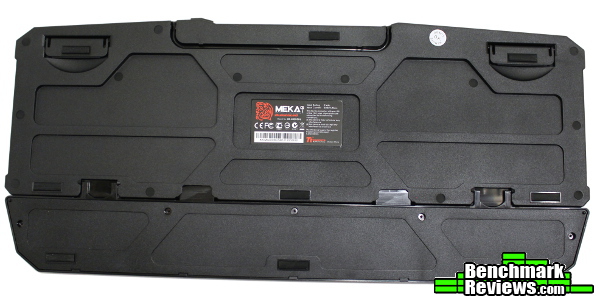
Flipping over the MEKA G-Unit Illuminated reveals a substantial number of rubber feet to prevent any sliding along with a channel for cable management. The Razer Black Widow Stealth keyboard I’ve been using for the past year struggles with this, and I’m glad to see Thermaltake include enough of these to keep this keyboard in place. The hard textured plastic used up top continues here, and the design on the bottom seems to help a little with flex. The Black Widow seems to be stiffer, and if Thermaltake uses a steel floor plate it must be pretty thin as I can still noticeably twist the keyboard longitudinally. Of course when the keyboard is sitting on a flat surface this isn’t much of an issue, and the only thing that really matters is flex while typing (which isn’t a problem whatsoever).

The keyboard plank itself is angled slightly and the key caps are contoured by row to allow for more natural typing. The slight angles help keep your hands in place and help remind your fingertips where they are. While a little difficult to tell from this angle, all of the square keys use a cylindrical shape for the cap, cradling your fingertips nicely (the bigger keys like Enter, Shift, Ctrl, etc. are all flat/standard).
Let’s take a closer look at some of the detailed features of the MEKA G-Unit Illuminated mechanical keyboard.
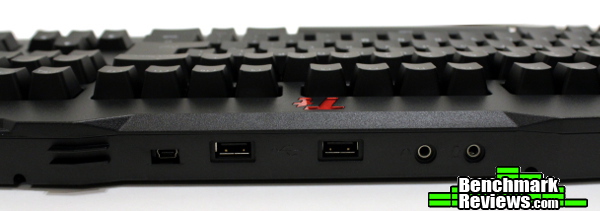
This keyboard includes two USB 2.0 ports along with the upstream mini-USB for connecting the keyboard itself. The audio headphone/mic jacks are standard 3.5mm ports, and appear to use a USB audio driver to pass their signals through the lone detachable USB cable. It’s definitely a solution that cuts down on cable clutter, but some may not want to add another audio device to their system – either way, in use they are relatively free of the electronic noise that plagues most integratedkeyboard jacks. During playback I didn’t notice any “hiss,” only after the system was idle for a short period of time would some noise creep in to my headphones. Overall, it was one of the better experiences I’ve had using the built-in audio jacks, as most keyboards I’ve used struggle with additional noise.

As with most keyboards, the MEKA G-Unit Illuminated has built-in risers to increase the angle of the keyboard for those that prefer a different angle. Unlike most keyboards, they keep a rubber pad in contact with your desk surface in both their raised and lowered positions.

I am mystified that more companies don’t do this, as it seems to be the exception rather than the rule (almost every keyboard I’ve owned will begin sliding around in a raised position). This is a wonderful (albeit small) detail that Thermaltake should be commended for.

The MEKA G-Unit Illuminated uses Cherry MX Black switches under all of the keys. With an actuation force of 60 cN (centiNewtons, or ~60 grams of force) and an actuation distance of 2mm (bottoming out at 4mm), the linear action of Blacks are commonly quoted as ideal for gaming. Unlike the Cherry Blue variety (and to a lesser extent Cherry Brown switches) there isn’t much of a “reset” point in the travel, so linear switches like Cherry Reds and Blacks are easier to “double-tap” with. There isn’t any tactile bump or click here, which tends to make the keys a little quieter as well. Of course, if you’re heavy handed you can still get some awesome “clickety-clack” that mechanical keyboards are notorious for if you bottom out the keys while typing, but due to the stiffer actuation force of the Cherry MX Blacks and a little practice it is pretty easy to hit each key softly and consistently at its actuation point.
The illumination is nice and even, with each key containing a red LED. The Caps Lock, Scroll Lock and Num Lock keys illuminate when active, which is an elegant solution instead of the common “notification” LEDs in the upper right corner. Note that the keys with additional characters on them only light the main legend, while the text or special characters are indirectly lit (the number row, Shifts, Backspace and the Home/PgUp/PgDn/End/Ins/Del keys on the number pad).
The 12 Macro keys (T-Keys) are located on the left and are separated into three groups of four, allowing for a nice physical organization for whatever you’d like to program them for.
The profile and mode switch keys are in the top left corner, along with the media keys in the top right. While these obviously do not use Cherry MX Black switches, they all have a pleasant tactile click to them and don’t feel out of place. If anything, they could be a little taller or easier to find, since they aren’t back-lit like the other keys and are a little tough to actuate without hitting the ESC / F-keys or volume controls.
Your settings can be stored in the MEKA G-Unit Illuminated’s onboard memory (64KB), but in order to change any key assignments or configure those profiles in the first place you’ll need to install the MEKA’s driver software. In the age of cloud-based software and online accounts, I was relieved to see that the install was fast and painless – no accounts to set up or configure. This is the way devices should work, in my opinion. Store the profiles on the device itself, it’s not like you’ll need that data if you don’t take your keyboard with you anyway… The On-Screen Display functions of the driver (they display an image whenever you switch profiles or modes) runs in a small service with negligible overhead (about 2.5MB of memory according to the Windows task manager).
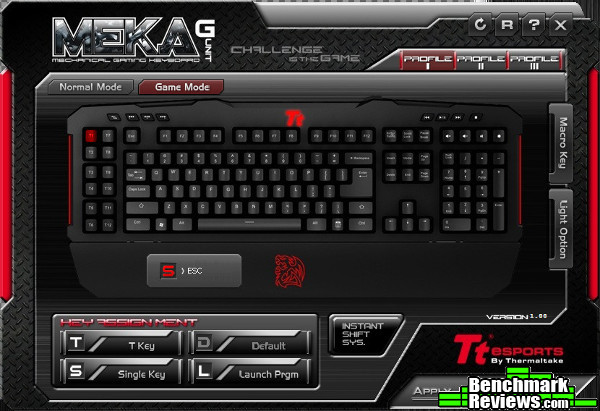
In Normal mode you are limited to assigning specific functions to the 12 T Keys on the left, but in Gaming mode you can reassign up to 8 standard keys as well (this is why Thermaltake lists the keyboard as having 20 Macro keys – a little deceptive, but accurate nonetheless). The instant shift function allows you to use a modifier with the T Keys and different profiles, allowing (as near as I could tell in testing) instantaneous switching between the different profiles.

While the dedicated “illumination” key on the keyboard will switch between the brightness levels (with the final level switching to the fade in/out mode) without the use of software, in order to change the lighting zones you need to use the Light Option tab in the driver software. The only zones you can activate are the WASD and arrow keys (pictured above), or the entire keyboard.

The included macro editor is pretty standard for keyboards in this category. Thankfully it allows for editing and moving individual commands after inputting the keys you’d like in your macro, so you don’t have to get it perfect the first time. After entering the keyboard commands you’d like to assign to that macro, you can change the delays between each action or assign a static delay to every key. The drop down box in the lower right lists common Windows commands (Copy, Cut, Paste, etc.) that are available for use as well. Overall it is easy to use and powerful enough to satisfy most users. Personally, I don’t use macros that much, as I’ve rarely found an effective use for them. I do enjoy keyboards with extra keys though, as I can map extra functions to keys that are easier to find or reach (radio commands, switching seats in vehicles in-game, etc.).
The features users want in a peripheral can vary wildly from person to person, and the entire thing can be a terribly subjective experience. Some balk at the idea of spending anywhere close to $50 on a keyboard, let alone twice that. I personally feel that spending up on quality peripherals can drastically change your experience at a computer for the better – after all, it’s the only part that you actually interact with during use.
A mechanical keyboard is a great way to enhance the quality of interaction with your computer. Of course, they come in a multitude of varieties, and you’ll have to decide what particular features you care about. The Thermaltake MEKA G-Unit Illuminated edition provides many high-end features, comparable to other products in its price range.
I didn’t uncover any significant issues after using this as my main keyboard for over a week. I preferred the simple driver installation and configuration utility, and liked the linear feel of the Cherry Black keys (especially for gaming). I played a few rounds in games such as Mechwarrior Online, Battlefield 3 and ARMA 3 to uncover any eccentricities with the MEKA G-Unit Illuminated – it was a pretty easy transition for me, and I was satisfied with my experience while gaming. My only annoyance was brushing the ESC key when searching for the profile switch buttons – they could stand to be a little taller. The “T-Keys” were especially helpful in ARMA 3, as having a set of dedicated “extra” keys were useful to re-locate commonly used commands (and still keep the original key mappings).

I like to test my typing skills from time to time using typeracer.com, and while they don’t offer a benchmark I’ve found that racing others is a great way to uncover subtle differences between keyboards in a “real-world” activity. Keep in mind I’ve had over a year of practice with a Razer Black Widow Stealth with Cherry Brown switches, but switching to the MEKA G-Unit Illuminated wasn’t difficult. I felt like I made less mistakes due to accidental keypresses using the stiffer Cherry Black switches, but the numbers between the two keyboards were essentially the same. Averaging the scores from five consecutive rounds on each keyboard, I ended up with an average of 79.4 wpm / 94.66% accuracy with Thermaltake’s keyboard vs 81.8 wpm / 96.14% accuracy with Razer’s Black Widow. There doesn’t seem to be a switch that’s “better” than any other, and it really comes down to familiarity and personal preference. I’ll echo the common statement that linear switches felt better for gaming, with tactile switches being better for typing.
The most common phrase that stuck out to me from reviews when I was selecting a mechanical keyboard for my own use was “I’ll never switch back to a membrane keyboard again” (or some variation thereof). If you’ve tried a mechanical keyboard, you’ll probably agree. I hesitate to agree that they are better for gaming however, and I feel it is unfortunate they are commonly marketed as such. The main benefit of a mechanical keyboard, in my opinion, is their build quality is generally better than a typical membrane switch keyboard. Coupled with the durability and feel of mechanical switches, this usually leads to a better product overall.
In essence, you can’t really go wrong with any mechanical keyboard, and that includes the Thermaltake MEKA G-Unit Illuminated edition. I would take the time to learn the difference between the different types of switches to determine what you prefer (and try them out personally!), but you’ll generally get what you pay for. I think the only downside (if you can call it that) is the main cost of mechanical keyboards are the switches themselves – making most offerings almost identical, in price and features. I don’t see a whole lot here that places the MEKA G-Unit Illuminated ahead of the competition, but it isn’t behind either. If you like Cherry MX Black switches and red LEDs, you’ll also get a decent programmable keyboard along with ’em.
The Cherry MX Black keys were a great experience. The keyboard seemed to register at most six simultaneous keypresses (+ modifier keys) in my testing in Normal mode – you gain a little more in Gaming mode, but I rarely find myself pressing six keys at once (even with Shift/Ctrl/Alt) so this should be sufficient for most users and par for the category. I didn’t encounter any significant issues while testing – not even any minor issues, for that matter. Overall, a solid offering that fits right alongside others in the category.
I’m not normally a fan of red as a color (my preferences are usually on the other end of the spectrum) but it is well implemented here and looks great. Red is a great color for use in low-light environments that gamers would (stereo?)typically find themselves in, and is executed beautifully here. I didn’t care for the extra G-Unit dragon branding, but that’s such a minor personal nitpick that it barely merits a mention – how about, “I’d prefer a more streamlined design approach to branding?” Although overall the keyboard fits right in along with others in the category, I think Thermaltake could still refine the design to be even more attractive. The red colored strips on the sides should be narrower or non-existent (or, failing that, just light ’em up!) – they seem extraneous otherwise. Otherwise the rest of the keyboard is just as pleasing to the eye as many other products, and the typeface used for the key legends are sharp and readable. Thermaltake may not have a design language as identifiable as products from companies like Razer and Corsair, but there’s enough here to prevent the MEKA G-Unit Illuminated from looking like a generic wedge of keys.
Mechanical keyboards are notorious for being solid and heavy. While there’s definitely some heft to the MEKA G-Unit Illuminated, it didn’t have the “last-resort zombie apocalypse weapon” feel of some other mechanical keyboards – the primarily plastic construction keeps weight down, but the entire plank could be a little more stiff. This isn’t something that you’ll notice when its sitting on a desk, so it isn’t a major issue but the overall stiffness and “floor plate” of a keyboard can affect the feel of the key presses. I don’t have another keyboard on hand to compare, but I almost wonder if a stiffer keyboard would give a different, more satisfying feel to the Cherry MX Black switches.
The MEKA G-Unit Illuminated has a bit more functionality than many of its peers due to the dedicated media controls and 12 dedicated macro keys. The built-in USB ports and audio jacks work great, and are welcome additions to keyboards in this price category. Of course the detachable wrist/palm rest is a nice feature as well, and the simple and effective driver software rounds out the functionality. Whether you just want the typing experience that mechanical keyboards offer or the additional programming features and response time of a gaming device, the MEKA G-Unit Illuminated will accommodate you.
All of this adds up to the ever popular “is it worth it?” discussion. As of late September 2013, the MEKA G-Unit Illuminated was on sale for $99.99 (Amazon / NewEgg), making it one of the less expensive back-lit options for mechanical keyboards. The normally listed price of $129.99 fits right in the middle of mechanical keyboards with backlighting and additional USB/audio ports (unlike the eSPORTS website MSRP of $149), so if you manage to get it on sale it is a decent value. The “extras” like the carrying case and detachable wrist rest don’t hurt either.
Possibly the worst thing I can say about the MEKA G-Unit Illuminated keyboard is that it doesn’t do a whole lot to separate itself from the competition. Then again, it follows the “Back-lit Programmable Mechanical Gaming Keyboard” formula pretty closely, so I wouldn’t expect it to. If you like what you see, prefer Cherry Black switches and manage to snag one at a good price, you’ll probably be satisfied.
+ Detachable USB cable with built in cable management
+ Two USB ports
+ Headphone jack creates less “electronic noise” than many others
+ Bright, even, adjustable backlighting
+ Macro functions work as described
+ Carrying case included!
+ Good attention to detail
– Doesn’t offer much that you can’t get with any other product
– Primarily plastic construction
– Dedicated media keys are nice but hard to activate by feel
-
Performance: 8.00
-
Appearance: 8.00
-
Construction: 7.50
-
Functionality: 9.00
-
Value: 8.00
COMMENT QUESTION: Who makes your favorite keyboard?


