By Greg Schepers
Manufacturer: GAMDIAS Technology Co., Ltd
Product Name: ZEUS Laser Gaming Mouse
Model Number: GMS1100
UPC: 848475000787
Price As Tested: $129 MSRP
Full Disclosure: The product sample used in this article has been provided by GAMDIAS.
The relatively unknown gaming peripheral company GAMDIAS has set some lofty goals, planning on being a serious contender in the near future among the established companies out there. One of its initial entries into the marketplace, the GAMDIAS ZEUS GMS1100 E-Sport Edition Laser Gaming Mouse, has a unique look to it and has plenty of features. Benchmark Reviews recently had an opportunity to take a closer look at this new gaming mouse and, on paper, it looks like it is ready for prime time, but can it compete with gaming mice from the likes of Razer and Logitech?
The GAMDIAS ZEUS laser gaming mouse is adorned with features that we have come accustomed to seeing in a high-end mouse; 8200 DPI, 1000 Hz polling rate, a braided cable, and so on. However, the GAMDIAS ZEUS has a some surprises for us. For example, if you upend the mouse, you will notice three wheels. These wheels allow you to adjust three different sections of the right side and left side of the mouse in order to find a configuration that best suits you. As we move on, I am confident you will agree that the GAMDIAS ZEUS is, at the very least, intriguing.

The GAMDIAS ZEUS laser gaming mouse was used extensively for approximately four weeks and was employed for both gaming and for typical everyday use. I encourage you to check out the complete list of features and specifications below before we move on and take a closer look at the GAMDIAS ZEUS gaming mouse.
- 3 independently adjustable side expansions to customize hand size and grip comfort
- Laser sensor up to 8200 DPI for pixel perfect accuracy
- 512KB onboard memory for button and profile assignments
- Selectable polling rate 125 / 250 / 500 / 1000 Hz
- Heavy-duty 11 million click lifecycle
- Customizable profile / DPI / ambiance lighting luminance
- Customize weight with weight tuning system
- Rapid profile switching key
- Military grade braided cable with Gold-plated USB connector
| Weight System | Yes (4.5g x5) |
| Cable Length | 2M |
| Keys | 11 Keys |
| Resolution | up to 8200 DPI |
| Polling Rate | 125 / 250 / 500 /1000 Hz |
| Onboard Memory | 512KB |
| Dimension(LxWxH) | 127.14 x 84.46 x 43.2 mm |
| Tracking Method | Advanced Gaming Laser Sensor |
| Switch Lifecycle | 11 Million |
| Graphical UI | Yes (GAMDIAS HERA) |
The box that the GAMDIAS ZEUS gaming mouse comes in is actually quite attractive and protects the device very well. There is a flap on the front of the box that is held down magnetically and can be opened to reveal the mouse.

Once the entire top of the box is removed, the GAMDIAS ZEUS is basically in a display case. The plastic around the mouse is not in a hard plastic shell like a Mad Catz product, but it is attractively displayed nonetheless.

Besides the GAMDIAS ZEUS laser gaming mouse, the contents of the box includes GAMDIAS stickers, a user manual, and accessories pouch, extra teflon pads, and a holder for the weights that are not being used inside the mouse.

Okay, enough about the packaging; let’s take a closer look at the mouse itself. The GAMDIAS ZEUS E-Sport Edition has a matte finish, yet the surface maintains a pretty smooth feel to it. There is a little texture there, but it is significantly muted. The layout works really well for me; four buttons on the left, one on the top-left towards the front, and three running vertically away from the scroll wheel. Altogether, there are 11 buttons, nine of which are programmable. Below the top-left button, which by default is the button for switching profiles, is a light that indicates which profile is active.

What are those three wheel-looking things on the bottom of the GAMDIAS ZEUS E-Sport Edition? Well, each of the three wheels is used to manipulate a section on the sides of the mouse. Each of the three sections can be moved in or out, which gives you the ability to find the right configuration for your hand. The other items on the bottom include the teflon pads, the centrally-located laser, and, on the far right in the image below, the door for the weights.

There isn’t too much happening on the right side of the GAMDIAS ZEUS laser gaming mouse in terms of features or buttons. However, the right side does have two of the adjustable areas on it.

The left side of the GAMDIAS ZEUS you will find the third adjustable section on it, which can be found immediately below the four programmable buttons. Speaking of the four buttons on the left side, I found them to be easily manipulated by my right thumb. Also, these buttons are not difficult to discern from one another, since they have plenty of separation between them.

So far, so good. The GAMDIAS ZEUS E-Sport Edition Laser Gaming Mouse seems to have some great features on it, which includes the innovative approach to physical altering its shape so that it may fit just about anyone’s hand. Let’s look at this mouse a bit closer and see what else is going on.
Below is another image of the bottom of the GAMDIAS ZEUS. However, this image shows the number of weights that can be placed inside the mouse. Each of the five weights weigh in at 4.5 g. The weight door is attached to the mouse and has hinges that allow it to open.

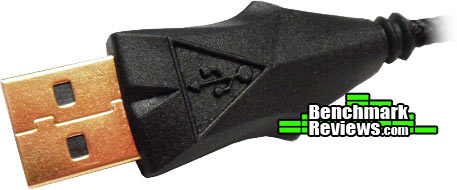
At the end of the braided cable, you will find the USB plug. It has a gold-plated connector and the plug itself is very large. You shouldn’t have a problem utilizing adjacent USB ports, but it will probably be a tight squeeze.
Below, you can see the image of a braided cable that is starting to fray. The problem is that the GAMDIAS ZEUS laser gaming mouse has a very small grommet where the cable meets the mouse and that grommet tends to angle the cable down rather than helping it to maintain a position that is parallel to the surface.

The software for the GAMDIAS ZEUS is called the HERA. This is the software used for all GAMDIAS gaming peripherals. It has the common elements we’ve come to expect from a mouse’s GUI, such as having the ability to adjust polling rate, change DPI settings, customize illumination, record macros, manipulate key assignments, etc. However, it has some unique features as well. These features include:
- Switching GAMDIAS keyboard & mouse profiles simulateneously with one click
- Creating and assigning sound FX alerts for changes to DPI, profile, sensitivity, or other settings
- Recording and customizing sound effects / voice messages for use on all GAMDIAS gear
- Creating macros that combine keyboard, mouse, and instant messaging functions through integrated UI software
- Sending pre-recorded voice messages to teammates with the push of button
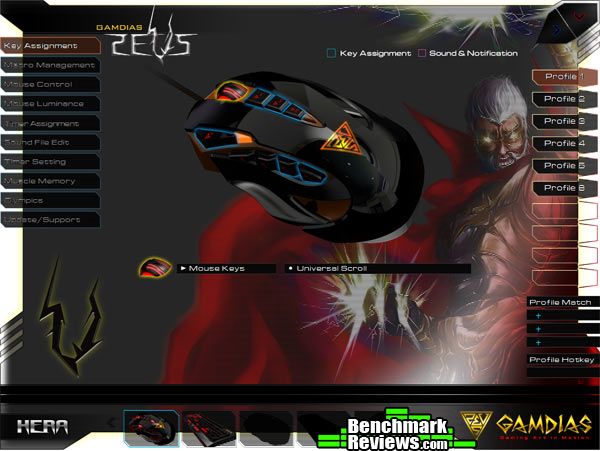
GAMDIAS has stated that one of its objectives is to ensure its devices appeal all gamers, regardless of the skill level. The GAMDIAS ZEUS coupled with the HERA software is a good example of that objective. It is pretty straight forward and easy to use, yet it has features that far more advance gamers will likely utilize.
The GAMDIAS ZEUS E-Sport Edition Laser Gaming Mouse was used to complete both daily tasks and to participate in numerous gaming sessions for a period of approximately four weeks. The programs utilized while conducting normal daily activity included Microsoft Office 2007 (Word, Excel, Outlook), Adobe CS5 (Dreamweaver, Photoshop), Skype, Google Chrome, Mozilla Firefox, Audacity, and more. The games played while testing the GAMDIAS ZEUS included Battlefield 3 and Battlefield 4 Beta through Origin, Company of Heroes and Battlefield: Bad Company 2 through Steam, and Assassins Creed III through Ubisoft.
- Motherboard: Gigabyte GA-990FXA-UD3
- System Memory: 16GB (2 x 8GB) DDR3 1333 G.Skill Ripjaws X Series
- Processor: AMD FX-6100 Zambezi 3.3 GHz Six-Core Processor
- Audio: ASUS XONAR DG Headphone Amp & PCI 5.1 Audio Card
- Video: EVGA GeForce GTX 550 TI
- Optical Drive: Pioneer Black Internal BD/DVD/CD Writer BDR-207DBKS
- PSU: Corsair HX Series HX750 750W GOLD Certified Modular Active PFC Power Supply
- Monitor: AOC e2752Vh (27″) & Samsung SyncMaster PX2370 (24″)
- Operating System: Windows 7 Ultimate
As the specifications indicate, the GAMDIAS ZEUS gaming mouse is capable of 125 / 250 / 500 /1000 Hz polling rates. The polling rate can be adjusted in the HERA GUI under the tab that reads “Mouse Control,” which is located in the left-hand navigation. The GAMDIAS ZEUS was set to 1000 Hz and the Mouse Rate Checker was used to produce the following polling rate results:

There is really nothing mind-blowing to report in terms of the benefits provided by the GAMDIAS ZEUS when conducting work-related tasks. Of course, having 9 programmable buttons can certainly have it perks, but the most useful feature is having the ability to adjust the DPI on the fly. The two buttons closest to the scroll wheel can be used to manipulate the DPI, and this comes in really handy when precise movement is required, such as when editing images in Photoshop.
From a gaming standpoint, I felt that the GAMDIAS ZEUS helped to improve my performance, especially in FPS games. Having 11 total buttons, nine being programmable, is highly beneficial and when you get accustomed to your button assignments, you can really start to dominate. In Battlefield 3, I was able to assign buttons for every weapon/device in my inventory rather than utilizing the scroll wheel. As I’m sure those of you that play Battlefield 3 are well aware, scrolling through your inventory to find the right weapon, especially when you’ve emptied the magazine on your primary weapon and need to quickly switch to the secondary, is very inefficient to say the least.
I have medium-large hands and the GAMDIAS ZEUS fits well and feels very natural in my right hand. Whether you have large or small hands, its size should be very accommodating and allow for its user to employ either the claw-style or palm-style grip. Even after several consecutive hours of use, the ZEUS remained very comfortable. Plenty of the credit for this result is due to the mouse’s ability to customize the physical configuration. Even though each of the three adjustable areas on the sides of the mouse have only about a 1/4″ of movement, it was enough for me to find a comfortable configuration.
As the gaming peripheral market becomes more and more saturated, it becomes increasingly difficult to produce a device that has innovative features. However, newcomer GAMDIAS has been able to find opportunities for innovation on more than one device. First we had the HERMES mechanical gaming keyboard and among other smart design features, it had the wrist rest that doubled as a dust cover. Now, we have the GAMDIAS ZEUS laser gaming mouse, which provides three different adjustable panels located on the sides of the mouse. As a result, the shape of the mouse can be manipulated, resulting in a configuration that is best suited for the user.
As innovative as the adjustable side panel feature is, I was a little surprised that each panel didn’t have more of a range of motion. The maximum range for any of the three side panels was only about 1/4″. However, I was able to find a comfortable configuration and I think most people will also be able to find a setting that is comfortable and fits well. The other observation I made while testing this feature was that, even though the range is limited, the adjustable panel located under the four buttons on the left side of the mouse, when extended to its maximum setting, made it difficult for me to manipulate the buttons. To make the GAMDIAS ZEUS accommodating to even more hands, maybe the side panels could be replaced with other side panels of different shapes and sizes.
The most disappointing design characteristic was the grommet on the front of the mouse. The braided cord comes out of this grommet and has a natural tendency to want to angle down, which means the cord will be rubbing on the surface. My cord started to fray in a matter of a few days. I doubt this is a difficult fix, and I highly recommend that GAMDIAS replaces the current grommet with one that promotes parallel cord/surface alignment.
In general, I was impressed with the GAMDIAS ZEUS E-Sport Edition Laser Gaming Mouse. It was highly configurable, comfortable to use, and performed well. Considering what we’ve seen so far from GAMDIAS, I think we can expect big things from this organization.

In both phases of my testing, which included the performance of work-related tasks and extended gaming sessions for about four weeks, the GAMDIAS ZEUS performed quite well. Having 11 buttons (nine programmable) at your disposal is highly beneficial whether you are using them to lower the DPI for precise image editing in Photoshop or switching to your secondary weapon in Battlefield 3.
The tagline for GAMDIAS is “Gaming Art in Motion.” Are you going to find the GAMDIAS ZEUS laser gaming mouse in an art museum anytime soon? Probably not. In fact, I’m not sure what qualifies as “Gaming Art,” nor do I know the exact definition of that term. However, I can say that the ZEUS is an attractive device. It has great lines, giving it a sculpted appearance. The matte black finish was a good choice. Personally, I like the muted finish over a glossy one. The LED lighting is suble, yet can be customized (with the exception of the “ZEUS” logo).
With the exception of the braided cord/grommet on the front of the mouse issue, the GAMDIAS ZEUS is very well built. Even with the wheels and adjustable panels, it feels solid and you will not hear anything rattle. It also comes with a military-grade braided cord and a gold-plated USB connector.
The HERA GUI provides the GAMDIAS ZEUS with many of the functions that are pretty standard in terms of a GUI. However, it does offer a few extras, such as providing you with the ability to create and assign sound alerts to mouse setting changes. When the HERA is paired with the button placement on the ZEUS, the result is a gaming weapon that is sure to improve your performance.
The testing phase for this GAMDIAS ZEUS E-Sport Edition Laser Gaming Mouse, which the company states will retail at $129, went well. It performed at the level of a high-end gaming mouse. In addition, GAMDIAS was able to implement some innovative features into the design. However, GAMDIAS has no reputation to stand on, and I wasn’t exactly blown away by my experience with the ZEUS.
Shopping for a new gaming mouse can be a difficult task simply due to the sheer number of gaming mice on the market. What we want to find is the gaming mouse that provides the best bang for the buck. The GAMDIAS ZEUS is capable of providing the bang, but considering that this is a new company and this is its initial foray into the gaming peripheral industry, I’m not sure that a retail price of $129 is going to result in the ZEUS flying off the shelf. It is at a price point equal to, if not higher than, high-end Razer, Logitech, and Mad Catz mice, but these companies have established reputations; GAMDIAS does not.
+ adjustable side panels
+ button placement
+ HERA GUI
+ superb gaming performance
+ aesthetics
– price
– cord/grommet issue
– adjustable panel range
-
Performance: 9.00
-
Appearance: 9.00
-
Construction: 7.00
-
Functionality: 8.50
-
Value: 7.00
Recommended: Benchmark Reviews Seal of Approval.
COMMENT QUESTION: What is a fair asking price for a high-end gaming mouse from a newcomer?


