By Tom Jaskulka
Manufacturer: BitFenix Co., Ltd.
Product Name: Phenom ITX Case
Model Number: BFC-PHE-300-WWXKK-RP
UPC: 886027003220
Price As Tested: $79.99 (Newegg / Amazon)
Full Disclosure: The product sample used in this article has been provided by BitFenix Co., Ltd.
When the BitFenix Prodigy was released last year, it expanded on the idea of how much performance could fit in a small case. There were some users (me included) that felt the original Prodigy was just a little too big for an ITX box – responding to customer feedback, BitFenix wanted to provide a more streamlined option for those users that wanted all that the Prodigy had to offer in a more compact package. With essentially the same internal layout as the original Prodigy, the new BitFenix Phenom (model BFC-PHE-300-WWXKK-RP) caters to those that want something a little more minimalistic with airflow taking a backseat to looks and finesse. Benchmark Reviews is ready to look inside and see how much of the Prodigy legacy stays intact with the BitFenix Phenom ITX case.

I’ll just get this out of the way – this is the ITX version of the Phenom, which has the same internals as the first Prodigy case. Even though the Phenom was conceived as a quieter, slimmer Prodigy I won’t be doing any objective sound testing; the results would essentially be meaningless (unless you happened to own the exact components I’ll be installing into the Phenom in this review, and place it in a room with similar dimensions and the same number of sound sources). I’ll be focusing on what building a system in the Phenom is like, and highlighting anything that I find along the way. So let’s get started!
| Materials | Steel, Plastic, SofTouch™ |
| Colors (Int/Ext) | Black/Black, White/White |
| Dimensions (WxHxD) | 250 x 330 x 374mm |
| Motherboard Sizes | Mini-ITX |
| 3.5” Drive Bays | x 6 (5 + 1 using included adapter) |
| 2.5” Drive Bays | x 11 (5 + 2 + 2 + 1 + 1 using included adapter) |
| Cooling Top | 120mm x 2 (optional) |
| Cooling Front | 120mm x 2 (1 included) or 140/180/200/230mm x 1 (optional) |
| Cooling Rear | 120mm x 1 (included) or 140mm x 1 (optional) |
| PCI Slots | x 2 |
| I/O | USB 3.0 x 2, HD Audio |
| Power Supply | PS2 ATX (bottom, multi direction) |
| Extras | Tool-free drive locking mechanisms, SofTouch™ surface treatment, filtered intakes |
I received the white version of the Phenom, coated mainly with BitFenix’s trademarked SofTouch finish. I realized quickly upon receiving the case that I’ve never had to photograph a white case before! I’ll ask for a little leeway in some of these photos, as getting the images to correctly display the accurate shade of white was more difficult than I had expected. I will mention though, that if photographing a white case is difficult I couldn’t imagine how tough it would be to paint it. There’s a mixture of metal and plastic panels here each with their own subtle texture before paint is applied – the fact that BitFenix pulled it off this well is impressive, as each panel matches the rest of the case very well. I wanted to mention this at the beginning, so if you notice slightly different shades from picture to picture it isn’t the Phenom!
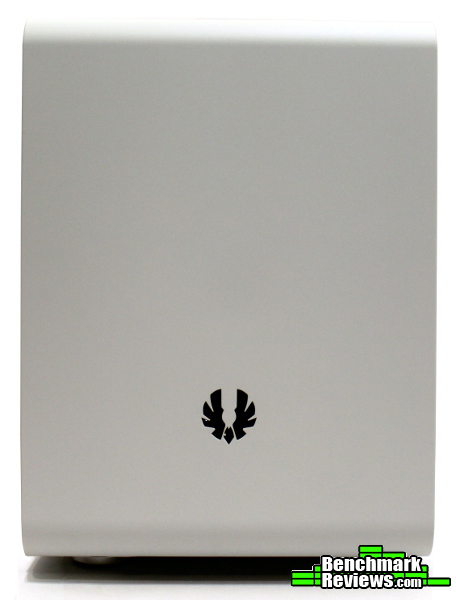
Fresh from reviewing the BitFenix Prodigy M with micro-ATX layout, it’s interesting to note that the Phenom looks much more different from the original Prodigy while being more similar than the Prodigy M. It’s physically smaller with the loss of the FyberFlex handles, and uses a smooth transition from the front panel to the top. These two panels use BitFenix’s SofTouch paint which is a very matte, premium finish that feels great to the touch. I’m a huge proponent of using matte finishes – maybe they don’t “wipe off” easily to a sparkly finish like a gloss would, but at least you don’t have to constantly wipe them down in the first place… Personally, I just prefer the feel of matte finishes; I really think they’re under-utilized in most products but BitFenix does a great job with them on the Phenom.

The back of the case displays the usual ITX Prodigy layout, with power supply at the bottom and a 120/140mm fan mount above the motherboard. You’ll notice some extra thumbscrews around the PSU mount, they attach the removable power supply mounting bracket to the case. We’ll see how this works during the build process.

There probably isn’t much of a reason to show this side of the Phenom, other than on an ITX Prodigy this would include some perforations for the GPU. The intent of the Phenom was to provide a more streamlined enclosure better suited for HTPC and minimalistic builds, so the perforations were exchanged for a smooth panel.

The SofTouch finish covers the front and top panels, while the sides are painted normally. The mesh strips are mainly cosmetic and extend along both sides with a slight curve in the front (which allows for a bit more airflow from the bottom cutout under the front edge). They may be a little hard to spot, but there’s some circles cut out behind the mesh trim of that front panel. These help provide a little additional airflow to the hard drives while not allowing a lot of sound to escape.
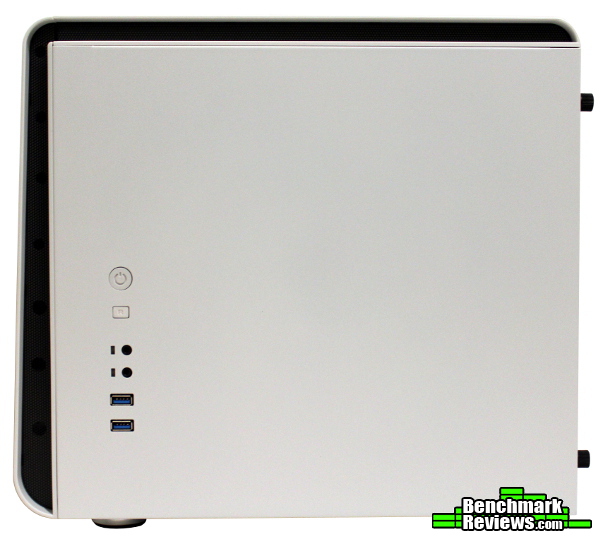
This side panel features the I/O cluster, with a typical arrangement of USB 3.0 ports, headphone/microphone jacks, power button, reset button and the blue power/hdd activity indicator LEDs. This back of this panel contains a bracket for two 2.5″ drives and is interchangeable as well, so if you want to swap this to the other side of the Phenom (to fit whichever side you place the Phenom on/beside your desk, etc.) it’s a simple task.

The top panel carries over the removable mesh filter (covering 2x120mm fan mounts) from the Prodigy. This panel sits on top of the chassis, creating a little extra space between the filter and fans than in the Prodigy but not enough to mount fans in between (thus the clearances for radiators are the same as always).

The bottom strays a little from the Prodigy design, swapping out the handles for four standard case feet. You can easily see the two “rails” that the HDD cages inside are mounted to; if you want to remove the cage that is attached to the bottom you’ll need to remove those six screws (and two case feet to reach some of them). The removable power supply intake filter carries over from the Prodigy, and is an always appreciated feature.
Now that we’ve looked at the changes on the outside, let’s take the side panels off and look at some of the internal features of the Phenom.

You’ve probably seen this before; indeed the interior is essentially unchanged from the original Prodigy that spawned the Phenom. Sharing the layout helps keep costs down I’m sure, and I don’t think it really needed improving upon in the first place (although a little smaller would be nice – it is an ITX case after all, but I suppose the extra space is what made the Prodigy different). A 140mm power supply is essential, and is the only carryover from the Prodigy that could have used an adjustment. A centimeter or two of extra space in the power supply compartment would help with installation, as we’ll see later.

See the gap between the top panel and the chassis above? The twin 120mm fan mounts are in the same place as on the Prodigy (and Prodigy M, for that matter) but the panel raises the removable filter away from the fans. This will have the side effect of quieting some of the intake noise from the fans, as well as possibly improve airflow (many fans will change their airflow patterns drastically when placed directly against a filter or other restriction). It’ll add a bit of height to the case, but without the handles the Phenom still has a much smaller profile than the Prodigy.

The panels can be swapped, placing the I/O cluster on whichever side you want it. The included cables are long enough to reach the various layouts of mini-ITX boards. Since two 2.5″ drives can be secured here, the default location for this panel (right side of the chassis) might make the most amount of sense as you can keep your SATA data and power cables all in the same location.

BitFenix employs flexible plastic drive sleds, which simply bend around your hard drive and allow you to snap them in place using the rails in the drive cages. I usually prefer attaching drives this way, as there aren’t any screws to mess with when swapping drives. Of course they aren’t as secure as actually fastening a drive to the cage, but if you’re worried about them shifting in transit or something you can fasten down the sleds as well.
ITX chassis are notorious for being somewhat difficult to build in – the Prodigy (and therefore the Phenom interior) changed that to an extent with respect to aftermarket cooling, but the interior layout itself hasn’t changed. Let’s put some components in the Phenom to get a feel for what this chassis can offer.

Starting with the power supply unit, I followed BitFenix’s (and everyone else’s!) recommendation of installing a 140mm non-modular unit. At least placing the PSU into the chassis is pretty simple, just attach the plate and slide it in (then fasten down with thumbscrews) – which was easy until the point in the picture above. You’ll need both hands to make sure the cables stay out of the way and don’t get shoved into the partition wall for the PSU compartment. Some users have had success with 160mm non-modular power supplies, but I wouldn’t feel comfortable trying (although it wouldn’t be too hard to add some standoffs to the PSU bracket, offsetting the power supply by another few millimeters…).
Anyway, it works, but it’s a little disappointing to see this unchanged from the original Prodigy. Thankfully with more of a focus on small enclosures and energy use / efficiency, the selection of 140mm power supplies seems to be larger than a year ago.

You’ll have to forgive me for skipping a step, but I went ahead and removed the center 3-bay HDD cage (simply squeeze the tabs and it slides out) and the top 5.25″ bay. The optical drive bay is interesting – even though it’s a carryover from the Prodigy, what doesn’t carry over is a cutout for the bay in the front panel. You can still use the plastic tray insert to attach a hard drive or SSD, but it all seems like somewhat of a waste. The purpose of the Phenom was to provide a more streamlined, smaller Prodigy for uses like a NAS box, Steam machine or HTPC; it’s hard for me to imagine an HTPC without some sort of optical drive (bluray/dvd). I’m sure we’ll see some enterprising modders find a solution for this in short order…and there’s always the aftermarket Prodigy face plates that are interchangeable – those will give you a cutout for the optical bay, but then you’ll have to find a way to blend it in to the top panel. Maybe BitFenix will develop a custom face plate for the Phenom as well…
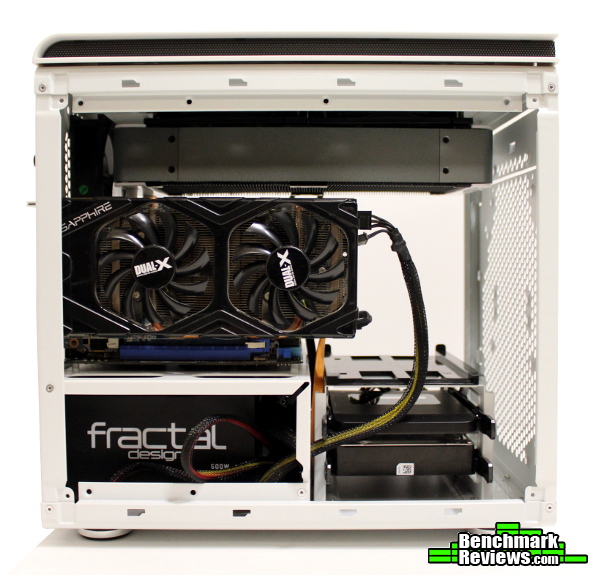
Installing the motherboard is very simple – all of the standoffs are pre-existing (as they should be for an ITX case) and with both panels off there’s a lot of room to work. Routing cables isn’t too difficult, as the cable routing holes on each side of the motherboard allow you to use only the length you need and stash the rest beside the PSU. Drives snap in easily, and the oversized SilverStone TD02 radiator has more than enough room with the 5.25″ bay removed (there are six screws attaching the bay to the frame). As you can see, there’s ample room for large graphics cards – the Radeon 7850 pictured only takes up a little more than half of the room available.
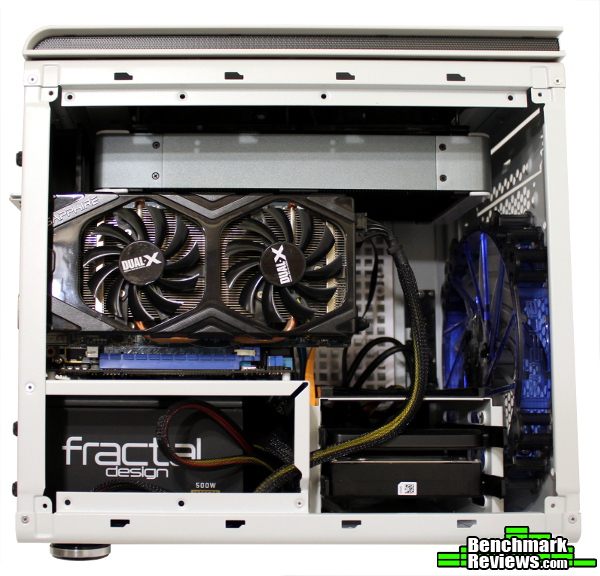
I removed the stock 120mm Spectre intake fan to make room for a 200mm BitFenix Spectre Pro (there’s room for two 120mm fans or one 230/200mm fan in the front). I was curious to see if airflow was compromised by the solid front panel, but there seemed to be enough circular holes in the mesh sides of the front panel to make this an option (the Prodigy sells alongside the new Phenom if you really need the maximum amount of airflow this chassis can provide – they are meant to address different segments of the market after all). By the way, the BitFenix “Phoenix” badge in the front face of the Phenom is removable – I’m not sure if they plan to offer aftermarket versions of these as well, but removing it has a side effect of allowing an LED fan to glow through the opening. A frosted, translucent replacement would be a popular item I think…
Cable management was very simple, easily among the best of the ITX cases that I’ve worked with. Of course, when the Phenom is almost twice the volume of enclosures like the FT03 Mini, Node 304 and Elite 130 it would stand to reason there would be much more room for such things as cables and aftermarket cooling.
I appreciate that BitFenix has expanded their popular Prodigy line to include the Phenom and upcoming Colossus enclosures. It isn’t “Prodigy 2.0,” mostly because it was never intended to be! The Phenom provides another option to system builders that prefer clean lines and a minimalist approach to design while featuring the capabilities of the Prodigy interior – I think it accomplishes that goal admirably well. I’m not certain they needed an entirely new chassis for that though; perhaps they could have created a “Prodigy Ecosystem” where add-on “Phenom” panels could be added to a base Prodigy chassis. This would still give end-users options for different types of systems – the changes for the Phenom are primarily cosmetic anyway. It’s still a fresh approach to a familiar case though, and it is executed very well.
Overall, I think the Phenom is almost a better fit for an ITX build than the original Prodigy – if BitFenix would have taken the opportunity to shrink the overall dimensions even more, I think it would have given cases like Fractal Design’s Node 304 and Cooler Master’s Elite 130 some incredible competition. Due to the increased size, I think the Phenom will end up being compared against mATX mini towers like the Arc Mini R2/Define Mini and N200 even though the Phenom M exists for that purpose.

The short version is, the original Prodigy formula works beautifully here – I’d even go so far as to say this is an even better option in ITX trim for those users that want a small(er), streamlined, easy to assemble build that still provides room for expansion and performance. The ITX format brings with it easy to use tool-less drive trays and lots of room for radiators (compared to the micro-ATX Prodigy M, which required a more careful selection of components).
The original Prodigy was one of the coolest-running mini-ITX enclosures of its time and was one of the first (if not the first) ITX cases to accommodate 240mm radiator(s). This might be one of the only chassis where your options for aftermarket cooling are more limited by the motherboard than the enclosure! Even with less overall airflow than the Prodigy, I achieved a higher overclock (with cooler motherboard temps) than I had in any other ITX case. I would say the Prodigy legacy for performance is alive and well with the Phenom – and if you need every bit of performance possible, the Prodigy is still being sold in ITX trim…
The Phenom will turn heads – this is one of those cases where people stop and ask, “is that a computer?“ Personally, I think the main draw of the Phenom (and the best reason to choose it over the similar Prodigy) is the aesthetic – it really is a Prodigy with a new shell and purpose. If you liked the Prodigy, it’s still available – the Phenom just provides another option for those that prefer something a little more streamlined. The trademark SofTouch finish really looks premium and sets off the white very well. BitFenix did a great job with making what amounts to a metal box very attractive, and with their aftermarket accessories you should be able to accent the look to make it even more your own.
It still surprises me how sturdy the BitFenix Phenom cases are constructed. For some reason, I just don’t expect small cases to feel so substantial but the Phenom is very solid. The hinged side panels are very sturdy with no hint of flex, and the panels snap in neatly and securely. There isn’t a sharp edge anywhere, and the steel is thicker than you would expect. The almost cube-like dimensions lend a lot of stability to the chassis and the overall fit and finish is higher than many other cases in this price bracket.
The Phenom is very functional for an ITX case. With capacity for six 3.5″ drives (or eleven 2.5″ drives) you could have a lot of storage in a pretty small space – or just quickly remove some of the drive cages to improve airflow to a performance-oriented gaming build and still have space for a 240mm radiator. That’s something not many ITX cases can claim to support, and is one of the reasons the original Prodigy made such a name for itself. It would be nice if it would accommodate larger power supplies a little better, but a 140mm PSU isn’t an unreasonable requirement for an ITX case – and there’s always the Phenom M if you need some more space…
As of November 2013, the BitFenix Phenom cases are already available in ITX trim and selling for $79.99 (Newegg / Amazon). While I’ve always thought most ITX components (cases included) carry a slight premium for their size, the Phenom does an excellent job of justifying its cost. You won’t be limited to certain CPU coolers or graphics cards with the ITX Phenom, and the extra volume means you won’t be as thermally constrained as some other ITX cases. The tool-less features and drive capacity are extensive, and the overall quality is there to match. I think the Phenom appeals too much to a specific demographic to call it the best value for an ITX case (best would depend on what you’re looking for in an ITX build), but if a case like this appeals to you I think you’ll agree it’s priced right.
I like what BitFenix has done with the Phenom, and I’m excited to see them continue to respond to customer feedback (which is what spawned the Phenom in the first place). I think the Phenom is an exciting addition to BitFenix’s lineup – the case itself is very well done, but even more important to me is what it represents. I feel BitFenix is beginning to capture why people choose to build their own PCs and they’ve provided an extensive array of products and accessories to reflect that – as a company they deserve a Gold Tachometer award for being so tuned in to their community.
As for the case itself, I’m not sure if I can get away with not assigning an award – it’s based on the Prodigy, an award winning chassis and all-around game changer. The Phenom retains the majority of the features that made the Prodigy popular, and does so while addressing a different market. Now that there are micro-ATX options though, I really find myself wishing BitFenix would have taken the opportunity to shrink their ITX cases a bit more. That’s tough to ask as there wouldn’t be a way to retain all of the advantages in a significantly smaller case – sharing a platform with the Prodigy is what allows the Phenom to perform so well. At the end of the day, for its intended audience the Phenom offers a quality option for enthusiasts. The Prodigy formula is a winner here too, but it carries over the same quirks as the original chassis. If that doesn’t bother you, I wouldn’t hesitate to recommend the BitFenix Phenom.
+ Award winning performance with a new face
+ Retains most (if not all) of the features that made the original Prodigy so popular
+ Streamlined features give the Phenom new character
+ Overall quality is top-notch
+ Reduced size from the Prodigy
+ Component choice limited by the motherboard, not the chassis…
– …except for the PSU – needs 140mm unless you’re willing to get creative
– 5.25″ bay without ability to mount an optical drive
– Still large for an ITX enclosure
-
Performance: 8.75
-
Appearance: 9.00
-
Construction: 9.00
-
Functionality: 8.00
-
Value: 8.50
Recommended: Benchmark Reviews Seal of Approval.
COMMENT QUESTION: Which form factor are you building with?


One thought on “BitFenix Phenom mITX Case Review”
I’ve always like the internal design of the Bitfenix mITX cases, but this modern conceit of putting the I/O panel on the side of the case continues to annoy me. Sure, you get a sleek front panel, but it reminds me of all the stupid things Jobs used to do at Apple in the name of aesthetics (1-button hockey-puck mouse, anyone?)
Comments are closed.