By Olin Coles
Manufacturer: NVIDIA Corporation
Product Name: GeForce GTX 780 Ti Graphics Card
Price: Starting at $699.99 (Newegg | Amazon | B&H)
Full Disclosure: The product sample used in this article has been provided by NVIDIA.
NVIDIA tends to dominate the field when it comes to graphics processing power, leaving AMD scrambling to remain competitive by reducing prices on their products to add value for an aging technology. Recently the AMD Radeon R9 290X was revealed as the brand’s flagship graphics card, virtually occupying future shelf space for around $599 and expected to compete against NVIDIA’s less-expensive GeForce GTX 780 that has been available since May (2013). Not one to allow competition into their high-end territory, NVIDIA pushes back with the introduction of GeForce GTX 780 Ti. Capable of producing the fastest and most efficient graphics power ever available, GeForce GTX 780 Ti offers 25% more processing cores than GTX 780 while leaving room to deliver record-level 336 GB/sec GDDR5 memory bandwidth so to leave no doubt who controls the top-end of discreet graphics.
In many ways, GeForce GTX 780 Ti graphics card is similar to the GTX TITAN that visual professionals enjoy. NVIDIA replaces TITAN’s double-precision with a massive number of CUDA cores in GTX 780 Ti to generate maximum frame rates from video game graphics. But GeForce GTX 780 Ti goes beyond high FPS performance, and delivers a host of additional features not seen or available from the competition. Ultra HD 4K resolution displays are supported, and so is the cutting-edge G-SYNC technology that eliminates screen tearing and display-generated stutter. FXAA and TXAA post-processing effects smooth rough edges and soften their graphical appearance. GeForce GTX 780 Ti also yields some of the most efficient processing power produced by any video card in history, even with always-on NVIDIA ShadowPlay capturing real-time gaming action in 1080p.
While offering gamers more than GTX TITAN, the new GeForce GTX 780 Ti goes far beyond being a faster GTX 780. Clocked from 875 MHz up to 928 MHz with NVIDIA Boost 2.0 technology, there are 2880 single precision CUDA cores on GeForce GTX 780 Ti (with 960 double precision cores), compared to 2304 CUDA cores from the GK110 GPU on GTX 780. Like GTX TITAN and GTX 780, GeForce GTX 780 Ti also delivers a 3GB video frame buffer. However, unlike GTX 780 and TITAN, the 7000 MHz GDDR5 memory on GTX 780 Ti delivers an impressive 336 GB/s of bandwidth. In this article, Benchmark Reviews tests and compares the NVIDIA GeForce GTX 780 graphics card using several highly-demanding DX11 video games, such as Battlefield 4, Metro: Last Light and Batman: Arkham City.

There are three platforms available to video games: portable, console, and PC. While smartphone and tablet devices can play games, graphics rarely go beyond simple 2D. Gaming consoles take detail quality a few steps farther and display up to 1080p resolution, but pale in comparison to the hyper-realistic gaming experience available to high-end PC graphics cards attached to high-resolution monitors and Ultra HD 4K displays. While game developers might not consider PC gaming as lucrative as entertainment consoles, companies like NVIDIA use desktop graphics technology to set the benchmark for smaller more compact GPU designs that make it into notebooks, tablets, and smartphone devices.
Source: NVIDIA
The GeForce GTX 780 Ti is designed for gamers who want to enjoy their games at the maximum graphics settings and screen resolutions, with high levels of AA enabled. GeForce GTX 780 Ti ships with 2880 CUDA Cores and 15 SMX units. The memory subsystem of GeForce GTX 780 Ti consists of six 64-bit memory controllers (384-bit) with 3GB of GDDR5 memory. The base clock speed of the GeForce GTX 780 Ti is 875MHz. The typical Boost Clock speed is 928MHz.
The Boost Clock speed is based on the average GeForce GTX 780 Ti card running a wide variety of games and applications. Note that the actual Boost clock will vary from game-to-game depending on actual system conditions. GeForce GTX 780 Ti’s memory speed is 7000MHz data rate.
The GeForce GTX 780 Ti reference board measures 10.5” in length. Display outputs include two dual-link DVIs, one HDMI and one DisplayPort connector. One 8-pin PCIe power connector and one 6-pin PCIe power connector are required for operation.
NVIDIA GPU Boost technology automatically increases the GPU’s clock frequency in order to improve performance. GPU Boost works in the background, dynamically adjusting the GPU’s graphics clock speed based on GPU operating conditions.
Originally GPU Boost was designed to reach the highest possible clock speed while remaining within a predefined power target. However, after careful evaluation NVIDIA engineers determined that GPU temperature is often a bigger inhibitor of performance than GPU power. Therefore for Boost 2.0, we’ve switched from boosting clock speeds based on a GPU power target, to a GPU temperature target. This new temperature target is 80 degrees Celsius.
As a result of this change, the GPU will automatically boost to the highest clock frequency it can achieve as long as the GPU temperature remains at 80C. Boost 2.0 constantly monitors GPU temperature, adjusting the GPU’s clock and its voltage on-the-fly to maintain this temperature.
In addition to switching from a power-based boost target to a temperature-based target, with GPU Boost 2.0 we’re also providing end users with more advanced controls for tweaking GPU Boost behavior. Using software tools provided by NVIDIA add-in card partners, end users can adjust the GPU temperature target precisely to their liking. If a user wants his GeForce GTX 780 board to boost to higher clocks for example, he can simply adjust the temperature target higher (for example from 80C, to 85C). The GPU will then boost to higher clock speeds until it reaches the new temperature target.
Besides adjusting the temperature target, Boost 2.0 also provides users with more powerful fan control. The GPU’s fan curve is completely adjustable, so you can adjust the GPU’s fan to operate at different speeds based on your own preferences.
Adaptive Temperature Controller
With GPU Boost 2.0, the GPU will boost to the highest clock speed it can achieve while operating at 80C. Boost 2.0 will dynamically adjust the GPU fan speed up or down as needed to attempt to maintain this temperature. While we’ve attempted to minimize fan speed variation as much as possible in prior GPUs, fan speeds did occasionally fluctuate.
For GeForce GTX 780, we’ve developed an all-new fan controller that uses an adaptive temperature filter with an RPM and temperature targeted control algorithm to eliminate the unnecessary fan fluctuations that contribute to fan noise, providing a smoother acoustic experience.
GeForce Experience is a new application from NVIDIA that optimizes your PC in two key ways. First, it maximizes your game performance and game compatibility by automatically downloading the latest GeForce Game Ready drivers. Second, GeForce Experience intelligently optimizes graphics settings for all your favorite games based on your hardware configuration.
Shadow Play
Utilizing the H.264 video encoder built-in to every Kepler GPU, ShadowPlay works in the background, seamlessly recording your last 20 minutes of gameplay footage, or if you’d like to record your latest StarCraft match, ShadowPlay can record that too. Compared to software-based video encoders like FRAPS, ShadowPlay takes less of a performance hit, so you can enjoy your games while you’re recording.
Download NVIDIA GeForce Experience here: geforce.com/drivers/geforce-experience/download
GeForce GTX 780 Ti is a top-end discrete graphics card for desktop computer systems, available for $699.99 (Newegg | Amazon) online. NVIDIA has built the GeForce GTX 780 Ti specifically for high-performance hardware enthusiasts and hard-core gamers wanting to play PC video games at their maximum graphics quality settings using the highest screen resolution possible. It’s a small niche market that few can claim, but also one that every PC gamer dreams of enjoying.
Like the GeForce GTX TITAN it’s modeled after, GeForce GTX 780 Ti is a dual-slot video card that measures 10.5″ long and 4.4″ wide. Sharing a nearly identical appearance to GTX TITAN and GTX 770, GeForce GTX 780 Ti also features the same GK110 GPU used in both those top-end video cards. Similarly, GTX 780 Ti also supports the following NVIDIA technologies: GPU Boost 2.0, 3D Vision, CUDA, DirectX 11, PhysX, TXAA, Adaptive VSync, FXAA, 3D Vision Surround, and SLI.
In addition to a new and improved NVIDIA GPU Boost 2.0 technology, GeForce GTX 780 Ti also delivers refinements to the user experience. Smoother FXAA and adaptive vSync technology results in less chop, stutter, and tearing in on-screen motion. Adaptive vSync technology adjusts the monitor’s refresh rate whenever the FPS rate becomes too low to properly sustain vertical sync (when enabled), thereby reducing stutter and tearing artifacts. Finally, NVIDIA TXAA offers gamers a film-style anti-aliasing technique with a mix of hardware post-processing, custom CG file style AA resolve, and an optional temporal component for better image quality.

Fashioned from technology developed for the NVIDIA GeForce GTX TITAN, engineers adapted a slightly tweaked design for GeForce GTX 780 Ti. The two cards look virtually identical, save for the model name branded near the header. A single rearward 60mm (2.4″) blower motor fan is offset from the cards surface to take advantage of a chamfered depression, helping GTX 780 Ti to draw cool air into the angled fan shroud. This design allows more air to reach the intake whenever two or more video cards are combined in close-proximity SLI configurations. Add-in card partners with engineering resources may incorporate their own cooling solution into GTX 780 Ti, although there seems little benefit from eschewing NVIDIA’s cool-running reference design.

GeForce GTX 780 Ti offers two simultaneously functional dual-link DVI (DL-DVI) connections, a full-size HDMI 1.4a output, and a DisplayPort 1.2 connection. Add-in partners may elect to remove or possibly further extend any of these video interfaces, but most will likely retain the original reference board engineering. Only one of these video cards is necessary to drive triple-displays and NVIDIA 3D-Vision Surround functionality, when using both DL-DVI and either the HDMI or DP connection for third output. All of these video interfaces consume exhaust-vent real estate, but this has very little impact on cooling because the 28nm Kepler GPU generates much less heat than past GeForce processors, and also because NVIDIA intentionally distances the heatsink far enough from these vents to equalize exhaust pressure.

As with past-generation GeForce GTX series graphics cards, the GeForce GTX 780 Ti is capable of two-card “Quad-SLI” configurations. Because GeForce GTX 780 Ti is PCI-Express 3.0 compliant device, the added bandwidth could potentially come into demand as future games and applications make use of these resources. Most games will be capable of utilizing the highest possible graphics quality settings using only a single GeForce GTX 780 Ti video card, but multi-card SLI/Quad-SLI configurations are perfect for extreme gamers wanting to experience ultra-performance video games played at their highest quality settings with all the bells and whistles enabled across multiple monitors.
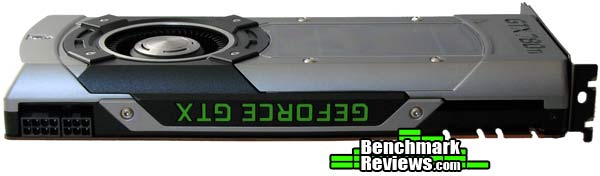
Specified at 250W Thermal Design Power output, the Kepler GPU in GeForce GTX 780 Ti operates much more efficiently than NVIDIA’s previous generation GPUs. Since TDP demands have been reduced GTX 780 Ti runs cooler during normal operation, and has move power available for Boost 2.0 requests. NVIDIA has added a “GeForce GTX” logo along the exposed side video card, and the LED backlit letters glow green when the system is powered on. GeForce GTX 780 Ti requires an 8-pin and 6-pin PCIe power connectors for operation, allowing NVIDIA to recommend a modest 600W power supply for computer systems equipped with one of these video cards.

By tradition, NVIDIA’s GeForce GTX series offers enthusiast-level performance with features like multi-card SLI pairing. More recently, the GTX family has included GPU Boost application-driven variable overclocking technology – now into GPU Boost 2.0. The GeForce GTX 780 Ti graphics card keeps with tradition in terms of performance by producing single-GPU frame rates second to only GTX TITAN. Of course, NVIDIA’s Kepler GPU architecture adds proprietary features to both versions, such as: 3D Vision, Adaptive Vertical Sync, multi-display Surround, PhysX, and TXAA antialiasing.

GeForce GTX 780 Ti’s GK110 graphics processor ships with 15 SMX units: good for 2880 single-precision CUDA cores clocked to 875 MHz that boost to 928 MHz. That Boost Clock speed is based on the average GeForce GTX 780 Ti card running a wide variety of games and applications tested during production – so your speeds may vary. The memory subsystem of GeForce GTX 780 Ti consists of six 64-bit memory controllers combined to create a 384-bit lane, which use 3GB of GDDR5 operating at 7000 MHz data rate to produce 336 GB/s memory bandwidth. GeForce GTX 780 Ti’s fill rate reaches 210 GigaTexels per second across the backwards-compatible PCI-Express 3.0 compliant graphics interface.

GTX 780 Ti’s exposed printed circuit board reveals an otherwise sparse PCB backside with few exciting features. Many of NVIDIA’s latest products have used less and less PCB real estate, with GTX models occasionally needing nothing more than space for the fan. Because of the optimized Kepler GPU, GeForce GTX 780 Ti does not benefit from any surface heatsink or cooling plates.
In the next section, we detail our test methodology and give specifications for all of the benchmarks and equipment used in our testing process…
The Microsoft DirectX-11 graphics API is native to the Microsoft Windows 7 Operating System, and will be the primary O/S for our test platform. DX11 is also available as a Microsoft Update for the Windows Vista O/S, so our test results apply to both versions of the Operating System.Sapphire Radeon R9 270X Vapor-X Video Card GPUZ
In each benchmark test there is one ‘cache run’ that is conducted, followed by five recorded test runs. Results are collected at each setting with the highest and lowest results discarded. The remaining three results are averaged, and displayed in the performance charts on the following pages.
A combination of synthetic and video game benchmark tests have been used in this article to illustrate relative performance among graphics solutions. Our benchmark frame rate results are not intended to represent real-world graphics performance, as this experience would change based on supporting hardware and the perception of individuals playing the video game.
- Motherboard: ASUS P9X79 Deluxe (Intel X79 Express)
- Processor: Intel Core i7-3960X Extreme Edition (six cores/3300 MHz)
- System Memory: 32GB G.SKILL Ripjaws-Z DDR3-1600
- Power Supply Unit: OCZ Z-Series Gold 850W OCZZ850
- Monitor: Lenovo ThinkVision LT3053p IPS LED-Backlit 30″ LCD
- 3DMark11 Professional Edition by Futuremark
- Settings: Performance Level Preset, 1280×720, 1x AA, Trilinear Filtering, Tessellation level 5)
- Aliens vs Predator Benchmark 1.0
- Settings: Very High Quality, 4x AA, 16x AF, SSAO, Tessellation, Advanced Shadows
- Batman: Arkham City
- Settings: 8x AA, 16x AF, MVSS+HBAO, High Tessellation, Extreme Detail, PhysX Disabled
- Battlefield 3
- Settings: Ultra Graphics Quality, FOV 90, 180-second Fraps Scene
- Battlefield 4
- Settings: Ultra Graphics Quality, FOV 70, 180-second Fraps Scene
- Lost Planet 2 Benchmark 1.0
- Settings: Benchmark B, 4x AA, Blur Off, High Shadow Detail, High Texture, High Render, High DirectX 11 Features
- Metro 2033 Benchmark
- Settings: Very-High Quality, 4x AA, 16x AF, Tessellation, PhysX Disabled
- Unigine Heaven Benchmark 3.0
- Settings: DirectX 11, High Quality, Extreme Tessellation, 16x AF, 4x AA
| Graphics Processing Clusters | 5 |
| Streaming Multiprocessors | 15 |
| CUDA Cores (single precision) | 2880 |
| CUDA Cores (double precision) | 960 |
| Texture Units | 240 |
| ROP Units | 48 |
| Base Clock | 875 MHz |
| Boost Clock | 928 MHz |
| Memory Clock (Data rate) | 7000 MHz |
| L2 Cache Size | 1536K |
| Total Video Memory | 3072MB GDDR5 |
| Memory Interface | 384-bit |
| Total Memory Bandwidth | 336 GB/s |
| Texture Filtering Rate (Bilinear) | 210 GigaTexels/sec |
| Fabrication Process | 28 nm |
| Transistor Count | 7.1 Billion |
| Connectors | 2x Dual-Link DVI 1x HDMI 1x DisplayPort |
| Form Factor | Dual Slot |
| Power Connectors | One 8-pin and one 6-pin |
| Recommended Power Supply | 600 Watts |
| Thermal Design Power (TDP) | 250 Watts |
| Thermal Threshold | 95° C |
| Graphics Card | GeForce GTX580 | Radeon R9 270X | Radeon HD7950 | GeForce GTX760 | GeForce GTX680 | Radeon HD7970 | GeForce GTX780 | Radeon R9 290X | GeForce GTX780Ti |
| GPU Cores | 512 | 1280 | 1792 | 1152 | 1536 | 2048 | 2304 | 2816 | 2880 |
| Core Clock (MHz) | 772 | 1030 | 850 | 980 | 1006 | 925 | 863 | 1000 | 876 |
| Shader Clock (MHz) | 1544 | 1120 Boost | N/A | 1033 Boost | 1058 Boost | N/A | Boost 902 | N/A | Boost 928 |
| Memory Clock (MHz) | 1002 | 1400 | 1250 | 1502 | 1502 | 1375 | 1502 | 1250 | 1750 |
| Memory Amount | 1536MB GDDR5 | 2048MB GDDR5 | 3072MB GDDR5 | 2048MB GDDR5 | 2048MB GDDR5 | 3072MB GDDR5 | 3072MB GDDR5 | 4096MB GDDR5 | 3072MB GDDR5 |
| Memory Interface | 384-bit | 256-bit | 384-bit | 256-bit | 256-bit | 384-bit | 384-bit | 512-bit | 384-bit |
- NVIDIA GeForce GTX 580 (772 MHz GPU/1544 MHz Shader/1002 MHz vRAM – Forceware 320.39)
- Sapphire Radeon R9 270X (1050 MHz GPU/1100 MHz Boost/1450 MHz vRAM – AMD Catalyst 13.11 Beta v8)
- AMD Radeon HD 7950 (850 MHz GPU/1250 MHz vRAM – AMD Catalyst 13.9)
- NVIDIA GeForce GTX 760 (980 MHz GPU/1033 MHz Boost/1502 MHz vRAM – Forceware 320.39)
- NVIDIA GeForce GTX 680 (1006 MHz GPU/1059 MHz Boost/1502 MHz vRAM – Forceware 320.39)
- AMD Radeon HD 7970 (925 MHz GPU/1375 MHz vRAM – AMD Catalyst Catalyst 13.11 Beta v8)
- NVIDIA GeForce GTX 780 (869 MHz GPU/902 MHz Boost/1502 MHz vRAM – Forceware 331.70)
- MSI Radeon R9 290X (1000 MHz GPU/1250 MHz vRAM – AMD Catalyst 13.11 Beta v8)
- NVIDIA GeForce GTX 780 Ti (875 MHz GPU/928 MHz Boost/1750 MHz vRAM – Forceware 331.70)
FutureMark 3DMark11 is the latest addition the 3DMark benchmark series built by FutureMark corporation. 3DMark11 is a PC benchmark suite designed to test the DirectX-11 graphics card performance without vendor preference. Although 3DMark11 includes the unbiased Bullet Open Source Physics Library instead of NVIDIA PhysX for the CPU/Physics tests, Benchmark Reviews concentrates on the four graphics-only tests in 3DMark11 and uses them with medium-level ‘Performance’ presets.
The ‘Performance’ level setting applies 1x multi-sample anti-aliasing and trilinear texture filtering to a 1280x720p resolution. The tessellation detail, when called upon by a test, is preset to level 5, with a maximum tessellation factor of 10. The shadow map size is limited to 5 and the shadow cascade count is set to 4, while the surface shadow sample count is at the maximum value of 16. Ambient occlusion is enabled, and preset to a quality level of 5.

- Futuremark 3DMark11 Professional Edition
- Settings: Performance Level Preset, 1280×720, 1x AA, Trilinear Filtering, Tessellation level 5)


3DMark11 Benchmark Test Results
| Graphics Card | GeForce GTX580 | Radeon R9 270X | Radeon HD7950 | GeForce GTX760 | GeForce GTX680 | Radeon HD7970 | GeForce GTX780 | Radeon R9 290X | GeForce GTX780Ti |
| GPU Cores | 512 | 1280 | 1792 | 1152 | 1536 | 2048 | 2304 | 2816 | 2880 |
| Core Clock (MHz) | 772 | 1030 | 850 | 980 | 1006 | 925 | 863 | 1000 | 876 |
| Shader Clock (MHz) | 1544 | 1120 Boost | N/A | 1033 Boost | 1058 Boost | N/A | Boost 902 | N/A | Boost 928 |
| Memory Clock (MHz) | 1002 | 1400 | 1250 | 1502 | 1502 | 1375 | 1502 | 1250 | 1750 |
| Memory Amount | 1536MB GDDR5 | 2048MB GDDR5 | 3072MB GDDR5 | 2048MB GDDR5 | 2048MB GDDR5 | 3072MB GDDR5 | 3072MB GDDR5 | 4096MB GDDR5 | 3072MB GDDR5 |
| Memory Interface | 384-bit | 256-bit | 384-bit | 256-bit | 256-bit | 384-bit | 384-bit | 512-bit | 384-bit |
Aliens vs. Predator is a science fiction first-person shooter video game, developed by Rebellion, and published by Sega for Microsoft Windows, Sony PlayStation 3, and Microsoft Xbox 360. Aliens vs. Predator utilizes Rebellion’s proprietary Asura game engine, which had previously found its way into Call of Duty: World at War and Rogue Warrior. The self-contained benchmark tool is used for our DirectX-11 tests, which push the Asura game engine to its limit.
In our benchmark tests, Aliens vs. Predator was configured to use the highest quality settings with 4x AA and 16x AF. DirectX-11 features such as Screen Space Ambient Occlusion (SSAO) and tessellation have also been included, along with advanced shadows.
- Aliens vs Predator
- Settings: Very High Quality, 4x AA, 16x AF, SSAO, Tessellation, Advanced Shadows

Aliens vs Predator Benchmark Test Results
| Graphics Card | GeForce GTX580 | Radeon R9 270X | Radeon HD7950 | GeForce GTX760 | GeForce GTX680 | Radeon HD7970 | GeForce GTX780 | Radeon R9 290X | GeForce GTX780Ti |
| GPU Cores | 512 | 1280 | 1792 | 1152 | 1536 | 2048 | 2304 | 2816 | 2880 |
| Core Clock (MHz) | 772 | 1030 | 850 | 980 | 1006 | 925 | 863 | 1000 | 876 |
| Shader Clock (MHz) | 1544 | 1120 Boost | N/A | 1033 Boost | 1058 Boost | N/A | Boost 902 | N/A | Boost 928 |
| Memory Clock (MHz) | 1002 | 1400 | 1250 | 1502 | 1502 | 1375 | 1502 | 1250 | 1750 |
| Memory Amount | 1536MB GDDR5 | 2048MB GDDR5 | 3072MB GDDR5 | 2048MB GDDR5 | 2048MB GDDR5 | 3072MB GDDR5 | 3072MB GDDR5 | 4096MB GDDR5 | 3072MB GDDR5 |
| Memory Interface | 384-bit | 256-bit | 384-bit | 256-bit | 256-bit | 384-bit | 384-bit | 512-bit | 384-bit |
Batman: Arkham City is a 3d-person action game that adheres to story line previously set forth in Batman: Arkham Asylum, which launched for game consoles and PC back in 2009. Based on an updated Unreal Engine 3 game engine, Batman: Arkham City enjoys DirectX 11 graphics which uses multi-threaded rendering to produce life-like tessellation effects. While gaming console versions of Batman: Arkham City deliver high-definition graphics at either 720p or 1080i, you’ll only get the high-quality graphics and special effects on PC.
In an age when developers give game consoles priority over PC, it’s becoming difficult to find games that show off the stunning visual effects and lifelike quality possible from modern graphics cards. Fortunately Batman: Arkham City is a game that does amazingly well on both platforms, while at the same time making it possible to cripple the most advanced graphics card on the planet by offering extremely demanding NVIDIA 32x CSAA and full PhysX capability. Also available to PC users (with NVIDIA graphics) is FXAA, a shader based image filter that achieves similar results to MSAA yet requires less memory and processing power.
Batman: Arkham City offers varying levels of PhysX effects, each with its own set of hardware requirements. You can turn PhysX off, or enable ‘Normal levels which introduce GPU-accelerated PhysX elements such as Debris Particles, Volumetric Smoke, and Destructible Environments into the game, while the ‘High’ setting adds real-time cloth and paper simulation. Particles exist everywhere in real life, and this PhysX effect is seen in many aspects of game to add back that same sense of realism. For PC gamers who are enthusiastic about graphics quality, don’t skimp on PhysX. DirectX 11 makes it possible to enjoy many of these effects, and PhysX helps bring them to life in the game.
- Batman: Arkham City
- Settings: 8x AA, 16x AF, MVSS+HBAO, High Tessellation, Extreme Detail, PhysX Disabled

Batman: Arkham City Benchmark Test Results
| Graphics Card | GeForce GTX580 | Radeon R9 270X | Radeon HD7950 | GeForce GTX760 | GeForce GTX680 | Radeon HD7970 | GeForce GTX780 | Radeon R9 290X | GeForce GTX780Ti |
| GPU Cores | 512 | 1280 | 1792 | 1152 | 1536 | 2048 | 2304 | 2816 | 2880 |
| Core Clock (MHz) | 772 | 1030 | 850 | 980 | 1006 | 925 | 863 | 1000 | 876 |
| Shader Clock (MHz) | 1544 | 1120 Boost | N/A | 1033 Boost | 1058 Boost | N/A | Boost 902 | N/A | Boost 928 |
| Memory Clock (MHz) | 1002 | 1400 | 1250 | 1502 | 1502 | 1375 | 1502 | 1250 | 1750 |
| Memory Amount | 1536MB GDDR5 | 2048MB GDDR5 | 3072MB GDDR5 | 2048MB GDDR5 | 2048MB GDDR5 | 3072MB GDDR5 | 3072MB GDDR5 | 4096MB GDDR5 | 3072MB GDDR5 |
| Memory Interface | 384-bit | 256-bit | 384-bit | 256-bit | 256-bit | 384-bit | 384-bit | 512-bit | 384-bit |
In Battlefield 3, players step into the role of the Elite U.S. Marines. As the first boots on the ground, players will experience heart-pounding missions across diverse locations including Paris, Tehran and New York. As a U.S. Marine in the field, periods of tension and anticipation are punctuated by moments of complete chaos. As bullets whiz by, walls crumble, and explosions force players to the grounds, the battlefield feels more alive and interactive than ever before.
The graphics engine behind Battlefield 3 is called Frostbite 2, which delivers realistic global illumination lighting along with dynamic destructible environments. The game uses a hardware terrain tessellation method that allows a high number of detailed triangles to be rendered entirely on the GPU when near the terrain. This allows for a very low memory footprint and relies on the GPU alone to expand the low res data to highly realistic detail.
Using Fraps to record frame rates, our Battlefield 3 benchmark test uses a three-minute capture on the ‘Secure Parking Lot’ stage of Operation Swordbreaker. Relative to the online multiplayer action, these frame rate results are nearly identical to daytime maps with the same video settings.
- BattleField 3
- Settings: Ultra Graphics Quality, FOV 90, 180-second Fraps Scene

Battlefield 3 Benchmark Test Results
| Graphics Card | GeForce GTX580 | Radeon R9 270X | Radeon HD7950 | GeForce GTX760 | GeForce GTX680 | Radeon HD7970 | GeForce GTX780 | Radeon R9 290X | GeForce GTX780Ti |
| GPU Cores | 512 | 1280 | 1792 | 1152 | 1536 | 2048 | 2304 | 2816 | 2880 |
| Core Clock (MHz) | 772 | 1030 | 850 | 980 | 1006 | 925 | 863 | 1000 | 876 |
| Shader Clock (MHz) | 1544 | 1120 Boost | N/A | 1033 Boost | 1058 Boost | N/A | Boost 902 | N/A | Boost 928 |
| Memory Clock (MHz) | 1002 | 1400 | 1250 | 1502 | 1502 | 1375 | 1502 | 1250 | 1750 |
| Memory Amount | 1536MB GDDR5 | 2048MB GDDR5 | 3072MB GDDR5 | 2048MB GDDR5 | 2048MB GDDR5 | 3072MB GDDR5 | 3072MB GDDR5 | 4096MB GDDR5 | 3072MB GDDR5 |
| Memory Interface | 384-bit | 256-bit | 384-bit | 256-bit | 256-bit | 384-bit | 384-bit | 512-bit | 384-bit |
In Battlefield 4, players step into the role of a U.S. Marines named Recker who leads a special operations unit called ‘Tombstone’. While the single-player campaign offers a unique and exciting storyline, BF4 truly shine with a new 64-player online multiplayer mode with large spacious maps.
The graphics engine behind Battlefield 4 is called Frostbite 3, which offers more realistic environments with higher resolution textures and next-generation particle effects. A first-time ‘networked water’ fluid system allows players in the game to see the same wave at the same time. Tessellation has also been improved since Frostbite 2 in BF3.
AMD graphics cards are optimized for Battlefield 4 using AMD’s Mantle API that enables a boost in performance.
Using Fraps to record frame rates, our Battlefield 4 benchmark test uses a three-minute capture on the ‘Baku’ stage where Recker is handed the tactical binoculars. Relative to the online multiplayer action, these frame rate results are nearly identical to most large maps with the same video settings.

- BattleField 4
- Settings: Ultra Graphics Quality, FOV 70, 180-second Fraps Scene

Battlefield 4 Benchmark Test Results
| Graphics Card | GeForce GTX580 | Radeon R9 270X | Radeon HD7950 | GeForce GTX760 | GeForce GTX680 | Radeon HD7970 | GeForce GTX780 | Radeon R9 290X | GeForce GTX780Ti |
| GPU Cores | 512 | 1280 | 1792 | 1152 | 1536 | 2048 | 2304 | 2816 | 2880 |
| Core Clock (MHz) | 772 | 1030 | 850 | 980 | 1006 | 925 | 863 | 1000 | 876 |
| Shader Clock (MHz) | 1544 | 1120 Boost | N/A | 1033 Boost | 1058 Boost | N/A | Boost 902 | N/A | Boost 928 |
| Memory Clock (MHz) | 1002 | 1400 | 1250 | 1502 | 1502 | 1375 | 1502 | 1250 | 1750 |
| Memory Amount | 1536MB GDDR5 | 2048MB GDDR5 | 3072MB GDDR5 | 2048MB GDDR5 | 2048MB GDDR5 | 3072MB GDDR5 | 3072MB GDDR5 | 4096MB GDDR5 | 3072MB GDDR5 |
| Memory Interface | 384-bit | 256-bit | 384-bit | 256-bit | 256-bit | 384-bit | 384-bit | 512-bit | 384-bit |
Lost Planet 2 is the second installment in the saga of the planet E.D.N. III, ten years after the story of Lost Planet: Extreme Condition. The snow has melted and the lush jungle life of the planet has emerged with angry and luscious flora and fauna. With the new environment comes the addition of DirectX-11 technology to the game.
Lost Planet 2 takes advantage of DX11 features including tessellation and displacement mapping on water, level bosses, and player characters. In addition, soft body compute shaders are used on ‘Boss’ characters, and wave simulation is performed using DirectCompute. These cutting edge features make for an excellent benchmark for top-of-the-line consumer GPUs.
The Lost Planet 2 benchmark offers two different tests, which serve different purposes. This article uses tests conducted on benchmark B, which is designed to be a deterministic and effective benchmark tool featuring DirectX 11 elements.
- Lost Planet 2 Benchmark 1.0
- Settings: Benchmark B, 4x AA, Blur Off, High Shadow Detail, High Texture, High Render, High DirectX 11 Features

Lost Planet 2 Benchmark Test Results
| Graphics Card | GeForce GTX580 | Radeon R9 270X | Radeon HD7950 | GeForce GTX760 | GeForce GTX680 | Radeon HD7970 | GeForce GTX780 | Radeon R9 290X | GeForce GTX780Ti |
| GPU Cores | 512 | 1280 | 1792 | 1152 | 1536 | 2048 | 2304 | 2816 | 2880 |
| Core Clock (MHz) | 772 | 1030 | 850 | 980 | 1006 | 925 | 863 | 1000 | 876 |
| Shader Clock (MHz) | 1544 | 1120 Boost | N/A | 1033 Boost | 1058 Boost | N/A | Boost 902 | N/A | Boost 928 |
| Memory Clock (MHz) | 1002 | 1400 | 1250 | 1502 | 1502 | 1375 | 1502 | 1250 | 1750 |
| Memory Amount | 1536MB GDDR5 | 2048MB GDDR5 | 3072MB GDDR5 | 2048MB GDDR5 | 2048MB GDDR5 | 3072MB GDDR5 | 3072MB GDDR5 | 4096MB GDDR5 | 3072MB GDDR5 |
| Memory Interface | 384-bit | 256-bit | 384-bit | 256-bit | 256-bit | 384-bit | 384-bit | 512-bit | 384-bit |
Metro 2033 is an action-oriented video game with a combination of survival horror, and first-person shooter elements. The game is based on the novel Metro 2033 by Russian author Dmitry Glukhovsky. It was developed by 4A Games in Ukraine and released in March 2010 for Microsoft Windows. Metro 2033 uses the 4A game engine, developed by 4A Games. The 4A Engine supports DirectX-9, 10, and 11, along with NVIDIA PhysX and GeForce 3D Vision.
The 4A engine is multi-threaded in such that only PhysX had a dedicated thread, and uses a task-model without any pre-conditioning or pre/post-synchronizing, allowing tasks to be done in parallel. The 4A game engine can utilize a deferred shading pipeline, and uses tessellation for greater performance, and also has HDR (complete with blue shift), real-time reflections, color correction, film grain and noise, and the engine also supports multi-core rendering.
Metro 2033 featured superior volumetric fog, double PhysX precision, object blur, sub-surface scattering for skin shaders, parallax mapping on all surfaces and greater geometric detail with a less aggressive LODs. Using PhysX, the engine uses many features such as destructible environments, and cloth and water simulations, and particles that can be fully affected by environmental factors.
NVIDIA has been diligently working to promote Metro 2033, and for good reason: it’s one of the most demanding PC video games we’ve ever tested. When their flagship GeForce GTX 480 struggles to produce 27 FPS with DirectX-11 anti-aliasing turned two to its lowest setting, you know that only the strongest graphics processors will generate playable frame rates. All of our tests enable Advanced Depth of Field and Tessellation effects, but disable advanced PhysX options.
- Metro 2033 Benchmark
- Settings: Very-High Quality, 4x AA, 16x AF, Tessellation, PhysX Disabled

Metro 2033 Benchmark Test Results
| Graphics Card | GeForce GTX580 | Radeon R9 270X | Radeon HD7950 | GeForce GTX760 | GeForce GTX680 | Radeon HD7970 | GeForce GTX780 | Radeon R9 290X | GeForce GTX780Ti |
| GPU Cores | 512 | 1280 | 1792 | 1152 | 1536 | 2048 | 2304 | 2816 | 2880 |
| Core Clock (MHz) | 772 | 1030 | 850 | 980 | 1006 | 925 | 863 | 1000 | 876 |
| Shader Clock (MHz) | 1544 | 1120 Boost | N/A | 1033 Boost | 1058 Boost | N/A | Boost 902 | N/A | Boost 928 |
| Memory Clock (MHz) | 1002 | 1400 | 1250 | 1502 | 1502 | 1375 | 1502 | 1250 | 1750 |
| Memory Amount | 1536MB GDDR5 | 2048MB GDDR5 | 3072MB GDDR5 | 2048MB GDDR5 | 2048MB GDDR5 | 3072MB GDDR5 | 3072MB GDDR5 | 4096MB GDDR5 | 3072MB GDDR5 |
| Memory Interface | 384-bit | 256-bit | 384-bit | 256-bit | 256-bit | 384-bit | 384-bit | 512-bit | 384-bit |
The Unigine Heaven benchmark is a free publicly available tool that grants the power to unleash the graphics capabilities in DirectX-11 for Windows 7 or updated Vista Operating Systems. It reveals the enchanting magic of floating islands with a tiny village hidden in the cloudy skies. With the interactive mode, emerging experience of exploring the intricate world is within reach. Through its advanced renderer, Unigine is one of the first to set precedence in showcasing the art assets with tessellation, bringing compelling visual finesse, utilizing the technology to the full extend and exhibiting the possibilities of enriching 3D gaming.
The distinguishing feature in the Unigine Heaven benchmark is a hardware tessellation that is a scalable technology aimed for automatic subdivision of polygons into smaller and finer pieces, so that developers can gain a more detailed look of their games almost free of charge in terms of performance. Thanks to this procedure, the elaboration of the rendered image finally approaches the boundary of veridical visual perception: the virtual reality transcends conjured by your hand.
Since only DX11-compliant video cards will properly test on the Heaven benchmark, only those products that meet the requirements have been included.
- Unigine Heaven Benchmark 3.0
- Settings: DirectX 11, High Quality, Extreme Tessellation, 16x AF, 4x AA

Heaven Benchmark Test Results
| Graphics Card | GeForce GTX580 | Radeon R9 270X | Radeon HD7950 | GeForce GTX760 | GeForce GTX680 | Radeon HD7970 | GeForce GTX780 | Radeon R9 290X | GeForce GTX780Ti |
| GPU Cores | 512 | 1280 | 1792 | 1152 | 1536 | 2048 | 2304 | 2816 | 2880 |
| Core Clock (MHz) | 772 | 1030 | 850 | 980 | 1006 | 925 | 863 | 1000 | 876 |
| Shader Clock (MHz) | 1544 | 1120 Boost | N/A | 1033 Boost | 1058 Boost | N/A | Boost 902 | N/A | Boost 928 |
| Memory Clock (MHz) | 1002 | 1400 | 1250 | 1502 | 1502 | 1375 | 1502 | 1250 | 1750 |
| Memory Amount | 1536MB GDDR5 | 2048MB GDDR5 | 3072MB GDDR5 | 2048MB GDDR5 | 2048MB GDDR5 | 3072MB GDDR5 | 3072MB GDDR5 | 4096MB GDDR5 | 3072MB GDDR5 |
| Memory Interface | 384-bit | 256-bit | 384-bit | 256-bit | 256-bit | 384-bit | 384-bit | 512-bit | 384-bit |
In this section, PCI-Express graphics cards are isolated for idle and loaded electrical power consumption. In our power consumption tests, Benchmark Reviews utilizes an 80-PLUS GOLD certified OCZ Z-Series Gold 850W PSU, model OCZZ850. This power supply unit has been tested to provide over 90% typical efficiency by Chroma System Solutions. To measure isolated video card power consumption, Benchmark Reviews uses the Kill-A-Watt EZ (model P4460) power meter made by P3 International. In this particular test, all power consumption results were verified with a second power meter for accuracy.
The power consumption statistics discussed in this section are absolute maximum values, and may not represent real-world power consumption created by video games or graphics applications.
A baseline measurement is taken without any video card installed on our test computer system, which is allowed to boot into Windows 7 and rest idle at the login screen before power consumption is recorded. Once the baseline reading has been taken, the graphics card is installed and the system is again booted into Windows and left idle at the login screen before taking the idle reading. Loaded power consumption reading is taken with the video card running a stress test using graphics test #4 on 3DMark11 for real-world results, and again using FurMark for maximum consumption values.
This section discusses power consumption for the NVIDIA GeForce GTX 780 Ti video card, which operates at reference clock speeds. Our power consumption results are not representative of the entire GTX 780 Ti-series product family, which may feature a modified design or include factory overclocking by some partners. GeForce GTX 780 Ti requires an 8-pin and 6-pin PCI-E power connections for normal operation, and will not activate the display unless proper power has been supplied. NVIDIA recommends a 600W power supply unit for stable operation with one GeForce GTX 780 Ti video card.

Measured at the lowest reading, GeForce GTX 780 Ti consumed a mere 12W at idle. NVIDIA’s average TDP is specified as 250W, however our real-world stress tests using 3D Mark Vantage caused this video card to consume 295 watts. Using FurMark’s torture test to draw maximum power, GeForce GTX 780 Ti increased its consumption up to 320 watts… which is modest compared to 380W for R9 290X.
These results position the GTX 780 Ti among the least power-hungry top-end video cards we’ve tested under load, but much more impressive is that it’s achieved by a flagship GTX-series product. If you’re familiar with electronics, it will come as no surprise that less power consumption equals less heat output as evidenced by our thermal results below…
This section reports our temperature results subjecting the video card to maximum load conditions. During each test a 20°C ambient room temperature is maintained from start to finish, as measured by digital temperature sensors located outside the computer system. GPU-Z is used to measure the temperature at idle as reported by the GPU, and also under load.
Using a modified version of FurMark’s “Torture Test” to generate maximum thermal load, peak GPU temperature is recorded in high-power 3D mode. FurMark does two things extremely well: drives the thermal output of any graphics processor much higher than any video games realistically could, and it does so with consistency every time. Furmark works great for testing the stability of a GPU as the temperature rises to the highest possible output.
The temperatures illustrated below are absolute maximum values, and do not represent real-world temperatures created by video games or graphics applications:
| Video Card | Ambient | Idle Temp | Loaded Temp | Max Noise | ||||
| ATI Radeon HD 5850 | 20°C | 39°C | 73°C | 7/10 | ||||
| NVIDIA GeForce GTX 460 | 20°C | 26°C | 65°C | 4/10 | ||||
| AMD Radeon HD 6850 | 20°C | 42°C | 77°C | 7/10 | ||||
| AMD Radeon HD 6870 | 20°C | 39°C | 74°C | 6/10 | ||||
| ATI Radeon HD 5870 | 20°C | 33°C | 78°C | 7/10 | ||||
| NVIDIA GeForce GTX 560 Ti | 20°C | 27°C | 78°C | 5/10 | ||||
| NVIDIA GeForce GTX 570 | 20°C | 32°C | 82°C | 7/10 | ||||
| ATI Radeon HD 6970 | 20°C | 35°C | 81°C | 6/10 | ||||
| NVIDIA GeForce GTX 580 | 20°C | 32°C | 70°C | 6/10 | ||||
| NVIDIA GeForce GTX 590 | 20°C | 33°C | 77°C | 6/10 | ||||
| AMD Radeon HD 6990 | 20°C | 40°C | 84°C | 8/10 | ||||
| NVIDIA GeForce GTX 650 Ti BOOST | 20°C | 26°C | 73°C | 4/10 | ||||
| NVIDIA GeForce GTX 650 Ti | 20°C | 26°C | 62°C | 3/10 | ||||
| NVIDIA GeForce GTX 670 | 20°C | 26°C | 71°C | 3/10 | ||||
| NVIDIA GeForce GTX 680 | 20°C | 26°C | 75°C | 3/10 | ||||
| NVIDIA GeForce GTX 690 | 20°C | 30°C | 81°C | 4/10 | ||||
| NVIDIA GeForce GTX 780 | 20°C | 28°C | 80°C | 3/10 | ||||
| Sapphire Radeon R9 270X Vapor-X | 20°C | 26°C | 68°C | 4/10 | ||||
| MSI Radeon R9 290X | 20°C | 34°C | 95°C | 8/10 | ||||
| NVIDIA GeForce GTX 780 Ti | 20°C | 31°C | 82°C | 3/10 |
As we’ve mentioned on the pages leading up to this section, NVIDIA’s Kepler architecture yields a much more efficient operating GPU compared to previous designs. This becomes evident by the low idle temperature, and translates into modest full-load temperatures. While NVIDIA’s reference design works exceptionally well at cooling the GK110 GPU on GeForce GTX 780 Ti, consumers should expect add-in card partners to advertise unnecessarily excessive over-cooled versions for an extra premium. 82°C after ten minutes at 100% load using Furmark’s Torture Test is nothing at all, and is nowhere close to this card’s 95°C thermal threshold (which the R9 290X could actually reach).
IMPORTANT: Although the rating and final score mentioned in this conclusion are made to be as objective as possible, be advised that every author perceives these factors differently. While we each do our best to ensure that all aspects of the product are considered, there are often times unforeseen market conditions and manufacturer revisions that occur after publication which could render our rating obsolete. Please do not base any purchase solely on this conclusion, as it represents our rating specifically for the product tested which may differ from future versions. Benchmark Reviews begins our conclusion with a short summary for each of the areas that we rate.
My ratings begin with performance, where the $699 NVIDIA GeForce GTX 780 Ti is matched up against the competition’s $599 flagship: AMD Radeon R9 290X. There is a $100 price difference between these two products, but there’s more than money separating them. In DirectX 11 tests the NVIDIA GeForce GTX 780 Ti outperformed the original GTX 780, while easily surpassing the AMD Radeon R9 290X in our benchmark FPS tests.
Synthetic benchmark tools offer an unbiased rating for graphics products, allowing video card manufacturers to display their performance without special game optimizations or driver influence. Futuremark’s 3DMark11 benchmark suite strained our high-end graphics cards with only mid-level settings displayed at 720p, which forced GTX 780 Ti to either pull ahead or trail behind R9 290X depending on the test. Unigine Heaven 3.0 benchmark tests used maximum settings that tend to crush most products, yet the NVIDIA GeForce GTX 780 Ti trampled AMD’s Radeon R9 290X by more than 11 FPS at 1680×1050 and 9 FPS at 1920×1080.
In Aliens vs Predator, performance was competitive between the R9 290X and GTX 780, but GTX 780 Ti crushed them both with a 13 FPS lead. Ultra-demanding DX11 games such as Batman: Arkham City produced 125 FPS from the reference-clocked GeForce GTX 780 Ti, compared to 115 FPS for the Radeon R9 290X that failed to compete with 118 FPS produced by the original GTX 780. Battlefield 3 generated 108 FPS on the GTX 780 Ti with ultra quality settings, while the R9 290X trailed behind with 103.7 FPS. Lost Planet 2 played well on all graphics cards when set to high quality with 4x AA, but was a test anomaly that forced the Radeon R9 290X to trail 18 FPS behind GTX 780 Ti and also nearly 12 FPS behind GTX 780. Metro 2033 is another demanding game that requires tremendous graphics power to enjoy high quality visual settings, allowing the Radeon R9 290X to trail GTX 780 Ti at 1680×1050 before keeping pace at 1920×1080. The Frostbite 3 game engine in Battlefield 4 is very demanding, and forces the Radeon R9 290X to suffer a 13 FPS difference in favor of GeForce GTX 780 Ti at 1920×1080 and 9 FPS at 2560×1600.

Beyond the raw frame rate performance results, there’s a incredibly alarming difference between the architecture of these two products. On paper it might appear that both products feature similar power management technology, which limits clock speeds and the amount of boost overclock based on application needs and/or temperature. Typically you won’t see obvious differences between how this is accomplished on mainstream graphics cards, but at the top-end they become impossible to ignore. It’s true that NVIDIA’s GeForce GTX 780 Ti is built in the image of GTX TITAN and GTX 780 combined, which is to say that the card operates within a certain power envelope to ensure TDP (and hence heat output) are kept under control of the card’s thermal management system. In the event fan power increases, whether automatically or forced manually, the blower motor is optimized for low noise output. The same cannot be said for AMD’s Radeon R9 290X, which sounds and feels like a blow-dryer set to high under moderate load. GTX 780 Ti might have a 10% performance lead, but it outperforms R9 290X by 100% when it comes to noise and heat levels.
Appearance is a much more subjective matter, especially since this particular rating doesn’t have any quantitative benchmark scores to fall back on. NVIDIA’s GeForce GTX series has traditionally used a recognizable design over the past two years, but beginning with GTX TITAN and seen again with GeForce GTX 780. Keeping with an ‘industrial’ look, GeForce GTX 780 Ti uses matte silver trim to help the series stand out. Because GeForce GTX 780 Ti operates so efficiently and allows nearly all of the heated air to exhaust outside of the computer case, the reference design does an excellent job cooling the GPU. While fashionably good looks might lead to more consumers, keep in mind that this product still outperforms all the competition while generating far less heat and producing very little noise.
Construction is the one area NVIDIA graphics cards continually shine, and thanks in part to extremely quiet operation paired with more efficient processor cores that consume less energy and emit less heat, it seems clear that GeForce GTX 780 Ti continues to carry on this tradition. Requiring an 8- and 6-pin PCI-E power connections reduce power supply requirements to 600W, which is practically mainstream for most enthusiast systems. Additionally, consumers have a top-end single-GPU solution capable of driving three monitors in 3D Vision Surround with the inclusion of two DL-DVI ports with supplementary HDMI and DisplayPort output.
As of launch day (07 November 2013), the NVIDIA GeForce GTX 780 Ti video card is expected to sell with a starting price of $699.99 (Newegg | Amazon), which is only $50 more than the original GTX 780 debuted at. Please keep in mind that hardware manufacturers and retailers are constantly adjusting prices, so expect prices to change a few times between now and one month later. There’s still plenty of value delivered beyond frame rate performance, and the added NVIDIA Kepler features run off the charts. Only NVIDIA Kepler video cards can offer automated GPU Boost 2.0 technology, 3D Vision, Adaptive VSync, PhysX technology, FXAA, TXAA, ShadowPlay, and now G-SYNC.
In conclusion, GeForce GTX 780 Ti is the gamer’s version of GTX TITAN with a powerful lead ahead of Radeon R9 290X. Even if it were possible for the competition to overclock and reach similar frame rate performance, temperatures and noise would still heavily favor the GTX 780 Ti design. I was shocked at how loud AMD’s R9 290X would roar once it began to heat up midway through a benchmark test, creating a bit of sadness for gamers trying to play with open speakers instead of an insulated headset. There is a modest price difference between them, but quite frankly, the competition doesn’t belong in the same class. GeForce GTX 780 Ti delivers performance beyond expectations, offers a myriad of proprietary technologies that enhance the user experience, and challenges game developers to build even more realism into their titles.

+ Surpasses AMD Radeon R9 290X performance
+ Outstanding performance with DX11 video games
+ Supports NVIDIA GPU Boost 2.0, G-SYNC, ShadowPlay, TXAA, and 3D Vision
+ Triple-display and 3D Vision Surround support
+ Cooling fan operates at very quiet acoustic levels
+ Features DisplayPort connectivity for future monitor technology
+ Very low power consumption at idle and heat output under load
+ Upgradable into dual- and triple SLI card sets
– Very expensive enthusiast product!
-
Performance: 9.75
-
Appearance: 9.50
-
Construction: 9.50
-
Functionality: 9.75
-
Value: 6.50
Excellence Achievement: Benchmark Reviews Golden Tachometer Award.
COMMENT QUESTION: Which would you buy: GTX 780 Ti or Radeon R9 290X?


7 thoughts on “NVIDIA GeForce GTX 780 Ti Video Card Review”
It’s competitive from a price performance standpoint (a first I suppose for high end GPUs).
Hmm … it looks like:
– It beats the Titan handily (unless the 3gb of VRAM runs out)
– At lower resolutions, and more important at 2560×1440 it beats the 290X
I wonder though how it will do against the 290X Crossfired at 4K if the 780Ti is in SLI?
I’ve only read the first page and already it reads like a spiel from the Nvidia marketing division.
I would have expected a more professional, independent approach to the review, but it seems their is a bias towards Nvidia products here.
“delivers a host of additional features not seen or available from the competition. Ultra HD 4K resolution displays are supported, and so is the cutting-edge G-SYNC technology”
So where is this host of features? Ultra HD is supported on the new AMD card, G-Sync is a Nvidia product not applicable to AMD cards. That makes one feature so far…
Can we please try to be professional when reviewing?
This type of B.S. isn’t needed or necessarily true: “NVIDIA tends to dominate the field when it comes to graphics processing power, leaving AMD scrambling to remain competitive by reducing prices on their products to add value for an aging technology.”
The clincher there is you left of “pre” from the second word in that sentence.
Did I offend an AMD fanboy with the truth? Only someone like that would go off on a rant without reading anything more than the first few paragraphs, and then selectively ignore the content. Since you didn’t make it past page one, here are the features you missed:
NVIDIA G-SYNC (noted)
NVIDIA ShadowPlay (mentioned in the same paragraph you quoted)
NVIDIA Boost 2.0 (listed next)
FXAA and TXAA post-processing
NVIDIA 3D Vision
Adaptive VSync
PhysX technology
Furthermore, please feel free to compare the months that NVIDIA and AMD have each been the leader in discreet graphics technology. You’ll see that NVIDIA offers the ‘most powerful’ video card 11 months for every 1 month (rounded up) that AMD has managed to do so. Facts… they’re so pesky.
More like I offended an Nvidia fanboy.
The features you mention are proprietary, AMD also has a large list of proprietary features, something you neglect to mention in your fervour and slathering to your favourite company.
Funny how you always seem to include negative remarks about AMD, even when they hold no relevance to the comparison.
I said “delivers a host of additional features not seen or available from the competition”, which you’ve just confirmed to be completely true by pointing out their proprietary nature. Also, and in much the same way as you ignorantly posted a rant without reading the article, you’ve also failed to notice how many AMD articles I’ve written… namely the recent R9 270X by MSI and Sapphire… both of which received my praise and awards.
As I’ve mentioned several times before: I don’t care who makes the product. All I care about is who offers the best product, the best features, or the best value. It’s easy to post a ridiculous comment that cries foul when you ignore facts like benchmarks, temperatures, fan noise, features, etc. Obviously you’re blinded by your commitment to the AMD brand, as evidenced by your comment in defense of Radeon R9 290X against GeForce GTX 780 Ti. Regardless of how you want to twist things: AMD is still #2 in GPU performance just like they usually are.
I read your article and it is bias no ultra hd 4k numbers and lower resolution for some games higher for others. The 290X is a god send it made Nvidia have to adjust there prices and that is more important then anything. If it was not for Amd you would be paying 1200 for that 780GTX TI. Amd gives us 780 GTX performance for 399.00 with R290 while Nvidia gave it to us for 649.00 with the GTX 780. The 290x is the future with some tweaking it will be the card of the future. With Ultra HD 4k on the horizon the extra memory will come into play and again Nvidia keeps sticking it to its customers by giving us 3 gb instead of 4gb or 6 gb like the titan which is what this card will need in 4k game play. That G-sync is a joke since none of the top Monitors provide it. I bet you ran the 290x in quiet mode. You did not even use the new drivers from AMD betas 9.2 also. Amd’s mantle will also improve the gaming experience and with all the game manufactures programing for the AMD chips since all the game systems use them now it will leave NVidia out in the cold. I’m not a Fan boy of either but will give credit will credit is due Nvidia Has given game players the shaft for a while with over priced video cards and we can thank AMD for giving NVidia a reality check. Thank you AMD for not fucking us like Nvidia has for along time with over priced video cards. I also own a over price EVGA classified 780 GTX card. You got once NVidia never again waiting for 290x Asus matrix that will be a hot video card.
The AMD R9 290X is not 780 GTX performance for 399.00.
For starters the R9 290X has no overclocking headroom, but the GTX 780 has. NVidia had the GTX 780Ti months ago but didn’t need to release it till now since AMD are only just able to muster up some competition. You seem to forget that AMD recent releases were just more re-brands.
Comments are closed.