By Jeremy Miller
Manufacturer: Corsair Components, Inc.
Product Name: Raptor M40 Gaming Mouse
Model Number: CH-9000041-NA
UPC: 843591038812 EAN: 0843591038812
Price As Tested: $44.99 (Amazon / NewEgg)
Full Disclosure: The product sample used in this article has been provided by Corsair.
Corsair acquired Raptor Gaming last year in a deal that made quite a few in the European market quite happy. Raptor Gaming was known for their quality gaming peripherals, and the deal meant that Corsair would be adding their expertise to the mix as well. With the release of the new Corsair Raptor line of gaming products, today we will be examining the Corsair Raptor M40 gaming mouse. It is a mid-range mouse (~$45) that appears to pack quite a punch for the price point, and definitely has the build quality expected from Corsair. In this article Benchmark Reviews will take a look at the Raptor M40 and let you know if it is a true gaming beast worthy of its name!
The first thing you will probably notice about the mouse is the similar design to Corsairs M60 and M65, which is certainly not a bad thing. The overall design is very eye catching, and the smooth top contrasts well with the rough texturized side grips. The cutaway on the rear of the mouse is another nice touch for the looks, however could pose a problem for some with larger hands (more on this later). The mouse is packed with a 4,000dpi optical sensor which is more than adequate for most users, however those that come from a high dpi laser mouse could be a bit disappointed. On the bottom you will notice the many glide pads as well as the 3 screw weight system. Packed with a braided cable for durability, a slick design, and an extremely customizable weight system the Corsair Raptor M40 seems to have what it takes on every level!

I have personally tested this mouse for several weeks now, and have run it through the vigorous grind of my day to day use. It has seen extensive gaming sessions in a multitude of games, assisted me in my Photoshop endeavors, and helped me move from page to page in my internet browsing. I will certainly give you the low down on how it performed, and let you know of every pro and con I have personally encountered. Check out the full feature list below, and then we will dive deeper into the Corsair Raptor M40 gaming mouse!
- High Performance ADNS-3090 Optical Mouse Sensor
- Up to 60 inches per second and 20g motion detection
- Up to 4000 DPI with 800/1600/3200/4000 steps
- Selectable USB Response Rates (1000/500/250/125Hz)
- Seven programmable buttons
- Weight system: 3x 1.5g screws, 3x 4g weights, 16.5g total adjustability
- Low-friction braided cable
- Extra Large PTFE mouse feet
When first looking at the Corsair Raptor M40 you will notice the striking resemblance to the Corsair M60 and M65. Keeping this look allows the mouse to be very recognizable as a Corsair mouse, even at a lower price point. The look overall is very minimalistic and nice. The Corsair logo illuminates a beautiful red color, and the light also permeates around the scroll wheel. This adds a bit of flare to an otherwise very simplistic mouse. The other feature that is distinct in the Corsair mice that has carried over to the Raptor M40 is the large cutaway on the rear of the mouse. This gives the mouse a very nice design aesthetic.

The top of the mouse is coated with a soft rubber that feels absolutely superb in the hand. It is smooth to the touch yet has a bit of grip so that you can position your hand in a comfortable state and not worry about it sliding. The other thing of note on the top of the mouse is the sturdy metal scroll wheel. It has a very tactile feel when scrolling and the rubberized middle helps ensure you never go a notch too far when selecting in game items or weapons.

On the left side of the mouse there are two programmable thumb buttons surrounded by the very rough textured rubber that engulfs the entire side of the M40. The harshness of the feel was a bit surprising to me at first as it is way coarser than any other side grips I have experienced. However over time it became an afterthought, and actually I have noticed just how well this rugged material prevents sweat slippage and sliding. It does its job extremely well. The biggest problem I faced with this mouse was the small cutout on the back left side. While I am normally a palm-gripper, while palming the corsair the cutout made my hand extremely uncomfortable in this area. When I switched to a modified claw grip it was not a problem. I have rather large hands, so if you have smaller hands this could very well be a non-issue, but it is something to take into consideration.

The right side of the mouse is covered in the very rough textured rubber as well, and features an even larger cutout. This makes the mouse right handed only, as if a left handed person were to use it this large cut out would make the mouse near unusable. However for a right handed person, this in no way causes any issues.

The bottom of the mouse features one of the main selling points of the mouse. The weight system is highly customizable. For example, if you prefer a mouse with the majority of the weight in the front you can simply remove the screw and inner weight from the rear of the mouse to make it more to your liking. This can be done with any of the three weights to cater to your personal preference. The many glide pads on the bottom make using the mouse a smooth and effortless job. The 4,000dpi optical sensor isn’t as robust as some laser sensors but does offer an accurate and consistent feel.

The Corsair Raptor M40 gaming mouse doesn’t come prepackaged with a driver disc, however you can download their software from the Corsair website. Upon opening the software you will see many options spread across three different tabs. On the first tab (Assign Buttons) you will be able to reassign the 7 buttons of your mouse to be able to play your games the way you like to play. Want to be able to reload using the front side button? Map it out and get it done! You can also turn the LED illumination on and off from this tab. The last thing you will be able to do here is record macros and set the playback options to your needs. The macro functionality is absolutely amazing, and needs to be praised for the effectiveness.
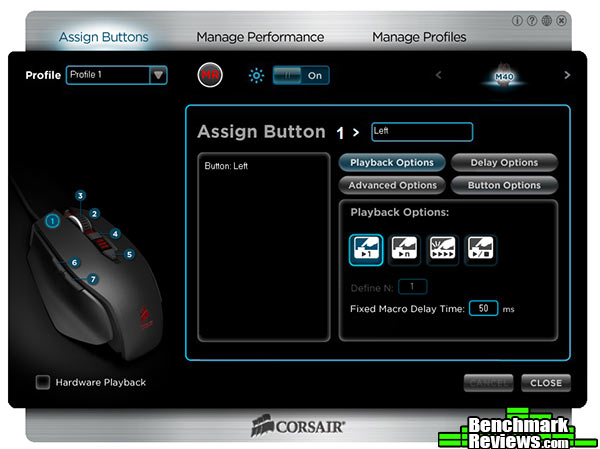
The second tab is named Manage Performance and, as the name suggests, it lets you do exactly that. From here you will be able to adjust the three stage DPI toggle (from 800 to 4,000), change the report rate (in ms), and adjust the lift height. You will also be able to test your surface quality to ensure you are getting the most out of your Corsair Raptor M40 gaming mouse. One thing that is missing from the M40 is the dedicated sniper button seen on the M60. However you can adjust the sniper sensitivity setting on this page, and then simply map the sniper control to one of the 7 programmable buttons on the mouse.

The last tab is where you will save and edit your profiles. The mouse allows you to save multiple profiles for use in a ton of different applications. You are limited to 50, but the average user will never even get close to this many. I found myself experimenting with different applications and found it worked very well.

I tested the polling rate with the report rate set at 1 ms to see if we were hitting on the 1,000Mhz we should be. The test results are below.

The Corsair M40 Raptor I tested in a multitude of different games, as well as my normal day to day use. While this mouse is clearly labeled as a “Gaming Mouse,” not many people will be switching out for another when they want to surf the web or use Photoshop. You can see the software and system the mouse was tested on below.
-
Motherboard: Gigabyte H67MA-USB3-B3
-
System Memory: 12 Gb KingstonDDR3 1333 Mhz
-
Processor: Intel i7 3770k
-
Audio: Realtek High Definition
-
Video: Powercolor HD 7870 Myst
-
Optical Drive: Lite-On IHAS124-04 Internal DVD Writer
-
Enclosure: Thermaltake V3 Black Edition
-
PSU: Apevia ATX-AS680W-BL 680W
-
Monitor: Sony 98078 24″ 3D LED monitor
-
Operating System: Windows 7 Home Premium 64-bit

Gaming: The Corsair M40 Raptor saw an absolute ton of time in FPS games thanks to the recent release of Battlefield 4. I used this mouse extensively throughout the last couple of weeks and it has not let me down a single time. The responsiveness of the mouse is absolutely wonderful, and with the sniper button assigned it makes shooting long range targets a breeze. The scroll wheel is superb as well, with a very strong click when scrolling. This prevents mistakes such as switching to the wrong weapon which spells certain death. The actual DPI switch is located directly behind the scroll wheel which is not ideal, but functions fine for where it is.
The same can be said for Smite. The accuracy when playing ranged characters was spot on, allowing me to be quite deadly with skill shots on the move. I did not map out any macros specifically for the game, however I believe with a bit of tweaking this mouse would actually perform admirably in a MOBA such as Smite or League of Legends.
Diablo III really can test a mouse if put to proper use. With many character builds being perfect for macro use, this let me really put the M40’s macro functions to the test. After using it for a good while, I am very impressed. You can edited the macros extensively by selecting the type of keystroke, the duration of the delay, and insert additional keys without rerecording. With the ability to record multiple key functions to the 7 programmable keys, I was able to eliminate hordes of enemies with ease.
Desktop Applications: The Corsair Raptor M40 gaming mouse works fine in everyday use. In Photoshop the mouse is precise enough to make extremely smooth lines and edges. The mouse buttons offer a very springy action, but are not overly easy to press causing accidental clicks.
Surfing the internet and other normal use is where I had a bit of an issue with the Corsair Raptor M40. The fact that I enjoy palm gripping and relaxing my hand during long work sessions makes the mouse uncomfortable due to the cutout that is on the left side of the mouse. The way my hand rests on the mouse makes it uncomfortable in the soft part around the base of my thumb. I found it a bit irritating to say the least. I do have large hands, so I had my fiancé use it in order to see if it was any better. She had no issue with this, so those with smaller hands should be fine.
Comfort: As stated above the only time I had any discomfort is when going to a full palm grip while surfing the internet and doing other normal usage activities. During long gaming sessions the mouse was extremely comfortable in a modified claw grip, while still not the best for a full palm grip. The mouse is quite small, so this is understandable. It seems to be designed with the claw grip in mind. It took a bit of time for my large hand to get accustomed to the small size, but once it settled in it was a very enjoyable experience.
The Corsair Raptor M40 has the looks of a champion. The design is beautiful and minimalistic. The red LED’s add a hint of flare that makes the mouse look even fiercer on your desk. They have obviously cut corners to make the mouse fall into the price range it is in, but none have compromised the build quality nor the performance in any meaningful way. The biggest difference between this mouse and the pricier M60 or M65 is the lack of the metal body on the Raptor M40. The mouse is all plastic, but the quality is still top notch. The real difference is the price, with the Corsair Raptor M40 coming in at $44.99 (Amazon).
With so many new and exciting gaming mice entering the market at reasonable prices, the fact that a major brand such as Corsair can match them is quite remarkable. I cannot emphasize enough how well built the Raptor M40 is. The mouse feels like it could take a lot of extensive gaming sessions and all the wear and tear that comes along with that. The lack of a laser sensor in favor of the optical version will not be noticeable to any but the pickiest of gamers.
The Raptor M40 has excellent performance, and the ability to record complex macros puts it over the top of many of its competitors. I was truly surprised by the advanced features packed into the macro feature. It will rival even the heavy hitters in the gaming mouse market. The 4,000 dpi optical sensor is a good performer, while lacking the extreme dpi settings of a laser gaming mouse.
First appearances are everything, and the beautiful chassis of the Corsair Raptor M40 will put a smile on your face. From the contrasting rubber on the sides and top to the gorgeous red LEDs around the scroll wheel and behind the logo on the palm rest, this mouse definitely is a looker.
The construction and build quality of the mouse is top notch. While it lacks the aluminum body of the more expensive Corsair mice, the Raptor M40 feels sturdy and solid in the hand. The solid metal scroll wheel is a testament to the quality you expect from Corsair. The many glide pads on the bottom are thick enough to ensure a ton of use yet thin enough to not be a hindrance. The easily changeable weight system is also very well designed.
If you have larger hands, the functionality department is where the Corsair Raptor M40 suffers a bit. I did not have the most enjoyable experience while using it for everyday tasks using a palm style grip. If you prefer to relax your hand and really palm your mouse during relaxed PC sessions, this could cause a problem. If you have smaller hands or prefer to use a claw grip all the time then this is more than likely a non-issue, so you have no worries.
The value of the Corsair Raptor M40 is excellent. Coming in at a sub $50 price, you will be hard pressed to find a mouse with as many high end features and such intuitive software (especially the macro abilities) as the Raptor M40. While Corsair cut corners by using a 4,000 dpi optical sensor instead of the more powerful laser, and an all plastic chassis, the mouse is still extremely solid.
And now for the final word on the Corsair Raptor M40. I absolutely believe it is one of the best options available on the market for about $44.99 (Amazon / NewEgg). Corsair has managed to keep their undeniably reliable construction and pack it into a very affordable package. With the nice weight system, the excellent software, and the overall excellent performance there is no doubt this will receive high recommendations from me. An absolute must buy for anyone in the market for a gaming mouse.
+Solid construction
+Great gaming performance
+Sleek design
+Superb weight system
+Excellent macro abilities
-Not the best for larger hands/palm grip
-Optical instead of laser sensor
-
Performance: 9.25
-
Appearance: 9.75
-
Construction: 9.00
-
Functionality: 8.75
-
Value: 8.25
Excellence Achievement: Benchmark Reviews Golden Tachometer Award.
COMMENT QUESTION: What are your favorite features in a gaming mouse?


