By David Ramsey
Manufacturer: Cooler Master, Inc.
Product Name: Elite 130
Model Number: RC-130-KKN1
UPC: 884102024221 EAN: 719512045176
Price As Tested: $49.99 (Amazon | Newegg | B&H)
Full Disclosure: Cooler Master provided the product sample used in this article.
I’ve reviewed a lot of Cooler Master cases over the years for Benchmark Reviews, and one thing that impresses me about the company is that they never stop innovating or refining. One has only to track the evolution of the Cosmos series of cases to see this writ large (very large, in the case of the Cosmos II), but what keeps my attention is the way they’ll roll smaller, incremental improvements into an existing case line. Today’s example: the Cooler Master Elite 130 mini-ITX computer case.
I’ve previously reviewed the Cooler Master Elite 120 Advanced case that the 130 descends from, and it impressed me with its design and low price, making it my favorite mini-ITX computer case. If it had a weak point, it was CPU cooling: since the power supply is mounted over the motherboard, you had to use a very low-profile cooler. Depending on the motherboard in your system, you might have been limited to the stock Intel cooler.
 .
.
The Elite 130 addresses this limitation by supporting closed-loop water coolers with 120mm radiators. How did Cooler Master manage to find the space for this in a mini-ITX form factor? It’s not as if there was a lot of free space inside the Elite 120 Advanced…
| Model | RC-130-KKN1 |
| Color | Midnight Black |
| Material | Appearance: polymer front mesh panel. Case body: Steel alloy |
| Dimension | 240 x 205 x 377.5 mm / 9.4 x 8.1 x 14.9 inch |
| Weight | 3.1 kg / 6.8 lbs |
| M/B Type | Mini-ITX |
| 5.25″ Drive Bay | 1 |
| 3.5″ Drive Bay | 3 (1 from 5.25” drive bay) |
| SSD Bays | 4 (3 from 5.25″ drive bays, 1 from the side bracket) |
| I/O Panel | USB 3.0 x 2, USB 2.0 x 1, Audio In & Out |
| Expansion Slots | 2 |
| Cooling System | Front: 120mm fan x 1 (installed)Side: 80x15mm fan x 1 (installed) |
| Power Supply | Standard ATX PS2 (optional) |
| Maximum Compatibility | VGA card length: 343mm / 13.5 inch CPUcooler height: 65mm / 2.5 inchPSU length: 180mm/ 7.1 inch (w/ less cable management) 142mm / 5.6 inch (w/ full cable management) |
| Warranty | 2 years |
| UPC Code | 884102024221 |
Let’s take a look at this new case in the next section.
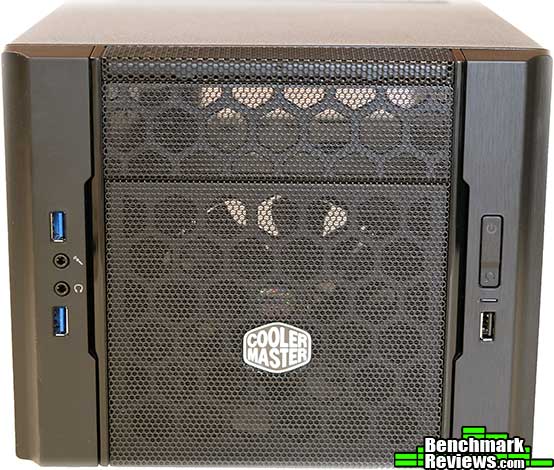
The Cooler Master Elite 130 case is comprised of black-painted steel and black plastic. Rather than the solid front panel of the Elite 120 Advanced (with hidden side air inlets), the front panel of the Elite 130 is mesh. The accent panels on either side appear to be black brushed aluminum. On the left are two USB 3.0 ports and the analog audio ports; on the right is the power/reset rocker switch (with an integrated power LED), a drive activity LED, and a single USB 2.0 port.
Both sides of the case are identical: plain black steel with ventilation holes.

On the bottom of the case we can see several tie-down points as well as mounting holes for a single 2.5″ or 3.5″ drive.

At the rear of the case are the power supply mount, which extends outwards about an inch from the case body, the cutout for the mITX motherboard I/O panel, and two card slots. The grommeted hole above the cards slots that’s present on the back of the Elite 120 Advanced case is missing here.

The front panel pops off easily to reveal the recessed intake fan, which is secured by plastic push pins and very easy to remove.

Compared the the Elite 120 Advanced on the right, the only functional difference is that the Elite 130 has two USB 3.0 ports and one USB 2.0 port on the front, while the older case has two USB 2.0 ports on the front and only one USB 3.0 port.

So, from the outside, there’s not that much difference. The real changes have taken place on the inside, as we’ll see in the next section.
The Elite 120 Advanced (right in this photo) had a single 5.25″ bay and a three-slot drive cage that could hold any combination of 2.5″ drives or 3.5″ drives mounted directly under it. The Elite 130 does away with the drive cage in favor of “mounting points” scattered about the interior.

There are four places to mount 2.5″/3.5″ devices. Three of them involve the use of special screws and rubber grommets that press into place to secure the drive. There’s room for two 2.5″ devices in the 5.25″ tray if you’re not using something else there, and you can mount a 2.5″ or 3.5″ drive at the bottom of the case and on the removable vertical perforated panel in the right side of the case. There’s also a “slide-in” mount for a single 2.5″ device on the bottom side of the 5.25″ bay. All of these mounting points mean you don’t need a drive cage, and the lack of a drive cage frees up space for a single 120mm radiator and fan at the front of the case.

The vertical perforated “drive mount” panel can be removed, as can the small 80mm fan to its right. The fan is useful for blowing cool are over your motherboard’s voltage regulators, but I found it to have an annoying high-pitched sound, so I removed it.

That’s pretty much all there is to the interior. The removal of the drive cage makes the Elite 130 an open box for your system.

So, can we really fit a water cooler and three drives in there? Let’s find out…
My Hackintosh system is currently a mini-ITX build based on a Gigabyte motherboard. In the Elite 120, I was forced to use the stock Intel cooler, since I couldn’t find any other low-profile coolers that would fit this motherboard without hitting the graphics card. But now I can water cool! Let’s see how well the radiator and fan from the Intel RTS2011 water-cooling kit fits:

Actually, it fits pretty well. This kit uses a standard thickness radiator and a singe fan. Note that in the image above I have an SSD mounted in the slide-in tray below the 5.25″ bay, and that the radiator is virtually touching it. This means you’d need to get out your trusty Dremel tool should you wish to use push-pull fans or a thicker radiator.

The 120x25mm fan included with the Intel cooler fits in a recess in the front of the case; the screws at each corner of the fan go through the holes at the corners of this recessed area to secure the radiator. This “recessed” design means that the fan must be in the front; you can’t mount the radiator at the front with the fan behind it. So you’re limited to either a “pull” configuration that exhausts air from the front of the case, or a “push” configuration that moves cool outside air through the radiator into the case. Cooler Master recommends the latter configuration, which I’ll get into in more detail later.

My Hackintosh setup uses three drives: an SSD boot drive, a 2.5″ backup drive, and a 3.5″ media/storage drive. All three drives are mounted in the image above: the SSD in the slide-in bay under the 5.25″ bay; the media/storage drive at the bottom of the case, and the backup drive at the side. There’s still plenty of room here and we’ve a clear area behind the radiator for good air flow. However, I could already see a potential problem: with the Cooler Master Elite 120 Advanced design, all the drives are mounted one above the other in a drive cage, which makes the power and data cabling easy. In the Elite 130, each drive’s power and data connectors are in a different plane, facing in different directions.

And that means that cabling is going to start to get…at little messy. Especially when you throw an optical drive into the mix. Now you have four SATA devices, all of whose power and data connectors are facing different directions.

The first thing to know is that standard SATA power cables like the one on the right aren’t going to work for most of your drive positions. Since the drives are mounted flat against metal plates, you won’t have the clearance to accommodate a SATA power cable’s wires. You’ll need a right-angled cable or a straight-on cable such as the one shown on the left.
Follow me as I continue the build in the next section.

As you can see, the end of my GTX780 is pressing right up against the power and data cables for the SSD boot drive. I had to use right-angled connectors for both here. Flipping the boot drive around so that its connectors faced the other side of the case was problematic because of the tubes for the water cooling unit.

I went with a Silverstone STF45F-G modular power supply for this build (Newegg/Amazon), since its small SFX form factor and modular cables helped make the best of a tight situation. At about $95, this 450 watt gold-rated power supply is pricey, but its tiny size, modular cables, and quiet operation make it ideal for tight m-ITX builds. Still, things are somewhat cramped. With four SATA devices (one optical drive, two hard drives, one SSD), all of whose connectors are facing different directions, it’s almost impossible to come up with a neat cabling scheme. Note that I have the SFX power supply mounted so that its intake fan is pointing down: Cooler Master recommends this orientation for builds using a water cooler, the idea being that air will flow into the system from the front of the case, and the power supply fan will help to exhaust it. For air-cooled builds, Cooler Master recommends that the power supply be mounted with the fan at the top.

A view of the right side of the case gives a better idea of just how chaotic the wiring is. I had to use Molex to SATA adapter cables in order to connect all the drives, which added more clutter.

At the left side of the case is the NVIDIA GTX780 graphics card. It fits easily, although as I noted earlier the front of the card is pressing against the power and data cables for the SSD. At the lower right of this image, you can see an NZXT IU01 internal USB hub (Newegg). This $20.00 accessory is a life-saver for motherboards like my Gigabyte Z77-N, which has only a single USB 2.0 header.
Despite the clutter in these images, I managed to keep the area behind the radiator pretty clear for good airflow. The system’s been running for days now and the CPU and GPU temps are quite reasonable, so I’m happy.
Next, my final thoughts and conclusions about the Cooler Master Elite 130 mITX computer case.
Hackintosh builds are well-suited for the mini-ITX form factor since SLI and CrossFireX aren’t supported in OS X. Since you can only have one graphics card, it might as well be a powerful one, and the Cooler Master Elite 130 mini-ITX case easily accommodates a full-length card like the NVIDIA GTX780. It’s also nice to see an m-ITX case with a full-sized 5.25″ bay, since this feature is increasingly rare as optical drives begin to fade away like the floppies of old.

No mini-ITX case is going to have very much room inside, and while the system I built– with its three drives, optical drive, card reader, 120mm water cooler, and full-length graphics card– stretches the boundaries of what most would consider reasonable for an mITX system, the Cooler Master Elite 130 handled it all pretty well.
Removing the drive cage used in the Elite 120 Advanced made this possible, but the tradeoff was an ad-hoc drive mounting system that makes cable management a nightmare. Admittedly, for most builds with only one or two drives, this will be less of a problem. I do plan to make another pass at cable management at some point, but for now, things are functional.
Cooler Master Elite 130 Computer Case Conclusion
Like its Elite 120 Advanced forebear, the Elite 130 mITX computer case is a fantastic blend of features, quality, and low price. It’s my new favorite in mini-ITX case, if only because it’s the smallest production case I know of that you can actually install a water cooler in. The only thing I can complain about is the cable management problems that come with multiple internal drives.
Performance of the case was excellent. I couldn’t overclock at all in the CM 120 Advanced, since I was limited to using a low-profile cooler. Now I can use a water cooler.
The appearance of the case is pretty bland: it’s a black cube. You can spice it up a bit by replacing the stock front fan with an LED unit, but it’s still going to be a black cube. The brushed metal accents at either side of the mesh front are the only aesthetic touch on the case.
The black steel construction of the case is very sturdy. If you look at some of the interior images, you’ll see a thin black brace across the middle top of the chassis. Although it’s only a few millimeters thick, this brace is easily strong enough to serve as a handle to carry a fully loaded system (with the cover off).
This case may be the most functional mITX case in existence when you take “bang for the buck” into account. It can handle up to five internal drives, or three internal drives plus an optical drive; it accommodates a water cooler, full-sized ATX power supplies if you are so inclined, and full-length graphics cards, all while remaining quite compact. The one functional thing I can nick it on is the cabling problems engendered by the drive mounting system.
Value-wise, this $49.99 (Amazon | Newegg | B&H) is a real winner. You simply won’t find another mITX case at this price point that offers this array of features and functionality. If you’re looking at building a high-end or gaming m-ITX system, this will be the best $50 you’ll spend.
Pros:
+ Accommodates 120mm closed loop water cooler
+ Can use full sized ATX power supplies and full length graphics cards
+ Full-sized 5.25″ drive bay
+ Three front USB ports
+ Aggressively priced
– No intake air filter
– Drive mounting system makes cable management problematic for more than two drives
-
Performance: 9.75
-
Appearance: 8.00
-
Construction: 9.25
-
Functionality: 8.75
-
Value: 9.75


10 thoughts on “Cooler Master Elite 130 Review”
Hi,
thanks for the nice review.
I’m looking for a case in these dimensions; before seeing your image above, I missed a possibility build a DVD-RW and a cardreader into the Elite 130.
Which components are needed for the this combination? A slim-DVD-drive and a 3,5″-Cardreader … and anything else? Do I need to buy a “mounting frame”?
PS: Sorry for al the certainly existing mistakes … I’m not a native english-speaker.
There are too many options to list, but we did just review this: https://techplayboy.com/15508/fractal-design-node-804-micro-atx-case-review/
Hi Nyks,
Yes, I like an optical drive and card reader in all my computers. To mount both a slim optical drive and a 3.5″ drive adapter in a single 5.25″ bay, I used this adapter:
https://www.newegg.com/Product/Product.aspx?Item=N82E16817998058
@Olin: The Note 804 doesnt sound good: it isnt jet relased, the dimensions are unknown, there are no front-mountingtrays, and the estimated price is rather high (99 EUR).
Thank you David Ramsey! A mount like this (SLIM + 3,5″) seems to be very rarely available. But I could find the “SLIMCDFDCAGE” at least from one german amazon-marketplace-retailer.
Nice review and plenty of pictures ! Excellent ! My case is on it’s way and already planning to build, as you did, an hackintosh for my self and your review has inspired me 🙂 One question though, what motherboard model you’r using ?
I guessing it’s a Gigabyte but which model number ?
Thanks for the answer
Ludwig K
I’m using a Gigabyte GA-Z77N mini-ITX board.
Could you please recommend a few Water Cooling 120mm AIO units that will fit into this case? Thank You!
Virtually any 120mm AIO cooler should fit, although those with double-thick radiators like the Antec Kuhler 920 might be tight. Any of Corsair’s 120mm AIO coolers will work fine.
I bought an SFX power supply but it’s too small. How did you fit it in your build? Thanks!
The Silverstone SFX power supplies I’ve used come with ATX adapter plates so they can be mounted in ATX mounting holes.
Comments are closed.