By Tom Jaskulka
Manufacturer: SilverStone Technology Co., LTD.
Product Name: Milo ML04
Model Number: SST-ML04B
UPC: 844761010232
Price As Tested: $74.99 (Newegg / Amazon)
Full Disclosure: The product sample used in this article has been provided by SilverStone.
Benchmark Reviews was recently given the chance to sample the Milo ML04 HTPC micro-ATX case from SilverStone. Possibly an under-appreciated corner of the PC case market, a good home theater case can provide a subtle home for some powerful components. With computers making a gradual shift from the office to the living room and form factors steadily decreasing in size, HTPC cases can offer a home for an older, re-purposed office machine or a sophisticated enclosure for a dedicated media box. Part of the entry-level Milo series designed to offer the full size features of the Grandia series in a smaller size, will SilverStone’s SST-ML04B fulfill the special requirements of an HTPC platform? Why not just use any old computer case and set it in the living room? Let’s take a look and find out if the ML04 is a better option.
One thing I try to mention from time to time is the reason I don’t do objective sound testing for cases. There’s far too many variables to make it relevant, and while you certainly don’t want an obnoxiously loud computer case (especially in a home theater scenario) every user will have their own particular set up and their own tolerance levels for noise determined by the size of the room and the other noise sources in it. I’ll comment subjectively if anything is noticeable, but take any noise observations with a grain of salt. HTPC cases already have an advantage in that they’re usually located across the room from the user (instead of sitting on or near a desk directly in front of them), but their smaller size makes your component choice the main factor in the production of noise, not so much the case itself.
|
Model No.
|
SST-ML04B (black) | |
|
Material
|
Aluminum front door and plastic front panel, steel body | |
|
Motherboard
|
Micro-ATX, DTX, Mini-ITX | |
|
Drive Bay
|
External | 5.25″ x 1 (compatible with one 3.5” HDD or two 2.5” HDD/SSD) |
| None | ||
| Internal | 3.5″ x 2 (compatible with one 2.5” HDD each), 2.5” x1 | |
|
Cooling System
|
Front | — |
| Rear | — | |
| Side | Right: 4 x 80mm fan slot; Left: Hard drive vents | |
| Top | Oversized CPU vents with included FF141 fan filter | |
| Bottom | — | |
| Internal | — | |
|
Expansion Slot
|
4+1 | |
|
Front I/O Port
|
USB 3.0 x 2 audio x 1 MIC x 1 |
|
|
Power Supply
|
Optional standard PS2(ATX) up to 140mm | |
|
Operating system support
|
— | |
|
Expansion Card
|
4 x low profile + 1 x utility, width restriction-2.95″ | |
|
Limitation of CPU cooler
|
70mm | |
|
Limitation of PSU
|
140mm | |
|
Net Weight
|
4kg | |
|
Dimension
|
440 mm (W) x 105 mm (H) x 350 mm (D), 16.2 liters | |
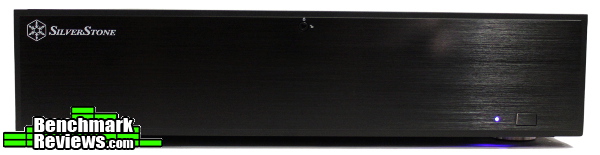
With relatively compact dimensions of 440mm (width) x 105mm (height) x 350mm (depth), the SilverStone ML04 still manages to include some interesting features. The exterior (or front panel, really) is what you’ll be staring at while the ML04 is sitting in an entertainment center, and SilverStone did a great job of dressing up that exterior from the previous ML03 – namely, by covering everything with a very nice brushed aluminum door. Far from “the easy way out,” I think this door is one of the ML04’s greatest strengths and allows for some of its better HTPC qualities.

One of the best features of the ML04 in my opinion is the lockable front panel. The power button itself can be locked, preventing any curious fingers from repeatedly powering on your HTPC (for a case that will probably sit in a living room, usually at a level right in front of a young child’s eyes, this becomes a must have feature that is immensely appreciated). The slight inconvenience of having to open a panel to swap a movie DVD or Blu-ray is more than offset by this feature. The solid aluminum brushed panel also conceals the I/O ports while allowing the case to blend in with any other equipment, and the power LED itself can be dimmed by a slider (or just turned off entirely). These are features that are very nice to have, and are usually only found on dedicated HTPC cases like the ML04 (these options are surprisingly more rare than they should be in this category).

The ML04’s 4.1″ (105mm) height means there’s only room for half-height expansion cards (unless you include the full-length slot above the motherboard’s rear I/O panel, which is designed more for fan controllers and CMOS switches). As a dedicated HTPC case, this is usually much more acceptable and a necessary tradeoff to get the case down to A/V equipment size. Most HTPC-class graphics cards come in a half height version, and TV tuner cards/audio expansion cards will as well. Besides, there’s the Grandia series from SilverStone if you need to accommodate more powerful hardware, the Milo series is designed for a different part of the market.

If you look closely you can pick out the mounting holes for four 80mm fans on this side panel. You’d probably want to select those fans carefully to keep noise down (and keeping the wiring clean would take some effort), but that’s a considerable amount of potential airflow for a half-height micro-ATX HTPC case. Even the open mesh panel ensures a decent amount of airflow, although it does provide an area for sound to easily escape (or dust to enter – but some of SilverStone’s FF81B‘s would fix that if it was a huge concern) . This may not be much of an issue, as the front door blocks most of the sound from the internals which is the “important” angle anyway. The type of cabinet you place the ML04 in will change how the sound escapes as well, so this will vary per user.

The left side contains some ventilation for the 3.5″ drive bay located under the optical drive, and should be sufficient to keep temperatures in check. SilverStone includes some rubber drive mounts for use in this location to help keep noise down, but your drive selection will be the determining factor here – and really, that’s true for any HTPC build (your component choices make the contributing factor to noise, the case itself can only do so much). The top cover includes this side (the right side / 80mm fan mounts stay attached to the base), so when removing or replacing the lid you’ll need to make sure this segment latches correctly – thankfully the smaller size makes this easier than some other cases that use this type of “wrap-around” panel.

The top of the ML04 is pretty uneventful barring the angled mesh vent for CPU cooling. An included magnetic filter provides some dust protection too and is easy to attach or remove for cleaning. The depth of the case (how far it would reach into a cabinet or shelf) is 13.78 inches (350mm), which is pretty shallow and should fit in nicely with other A/V equipment (the few other HTPC cases I’ve worked with have all been significantly longer in depth, making stacking other equipment on a shelf interesting or impossible).

The bottom of the ML04 highlights the locations for 2.5 and 3.5 inch drives, as well as the filtered power supply intake and the rubber feet (with the ones in front getting the “stereo” treatment). The hinged front panel should clear any equipment around the ML04, so if the heat produced stays within reasonable limits you could easily stack this case in among other home theater equipment.
Now that the external features are covered, let’s pull off the cover and look inside.

There aren’t many additional accessories included with the ML04 but the magnetic dust filter and reusable cable ties are welcome items. The plastic key to unlock the front panel is a must of course, and there’s an additional set of yellow rubber gaskets for dampening vibrations from hard drives – as well as a simple manual and a bag of screws. I still struggle to understand why 2.5″, 3.5″ and 5.25″ devices all have different screws, but it doesn’t make sorting through a collection of screws any easier (I’ve been irrevocably spoiled by cases that separate these screws for you…).

Anyway, this is a SilverStone case – and an HTPC case at that, so you should know to have a screwdriver close by. I’m not sure if any HTPC case I’ve worked on had extensive tool-less features, so this is to be expected. Removing three screws from the back releases the top lid and exposes the internals. The layout is actually pretty spacious for a micro-ATX HTPC enclosure, and I’m glad to see I won’t need to cram my hands in tight spaces to attach drives or route cables.

The layout is pretty straightforward as well (essentially the same as the previous ML03), and everything is readily accessible. I didn’t need to remove the bracing rod (necessary to keep the sides square) for any part of the install, but that’s easily removed too if it bothers you. In fact, I found those two metal rods to double as convenient handles for lifting and turning the system during the build process.
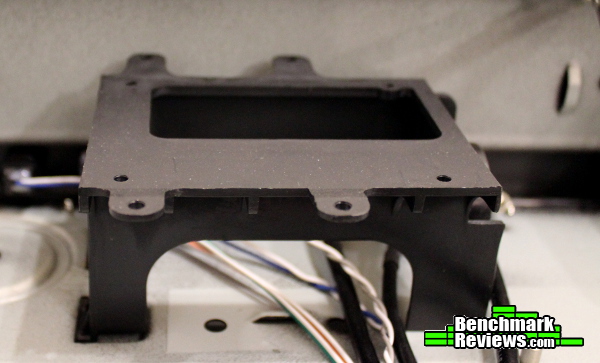
This unique apparatus is a stand for mounting either a 2.5″ or 3.5″ hard drive (or SSD, of course). You’ll get a better idea of how it works on the next page, but I can’t help but wonder if there could have been a better solution. The stand helps drives clear the motherboard, but it just seems very inefficient – to mount drives, you’ll need to remove it and flip it upside down to gain access to the mounting screw locations. Honestly, there’s already a 3.5″ drive bay under the optical drive, I would have preferred to stack a couple 2.5″ drives on their edges next to the front panel instead of having to deal with this bracket.

There isn’t a lack of 2.5″ drive mounting locations though as two can be mounted instead of an optical drive up top, one in front of the power supply and one under the optical drive bay (attaching SATA power cables might get tricky on these two). At least there’s quite a few tie down points to help direct and manage cables to these drives since they’ll be pointing in different directions.

Since this is a mATX home theater PC case, I wanted to at least show what that size of board would look like installed. This Biostar board is a little “narrower” than some mATX cases (most with four DIMM slots will extend to the additional set of standoffs, right in front of the plastic drive bracket). You can see that stock coolers (and only low profile aftermarket CPU coolers, up to 70mm in height) will be able to fit easily in the ML04.

I chose to utilize my ASRock FM2A85X-ITX board for this build, as I like having the additional graphics power of AMD’s APU processors in systems without discrete graphics. Mini-ITX boards free up even more room, although if you really want to have a small HTPC you might want to take a look at SilverStone’s 7-liter ML05. The relatively compact ML04 looks almost cavernous with a mini-ITX board, but there’s enough space in front of even a micro-ATX board to do a decent job of managing cables.
Now that we’ve seen how much space there is for mATX and mini-ITX boards, let’s place the rest of the components in and see how it looks.

A 3.5″ drive fits in this bay and mounts to the holes that already have rubber grommets installed (an extra set of these grommets is included for mounting a 3.5″ drive in the optical drive bay). This is probably the best location for a bigger hard drive, and the vibration dampening grommets should help cut down on noise that is transmitted to the chassis.

If you’d like you can also use the plastic stand to install either a 3.5″ or 2.5″ drive. The screws to secure this stand to the chassis are located on the right side, so to keep them accessible the drive hangs off quite a bit to the left. The entire assembly needs to be removed to attach drives – it’d be nice to find a way to avoid that if possible.

2.5″ drives fit a little better on the stand (although that doesn’t impact performance whatsoever, that’s purely a cosmetic observation) but again the bracket needs to be removed to install or swap drives.

If you need the storage space and are willing to give up the optical drive bay to get it, two more 2.5″ drives (or a single 3.5″ drive) can be installed in this location, just remember to install the additional vibration-dampening grommets for the 3.5″ drive.

If you opt for a full length Blu-ray drive (or DVD burner/combo drive – although these are easier to find in shorter sizes), you’d better be using the recommended 140mm sized power supply. SilverStone sent along one of their Strider Essentials 80+ series of PSUs (the 400W SilverStone Strider Essentials, model SST-ST40F-ES, $44.99 Newegg / Amazon) which is a great match for this case. Its 140mm length allowed a full size (Sony Optiarc BR-5100S, 190mm / 7.48 in long) Blu-ray drive to fit if only just barely – there isn’t another millimeter of wiggle room here. A right angle SATA connector is a must, and low profile SATA leads would be helpful too (the ones on the Essentials series PSU from SilverStone fit nicely). You may even want to remove the support bars from the top and side of the case (to take advantage of the case flex) to help line up the mounting holes for the optical drive – I didn’t need to, but I had to apply an uncomfortable amount of pressure to get the Blu-ray drive secured. At least I know the power/data cables won’t jiggle loose!

The mini-ITX motherboard frees up a lot of room, and most of the cabling I could just tuck under the optical drive bay. To clean up the wiring a little more, I’d probably spend some time bundling the LED and switch wires together and sleeving them to make them easier to route and manage. The A10-5800K APU I’m using means I can get by with the integrated graphics, but wiring could get a little more interesting with a full micro-ATX motherboard and all PCI expansion slots filled. The cable ties included with the case and the adequate tie-down points in front of those expansion slots will undoubtedly help though, and with a little work you could have very tidy wiring (that plastic drive bracket will actually redeem itself a bit with micro-ATX boards, as cables can be routed underneath it pretty easily – in fact, looking at these pictures later helps me realize I should have used it for routing the main 24-pin ATX cable on this build).

With the system assembled there’s a couple more things to cover – or uncover, perhaps? The entire front face plate (made entirely of a hefty aluminum) flips down to expose the USB 3.0 / headphone / mic ports, optical drive and power/reset buttons. It also manages to hide all of the logos prevalent on optical drives for a cleaner appearance (perhaps the SilverStone logo would have been better located on the inside panel as well for a completely uninterrupted look – even just the “snowflake” logo in the corner would be better). On the back of the opened cover, you’ll see a latch that slides down to “lock” the external power button, preventing that button from powering on or off the system which is a wonderful and welcome option for an HTPC case.
The power LED shines through the front face, but it’s dim enough to not be distracting. If you disagree, place your finger right underneath the LED and you’ll feel a little slider that allows you to adjust the brightness (or just block the LED entirely). These little touches are what getting a dedicated HTPC case are all about, and are thoughtful additions for HTPC users. The magnet used to hold the hefty aluminum face plate could stand to be a bit stronger, but one good “squeeze” depressed the plastic covering enough to get a little stronger attraction between the magnets. I’d assume there’s probably some variation between the magnets used, so your experience may differ.
You have to temper your expectations a bit when building a system in a dedicated HTPC case. Sure, you could just take an old ATX tower and set it next to a TV, but most living rooms aren’t designed to accommodate full-tower PC cases. Giving up the extra airflow and expand-ability for a dedicated HTPC enclosure gives you access to specific features like a subdued front panel and compact dimensions while still including necessary features like an optical drive and a full-size power supply (I have previously preferred standard ATX power supplies as their larger fans are generally quieter – with the recent focus on small form factors, this has started to change). While it’s still likely a niche market, the ML04 provides a very elegant option for a dedicated home theater PC.

Performance for HTPC cases means something a little different than a typical enthusiast oriented case, in my opinion. Without room for multiple huge fans, airflow usually takes a back seat to compact dimensions and appearance. Still, in stock form the ML04 provided enough room to allow a 100W APU to do some light gaming (although the stock cooler limited any overclocks), and the fan noise of the stock AMD cooler stayed unnoticeable while watching movies or browsing the web. This is really all you could ask for in a slim HTPC enclosure like this, and the ML04 manages it well. If you really wanted to keep things cool, you could take advantage of the four 80mm fan mounting points on the side. It’s too bad there isn’t room to add a closed loop liquid cooler to allow for some extra performance out of the APU, but that’s a very niche feature better suited to gaming-oriented cases or larger HTPC enclosures (optimized for more airflow like the Grandia series from SilverStone or the Node 605 from Fractal Design); hardly something to expect from an HTPC case in the first place.
Appearance is where SilverStone excels with the ML04. Using their customary brushed aluminum and minimalist approach, the ML04 should blend in nicely to whatever equipment you have. The dimmable power LED is subtle enough to do its job without blinding you, and can be turned off as well. Overall, the ML04 is one of the best looking slim HTPC cases I’ve had the chance to work with and a clear cosmetic improvement over the previous ML03 (which wasn’t hurting either) – I’d recommend it for anyone that wants to add a touch of class to their home theater setup.
Being a SilverStone case, the ML04 is constructed well. It needs the cross braces to keep it from flexing, but these aren’t much of a problem to work around (and they contribute immensely to the stability of the case). It’s a better option than losing a lot of space in the corners of the case anyway. The steel used is more than adequate, and the brushed aluminum front cover is very solid and swings open smoothly. Most of the attention was spent on the outside of the case, as the interior is unpainted and left a little more “rough,” but that’s very standard among HTPC cases on the market and barely worth a mention.
With the ability to fit four low-profile expansion cards, an optical drive and micro-ATX components the ML04 can accommodate a decent amount of functionality. All of the HTPC-oriented features are there, with the possible exception of some more noise isolation (the solid aluminum front door does a great job of redirecting any noise from drives and internal components, but your component choice is going to make the most difference). There’s even room to add additional airflow if you are willing to wire up four 80mm fans. The adjustable power LED is perfect for a living room environment, and the lockable front power button (and the panel itself) is a great feature that is very welcome on an HTPC case. It’d be nice to have some more tool-less features, but those types of conveniences are rarely found in this category anyway – I’d settle for a little re-engineering of the plastic 2.5″/3.5″ combo drive mount so they’re even easier to install. The included magnetic fan filter is a nice addition, but I’d almost prefer a custom 80 x 320mm dust filter for use with the side fan intakes.
In January of 2014, the SilverStone ML04B was selling online for $74.99 (Newegg / Amazon). That’s a little on the expensive side for an enclosure that fits only half-height cards and arrives without a PSU, but the HTPC specific features and compact dimensions ensure the ML04 remains one of the only options to pick from if you truly want a dedicated home theater PC case. I had trouble finding a case that had the shorter depth to fit in among other A/V components and still fit an ATX PSU and an optical drive – the ML04 does that in one of the best looking HTPC cases I’ve worked with.
While you can certainly spend (a lot) more on an HTPC case with even more features, if you want a compact enclosure that can provide the foundation for a dedicated living room entertainment PC the ML04 is a solid choice.
+ One of the best looking HTPC cases available in this size, brushed aluminum finish on front cover
+ HTPC-specific features, designed for the living room
+ Dimmable power LED
+ Lockable front power button
+ Shorter depth, should fit nicely with A/V components
+ mATX, optical drive and full size ATX PSU in a relatively compact case
– Half-height expansion cards only (one full-size “utility” slot)
– Magnet could be a little stronger to keep door closed when unlocked
– No included fans for airflow
– No “window” for IR remotes in front panel
-
Performance: 8.00
-
Appearance: 9.50
-
Construction: 8.50
-
Functionality: 8.50
-
Value: 8.25
Recommended: Benchmark Reviews Seal of Approval.
COMMENT QUESTION: Which HTPC enclosure to you prefer most?


