By Hank Tolman
Manufacturer: PINE Technology Holdings Limited, dba XFX
Full Disclosure: XFX provided the product sample used in this article.
AMD released their new lineup of GCN-based video cards back in October and the industry manufacturers have since been adding their own special tweaks and improvements to the initial designs. XFX has recently released their latest version of the Radeon R9 280X card in the form of the XFX Black Edition Double Dissipation Radeon R9 280X. The XFX R9 280X TDBD sports upgraded features like a factory overclock to 1080MHz, high quality DURATEC components, a dual-fan design, and the second generation of XFX proprietary Ghost Thermal technology.
 Although the Radeon R9 280X comes packaged with a new name, the actual GPU is unchanged from the Radeon HD 7970’s Tahiti, the GHz Edition anyway. That’s not to say the two cards are identical, however. AMD made some changes to the new video cards that definitely set them apart. The most interesting to me, as something I’ve been waiting for, is the ability to run three HDMI/DVI displays from a single card. DisplayPort just hasn’t made it over to the monitors yet and you still need an active converter cable to use a third monitor. That’ll cost you an extra $30 or so. AMD also added TrueAudio to the R9 290X and R7 260X (although it was technically part of the R7 260X’s predecessor, the 7790, as well).
The rest of the story is pretty cut and dried. The R9 280X, released two years after it’s predecessor, the HD 7970, costs $250 less than the 7970 did on release and it runs faster. Two years is plenty of time for the fabrication process to work out the kinks. The yields will be at all-time highs and Graphics Core Next is doing great. It looks like AMD is moving the price down, keeping manufacturing up, and adding a few enhancements while they work on something new.
Processor & Bus
Bus Type : PCI-E 3.0
Chipset version : Tahiti XTL
GPU Bus (bit) : 384
GPU Clock : 1080MHz
Performance Category : Performance
Stream Processors : 2048
Memory
Memory Bus : 384 bit
Memory Clock : 6.2 GHz
Memory Size : 3 GB
Memory Type : DDR5
Feature Technologies
AMD HD3D Technology : Y
AMD Hybrid Graphics Technology : Y
AMD PowerPlay Technology : Y
AMD Stream Technology : Y
Environmental
RoHS : Y
Display Output
Display Port ready : 1.2
HDMI Ready : 1.4a
Max Supported Resolution (ANALOG) : 2048 x 1536
Max Supported Resolution (DIGITAL) : 2560 x 1600(DVI);4096 x 2160(HDMI;DP)
Output – DL-DVI-I : 1
Output – HDMI : 1
Output – mini DP : 2
Output – SL-DVI-D : 1
When the XFX Radeon R9 280X Double Dissipation Black Edition Video Card arrived, I didn’t know what it was. XFX Packed it up very well in a gigantic, nondescript, brown shipping box that looked like it could have fit a mATX case. Inside was the XFX R9 280X TDBD, gently packed in mountains of packing paper and bubble wrap. The actual box of the XFX Radeon R9 280X Black Edition Video Card is a typical long, rectangular box that opens. It seems like I’ve been seeing this style of box more and more.
 The XFX R9 280X TDBD doesn’t come with a lot of accessories, but you’ll find everything you need. There are two PCI-E PSU adapters, an eight pin and a six pin, just in case your power supply doesn’t have them already. As you would expect, a driver disc is included, along with a quick installation guide and a warranty guide. There are also some advertisements for other XFX gear included with the accessories. And that is it, folks. For a $400 video card, I might expect some trinket like a sticker or a lanyard or a Do Not Disturb doorknob hanger. No such luck, although you’ll probably get some sort of a Never Settle bundle deal. An R9 280X is bound to get you at least two or three free games.

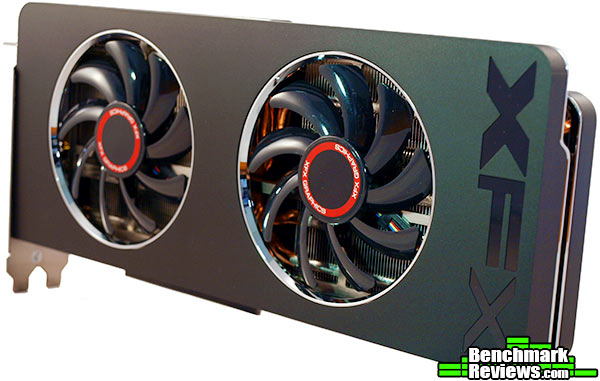
Upon unpacking, I was quite impressed by the sleek design and appearance of the XFX Radeon R9 280X Black Edition Double Dissipation video card. The black surfaces were covered with a plastic protector to keep dust and fingerprints off, which I promptly removed. The face of the R9 280X TDBD is only decorated by the XFX logo on the end and red rings around the center of the fans. The two 9-bladed IP-5X dust-free fans are the center of attention, drawing the viewer to the natural conclusion that the XFX Radeon R9 280X TDBD is meant to run fast and cool. The I/O panel on the XFX Radeon R9 280X TDBD is pretty typical for this level of video card. The two DVI ports stand out since they are colored red, rather than the standard black or white. One of the DVI ports is a Dual-Link DVI-I, carrying both digital and analog signals, and the other, according to XFX, is a Single-Link DVI-D port, although you couldn’t tell by looking at it. There are also two mini DisplayPorts and an HDMI port. The DisplayPorts are standard 1.2 ports and the HDMI port is a standard 1.4a port. With 4K resolutions being such a big deal now, I can forsee the potential of devices out later this year with HDMI 1.4b ports or even (dare I say it?) HDMI 2.0 ports. With AMDs latest drivers, both DisplayPorts and the HDMI port support 4K resolutions up to 4096×2160. The I/O panel also touts the XFX logo, which just happens to be part of the R9 280X TBDBs cooling features as well.
The top of the XFX Radeon R9 280X gives us a glance at the PCI-e power connectors, which can give us an idea of the potential power consumption of the card. The R9 280X TDBD has a 6-pin and an 8-pin power connector. The PCIe slot itself lets a PCIe x16 card draw up to 75W of power. A 6-pin adapter gives it another potential 75W and the 8-pin adds up to another 150W. All told, that is up to 300W of power that could be drawn by the XFX Radeon R9 280X Black Edition video card. I really doubt you would be able to max that out, but it does give us an idea of the potential.
The XFX Radeon R9 280X Black Edition isn’t your standard R9 280X, if you couldn’t tell from the name. The XFX R9 280X TDBD is set apart first and foremost because of it’s factory overclock. The run-of-the-mill R9 280X is clocked the same as the Radeon HD 7970GHz Edition at 1000MHz (or 1GHz, thus the moniker). The XFX Radeon R9 280X Black Edition TDBD is clocked at 1080MHz, an 8% increase in clock speed over the stock R9 280X cards. But what else sets the XFX Radeon R9 280X Black Edition Video Card apart from the pack?
 One technology that XFX touts on the R9 280X TDBD is its Double Dissipation technology, which claims to provide temperatures up to 7 degrees cooler than the competition while also remaining 13dB quieter than the competition. The Double Dissipation technology is interesting to me. It uses a full-length heatsink with a single point of contact at the GPU. Three copper heatpipes channel heat away from the GPU. The heatpipes are each 7mm in size. XFX says that their Triple Direct Copper Heatpipes add one pipe over the competition, but I’m not sure who they are talking about when they say that. I’ve seen a lot cards with five heatpipes and some with four. For example, the HIS R9 280X IceQ X2 has five heatpipes, and the MSI R9 270X GAMING video card has four.
 The XFX Double Dissipation also touts the Special XFX Exhaust Vent. Basically, that refers to the XFX logo cut into the bracket face. This supposedly provides 30% more exhaust airflow and by itself reduces temperatures by up to 2 degrees Celcius. It does look significantly more open than most bracket vents. The R9 280X TDBD also includes XFX’s Duratec components. Those consist of solid capacitors, ferrite core chokes, IP5X Dust Free fans, a 2oz Copper layer on the PCB, and lower RDS on MOSFETs.
Let’s talk about a feature I’m kind of in love with. It’s actually not just a feature of the XFX Radeon R9 280X Black Edition Double Dissipation Video Card, but one that spans the entire AMD Radeon RX 200 series of cards. That feature is the support for an additional TMDS (HDMI/DVI) interface. I’ll be honest, I buy inexpensive monitors. 30″+ and monitors with resolutions higher than 1080p are expensive. Sure, you can find some monitors with DisplayPorts, but I’ve bought five monitors in the last year and not a single one has a DisplayPort. It’s another $30 or so to buy an active cable to get another monitor to work. For those reasons, I’m excited that AMD added support for another TMDS interface. There is a catch, though.

AMD took the easy way out (read – less expensive) when adding support for another TMDS interface. Because DVI and HDMI interfaces are tied to their own clock generator, unlike DisplayPort, you would technically need to add another clock generator in addition to the two for TMDS device already present to be able to use another monitor. In the 200 series, AMD was able to use a single clock generator for multiple TMDS interfaces. Since the clock generator dynamically adjusts to the interface based on the display, however, the two displays must use identical clocks in order to function off a single clock generator. You’ll basically want to have two of the same monitor to use this feature, which is actually pretty ideal for Eyefinity.
The Microsoft DirectX-11 graphics API is native to the Microsoft Windows 7 Operating System, and will be the primary OS for our test platform. DX11 is also available as a Microsoft Update for the Windows Vista OS, so our test results apply to both versions of the operating system. All of the tests in this review were run with DX11 graphics.
While a lot of gamers use the 1680×1050 desktop resolution, 1920×1080 is rapidly becoming the most popular. Because it is the more demanding of the two, I ran all of my tests at a resolution of 1920×1080. You can expect slightly better frame rates if you are using 1680×1050, but the difference probably won’t be dramatic.
I used a combination of synthetic and video game benchmark tests in this article to illustrate relative performance among graphics solutions. Our benchmark frame rate results are not intended to represent real-world graphics performance, as this experience would change based on supporting hardware and the perception of individuals playing the video game.
- Motherboard: Biostar Hi-Fi Z87W Motherboard
- Processor: Intel Core i5-4670K Sandy Bridge CPU 3.4GHz
- System Memory: 16GB Kingston HyperX Beast DDR3-2133MHz
- Disk Drive: Seagate 1TB SSHD ST1000LM014
- PSU: Corsair CMPSU-850TX 850W 80-Plus Certified
- Operating System: Windows 7 Professional 64-bit
Synthetic Benchmarks
- 3DMark11
- “Extreme” settings (1920×1080)
- ComputeMark 2.1
- Extreme Presets, 1920×1080
- Unigine Heaven Benchmark 4.0
- Extreme tesselation, high shaders, 4xAF, 8xAA
Gaming Benchmarks
- Assassin’s Creed III
- Very high textures, high shadows, tesselation, SSAO, advanced shadow sampling, 4x AA, 16x AF
- Far Cry 3
- Performance Presets
- Tomb Raider
- Ultra textures, AFx16, TressFX Hair, FXAA, Ultimate Settings
- Bioshock Infinite
- Ultra Quality Level Presets (1920×1080)
- Lost Planet 2 Benchmark
- High textures, High shadows, High DX11, High rendering, CSAA32X
3DMark11 is Futuremark’s latest iteration of the video card software benchmark suite, building on the features of 3DMark Vantage and 3DMark 06 as well as earlier version. It’s optimized and intended for testing DirectX-11 capable hardware running under Windows Vista or Windows 7.
- 3DMark11
- “Extreme” settings, 1920×1080 resolution

Those are the Benchmark Scores, but as part of the testing, 3DMark 11 goes through four different graphics tests. The first two are shown in the chart below.

Tests 3 and 4 are shown in the chart below.
ComputeMark is actually a relatively old benchmarking tool, but it really stresses out even the highest-end GPUs. ComputeMark 2.1 is a Compute Shader benchmark and a GPU burner. It measures the compute power of the GPU by putting it through a serious of rigorous tests. Those tests include Fluid 3DTex, Fluid 2DTexArr, Mandel Vector, Mandel Scalar, and QJuliaRayTrace.

The Unigine Heaven 3.0 benchmark is a free publicly available tool that grants the power to unleash the graphics capabilities in DirectX-11 for Windows 7 or updated Vista Operating Systems. It reveals the enchanting magic of floating islands with a tiny village hidden in the cloudy skies. With the interactive mode, emerging experience of exploring the intricate world is within reach. Through its advanced renderer, Unigine is one of the first to set precedence in showcasing the art assets with tessellation, bringing compelling visual finesse, utilizing the technology to the full extend and exhibiting the possibilities of enriching 3D gaming.
The distinguishing feature in the Unigine Heaven benchmark is a hardware tessellation that is a scalable technology aimed for automatic subdivision of polygons into smaller and finer pieces, so that developers can gain a more detailed look of their games almost free of charge in terms of performance. Thanks to this procedure, the elaboration of the rendered image finally approaches the boundary of veridical visual perception: the virtual reality transcends conjured by your hand. The Heaven benchmark excels at providing the following key features:
- Native support of OpenGL, DirectX 9, DirectX-10 and DirectX-11
- Comprehensive use of tessellation technology
- Advanced SSAO (screen-space ambient occlusion)
- Volumetric cumulonimbus clouds generated by a physically accurate algorithm
- Dynamic simulation of changing environment with high physical fidelity
- Interactive experience with fly/walk-through modes
- ATI Eyefinity support
- Unigine Heaven 3.0
- High Shaders, Extreme tessellation,8xAA, 4xAF

Up next are the gaming benchmarks.
Far Cry 3 is the next installation in the Far Cry series which pits players against a tropical landscape and hostile indigenous forces. After escaping from ruthless kidnappers, the player is sent on a mission to avenge his brother’s death and find and rescue the remaining members of his initial party. With DX 11 optimization, Far Cry 3 uses the Dunia engine to render the island and village landscapes in stunning detail. One of the most difficult jobs of any graphics engine is to render water, and Far Cry 3 has plenty of that.
- Far Cry 3
- High Settings, DX11, 4xAA, 4xAF

The Tomb Raider game includes a benchmark in it that highlights the TressFX features used in the game. TressFX is specifically a hair quality physics feature that aids in realistic looking hair in games. Each strand of hair is given dozens of connections in a chain-like fashion. Each strand can be affected by gravity, wind, and head movements. The hair is also given collision, so that the overlapping hairs don’t merge together and they don’t penetrate solid surfaces like the character’s head.

Bioshock Infinite, by Irrational Games, was one of the most highly anticipated games of its time. According the vast majority of reviews on the game, it didn’t disappoint. Having played it, I can tell you that the story line grabs you and doesn’t let go. The moral and ethical quandries and twisting plot will keep you in front of your screen for hours on end. The graphics are nothing to shake a stick at either. That being said, Bioshock Infinite was built on the aging (although still widely used) Unreal Engine 3. That same engine has been in use since DX9 and was designed to take full advantage of shader hardware. In Bioshock Infinite, of course, the engine uses DX11 features to make the graphics that much more realistic.

Capcom provides a stand-alone benchmark tool for Lost Planet 2. Reviewers love stand alone benchmarks, and users should, too, since they allow the evaluation of a system without the trouble and expense of purchasing and configuring the actual game. Lost Planet 2 takes place on E.D.N. III, the same planet in the original Lost Planet game, but ten years later. The snow has melted and somehow giant tropical jungles have grown to fill the landscape.
Lost Planet 2 takes advantage of DX11 features including tessellation and displacement mapping on water, level bosses, and player characters. In addition, soft body compute shaders are used on ‘Boss’ characters, and wave simulation is performed using DirectCompute. These cutting edge features make for an excellent benchmark for top-of-the-line consumer GPUs. There are two parts to the benchmark: Test A, which is a semi-random script that’s a good example of normal game play, and Test B, which is a deterministic script that places a significantly heavier load on the card being tested.

Assassin’s Creed III is based on the AnvilNext engine and uses Havok CPU physics. This makes it a perfect game to test using both NVIDIA and AMD graphics cards, as long as your CPU doesn’t bottleneck performance at all. Assassin’s Creed III is very visually intensive and utilizes DX 11 features, especially tesselation, to provide an extremely realistic experience. Wood and clothing grains are extenuated and movement and environment look more natural than ever.
Assassin’s Creed III is the latest in the Assassin’s Creed line and follows Desmond Miles as he steps into the memories of his ancestors. This time, Miles is transported to early American history as his native American ancestor, Connor, battles his way through both sides of the American Revolutionary War. The area covered in the game is enormous and the landscape and features are very detailed.
- Assassin’s Creed III
- High Settings

That’s it for the benchmarks. Now let’s take a look at temperatures and power consumption.
We’re at the start of a transition: for years the PC industry has produced faster and more powerful CPUs and GPUs, which always came with ever-higher power draws. But as the industry moves to smaller and smaller fabrication processes, we’re seeing power draws drop, and clever designs save even more power. Users benefit from GPUs that disable large portions of their circuitry when idle, leading to dramatically lower power draws and very cool idle temperatures. At the other end of the scale, reduced power at the higher end means smaller coolers, quieter fans, and less heat to worry about dissipating.
At the start of this test, I measure the idle temperature of the card with the card sitting at the Windows desktop, using the GPU-Z utility. Next, I start FurMark’s stress test and let it run until the temperature curve flattens and the temperature has not varied more than 1 degree in the last five minutes.
FurMark does two things extremely well: drive the thermal output of any graphics processor higher than applications of video games realistically could, and it does so with consistency every time. FurMark works great for testing the stability of a GPU as the temperature rises to the highest possible output. The temperatures discussed below are absolute maximum values, and not representative of real-world performance.
The Double Dissipation cooling technology does a very good job at keeping this R9 280X cool under pressure.
| Ambient Temperature | 20C |
| XFX R7790 Idle Temperature | 29C |
| XFX R7790 Load Temperature | 69C |
The new generation of video cards– AMD’s Southern Islands and NVIDIA’s Kepler— are certainly fast, but their new power saving features are almost as impressive. The move to a smaller process has helped, but both products benefit from a variety of power-saving techniques, including aggressively underclocking and undervolting themselves in low demand scenarios, as well as turning off unused portions of the card. Both companies also use other, proprietary methods to keep power usage low.
To measure isolated video card power consumption, Benchmark Reviews uses the Kill-A-Watt EZ (model P4460) power meter made by P3 International. A baseline test is taken without a video card installed inside our test computer system, which is allowed to boot into Windows 7 and rest idle at the login screen before power consumption is recorded. Once the baseline reading has been taken, the graphics card is installed and the system is again booted into Windows and left idle at the login screen. Another power reading is taken when the display sleeps, and then I measure the power under a heavy gaming load. Our final loaded power consumption reading is taken with the video card running a stress test using FurMark.
Below is a chart with the system totals displayed in watts for each specified test product:
| Situation | Power |
| Windows login, no video card | 52 watts |
| Windows login, video card | 69 watts |
| Windows desktop | 71 watts |
| Windows desktop, display sleep | 62 watts |
| Gaming load | 158 watts |
| FurMark load | 212 watts |
The XFX R9 280X falls right in line with what we would expect to see from a high-end graphics card. In fact, the numbers are very close to what we saw from the GTX 760 and the Radeon HD 7970. No surprise there, considering the R9 280X is practically the same card. In all likelihood, you’ll never hit anywhere near 200W with the XFX R9 280X TDBD under any practical circumstances.
IMPORTANT: Although the rating and final score mentioned in this conclusion are made to be as objective as possible, please be advised that every author perceives these factors differently at various points in time. While we each do our best to ensure that all aspects of the product are considered, there are often times unforeseen market conditions and manufacturer changes which occur after publication that could render our rating obsolete. Please do not base any purchase solely on our conclusion, as it represents our product rating specifically for the product tested, which may differ from future versions. Benchmark Reviews begins our conclusion with a short summary for each of the areas that we rate.

Now that the Tahiti core has been around for a while, higher yields mean more solid GPUs. That means factory overclocks can safely and stably attain higher levels, thus giving your typical Tahiti based card a better level of performance. That is certainly the case with the XFX Radeon R9 280X TDBD. The stock 1080MHz GPU clock takes the XFX R9 280X the benchmark scores we saw earlier in the testing section. The XFX R9 280X TDBD easily beats the stock 7970 and the GTX 670 we used to test against in every benchmark expect one.
The XFX R9 280X TDBD is a good looking video card, in my opinion. It isn’t one of the coolest designs I have seen, but I do like the sleek smoothness of the plain black design. I also like the use of red on the I/O panel to break up the monotony. The XFX R9 280X TDBD doesn’t rely on an image-laden housing to make itself visually appealing, but it also doesn’t really have anything that shows it off once you get it into your case, which is where it is going to spend most of its time. The matte black finish just blends into the dark interior. If you have a windowed case, like I do, the XFX R9 280X isn’t going to shine, even though it will take up a good portion of that windowed space.
Like most hardware manufacturers, XFX prides itself on using high quality components in the construction of their parts. The XFX R9 280X TDBD is no different, using the same Duratec components that we are used to seeing in XFX video cards. Those components include a 2oz copper PCB, dust-free IP5X fans, and high quality parts like solid capacitors and ferrite core chokes. As we saw from the close-up of the back of the XFX R9 280X TDBD, XFX isn’t sloppy in their production, either. The XFX R9 280X TDBD is solidly built and lives up to XFX’s standards.
Functionally, the XFX R9 280X TDBD has a lot to offer. It incorporates all of AMD’s latest advancements (other than TrueAudio) including the ability to use three TDMS displays simultaneously, GCN 2.0, and OpenCL 1.2 support. The XFX R9 280X goes one step further by including a huge factory overclock up to 1080MHz on the GPU clock. They also use their proprietary technologies to make the card run quiet, cool, and efficiently. Other than the overclock, these are all things that we expect out of video cards today. That means that the real functionality value added into the XFX R9 280X TDBD comes from the factory overclock. As we saw in our tests, that overclock pushes the XFX R9 280X TDBD to some great performance numbers.
One of the best features I find on the XFX R9 280X TDBD is its value. As of January 2014, the XFX R9 280X TDBD retails for $439.99 (Newegg / Amazon). That places it below most Radeon HD 7970 cards still on the market. While the two cards use the same GPU, the XFX Radeon R9 280X is highly overclocked and will outperform those GPUs. It also includes the newer features available on the R9 200 series. The XFX R9 280X sports a pretty average price for a factory overclocked R9 280X, putting it in direct competition with other manufactures. That being said, the 1080MHz core clock is one of the higher factory overclocks on the R9 280X cards.
Pros:
+ Great Performance
+ Support for 3 TDMS displays
– Very Skimpy on the Accessories
– Nothing Flashy about the Looks
-
Performance: 9.00
-
Appearance: 7.50
-
Construction: 8.75
-
Functionality: 8.50
-
Value: 8.75


