By Jason Vaught
Manufacturer: Cooler Master Ltd. Inc.
Product Name: Elite 110
Model Number: RC-110-KKN2-AMZ
UPC: 884102025877 EAN: 4719512046876
Price As Tested: $49.99 (Newegg | Amazon | CMStore)
Full Disclosure: The product sample used in this article has been provided by Cooler Master.
The Cooler Master Elite 110 Mini-ITX Computer Case is a compact, cube style case that can handle some full sized desktop components, while maintaining a relatively small footprint. With the ability to handle a ATX sized power supply, and desktop graphic cards up to 210mm (8.26 inches), the Elite 110 is aimed at more than just the niche market. Sporting the ability to hold 4 SSDs or 3 HDDs, storage options are not a problem.
In the past I normally stayed away from small or “tight” cases, mainly because they lacked sufficient space, at least for my tastes. But with the ease and portability of the Mini-ITX platform, cases like the Elite 110 offer little sacrifice in the way of full size performance and features.

| Model | RC-110-KKN2-AMZ |
| Color | Midnight Black (black interior) |
| Material | Appearance: polymer front mesh panel Case body: Steel alloy |
| Dimension | 280 x 260 x 208 mm (11.1 x 10.3 x 8.2 in) |
| Weight | 2.7 kg / 5.9 lbs |
| Form Factor | Cube Style / LAN Box / HTPC |
| M/B Type | Mini-ITX |
| 3.5″ Drive Bay | 3.5″ HDD x 3, or 3.5″ HDD x 2 + SSD x 2 or 3.5″ HDD x 1 + SSD x 3 or SSD x 4 |
| I/O | USB 3.0 x 2, Audio In & Out |
| Expansion Slots | 2 |
| Cooling System | Front: 120mm fan x 1 (installed, or convert to 140mm fan x 1) Side: 80x25mm fan x 2 (optional) |
| Power Supply | Top Mount, Standard ATX Form Factor up to 180mm Long |
| Maximum Compatibility | VGA card length: 210mm / 8.3 inch CPU cooler height: 76mm / 3 inch PSU length: 180mm/ 7.1 inch (w/ less cable management) 142mm / 5.6 inch (w/ full cable management) |
| Special Features | Standard ATX PSU Support, 120mm Radiator Support Up to 8.3 inch Long Graphics Card Support |
| Accessories | Accessory Kit |
| Warranty | 2 years |
The Cooler Master Elite 110 is the newest member in the Mini-ITX Elite Series. Considerably smaller than the Elite 120 and the Elite 130, as you can see here, it provides an even smaller footprint than it’s predecessors.

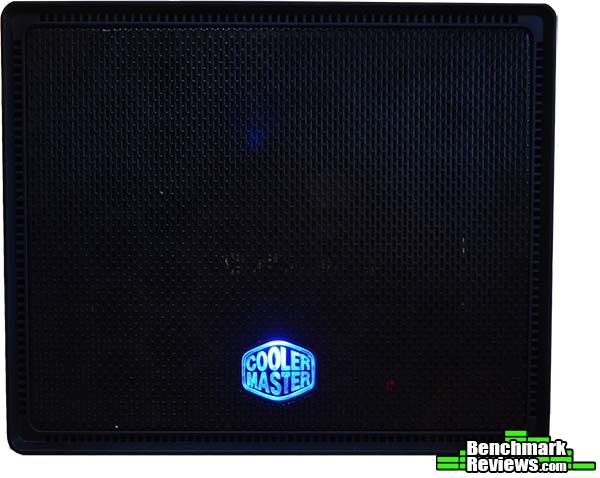
The front panel of the Cooler Master Elite 110 features a full mesh grill and vents built directly into the bezel’s edge. Also built into the front bezel is the power switch which also serves as the case badge and power LED.
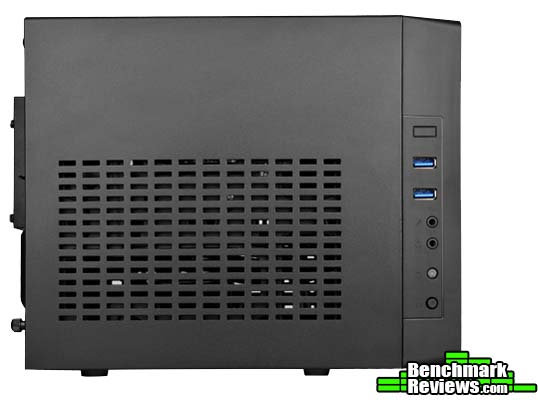
The right side of the bezel features two USB 3.0 ports, microphone, headphone, HDD status LED, as well as the reset switch. It’s worth noting that there appears to be an empty USB slot above the USB 3.0 ports, assuming Cooler Master wanted to allow an upgrade or modification in the future.
The rear of the case features two expansion slots, a small vent located underneath the power supply for the air from the front intake to escape.

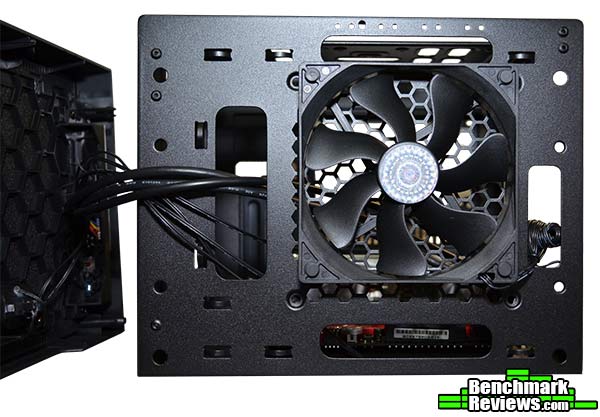
There is also an optional fan placement on the right side of the case for 2 x 80mm fans (not shown). This would allow more air flow intake or exhaust. However, you lost a SSD mounting spot by utilizing the 80mm fan mounts.
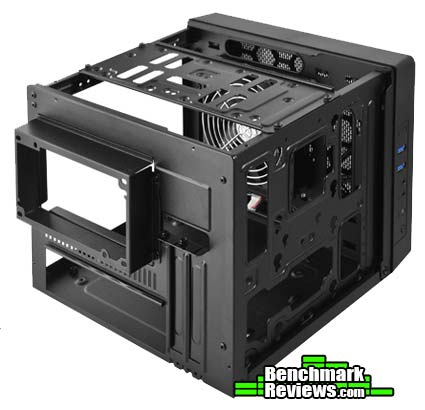
Unlike similar Mini-ITX cases, Cooler Master chose to go with a single 3 sided cover instead of individual panels. This is a fitting option seeing as how nothing is attached to the cover and the frame underneath is self contained.
With the cover removed, you can see hard drive mounting points across the cross member and down the right side of the inside of the case. Cooler Master utilized some proprietary screws and grommets for mounting the hard drives, so make sure you don’t loose or throw away your extras.
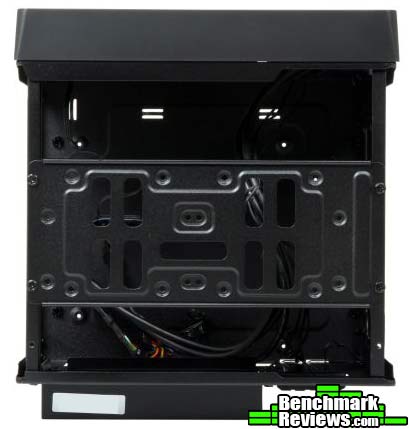
Here is a closeup of the cross member on top of the case frame. This easily comes off with the removal of the four screws pictured below. There is a catch though, it does not readily indicate as to the correct positioning for reattachment to the frame. Hopefully my photos will help you orient it correctly!
One of the things Cooler Master has done with this case that I absolutely enjoyed was having the USB 3.0 ports, headphone, microphone jacks on the side of the front bezel, and not attached to the door/cover itself. This allows easier servicing without having to worry about those wires getting in your way upon reattachment of the door/cover.
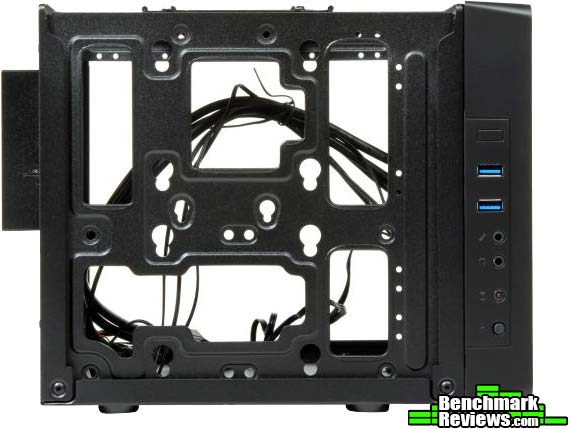
As you can see here, there is one slight caveat to the PSU placement, you’re forced to use the extruded bezel in order to attach the PSU to the case correctly. It does, however, help balance the weight of the PSU so that you don’t have as much weight being suspended solely by the 4 standard PSU screws. The extended PSU bracket does have a specific orientation, which is marked by the engraved word “TOP” on one side.
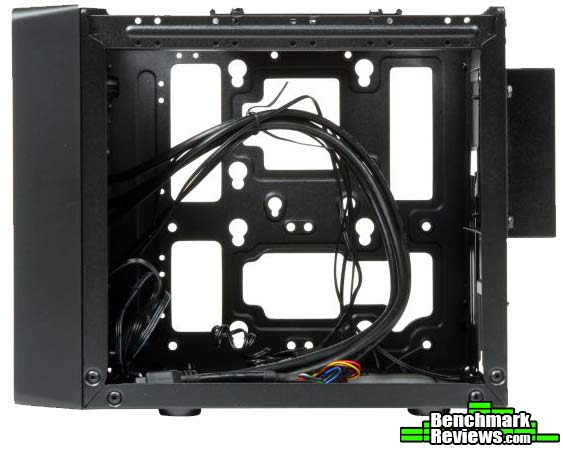
Now let us get to the build inside this mighty Mini-ITX case!
Now we’ll get down to the actual build inside this minimalist styled Mini-ITX case. Removing the top hard drive mount / cross member really helps aid in the build. With this case though, everything is gonna be tight. So you really want to plan out the steps of your build, starting at the with the vertical mounted hard drive(s) and/or 80mm fans, and finishing with the PSU and cable routing/tidying.
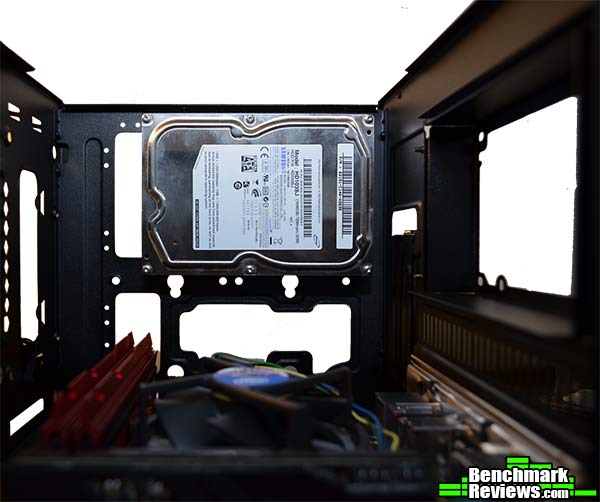
 As you can see, there is just enough room on the right side of the frame to mount either 1 x HDD and 1 x SSD or 2 x SSDs respectively. Below the hard drive pictured here you have the option to mount 2 x 80mm fans if you choose to. While I admire and understand the option for more fan mount locations, I cringe at the idea of using 80mm fans anymore. Mainly because if you want some real airflow, then they’ll be loud! I feel that they might be mandated to help with keeping the system cooler and aid in cooling your graphics card.
Now I’m sure you’ve been already thinking, what if my graphics card pushes the size limitation to the max, and the power connectors are on the back of the card instead of the side?! Well Cooler Master has thought about that as well, not only does this cutout allow more options for cable management, it also serves as an easy way to get to those connectors on the back of your graphics card! As you can see in this photo, the graphics card I installed does not require any extra power connections. So this, in my case, was a mute point.

While on the subject of cable management, as you can see, Cooler Master was thoughtful enough to include several tie down points all over this case. The only problem with them on the front of the case behind the bezel is that you’re limited to how much you can stuff in there based on the amount of room between the front part of the frame and the case’s bezel. As well as the stiff cables that are routed from the USB 3.0 connectors on the side of the front bezel. The front mounted fan also poses a small issue, as you have to route cables around it to not interfere with its operation.
With any computer case, aside from testing airflow, I will show you just how tight this case can get! I want to demonstrate photographically just how little room “goes to waste”! Now one thing that I wholeheartedly recommend is a modular or at least semi-modular PSU.
Also if you have the skills and you’re very comfortable doing so, I recommend using modified or short PSU cables if at all possible. This will greatly aid you in cable managment.
-
Motherboard: ASUS Maximus VI Impact LGA 1150 Intel Z87
-
System Memory: G.Skill Trident X-Series 16GB (2 x 8GB) DDR3 SDRAM
-
Processor: Intel Core i5-4670K Haswell 3.4GHz LGA 1150 84W Quad Core
-
Audio: On-board
-
Video: VisionTek Radeon HD 4670 1GB
-
Disk Drive 1: Samsung 1TB HDD
-
Disk Drive 2: Samsung 840 Pro SSD
-
PSU: Corsair AX Series AX760 760W
Ideally, the top down view of your case should look something like this, take note that the PSU draws air from the top and will exhaust it out the back, making it effectively no help to your airflow at all. Here you can also see a closed water-cooling loop installed. If y

If you choose to go the closed water-cooled loop option, note that you’re limited not only on the size of the radiator, but on the thickness of your water lines, as you can see here, they tend to press somewhat awkwardly against the PSU. This makes me very worried of installing a closed water-loop in this system, as only time will tell what kind of strain this will cause on the lines and the barbs.

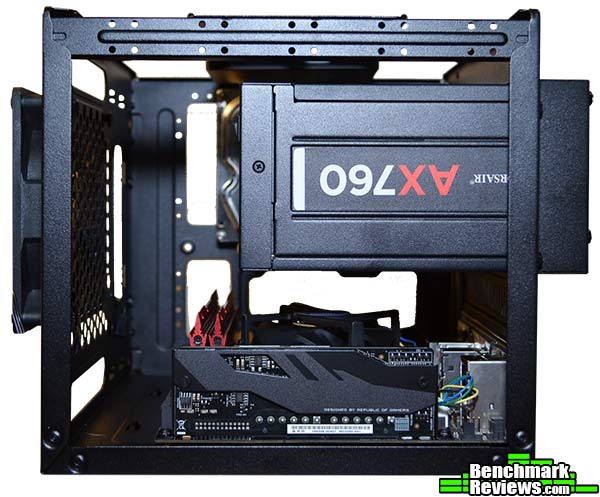
With the system assembled, and no cables attached yet, the Cooler Master Elite 110 Looks very sleek. Even with the extruded PSU bracket.
But, add the minimum amount of cables needed, and you get a very different looking monster! Granted these are standard length cables that came with the AX760. I think shortened or at least shorter cables would greatly benefit someone building in a case of this stature.

To the best of my ability, I attempted to route these cables as much out of site as possible. The 24-pin motherboard connector and its very stiff cable, proved to be the biggest challenge in terms of placement. But when it was all said and done, it finally fit together quite nicely.
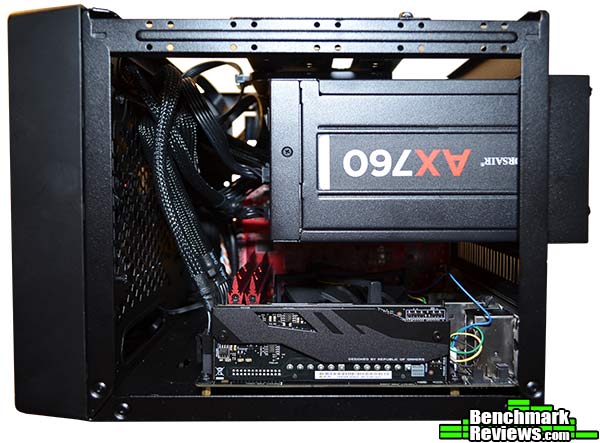
With standard length PSU cables, cable management is going to be a bit of a chore, but if you can get it right the first time, then you won’t have too many problems. However, in order to service anything on the motherboard, or replace the 80mm fans or hard drive. Then you’re going to have to either remove the PSU, undoing much of your cable management efforts, or find someone with small hands to get down in there for you.
I enjoyed working with the Elite 110. The overall experience makes you appreciate cable tie downs and pre-planning your build. The small footprint of this case is the real selling point, that and that it can hold up to 4 hard drives. The case itself is very sturdy, once assembled. The only time I felt it to be a little flimsy was with the cross member / top hard drive mount removed, it tended to bow a little bit when moving it.
There are a few design choices that I would not have made, but I do understand they were trying to keep the footprint relatively small. I believe this case would be best suited for a small server or HTPC case. The main thing I think that would turn someone off from this case is the extruded PSU bracket. While it serves an important purpose, it’s not very pleasing to the eye, and for some, that will be a big turnoff. Originally when taking on this build I thought that the PSU bracket was going to be optional depending on the length of your PSU, but there simply is no way to mount the PSU otherwise, and even if you could, I just don’t feel that the metal is thick enough to withstand the amount of down-force that would be exerted on the rear of the case. Video card length and placement may prove to be an issue for some as well. If you’re utilizing a two slot graphics card and all hard drive options, then your video card will come very close to the hard drive next to it, restricting airflow and making cable management all the more important to avoid hitting the fan on the graphics card.

As it pertains to performance, I feel the best approach is to rate this case based on what options come standard, and what options you can add and/or modify. In terms of the Elite 110, what you see is what you get, there are one or two small things you can change, specifically with fan size in the front and the option to add a closed loop CPU water cooler, as well as 2 x 80mm fans. Given the small amount of cubic space in this case, airflow should not be a large problem, provided you’re not generating large amounts of heat from the graphics card.
The Cooler Master excels in being small and sleek, with the exception of the PSU bracket. The incorporation of the power switch and power LED into the front logo is something not often seen anymore and is a welcomed feature. The midnight black finish is of good quality and uniformity, with zero inconsistencies. This case would make for a suitable HTPC or Home Server build that can fit well within budget.
The construction of the Elite 110 is of a somewhat thin steel alloy that is very nicely powder coated in a midnight black color. With the top cross member / hard drive mount installed, it is decently sturdy. The tri-paneled outer cover is of the same thickness, so I would not recommend stacking anything heavy atop this case. Although it would probably support it, indentations in the case material would be inevitable. Do not use this case without the top cross member installed, it becomes very unstable without it.
In terms of functionality, Cooler Master was trying to accomplish a small case with big case components. To a large degree, they did just that. Being able to support full sized PSUs up to 180mm and graphics card up to 210mm, the Elite 110 makes the consumer take little sacrifice in terms of available components. As for storage, being able to support 3 HDDs or 4 SSDs and all variations in between, the Elite 110 offers far more storage options than other cases of similar and layout. Supporting 120mm radiator is also a nice touch. With the Elite 110’s somewhat limited airflow options, this may prove to serve as a must depending on what kind of heat you’ll be generating. While the airflow is ample for the PSU, the CPU and the video card, the rest of the system may suffer from heat buildup if you do not utilize one or two of the 80mm fans slots for a push/pull setup. Cable management options with this case are abundant, but I would recommend a full modular PSU and, if available, short cables. To do any work inside this case, you’ll more than likely have to remove the PSU to do so, and not having to undo your hard work in the cable management arena with a full modular PSU can only benefit you.
At the time of this writing, the Cooler Master Elite 110 is sold directly from the CM Store for $39.99, however it is listed on Amazon for $101.93 and on Newegg for $49.99. Both Cooler Master and Newegg list these as out of stock, but Amazon has them in stock. For $101.93, it’s not as much a value, but for $39.99 or even $49.99, it’s a great value. My rating is reflecting the CMStore and Newegg price, not Amazon’s.
The Cooler Master Elite 110 is very nice case with a very small footprint, giving you the best of both worlds without the need for unnecessary options, such as a 5.25″ bay, allowing you to save space while still being able to have full sized performance. I really enjoyed this case, with the exception of graphics card limitations, it’s a very gaming capable case. I don’t know that I would recommend it as a lan box, which seems to be the where the Mini-ITX platform can really shine, but for anything other than lan gaming, it’s a very attractive option.
+ Small footprint
+ Can fit up to 210mm graphics card
+ Supports standard length ATX PSU up to 180mm
+ Supports 120mm radiator in the front (on the inside)
+ Dual Super Speed USB 3.0 Ports on the side
+ Lots of ventilation for airflow
+ Sturdy design, when fully assembled
+ Affordable price
– Extruded PSU bracket
– Limited fan options and airflow design
– Front mesh panel not the sturdiest
– Front USB 3.0 cables are stiff and can get in the way of advanced cable management
– Have to remove the PSU to do any real work inside the case
-
Performance: 8.50
-
Appearance: 9.00
-
Construction: 8.50
-
Functionality: 8.25
-
Value: 9.50 (based on the $39.99 MSRP)


2 thoughts on “Cooler Master Elite 110 Mini-ITX Case Review”
This is why I like SilverStone Strider modular power supplies. For $24.95 you can buy the “PP-05” short cable kit, which is perfect for building inside mATX or mini-ITX cases.
Yes, SilverStone does offer short cables! You just have to make sure about dimensions of the PSU as the Cooler Master Elite 110 supports a max of 180mm depth and the 1500W (although I can’t fathom someone needing a PSU this big in this case) is 220mm in depth.
Comments are closed.