By Olin Coles
Manufacturer: ASUSTeK Computer Inc.
Product Name: Intel Z97 LGA 1150 Motherboard
Model Number: Z97-DELUXE (NFC & WLC)
Price As Tested: DELUXE $289.99 (Newegg), DELUXE NFC WLC $399.99 (Newegg)
Full Disclosure: ASUS provided the product sample used in this article.
It’s a rare occasion that Intel releases a motherboard chipset without a corresponding processor to accompany it, yet here we are. With the introduction of Intel’s Z97 Express platform comes support for existing 4th-generation 22nm Haswell / Devil’s Canyon and upcoming 5th-generation Intel desktop processors fit for the LGA 1150 socket. Among the updates are: PCIe M.2 support for on-board solid state storage, enough bandwidth for up to six SuperSpeed USB 3.0 ports, and up to six SATA 6 Gb/s ports that fully support Intel’s Rapid Storage Technology 13.
Carryover technology includes support for up to three independent displays from the board’s DP/HDMI/DVI/VGA interface choices. Utilizing a DisplayPort 1.2 monitor enables users to daisy-chain up to three linked displays through one connected port at the board. Like Intel’s Z87 platform, there are 16x PCIe 3.0 lanes available, plus four PCIe 2.0 lanes delivered by the Haswell CPU. Dual channel DDR3 system memory finishes out the platform, so no DDR4 support will debut with this launch.

While there may not be a wealth of change to accompany Intel’s Z97-Express, companies such as ASUS have included many of their own in-house innovations on the platform. For the ASUS Z97-series you’ll find support for DDR3/DDR3L up to 3300 MHz with overclock. The ASUS Z97-DELUXE, -PRO, and -A series all include 10 GB/s SATA Express ports and a M.2 SuperSpeed Inter-Chip. Three 16x PCIe 3.0 ports and Realtek eight-channel (7.1) DTS audio come standard on all ASUS Z97-Express boards. Of course, ASUS retains their feature-rich UEFI BIOS for all Z97-series motherboard products, and even adds several visual improvements to the interface.
Where ASUS really pulls away from their competition is with digital power control for memory and processor, utilizing up to 16 power phases to ensure absolute precision stability. All hardware points are controlled by Dual Intelligent Processors 5, which consists of DIGI+ Power Control, TPU, EPU, Turbo App, and Fan Xpert. ASUS Z97-DELUXE and Z97-PRO models feature dual-band Wi-Fi 802.11ac (a/b/g/n/ac) and BlueTooth 4.0 wireless functionality. In this article Benchmark Reviews showcases the ASUS Z97-DELUXE (NFC & WLC) motherboard, and reveals the many hardware features packed onto this mainstream channel desktop board.
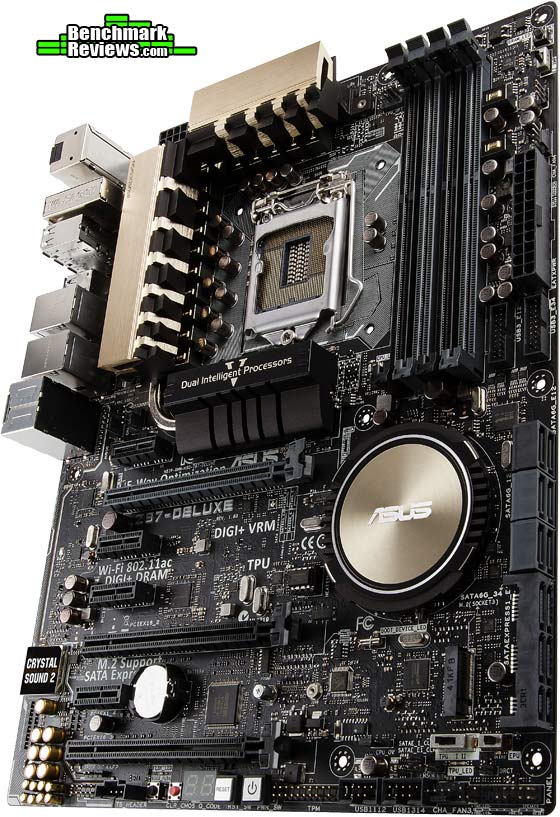
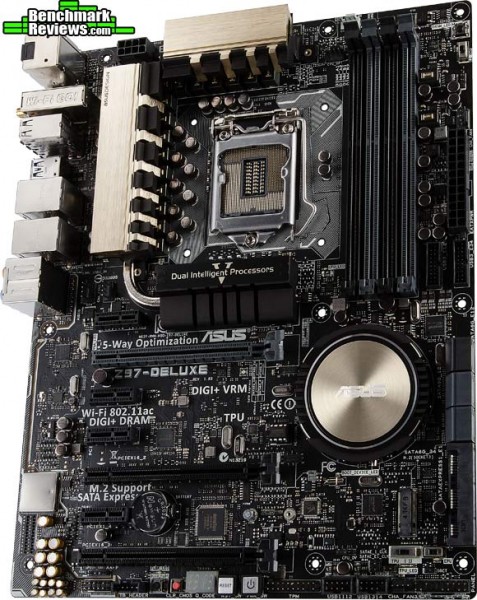
The ASUS Z97-DELUXE series (and also Z97-PRO series) are standard ATX form-factor desktop motherboards designed for the desktop enthusiast channel. By using the entire ATX landscape into their design, ASUS packs on features like Dual Intelligent Processors 5 (which we detail in the next section), dual-band Wi-Fi 802.11ac wireless, BlueTooth 4.0, DTS UltraPC II audio, dual Gigabit Ethernet adapters, PWM fan headers, a four-digit POST code display, and colonies full of USB and SATA ports.

As the name suggests, there are some added features which set the ASUS Z97-DELUXE (NFC & WLC) motherboard apart from the rest of the series. A few newly designed expansion adapters comes bundled with the Z97-DELUXE (NFC & WLC) motherboard: an ASUS ThunderboltEX II/Dual adapter that supports Intel Thunderbolt 2, an ASUS NFC Express 2 receiver and an ASUS Wireless Charger station. These may not come bundled with the other ASUS Z97 boards, but they’re all supported by them.

As you might expect from the top desktop motherboard supplier, ASUS kits come packed with cables and accessories. There are ASUS Q-Connectors for easy attachment of wire leads onto the front panel and audio headers, a flexible NVIDIA 2-Way SLI connector, a combination wireless antenna for 802.11ac and BlueTooth 4.0, six latch-securing SATA 6 Gb/s cables, standard and mini-USB cables, standard and mini-DisplayPort cables, a Thunderbolt header connection cable, wall-mounted AC-USB power adapter, an ASUS Q-Shield I/O panel, and several user manuals for the board and various adapters.

Utilizing Intel HD Graphics support, the ASUS Z97-DELUXE series offers on-board DisplayPort, mDP, and HDMI video outputs. The other Z97 counterparts offer DisplayPort, HDMI, DVI, and VGA (analog D-Sub) connections. The Z97-DELUXE and Z-97 PRO series include support for quad-GPU NVIDIA SLI and three-way AMD CrossFireX. An SLI bridge comes with each kit, however CrossFire bridges are no longer necessary as the technology supports software-based bridging.
Audio support has been strong among desktop offerings for the past few years, and the Z97-series is no different. Realtek ALC1180 eight-channel (7.1) DTS audio comes standard on all ASUS Z97-Express boards, boasting high-quality 112 dB SNR output.
ASUS Wi-Fi GO! delivers Dual-Band Wi-Fi 802.11ac and BlueTooth 4.0 support for ASUS Z97-DELUXE and Z97-PRO motherboards (Z97-A lacks this features), and replaces two separate stick antennas issued with previous releases for an integrated Wi-Fi and BlueTooth antenna. Since these boards supports the very latest Wi-Fi 802.11ac specification, by using a matching AC router (the ASUS RT-AC66U would be our first choice) you’ll get great wireless performance. For cabled networking, all ASUS Z97-series boards include an Intel I218-V Gigabit LAN controller, however Z97-DELUXE adds a second network card using the Intel I211-AT controller.

With storage device capacities ever-increasing, you’ll be surprised by so many SATA and SATA-Express connections. All of the ASUS Z97-series boards include 10 GB/s SATA Express ports and a M.2 SuperSpeed Inter-Chip based on the socket 3 design. ASUS Z97-DELUXE features eight total SATA 6 Gb/s ports and two SATA-Express ports.
In the next section, we dig deeper into the ASUS Z97-DELUXE motherboard and find out what its made of…
Although ASUS has packed their boards with everything imaginable, the primary purpose of Z97 Express is to support 14nm Broadwell-D desktop processors when they arrive in early 2015. Intel plans to debut a full lineup of refreshed 4th-generation 22nm Haswell desktop processors later this year (code named Devil’s Canyon: faster speeds, improved thermal interface material), but ahead of that release they’ve set the groundwork for 5th-generation processors with Z97. Intel Z97 Express uses the same LGA 1150 socket design, and supports both existing 4th-generation and upcoming 5th-generation Intel desktop processors. The good news is that socket LGA 1150 will fit Haswell, Devil’s Canyon, and Broadwell desktop processors and can use the same heatsink cooler as Z79 and Z89 boards have used (LGA 1156, LGA 1155, LGA 2011). The bad news is that Broadwell is still a very long ways off.
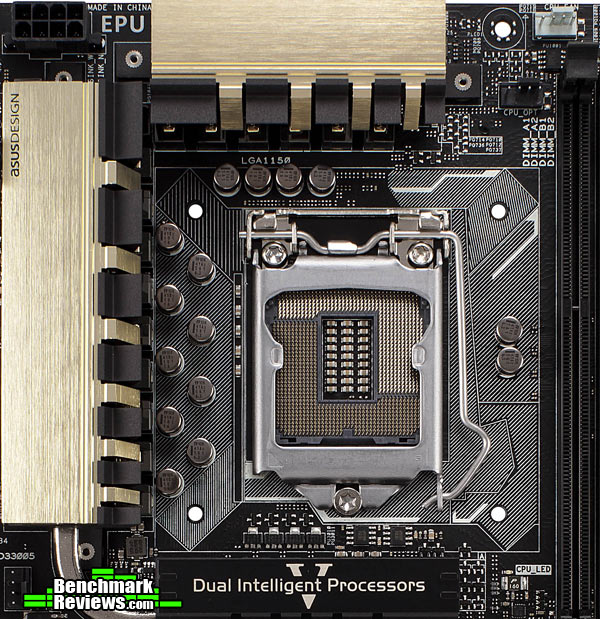
Surrounding the LGA 1150 socket is an array of Japanese 5,000-hour solid capacitors, which are well known to provide superior durability and sustained stability. Hidden under solid aluminum heatsinks are the boards sixteen power phase components, the heart of ASUS’ DIGI+ power control. A large white square surrounds the Intel LGA 1150 socket, illustrating the available area designated for (aftermarket) heatsink coolers. Note that there’s at least an extra 1/8-1/4 inch surrounding this area, so that oversized RAM modules will not interfere with cooler placements.

Four DIMM slots support up to 32GB of non-ECC unbuffered DDR3 system memory when using 8GB RAM modules. Modules must be set in pairs, occupying either black or gray slots for each set. Similar to past ASUS designs, these DIMM sockets utilize retaining levers on one side (top) and a permanent edge on the other (bottom). ASUS MemOK! assists you in recovering from an unbootable system due to unstable memory overclock, while ASUS EZ XMP helps you overclock that memory using its designed profile.
Two front-panel USB 3.0 headers are supported by the board’s ASMedia ASM1042e chip, which also supplies six separate SuperSpeed USB 3.0 ports in the back to compliment four Intel-supplied USB 2.0 ports.

Realtek ALC1180 audio is output through either a 7.1-channel digital optical Tos-Link SPDIF output or 5.1-channel analog 3.5mm audio jacks that feature a new de-pop circuit to reduce start-up noise. ASUS uses highest-quality Japanese capacitors to provide warm sound with natural fidelity, and utilizes separate PCB layers for stereo channels to help preserve the sound quality of sensitive audio signals. All audio enclosures are treated with EMI shielding covers, which prevent and reduce electrical noise interference that might affect amplifier sound quality. Once you’re plugged in, ASUS Crystal Sound 2 takes control to auto-optimize an audio profile fine-tuned to either headset or speaker hardware.

Thanks to Intel’s Z97 Express chipset paired to ASMedia chips, there’s no shortage of SATA-based storage connectivity. An ASMedia ASM1467 chip delivers the first two SATA 6 Gb/s ports (black), then Intel’s Z97 Express pitches in for two pairs of ports in the middle, followed by four more SATA 6 Gb/s ports and a pair of SATA Express ports by way of three ASMedia ASM1467 chips. An ASMedia ASM106SE SATA-Express bridge chip controls the M.2 (socket 3) SuperSpeed Inter-Chip, and an ASMedia ASM1480 16-to-8 channel multiplexer/demultiplexer switch chip ties everything together on the bus.

ASUS Z97-DELUXE and Z97-PRO boards provide the full ATX complement of seven slots: three PCIe x16 and four PCIe x1. Shared between three PCIe x16 slots are sixteen PCIe 3.0 lanes of bandwidth available, which can be dedicated towards a single graphics card, or split into an x8-x8 configuration with two cards. The board’s PLX chip enables a 8x/4x/4x configuration with three video cards installed, but don’t worry about 4x holding you back because these are PCIe 3.0 lanes after all.
All the ASUS Z97-series motherboards use a number of third-party and custom-made chips to implement proprietary features, such as “5-Way Optimization”. ASUS Dual Intelligent Processor 5 is a collection of five applications that manage system control for adjustable hardware aspects on ASUS Z97-series boards. ASUS Turbo App and ASUS Fan Xpert are two apps that depend heavily upon a Nuvoton NCT6791D system management chip to maintain voltage, adjust system parameters, manage network priority, and optimize audio. ASUS TPU delivers “on-the-fly” overclocking for CPU and iGPU via a TPU KB3720QF chip, which operates in either “Ratio Boost” or “BCLK + Ratio Boost” mode. ASUS DIGI+ Power Control delivers precise digital power control for increased stability by using 16-Phase digital power control chokes. Finally, an ASUS EPU chip detects and shuts off unused ports to save energy.
Included with the ASUS Z97-DELUXE and Z97-PRO kits is a ASUS 2T2R dual-band 2.4/5.0 GHz wireless antenna (WiFi 802.11a/b/g/n/ac compliant). ASUS Wi-Fi GO! enables users to create a wireless hotspot using the new 802.11ac standard, producing up to 867 Mb/s data throughput. Users can also utilize wireless AP Mode support for an extended wireless 802.11 a/b/g/n connection. The ASUS Interactive Home Cloud enables remote data sharing and control through three function sets: Wi-Fi GO!, Media Streamer, and NFC Express 2. ASUS Media Streamer is a a digital repository for sharing media for remote access, and matches nicely to smart devices. ASUS Wi-Fi GO! enables a remote desktop, file transfers, Cloud GO! support, and a remote keyboard and mouse.

Near Field Communication (NFC) is a wireless data exchange technology that allows for simplified transfer simply by touching NFC devices together. Bundled with the ASUS Z97-DELUXE (NFC & WLC) board is their new ASUS NFC Express 2 near-field communication receiver, along with a yellow tag that contains a NFC chip paired to the receiver. The NFC Express 2 receiver yields another two USB 3.0 ports directly on the hub. The last bundled extra is the ASUS Wireless Charger station, which will recharge supported WPC Qi 1.1 compliant battery-powered devices.
Some key features that ASUS NFC Express 2 unlocks are:
- Remote Desktop: remotely control your PC anywhere, anytime
- Windows 8 Login: tap to log in to your PC – no typing required
- Video-to-go: Tap to pick up movie clips from your PC, from right where you left them. Don’t miss a moment of what you’re watching with smart resume functionality. Tap your phone to switch video output from your PC to your phone to your smart TV and pick up right where you left off. *Install ASUS Media Streamer to enable this function.
- Photo Express: Photo-transfer from smartphone to PC
- Quick-Launch Apps: Launch favorite apps, games, websites – all at once
- Bluetooth Pairing: Auto pairing with your PC and play music stored in your smart devices. Tap to pair your smart devices with your PC for Bluetooth A2DP* playback through your PC speakers. *The Advanced Audio Distribution Profile (A2DP) is a Bluetooth profile that allows for the wireless transmission of stereo audio streamed from one device to another.
ASUS also bundles a wireless charger unit with their Z97-DELUXE (NFC & WLC) motherboard kit. Wireless charging uses an electromagnetic field to transfer energy between two objects, usually between a wireless charger and battery-powered device. Wireless chargers typically use an induction coil in both charging station and portable device to send the energy to charge batteries. Qi (pronounced “Chee”) is an interface standard developed by the Wireless Power Consortium for inductive electrical power transfer. The ASUS Wireless Charger unit is compatible with Qi-certified products fitted with a Qi wireless charging receiver (not included).

The newly designed ASUS ThunderboltEX II/Dual expansion adapter delivers two Thunderbolt connectors plus two DisplayPort inputs, and comes bundled with the Z97-DELUXE (NFC & WLC) motherboard. All other ASUS Z97-series motherboards (and previously released Z87-series boards) support the ThunderboltEX II (single port) or ThunderboltEX II/Dual expansion adapters, which may be purchased separately. The new dual-port adapter is based on the Intel DSL5520 Thunderbolt 2 controller chipset, delivering 20 Gb/s bandwidth on each port and allowing six devices per connection for a total of twelve chained devices.
The Z97-DELUXE series motherboards can support three monitors natively since Thunderbolt ports can each be used to drive DisplayPort monitors, and all three ports (Thunderbolt, DisplayPort, and HDMI) support 4K Ultra HD resolutions (albeit at a 24Hz refresh rate).
At the time of this writing, performance results were under embargo by Intel. That period has passed, and Benchmark Reviews has published our test results here: ASUS Z97-DELUXE Motherboard Performance Review
For the sake of discussion, I will presume that we’re all wondering why Intel would offer a fresh motherboard chipset without a corresponding new processor to launch with it. Intel’s Z87 Express chipset works wonderfully with current 4th generation Haswell desktop processors, and board partners like ASUS have (over)loaded their product with features beyond the needs of most enthusiasts. We’re still a few months away from a Haswell series refresh with Devil’s Canyon, which retains the same 22nm architecture for LGA 1150 but delivers small speed bumps at each SKU level and comes with improved pre-applied thermal interface material. Z97 Express sets the groundwork for 5th-generation processors, but these 14nm Broadwell-D desktop CPUs are not rumored to debut until Q1 2015. That could mean two things for the next year: 1) with at least 6-9 months until Broadwell arrives, system builders will continue to use Haswell-based CPU inventory, and 2) once Broadwell arrives, Z97 Express will remain the supported channel board chipset for quite some time afterward. Of course, there’s still time for Intel to make changes to their plans for X99 Express, but their roadmap draws a clear picture of the plan.
As it looks now, Haswell-E (Enthusiast) is where things will get interesting. The new 14nm enthusiast 6- and 8-core desktop CPU will utilize a new LGA 2011-3 socket, which is why is won’t be supported on Z97 Express. With the arrival of Intel’s X99 Express chipset enthusiasts will be treated to: DDR4 memory support, five PCIe 3.0 x16 card slots, and ten SATA 6 Gb/s ports. Intel’s Haswell-E processors and X99 Express motherboards are rumored for arrival in late 2014 near the holiday shopping season.

With this Z97 Express chipset launch, we’ve got a new channel board that can and will support all Haswell, Devil’s Canyon, or Broadwell desktop processors available now or in the future. This will likely create quite the product life cycle for Z97-based boards, well into 2016. This bodes well for the ailing desktop computer industry, which has trimmed away so much fat that all that remains are bone and the strongest muscles. Keeping Intel’s strategy to remove itself from the desktop board market, Z97 and X99 could be what we’re given to chew on for quite some time.
What do you think?

One thought on “ASUS Z97-DELUXE Motherboard Hardware Review”
That the performance review should anonymously leak instead of holding all info about upcoming products until some certain magical date only to make Intel’s marketing happy.
It should be clear to customers what to expect, specs wise, performance wise and price wise.
What type is the M.2? No one seems to mention it, is it the same or better than Sata? As far as I know there are two versions, one is sata and one is pcie, and the pcie could use more than one lane and have better performance than Sata.
Comments are closed.