By Akim Green
Manufacturer: Phanteks Co.
Product Name: Enthoo Primo
Model Number: PH-ES813P_BL
UPC: 886523300014
Price As Tested: $249.99 (Amazon / Newegg)
Full Disclosure: The product sample used in this article has been provided by Phanteks.
When it comes to high-end full-tower cases, a few models immediately come to mind: Corsair’s 900D, Thermaltake’s Level 10 GT, Cooler Master’s HAF-X, and a couple others. There isn’t nearly as much variety for E-ATX compatible cases as there is for cases that support ATX and Micro-ATX motherboards. Perhaps this why Phanteks was keen to release their first case into this category. Enter the Enthoo Primo, A premium full-tower aluminum body case with numerous new features and great compatibility for water-cooling hardware. Phanteks is among the best manufacturers of computer case fans and CPU heatsinks, so one would expect that their genius in cooling innovation would carry over to the Enthoo Primo. It is quite clear that Phankteks aims to make a statement with this new case; It will be competing head on with the already established high-end full-tower cases. Benchmark reviews will take a closer look at the Enthoo Primo (model PH-ES813P) to see whether or not Phantek’s first chassis deserves a place among the very best.
Being mostly constructed of metal, the Ethoo Primo is very heavy and when fully assembled it is very near immobile. However, such materials help to make a case cooler, quieter, and more aesthetically pleasing. The chassis is very well designed and looks good from every angle. Phanteks has opted for a more subtle, minimal design rather a vivid, extravagant theme employed by some manufacturers.
Despite the massive accommodations made for water cooling, in this review, the Enthoo Primo will be housing a fully air-cooled system. Remarks will be made about the aesthetics, ease of assembly, noise levels, and temperature of the chassis. General remarks will be made about how it compares to a cheaper full-tower case, The NZXT phantom.

|
Case Specifications |
||
|
Dimension |
250mm x 650mm x 600mm (WxHxD) |
|
|
Form Factor |
Full Tower Chassis |
|
|
Material(s) |
Aluminum Faceplates, Steel Chassis |
|
|
Motherboard Support |
ATX, EATX, mATX, SSI EEB |
|
|
Front I/O |
2x USB 3.0, 2x USB 2.0, Mic, Headphone, LED Switch, Reset Switch |
|
|
Side Window |
Yes, split-window design |
|
| Expansion & Drive Bays | ||
|
Expansion slots |
8 |
|
|
Power Supply Slots |
2 |
|
|
External 5.25″ |
5 |
|
|
Internal 3.5″ |
6 (2x 3 HDD cages) |
|
|
Internal 2.5″ |
12 (2x 3 HDD cages + 2x doublestack SSD brackets ) *expandable to 3x |
|
|
Cooling |
120mm fan |
140mm fan |
|
Front |
2x |
2x (2x included with LED) |
|
Top |
4x |
3x (1x included) |
|
Side |
2x |
2x |
|
Rear |
2x |
1x (1x included) |
|
Bottom |
4x |
2x (1x included) |
|
HDD |
2x |
– |
|
Liquid Cooling |
120mm radiator |
140mm radiator |
|
Front |
Up to 240 |
– |
|
Top |
Up to 480 |
Up to 420 |
|
Side (w/o HDD cages) |
Up to 240 |
– |
|
Rear |
120 |
140 |
|
Bottom |
Up to 480 |
Up to 280 |
|
Clearance |
||
|
Graphic card |
257mm (reservoir bracket installed) |
|
|
277mm (reservoir bracket installed w/o cover) |
||
|
350mm (no reservoir bracket) |
||
|
390mm (HDD cages in front position) |
||
|
515mm (no HDD cages) |
||
|
CPU cooler |
207mm |
|
|
Cable management |
30mm |
|
|
PH-F140SP (included fans) |
||
|
Speed (rpm) |
1200±250 rpm |
|
|
Max Airflow |
82.1 CFM |
|
|
Static Pressure |
1.33mm H2O |
|
|
Acoustical Noise |
19 dB |
|
|
Packaging Information |
||
|
Package Dimension |
320mm x 725mm x 705mm (WxHxD) |
|
|
Net Weight |
17.9 kg |
|
|
Gross Weight |
20 kg |
|
|
Warranty |
||
|
Length |
5 Years Limited |
|
The Phanteks Enthoo Primo computer case boasts a modern, minimalist design: it looks cool and futuristic while maintaining simplicity. It’s full black, brushed aluminum aluminum body adds a sense of sophistication, and the blue led running along the face to the top make’s it looks like something you would find in Bruce Wayne’s residence.
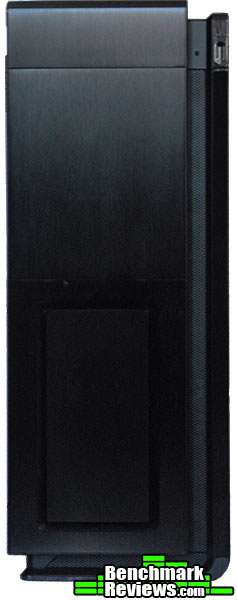
This case is about as big as they get, it is huge! Standing at about 2 feet, it is 2 inches shy of the 900D’s height. Anyone in the market for a case such as this would most likely be filling it with some serious hardware, Phankteks has taken that into consideration and provided a large glass window side panel to show it off.

The Enthoo Primo will certainly turn a lot of heads with it’s unique off-center design. The lower section of the front panel acts an intake and dust filters for the two 140mm fans behind it.
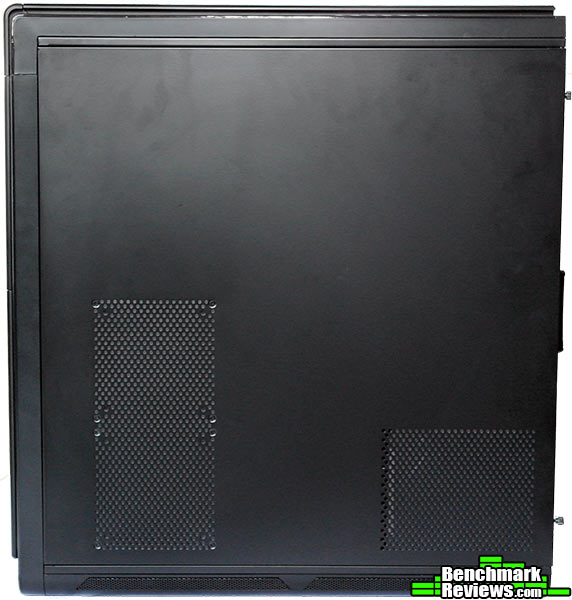
The right side panel can be fitted with 2 120/140mm fans or a radiator for a water-cooled system provided one of the hard drive cages are removed. It also has a vent for PSU air intake.
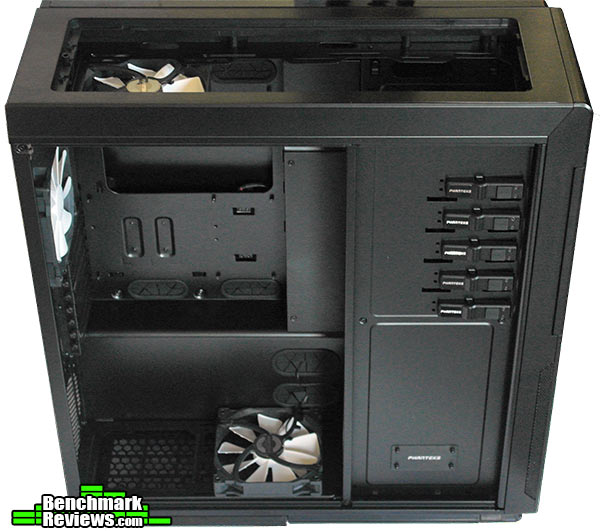
The Enthoo Primo features a shield for all the storage devices. Immediately to the left of it is a mounting bracket for water reservoirs that can be removed to allow for clearance of longer graphic cards.
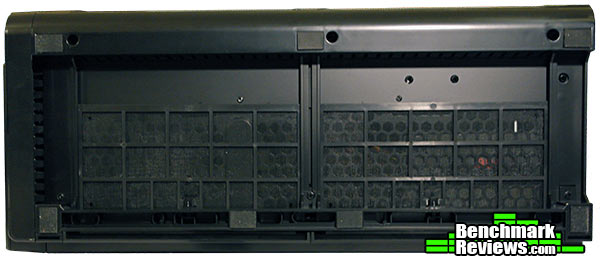
Thick rubber pads are fastened to the Enthoo Primo’s underside to ensure that this behemoth of a case won’t be accidentally pushed around .
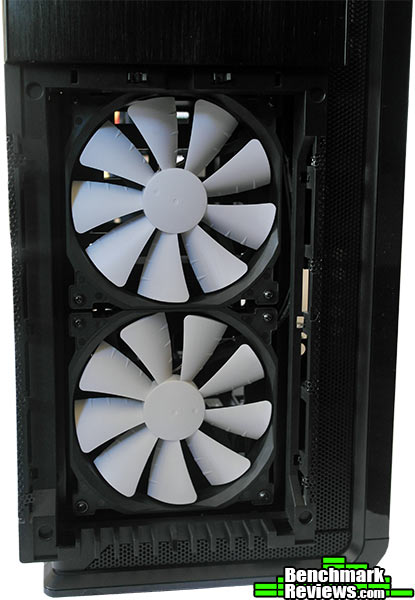
When it comes to case fans, the Phanteks PH-F140SP is just about the best you can get; they offer efficient cooling at low noise levels. Phanteks have included five of them with the Enthoo Primo, 2 blue led, and 3 regular ones.
A PWM hub is included with the Phanteks flagship case. This hub make standard fans emulate PWM functionality. As opposed to standard case fans, PWM fans operate under a constant voltage and are more energy efficient than standard case fans. They will also alter their rotation speed based on information from the motherboard so the user will not have to worry about manually cranking up the fans.

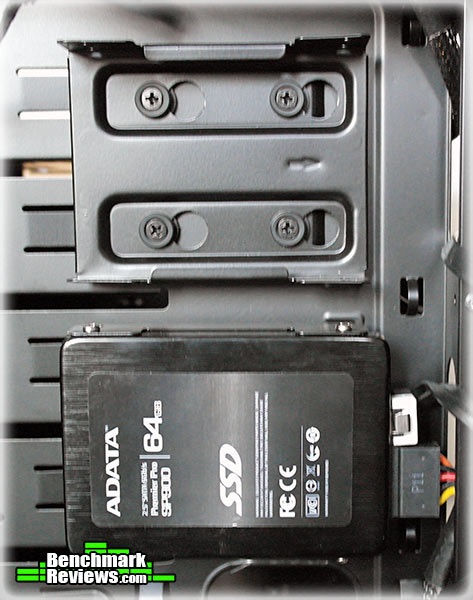
Phanteks also came up with a crafty SSD mounting system: the “Drop-N-Lock Double Stack SSD Brackets”. Each one can hold two SSDs and they are simple to use. Simply remove the bracket, fasten the SSDs into place, then drop and lock the bracket over the screws.
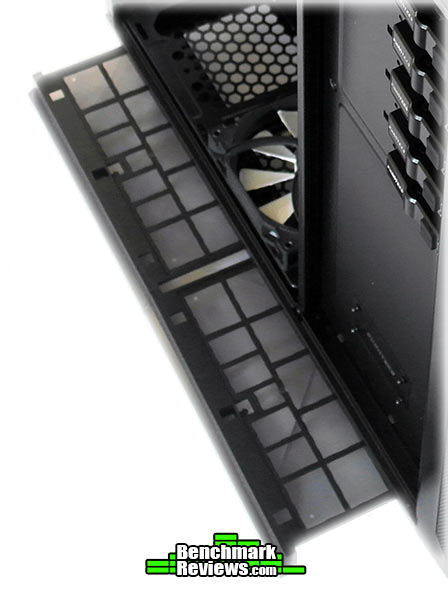
Washable dust filters are inserted behind every fan vent: two in the bottom, one in the front and one on top. It is nice to see that Phanteks has included these because they are not included with every case as they should be.
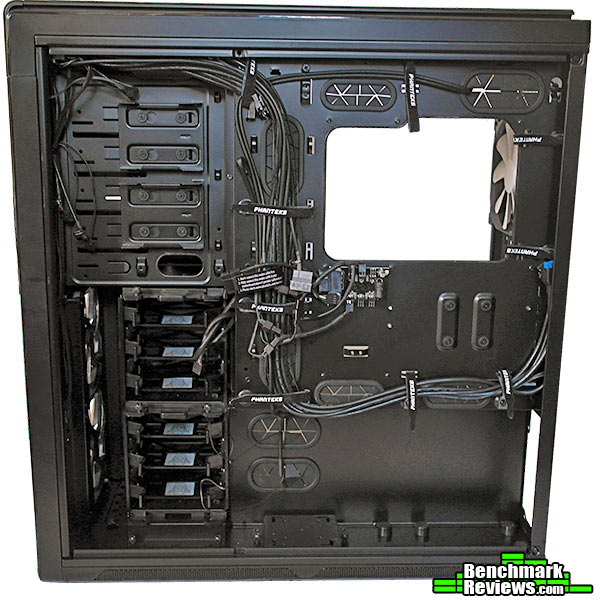
There is ample room in the Enthoo Primo for cable management and Phanteks has supplied as well as pre-installed their labeled, velcro cable ties to make the task even easier.
 .
.
Another feature unique to the Enthoo Primo is the thermally isolated PSU bay. There is a very thick piece of steel separating the PSU bay and the inside of the case. The PSU can also be placed in it’s usual place below the motherboard, but Phanteks advises against it.
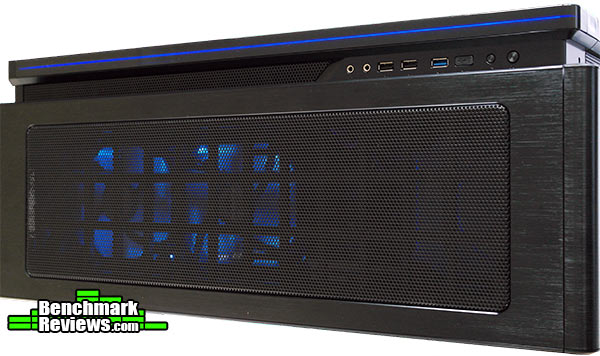
On top of the case lies 2 USB 2.0 ports, 2 USB 3.0 ports, power and reset buttons, and a button to toggle the case lights. 2 of the 5 included fans emit a cool blue light, they were originally position at the case’s front behind the intake vent.
After a quick inspection of the case, it was clear that it was designed with water-coolers in mind. This case can support numerous water cooling configurations and should definitely be considered by any who plans to water-cool their machine. However, for the purpose of this review, the Enthoo Primo was assembled with a fully air-cooled system. In section I will share my experience of building a system with the Enthoo Primo and report how well it performed thermally, and acoustically.
-
Motherboard: Asus Rampage 4 Extreme
-
System Memory: 8 GB G.Skill Ripjaws
-
Processor: Intel I7-3820
-
Audio: Asus Xonar DSX
-
Video: GTX 570 SLI
-
Disk Drive 1: ADATA SPX900 60GB
-
Disk Drive 2: Seagate Barracuda 2TB
-
Optical Drive: Asus BWrw
-
PSU: Antec HCG-900
Many PC enthusiasts take joy in assembling their systems just as much as in using it. A good case should allow for simple installation of hardware and provide clear documentation to assist the user. Phanteks’ Enthoo Primo isn’t your average case, it has so many modular parts and allows for various different hardware configurations. Thankfully, the user manual included with the case is very clear and complete and made for a smooth assembly process.
Being made from almost 100% metal, the Enthoo Primo is quite heavy and it was a bit of a hassle to move around while installing the parts. In order to fit my graphic cards, the reservoir mounting panel had to removed. The Enthoo Primo features a thermally isolated PSU bay on the right side of the case, Phanteks warns against installation the PSU in the alternate(standard) location because it doesn’t provide maximum airflow to the power supply. Disliking how empty the bottom half of the case looked, I decided to install the PSU in the normal location. If one decides to do the same, be warned that there will be a large hole in the back of the case: a cover was not provided for the PSU bay in case it wasn’t being used.

For the most part, assembling the system was a breeze. Being such a large case, there was plenty of room to work and make necessary adjustments. I found that the blue led fans at the front took away from the elegant look of the Enthoo Primo so I moved them to the top and used them as exhausts instead of intakes. With this configuration I noticed slightly lower temperatures than the default fan layout. Below is a screen shot showing the various hardware components and their temperatures after a running Battlefield 3 on ultra settings for about 20 minutes.
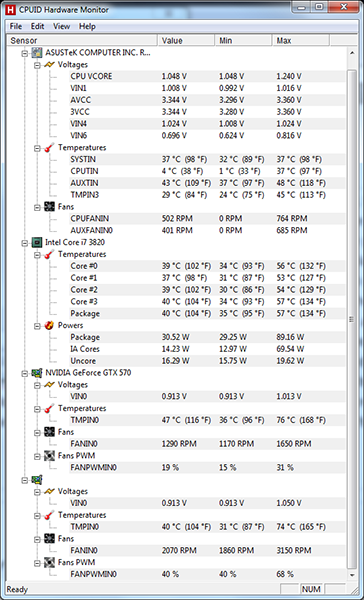
Running the same test with with the NZXT phantom produced CPU temperatures exceeding 60 degrees, and GPU temps over 80 degrees. The Enthoo Primo is also very quiet due in no small part to the PH-F140SP case fans. While idle or under small workload, the case is near silent; the sound of air being pulled through the vents is louder than the fan itself. Also, due to it’s aluminum body, no one part of the case gets too warm. The overall structure of the case is very sturdy, add in the weight of all the components and desktop will be pretty much immobile.
The Enthoo Primo is a well designed, well constructed chassis. It can house the largest motherboards, 2 power supplies, 12 SSDs, 6 HDDs, 16 120mm fans, 5 radiators, and should therefore suit the needs of even the highest level of PC enthusiasts. It was clearly designed with water-cooling in mind, without sacrificing it’s air-cooling compatibility: most of the specialized parts can be removed if not in use. The use of aluminum, steel, and galss make the Enthoo Primo look and feel like a premium piece of hardware. There are really no major flaws with the Enthoo Primo, just small things like the main PSU chamber not having a cover, and the front door opening to the left. There are many qualities of the case that puts in a class of it’s own: the inclusion of premium case fans, the thermally isolated PSU bay, the PWM hub, drop and lock SSD brackets, even the labeled cable straps. Phanteks has raised the bar in high end full-tower cases with the Enthoo Primo, they deserve great credit with this being their first attempt at a case, hopefully we will see more cool cases from Phanteks in the future.
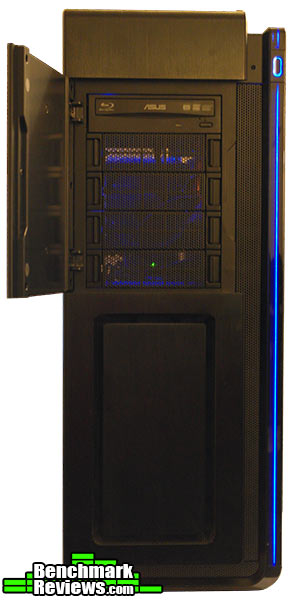
The PH-F140SP fans included with the Enthoo Primo quietly produces great air flow and keeps components cool. Washable dust filters prevent massive amounts of dust accumulating in the case.
The Enthoo Primo’s best attribute is probably it’s appearance. The use of aluminum makes it looks premium, the blue led strip adds a futuristic element, the large glass window gives a great view of the internals, and the creative off-center look adds to the uniqueness of the Enthoo Primo. Without being overly extravagant, Phanteks have created an aesthetic marvel.
The steel body of the Enthoo Primo is very sturdy, all the modular parts fit tightly into place and nothing on or in the case is loose or shaky. The washable dust filters are inconspicuously placed about the case’s body and are easily removed. None of aluminum panels attract fingerprints and are not easily scuffed. The only complaints about the Enthoo Primo are the front swinger door and the lack of a cover for the PSU bay.
The Enthoo Primo was designed to enclose the highest end of systems with a special emphasis for water-cooling. It allows numerous arrangements for fans, radiators, and water reservoirs, allowing the user to find the most optimal layout for their system. The case features PWM hub that provide PWM functionality for 3 pin fans, relieving the user from the task manual altering fan speds.
Considering the price of other high-end full-tower cases on the market, the Enthoo Primo is relatively well priced at $249.99 (Amazon / Newegg). In fact, it makes you question why other cases in the category can get away with a much heftier price tag.
Phanteks’ first attempt at a PC enclosure was thoroughly impressive. The Enthoo Primo case is definitely worth a look if you’re in the market for a full tower case, more so if you are building a water-cooled system.
+ Contemporary, futuristic design
+ PH-F140SP fans are quiet and cool efficiently
+ Case allows for multiple arrangements of fans and radiators
+ PWM fan hub make fans adjust speed automatically
+ Ample room for cable management
+ Thermally isolated PSU bay
– Case is quite heavy even without any hardware installed
– Optical drive door opens to the left
– No cover for main PSU bay
-
Performance: 9.00
-
Appearance: 9.50
-
Construction: 9.50
-
Functionality: 9.75
-
Value: 8.75
Excellence Achievement: Benchmark Reviews Golden Tachometer Award.
COMMENT QUESTION: How would you rate the Enthoo Primo case?


2 thoughts on “Phanteks Enthoo Primo Case Review”
meu deus que agonia ver essa vga entortando :O
Have the Phanteks PH-ES613PC Decent case. Also, have the Phanteks PH-ES813P which is excellent. Would love to get the Phanteks PH-ES916E (when I hit the Lotto) !
Comments are closed.