By Steven Iglesias-Hearst
Manufacturer: Hightech Information System Ltd.
Product Name: R9 270X IceQ X² Turbo Boost Clock 2GB GDDR5 PCI-E DLDVI-I/HDMI/2xMini DP
Model Number: H270XQMT2G2M
UPC: 4895139008890
Price As Tested: $219.99 (NewEgg / Amazon)
Full Disclosure: The product sample used in this article has been provided by Hightech Information System Ltd.
In this next installment of AMD’s GPU 14 R9 line-up, Benchmark Reviews will be testing the HIS Radeon R9 270X IceQ X² Turbo Boost 2GB video card. As the name suggests, this particular model features the high end IceQ X2 cooler from the HIS labs and much faster Core and Memory speeds. I have seen the evolution of this cooler first hand and I know it to be fully capable. Two 89mm dual axial fans and five 6mm heatpipes ensure that your temperatures will stay well within safe limits.
Many say that these R9 and R7 GPU’s are simply re-brands of the 7000 series of AMD video cards but I think there is slightly more to it than that. Yes they are re-branded GPU’s, but they feature faster core speeds and faster memory that the previous generation of 7000 series video cards. Also, AMD have had more time to fine tune their drivers to get the best possible performance out of these new SKU’s.
What’s new in Radeon R9 270X: revamped AMD Graphics Core Next Architecture supports upcoming DirectX 11.2 API, UltraHD 4K resolution-ready via DisplayPort MST streams, and a new AMD CrossFire technology via hardware DMA engine.

- Total Stream Processors: 1280
- Engine Clock: 1100 MHz base speed, 1140 MHz Boost
- Memory Configuration: 2GB GDDR5 / 256-bit
- Memory Speed: 5.6 Gbps
- Power Connectors: 2x 6-pin
- PCI-E Standard: PCI-E 3.0
- API Support: DirectX 11.2, OpenGL 4.3, Mantle
- Card Dimension: 27 x 14 x 4.2 cm
UltraHD 4K Resolution is:
- 3840 x 2160 30 Hz TV
- 4096 x 2160 24 Hz TV
- Half frame 1920 x 2160 60 Hz IT
- Half frame 2048 x 2160 60 Hz IT
Selling online for $219.99 (NewEgg / Amazon), the HIS Radeon R9 270X IceQ X2 Turbo Boost 2GB video card is ~$20 higher than most other R9 270X video cards.
Designed and priced to compete with the NVIDIA GTX 660Ti and 760 video cards, the R9 270X is equivalent to a Radeon HD7870. Unfortunately I don’t have either of the GTX 660ti or a GTX 760 video cards to compare to so in the tests the HIS Radeon R9 270X IceQ X2 Turbo Boost 2GB video card will be tested against a GTX 560Ti and a HD 7950 video cards.


The HIS Radeon R9 270X IceQ X2 Turbo Boost 2GB video card features 2x mini display ports, a full size HDMI port and a Dual Link DVI-I connector.


Source: hisdigital.com
GCN
With AMD 2nd generation GCN technology, the card optimizes DirectX 11.2 gaming performance automatically up to 2.5 times faster! It also offers up to 4.5x compute performance and up to 95% lower GPU Idle Power Consumption!
Apps Faster & Smoother!
The card enables a “quality graphics” experience on everyday applications, giving huge performance boosts on image processing, file compression, media converter apps, and a lot more!
• Adobe Photoshop CS6
• Corel Winzip 16.5
• Musemage
• Handbrake
• MotionDSP Vreveal
• GIMP
• Cyberlink Power Director
• ArcSoft Media Converter
PCI-e 3.0 Support
Armed with the latest PCI-e 3.0 bus design maximizes performance by delivering double bandwidth per lane of PCI-e 2.x. Paired the card with the latest platforms and get the ultimate performance!
More Graphics, Less Power!
The new architecture of the card gets more usable processing power for your money, enabling better frame rates in the latest games at high resolutions. In addition, with AMD ZeroCore Power & AMD PowerTune technologies, you can optimize the balance between performance and power consumption of your system by adjusting the engine clock during runtime of the card. Manage the power and keep your wallet loaded!
See More, Enjoy More!
The card supports 30” LCD monitor and any large size TV up to 80″ feature with 16:9 ratio in amazing 4096 by 2160 resolution. Up-scaling your computer into a multimedia center with the biggest display!
Enjoy HD Beauty
With Full HD 1080p support, the card delivers high quality 1920X1080 graphics, enabling seamless full-screen video playback. See HD, hear HD and feel HD – Enjoy the beautiful graphics now with the card!
Enjoy Copy Protected Movies
The card is HDCP complaint, enabling users to play copy-protected content, such as commercial DVD movies.
Enjoy True to Life Graphics
ULTRA HD videos have resolution four times that of current HD videos, meaning images too clear that may deceive your eyes! With the card, you are set for getting the movie theater experience to your home. You may be able to watch a video shooting the Eiffel tower and zoom it in to see your friend’s face clearly from the top! Get your eyes impressed and enjoy mind-blowing graphics with extreme clarity, depth and texture!
See More, Win More!
The card is capable to turn your computer into a super gaming machine. Enjoy the latest 3D games with stunning graphics and effects that your enemies cannot match! Get an immersive experience with AMD Eyefinity!
Expand your game across up to 4 displays while your opponents have one monitor. Along with all-new support for stereo 3D, universal bezel compensation and brand new display configurations, take the unfair advantage over your opponent and win more with the surround sight
View More, Work Better
Having one dedicated screen just for twitter or Facebook and a second for outlook is not a dream anymore. The card features 2 Mini-display Ports for enhanced workspace flexibility. You can easily connect to two displays, including the 27” Apple LED Cinema Displays with the two Mini DisplayPorts. The dual-link DVI port allows you connect to a 30” DVI display up to 2560×1600. Resolution can even reach 4096×2160 with HDMI® , good for TV up to 80″!
Hear Better in Video Conference
Most GPUs today support only one audio stream at a time. The card, however, has Discrete Digital Multi-Point Audio that can simultaneously output multiple, independent audio streams. Audio seamlessly follows the video, providing affordable multi-display, multi-audio conferencing for consumers!
The Microsoft DirectX-11 graphics API is native to the Microsoft Windows 7 Operating System, and will be the primary O/S for our test platform. DX11 is also available as a Microsoft Update for the Windows Vista O/S, so our test results apply to both versions of the Operating System.
 In each benchmark test there is one ‘cache run’ that is conducted, followed by five recorded test runs. Results are collected at each setting with the highest and lowest results discarded. The remaining three results are averaged, and displayed in the performance charts on the following pages.
A combination of synthetic and video game benchmark tests have been used in this article to illustrate relative performance among graphics solutions. Our benchmark frame rate results are not intended to represent real-world graphics performance, as this experience would change based on supporting hardware and the perception of individuals playing the video game.
-
Motherboard: MSI Z77A-G45 Gaming
-
System Memory: 8GB Corsair DDR3 1600MHz
-
Processor: Intel Core i7 2600k 3.4GHz
-
Disk Drive 1: 120GB Kingston HyperX 3K SSD
-
Disk Drive 2: 1TB Seagate 7200 SATA HDD
-
PSU: Corsair HX750w (model: CMPSU-750HX)
-
Operating System: Windows 7 Ultimate x64
- 3DMark11 Professional Edition by Futuremark
- Settings: Performance Level Preset, 1280×720, 1x AA, Trilinear Filtering, Tessellation level 5)
- Aliens vs Predator Benchmark 1.0
- Settings: Very High Quality, 4x AA, 16x AF, SSAO, Tessellation, Advanced Shadows
- Lost Planet 2 Benchmark 1.0
- Settings: Benchmark B, 32xCSAA, High Shadow Detail, High Texture, High Render, High DirectX 11 Features
- Unigine Heaven Benchmark 4.0
- Settings: DirectX 11, Ultra Quality, Extreme Tessellation, 8x AA
- BattleField 3
- Settings: Ultra Quality, 4x MSAA, AA Post High, 16x AF 120s Fraps scene (Operation Swordbreaker)
- BattleField 4 BETA
- Settings: Ultra Quality, 4x MSAA, Terrain Ultra, AA Post High ,HBAO – 120s Fraps (Multiplayer Conquest Large: Objective A to C via water and round back to A on foot)
- Metro 2033 Benchmark
- Settings: Very-High Quality, 4x AA, 16x AF, Tessellation, PhysX Disabled – 120s Fraps (Chase Scene)
- Project Cars (Alpha Build 577)
- Settings: DirectX-11, Ultra Quality, SMAA S2X, 16x AF, Texture Resolution High, World Detail High – 120s Fraps (1 Lap Milan Classic Formula B)
| Graphics Card | GeForce GTX560Ti | HIS R9 270X | Radeon HD7950 | GeForce GTX770 | HIS R9 280X |
| GPU Cores | 384 | 1280 | 1792 | 1536 | 2048 |
| Core Clock (MHz) | 950 | 1050 | 900 | 1046 | 1000 |
| Shader Clock (MHz) | 1900 | 1140 Boost | N/A | 1085 Boost | 1050 Boost |
| Memory Clock (MHz) | 1050 | 1400 | 1250 | 1752 | 1500 |
| Memory Amount | 1024MB GDDR5 | 2048MB GDDR5 | 3072MB GDDR5 | 2048MB GDDR5 | 3072MB GDDR5 |
| Memory Interface | 256-bit | 256-bit | 384-bit | 256-bit | 384-bit |
- NVIDIA GeForce GTX 560Ti (950 MHz GPU/1050 MHz vRAM – Forceware 331.40)
- HIS Radeon R9 270X (1050 MHz GPU/1140 MHz Boost/1400 MHz vRAM – AMD Catalyst 13.11)
- AMD Radeon HD7950 (900 MHz GPU/1250 MHz vRAM – AMD Catalyst 13.11)
- NVIDIA GeForce GTX 770 (1046 MHz GPU/1085 MHz Boost/1752 MHz vRAM – Forceware 331.40)
- MSI Radeon R9 280X GAMING (1000 MHz GPU/1050 MHz Boost/1500 MHz vRAM – Catalyst 13.11)
FutureMark 3DMark11 is the latest addition the 3DMark benchmark series built by FutureMark corporation. 3DMark11 is a PC benchmark suite designed to test the DirectX-11 graphics card performance without vendor preference. Although 3DMark11 includes the unbiased Bullet Open Source Physics Library instead of NVIDIA PhysX for the CPU/Physics tests, Benchmark Reviews concentrates on the four graphics-only tests in 3DMark11 and uses them with medium-level ‘Performance’ presets.
The ‘Performance’ level setting applies 1x multi-sample anti-aliasing and trilinear texture filtering to a 1280x720p resolution. The tessellation detail, when called upon by a test, is preset to level 5, with a maximum tessellation factor of 10. The shadow map size is limited to 5 and the shadow cascade count is set to 4, while the surface shadow sample count is at the maximum value of 16. Ambient occlusion is enabled, and preset to a quality level of 5.
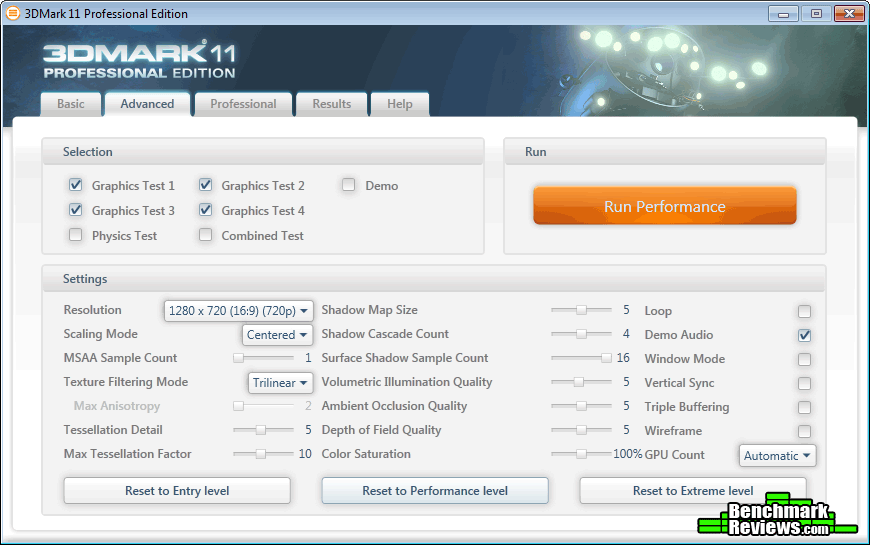
- Futuremark 3DMark11 Professional Edition
- Settings: Performance Level Preset, 1280×720, 1x AA, Trilinear Filtering, Tessellation level 5

 3DMark11 Benchmark Results

| Graphics Card | GeForce GTX560Ti | HIS R9 270X | Radeon HD7950 | GeForce GTX770 | HIS R9 280X |
| GPU Cores | 384 | 1280 | 1792 | 1536 | 2048 |
| Core Clock (MHz) | 950 | 1050 | 900 | 1046 | 1000 |
| Shader Clock (MHz) | 1900 | 1140 Boost | N/A | 1085 Boost | 1050 Boost |
| Memory Clock (MHz) | 1050 | 1400 | 1250 | 1752 | 1500 |
| Memory Amount | 1024MB GDDR5 | 2048MB GDDR5 | 3072MB GDDR5 | 2048MB GDDR5 | 3072MB GDDR5 |
| Memory Interface | 256-bit | 256-bit | 384-bit | 256-bit | 384-bit |
Aliens vs. Predator is a science fiction first-person shooter video game, developed by Rebellion, and published by Sega for Microsoft Windows, Sony PlayStation 3, and Microsoft Xbox 360. Aliens vs. Predator utilizes Rebellion’s proprietary Asura game engine, which had previously found its way into Call of Duty: World at War and Rogue Warrior. The self-contained benchmark tool is used for our DirectX-11 tests, which push the Asura game engine to its limit.
In our benchmark tests, Aliens vs. Predator was configured to use the highest quality settings with 4x AA and 16x AF. DirectX-11 features such as Screen Space Ambient Occlusion (SSAO) and tessellation have also been included, along with advanced shadows.
- Aliens vs Predator Benchmark 1.0
- Settings: Very High Quality, 4x AA, 16x AF, SSAO, Tessellation, Advanced Shadows
 Alien vs Predator Benchmark Results

| Graphics Card | GeForce GTX560Ti | HIS R9 270X | Radeon HD7950 | GeForce GTX770 | HIS R9 280X |
| GPU Cores | 384 | 1280 | 1792 | 1536 | 2048 |
| Core Clock (MHz) | 950 | 1050 | 900 | 1046 | 1000 |
| Shader Clock (MHz) | 1900 | 1140 Boost | N/A | 1085 Boost | 1050 Boost |
| Memory Clock (MHz) | 1050 | 1400 | 1250 | 1752 | 1500 |
| Memory Amount | 1024MB GDDR5 | 2048MB GDDR5 | 3072MB GDDR5 | 2048MB GDDR5 | 3072MB GDDR5 |
| Memory Interface | 256-bit | 256-bit | 384-bit | 256-bit | 384-bit |
Lost Planet 2 is the second instalment in the saga of the planet E.D.N. III, ten years after the story of Lost Planet: Extreme Condition. The snow has melted and the lush jungle life of the planet has emerged with angry and luscious flora and fauna. With the new environment comes the addition of DirectX-11 technology to the game.
Lost Planet 2 takes advantage of DX11 features including tessellation and displacement mapping on water, level bosses, and player characters. In addition, soft body compute shaders are used on ‘Boss’ characters, and wave simulation is performed using DirectCompute. These cutting edge features make for an excellent benchmark for top-of-the-line consumer GPUs.
The Lost Planet 2 benchmark offers two different tests, which serve different purposes. This article uses tests conducted on benchmark B, which is designed to be a deterministic and effective benchmark tool featuring DirectX 11 elements.
- Lost Planet 2 Benchmark 1.0
- Settings: Benchmark B, 32xCSAA, High Shadow Detail, High Texture, High Render, High DirectX 11 Features
 Lost Planet 2 Benchmark Results

| Graphics Card | GeForce GTX560Ti | HIS R9 270X | Radeon HD7950 | GeForce GTX770 | HIS R9 280X |
| GPU Cores | 384 | 1280 | 1792 | 1536 | 2048 |
| Core Clock (MHz) | 950 | 1050 | 900 | 1046 | 1000 |
| Shader Clock (MHz) | 1900 | 1140 Boost | N/A | 1085 Boost | 1050 Boost |
| Memory Clock (MHz) | 1050 | 1400 | 1250 | 1752 | 1500 |
| Memory Amount | 1024MB GDDR5 | 2048MB GDDR5 | 3072MB GDDR5 | 2048MB GDDR5 | 3072MB GDDR5 |
| Memory Interface | 256-bit | 256-bit | 384-bit | 256-bit | 384-bit |
Heaven Benchmark with its current version 4.0 is a GPU-intensive benchmark that hammers graphics cards to the limits. This powerful tool can be effectively used to determine the stability of a GPU under extremely stressful conditions, as well as check the cooling system’s potential under maximum heat output. It provides completely unbiased results and generates true in-game rendering workloads across all platforms, such as Windows, Linux and Mac OS X.
Heaven Benchmark immerses a user into a magical steampunk world of shiny brass, wood and gears. Nested on flying islands, a tiny village with its cozy, sun-heated cobblestone streets, an elaborately crafted dirigible above the expanse of fluffy clouds, and a majestic dragon on the central square gives a true sense of adventure. An interactive experience with fly-by and walk-through modes allows for exploring all corners of this world powered by the cutting-edge UNIGINE Engine that leverages the most advanced capabilities of graphics APIs and turns this benchmark into a visual masterpiece.
- Unigine Heaven Benchmark 4.0
- Settings: DirectX 11, Ultra Quality, Extreme Tessellation, 8x AA
 Unigine Heaven 4 Benchmark Results

| Graphics Card | GeForce GTX560Ti | HIS R9 270X | Radeon HD7950 | GeForce GTX770 | HIS R9 280X |
| GPU Cores | 384 | 1280 | 1792 | 1536 | 2048 |
| Core Clock (MHz) | 950 | 1050 | 900 | 1046 | 1000 |
| Shader Clock (MHz) | 1900 | 1140 Boost | N/A | 1085 Boost | 1050 Boost |
| Memory Clock (MHz) | 1050 | 1400 | 1250 | 1752 | 1500 |
| Memory Amount | 1024MB GDDR5 | 2048MB GDDR5 | 3072MB GDDR5 | 2048MB GDDR5 | 3072MB GDDR5 |
| Memory Interface | 256-bit | 256-bit | 384-bit | 256-bit | 384-bit |
In Battlefield 3, players step into the role of the Elite U.S. Marines. As the first boots on the ground, players will experience heart-pounding missions across diverse locations including Paris, Tehran and New York. As a U.S. Marine in the field, periods of tension and anticipation are punctuated by moments of complete chaos. As bullets whiz by, walls crumble, and explosions force players to the grounds, the battlefield feels more alive and interactive than ever before.
The graphics engine behind Battlefield 3 is called Frostbite 2, which delivers realistic global illumination lighting along with dynamic destructible environments. The game uses a hardware terrain tessellation method that allows a high number of detailed triangles to be rendered entirely on the GPU when near the terrain. This allows for a very low memory footprint and relies on the GPU alone to expand the low res data to highly realistic detail.
Using Fraps to record frame rates, our Battlefield 3 benchmark test uses a two-minute capture on the Intro stage (after interogation cut-scene) of Operation Swordbreaker. Relative to the online multiplayer action, these frame rate results are nearly identical to daytime maps with the same video settings.
- BattleField 3
- Settings: Ultra Quality, 4x MSAA, AA Post High, 16x AF 120s Fraps scene (Operation Swordbreaker)
 Battlefield 3 Benchmark Results

| Graphics Card | GeForce GTX560Ti | HIS R9 270X | Radeon HD7950 | GeForce GTX770 | HIS R9 280X |
| GPU Cores | 384 | 1280 | 1792 | 1536 | 2048 |
| Core Clock (MHz) | 950 | 1050 | 900 | 1046 | 1000 |
| Shader Clock (MHz) | 1900 | 1140 Boost | N/A | 1085 Boost | 1050 Boost |
| Memory Clock (MHz) | 1050 | 1400 | 1250 | 1752 | 1500 |
| Memory Amount | 1024MB GDDR5 | 2048MB GDDR5 | 3072MB GDDR5 | 2048MB GDDR5 | 3072MB GDDR5 |
| Memory Interface | 256-bit | 256-bit | 384-bit | 256-bit | 384-bit |
Battlefield 4 (also known as BF4) is an upcoming first-person shooter video game developed by EA Digital Illusions CE and published by Electronic Arts. The game is a sequel to 2011’s Battlefield 3.
Battlefield 4 features several changes compared to its predecessor. The game’s heads-up display is much the same, composed of two compact rectangles. The lower left-hand corner features a mini-map and compass for navigation, and a simplified objective notice above it; the lower right includes a compact ammo counter and health meter. The mini-map, as well as the main game screen, shows symbols marking three kinds of entities: blue for allies, green for squadmates, and red/orange for enemies
Battlefield 4 is built on the new Frostbite 3 engine. The new Frostbite engine enables more realistic environments with higher resolution textures and particle effects. A new “networked water” system is also being introduced, allowing all players in the game to see the same wave at the same time. Tessellation has also been overhauled.
Using Fraps to record frame rates, our Battlefield 4 BETA benchmark test uses a two-minute capture on the Seige of Shanghai map with game mode ‘Conquest Large’. A set route was established and adhered to as closely as is humanly possible for each of the benchmark runs. All benchmark tests were conducted in an empty server for consistency, and servers were chosen with a ping of 24~30ms.
- BattleField 4 BETA
- Settings: Ultra Quality, 4x MSAA, Terrain Ultra, AA Post High ,HBAO – 120s Fraps (Multiplayer Conquest Large: Objective A to C via water and round back to A on foot)

Battlefield 4 BETA Benchmark Results
| Graphics Card | GeForce GTX560Ti | HIS R9 270X | Radeon HD7950 | GeForce GTX770 | HIS R9 280X |
| GPU Cores | 384 | 1280 | 1792 | 1536 | 2048 |
| Core Clock (MHz) | 950 | 1050 | 900 | 1046 | 1000 |
| Shader Clock (MHz) | 1900 | 1140 Boost | N/A | 1085 Boost | 1050 Boost |
| Memory Clock (MHz) | 1050 | 1400 | 1250 | 1752 | 1500 |
| Memory Amount | 1024MB GDDR5 | 2048MB GDDR5 | 3072MB GDDR5 | 2048MB GDDR5 | 3072MB GDDR5 |
| Memory Interface | 256-bit | 256-bit | 384-bit | 256-bit | 384-bit |
Metro 2033 is an action-oriented video game with a combination of survival horror, and first-person shooter elements. The game is based on the novel Metro 2033 by Russian author Dmitry Glukhovsky. It was developed by 4A Games in Ukraine and released in March 2010 for Microsoft Windows. Metro 2033 uses the 4A game engine, developed by 4A Games. The 4A Engine supports DirectX-9, 10, and 11, along with NVIDIA PhysX and GeForce 3D Vision.
The 4A engine is multi-threaded in such that only PhysX had a dedicated thread, and uses a task-model without any pre-conditioning or pre/post-synchronizing, allowing tasks to be done in parallel. The 4A game engine can utilize a deferred shading pipeline, and uses tessellation for greater performance, and also has HDR (complete with blue shift), real-time reflections, color correction, film grain and noise, and the engine also supports multi-core rendering.
Metro 2033 featured superior volumetric fog, double PhysX precision, object blur, sub-surface scattering for skin shaders, parallax mapping on all surfaces and greater geometric detail with a less aggressive LODs. Using PhysX, the engine uses many features such as destructible environments, and cloth and water simulations, and particles that can be fully affected by environmental factors.
NVIDIA has been diligently working to promote Metro 2033, and for good reason: it’s one of the most demanding PC video games we’ve ever tested. When their flagship GeForce GTX 480 struggles to produce 27 FPS with DirectX-11 anti-aliasing turned two to its lowest setting, you know that only the strongest graphics processors will generate playable frame rates. All of our tests enable Advanced Depth of Field and Tessellation effects, but disable advanced PhysX options.
- Metro 2033
- Settings: Very-High Quality, 4x AA, 16x AF, Tessellation, PhysX Disabled – 120s Fraps (Chase Scene)
 Metro 2033 Benchmark Results

| Graphics Card | GeForce GTX560Ti | HIS R9 270X | Radeon HD7950 | GeForce GTX770 | HIS R9 280X |
| GPU Cores | 384 | 1280 | 1792 | 1536 | 2048 |
| Core Clock (MHz) | 950 | 1050 | 900 | 1046 | 1000 |
| Shader Clock (MHz) | 1900 | 1140 Boost | N/A | 1085 Boost | 1050 Boost |
| Memory Clock (MHz) | 1050 | 1400 | 1250 | 1752 | 1500 |
| Memory Amount | 1024MB GDDR5 | 2048MB GDDR5 | 3072MB GDDR5 | 2048MB GDDR5 | 3072MB GDDR5 |
| Memory Interface | 256-bit | 256-bit | 384-bit | 256-bit | 384-bit |
The MADNESS Engine (developed by Slightly Mad Studios) is a cross-platform development framework and game engine currently supporting the PC, Playstation 3, Xbox 360. Built specifically for multi-core and multi-processor architectures, the MADNESS Engine is built to support next generation platforms, and offers the following features:
- Advanced AI with decision making
- Advanced physics for world physics, characters and objects with NVIDIA PhysX support
- Advanced vehicle physics/driving dynamics system
- Realistic depth of field and motion blur
- HDR lighting and displacement maps, per-pixel, per-vertex and volumetric lighting
- Radiosity, lightmapping, gloss maps, and anisotropic lighting
Project CARS is currently in development and is targeted for a Q2 2014 release on PC, PlayStation 3, Xbox 360 and Wii U. Since it is still in early alpha, many content deals are yet to be done, so there are placeholder names for many tracks and cars. Some are fictional, such as the Shifter Kart 01 and Formula B.
Using Fraps to record frame rates, our Project CARS benchmark test uses a two-minute capture on the ‘Milan Classic’ racetrack driving the ‘Formula B’ race car. Benchmarking was conducted in ‘Free Practice’ mode with no other race cars on the track.
- Project CARS (Alpha: Build 577)
- Settings: DirectX-11, Ultra Quality, SMAA S2X, 16x AF, Texture Resolution High, World Detail High – 120s Fraps (1 Lap Milan Classic Formula B)
 Project CARS (Alpha: Build 577) Benchmark Results

| Graphics Card | GeForce GTX560Ti | HIS R9 270X | Radeon HD7950 | GeForce GTX770 | HIS R9 280X |
| GPU Cores | 384 | 1280 | 1792 | 1536 | 2048 |
| Core Clock (MHz) | 950 | 1050 | 900 | 1046 | 1000 |
| Shader Clock (MHz) | 1900 | 1140 Boost | N/A | 1085 Boost | 1050 Boost |
| Memory Clock (MHz) | 1050 | 1400 | 1250 | 1752 | 1500 |
| Memory Amount | 1024MB GDDR5 | 2048MB GDDR5 | 3072MB GDDR5 | 2048MB GDDR5 | 3072MB GDDR5 |
| Memory Interface | 256-bit | 256-bit | 384-bit | 256-bit | 384-bit |
For power consumption tests, Benchmark Reviews utilizes an 80-Plus Gold rated Corsair HX750w (model: CMPSU-750HX). This power supply unit has been tested to provide over 90% typical efficiency by Ecos Plug Load Solutions. To measure isolated video card power consumption, I used the energenie ENER007 power meter made by Sandal Plc (UK).
A baseline test is taken without a video card installed inside our test computer system, which is allowed to boot into Windows-7 and rest idle at the desktop before power consumption is recorded. Once the baseline reading has been taken, the graphics card is installed and the system is again booted into Windows and left idle at the desktop. Our final loaded power consumption reading is taken with the video card running a stress test using FurMark. Below is a table with the isolated video card power consumption (not system total) displayed in Watts for each specified test product. The HIS Radeon R9 270X IceQ X2 Turbo Boost 2GB video card requires 2x 6-pin power connectors from your PSU. The power consumption results discussed below are absolute maximum values, and not representative of real-world performance.
Power Consumption
| Power State | Power Consumption (watts) | |
| Idle Desktop (no video card) | 45w | |
| Idle Desktop | 12w (57-45) | |
| FurMark Load (extreme burn-in) | 260w (305-45) |
Benchmark tests are always nice, so long as you care about comparing one product to another. But when you’re an overclocker, gamer, or merely a PC hardware enthusiast who likes to tweak things on occasion, there’s no substitute for good information. Benchmark Reviews has a very popular guide written on Overclocking Video Cards, which gives detailed instruction on how to tweak a graphics cards for better performance. Of course, not every video card has overclocking head room. Some products run so hot that they can’t suffer any higher temperatures than they already do. This is why we measure the operating temperature of the video card products we test.
To begin my testing, I use GPU-Z to measure the temperature at idle as reported by the GPU. Next I use FurMark’s “Burn In test” (with extreme burn-in enabled) to generate maximum thermal load and record GPU temperatures at high-power 3D mode. The ambient room temperature is also measured throughout testing. FurMark does two things extremely well: drive the thermal output of any graphics processor higher than applications of video games realistically could, and it does so with consistency every time. Furmark works great for testing the stability of a GPU as the temperature rises to the highest possible output. The temperatures discussed below are absolute maximum values, and not representative of real-world performance.
Ambient temperature 24°C
| Fan Speed | Temperature °C | Noise level /10 | |
| Idle | 20% | 29 | 1/10 |
| Load | 45% | 81 | 3/10 |
| Load | 100% | 78 | 8/10 |
The HIS Radeon R9 270X IceQ X2 Turbo Boost 2GB video card ships with a very high factory overclock out of the box and there really is very little overclocking headroom remaining. HIS have pushed this model to the limits of its capabilities and I could only pry out 20MHz extra core clock and 50MHz extra memory clock. These overclocks really didn’t do much to improve the benchmark results so they were disregarded. Temperatures and power consumption are also high enough with the factory overclock already without trying to squeeze out more performance.
That’s all of the testing over, in the next section I will deliver my final thoughts and conclusion.
My performance rating of the HIS Radeon R9 270X IceQ X2 Turbo Boost 2GB is based on a comparison between a Radeon HD7950 and an NVIDIA GTX 560Ti. While this isn’t the most ideal set to compare the R9 270X to, I’m hoping that you the readers will already know where these video cards stand in comparison to the GTX 660/660Ti and GTX760. With a super high factory overclock of 1140MHz, the HIS R9 270X IceQ X2 Turbo Boost 2GB was almost reaching Radeon HD7950 speeds. In the benchmark tests there was an average of 4.5 frames difference between the two video cards.
I think the HIS Radeon R9 270X IceQ X2 Turbo Boost 2GB video card looks absolutely awesome. The stock box designs of the AMD reference video cards has had a snazzy makeover, but these after market designs just blow them out of the water. There is a downside to having a good looking card however. All of the after market designs that I have seen exhaust most of their warm air inside the case rather than straight out the back like the AMD stock design. Sure you get a cooler core but you will also get a warmer interior case temperature to deal with too.
The HIS Radeon R9 270X IceQ X2 Turbo Boost 2GB is an extremely well constructed video card. Considering the size of the PCB and Cooler you could be forgiven for thinking it will be super heavy, but it’s not. There is a bit of weight to deal with, but HIS have this covered with their integrated component/mosfet/memory cooler that also doubles as a PCB support plate. Overall, the construction of the entire card, and layout of components are infallible.
Functionality wise, the HIS Radeon R9 270X IceQ X2 Turbo Boost 2GB video card could have been better. Factory overclocked out of the box and cool and quiet operation are the strong points of this video card. HIS have really pushed the R9 270X Pitcairn GPU to its limits and this unfortunately meant there wasn’t much overclocking headroom or voltage adjustments to back it up. The default fan profile does an excellent job of keeping temperatures in check while remaining quiet. The noise of the fans at 100% isn’t really worth the 3 degrees of temperature reduction when compared to the temperatures and noise level achieved with the default fan profile.
Priced online for $$219.99 (NewEgg / Amazon), the HIS Radeon R9 270X IceQ X2 Turbo Boost 2GB video card is ~$20 more than your average R9 270X video card but isn’t the most expensive model I have found. The question is whether or not the extra cost is worth the extra performance achieved. These cards are undoubtedly priced to take a dent out of NVIDIA’s profits and this is all good for the PC gaming community.
Unless you desperately need a current generation video card for whatever reason, you can do much better for your money at this level to buy a previous generation Radeon HD7870 while stock is still available. With recent price cuts by AMD and their partners, you can pick up an equivalent HIS IceQ Radeon HD 7870 GHz Edition 2GB video card for $45 cheaper.
+ Excellent design and construction
+ IceQ X2 Cooler performs brilliant
+ DirectX 11.2 ready and PCI-e 3.0 Compliant
+ Supports CrossFireX
+ UltraHD 4K display support
+ Multiple outputs – 2x mini DisplayPort / full size HDMI /DualLink DVI-I
+ Supports Triple-display and AMD HD3D Technology
+ Good power consumption figures
– Vents exhaust inside your PC case
– No real overclocking headroom
– Price is relatively high on current market
-
Performance: 8.75
-
Appearance: 9.00
-
Construction: 9.25
-
Functionality: 8.75
-
Value: 8.00
Quality Recognition: Benchmark Reviews Silver Tachometer Award.
COMMENT QUESTION: What factors help you decide which video card to purchase?


