By Tom Jaskulka
Manufacturer: Func
Product Name: Cherry MX Red Mechanical Gaming Keyboard
Model Number: FUNC-KB-460-US
UPC: 817301018913
Price As Tested: $99.99 Introductory Special / $119.99 Retail (NCIX)
Full Disclosure: The product sample used in this article has been provided by Func.
Following the release of their MS-3 gaming mouse this past year (an excellent first offering that garnered our Golden Tachometer Award from Benchmark Reviews), the mechanical KB-460 is Func’s next offering in a line of new peripherals. Utilizing Cherry MX Red switches, this LED backlit mechanical keyboard targets gamers and enthusiasts with a emphasis on simplicity and functionality. The soft-touch finish, two port USB hub and optional driver-less installation serve to differentiate the KB-460 from other mechanical offerings, but is it enough to set the KB-460 apart from the competition?

The best way to test peripherals is to use them, so over the course of two weeks the Func KB-460 became my “daily driver.” I used it to type this (and other) reviews, as well as for any games or applications I used during that time (there were more than a few rounds of Battlefield 4 played on the KB-460, as well as some Mechwarrior: Online, ARMA III and X3: Albion Prelude to try a few different keyboard-heavy games). Along with my impressions, I’ll also include a few tests using some online keyboard testing suites to help illustrate the capabilities of this keyboard.
It doesn’t just perform the commands from your keystrokes, the KB-460 mechanical keyboard keeps you on your toes thanks to the rapid and responsive mechanical switches geared towards all styles of game play.. Ready to be plugged in and put to use straight out of the box or can be customized in a variety of ways to fit your unique gamestyle through the accompanying software. The KB-460 brings forth a perfect balance of performance, quality and customization options.
Tech. Specs.
Switch type: Cherry MX Red linear switch
Key design: Cylindrical
Actuation force: 45 g
Responsiveness: 2 mm
Anti-ghost: Full N-key roll over USB
Backlit: Individual LED’s on each key
Memory: Onboard 128 KB
Connect-through ports: 2 x USB 2.0
Cord length: 1.8m (braided)
Connector: USB 2.0 (gold plated)
Dimensions & Weight
448x198x33 mm
Netto weight: 1245g
System Requirements
Windows® compatible
Available USB port
10 MB free space on hard drive
Available layouts
US, French, German, Nordic, Russian & UK.
Specifications taken from the manufacturer’s product page.
I hope you’ll forgive me if I let the pictures do most of the talking on the next two pages. I’ll share my impressions on the last page, but we’ll get to that later.

First I have to take a moment to talk about Func’s packaging for the KB-460 (I know, I said just pictures, but hear me out). I don’t normally describe or highlight the packaging for most products, but the fascinating thing about Func is their “philosophy” permeates even the box their products come in. Rather than inundate you with bursts of “WIN! 733T! SUPER OPPONENT CRUSH FEATURE!” (okay, there isn’t a product that actually has outbursts like that on the box, but I think you know what I’m getting at), the KB-460 simply states that it is a Gaming Keyboard. Oh, and it uses Cherry MX Red Mechanical Switches. There’s a little more detail on the back to fill you in on some of the included features, but it’s all presented in a really efficient manner – Func seems content to let the product speak for itself. It’s a really refreshing approach to marketing, and highly effective (in my own opinion, of course).

That approach carries over to the packaging. Nicely packed in foam, the KB-460 is accompanied by a manual, wrist rest and the clips that attach the rest to the keyboard.
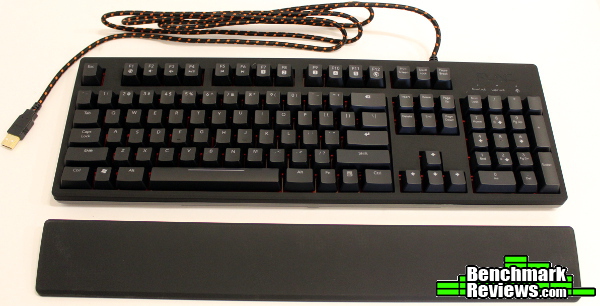
The braided cable uses Func’s signature orange braid throughout, and is a really high quality cloth braid. The cable is very flexible, and doesn’t seem like it will bind like some tightly braided cables I’ve used.

The KB-460 doesn’t use the same “wedge” shape as many other mechanical keyboards, offering a slimmer look than most of the competition. There’s only so much room to work with when using Cherry MX mechanical keys and full-size key caps, but the Func KB-460 makes smart use of the space with a traditional keyboard layout – both vertically and horizontally. It feels very sturdy if you have to pick it up and carry it around, with the slim profile making it easy to grip (I’d advise taking the wrist rest off though when transporting, as it unclips very easily).

Angled key caps are pretty standard among keyboards with full-size keys and will help orient your fingers (as well as keep the top of the keys a similar distance from your fingers in each row and making them easier to reach).
Other than that beautiful soft-touch finish, the KB-460 seems pretty similar to other mechanical keyboards so far. Let’s dig into some more details to see what might be different.

The palm/wrist rest arrives detached, and the keyboard works (and looks) just fine without it. It does make for more comfortable typing though, and you can attach it with the two included plastic clips. These are the only portion of the keyboard that made me a little nervous – time will tell how many clip/unclip cycles they can withstand. To be fair, once they install the palm rest most users won’t be constantly switching it out.

Func includes pretty substantial non-slip rubber pads at the front corners of the keyboard, and with the keyboard feet in the “raised” position you’ll have non-slip rubber in every corner (I didn’t experience any movement with the keyboard in a lowered position either – the wide grips at the front are very effective, especially combined with the weight of your palms).

You can see the keyboard casing itself has a very flat profile. Adding the palm rest also adds three more rubber non-slip pads, ensuring that the KB-460 will stay put.
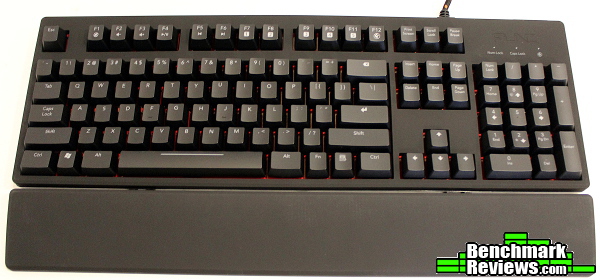
The reason Func used movable plastic clips to attach the palm rest becomes clear when you change the KB-460’s angle. The small gap between the palm rest and keyboard (and the plastic clips) allow the palm rest to adapt to whichever angle you choose. In the raised position, this has the effect of placing your hand a little “higher” (vertically/above the keyboard, not towards the top) in an ideal position, which helps with fatigue and general accuracy. I initially thought Func should have just integrated the palm rest into the keyboard, but this is actually a nice feature.
The US layout features a “slim” Enter and Backspace key, which I prefer. The typeface used for the key symbols is standard and very readable. Other than a function key the overall layout is very standard and should be very easy to transition to.

Two USB 2.0 ports fill the upper right corner of the keyboard. While there aren’t any cable routing channels underneath like some keyboards (which rarely keep cables in place anyway), at least Func only uses one “upstream” USB port, essentially adding an extra USB port to your system. Some extra spacing between the ports would have been appreciated, but I doubt most people use thick USB network adapters or other large plugs here – most will use these ports for a mouse and gamepad or other accessory in which case the spacing is perfectly adequate.

Func chose a fiery red for the LEDs, which are nicely “set off” by a subtle red back plate under the keys. I was hoping they’d be able to source some orange LEDs, but those are pretty rare (and usually involve an extra coating that reduces output even further) so I’m not surprised they stuck with red. It isn’t a deep, blood red like some keyboards, and red overall has the advantage of being easier on your “night vision” (I’m not sure how much this matters when staring at a bright LCD screen, but red is definitely less “piercing” than blue or green if you glance at the keyboard at night). The media key / profile / Func mode / volume functions are helpfully backlit as well, ensuring they remain useful in the dark (even touch-typers need help with these special functions as it seems they differ for every keyboard). Of course, since Cherry MX switches place the LED on the “top” portion of the switch (where the letters/symbols are) some of these special functions noticeably dim at the bottom edge. Every backlit mechanical keyboard suffers from this because of the LED placement in the switch itself, and it doesn’t really bother me as the only keys it affects are the “secondary” functions anyway – I just appreciate that they’re backlit at all.
The KB-460 (like the MS-3) works just fine without software, although of course you are then limited to the default settings. Installing the configuration software is done from a simple installer, after which you can then begin to customize various aspects of the keyboard and save your settings to the device’s memory. The software follows the same design as the packaging, with clean white lines and orange accents.

Functionality is the focus here too, and changing settings is simple and straightforward – just click on the key you want to change. You’ll need to switch to “Func mode” using Fn+F12, which will then activate your reassigned keys. The default settings are perfectly usable – you’d really only need to change anything here if you want a different key layout or assign some keys to execute a macro. There’s an easy way to backup and restore your custom profiles (and restore the keyboard to default settings as well) along with a link to Func.net.

The macro recorder was my only complaint with the MS-3 gaming mouse (which has since been improved in a software update by Func), and I’m glad to see an improved version here as well. You’ll need to first assign a Macro to one of the “virtual” M(x) keys on the left, then the Macro recorder will pop up and allow you to enter the sequence of keys you want to record. You can change the order of keys once entered, and delete erroneous commands without having to redo the entire macro. I still haven’t found really useful applications for macros (although X3: Albion Prelude warrants a look, as there are some complex sequences of key presses that could be automated with a macro).
Microsoft’s Applied Sciences page contains a demo that is pretty interesting, as well as a good explanation for different keyboard terms and why things like “ghosting” are an issue on certain keyboards. I used the demo on three keyboards I had close by to help illustrate the differences between them. I tried to press as many of the same keys that I could on each keyboard by using the palm and fingers on one hand – while I couldn’t reach a limit on the Func KB-460, both of the Razer keyboards would only register the first 10 or so key presses (my palm is in the same spot in each of the instances below).

I used the “Gaming Mode” on the Razer boards to try and give a best case scenario (the KB-460 performed the same in both modes) – without this mode active, the DeathStalker especially performed far worse, with only 5-6 keys registering at a time (depending on their location). However, most users won’t be using key combinations of six or more keys, so this really just illustrates the technology behind each keyboard rather than any real limitation. Still, polling at a thousand times a second, it’s nice to know the Func KB-460 will consistently register any key presses you make.
I wasn’t sure how I felt about Cherry Reds at first, but overall it’s certainly a better experience than using a membrane keyboard – even a good membrane keyboard (which I still prefer at times). I think my dream peripheral would be a Nostromo-styled keypad that uses Cherry MX Reds (Func, if you made one of these using the design principles of the KB-460 but made the keys soft-touch rubber too…I would buy one the moment they were available. Preorder. Or Both. Doesn’t matter. I cannot express how perfect of a device this would be!) – the Orbweaver I’ve been using just seems awkward with Blues, not to mention it isn’t very comfortable. I prefer using a keypad to a full keyboard for many games as I find them vastly more comfortable – however, I found myself preferring the KB-460 while testing it over the last few weeks to even the Orbweaver. The linear action of Cherry MX Red switches take a little getting used to and unlike the other switches they WON’T make you a better typer – they’ll just magnify the mistakes you are already making (which helps identify where you need work I guess…). Still, in using the KB-460 for fast-paced shooters like Battlefield 4 I found myself being surprised my on-screen character was moving after just thinking about it – then realizing I was pressing keys without being conscious of the action, creating an almost telepathic link to what was happening on the display. That, to me, is the real benefit of Cherry MX Red switches, and they are packaged beautifully in the KB-460. Even more importantly, the ability for Func to be content to stay in the background (driver install is optional, on-board memory, no cloud service…) and allow this experience without getting in the way should be commended. The best peripherals are those that disappear beneath your fingertips and enable that direct link to the action happening on screen.
While at first glance it doesn’t seem to do much to set itself apart from other backlit mechanical keyboards, I wouldn’t dismiss the Func KB-460 too easily. The surface coating alone makes it worth a look in my opinion – I absolutely love the way this finish feels. Yeah, maybe you’ll get some palm imprints on the palm rest (although much less than any other surface I’ve tested – in most light you can’t even see them), but WHO CARES when it’s this comfortable to the touch. The KB-460 is a stylish gaming keyboard that just works, and it does so with a subtle style that is really appealing. Func is one of those few manufacturers of gaming devices that really nails the “less is more” design approach, and it’s reflected beautifully in their packaging, manuals and software (not to mention the products themselves). I absolutely love their focus on providing a simple and elegant experience throughout, and I love that they don’t try to overwhelm you with gimmicky bells and whistles just to capture your attention. The best part is, their new products aren’t exactly lacking either – Func provides a smart feature-set that you can actually take advantage of.
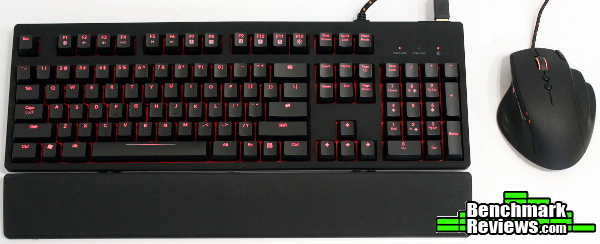
I can’t say anything detrimental about the performance of the KB-460. With those Cherry MX Red switches under the keycaps, you’ll get an almost telepathic response after 2mm of movement. Even mashing the keyboard with both hands won’t drop any signals, and the KB-460 responds better than any keyboard I’ve tested so far – and it wasn’t even in the gaming-oriented “Func mode.” Really, it’s a top performer in its category, and an impressive first effort by Func.
As for the KB-460’s appearance, Func knocks it out of the park. Yep – home run. Of course, opinions vary on the topic of aesthetics, but if you’ve read any of my other reviews you know that I’m very fond of that soft-touch rubber finish (and matte finishes in general). Coating the entire top of the keyboard entirely in that exquisite finish was a great move, and in my opinion enhances the perception of the keyboard overall (it doesn’t hurt that it feels great on your palms and fingers). The subtle glimpse of red from the back plate underneath the keys is a beautiful touch and keeps the overall design subdued and attractive, merely hinting at the gaming DNA that runs throughout this keyboard instead of shouting it in your face.
I’m not a fan of the plastic brackets that attach the palm rest, but they’ve held up so far and seem to be adequate. This is the only aspect of the KB-460 that could use some more attention, but it does allow for an optimum wrist angle when typing in both the raised and lowered positions so perhaps it’s a necessary evil for now. The rest of the construction is solid, with no distracting flex or creaking seams. The palm rest seems a little…hollow…(which it is…), but it doesn’t feel like it in use, it’s actually really comfortable and I’m sure helps keep the overall cost down. It couldn’t have been cheap to use such a wonderful soft touch finish. It’s too bad Func didn’t coat the keys themselves in this stuff, but I can understand why they didn’t – can you imagine trying to clean the oils from your fingers off the keys if they too were rubber? (I’d still like the option though…maybe…an optional set of keys as an aftermarket accessory for those crazy about matte finishes and willing to deal with the consequences?)
With a tagline of “Functionality. Perfected.”, Func better not mess around when it comes to the functionality of their products. The MS-3 proved to be a very capable and feature-rich gaming mouse, and the KB-460 follows suit in keyboard form. Storing profiles on the keyboard itself is how it should be done – no cloud-based solutions here. All functions (media keys, Func mode, LED brightness) with the exception of remapping keys work perfectly without installing the driver (unless of course your custom keys are saved to the keyboard’s memory already), but even the settings software is powerfully efficient. Yes, there are keyboards with rows of extra macro keys and removable thingys and LCD screens and wheels, but the KB-460 is functional. Don’t get me wrong, those other features have a place (and price…) and can have their benefits too, but don’t make the mistake of thinking you’re missing out on something with a keyboard like the KB-460. The integrated USB 2.0 ports are a nice addition (only one USB cable to route behind your desk!) and the removable palm rest is comfortable. Overall, there’s more than enough functionality here to justify the price, and Func’s approach of enhancing your experience without getting in the way is absolutely appreciated.
While they’re still difficult to find in retail outlets almost a month (January 2014) after their release, the Func KB-460 is selling for a promotional price of $99.99 for an unspecified amount of time. At that price, it’s an incredible bargain – you just won’t get access to backlit Cherry MX Reds in such a refined package for anything close to that. The regular retail price will be $119.99 (one just popped up at NCIX), and that places it right in the usual range for backlit mechanical keyboards – and although most of the competition may offer similar features like the USB hub and backlit keys they rarely do it in such a composed and refined manner. In my opinion, the Func KB-460 is an outstanding value even after the promotional pricing period.
Mechanical keyboards have become pretty popular – almost every major manufacturer has or will be releasing a model, with most offering a “higher-end” backlit version as well. Since the major cost of these keyboards are the switches themselves, it isn’t surprising that most of them look similar and offer the same features. The KB-460 manages to take this formula and offer a product that seems really mature compared to the others, with common-sense features that just work without having to jump through hoops or bother with overly-complicated configurations.
Every so often a product comes along that shifts your perception of the category it’s in; the KB-460 has become my “baseline,” the benchmark to which I’ll find myself comparing everything else to. The KB-460 offers everything you could expect in an elegantly powerful gaming keyboard, and better yet it’s backed by a company that seems intent on meeting the needs of an enthusiast and actually enhancing your experience. There’s a purity and clarity of purpose here that you just don’t find in many products. No gimmicks, no tricks, just pure, perfected function. For such a refined offering I feel Func deserves a Golden Tachometer award for their first mechanical keyboard. There’s always room for this type of quality and finesse – well done, Func.
+ On-board memory
+ Appearance = top of class
+ Soft touch finish is amazing
+ Fully functional without driver
+ Additional USB ports
+ No-nonsense features that add to your experience without getting in the way
+ Back-lit Cherry MX Reds
– No dedicated macro keys
– Palm rest detaches easily if moved around
– Typing purists might prefer Cherry Blues/Browns
-
Performance: 9.25
-
Appearance: 9.75
-
Construction: 9.00
-
Functionality: 9.25
-
Value: 9.50
Excellence Achievement: Benchmark Reviews Golden Tachometer Award.
COMMENT QUESTION: Which style of mechanical keyboard do you prefer?


