By Joe Gulczinski
Manufacturer: Cooler Master Ltd. Inc.
Product Name: CM Storm Reaper
Model Number: SGM-6002-KLLW1
UPC: 884102020704
Price As Tested: ~$65 (Amazon)
Full Disclosure: The product sample used in this article has been supplied by Cooler Master.
Cooler Master, a company world renown for their excellent case and cooling solutions, has recently augmented their Storm series lineup with some new additions. “What is this Storm series?” one may ask. It is Cooler Master’s answer for consumers looking for higher then average specifications, durability, and aesthetics. Today Benchmark Review’s has taken the opportunity to give the CM Storm Reaper a formidable shakedown to see what sets this apart from the rest.
With such a foreboding name chosen, you just know this mouse was designed for gaming in mind. Just from first glance one can take in the oversized buttons and the monstrous metal-weighted scroll wheel. Does the Reaper have what it takes to live up to its name? Check out the complete list of features and specifications below before we take a closer look.

- Avago ADNS-9800 Laser Sensor
- 8 fully programmable buttons
- Omron switches
- 128 K internal memory
- 1.8m / 5.75″ braided cable with gold plated USB connector
- Passive cooling with a removable anodized aluminum plate cover
- Macro management and 3 custom profiles
- X/Y DPI Axis settings may be adjusted independently or together
- White LED grounding light effects
- Massive metal mouse wheel
| Max DPI | 8200 |
| Polling Rate | 1000 Hz / 1 ms |
| Lift Off Distance | Adjustable |
| Inches per Second | 150 |
| Max Acceleration | 30g |
| Grip Design | Palm grip |
| Form Factor | Right hand |
| Material | Aluminum, Plastic, Rubber |
| Size | 73.85mm (W) x 127.22mm (L) x 37.24 (H) |
| Weight | 145g |
The Cooler Master Reaper comes in a completely flat-matte box with no accessories save a small specifications card inside. The particular design of this mouse makes it rather heavy to begin with (a large part has to do with it being over half metal), so additional weights are not necessary.
 |
 |
The business side of the Reaper has slightly oversized thumb buttons with the additional massive “Clutch” button. The clutch’s purpose is to instantly drop DPI down to a predetermined setting (default 200 DPI which is ridiculously low) while the button is depressed. This aids in games where there is a scope on a weapon or in an application such as Photoshop for zooming up and precision editing is required. The small indentation is where the thumb will rest naturally, using the top side of the thumb to depress the forward / back buttons and the very tip to access the clutch. Note that due to this design it may be problematic to depress more then one thumb button at a time. The right side of the Reaper in contrast is smooth with just enough of a subtle curve to support the pinky finger. Note that the matt black finish is actually a very fine coating of a non-smearing rubber material. Good for preventing accidental slippage of the hand and fingers.
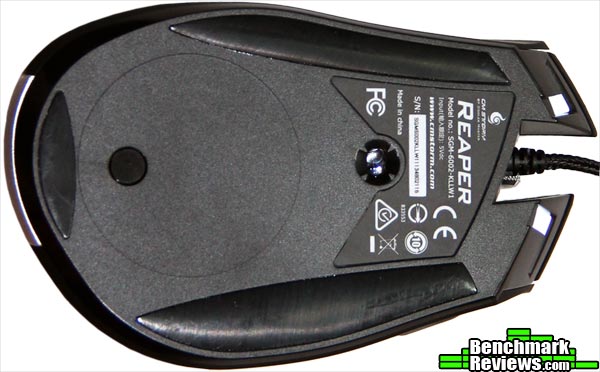
 The bottom shows three giant sliding pads that are smooth and ultra slick. Be warned that this is a type of mouse you only want to use a soft mouse pad with, since using a hard surface will eventually wear these pads down (replacements may be difficult to come by). Towards the bottom of the mouse is a little removable rubber grommet that is for screw access on removing the aluminum metal plate on top (this is for customizing — additional plates are available for all Storm series accessories at Cooler Master’s site). Cooler Master claims the giant plate is for “passive cooling” your hand while gaming (we’ll see how this works out).
 |
 |
Overall the Reaper is a very well constructed mouse on first impression. It’s body and high arc into the palm does not mimic any other type of mice out there at the moment. Even though specifications claim this is a “claw type” of mouse, it is completely possible to also use it with a full open palm with support built in for all fingers (with the middle finger resting on wheel). The mouse wheel itself is a top feature of the Reaper: let’s examine it in finer detail.
Just take a gander at this massive metal mouse wheel! It is oversized, rock solid (no wobble), and has the perfect amount of resistance between the soft yet distinct indentation scrolling (the scroll and click is completely silent). Now that’s a mouse wheel made right. Notice below the white LED accent “headlights” which are not overpowering or obnoxious. Here is low-level light shot illustrating the soft white light rays emanating from the Reaper. The sharp, distinct, white line dissecting the middle lends an almost industrial and futuristic feel. Lighting may be changed for intensity as well as four basic parameters including breathing and rapid-fire.
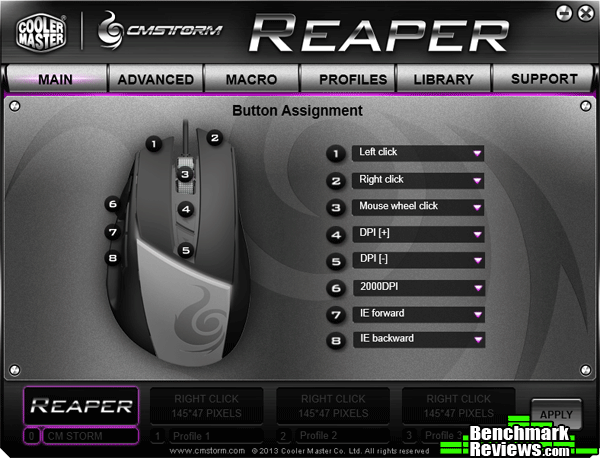
 Moving on to the drivers (which need to be downloaded from the Cooler Master site), it’s a bonus to see onboard memory on the Reaper, giving it the capability of moving between multiple systems without having to install separate drivers on each system.
 |
 |
The first two tabs in the drivers are going to be the most used panels. The button assignment panel is just fine at default settings, with the exception of the clutch control (button #6). Recommendations would be to boost this from 200 DPI to around 1600-2000 for HD monitors. The second panel is used for setting default DPI profiles where four settings are available, each with it’s own polling rate.
 |
 |
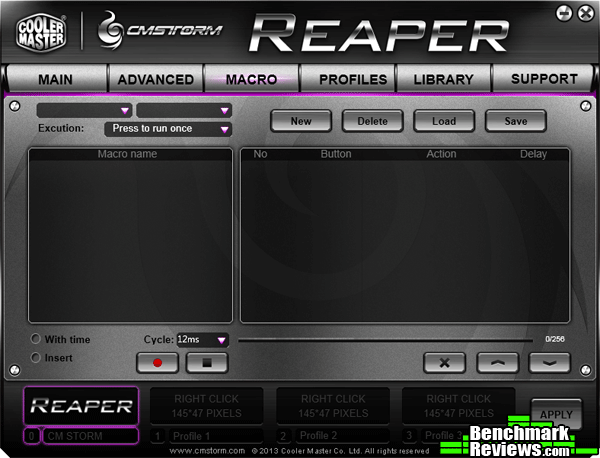
Macros and profiles may also be set up and flashed to memory if so desired in this section. The software is easy to understand and streamlined in such a way that it is intuitive and hassle free.
 |
 |
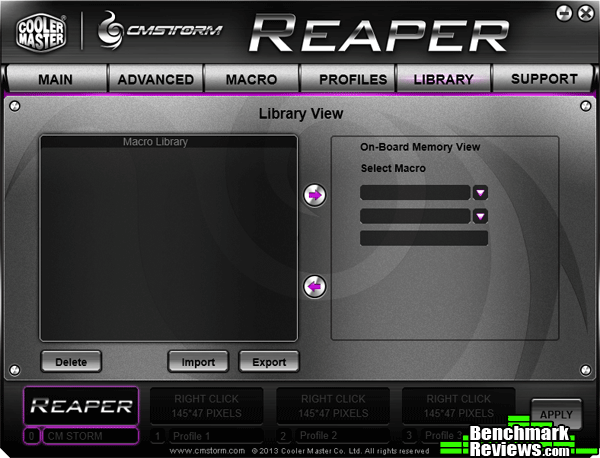
The Library View macro panel is designed for loading a set of macros aimed for a specific game or application, if the previous profiles and macro panels are just not enough. The last tab in the drivers gives the ability to check the firmware version of the Reaper and a link for materials or downloads relating to it.
The Cooler Master Reaper was tested over a period exceeding 80 hours. The main programs and games used during testing consisted of Adobe CS5, Warframe, and StarCraft II.
- Motherboard: Asus P8Z77-M
-
Processor: Intel i5 3570K Ivy Bridge @ 4.0 GHz
- System Memory: Corsair Vengeance 16GB (8x2GB) DDR3 1600 MHz
- Video: Gigabyte Windforce GTX 670 TI (2GB)
- Audio: HT Omega Claro Plus
- PSU: Cooler Master Silent Pro M700 (Gold)
- Monitor: LG 27EA83-D 27″ 5ms IPS @ 2560 x1440
- Operating System: Windows 7 (64 bit)
The Reaper has the ability to change the polling rates individually per each of the four main DPI settings (the maximum polling rate of 1000 Hz was used for all tests). According to two separate polling tools, Direct Input Mouse Rate for DirectX and Mouse Rate Checker, the Reaper actually exceeded the peak advertised polling rate.

Desktop Applications: The Reaper excelled easily and comfortably in this area. With a native desktop resolution of 2560×1440 the DPI setting mostly used was 5000 DPI. In Photoshop when doing fine detail work such as airbrushing (zoomed up to pixel level), the clutch came in very handy to instantly drop the DPI down to 2000. As for tracking (due to the larger surface pads on the bottom) it did seem to catch hairs and dust particles more easily, so keeping an ultra-clean mouse pad is very important.
Gaming: StarCraft II was used for the mouse button torture test. Even though not specified, it certainly feels like Omron switches were used on all buttons excluding the mouse wheel itself. Playing SC2 seemed a smoother experience with a positive tactile feedback due to the sensitive Omron switches. Warframe was chosen especially to test DPI sensitivity and put the clutch to the test. In Warframe, the weapons load out all have variable levels of zoom. When zooming way out there with any scoped weapon (or bow) the DPI just goes insane-sensitive to the point where it is almost impossible to keep a steady aim. It is a pleasure to report the Reaper’s clutch not only worked beyond expectations, but made an already exceptional game even more fun to play.
The Reaper is definitely a gamer’s weapon to contend with. The ability to achieve any DPI on the fly definitely will give a serious edge in first-person shooters. Accompanied with that elite Storm mouse wheel and you have a deadly package combination.
A few things to keep in mind though about this particular model is the ergonomic approach Cooler Master took. After prolonged use the higher arc of the metal plate does bring about some fatigue if you are a palm type user (not applicable to claw type users). The metal plate itself is supposed to be a special feature to customize the mouse and doubles as “passive cooling;” however, in real world testing the metal plate did not cool human hands well. One additional thing to note here is that the position of the clutch button makes it so you can only depress it with the tip of your thumb, making the simultaneous depression of the other thumb buttons impossible.

Performance wise the Reaper gets it right from the solid laser sensor (the latest Avago ADNS-9800) to the perfect Omron switch responsiveness. The mouse wheel and clutch is what really makes this product stand out from the rest. With the latest monitor resolutions as high as 4k, the Reaper can fit the bill easily.
The Reaper also nailed the aesthetics right too. The soft glowing accents and customizable metal plate fits nicely with any Storm themed outfit. It looks like a piece of living science fiction sitting on your desktop.
Functionality wise the Reaper lays out the optional drivers in a streamlined and logical fashion that any novice could configure. The only issue here is that upon driver initialization it appears the memory in the mouse is on the slow side and takes up to 30 seconds to read what is flashed in memory.
Being that the majority of the Reaper is constructed from metal instead of plastic, it is built like a tank. This mouse is going to be able to take a lot of abuse and be able to shrug it off no problem. Some may be put off by not having the option of a customizable weight set, but at 145 grams it is already dangerously close on the heavy side.
Even though the Reaper isn’t immediately available as of this writing, it will be released with an approximate MSRP of $65. If one is patient it may even be available at a cheaper price point. Considering the Reaper offers not only a decent base feature set, but went the extra mile on the wheel and clutch control, this is a fair price, but would fall into a more optimal scoring range if it was in the $50 range.
+ Maximum DPI of 8200
+ Industrial mouse wheel with incredible fluidity and smoothness
+ Clutch button for instant DPI on-the-fly change
+ Omron switches
– Slight fatigue due to high arc of metal plate (may not apply to claw users)
– Metal plate does not adequately support “passive cooling”
– Clutch button should be positioned back closer to other thumb buttons
- Performance: 8.75
- Appearance: 8.00
- Construction: 9.00
- Functionality: 7.25
- Value: 7.00


